跨端实现经典:Flutter × OpenHarmony 超级玛丽游戏系统的数据结构与 UI 解析
本文介绍了使用Flutter和OpenHarmony构建跨平台超级玛丽游戏系统的开发实践。通过分析游戏介绍页面和排行榜UI的核心代码,展示了Flutter组件化开发的优势,包括灵活布局、性能优化和跨端一致性。文章重点解析了排行榜列表项的数据结构设计和UI实现方法,采用嵌套Row布局和圆形标记等视觉元素。开发者可以基于此框架扩展游戏逻辑、关卡管理和动画效果,实现完整的跨端游戏体验。该方案有效解决了多
文章目录
欢迎加入开源鸿蒙跨平台社区: https://openharmonycrossplatform.csdn.net
跨端实现经典:Flutter × OpenHarmony 超级玛丽游戏系统的数据结构与 UI 解析
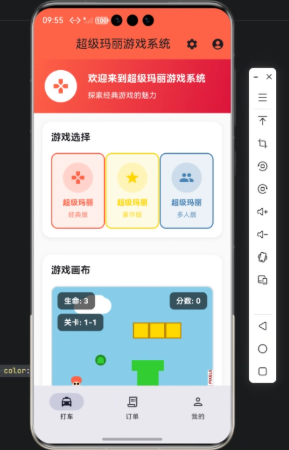
前言
随着移动端和智能设备的多样化,游戏开发者面临一个新的挑战:如何在 不同终端 上保持一致的游戏体验,同时利用现代框架简化开发流程。本文以经典的 超级玛丽游戏系统 为例,展示如何使用 Flutter × OpenHarmony 构建跨端游戏 UI,并分析其核心数据结构与组件设计。
本篇文章适合希望掌握跨端游戏开发、UI 构建以及数据管理的开发者。
背景
超级玛丽是最经典的横版跑酷类游戏,其核心功能包括:
- 角色控制:玩家控制玛丽跳跃、移动。
- 关卡管理:不同的关卡及障碍物。
- 分数与排行:记录玩家成绩并显示排行榜。
- 跨终端支持:在手机、平板、电视等设备上都有一致体验。
在传统开发中,需要分别编写 Android、iOS、鸿蒙 HarmonyOS 端代码,维护成本高。而 Flutter × OpenHarmony 的组合可以让我们 一次开发、多端部署。
Flutter × OpenHarmony 跨端开发介绍
-
Flutter:Google 提供的 UI 框架,基于 Dart 语言,支持跨平台渲染,高度可定制化 UI。
-
OpenHarmony:华为开源的 IoT/移动终端操作系统,支持分布式能力和多设备协作。
-
组合优势:
- 统一 UI 代码:Flutter 提供 Widget 构建系统。
- 跨端性能优化:OpenHarmony 提供轻量化运行环境。
- 可扩展性:未来可以接入分布式设备,例如手表、电视控制器等。
开发核心代码解析
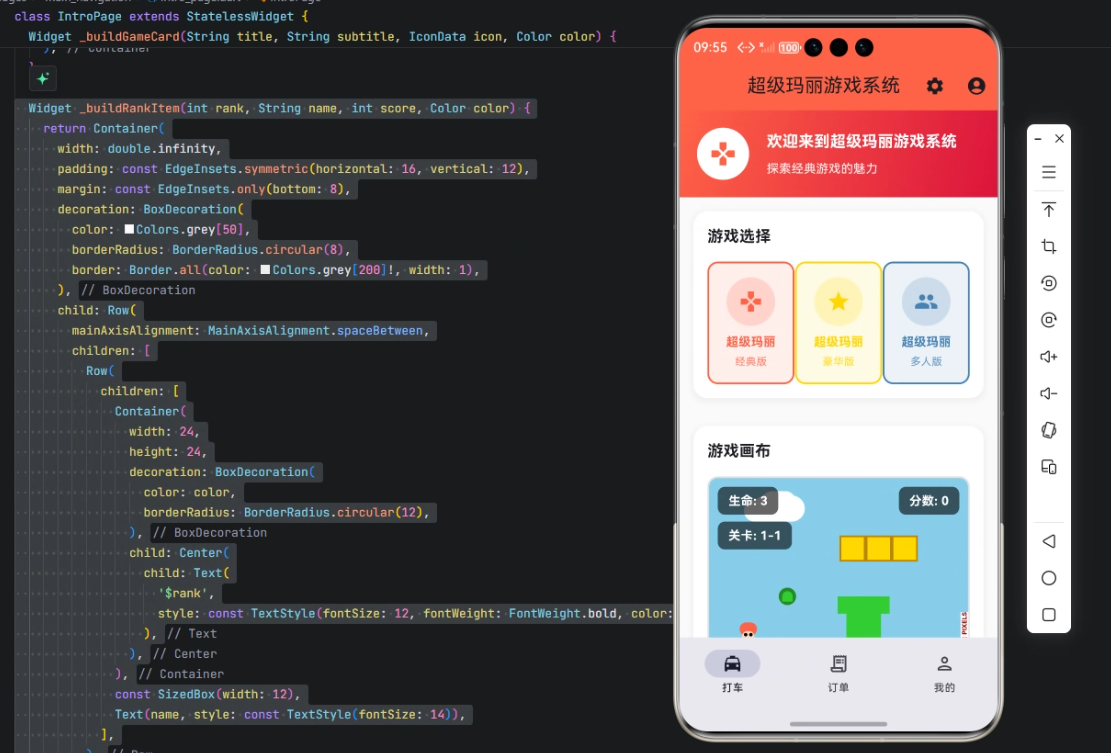
本文示例中,我们实现了 超级玛丽游戏系统的介绍页面和排行榜 UI。以下是完整核心代码及详细解析。
1. IntroPage 页面
class IntroPage extends StatelessWidget {
  const IntroPage({Key? key}) : super(key: key);
- 作用:定义游戏系统的首页,继承自
StatelessWidget表示 UI 不可变。 - 构造函数:使用
const提高性能,Flutter 可以进行 编译时优化。
Widget build(BuildContext context) {
return Scaffold(
backgroundColor: Colors.grey[50],
appBar: AppBar(
title: const Text('超级玛丽游戏系统'),
backgroundColor: const Color(0xFFFF6347), // 玛丽红
elevation: 0,
actions: [
IconButton(
icon: const Icon(Icons.settings),
onPressed: () {},
),
IconButton(
icon: const Icon(Icons.account_circle),
onPressed: () {},
),
],
),
-
Scaffold:Flutter 的页面骨架,包含 AppBar、Body、Drawer 等。
-
backgroundColor:设置整体背景为浅灰色。
-
AppBar:
title显示页面名称。backgroundColor使用经典玛丽红色。actions提供设置和用户图标按钮,点击事件可后续绑定功能。
2. 排行榜列表项构建函数
  Widget _buildRankItem(int rank, String name, int score, Color color) {
    return Container(
      width: double.infinity,
      padding: const EdgeInsets.symmetric(horizontal: 16, vertical: 12),
      margin: const EdgeInsets.only(bottom: 8),
      decoration: BoxDecoration(
        color: Colors.grey[50],
        borderRadius: BorderRadius.circular(8),
        border: Border.all(color: Colors.grey[200]!, width: 1),
      ),
-
作用:构建每一个排行榜条目。
-
Container是基础容器,提供尺寸、边距、圆角和边框。 -
padding与margin区分内间距和外间距。 -
decoration:color背景色。borderRadius圆角。border设置灰色边框增强层次感。
      child: Row(
        mainAxisAlignment: MainAxisAlignment.spaceBetween,
        children: [
          Row(
            children: [
              Container(
                width: 24,
                height: 24,
                decoration: BoxDecoration(
                  color: color,
                  borderRadius: BorderRadius.circular(12),
                ),
                child: Center(
                  child: Text(
                    '$rank',
                    style: const TextStyle(fontSize: 12, fontWeight: FontWeight.bold, color: Colors.white),
                  ),
                ),
              ),
-
Row 嵌套:
- 外层 Row:左右分布 rank+name 与 score。
- 内层 Row:rank 圆形标记 + 玩家名字。
-
rank 圆形:
width与height= 24,形成正方形。borderRadius.circular(12)转为圆形。Center+Text显示排名数字。
              const SizedBox(width: 12),
              Text(name, style: const TextStyle(fontSize: 14)),
            ],
          ),
          Text('$score', style: const TextStyle(fontSize: 14, fontWeight: FontWeight.bold)),
        ],
      ),
    );
  }
}
SizedBox用于间距。Text(name)显示玩家名称。- 最右侧显示
score,字体加粗突出。
数据结构设计思路
- 排行榜数据结构:
List<Map<String, dynamic>>或List<Player>。 - Player 类示例:
class Player {
  final String name;
  final int score;
  Player(this.name, this.score);
}
- UI 渲染:通过
ListView.builder遍历玩家列表,调用_buildRankItem构建条目。
心得
通过本次开发,我体会到:
- Flutter UI 灵活:组件嵌套、布局组合非常直观。
- 跨端一致性:OpenHarmony 支持 Flutter 渲染,使 UI 在手机和平板端保持一致。
- 可扩展性:排行榜、设置按钮、用户信息等可快速扩展新功能。
- 性能优化:
const、StatelessWidget、列表懒加载等方式可有效减少重绘。

总结
本篇文章展示了如何使用 Flutter × OpenHarmony 构建超级玛丽游戏系统的 UI 与数据结构,实现了:
- 跨端可运行的游戏系统首页。
- 结构清晰、易维护的排行榜组件。
- 可扩展的数据结构设计。
未来可在此基础上加入 游戏核心逻辑、关卡管理、分数存储和动画效果,实现完整的跨端超级玛丽游戏体验。

开源鸿蒙跨平台开发社区汇聚开发者与厂商,共建“一次开发,多端部署”的开源生态,致力于降低跨端开发门槛,推动万物智联创新。
更多推荐



 14
14 0
0- 0


 已为社区贡献22条内容

所有评论(0)