Flutter框架跨平台鸿蒙开发——工资条生成APP的开发流程
本文介绍了使用Flutter框架开发跨平台工资条生成APP的流程,重点支持鸿蒙系统。APP核心功能包括员工信息管理、工资组成自定义、自动计算应发/实发工资等。文章详细阐述了数据模型设计、服务层实现和UI界面开发,展示了Flutter在跨平台开发中的优势。通过该方案,企业可以高效生成工资条,简化HR工作流程。项目采用模块化设计,便于功能扩展和跨平台部署。
Flutter框架跨平台鸿蒙开发——工资条生成APP的开发流程
🚀运行效果展示
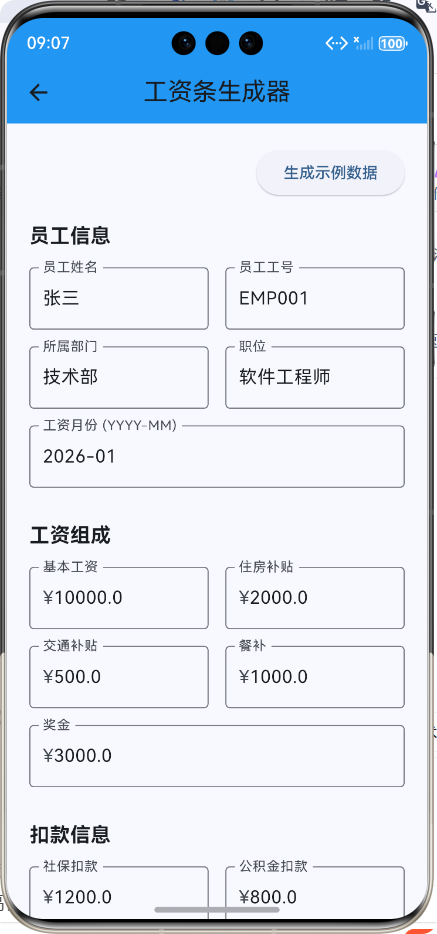
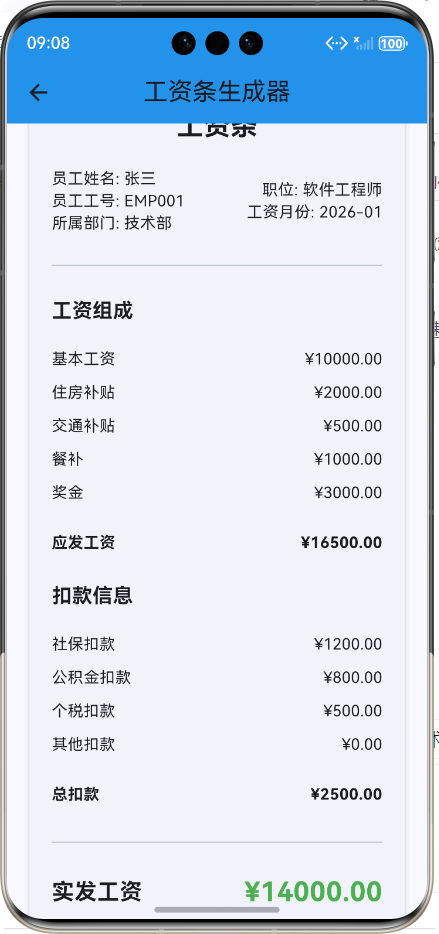
Flutter框架跨平台鸿蒙开发——工资条生成APP的开发流程
📝 前言
随着企业数字化转型的加速,人力资源管理系统的自动化和智能化需求日益增长。工资条作为员工薪酬管理的重要组成部分,其生成和发放的效率直接影响到企业的运营效率和员工满意度。传统的工资条生成方式通常依赖于复杂的Excel模板或专业的HR软件,操作繁琐且不够灵活。
Flutter作为Google推出的跨平台UI框架,以其"一次编写,处处运行"的优势,成为企业应用开发的理想选择。而华为的鸿蒙系统作为一款全新的分布式操作系统,也在不断扩大其市场份额。将Flutter与鸿蒙系统结合,开发跨平台的工资条生成APP,不仅可以提高开发效率,降低维护成本,还可以为企业提供灵活、高效的工资条生成解决方案。
本文将详细介绍如何使用Flutter框架开发一款跨平台的工资条生成APP,并在鸿蒙系统上运行。
💼 应用介绍
功能概述
工资条生成APP是一款用于快速生成和管理员工工资条的工具,主要功能包括:
- 员工信息管理:支持输入和编辑员工基本信息
- 工资组成自定义:可自定义基本工资、各种补贴和奖金
- 扣款信息管理:支持社保、公积金、个税和其他扣款的设置
- 工资条自动计算:自动计算应发工资、总扣款和实发工资
- 工资条预览功能:实时预览生成的工资条
- 示例数据生成:一键生成示例工资条数据
- 工资条保存功能:支持保存生成的工资条
应用场景
- 企业HR部门:快速生成员工工资条,提高工作效率
- 小型企业主:无需专业HR软件,即可轻松管理员工薪酬
- 财务人员:辅助进行工资核算和发放
- 员工自我管理:了解工资组成和扣款明细
技术栈
- 前端框架:Flutter 3.6.2
- 开发语言:Dart
- 运行平台:HarmonyOS API 9+
- 状态管理:原生状态管理
- 数据存储:待扩展(可支持SQLite或云端存储)
🛠️ 开发环境搭建
系统要求
- 操作系统:Windows 11
- Flutter版本:3.6.2或更高
- HarmonyOS SDK:API Version 9或更高
- 开发工具:DevEco Studio 3.1+,VS Code
环境配置
- 安装Flutter SDK:从Flutter官网下载并安装Flutter SDK
- 配置鸿蒙开发环境:安装DevEco Studio,并配置HarmonyOS SDK
- 创建Flutter项目:使用
flutter create命令创建Flutter项目 - 配置鸿蒙支持:在项目中添加鸿蒙支持,配置相关依赖
📁 项目结构设计
lib/
├── salary_slip/
│   ├── models/
│   │   └── salary_slip_model.dart   # 工资条数据模型
│   ├── services/
│   │   └── salary_slip_service.dart # 工资条服务,处理核心逻辑
│   └── screens/
│       └── salary_slip_screen.dart  # 主界面,用户交互
└── screens/
    └── home_screen.dart             # 应用首页,功能入口
🔧 核心功能实现
1. 数据模型设计
数据模型是应用的基础,用于管理工资条的各种参数。我们设计了SalarySlip类来封装工资条的状态:
/// 工资条数据模型
class SalarySlip {
  /// 员工姓名
  final String employeeName;

  /// 员工工号
  final String employeeId;

  /// 所属部门
  final String department;

  /// 职位
  final String position;

  /// 工资月份
  final String month;

  /// 基本工资
  final double basicSalary;

  /// 住房补贴
  final double housingAllowance;

  /// 交通补贴
  final double transportationAllowance;

  /// 餐补
  final double mealAllowance;

  /// 奖金
  final double bonus;

  /// 社保扣款
  final double socialSecurity;

  /// 公积金扣款
  final double housingFund;

  /// 个税扣款
  final double tax;

  /// 其他扣款
  final double otherDeductions;

  /// 构造函数
  const SalarySlip({
    required this.employeeName,
    required this.employeeId,
    required this.department,
    required this.position,
    required this.month,
    required this.basicSalary,
    required this.housingAllowance,
    required this.transportationAllowance,
    required this.mealAllowance,
    required this.bonus,
    required this.socialSecurity,
    required this.housingFund,
    required this.tax,
    required this.otherDeductions,
  });

  /// 计算应发工资
  double get grossSalary => basicSalary + housingAllowance + transportationAllowance + mealAllowance + bonus;

  /// 计算总扣款
  double get totalDeductions => socialSecurity + housingFund + tax + otherDeductions;

  /// 计算实发工资
  double get netSalary => grossSalary - totalDeductions;
}
2. 服务层实现
SalarySlipService是应用的核心服务,负责处理工资条的创建、保存和加载等逻辑:
import '../models/salary_slip_model.dart';

/// 工资条生成服务
class SalarySlipService {
  /// 构造函数
  SalarySlipService();

  /// 创建工资条
  SalarySlip createSalarySlip({
    required String employeeName,
    required String employeeId,
    required String department,
    required String position,
    required String month,
    required double basicSalary,
    required double housingAllowance,
    required double transportationAllowance,
    required double mealAllowance,
    required double bonus,
    required double socialSecurity,
    required double housingFund,
    required double tax,
    required double otherDeductions,
  }) {
    return SalarySlip(
      employeeName: employeeName,
      employeeId: employeeId,
      department: department,
      position: position,
      month: month,
      basicSalary: basicSalary,
      housingAllowance: housingAllowance,
      transportationAllowance: transportationAllowance,
      mealAllowance: mealAllowance,
      bonus: bonus,
      socialSecurity: socialSecurity,
      housingFund: housingFund,
      tax: tax,
      otherDeductions: otherDeductions,
    );
  }

  /// 保存工资条
  Future<bool> saveSalarySlip(SalarySlip salarySlip) async {
    // 这里可以实现将工资条保存到本地存储或数据库
    // 暂时返回true表示保存成功
    return true;
  }

  /// 加载工资条列表
  Future<List<SalarySlip>> loadSalarySlips() async {
    // 这里可以实现从本地存储或数据库加载工资条列表
    // 暂时返回空列表
    return [];
  }

  /// 计算个税(简单示例,实际计算规则更复杂)
  double calculateTax(double grossSalary, double deductions) {
    // 计算应纳税所得额
    final double taxableIncome = grossSalary - deductions - 5000; // 5000为起征点

    if (taxableIncome <= 0) {
      return 0;
    }

    // 简单的个税计算,实际使用累进税率表
    if (taxableIncome <= 3000) {
      return taxableIncome * 0.03;
    } else if (taxableIncome <= 12000) {
      return taxableIncome * 0.1 - 210;
    } else if (taxableIncome <= 25000) {
      return taxableIncome * 0.2 - 1410;
    } else if (taxableIncome <= 35000) {
      return taxableIncome * 0.25 - 2660;
    } else if (taxableIncome <= 55000) {
      return taxableIncome * 0.3 - 4410;
    } else if (taxableIncome <= 80000) {
      return taxableIncome * 0.35 - 7160;
    } else {
      return taxableIncome * 0.45 - 15160;
    }
  }

  /// 生成示例工资条
  SalarySlip generateSampleSalarySlip() {
    return SalarySlip(
      employeeName: '张三',
      employeeId: 'EMP001',
      department: '技术部',
      position: '软件工程师',
      month: '2026-01',
      basicSalary: 10000.0,
      housingAllowance: 2000.0,
      transportationAllowance: 500.0,
      mealAllowance: 1000.0,
      bonus: 3000.0,
      socialSecurity: 1200.0,
      housingFund: 800.0,
      tax: 500.0,
      otherDeductions: 0.0,
    );
  }
}
3. UI层实现
UI层是用户与应用交互的桥梁,我们设计了简洁直观的界面,包含员工信息输入、工资组成输入、扣款信息输入和工资条预览等功能。
3.1 员工信息表单
/// 构建员工信息输入表单
Widget _buildEmployeeInfoForm() {
  return Column(
    crossAxisAlignment: CrossAxisAlignment.start,
    children: [
      const Text(
        '员工信息',
        style: TextStyle(fontSize: 18, fontWeight: FontWeight.bold),
      ),
      const SizedBox(height: 15),
      Row(
        children: [
          Expanded(
            child: TextFormField(
              controller: _employeeNameController,
              decoration: const InputDecoration(
                labelText: '员工姓名',
                border: OutlineInputBorder(),
              ),
              validator: (value) {
                if (value == null || value.isEmpty) {
                  return '请输入员工姓名';
                }
                return null;
              },
            ),
          ),
          const SizedBox(width: 15),
          Expanded(
            child: TextFormField(
              controller: _employeeIdController,
              decoration: const InputDecoration(
                labelText: '员工工号',
                border: OutlineInputBorder(),
              ),
              validator: (value) {
                if (value == null || value.isEmpty) {
                  return '请输入员工工号';
                }
                return null;
              },
            ),
          ),
        ],
      ),
      // 更多员工信息输入字段...
    ],
  );
}
3.2 工资条预览组件
/// 构建工资条预览组件
Widget _buildSalarySlipPreview() {
  if (_generatedSalarySlip == null) {
    return Container();
  }

  final SalarySlip slip = _generatedSalarySlip!;

  return Card(
    elevation: 4,
    margin: const EdgeInsets.only(top: 20),
    child: Padding(
      padding: const EdgeInsets.all(20),
      child: Column(
        crossAxisAlignment: CrossAxisAlignment.start,
        children: [
          // 标题
          const Center(
            child: Text(
              '工资条',
              style: TextStyle(fontSize: 24, fontWeight: FontWeight.bold),
            ),
          ),
          const SizedBox(height: 20),

          // 员工基本信息
          Row(
            mainAxisAlignment: MainAxisAlignment.spaceBetween,
            children: [
              Column(
                crossAxisAlignment: CrossAxisAlignment.start,
                children: [
                  Text('员工姓名: ${slip.employeeName}'),
                  Text('员工工号: ${slip.employeeId}'),
                  Text('所属部门: ${slip.department}'),
                ],
              ),
              Column(
                crossAxisAlignment: CrossAxisAlignment.end,
                children: [
                  Text('职位: ${slip.position}'),
                  Text('工资月份: ${slip.month}'),
                ],
              ),
            ],
          ),
          // 更多工资条内容...
        ],
      ),
    ),
  );
}
📊 应用流程图
🎯 核心技术点
1. 表单验证和数据处理
应用使用了Flutter的表单验证机制,确保用户输入的数据有效:
TextFormField(
  controller: _basicSalaryController,
  decoration: const InputDecoration(
    labelText: '基本工资',
    border: OutlineInputBorder(),
    prefixText: '¥',
  ),
  keyboardType: TextInputType.number,
  validator: (value) {
    if (value == null || value.isEmpty) {
      return '请输入基本工资';
    }
    final double? amount = double.tryParse(value);
    if (amount == null || amount < 0) {
      return '请输入有效的基本工资';
    }
    return null;
  },
),
2. 工资自动计算
应用实现了工资的自动计算功能,包括应发工资、总扣款和实发工资:
/// 计算应发工资
double get grossSalary => basicSalary + housingAllowance + transportationAllowance + mealAllowance + bonus;

/// 计算总扣款
double get totalDeductions => socialSecurity + housingFund + tax + otherDeductions;

/// 计算实发工资
double get netSalary => grossSalary - totalDeductions;
3. 示例数据生成
为了方便用户快速体验应用,我们实现了示例数据生成功能:
/// 生成示例数据
void _generateSampleData() {
  final sampleSlip = _salarySlipService.generateSampleSalarySlip();

  // 更新控制器值
  _employeeNameController.text = sampleSlip.employeeName;
  _employeeIdController.text = sampleSlip.employeeId;
  _departmentController.text = sampleSlip.department;
  // 更新更多控制器值...
}
🧪 测试和调试
测试过程
- 单元测试:对核心功能进行单元测试,如工资计算、个税计算等
- 集成测试:测试各个组件之间的协作,如表单验证、工资条生成等
- 真机测试:在鸿蒙设备上进行真机测试,验证应用的实际运行效果
遇到的问题及解决方案
-
编译错误:Nullable类型处理
- 问题:
double.tryParse()函数期望的是不可空的String,但TextFormField的validator参数value是可空的String? - 解决方案:使用空值合并运算符
??处理可空值
final double? amount = double.tryParse(value ?? ''); - 问题:
-
UI布局问题:表单字段对齐
- 问题:使用Row和Expanded组合时,表单字段的高度不一致
- 解决方案:统一设置表单字段的样式和高度,确保布局对齐
-
性能问题:表单输入响应
- 问题:输入大量数据时,界面响应较慢
- 解决方案:优化状态更新逻辑,减少不必要的重建
🎉 总结
通过本次开发,我们成功实现了一款功能完整的工资条生成APP,并在鸿蒙系统上运行。本次开发的主要收获包括:
-
Flutter跨平台开发优势:使用Flutter框架可以快速开发跨平台应用,提高开发效率,降低维护成本。
-
鸿蒙系统适配:成功将Flutter应用适配到鸿蒙系统,验证了Flutter在鸿蒙平台上的可行性。
-
表单处理和验证:掌握了在Flutter中实现复杂表单处理和验证的方法。
-
状态管理和数据流:学习了如何设计清晰的状态管理和数据流,提高代码的可维护性和扩展性。
-
UI设计和用户体验:注重UI设计的简洁性和易用性,提供了良好的用户体验。
未来,我们可以进一步完善这款工资条生成APP,添加更多功能,如:
- 支持批量导入和导出员工信息
- 添加工资条历史记录管理
- 支持工资条分享功能(PDF、图片等格式)
- 集成云端存储,实现数据同步
- 添加更多工资计算规则和模板
- 支持多语言和主题切换
通过不断优化和完善,这款工资条生成APP可以更好地满足企业和个人的需求,成为薪酬管理的得力助手。
📚 参考资料
欢迎加入开源鸿蒙跨平台社区:https://openharmonycrossplatform.csdn.net

开源鸿蒙跨平台开发社区汇聚开发者与厂商,共建“一次开发,多端部署”的开源生态,致力于降低跨端开发门槛,推动万物智联创新。
更多推荐


 15
15 0
0- 0


 已为社区贡献16条内容

所有评论(0)