进阶实战 Flutter for OpenHarmony:url_launcher 第三方库实战
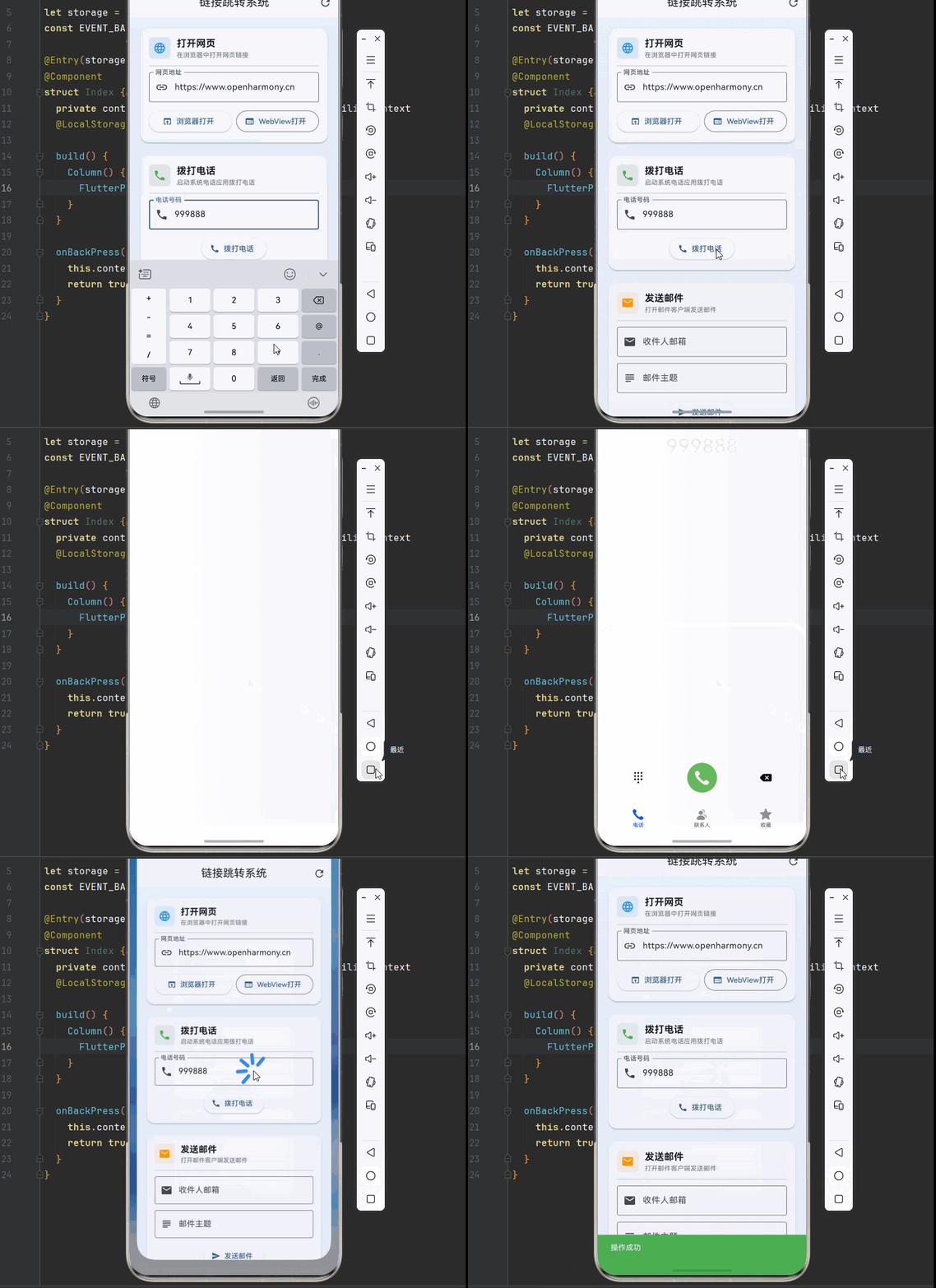
欢迎加入开源鸿蒙跨平台社区:https://openharmonycrossplatform.csdn.net
🔍 一、第三方库概述与应用场景
📋 1.1 url_launcher 是什么?
url_launcher 是 Flutter 官方维护的一个核心插件,专门用于在应用内启动外部 URL。它提供了一套统一的 API,让开发者可以轻松实现打开网页、拨打电话、发送邮件、启动其他应用等功能,同时屏蔽了不同平台的底层差异。
在 OpenHarmony 平台上,url_launcher 同样提供了完整的支持,让开发者可以无缝地使用这套 API 来实现各种跳转功能。无论是打开浏览器、调用系统电话应用,还是启动邮件客户端,都可以通过简单的 API 调用来完成。
🎯 1.2 核心功能特性
| 功能特性 | 详细说明 | OpenHarmony 支持 |
|---|---|---|
| 网页打开 | 在默认浏览器或应用内 WebView 中打开网页 | ✅ 完全支持 |
| 电话拨打 | 启动系统电话应用并预填号码 | ✅ 完全支持 |
| 邮件发送 | 打开邮件客户端并预填收件人、主题、正文 | ✅ 完全支持 |
| 短信发送 | 打开短信应用并预填收件人和内容 | ✅ 完全支持 |
| 应用商店 | 跳转到应用商店的指定应用详情页 | ✅ 完全支持 |
| 地图导航 | 打开地图应用进行导航 | ✅ 完全支持 |
| 自定义协议 | 支持自定义 URL Scheme 启动其他应用 | ✅ 完全支持 |
💡 1.3 典型应用场景
在实际的应用开发中,url_launcher 有着广泛的应用场景:
电商应用:点击商品链接跳转到详情页、联系客服拨打电话、分享商品链接等。
社交应用:打开用户主页、发送私信邮件、分享内容到其他平台等。
工具应用:打开帮助文档网页、反馈问题邮件、跳转应用商店评分等。
企业应用:联系客户拨打电话、发送报告邮件、打开公司官网等。
🏗️ 二、系统架构设计
📐 2.1 整体架构
为了构建一个可维护、可扩展的链接跳转系统,我们采用分层架构设计:
┌─────────────────────────────────────────────────────────┐
│                    UI 层 (展示层)                        │
│  ┌─────────────┐  ┌─────────────┐  ┌─────────────┐     │
│  │  链接卡片   │  │  操作按钮   │  │  状态提示   │     │
│  └─────────────┘  └─────────────┘  └─────────────┘     │
├─────────────────────────────────────────────────────────┤
│                  服务层 (业务逻辑)                       │
│  ┌─────────────────────────────────────────────────┐   │
│  │              LauncherService                     │   │
│  │  • 统一的链接启动接口                            │   │
│  │  • 链接有效性验证                                │   │
│  │  • 错误处理与重试机制                            │   │
│  └─────────────────────────────────────────────────┘   │
├─────────────────────────────────────────────────────────┤
│                  基础设施层 (底层实现)                   │
│  ┌─────────────────────────────────────────────────┐   │
│  │              url_launcher 插件                   │   │
│  │  • canLaunchUrl() - 检查链接可启动性            │   │
│  │  • launchUrl() - 启动链接                       │   │
│  │  • closeInAppWebView() - 关闭内嵌 WebView       │   │
│  └─────────────────────────────────────────────────┘   │
└─────────────────────────────────────────────────────────┘
📊 2.2 数据模型设计
为了更好地管理不同类型的链接,我们设计了一套数据模型:
/// 链接类型枚举
enum LinkType {
  web,        // 网页链接
  phone,      // 电话
  email,      // 邮件
  sms,        // 短信
  map,        // 地图
  appStore,   // 应用商店
  custom,     // 自定义协议
}

/// 链接配置模型
class LinkConfig {
  /// 链接类型
  final LinkType type;

  /// 显示名称
  final String displayName;

  /// 链接图标
  final IconData icon;

  /// 主题颜色
  final Color color;

  /// URL 模板
  final String scheme;

  /// 是否需要权限检查
  final bool requiresPermissionCheck;

  const LinkConfig({
    required this.type,
    required this.displayName,
    required this.icon,
    required this.color,
    required this.scheme,
    this.requiresPermissionCheck = false,
  });
}
📦 三、项目配置与依赖安装
📥 3.1 添加依赖
在 Flutter 项目中使用 url_launcher,需要在 pubspec.yaml 文件中添加依赖。由于我们要支持 OpenHarmony 平台,需要使用适配版本的仓库。
打开项目根目录下的 pubspec.yaml 文件,找到 dependencies 部分,添加以下配置:
dependencies:
  flutter:
    sdk: flutter

  # url_launcher - 链接启动插件
  # 使用 OpenHarmony 适配版本
  url_launcher:
    git:
      url: "https://atomgit.com/openharmony-tpc/flutter_packages.git"
      path: "packages/url_launcher/url_launcher"
配置说明:
git方式引用:因为 OpenHarmony 适配版本需要从指定的 Git 仓库获取url:指向开源鸿蒙 TPC 维护的 flutter_packages 仓库path:指定仓库中 url_launcher 包的具体路径- 本项目基于
url_launcher@6.3.3开发,适配 Flutter 3.27.5-ohos-1.0.4
🔧 3.2 权限配置
url_launcher 在 OpenHarmony 平台上需要配置网络权限,否则在安装 hap 包时可能会报错。
3.2.1 在 module.json5 中添加权限
打开 ohos/entry/src/main/module.json5 文件,在 requestPermissions 数组中添加网络权限:
{
  "module": {
    "name": "entry",
    "type": "entry",
    "requestPermissions": [
      {
        "name": "ohos.permission.INTERNET",
        "reason": "$string:network_reason",
        "usedScene": {
          "abilities": ["EntryAbility"],
          "when": "inuse"
        }
      }
    ]
  }
}
3.2.2 添加权限原因说明
打开 ohos/entry/src/main/resources/base/element/string.json 文件,添加权限原因的字符串:
{
  "string": [
    {
      "name": "network_reason",
      "value": "使用网络打开网页链接"
    }
  ]
}
🛠️ 四、核心服务实现
🔗 4.1 链接启动服务
首先,我们实现一个链接启动服务,封装 url_launcher 的底层 API:
import 'package:url_launcher/url_launcher.dart';
import 'package:flutter/material.dart';

/// 链接启动服务
///
/// 该服务封装了 url_launcher 的底层 API,提供统一的链接启动接口。
/// 所有方法都是静态的,可以在应用的任何地方直接调用。
class LauncherService {
  /// 缓存的链接支持状态
  static final Map<String, bool> _canLaunchCache = {};

  /// 检查链接是否可以启动
  ///
  /// [url] 要检查的 URL
  /// [useCache] 是否使用缓存结果,默认为 true
  static Future<bool> canLaunch(String url, {bool useCache = true}) async {
    if (useCache && _canLaunchCache.containsKey(url)) {
      return _canLaunchCache[url]!;
    }

    try {
      final uri = Uri.parse(url);
      final result = await canLaunchUrl(uri);
      _canLaunchCache[url] = result;
      return result;
    } catch (e) {
      debugPrint('检查链接失败: $e');
      return false;
    }
  }

  /// 在浏览器中打开链接
  ///
  /// [url] 要打开的 URL
  /// 返回是否成功启动
  static Future<bool> launchInBrowser(String url) async {
    try {
      final uri = Uri.parse(url);
      return await launchUrl(
        uri,
        mode: LaunchMode.externalApplication,
      );
    } catch (e) {
      debugPrint('在浏览器中打开失败: $e');
      return false;
    }
  }

  /// 在应用内 WebView 中打开链接
  ///
  /// [url] 要打开的 URL
  /// [enableJavaScript] 是否启用 JavaScript,默认为 true
  static Future<bool> launchInWebView(
    String url, {
    bool enableJavaScript = true,
  }) async {
    try {
      final uri = Uri.parse(url);
      return await launchUrl(
        uri,
        mode: LaunchMode.inAppWebView,
        webViewConfiguration: WebViewConfiguration(
          enableJavaScript: enableJavaScript,
          enableDomStorage: true,
        ),
      );
    } catch (e) {
      debugPrint('在 WebView 中打开失败: $e');
      return false;
    }
  }

  /// 拨打电话
  ///
  /// [phoneNumber] 电话号码
  static Future<bool> makePhoneCall(String phoneNumber) async {
    try {
      final uri = Uri(scheme: 'tel', path: phoneNumber.trim());
      final canCall = await canLaunchUrl(uri);
      if (!canCall) {
        debugPrint('设备不支持拨打电话');
        return false;
      }
      return await launchUrl(uri);
    } catch (e) {
      debugPrint('拨打电话失败: $e');
      return false;
    }
  }

  /// 发送邮件
  ///
  /// [email] 收件人邮箱
  /// [subject] 邮件主题
  /// [body] 邮件正文
  static Future<bool> sendEmail({
    required String email,
    String? subject,
    String? body,
  }) async {
    try {
      final uri = Uri(
        scheme: 'mailto',
        path: email,
        query: _encodeQueryParameters({
          if (subject != null) 'subject': subject,
          if (body != null) 'body': body,
        }),
      );
      return await launchUrl(uri);
    } catch (e) {
      debugPrint('发送邮件失败: $e');
      return false;
    }
  }

  /// 发送短信
  ///
  /// [phoneNumber] 收件人电话号码
  /// [message] 短信内容
  static Future<bool> sendSms({
    required String phoneNumber,
    String? message,
  }) async {
    try {
      final uri = Uri(
        scheme: 'sms',
        path: phoneNumber,
        query: message != null ? 'body=$message' : null,
      );
      return await launchUrl(uri);
    } catch (e) {
      debugPrint('发送短信失败: $e');
      return false;
    }
  }

  /// 打开地图定位
  ///
  /// [query] 搜索关键词
  /// [latitude] 纬度(可选)
  /// [longitude] 经度(可选)
  static Future<bool> openMap({
    String? query,
    double? latitude,
    double? longitude,
  }) async {
    try {
      String url;
      if (latitude != null && longitude != null) {
        url = 'geo:$latitude,$longitude';
        if (query != null) {
          url += '?q=$query';
        }
      } else if (query != null) {
        url = 'geo:0,0?q=$query';
      } else {
        return false;
      }

      final uri = Uri.parse(url);
      return await launchUrl(uri);
    } catch (e) {
      debugPrint('打开地图失败: $e');
      return false;
    }
  }

  /// 打开应用商店
  ///
  /// [appId] 应用 ID
  /// [storeType] 商店类型
  static Future<bool> openAppStore({
    String? appId,
    String storeType = 'huawei',
  }) async {
    try {
      String url;
      switch (storeType) {
        case 'huawei':
          url = 'store://appgallery.huawei.com/app/detail?id=${appId ?? ''}';
          break;
        default:
          url = 'market://details?id=${appId ?? ''}';
      }

      final uri = Uri.parse(url);
      return await launchUrl(uri);
    } catch (e) {
      debugPrint('打开应用商店失败: $e');
      return false;
    }
  }

  /// 清除缓存
  static void clearCache() {
    _canLaunchCache.clear();
  }

  /// 编码查询参数
  static String? _encodeQueryParameters(Map<String, String> params) {
    if (params.isEmpty) return null;
    return params.entries
        .map((e) => '${Uri.encodeComponent(e.key)}=${Uri.encodeComponent(e.value)}')
        .join('&');
  }
}
📋 4.2 链接配置管理
接下来,我们创建一个链接配置管理类,定义各种链接类型的配置:
/// 链接类型枚举
enum LinkType {
  web,
  phone,
  email,
  sms,
  map,
  appStore,
}

/// 链接配置模型
class LinkConfig {
  final LinkType type;
  final String displayName;
  final IconData icon;
  final Color color;
  final String description;

  const LinkConfig({
    required this.type,
    required this.displayName,
    required this.icon,
    required this.color,
    required this.description,
  });
}

/// 预定义的链接配置
class LinkConfigs {
  static const web = LinkConfig(
    type: LinkType.web,
    displayName: '打开网页',
    icon: Icons.language,
    color: Colors.blue,
    description: '在浏览器中打开网页链接',
  );

  static const phone = LinkConfig(
    type: LinkType.phone,
    displayName: '拨打电话',
    icon: Icons.phone,
    color: Colors.green,
    description: '启动系统电话应用拨打电话',
  );

  static const email = LinkConfig(
    type: LinkType.email,
    displayName: '发送邮件',
    icon: Icons.email,
    color: Colors.orange,
    description: '打开邮件客户端发送邮件',
  );

  static const sms = LinkConfig(
    type: LinkType.sms,
    displayName: '发送短信',
    icon: Icons.sms,
    color: Colors.purple,
    description: '打开短信应用发送短信',
  );

  static const map = LinkConfig(
    type: LinkType.map,
    displayName: '打开地图',
    icon: Icons.map,
    color: Colors.teal,
    description: '打开地图应用查看位置',
  );

  static const appStore = LinkConfig(
    type: LinkType.appStore,
    displayName: '应用商店',
    icon: Icons.store,
    color: Colors.indigo,
    description: '跳转到应用商店',
  );

  static const List<LinkConfig> all = [
    web,
    phone,
    email,
    sms,
    map,
    appStore,
  ];
}
📝 五、完整示例代码
下面是一个完整的多功能链接跳转系统示例:
import 'package:flutter/material.dart';
import 'package:url_launcher/url_launcher.dart';
// ============ 枚举定义 ============
enum LinkType {
web,
phone,
email,
sms,
map,
appStore,
}
// ============ 数据模型 ============
class LinkConfig {
final LinkType type;
final String displayName;
final IconData icon;
final Color color;
final String description;
const LinkConfig({
required this.type,
required this.displayName,
required this.icon,
required this.color,
required this.description,
});
}
class LinkConfigs {
static const web = LinkConfig(
type: LinkType.web,
displayName: '打开网页',
icon: Icons.language,
color: Colors.blue,
description: '在浏览器中打开网页链接',
);
static const phone = LinkConfig(
type: LinkType.phone,
displayName: '拨打电话',
icon: Icons.phone,
color: Colors.green,
description: '启动系统电话应用拨打电话',
);
static const email = LinkConfig(
type: LinkType.email,
displayName: '发送邮件',
icon: Icons.email,
color: Colors.orange,
description: '打开邮件客户端发送邮件',
);
static const sms = LinkConfig(
type: LinkType.sms,
displayName: '发送短信',
icon: Icons.sms,
color: Colors.purple,
description: '打开短信应用发送短信',
);
static const map = LinkConfig(
type: LinkType.map,
displayName: '打开地图',
icon: Icons.map,
color: Colors.teal,
description: '打开地图应用查看位置',
);
static const appStore = LinkConfig(
type: LinkType.appStore,
displayName: '应用商店',
icon: Icons.store,
color: Colors.indigo,
description: '跳转到应用商店',
);
static const List<LinkConfig> all = [
web,
phone,
email,
sms,
map,
appStore,
];
}
// ============ 服务类 ============
class LauncherService {
static final Map<String, bool> _canLaunchCache = {};
static Future<bool> canLaunch(String url, {bool useCache = true}) async {
if (useCache && _canLaunchCache.containsKey(url)) {
return _canLaunchCache[url]!;
}
try {
final uri = Uri.parse(url);
final result = await canLaunchUrl(uri);
_canLaunchCache[url] = result;
return result;
} catch (e) {
debugPrint('检查链接失败: $e');
return false;
}
}
static Future<bool> launchInBrowser(String url) async {
try {
final uri = Uri.parse(url);
return await launchUrl(
uri,
mode: LaunchMode.externalApplication,
);
} catch (e) {
debugPrint('在浏览器中打开失败: $e');
return false;
}
}
static Future<bool> launchInWebView(
String url, {
bool enableJavaScript = true,
}) async {
try {
final uri = Uri.parse(url);
return await launchUrl(
uri,
mode: LaunchMode.inAppWebView,
webViewConfiguration: WebViewConfiguration(
enableJavaScript: enableJavaScript,
enableDomStorage: true,
),
);
} catch (e) {
debugPrint('在 WebView 中打开失败: $e');
return false;
}
}
static Future<bool> makePhoneCall(String phoneNumber) async {
try {
final uri = Uri(scheme: 'tel', path: phoneNumber.trim());
final canCall = await canLaunchUrl(uri);
if (!canCall) {
debugPrint('设备不支持拨打电话');
return false;
}
return await launchUrl(uri);
} catch (e) {
debugPrint('拨打电话失败: $e');
return false;
}
}
static Future<bool> sendEmail({
required String email,
String? subject,
String? body,
}) async {
try {
final uri = Uri(
scheme: 'mailto',
path: email,
query: _encodeQueryParameters({
if (subject != null) 'subject': subject,
if (body != null) 'body': body,
}),
);
return await launchUrl(uri);
} catch (e) {
debugPrint('发送邮件失败: $e');
return false;
}
}
static Future<bool> sendSms({
required String phoneNumber,
String? message,
}) async {
try {
final uri = Uri(
scheme: 'sms',
path: phoneNumber,
query: message != null ? 'body=$message' : null,
);
return await launchUrl(uri);
} catch (e) {
debugPrint('发送短信失败: $e');
return false;
}
}
static Future<bool> openMap({
String? query,
double? latitude,
double? longitude,
}) async {
try {
String url;
if (latitude != null && longitude != null) {
url = 'geo:$latitude,$longitude';
if (query != null) {
url += '?q=$query';
}
} else if (query != null) {
url = 'geo:0,0?q=$query';
} else {
return false;
}
final uri = Uri.parse(url);
return await launchUrl(uri);
} catch (e) {
debugPrint('打开地图失败: $e');
return false;
}
}
static Future<bool> openAppStore({
String? appId,
String storeType = 'huawei',
}) async {
try {
String url;
switch (storeType) {
case 'huawei':
url = 'store://appgallery.huawei.com/app/detail?id=${appId ?? ''}';
break;
default:
url = 'market://details?id=${appId ?? ''}';
}
final uri = Uri.parse(url);
return await launchUrl(uri);
} catch (e) {
debugPrint('打开应用商店失败: $e');
return false;
}
}
static void clearCache() {
_canLaunchCache.clear();
}
static String? _encodeQueryParameters(Map<String, String> params) {
if (params.isEmpty) return null;
return params.entries
.map((e) => '${Uri.encodeComponent(e.key)}=${Uri.encodeComponent(e.value)}')
.join('&');
}
}
// ============ 应用入口 ============
void main() {
runApp(const LinkLauncherApp());
}
class LinkLauncherApp extends StatelessWidget {
const LinkLauncherApp({super.key});
Widget build(BuildContext context) {
return MaterialApp(
title: '链接跳转系统',
debugShowCheckedModeBanner: false,
theme: ThemeData(
colorScheme: ColorScheme.fromSeed(seedColor: Colors.blue),
useMaterial3: true,
),
home: const LinkLauncherPage(),
);
}
}
class LinkLauncherPage extends StatefulWidget {
const LinkLauncherPage({super.key});
State<LinkLauncherPage> createState() => _LinkLauncherPageState();
}
class _LinkLauncherPageState extends State<LinkLauncherPage> {
final TextEditingController _urlController = TextEditingController(
text: 'https://www.openharmony.cn',
);
final TextEditingController _phoneController = TextEditingController();
final TextEditingController _emailController = TextEditingController();
final TextEditingController _emailSubjectController = TextEditingController();
final TextEditingController _smsController = TextEditingController();
final TextEditingController _smsMessageController = TextEditingController();
final TextEditingController _mapQueryController = TextEditingController();
bool _hasCallSupport = false;
bool _isLoading = false;
void initState() {
super.initState();
_checkCallSupport();
}
void dispose() {
_urlController.dispose();
_phoneController.dispose();
_emailController.dispose();
_emailSubjectController.dispose();
_smsController.dispose();
_smsMessageController.dispose();
_mapQueryController.dispose();
super.dispose();
}
Future<void> _checkCallSupport() async {
final canCall = await LauncherService.canLaunch('tel:123');
setState(() {
_hasCallSupport = canCall;
});
}
Future<void> _executeAction(Future<bool> Function() action) async {
setState(() => _isLoading = true);
try {
final success = await action();
if (mounted) {
ScaffoldMessenger.of(context).showSnackBar(
SnackBar(
content: Text(success ? '操作成功' : '操作失败'),
backgroundColor: success ? Colors.green : Colors.red,
),
);
}
} finally {
if (mounted) {
setState(() => _isLoading = false);
}
}
}
Widget build(BuildContext context) {
return Scaffold(
appBar: AppBar(
title: const Text('链接跳转系统'),
centerTitle: true,
elevation: 0,
actions: [
IconButton(
icon: const Icon(Icons.refresh),
onPressed: () {
LauncherService.clearCache();
_checkCallSupport();
ScaffoldMessenger.of(context).showSnackBar(
const SnackBar(content: Text('缓存已清除')),
);
},
tooltip: '清除缓存',
),
],
),
body: _isLoading
? const Center(child: CircularProgressIndicator())
: Container(
decoration: BoxDecoration(
gradient: LinearGradient(
begin: Alignment.topCenter,
end: Alignment.bottomCenter,
colors: [
Colors.blue.shade50,
Colors.indigo.shade50,
],
),
),
child: ListView(
padding: const EdgeInsets.all(16),
children: [
_buildWebSection(),
const SizedBox(height: 16),
_buildPhoneSection(),
const SizedBox(height: 16),
_buildEmailSection(),
const SizedBox(height: 16),
_buildSmsSection(),
const SizedBox(height: 16),
_buildMapSection(),
const SizedBox(height: 16),
_buildAppStoreSection(),
const SizedBox(height: 32),
],
),
),
);
}
Widget _buildWebSection() {
return _buildSectionCard(
config: LinkConfigs.web,
child: Column(
children: [
TextField(
controller: _urlController,
decoration: const InputDecoration(
labelText: '网页地址',
prefixIcon: Icon(Icons.link),
border: OutlineInputBorder(),
hintText: 'https://example.com',
),
keyboardType: TextInputType.url,
),
const SizedBox(height: 12),
Row(
children: [
Expanded(
child: ElevatedButton.icon(
onPressed: () => _executeAction(
() => LauncherService.launchInBrowser(_urlController.text),
),
icon: const Icon(Icons.open_in_browser),
label: const Text('浏览器打开'),
),
),
const SizedBox(width: 8),
Expanded(
child: OutlinedButton.icon(
onPressed: () => _executeAction(
() => LauncherService.launchInWebView(_urlController.text),
),
icon: const Icon(Icons.web),
label: const Text('WebView打开'),
),
),
],
),
],
),
);
}
Widget _buildPhoneSection() {
return _buildSectionCard(
config: LinkConfigs.phone,
child: Column(
children: [
TextField(
controller: _phoneController,
decoration: const InputDecoration(
labelText: '电话号码',
prefixIcon: Icon(Icons.phone),
border: OutlineInputBorder(),
hintText: '请输入电话号码',
),
keyboardType: TextInputType.phone,
),
const SizedBox(height: 12),
ElevatedButton.icon(
onPressed: _hasCallSupport
? () => _executeAction(
() => LauncherService.makePhoneCall(_phoneController.text),
)
: null,
icon: const Icon(Icons.call),
label: Text(_hasCallSupport ? '拨打电话' : '不支持拨打电话'),
),
],
),
);
}
Widget _buildEmailSection() {
return _buildSectionCard(
config: LinkConfigs.email,
child: Column(
children: [
TextField(
controller: _emailController,
decoration: const InputDecoration(
labelText: '收件人邮箱',
prefixIcon: Icon(Icons.email),
border: OutlineInputBorder(),
),
keyboardType: TextInputType.emailAddress,
),
const SizedBox(height: 12),
TextField(
controller: _emailSubjectController,
decoration: const InputDecoration(
labelText: '邮件主题',
prefixIcon: Icon(Icons.subject),
border: OutlineInputBorder(),
),
),
const SizedBox(height: 12),
ElevatedButton.icon(
onPressed: () => _executeAction(
() => LauncherService.sendEmail(
email: _emailController.text,
subject: _emailSubjectController.text,
),
),
icon: const Icon(Icons.send),
label: const Text('发送邮件'),
),
],
),
);
}
Widget _buildSmsSection() {
return _buildSectionCard(
config: LinkConfigs.sms,
child: Column(
children: [
TextField(
controller: _smsController,
decoration: const InputDecoration(
labelText: '收件人号码',
prefixIcon: Icon(Icons.phone_android),
border: OutlineInputBorder(),
),
keyboardType: TextInputType.phone,
),
const SizedBox(height: 12),
TextField(
controller: _smsMessageController,
decoration: const InputDecoration(
labelText: '短信内容',
prefixIcon: Icon(Icons.message),
border: OutlineInputBorder(),
),
maxLines: 2,
),
const SizedBox(height: 12),
ElevatedButton.icon(
onPressed: () => _executeAction(
() => LauncherService.sendSms(
phoneNumber: _smsController.text,
message: _smsMessageController.text,
),
),
icon: const Icon(Icons.sms),
label: const Text('发送短信'),
),
],
),
);
}
Widget _buildMapSection() {
return _buildSectionCard(
config: LinkConfigs.map,
child: Column(
children: [
TextField(
controller: _mapQueryController,
decoration: const InputDecoration(
labelText: '搜索地点',
prefixIcon: Icon(Icons.search),
border: OutlineInputBorder(),
hintText: '例如:北京天安门',
),
),
const SizedBox(height: 12),
ElevatedButton.icon(
onPressed: () => _executeAction(
() => LauncherService.openMap(
query: _mapQueryController.text,
),
),
icon: const Icon(Icons.map),
label: const Text('打开地图'),
),
],
),
);
}
Widget _buildAppStoreSection() {
return _buildSectionCard(
config: LinkConfigs.appStore,
child: Column(
children: [
const Text(
'点击下方按钮跳转到华为应用商店',
style: TextStyle(color: Colors.grey),
),
const SizedBox(height: 12),
ElevatedButton.icon(
onPressed: () => _executeAction(
() => LauncherService.openAppStore(
appId: 'com.huawei.hmsapp.himovie',
storeType: 'huawei',
),
),
icon: const Icon(Icons.store),
label: const Text('打开华为应用商店'),
),
],
),
);
}
Widget _buildSectionCard({
required LinkConfig config,
required Widget child,
}) {
return Card(
elevation: 2,
shape: RoundedRectangleBorder(
borderRadius: BorderRadius.circular(16),
),
child: Padding(
padding: const EdgeInsets.all(16),
child: Column(
crossAxisAlignment: CrossAxisAlignment.start,
children: [
Row(
children: [
Container(
padding: const EdgeInsets.all(8),
decoration: BoxDecoration(
color: config.color.withOpacity(0.1),
borderRadius: BorderRadius.circular(8),
),
child: Icon(
config.icon,
color: config.color,
size: 24,
),
),
const SizedBox(width: 12),
Expanded(
child: Column(
crossAxisAlignment: CrossAxisAlignment.start,
children: [
Text(
config.displayName,
style: const TextStyle(
fontSize: 18,
fontWeight: FontWeight.bold,
),
),
Text(
config.description,
style: TextStyle(
fontSize: 12,
color: Colors.grey[600],
),
),
],
),
),
],
),
const Divider(height: 24),
child,
],
),
),
);
}
}
🏆 六、最佳实践与注意事项
⚠️ 6.1 错误处理最佳实践
在使用 url_launcher 时,正确的错误处理非常重要:
始终检查链接可启动性:在尝试启动链接之前,使用 canLaunchUrl() 检查设备是否支持该类型的链接。
使用 try-catch 包裹调用:网络操作和外部应用启动可能会抛出异常,需要妥善处理。
提供用户友好的错误提示:当操作失败时,向用户展示清晰的错误信息,而不是让应用崩溃。
🔐 6.2 安全注意事项
URL 验证:在启动用户提供的 URL 之前,务必验证其格式和安全性。
敏感操作确认:对于拨打电话、发送短信等敏感操作,建议在执行前向用户确认。
权限管理:某些操作可能需要特定权限,确保应用已正确配置权限。
📱 6.3 OpenHarmony 平台特殊说明
网络权限:必须配置 ohos.permission.INTERNET 权限才能打开网页链接。
应用商店跳转:OpenHarmony 平台支持华为应用商店的 URL Scheme。
WebView 模式:LaunchMode.inAppWebView 在 OpenHarmony 上可以正常工作。
📌 七、总结
本文通过一个完整的多功能链接跳转系统案例,深入讲解了 url_launcher 第三方库的使用方法与最佳实践:
架构设计:采用分层架构(UI层 → 服务层 → 基础设施层),让代码更清晰,便于维护和测试。
服务封装:统一封装链接启动逻辑,提供语义化的方法名,让调用代码更易读。
错误处理:完善的错误处理机制,确保应用在各种情况下都能稳定运行。
配置管理:使用配置类管理不同类型的链接,便于扩展和维护。
掌握这些技巧,你就能构建出专业级的链接跳转功能,为用户提供流畅、可靠的跨应用交互体验。
参考资料

开源鸿蒙跨平台开发社区汇聚开发者与厂商,共建“一次开发,多端部署”的开源生态,致力于降低跨端开发门槛,推动万物智联创新。
更多推荐
 7
7 0
0- 0


 已为社区贡献35条内容

所有评论(0)