进阶实战 Flutter for OpenHarmony:path_provider 第三方库实战 - 文件存储管理系统
在现代移动应用开发中,文件存储是一项基础且核心的功能。无论是保存用户生成的文档、缓存网络图片、记录应用日志,还是管理下载的文件,都需要与设备的文件系统进行交互。然而,不同操作系统有着截然不同的文件系统架构和存储策略,这给跨平台开发带来了巨大的挑战。让我们从一个实际的应用场景说起。假设你正在开发一款笔记应用,用户可以在应用中创建文本笔记、插入图片、录制语音备忘录。这些数据应该如何存储?文本笔记:用户
欢迎加入开源鸿蒙跨平台社区:https://openharmonycrossplatform.csdn.net
一、场景引入:为什么需要文件系统访问能力?
在现代移动应用开发中,文件存储是一项基础且核心的功能。无论是保存用户生成的文档、缓存网络图片、记录应用日志,还是管理下载的文件,都需要与设备的文件系统进行交互。然而,不同操作系统有着截然不同的文件系统架构和存储策略,这给跨平台开发带来了巨大的挑战。
1.1 移动应用中的文件存储需求
让我们从一个实际的应用场景说起。假设你正在开发一款笔记应用,用户可以在应用中创建文本笔记、插入图片、录制语音备忘录。这些数据应该如何存储?
文本笔记:用户辛辛苦苦写下的内容,绝对不能丢失。这类数据需要持久化存储,并且在应用更新、设备重启后依然可用。同时,用户可能希望将笔记导出为文件,以便在其他设备上查看或分享给他人。
图片附件:用户插入的照片可能来自相机拍摄或相册选择,这些图片文件可能很大,需要合理管理存储空间。如果用户删除了原始图片,应用中的附件应该仍然可用。
语音备忘录:录制的音频文件需要临时存储,用户可以选择保存或删除。这些文件可能占用较大空间,需要提供清理机制。
应用缓存:为了提升用户体验,应用可能需要缓存一些网络数据,如头像图片、网页内容等。这些缓存数据应该存储在专门的缓存目录中,便于系统或用户清理。
配置文件:应用的运行时配置、用户偏好设置等,可能需要以文件形式存储,便于跨平台同步或备份。
1.2 跨平台文件系统的差异
不同操作系统的文件系统架构存在显著差异,这给跨平台开发带来了挑战:
Android 平台:采用 Linux 风格的文件系统,有内部存储和外部存储之分。内部存储位于 /data/data/<package_name>/ 目录下,应用独占,无需权限;外部存储位于 /storage/emulated/0/ 或 /sdcard/ 目录下,需要申请存储权限。从 Android 10 开始,引入了分区存储(Scoped Storage)机制,限制应用对外部存储的访问。
iOS 平台:采用沙盒机制,每个应用只能访问自己的沙盒目录。主要目录包括:Documents(用户文档,会被 iCloud 备份)、Library(应用数据,包含 Caches 和 Application Support)、tmp(临时文件,系统可能清理)。iOS 不提供公共的外部存储概念。
OpenHarmony 平台:同样采用沙盒机制,应用只能访问自己的沙盒目录。目录结构与 iOS 类似,包括临时目录、缓存目录、文档目录等。OpenHarmony 提供了统一的分布式文件系统接口,便于跨设备文件同步。
桌面平台(Windows/macOS/Linux):文件系统更加开放,应用可以访问更多目录,但也需要遵循各平台的最佳实践和用户期望。
1.3 path_provider 的设计理念
path_provider 库的设计目标是提供一套统一的 API,让开发者无需关心底层平台的差异,就能获取到合适的存储路径。它的核心设计理念包括:
平台适配:库内部会根据运行平台,调用相应的原生 API 获取路径。例如,在 Android 上调用 Context.getFilesDir(),在 iOS 上调用 NSSearchPathForDirectoriesInDomains(),在 OpenHarmony 上调用分布式文件系统接口。
语义化路径:不是简单地返回一个路径,而是返回具有明确语义的目录类型。例如,getApplicationDocumentsDirectory() 返回的是"应用文档目录",开发者可以明确知道这个目录适合存储用户文档。
异步设计:文件系统操作可能涉及磁盘 I/O,因此所有路径获取方法都是异步的,返回 Future<Directory>,避免阻塞主线程。
类型安全:返回的是 Directory 对象而不是字符串路径,便于直接进行文件操作,同时提供更好的类型检查。
📊 1.4 目录类型的选择策略
选择正确的目录类型对于应用的稳定性和用户体验至关重要。以下是选择策略的详细分析:
| 目录类型 | 数据特性 | 生命周期 | 备份策略 | 典型用途 |
|---|---|---|---|---|
| 临时目录 (Temporary) | 可丢失、可重建 | 短期,系统可能清理 | 不备份 | 下载临时文件、图片压缩中间产物 |
| 文档目录 (Documents) | 用户创建、重要 | 长期,应用卸载删除 | 会备份 | 用户文档、导出文件、重要数据 |
| 支持目录 (Support) | 应用数据、配置 | 长期,应用卸载删除 | 部分备份 | 数据库文件、配置文件、日志文件 |
| 缓存目录 (Cache) | 可重新生成 | 中期,系统可能清理 | 不备份 | 图片缓存、网络缓存、离线数据 |
| 外部存储 (External) | 用户可见、可共享 | 长期,应用卸载可能保留 | 不备份 | 下载文件、导出文件、媒体文件 |
选择原则:
- 如果数据可以重新生成(如网络缓存),优先使用缓存目录
- 如果数据是用户创建的(如文档、笔记),使用文档目录
- 如果数据是应用运行必需的(如数据库),使用支持目录
- 如果数据需要与其他应用共享,考虑外部存储
- 临时处理文件使用临时目录,处理完成后及时删除
🏗️ 二、技术架构设计
🏛️ 2.1 分层架构思想
为了构建一个可维护、可扩展的文件存储系统,我们采用分层架构设计。这种架构将系统分为多个层次,每个层次负责特定的职责,层次之间通过清晰的接口进行通信。
┌─────────────────────────────────────────────────────────────┐
│                      UI 层 (Widgets)                         │
│  ┌─────────────┐  ┌─────────────┐  ┌─────────────────────┐  │
│  │ FileManager │  │ FileCard    │  │ StorageInfo        │  │
│  │  文件管理页  │  │  文件卡片    │  │   存储信息展示      │  │
│  └─────────────┘  └─────────────┘  └─────────────────────┘  │
│                                                              │
│  职责:展示文件列表、响应用户操作、调用服务层方法               │
└─────────────────────────────────────────────────────────────┘
                              │
                              │ 调用
                              ▼
┌─────────────────────────────────────────────────────────────┐
│                    服务层 (Services)                         │
│  ┌─────────────────────────────────────────────────────┐    │
│  │              FileStorageService                      │    │
│  │  - saveFile() / deleteFile()                        │    │
│  │  - listFiles() / getFileSize()                      │    │
│  │  - getStorageInfo() / clearCache()                  │    │
│  │  - exportFile() / importFile()                      │    │
│  └─────────────────────────────────────────────────────┘    │
│                                                              │
│  职责:封装文件操作逻辑、管理存储路径、处理文件读写              │
└─────────────────────────────────────────────────────────────┘
                              │
                              │ 调用
                              ▼
┌─────────────────────────────────────────────────────────────┐
│                   存储层 (Storage)                           │
│  ┌─────────────────────────────────────────────────────┐    │
│  │           PathService (path_provider)               │    │
│  │  - getDocumentsPath()                               │    │
│  │  - getCachePath()                                   │    │
│  │  - getTemporaryPath()                               │    │
│  │  - getExternalPath()                                │    │
│  └─────────────────────────────────────────────────────┘    │
│                                                              │
│  职责:封装路径获取逻辑、提供统一的路径访问接口                  │
└─────────────────────────────────────────────────────────────┘
架构优势:
- 关注点分离:每一层只关注自己的职责,UI 层不关心文件如何存储,存储层不关心业务逻辑
- 易于测试:可以针对每一层进行独立的单元测试,通过 Mock 替换依赖
- 灵活扩展:如果需要更换存储方案或添加新功能,只需修改相应层次
- 代码复用:服务层的方法可以被多个 UI 组件调用,避免代码重复
📋 2.2 文件数据模型设计
为了更好地管理文件信息,我们需要设计一个数据模型来表示文件的元数据:
/// 文件类型枚举
enum FileType {
  document,    // 文档类型
  image,       // 图片类型
  audio,       // 音频类型
  video,       // 视频类型
  archive,     // 压缩包类型
  other,       // 其他类型
}

/// 文件信息数据模型
class FileMetadata {
  /// 文件名(包含扩展名)
  final String name;

  /// 文件完整路径
  final String path;

  /// 文件大小(字节)
  final int size;

  /// 文件类型
  final FileType type;

  /// 创建时间
  final DateTime createdAt;

  /// 最后修改时间
  final DateTime modifiedAt;

  /// 文件扩展名
  String get extension => name.contains('.')
      ? name.split('.').last.toLowerCase()
      : '';

  /// 格式化的文件大小
  String get formattedSize => _formatFileSize(size);

  /// 对应的图标
  IconData get icon => _getIconForType(type);

  const FileMetadata({
    required this.name,
    required this.path,
    required this.size,
    required this.type,
    required this.createdAt,
    required this.modifiedAt,
  });

  /// 从文件系统实体创建
  factory FileMetadata.fromFileSystemEntity(FileSystemEntity entity) {
    final stat = entity.statSync();
    return FileMetadata(
      name: entity.path.split(Platform.pathSeparator).last,
      path: entity.path,
      size: stat.size,
      type: _getFileType(entity.path),
      createdAt: stat.changed,
      modifiedAt: stat.modified,
    );
  }

  /// 格式化文件大小
  String _formatFileSize(int bytes) {
    if (bytes < 1024) return '$bytes B';
    if (bytes < 1024 * 1024) return '${(bytes / 1024).toStringAsFixed(1)} KB';
    if (bytes < 1024 * 1024 * 1024) {
      return '${(bytes / (1024 * 1024)).toStringAsFixed(1)} MB';
    }
    return '${(bytes / (1024 * 1024 * 1024)).toStringAsFixed(1)} GB';
  }

  /// 根据扩展名判断文件类型
  static FileType _getFileType(String path) {
    final ext = path.contains('.')
        ? path.split('.').last.toLowerCase()
        : '';

    const documentExts = ['txt', 'pdf', 'doc', 'docx', 'xls', 'xlsx', 'ppt', 'pptx'];
    const imageExts = ['jpg', 'jpeg', 'png', 'gif', 'webp', 'bmp', 'svg'];
    const audioExts = ['mp3', 'wav', 'aac', 'flac', 'm4a', 'ogg'];
    const videoExts = ['mp4', 'avi', 'mov', 'mkv', 'webm', 'flv'];
    const archiveExts = ['zip', 'rar', '7z', 'tar', 'gz'];

    if (documentExts.contains(ext)) return FileType.document;
    if (imageExts.contains(ext)) return FileType.image;
    if (audioExts.contains(ext)) return FileType.audio;
    if (videoExts.contains(ext)) return FileType.video;
    if (archiveExts.contains(ext)) return FileType.archive;
    return FileType.other;
  }

  /// 获取文件类型对应的图标
  IconData _getIconForType(FileType type) {
    switch (type) {
      case FileType.document:
        return Icons.description;
      case FileType.image:
        return Icons.image;
      case FileType.audio:
        return Icons.audiotrack;
      case FileType.video:
        return Icons.videocam;
      case FileType.archive:
        return Icons.folder_zip;
      case FileType.other:
        return Icons.insert_drive_file;
    }
  }
}
2.3 存储路径管理策略
为了更好地管理不同类型的存储路径,我们设计一个路径管理器:
/// 存储路径类型
enum StoragePathType {
  documents,    // 文档目录
  cache,        // 缓存目录
  temporary,    // 临时目录
  support,      // 支持目录
  external,     // 外部存储
  downloads,    // 下载目录
}

/// 路径服务配置
class PathConfig {
  /// 路径类型
  final StoragePathType type;

  /// 路径显示名称
  final String displayName;

  /// 路径描述
  final String description;

  /// 是否可被系统清理
  final bool canBeCleared;

  /// 是否会被备份
  final bool isBackedUp;

  const PathConfig({
    required this.type,
    required this.displayName,
    required this.description,
    this.canBeCleared = false,
    this.isBackedUp = false,
  });
}

/// 预定义的路径配置
class PathConfigs {
  static const documents = PathConfig(
    type: StoragePathType.documents,
    displayName: '文档目录',
    description: '存储用户创建的重要文档',
    canBeCleared: false,
    isBackedUp: true,
  );

  static const cache = PathConfig(
    type: StoragePathType.cache,
    displayName: '缓存目录',
    description: '存储可重新生成的缓存数据',
    canBeCleared: true,
    isBackedUp: false,
  );

  static const temporary = PathConfig(
    type: StoragePathType.temporary,
    displayName: '临时目录',
    description: '存储临时处理文件',
    canBeCleared: true,
    isBackedUp: false,
  );

  static const support = PathConfig(
    type: StoragePathType.support,
    displayName: '支持目录',
    description: '存储应用运行必需的数据',
    canBeCleared: false,
    isBackedUp: true,
  );

  static const external = PathConfig(
    type: StoragePathType.external,
    displayName: '外部存储',
    description: '存储需要共享的文件',
    canBeCleared: false,
    isBackedUp: false,
  );

  static const downloads = PathConfig(
    type: StoragePathType.downloads,
    displayName: '下载目录',
    description: '存储用户下载的文件',
    canBeCleared: false,
    isBackedUp: false,
  );

  static const List<PathConfig> all = [
    documents,
    cache,
    temporary,
    support,
    external,
    downloads,
  ];
}
📦 三、项目配置与依赖安装
📥 3.1 添加依赖
在 Flutter 项目中使用 path_provider,需要在 pubspec.yaml 文件中添加依赖。由于我们要支持 OpenHarmony 平台,需要使用适配版本的仓库。
打开项目根目录下的 pubspec.yaml 文件,找到 dependencies 部分,添加以下配置:
dependencies:
  flutter:
    sdk: flutter

  # path_provider - 文件路径获取
  # 使用 OpenHarmony 适配版本
  path_provider:
    git:
      url: "https://atomgit.com/openharmony-tpc/flutter_packages.git"
      path: "packages/path_provider/path_provider"
配置说明:
git方式引用:因为 OpenHarmony 适配版本需要从指定的 Git 仓库获取url:指向开源鸿蒙 TPC 维护的 flutter_packages 仓库path:指定仓库中 path_provider 包的具体路径
3.2 安装依赖
配置完成后,在项目根目录执行以下命令下载依赖:
flutter pub get
执行成功后,终端会显示类似以下的输出:
Running "flutter pub get" in my_cross_platform_app...
Resolving dependencies...
Got dependencies!
🔐 3.3 平台权限配置
在 OpenHarmony 平台上,使用 path_provider 需要配置网络权限。打开 ohos/entry/src/main/module.json5 文件,确保 requestPermissions 中包含必要的权限:
{
  "module": {
    "name": "entry",
    "type": "entry",
    "requestPermissions": [
      {
        "name": "ohos.permission.INTERNET",
        "reason": "$string:network_reason",
        "usedScene": {
          "abilities": ["EntryAbility"],
          "when": "inuse"
        }
      }
    ]
  }
}
权限说明:
ohos.permission.INTERNET:网络访问权限,path_provider 在某些情况下需要网络访问能力reason:权限申请原因,需要引用字符串资源中的说明文字
四、核心服务实现
🛤️ 4.1 路径服务实现
首先,我们实现一个路径服务,封装 path_provider 的底层 API:
import 'dart:io';
import 'package:path_provider/path_provider.dart';

/// 路径服务
///
/// 该服务封装了 path_provider 的底层 API,提供统一的路径访问接口。
/// 所有方法都是静态的,可以在应用的任何地方直接调用。
///
/// 使用前必须先调用 [initialize] 方法进行初始化,通常在 main() 函数中调用。
class PathService {
  /// 缓存的路径映射
  static final Map<StoragePathType, String> _paths = {};

  /// 初始化路径服务
  ///
  /// 此方法必须在应用启动时调用,用于预加载所有常用路径。
  /// 由于路径获取是异步操作,所以此方法返回 Future。
  static Future<void> initialize() async {
    // 获取并缓存文档目录
    try {
      final docsDir = await getApplicationDocumentsDirectory();
      _paths[StoragePathType.documents] = docsDir.path;
    } catch (e) {
      print('获取文档目录失败: $e');
    }

    // 获取并缓存缓存目录
    try {
      final cacheDir = await getApplicationCacheDirectory();
      _paths[StoragePathType.cache] = cacheDir.path;
    } catch (e) {
      print('获取缓存目录失败: $e');
    }

    // 获取并缓存临时目录
    try {
      final tempDir = await getTemporaryDirectory();
      _paths[StoragePathType.temporary] = tempDir.path;
    } catch (e) {
      print('获取临时目录失败: $e');
    }

    // 获取并缓存支持目录
    try {
      final supportDir = await getApplicationSupportDirectory();
      _paths[StoragePathType.support] = supportDir.path;
    } catch (e) {
      print('获取支持目录失败: $e');
    }

    // 获取并缓存外部存储目录
    try {
      final externalDir = await getExternalStorageDirectory();
      if (externalDir != null) {
        _paths[StoragePathType.external] = externalDir.path;
      }
    } catch (e) {
      print('获取外部存储目录失败: $e');
    }

    // 获取并缓存下载目录
    try {
      final downloadsDir = await getDownloadsDirectory();
      if (downloadsDir != null) {
        _paths[StoragePathType.downloads] = downloadsDir.path;
      }
    } catch (e) {
      print('获取下载目录失败: $e');
    }
  }

  /// 获取指定类型的路径
  ///
  /// [type] 路径类型
  /// 返回路径字符串,如果未初始化或不可用则返回 null
  static String? getPath(StoragePathType type) {
    return _paths[type];
  }

  /// 获取文档目录路径
  static String? get documentsPath => _paths[StoragePathType.documents];

  /// 获取缓存目录路径
  static String? get cachePath => _paths[StoragePathType.cache];

  /// 获取临时目录路径
  static String? get temporaryPath => _paths[StoragePathType.temporary];

  /// 获取支持目录路径
  static String? get supportPath => _paths[StoragePathType.support];

  /// 获取外部存储路径
  static String? get externalPath => _paths[StoragePathType.external];

  /// 获取下载目录路径
  static String? get downloadsPath => _paths[StoragePathType.downloads];

  /// 获取所有可用路径信息
  static Map<StoragePathType, String> get allPaths => Map.unmodifiable(_paths);

  /// 检查路径是否可用
  static bool isPathAvailable(StoragePathType type) {
    return _paths.containsKey(type);
  }

  /// 获取路径配置信息
  static PathConfig getPathConfig(StoragePathType type) {
    return PathConfigs.all.firstWhere(
      (config) => config.type == type,
      orElse: () => PathConfigs.documents,
    );
  }
}
4.2 文件存储服务实现
接下来,我们实现文件存储服务,提供高级的文件操作接口:
import 'dart:io';
import 'package:path/path.dart' as p;
/// 文件存储服务
///
/// 该服务提供高级的文件操作接口,封装了文件的创建、读取、删除等操作。
/// 支持多种存储目录类型,自动处理路径拼接和错误处理。
class FileStorageService {
/// 单例实例
static final FileStorageService _instance = FileStorageService._internal();
/// 工厂构造函数
factory FileStorageService() => _instance;
/// 私有构造函数
FileStorageService._internal();
/// 保存文本文件
///
/// [fileName] 文件名(包含扩展名)
/// [content] 文件内容
/// [pathType] 存储路径类型,默认为文档目录
/// 返回保存的文件对象
Future<File> saveTextFile(
String fileName,
String content, {
StoragePathType pathType = StoragePathType.documents,
}) async {
final basePath = PathService.getPath(pathType);
if (basePath == null) {
throw StorageException('存储路径不可用: $pathType');
}
final filePath = p.join(basePath, fileName);
final file = File(filePath);
// 确保父目录存在
final parentDir = file.parent;
if (!await parentDir.exists()) {
await parentDir.create(recursive: true);
}
await file.writeAsString(content);
return file;
}
/// 保存二进制文件
///
/// [fileName] 文件名(包含扩展名)
/// [bytes] 文件字节数据
/// [pathType] 存储路径类型,默认为文档目录
Future<File> saveBinaryFile(
String fileName,
List<int> bytes, {
StoragePathType pathType = StoragePathType.documents,
}) async {
final basePath = PathService.getPath(pathType);
if (basePath == null) {
throw StorageException('存储路径不可用: $pathType');
}
final filePath = p.join(basePath, fileName);
final file = File(filePath);
final parentDir = file.parent;
if (!await parentDir.exists()) {
await parentDir.create(recursive: true);
}
await file.writeAsBytes(bytes);
return file;
}
/// 读取文本文件
///
/// [fileName] 文件名
/// [pathType] 存储路径类型
Future<String> readTextFile(
String fileName, {
StoragePathType pathType = StoragePathType.documents,
}) async {
final basePath = PathService.getPath(pathType);
if (basePath == null) {
throw StorageException('存储路径不可用: $pathType');
}
final filePath = p.join(basePath, fileName);
final file = File(filePath);
if (!await file.exists()) {
throw StorageException('文件不存在: $fileName');
}
return await file.readAsString();
}
/// 读取二进制文件
Future<List<int>> readBinaryFile(
String fileName, {
StoragePathType pathType = StoragePathType.documents,
}) async {
final basePath = PathService.getPath(pathType);
if (basePath == null) {
throw StorageException('存储路径不可用: $pathType');
}
final filePath = p.join(basePath, fileName);
final file = File(filePath);
if (!await file.exists()) {
throw StorageException('文件不存在: $fileName');
}
return await file.readAsBytes();
}
/// 删除文件
Future<bool> deleteFile(
String fileName, {
StoragePathType pathType = StoragePathType.documents,
}) async {
final basePath = PathService.getPath(pathType);
if (basePath == null) {
throw StorageException('存储路径不可用: $pathType');
}
final filePath = p.join(basePath, fileName);
final file = File(filePath);
if (await file.exists()) {
await file.delete();
return true;
}
return false;
}
/// 检查文件是否存在
Future<bool> fileExists(
String fileName, {
StoragePathType pathType = StoragePathType.documents,
}) async {
final basePath = PathService.getPath(pathType);
if (basePath == null) return false;
final filePath = p.join(basePath, fileName);
final file = File(filePath);
return await file.exists();
}
/// 列出目录中的所有文件
Future<List<FileMetadata>> listFiles({
StoragePathType pathType = StoragePathType.documents,
bool recursive = false,
}) async {
final basePath = PathService.getPath(pathType);
if (basePath == null) {
throw StorageException('存储路径不可用: $pathType');
}
final dir = Directory(basePath);
if (!await dir.exists()) {
return [];
}
final entities = await dir.list(recursive: recursive).toList();
return entities
.whereType<File>()
.map((file) => FileMetadata.fromFileSystemEntity(file))
.toList();
}
/// 获取目录大小
Future<int> getDirectorySize({
StoragePathType pathType = StoragePathType.documents,
}) async {
final basePath = PathService.getPath(pathType);
if (basePath == null) return 0;
final dir = Directory(basePath);
if (!await dir.exists()) return 0;
int totalSize = 0;
await for (final entity in dir.list(recursive: true)) {
if (entity is File) {
totalSize += await entity.length();
}
}
return totalSize;
}
/// 清空目录
Future<int> clearDirectory({
StoragePathType pathType = StoragePathType.cache,
}) async {
final basePath = PathService.getPath(pathType);
if (basePath == null) return 0;
final dir = Directory(basePath);
if (!await dir.exists()) return 0;
int deletedCount = 0;
await for (final entity in dir.list()) {
try {
await entity.delete(recursive: true);
deletedCount++;
} catch (e) {
print('删除失败: ${entity.path}, 错误: $e');
}
}
return deletedCount;
}
/// 创建子目录
Future<Directory> createSubDirectory(
String dirName, {
StoragePathType pathType = StoragePathType.documents,
}) async {
final basePath = PathService.getPath(pathType);
if (basePath == null) {
throw StorageException('存储路径不可用: $pathType');
}
final newDirPath = p.join(basePath, dirName);
final newDir = Directory(newDirPath);
if (!await newDir.exists()) {
await newDir.create(recursive: true);
}
return newDir;
}
/// 复制文件到另一个目录
Future<File> copyFile(
String fileName,
StoragePathType sourceType,
StoragePathType targetType, {
String? newFileName,
}) async {
final sourcePath = PathService.getPath(sourceType);
final targetPath = PathService.getPath(targetType);
if (sourcePath == null || targetPath == null) {
throw StorageException('存储路径不可用');
}
final sourceFile = File(p.join(sourcePath, fileName));
if (!await sourceFile.exists()) {
throw StorageException('源文件不存在: $fileName');
}
final targetFile = File(p.join(targetPath, newFileName ?? fileName));
return await sourceFile.copy(targetFile.path);
}
/// 移动文件到另一个目录
Future<File> moveFile(
String fileName,
StoragePathType sourceType,
StoragePathType targetType, {
String? newFileName,
}) async {
final sourcePath = PathService.getPath(sourceType);
final targetPath = PathService.getPath(targetType);
if (sourcePath == null || targetPath == null) {
throw StorageException('存储路径不可用');
}
final sourceFile = File(p.join(sourcePath, fileName));
if (!await sourceFile.exists()) {
throw StorageException('源文件不存在: $fileName');
}
final targetFile = File(p.join(targetPath, newFileName ?? fileName));
return await sourceFile.rename(targetFile.path);
}
}
/// 存储异常
class StorageException implements Exception {
final String message;
StorageException(this.message);
String toString() => 'StorageException: $message';
}
4.3 存储信息状态管理
为了在 UI 层展示存储信息,我们创建一个状态管理类:
import 'package:flutter/foundation.dart';

/// 存储信息
class StorageInfo {
  final StoragePathType type;
  final String displayName;
  final String? path;
  final int usedBytes;
  final int fileCount;
  final bool isAvailable;

  const StorageInfo({
    required this.type,
    required this.displayName,
    this.path,
    this.usedBytes = 0,
    this.fileCount = 0,
    this.isAvailable = false,
  });

  String get formattedUsedBytes {
    if (usedBytes < 1024) return '$usedBytes B';
    if (usedBytes < 1024 * 1024) return '${(usedBytes / 1024).toStringAsFixed(1)} KB';
    if (usedBytes < 1024 * 1024 * 1024) {
      return '${(usedBytes / (1024 * 1024)).toStringAsFixed(1)} MB';
    }
    return '${(usedBytes / (1024 * 1024 * 1024)).toStringAsFixed(1)} GB';
  }

  StorageInfo copyWith({
    StoragePathType? type,
    String? displayName,
    String? path,
    int? usedBytes,
    int? fileCount,
    bool? isAvailable,
  }) {
    return StorageInfo(
      type: type ?? this.type,
      displayName: displayName ?? this.displayName,
      path: path ?? this.path,
      usedBytes: usedBytes ?? this.usedBytes,
      fileCount: fileCount ?? this.fileCount,
      isAvailable: isAvailable ?? this.isAvailable,
    );
  }
}

/// 存储状态管理
class StorageProvider extends ChangeNotifier {
  final FileStorageService _storageService = FileStorageService();

  Map<StoragePathType, StorageInfo> _storageInfo = {};
  List<FileMetadata> _files = [];
  bool _isLoading = false;
  String? _error;
  StoragePathType _currentPathType = StoragePathType.documents;

  Map<StoragePathType, StorageInfo> get storageInfo => _storageInfo;
  List<FileMetadata> get files => _files;
  bool get isLoading => _isLoading;
  String? get error => _error;
  StoragePathType get currentPathType => _currentPathType;

  /// 刷新所有存储信息
  Future<void> refreshAllStorageInfo() async {
    _isLoading = true;
    _error = null;
    notifyListeners();

    try {
      final newInfo = <StoragePathType, StorageInfo>{};

      for (final config in PathConfigs.all) {
        final path = PathService.getPath(config.type);
        if (path != null) {
          final size = await _storageService.getDirectorySize(pathType: config.type);
          final files = await _storageService.listFiles(pathType: config.type);

          newInfo[config.type] = StorageInfo(
            type: config.type,
            displayName: config.displayName,
            path: path,
            usedBytes: size,
            fileCount: files.length,
            isAvailable: true,
          );
        } else {
          newInfo[config.type] = StorageInfo(
            type: config.type,
            displayName: config.displayName,
            isAvailable: false,
          );
        }
      }

      _storageInfo = newInfo;
    } catch (e) {
      _error = '获取存储信息失败: $e';
    }

    _isLoading = false;
    notifyListeners();
  }

  /// 切换当前目录
  Future<void> switchPathType(StoragePathType type) async {
    _currentPathType = type;
    await refreshFiles();
  }

  /// 刷新文件列表
  Future<void> refreshFiles() async {
    _isLoading = true;
    _error = null;
    notifyListeners();

    try {
      _files = await _storageService.listFiles(pathType: _currentPathType);
    } catch (e) {
      _error = '获取文件列表失败: $e';
      _files = [];
    }

    _isLoading = false;
    notifyListeners();
  }

  /// 保存文件
  Future<bool> saveFile(String fileName, String content) async {
    try {
      await _storageService.saveTextFile(
        fileName,
        content,
        pathType: _currentPathType,
      );
      await refreshFiles();
      return true;
    } catch (e) {
      _error = '保存文件失败: $e';
      notifyListeners();
      return false;
    }
  }

  /// 删除文件
  Future<bool> deleteFile(String fileName) async {
    try {
      await _storageService.deleteFile(
        fileName,
        pathType: _currentPathType,
      );
      await refreshFiles();
      return true;
    } catch (e) {
      _error = '删除文件失败: $e';
      notifyListeners();
      return false;
    }
  }

  /// 清空缓存
  Future<int> clearCache() async {
    try {
      final count = await _storageService.clearDirectory(
        pathType: StoragePathType.cache,
      );
      await refreshAllStorageInfo();
      return count;
    } catch (e) {
      _error = '清空缓存失败: $e';
      notifyListeners();
      return 0;
    }
  }

  /// 清空错误
  void clearError() {
    _error = null;
    notifyListeners();
  }
}
📝 五、完整示例代码
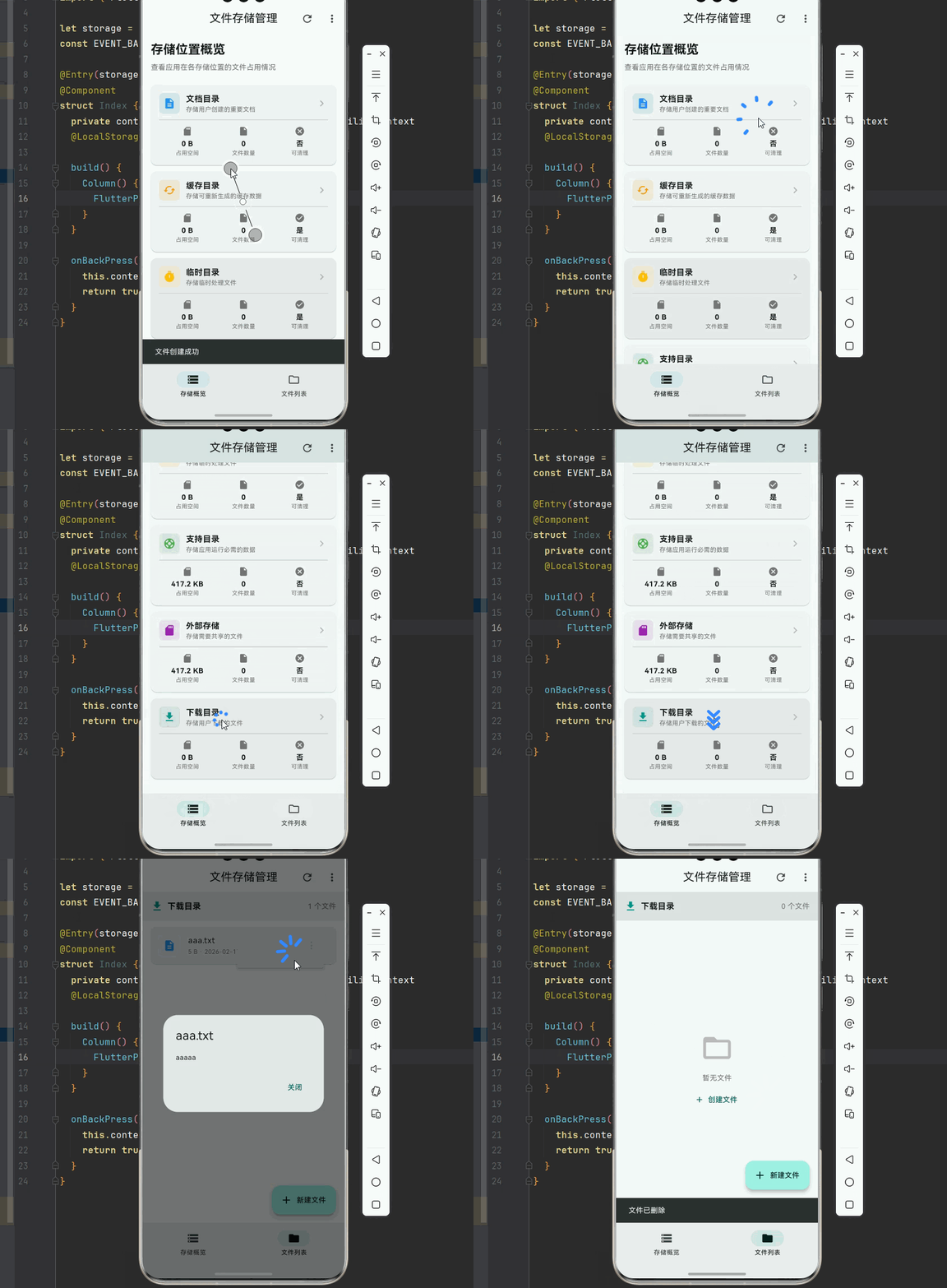
下面是一个完整的文件存储管理应用示例:
import 'package:flutter/material.dart';
import 'package:path_provider/path_provider.dart';
import 'package:flutter/foundation.dart';
import 'dart:io';
// ============ 枚举定义 ============
enum FileType {
document,
image,
audio,
video,
archive,
other,
}
enum StoragePathType {
documents,
cache,
temporary,
support,
external,
downloads,
}
// ============ 数据模型 ============
class PathConfig {
final StoragePathType type;
final String displayName;
final String description;
final bool canBeCleared;
final bool isBackedUp;
const PathConfig({
required this.type,
required this.displayName,
required this.description,
this.canBeCleared = false,
this.isBackedUp = false,
});
}
class PathConfigs {
static const documents = PathConfig(
type: StoragePathType.documents,
displayName: '文档目录',
description: '存储用户创建的重要文档',
);
static const cache = PathConfig(
type: StoragePathType.cache,
displayName: '缓存目录',
description: '存储可重新生成的缓存数据',
canBeCleared: true,
);
static const temporary = PathConfig(
type: StoragePathType.temporary,
displayName: '临时目录',
description: '存储临时处理文件',
canBeCleared: true,
);
static const support = PathConfig(
type: StoragePathType.support,
displayName: '支持目录',
description: '存储应用运行必需的数据',
);
static const external = PathConfig(
type: StoragePathType.external,
displayName: '外部存储',
description: '存储需要共享的文件',
);
static const downloads = PathConfig(
type: StoragePathType.downloads,
displayName: '下载目录',
description: '存储用户下载的文件',
);
static const List<PathConfig> all = [
documents,
cache,
temporary,
support,
external,
downloads,
];
}
class FileMetadata {
final String name;
final String path;
final int size;
final FileType type;
final DateTime createdAt;
final DateTime modifiedAt;
const FileMetadata({
required this.name,
required this.path,
required this.size,
required this.type,
required this.createdAt,
required this.modifiedAt,
});
String get extension => name.contains('.')
? name.split('.').last.toLowerCase()
: '';
String get formattedSize => _formatFileSize(size);
IconData get icon => _getIconForType(type);
factory FileMetadata.fromFileSystemEntity(FileSystemEntity entity) {
final stat = entity.statSync();
return FileMetadata(
name: entity.path.split(Platform.pathSeparator).last,
path: entity.path,
size: stat.size,
type: _getFileType(entity.path),
createdAt: stat.changed,
modifiedAt: stat.modified,
);
}
static String _formatFileSize(int bytes) {
if (bytes < 1024) return '$bytes B';
if (bytes < 1024 * 1024) return '${(bytes / 1024).toStringAsFixed(1)} KB';
if (bytes < 1024 * 1024 * 1024) {
return '${(bytes / (1024 * 1024)).toStringAsFixed(1)} MB';
}
return '${(bytes / (1024 * 1024 * 1024)).toStringAsFixed(1)} GB';
}
static FileType _getFileType(String path) {
final ext = path.contains('.')
? path.split('.').last.toLowerCase()
: '';
const documentExts = ['txt', 'pdf', 'doc', 'docx', 'xls', 'xlsx'];
const imageExts = ['jpg', 'jpeg', 'png', 'gif', 'webp'];
const audioExts = ['mp3', 'wav', 'aac', 'flac'];
const videoExts = ['mp4', 'avi', 'mov', 'mkv'];
const archiveExts = ['zip', 'rar', '7z', 'tar'];
if (documentExts.contains(ext)) return FileType.document;
if (imageExts.contains(ext)) return FileType.image;
if (audioExts.contains(ext)) return FileType.audio;
if (videoExts.contains(ext)) return FileType.video;
if (archiveExts.contains(ext)) return FileType.archive;
return FileType.other;
}
static IconData _getIconForType(FileType type) {
switch (type) {
case FileType.document:
return Icons.description;
case FileType.image:
return Icons.image;
case FileType.audio:
return Icons.audiotrack;
case FileType.video:
return Icons.videocam;
case FileType.archive:
return Icons.folder_zip;
case FileType.other:
return Icons.insert_drive_file;
}
}
}
class StorageInfo {
final StoragePathType type;
final String displayName;
final String? path;
final int usedBytes;
final int fileCount;
final bool isAvailable;
const StorageInfo({
required this.type,
required this.displayName,
this.path,
this.usedBytes = 0,
this.fileCount = 0,
this.isAvailable = false,
});
String get formattedUsedBytes {
if (usedBytes < 1024) return '$usedBytes B';
if (usedBytes < 1024 * 1024) return '${(usedBytes / 1024).toStringAsFixed(1)} KB';
return '${(usedBytes / (1024 * 1024)).toStringAsFixed(1)} MB';
}
}
// ============ 服务类 ============
class PathService {
static final Map<StoragePathType, String> _paths = {};
static Future<void> initialize() async {
try {
final docsDir = await getApplicationDocumentsDirectory();
_paths[StoragePathType.documents] = docsDir.path;
} catch (e) {
debugPrint('获取文档目录失败: $e');
}
try {
final cacheDir = await getApplicationCacheDirectory();
_paths[StoragePathType.cache] = cacheDir.path;
} catch (e) {
debugPrint('获取缓存目录失败: $e');
}
try {
final tempDir = await getTemporaryDirectory();
_paths[StoragePathType.temporary] = tempDir.path;
} catch (e) {
debugPrint('获取临时目录失败: $e');
}
try {
final supportDir = await getApplicationSupportDirectory();
_paths[StoragePathType.support] = supportDir.path;
} catch (e) {
debugPrint('获取支持目录失败: $e');
}
try {
final externalDir = await getExternalStorageDirectory();
if (externalDir != null) {
_paths[StoragePathType.external] = externalDir.path;
}
} catch (e) {
debugPrint('获取外部存储目录失败: $e');
}
try {
final downloadsDir = await getDownloadsDirectory();
if (downloadsDir != null) {
_paths[StoragePathType.downloads] = downloadsDir.path;
}
} catch (e) {
debugPrint('获取下载目录失败: $e');
}
}
static String? getPath(StoragePathType type) => _paths[type];
static bool isPathAvailable(StoragePathType type) => _paths.containsKey(type);
}
class FileStorageService {
static final FileStorageService _instance = FileStorageService._internal();
factory FileStorageService() => _instance;
FileStorageService._internal();
Future<File> saveTextFile(
String fileName,
String content, {
StoragePathType pathType = StoragePathType.documents,
}) async {
final basePath = PathService.getPath(pathType);
if (basePath == null) {
throw Exception('存储路径不可用: $pathType');
}
final file = File('$basePath/$fileName');
final parentDir = file.parent;
if (!await parentDir.exists()) {
await parentDir.create(recursive: true);
}
await file.writeAsString(content);
return file;
}
Future<String> readTextFile(
String fileName, {
StoragePathType pathType = StoragePathType.documents,
}) async {
final basePath = PathService.getPath(pathType);
if (basePath == null) {
throw Exception('存储路径不可用: $pathType');
}
final file = File('$basePath/$fileName');
if (!await file.exists()) {
throw Exception('文件不存在: $fileName');
}
return await file.readAsString();
}
Future<bool> deleteFile(
String fileName, {
StoragePathType pathType = StoragePathType.documents,
}) async {
final basePath = PathService.getPath(pathType);
if (basePath == null) return false;
final file = File('$basePath/$fileName');
if (await file.exists()) {
await file.delete();
return true;
}
return false;
}
Future<List<FileMetadata>> listFiles({
StoragePathType pathType = StoragePathType.documents,
}) async {
final basePath = PathService.getPath(pathType);
if (basePath == null) return [];
final dir = Directory(basePath);
if (!await dir.exists()) return [];
final entities = await dir.list().toList();
return entities
.whereType<File>()
.map((file) => FileMetadata.fromFileSystemEntity(file))
.toList();
}
Future<int> getDirectorySize({
StoragePathType pathType = StoragePathType.documents,
}) async {
final basePath = PathService.getPath(pathType);
if (basePath == null) return 0;
final dir = Directory(basePath);
if (!await dir.exists()) return 0;
int totalSize = 0;
await for (final entity in dir.list(recursive: true)) {
if (entity is File) {
totalSize += await entity.length();
}
}
return totalSize;
}
Future<int> clearDirectory({
StoragePathType pathType = StoragePathType.cache,
}) async {
final basePath = PathService.getPath(pathType);
if (basePath == null) return 0;
final dir = Directory(basePath);
if (!await dir.exists()) return 0;
int deletedCount = 0;
await for (final entity in dir.list()) {
try {
await entity.delete(recursive: true);
deletedCount++;
} catch (e) {
debugPrint('删除失败: ${entity.path}');
}
}
return deletedCount;
}
}
class StorageProvider extends ChangeNotifier {
final FileStorageService _storageService = FileStorageService();
Map<StoragePathType, StorageInfo> _storageInfo = {};
List<FileMetadata> _files = [];
bool _isLoading = false;
String? _error;
StoragePathType _currentPathType = StoragePathType.documents;
Map<StoragePathType, StorageInfo> get storageInfo => _storageInfo;
List<FileMetadata> get files => _files;
bool get isLoading => _isLoading;
String? get error => _error;
StoragePathType get currentPathType => _currentPathType;
Future<void> refreshAllStorageInfo() async {
_isLoading = true;
_error = null;
notifyListeners();
try {
final newInfo = <StoragePathType, StorageInfo>{};
for (final config in PathConfigs.all) {
final path = PathService.getPath(config.type);
if (path != null) {
final size = await _storageService.getDirectorySize(pathType: config.type);
final files = await _storageService.listFiles(pathType: config.type);
newInfo[config.type] = StorageInfo(
type: config.type,
displayName: config.displayName,
path: path,
usedBytes: size,
fileCount: files.length,
isAvailable: true,
);
} else {
newInfo[config.type] = StorageInfo(
type: config.type,
displayName: config.displayName,
isAvailable: false,
);
}
}
_storageInfo = newInfo;
} catch (e) {
_error = '获取存储信息失败: $e';
}
_isLoading = false;
notifyListeners();
}
Future<void> switchPathType(StoragePathType type) async {
_currentPathType = type;
await refreshFiles();
}
Future<void> refreshFiles() async {
_isLoading = true;
_error = null;
notifyListeners();
try {
_files = await _storageService.listFiles(pathType: _currentPathType);
} catch (e) {
_error = '获取文件列表失败: $e';
_files = [];
}
_isLoading = false;
notifyListeners();
}
Future<bool> saveFile(String fileName, String content) async {
try {
await _storageService.saveTextFile(
fileName,
content,
pathType: _currentPathType,
);
await refreshFiles();
return true;
} catch (e) {
_error = '保存文件失败: $e';
notifyListeners();
return false;
}
}
Future<bool> deleteFile(String fileName) async {
try {
await _storageService.deleteFile(
fileName,
pathType: _currentPathType,
);
await refreshFiles();
return true;
} catch (e) {
_error = '删除文件失败: $e';
notifyListeners();
return false;
}
}
Future<int> clearCache() async {
try {
final count = await _storageService.clearDirectory(
pathType: StoragePathType.cache,
);
await refreshAllStorageInfo();
return count;
} catch (e) {
_error = '清空缓存失败: $e';
notifyListeners();
return 0;
}
}
}
// ============ 应用入口 ============
void main() async {
WidgetsFlutterBinding.ensureInitialized();
await PathService.initialize();
runApp(const FileStorageApp());
}
class FileStorageApp extends StatelessWidget {
const FileStorageApp({super.key});
Widget build(BuildContext context) {
return MaterialApp(
title: '文件存储管理',
debugShowCheckedModeBanner: false,
theme: ThemeData(
colorScheme: ColorScheme.fromSeed(seedColor: Colors.teal),
useMaterial3: true,
),
home: const StorageMainPage(),
);
}
}
class StorageMainPage extends StatefulWidget {
const StorageMainPage({super.key});
State<StorageMainPage> createState() => _StorageMainPageState();
}
class _StorageMainPageState extends State<StorageMainPage> {
final StorageProvider _provider = StorageProvider();
final TextEditingController _fileNameController = TextEditingController();
final TextEditingController _fileContentController = TextEditingController();
int _currentIndex = 0;
void initState() {
super.initState();
_provider.refreshAllStorageInfo();
_provider.refreshFiles();
}
void dispose() {
_fileNameController.dispose();
_fileContentController.dispose();
_provider.dispose();
super.dispose();
}
Widget build(BuildContext context) {
return ListenableBuilder(
listenable: _provider,
builder: (context, child) {
return Scaffold(
appBar: AppBar(
title: const Text('文件存储管理'),
centerTitle: true,
elevation: 0,
actions: [
IconButton(
icon: const Icon(Icons.refresh),
onPressed: () {
_provider.refreshAllStorageInfo();
_provider.refreshFiles();
},
tooltip: '刷新',
),
PopupMenuButton<String>(
onSelected: (value) {
if (value == 'clear_cache') {
_showClearCacheDialog();
}
},
itemBuilder: (context) => [
const PopupMenuItem(
value: 'clear_cache',
child: ListTile(
leading: Icon(Icons.cleaning_services),
title: Text('清空缓存'),
),
),
],
),
],
),
body: _currentIndex == 0
? _buildStorageOverview()
: _buildFileList(),
bottomNavigationBar: NavigationBar(
selectedIndex: _currentIndex,
onDestinationSelected: (index) {
setState(() {
_currentIndex = index;
});
},
destinations: const [
NavigationDestination(
icon: Icon(Icons.storage_outlined),
selectedIcon: Icon(Icons.storage),
label: '存储概览',
),
NavigationDestination(
icon: Icon(Icons.folder_outlined),
selectedIcon: Icon(Icons.folder),
label: '文件列表',
),
],
),
floatingActionButton: _currentIndex == 1
? FloatingActionButton.extended(
onPressed: _showCreateFileDialog,
icon: const Icon(Icons.add),
label: const Text('新建文件'),
)
: null,
);
},
);
}
Widget _buildStorageOverview() {
if (_provider.isLoading && _provider.storageInfo.isEmpty) {
return const Center(child: CircularProgressIndicator());
}
if (_provider.error != null) {
return Center(
child: Column(
mainAxisAlignment: MainAxisAlignment.center,
children: [
const Icon(Icons.error_outline, size: 64, color: Colors.red),
const SizedBox(height: 16),
Text(_provider.error!),
const SizedBox(height: 16),
ElevatedButton(
onPressed: () => _provider.refreshAllStorageInfo(),
child: const Text('重试'),
),
],
),
);
}
return SingleChildScrollView(
padding: const EdgeInsets.all(16),
child: Column(
crossAxisAlignment: CrossAxisAlignment.start,
children: [
Text(
'存储位置概览',
style: Theme.of(context).textTheme.headlineSmall?.copyWith(
fontWeight: FontWeight.bold,
),
),
const SizedBox(height: 8),
Text(
'查看应用在各存储位置的文件占用情况',
style: Theme.of(context).textTheme.bodyMedium?.copyWith(
color: Colors.grey[600],
),
),
const SizedBox(height: 24),
...PathConfigs.all.map((config) {
final info = _provider.storageInfo[config.type];
return _buildStorageCard(config, info);
}),
],
),
);
}
Widget _buildStorageCard(PathConfig config, StorageInfo? info) {
return Card(
margin: const EdgeInsets.only(bottom: 12),
child: InkWell(
onTap: info?.isAvailable == true
? () {
setState(() {
_currentIndex = 1;
});
_provider.switchPathType(config.type);
}
: null,
borderRadius: BorderRadius.circular(12),
child: Padding(
padding: const EdgeInsets.all(16),
child: Column(
crossAxisAlignment: CrossAxisAlignment.start,
children: [
Row(
children: [
Container(
padding: const EdgeInsets.all(8),
decoration: BoxDecoration(
color: _getPathTypeColor(config.type).withOpacity(0.1),
borderRadius: BorderRadius.circular(8),
),
child: Icon(
_getPathTypeIcon(config.type),
color: _getPathTypeColor(config.type),
),
),
const SizedBox(width: 12),
Expanded(
child: Column(
crossAxisAlignment: CrossAxisAlignment.start,
children: [
Text(
config.displayName,
style: const TextStyle(
fontSize: 16,
fontWeight: FontWeight.bold,
),
),
Text(
config.description,
style: TextStyle(
fontSize: 12,
color: Colors.grey[600],
),
),
],
),
),
if (info?.isAvailable == true)
Icon(
Icons.chevron_right,
color: Colors.grey[400],
),
],
),
if (info?.isAvailable == true) ...[
const Divider(height: 24),
Row(
children: [
Expanded(
child: _buildInfoItem(
'占用空间',
info!.formattedUsedBytes,
Icons.sd_card,
),
),
Expanded(
child: _buildInfoItem(
'文件数量',
'${info.fileCount}',
Icons.insert_drive_file,
),
),
Expanded(
child: _buildInfoItem(
'可清理',
config.canBeCleared ? '是' : '否',
config.canBeCleared
? Icons.check_circle
: Icons.cancel,
),
),
],
),
] else
Padding(
padding: const EdgeInsets.only(top: 8),
child: Text(
'此存储位置在当前设备上不可用',
style: TextStyle(
fontSize: 12,
color: Colors.grey[500],
fontStyle: FontStyle.italic,
),
),
),
],
),
),
),
);
}
Widget _buildInfoItem(String label, String value, IconData icon) {
return Column(
children: [
Icon(icon, size: 20, color: Colors.grey[600]),
const SizedBox(height: 4),
Text(
value,
style: const TextStyle(
fontSize: 14,
fontWeight: FontWeight.bold,
),
),
Text(
label,
style: TextStyle(
fontSize: 11,
color: Colors.grey[600],
),
),
],
);
}
Widget _buildFileList() {
final currentConfig = PathConfigs.all.firstWhere(
(c) => c.type == _provider.currentPathType,
orElse: () => PathConfigs.documents,
);
return Column(
children: [
Container(
width: double.infinity,
padding: const EdgeInsets.all(16),
color: Theme.of(context).colorScheme.surfaceContainerHighest,
child: Row(
children: [
Icon(
_getPathTypeIcon(_provider.currentPathType),
color: _getPathTypeColor(_provider.currentPathType),
),
const SizedBox(width: 8),
Text(
currentConfig.displayName,
style: const TextStyle(
fontSize: 16,
fontWeight: FontWeight.bold,
),
),
const Spacer(),
Text(
'${_provider.files.length} 个文件',
style: TextStyle(color: Colors.grey[600]),
),
],
),
),
Expanded(
child: _provider.isLoading
? const Center(child: CircularProgressIndicator())
: _provider.files.isEmpty
? Center(
child: Column(
mainAxisAlignment: MainAxisAlignment.center,
children: [
Icon(
Icons.folder_open,
size: 64,
color: Colors.grey[400],
),
const SizedBox(height: 16),
Text(
'暂无文件',
style: TextStyle(color: Colors.grey[600]),
),
const SizedBox(height: 8),
TextButton.icon(
onPressed: _showCreateFileDialog,
icon: const Icon(Icons.add),
label: const Text('创建文件'),
),
],
),
)
: ListView.builder(
padding: const EdgeInsets.all(8),
itemCount: _provider.files.length,
itemBuilder: (context, index) {
final file = _provider.files[index];
return _buildFileItem(file);
},
),
),
],
);
}
Widget _buildFileItem(FileMetadata file) {
return Card(
margin: const EdgeInsets.symmetric(vertical: 4, horizontal: 8),
child: ListTile(
leading: Container(
padding: const EdgeInsets.all(8),
decoration: BoxDecoration(
color: _getFileTypeColor(file.type).withOpacity(0.1),
borderRadius: BorderRadius.circular(8),
),
child: Icon(
file.icon,
color: _getFileTypeColor(file.type),
),
),
title: Text(
file.name,
maxLines: 1,
overflow: TextOverflow.ellipsis,
),
subtitle: Text(
'${file.formattedSize} · ${_formatDate(file.modifiedAt)}',
style: TextStyle(fontSize: 12, color: Colors.grey[600]),
),
trailing: PopupMenuButton<String>(
onSelected: (value) {
if (value == 'delete') {
_showDeleteConfirmDialog(file);
} else if (value == 'read') {
_showFileContentDialog(file);
}
},
itemBuilder: (context) => [
const PopupMenuItem(
value: 'read',
child: ListTile(
leading: Icon(Icons.visibility),
title: Text('查看内容'),
),
),
const PopupMenuItem(
value: 'delete',
child: ListTile(
leading: Icon(Icons.delete, color: Colors.red),
title: Text('删除', style: TextStyle(color: Colors.red)),
),
),
],
),
),
);
}
Color _getPathTypeColor(StoragePathType type) {
switch (type) {
case StoragePathType.documents:
return Colors.blue;
case StoragePathType.cache:
return Colors.orange;
case StoragePathType.temporary:
return Colors.amber;
case StoragePathType.support:
return Colors.green;
case StoragePathType.external:
return Colors.purple;
case StoragePathType.downloads:
return Colors.teal;
}
}
IconData _getPathTypeIcon(StoragePathType type) {
switch (type) {
case StoragePathType.documents:
return Icons.description;
case StoragePathType.cache:
return Icons.cached;
case StoragePathType.temporary:
return Icons.timer;
case StoragePathType.support:
return Icons.support;
case StoragePathType.external:
return Icons.sd_card;
case StoragePathType.downloads:
return Icons.download;
}
}
Color _getFileTypeColor(FileType type) {
switch (type) {
case FileType.document:
return Colors.blue;
case FileType.image:
return Colors.green;
case FileType.audio:
return Colors.purple;
case FileType.video:
return Colors.red;
case FileType.archive:
return Colors.orange;
case FileType.other:
return Colors.grey;
}
}
String _formatDate(DateTime date) {
return '${date.year}-${date.month.toString().padLeft(2, '0')}-${date.day.toString().padLeft(2, '0')}';
}
void _showCreateFileDialog() {
showDialog(
context: context,
builder: (context) {
return AlertDialog(
title: const Text('新建文件'),
content: Column(
mainAxisSize: MainAxisSize.min,
children: [
TextField(
controller: _fileNameController,
decoration: const InputDecoration(
labelText: '文件名',
hintText: '例如: note.txt',
border: OutlineInputBorder(),
),
),
const SizedBox(height: 16),
TextField(
controller: _fileContentController,
decoration: const InputDecoration(
labelText: '文件内容',
border: OutlineInputBorder(),
),
maxLines: 4,
),
],
),
actions: [
TextButton(
onPressed: () => Navigator.pop(context),
child: const Text('取消'),
),
FilledButton(
onPressed: () async {
final fileName = _fileNameController.text.trim();
final content = _fileContentController.text;
if (fileName.isEmpty) {
ScaffoldMessenger.of(context).showSnackBar(
const SnackBar(content: Text('请输入文件名')),
);
return;
}
final success = await _provider.saveFile(fileName, content);
if (success && mounted) {
Navigator.pop(context);
_fileNameController.clear();
_fileContentController.clear();
ScaffoldMessenger.of(context).showSnackBar(
const SnackBar(content: Text('文件创建成功')),
);
}
},
child: const Text('创建'),
),
],
);
},
);
}
void _showDeleteConfirmDialog(FileMetadata file) {
showDialog(
context: context,
builder: (context) {
return AlertDialog(
title: const Text('确认删除'),
content: Text('确定要删除文件 "${file.name}" 吗?此操作不可撤销。'),
actions: [
TextButton(
onPressed: () => Navigator.pop(context),
child: const Text('取消'),
),
FilledButton(
style: FilledButton.styleFrom(
backgroundColor: Colors.red,
),
onPressed: () async {
final success = await _provider.deleteFile(file.name);
if (success && mounted) {
Navigator.pop(context);
ScaffoldMessenger.of(context).showSnackBar(
const SnackBar(content: Text('文件已删除')),
);
}
},
child: const Text('删除'),
),
],
);
},
);
}
void _showFileContentDialog(FileMetadata file) async {
try {
final storageService = FileStorageService();
final content = await storageService.readTextFile(
file.name,
pathType: _provider.currentPathType,
);
if (mounted) {
showDialog(
context: context,
builder: (context) {
return AlertDialog(
title: Text(file.name),
content: SizedBox(
width: double.maxFinite,
child: SingleChildScrollView(
child: Text(content),
),
),
actions: [
TextButton(
onPressed: () => Navigator.pop(context),
child: const Text('关闭'),
),
],
);
},
);
}
} catch (e) {
if (mounted) {
ScaffoldMessenger.of(context).showSnackBar(
SnackBar(content: Text('读取文件失败: $e')),
);
}
}
}
void _showClearCacheDialog() {
showDialog(
context: context,
builder: (context) {
return AlertDialog(
title: const Text('清空缓存'),
content: const Text('确定要清空缓存目录吗?这将删除所有缓存文件,不会影响用户数据。'),
actions: [
TextButton(
onPressed: () => Navigator.pop(context),
child: const Text('取消'),
),
FilledButton(
onPressed: () async {
final count = await _provider.clearCache();
if (mounted) {
Navigator.pop(context);
ScaffoldMessenger.of(context).showSnackBar(
SnackBar(content: Text('已清理 $count 个缓存文件')),
);
}
},
child: const Text('清空'),
),
],
);
},
);
}
}
🏆 六、最佳实践与注意事项
📂 6.1 目录选择最佳实践
在实际开发中,正确选择存储目录是保证应用稳定性和用户体验的关键:
文档目录使用场景:
- 用户创建的文档、笔记、绘图等不可重新生成的数据
- 用户导出的文件,如导出的 PDF、CSV 等
- 需要长期保存且用户期望存在的数据
缓存目录使用场景:
- 网络图片缓存、API 响应缓存
- 临时下载的文件,如更新包
- 可以重新生成的数据,如缩略图
临时目录使用场景:
- 文件处理过程中的中间产物
- 临时解压的文件
- 处理完成后应立即删除的数据
支持目录使用场景:
- 数据库文件(SQLite 等)
- 应用配置文件
- 日志文件
- 需要持久化但用户不直接访问的数据
6.2 错误处理策略
文件操作可能因为各种原因失败,需要完善的错误处理机制:
/// 安全的文件保存操作
Future<FileSaveResult> safeSaveFile(
  String fileName,
  String content,
) async {
  try {
    // 验证文件名
    if (fileName.isEmpty) {
      return FileSaveResult.failure('文件名不能为空');
    }

    // 检查文件名是否包含非法字符
    final illegalChars = RegExp(r'[<>:"/\\|?*]');
    if (illegalChars.hasMatch(fileName)) {
      return FileSaveResult.failure('文件名包含非法字符');
    }

    // 检查存储空间
    final availableSpace = await getAvailableStorageSpace();
    if (availableSpace < content.length) {
      return FileSaveResult.failure('存储空间不足');
    }

    // 执行保存
    final file = await saveTextFile(fileName, content);
    return FileSaveResult.success(file.path);

  } on FileSystemException catch (e) {
    return FileSaveResult.failure('文件系统错误: ${e.message}');
  } on StorageException catch (e) {
    return FileSaveResult.failure('存储错误: ${e.message}');
  } catch (e) {
    return FileSaveResult.failure('未知错误: $e');
  }
}

class FileSaveResult {
  final bool success;
  final String? filePath;
  final String? error;

  FileSaveResult.success(this.filePath)
      : success = true, error = null;

  FileSaveResult.failure(this.error)
      : success = false, filePath = null;
}
⚡ 6.3 性能优化建议
批量操作优化:
/// 批量删除文件
Future<int> deleteFilesBatch(List<String> fileNames) async {
  int deletedCount = 0;

  // 使用 isolate 处理大量文件
  if (fileNames.length > 100) {
    return await compute(_deleteFilesInIsolate, fileNames);
  }

  for (final fileName in fileNames) {
    try {
      await deleteFile(fileName);
      deletedCount++;
    } catch (e) {
      print('删除失败: $fileName');
    }
  }

  return deletedCount;
}
缓存路径信息:
// 在应用启动时预加载路径
Future<void> preloadPaths() async {
  await PathService.initialize();
  // 路径信息已缓存,后续访问无需异步
}
🎯 6.4 OpenHarmony 平台特殊注意事项
在 OpenHarmony 平台上使用 path_provider 时,需要注意以下几点:
权限配置:确保在 module.json5 中正确配置了网络权限,否则可能导致安装失败。
路径可用性:某些路径类型在特定设备上可能不可用,使用前应检查:
if (PathService.isPathAvailable(StoragePathType.external)) {
  // 使用外部存储
}
文件名编码:OpenHarmony 对文件名编码有特定要求,建议使用 UTF-8 编码,避免使用特殊字符。
并发访问:OpenHarmony 的文件系统对并发访问有限制,避免同时进行大量文件操作。
📌 七、总结
本文通过一个完整的文件存储管理系统案例,深入讲解了 path_provider 第三方库在 Flutter for OpenHarmony 中的应用。我们从实际场景出发,分析了移动应用中文件存储的需求和挑战,介绍了不同平台文件系统的差异,并详细讲解了如何设计一个分层架构的文件存储系统。
核心要点回顾:
-
目录选择:根据数据的特性和生命周期选择合适的存储目录,文档目录用于重要数据,缓存目录用于可重建数据,临时目录用于短期文件。
-
架构设计:采用分层架构,将路径获取、文件操作、状态管理分离,提高代码的可维护性和可测试性。
-
错误处理:文件操作可能因多种原因失败,需要完善的错误处理机制,提供友好的用户反馈。
-
性能优化:合理使用缓存、批量操作和异步处理,避免阻塞主线程。
-
平台适配:了解不同平台的文件系统特性,编写跨平台兼容的代码。

开源鸿蒙跨平台开发社区汇聚开发者与厂商,共建“一次开发,多端部署”的开源生态,致力于降低跨端开发门槛,推动万物智联创新。
更多推荐

 13
13 0
0- 0


 已为社区贡献36条内容

所有评论(0)