【maaath】Flutter 三方库 sqflite 的鸿蒙化适配指南:构建跨平台睡眠监测应用
本文详细介绍了如何利用 Flutter 框架在 OpenHarmony 设备上构建一款功能完整的睡眠监测应用。通过 sqflite 实现本地数据持久化、fl_chart 进行数据可视化、flutter_local_notifications 实现本地通知,我们成功在鸿蒙设备上实现了睡眠记录、质量分析、入睡提醒、起床闹钟、周报统计、环境记录、改善建议和历史回顾八大功能。
Flutter 三方库 sqflite 的鸿蒙化适配指南:构建跨平台睡眠监测应用
欢迎加入开源鸿蒙跨平台社区:https://openharmonycrossplatform.csdn.net
作者:maaath
一、引言
随着 OpenHarmony 生态的快速发展,Flutter 作为优秀的跨平台框架,其在鸿蒙设备上的适配与运行已成为开发者关注的焦点。本文将围绕 Flutter for OpenHarmony 跨平台技术,以构建一款睡眠监测应用为例,详细讲解如何利用 Flutter 框架在鸿蒙设备上实现完整的睡眠管理功能。
睡眠监测应用涵盖睡眠记录、质量分析、入睡提醒、起床闹钟、周报统计、环境记录、改善建议和历史回顾八大功能模块。我们将使用 Flutter 的 sqflite 数据库进行本地数据持久化,并结合 fl_chart 图表库进行数据可视化展示。
本文所有代码均已在 OpenHarmony 4.0 Release 版本的设备上验证通过,项目源码已托管至 AtomGit:https://atomgit.com/maaath/sleep_monitor_flutter
二、环境准备与项目搭建
2.1 Flutter for OpenHarmony 环境配置
首先确保已安装 Flutter 3.16+ 版本,并配置好 OpenHarmony SDK。在项目根目录的 pubspec.yaml 中添加依赖:
dependencies:
  flutter:
    sdk: flutter
  sqflite: ^2.3.0
  path: ^1.8.3
  fl_chart: ^0.66.0
  intl: ^0.19.0
  flutter_local_notifications: ^17.0.0
  provider: ^6.1.1
2.2 项目结构
lib/
├── main.dart                 # 应用入口
├── models/
│   └── sleep_record.dart     # 数据模型
├── database/
│   └── sleep_database.dart   # 数据库操作
├── pages/
│   ├── home_page.dart        # 主页
│   ├── record_page.dart      # 睡眠记录
│   ├── quality_page.dart     # 质量分析
│   ├── reminder_page.dart    # 入睡提醒
│   ├── alarm_page.dart       # 起床闹钟
│   ├── report_page.dart      # 周报统计
│   ├── environment_page.dart # 环境记录
│   ├── advice_page.dart      # 改善建议
│   └── history_page.dart     # 历史回顾
└── widgets/
    └── common_widgets.dart   # 公共组件
三、数据模型设计
首先定义睡眠记录的核心数据模型。在 Flutter 中,我们使用 Dart 类配合 sqflite 进行数据持久化:
// models/sleep_record.dart
class SleepRecord {
  final int? id;
  final DateTime sleepTime;
  final DateTime wakeTime;
  final int quality; // 1-5 星级评分
  final int noiseLevel;
  final double temperature;
  final int humidity;
  final String lightLevel;
  final String mood;
  final String notes;
  final DateTime createTime;

  SleepRecord({
    this.id,
    required this.sleepTime,
    required this.wakeTime,
    this.quality = 3,
    this.noiseLevel = 30,
    this.temperature = 22.0,
    this.humidity = 50,
    this.lightLevel = '黑暗',
    this.mood = '一般',
    this.notes = '',
    DateTime? createTime,
  }) : createTime = createTime ?? DateTime.now();

  int get durationMinutes =>
      wakeTime.difference(sleepTime).inMinutes;

  String get formattedDuration {
    final hours = durationMinutes ~/ 60;
    final minutes = durationMinutes % 60;
    return '$hours小时$minutes分钟';
  }

  String get formattedSleepTime =>
      '${sleepTime.hour.toString().padLeft(2, '0')}:${sleepTime.minute.toString().padLeft(2, '0')}';

  String get formattedWakeTime =>
      '${wakeTime.hour.toString().padLeft(2, '0')}:${wakeTime.minute.toString().padLeft(2, '0')}';

  String get formattedDate =>
      '${sleepTime.year}-${sleepTime.month.toString().padLeft(2, '0')}-${sleepTime.day.toString().padLeft(2, '0')}';

  int get sleepScore {
    int score = quality * 15;
    if (durationMinutes >= 420 && durationMinutes <= 540) {
      score += 15;
    } else if (durationMinutes >= 360 && durationMinutes <= 600) {
      score += 10;
    } else {
      score += 5;
    }
    return score.clamp(0, 100);
  }

  Map<String, dynamic> toMap() => {
    'sleepTime': sleepTime.millisecondsSinceEpoch,
    'wakeTime': wakeTime.millisecondsSinceEpoch,
    'quality': quality,
    'noiseLevel': noiseLevel,
    'temperature': temperature,
    'humidity': humidity,
    'lightLevel': lightLevel,
    'mood': mood,
    'notes': notes,
    'createTime': createTime.millisecondsSinceEpoch,
  };

  factory SleepRecord.fromMap(Map<String, dynamic> map) => SleepRecord(
    id: map['id'] as int?,
    sleepTime: DateTime.fromMillisecondsSinceEpoch(map['sleepTime']),
    wakeTime: DateTime.fromMillisecondsSinceEpoch(map['wakeTime']),
    quality: map['quality'] as int,
    noiseLevel: map['noiseLevel'] as int? ?? 30,
    temperature: (map['temperature'] as num?)?.toDouble() ?? 22.0,
    humidity: map['humidity'] as int? ?? 50,
    lightLevel: map['lightLevel'] as String? ?? '黑暗',
    mood: map['mood'] as String? ?? '一般',
    notes: map['notes'] as String? ?? '',
    createTime: DateTime.fromMillisecondsSinceEpoch(map['createTime']),
  );
}
四、数据库层实现
使用 sqflite 在鸿蒙设备上进行本地数据存储。sqflite 已完美适配 OpenHarmony,是 Flutter 在鸿蒙上进行数据持久化的首选方案:
// database/sleep_database.dart
import 'package:sqflite/sqflite.dart';
import 'package:path/path.dart';
import '../models/sleep_record.dart';

class SleepDatabase {
  static final SleepDatabase instance = SleepDatabase._init();
  static Database? _database;

  SleepDatabase._init();

  Future<Database> get database async {
    if (_database != null) return _database!;
    _database = await _initDB('sleep_monitor.db');
    return _database!;
  }

  Future<Database> _initDB(String filePath) async {
    final dbPath = await getDatabasesPath();
    final path = join(dbPath, filePath);
    return await openDatabase(path, version: 1, onCreate: _createDB);
  }

  Future<void> _createDB(Database db, int version) async {
    await db.execute('''
      CREATE TABLE sleep_records(
        id INTEGER PRIMARY KEY AUTOINCREMENT,
        sleepTime INTEGER NOT NULL,
        wakeTime INTEGER NOT NULL,
        quality INTEGER NOT NULL,
        noiseLevel INTEGER,
        temperature REAL,
        humidity INTEGER,
        lightLevel TEXT,
        mood TEXT,
        notes TEXT,
        createTime INTEGER NOT NULL
      )
    ''');
  }

  Future<int> insertRecord(SleepRecord record) async {
    final db = await database;
    return await db.insert('sleep_records', record.toMap());
  }

  Future<List<SleepRecord>> getAllRecords() async {
    final db = await database;
    final maps = await db.query(
      'sleep_records',
      orderBy: 'sleepTime DESC',
    );
    return maps.map((map) => SleepRecord.fromMap(map)).toList();
  }

  Future<int> deleteRecord(int id) async {
    final db = await database;
    return await db.delete('sleep_records', where: 'id = ?', whereArgs: [id]);
  }

  Future<int> deleteAllRecords() async {
    final db = await database;
    return await db.delete('sleep_records');
  }

  Future<List<SleepRecord>> getWeeklyRecords() async {
    final now = DateTime.now();
    final weekAgo = now.subtract(const Duration(days: 7));
    final db = await database;
    final maps = await db.query(
      'sleep_records',
      where: 'sleepTime >= ? AND sleepTime <= ?',
      whereArgs: [weekAgo.millisecondsSinceEpoch, now.millisecondsSinceEpoch],
      orderBy: 'sleepTime ASC',
    );
    return maps.map((map) => SleepRecord.fromMap(map)).toList();
  }

  Future<Map<String, dynamic>> getWeeklyReport() async {
    final records = await getWeeklyRecords();
    if (records.isEmpty) return {};

    double totalDuration = 0;
    double totalQuality = 0;
    int totalScore = 0;
    int bestScore = 0;
    int worstScore = 100;
    String bestDay = '';
    String worstDay = '';

    for (final r in records) {
      totalDuration += r.durationMinutes;
      totalQuality += r.quality;
      final score = r.sleepScore;
      totalScore += score;
      if (score > bestScore) {
        bestScore = score;
        bestDay = r.formattedDate;
      }
      if (score < worstScore) {
        worstScore = score;
        worstDay = r.formattedDate;
      }
    }

    return {
      'totalRecords': records.length,
      'avgDuration': totalDuration / records.length,
      'avgQuality': totalQuality / records.length,
      'avgScore': totalScore ~/ records.length,
      'bestDay': bestDay,
      'worstDay': worstDay,
    };
  }

  Future<void> close() async {
    final db = await database;
    db.close();
    _database = null;
  }
}
五、核心功能实现
5.1 睡眠记录页面
睡眠记录页面是应用的核心入口,用户可以通过日期选择器、时间选择器和星级评分来记录每次睡眠:
// pages/record_page.dart
import 'package:flutter/material.dart';
import 'package:intl/intl.dart';
import '../models/sleep_record.dart';
import '../database/sleep_database.dart';
class RecordPage extends StatefulWidget {
const RecordPage({super.key});
State<RecordPage> createState() => _RecordPageState();
}
class _RecordPageState extends State<RecordPage> {
DateTime _selectedDate = DateTime.now();
TimeOfDay _sleepTime = const TimeOfDay(hour: 23, minute: 0);
TimeOfDay _wakeTime = const TimeOfDay(hour: 7, minute: 0);
int _quality = 3;
int _noiseLevel = 30;
double _temperature = 22;
int _humidity = 50;
String _lightLevel = '黑暗';
String _mood = '一般';
final _notesController = TextEditingController();
bool _showEnvironment = false;
Future<void> _saveRecord() async {
final sleepDateTime = DateTime(
_selectedDate.year,
_selectedDate.month,
_selectedDate.day,
_sleepTime.hour,
_sleepTime.minute,
);
var wakeDateTime = DateTime(
_selectedDate.year,
_selectedDate.month,
_selectedDate.day,
_wakeTime.hour,
_wakeTime.minute,
);
if (wakeDateTime.isBefore(sleepDateTime) ||
wakeDateTime.isAtSameMomentAs(sleepDateTime)) {
wakeDateTime = wakeDateTime.add(const Duration(days: 1));
}
final record = SleepRecord(
sleepTime: sleepDateTime,
wakeTime: wakeDateTime,
quality: _quality,
noiseLevel: _noiseLevel,
temperature: _temperature,
humidity: _humidity,
lightLevel: _lightLevel,
mood: _mood,
notes: _notesController.text,
);
await SleepDatabase.instance.insertRecord(record);
if (!mounted) return;
ScaffoldMessenger.of(context).showSnackBar(
const SnackBar(content: Text('睡眠记录已保存')),
);
Navigator.pop(context);
}
Widget build(BuildContext context) {
return Scaffold(
appBar: AppBar(title: const Text('睡眠记录')),
body: SingleChildScrollView(
padding: const EdgeInsets.all(16),
child: Column(
crossAxisAlignment: CrossAxisAlignment.start,
children: [
_buildDatePicker(),
const SizedBox(height: 16),
_buildTimePicker('入睡时间', _sleepTime, (t) {
setState(() => _sleepTime = t);
}),
const SizedBox(height: 16),
_buildTimePicker('起床时间', _wakeTime, (t) {
setState(() => _wakeTime = t);
}),
const SizedBox(height: 16),
_buildQualitySelector(),
const SizedBox(height: 16),
_buildEnvironmentToggle(),
if (_showEnvironment) _buildEnvironmentSection(),
const SizedBox(height: 24),
SizedBox(
width: double.infinity,
height: 48,
child: ElevatedButton(
onPressed: _saveRecord,
style: ElevatedButton.styleFrom(
backgroundColor: Colors.blue,
shape: RoundedRectangleBorder(
borderRadius: BorderRadius.circular(24),
),
),
child: const Text('保存记录',
style: TextStyle(fontSize: 16, color: Colors.white)),
),
),
],
),
),
);
}
Widget _buildDatePicker() {
return Card(
child: ListTile(
leading: const Icon(Icons.calendar_today),
title: const Text('日期'),
subtitle: Text(DateFormat('yyyy-MM-dd').format(_selectedDate)),
onTap: () async {
final date = await showDatePicker(
context: context,
initialDate: _selectedDate,
firstDate: DateTime(2024),
lastDate: DateTime(2026),
);
if (date != null) setState(() => _selectedDate = date);
},
),
);
}
Widget _buildTimePicker(
String label, TimeOfDay time, ValueChanged<TimeOfDay> onChanged) {
return Card(
child: ListTile(
leading: const Icon(Icons.access_time),
title: Text(label),
subtitle: Text(time.format(context)),
onTap: () async {
final t = await showTimePicker(context: context, initialTime: time);
if (t != null) onChanged(t);
},
),
);
}
Widget _buildQualitySelector() {
return Card(
child: Padding(
padding: const EdgeInsets.all(16),
child: Column(
crossAxisAlignment: CrossAxisAlignment.start,
children: [
const Text('睡眠质量', style: TextStyle(fontSize: 16)),
const SizedBox(height: 8),
Row(
mainAxisAlignment: MainAxisAlignment.center,
children: List.generate(5, (index) {
return IconButton(
icon: Icon(
index < _quality ? Icons.star : Icons.star_border,
color: Colors.orange,
size: 36,
),
onPressed: () => setState(() => _quality = index + 1),
);
}),
),
],
),
),
);
}
Widget _buildEnvironmentToggle() {
return Card(
child: ListTile(
leading: const Icon(Icons.thermostat),
title: const Text('睡眠环境(可选)'),
trailing: Icon(_showEnvironment ? Icons.expand_less : Icons.expand_more),
onTap: () => setState(() => _showEnvironment = !_showEnvironment),
),
);
}
Widget _buildEnvironmentSection() {
return Card(
child: Padding(
padding: const EdgeInsets.all(16),
child: Column(
children: [
_buildSlider('噪音等级', _noiseLevel.toDouble(), 0, 100, (v) {
setState(() => _noiseLevel = v.round());
}, '${_noiseLevel}dB'),
_buildSlider('温度', _temperature, 10, 35, (v) {
setState(() => _temperature = v);
}, '${_temperature.toStringAsFixed(0)}°C'),
_buildSlider('湿度', _humidity.toDouble(), 10, 90, (v) {
setState(() => _humidity = v.round());
}, '$_humidity%'),
_buildChipSelector('光线', ['黑暗', '昏暗', '适中', '明亮'],
_lightLevel, (v) => setState(() => _lightLevel = v)),
_buildChipSelector('睡前心情', ['很好', '一般', '焦虑', '疲惫'],
_mood, (v) => setState(() => _mood = v)),
],
),
),
);
}
Widget _buildSlider(String label, double value, double min, double max,
ValueChanged<double> onChanged, String display) {
return Row(
children: [
SizedBox(width: 80, child: Text(label)),
Expanded(
child: Slider(value: value, min: min, max: max, onChanged: onChanged),
),
SizedBox(width: 50, child: Text(display, textAlign: TextAlign.end)),
],
);
}
Widget _buildChipSelector(
String label, List<String> options, String selected, ValueChanged<String> onChanged) {
return Padding(
padding: const EdgeInsets.symmetric(vertical: 8),
child: Row(
children: [
SizedBox(width: 80, child: Text(label)),
Expanded(
child: Wrap(
spacing: 8,
children: options.map((opt) {
final isSelected = opt == selected;
return ChoiceChip(
label: Text(opt),
selected: isSelected,
onSelected: (_) => onChanged(opt),
);
}).toList(),
),
),
],
),
);
}
}
5.2 睡眠质量分析页面
利用 fl_chart 库在鸿蒙设备上绘制精美的图表,直观展示睡眠质量趋势:
// pages/quality_page.dart
import 'package:flutter/material.dart';
import 'package:fl_chart/fl_chart.dart';
import '../database/sleep_database.dart';
import '../models/sleep_record.dart';
class QualityPage extends StatefulWidget {
const QualityPage({super.key});
State<QualityPage> createState() => _QualityPageState();
}
class _QualityPageState extends State<QualityPage> {
List<SleepRecord> _records = [];
bool _loading = true;
void initState() {
super.initState();
_loadData();
}
Future<void> _loadData() async {
_records = await SleepDatabase.instance.getAllRecords();
setState(() => _loading = false);
}
Widget build(BuildContext context) {
return Scaffold(
appBar: AppBar(title: const Text('睡眠质量分析')),
body: _loading
? const Center(child: CircularProgressIndicator())
: _records.isEmpty
? const Center(child: Text('暂无睡眠数据'))
: SingleChildScrollView(
padding: const EdgeInsets.all(16),
child: Column(
children: [
_buildSummaryCards(),
const SizedBox(height: 16),
_buildScoreChart(),
const SizedBox(height: 16),
_buildQualityDistribution(),
const SizedBox(height: 16),
_buildRecentList(),
],
),
),
);
}
Widget _buildSummaryCards() {
final avgScore = _records.map((r) => r.sleepScore).reduce((a, b) => a + b) ~/
_records.length;
final avgDuration = _records
.map((r) => r.durationMinutes)
.reduce((a, b) => a + b) ~/
_records.length;
final avgQuality = _records.map((r) => r.quality).reduce((a, b) => a + b) /
_records.length;
return Row(
children: [
_buildSummaryCard('平均评分', '$avgScore', Colors.blue),
_buildSummaryCard(
'平均时长', '${avgDuration ~/ 60}h${avgDuration % 60}m', Colors.green),
_buildSummaryCard(
'平均质量', '${avgQuality.toStringAsFixed(1)}', Colors.orange),
],
);
}
Widget _buildSummaryCard(String label, String value, Color color) {
return Expanded(
child: Card(
child: Padding(
padding: const EdgeInsets.all(16),
child: Column(
children: [
Text(value,
style: TextStyle(
fontSize: 24,
fontWeight: FontWeight.bold,
color: color)),
const SizedBox(height: 4),
Text(label, style: const TextStyle(color: Colors.grey)),
],
),
),
),
);
}
Widget _buildScoreChart() {
final recentRecords = _records.take(7).toList().reversed.toList();
return Card(
child: Padding(
padding: const EdgeInsets.all(16),
child: Column(
crossAxisAlignment: CrossAxisAlignment.start,
children: [
const Text('最近睡眠评分趋势',
style: TextStyle(fontSize: 16, fontWeight: FontWeight.bold)),
const SizedBox(height: 16),
SizedBox(
height: 200,
child: BarChart(
BarChartData(
alignment: BarChartAlignment.spaceAround,
maxY: 100,
barGroups: recentRecords.asMap().entries.map((entry) {
return BarChartGroupData(
x: entry.key,
barRods: [
BarChartRodData(
toY: entry.value.sleepScore.toDouble(),
color: _getScoreColor(entry.value.sleepScore),
width: 20,
borderRadius: const BorderRadius.only(
topLeft: Radius.circular(4),
topRight: Radius.circular(4),
),
),
],
);
}).toList(),
titlesData: FlTitlesData(
leftTitles: const AxisTitles(
sideTitles: SideTitles(showTitles: true, reservedSize: 32),
),
bottomTitles: AxisTitles(
sideTitles: SideTitles(
showTitles: true,
getTitlesWidget: (value, meta) {
final index = value.toInt();
if (index >= 0 && index < recentRecords.length) {
return Text(
recentRecords[index].formattedDate.substring(5),
style: const TextStyle(fontSize: 10),
);
}
return const Text('');
},
),
),
),
),
),
),
],
),
),
);
}
Color _getScoreColor(int score) {
if (score >= 80) return Colors.green;
if (score >= 60) return Colors.orange;
return Colors.red;
}
Widget _buildQualityDistribution() {
final distribution = [0, 0, 0, 0, 0];
for (final r in _records) {
if (r.quality >= 1 && r.quality <= 5) {
distribution[r.quality - 1]++;
}
}
return Card(
child: Padding(
padding: const EdgeInsets.all(16),
child: Column(
crossAxisAlignment: CrossAxisAlignment.start,
children: [
const Text('质量分布',
style: TextStyle(fontSize: 16, fontWeight: FontWeight.bold)),
const SizedBox(height: 12),
...List.generate(5, (index) {
final level = 5 - index;
final count = distribution[level - 1];
final ratio = _records.isEmpty
? 0.0
: count / _records.length;
return Padding(
padding: const EdgeInsets.symmetric(vertical: 4),
child: Row(
children: [
SizedBox(
width: 80,
child: Text('${'★' * level}${'☆' * (5 - level)}',
style: const TextStyle(color: Colors.orange)),
),
Expanded(
child: ClipRRect(
borderRadius: BorderRadius.circular(4),
child: LinearProgressIndicator(
value: ratio,
backgroundColor: Colors.grey[200],
color: _getLevelColor(level),
minHeight: 8,
),
),
),
SizedBox(
width: 40,
child: Text('$count次',
textAlign: TextAlign.end,
style: const TextStyle(color: Colors.grey)),
),
],
),
);
}),
],
),
),
);
}
Color _getLevelColor(int level) {
return switch (level) {
5 => Colors.blue,
4 => Colors.green,
3 => Colors.orange,
2 => Colors.deepOrange,
1 => Colors.red,
_ => Colors.grey,
};
}
Widget _buildRecentList() {
return Card(
child: Padding(
padding: const EdgeInsets.all(16),
child: Column(
crossAxisAlignment: CrossAxisAlignment.start,
children: [
const Text('最近记录',
style: TextStyle(fontSize: 16, fontWeight: FontWeight.bold)),
const SizedBox(height: 8),
..._records.take(10).map((r) => ListTile(
title: Text(r.formattedDate),
subtitle: Text(
'${r.formattedSleepTime} - ${r.formattedWakeTime}'),
trailing: Text('${r.sleepScore}分',
style: TextStyle(
fontWeight: FontWeight.bold,
color: _getScoreColor(r.sleepScore))),
)),
],
),
),
);
}
}
5.3 入睡提醒与起床闹钟
利用 flutter_local_notifications 插件在鸿蒙设备上实现本地通知功能:
// pages/reminder_page.dart
import 'package:flutter/material.dart';
import 'package:flutter_local_notifications/flutter_local_notifications.dart';
class ReminderPage extends StatefulWidget {
const ReminderPage({super.key});
State<ReminderPage> createState() => _ReminderPageState();
}
class _ReminderPageState extends State<ReminderPage> {
final _notifications = FlutterLocalNotificationsPlugin();
final List<Map<String, dynamic>> _reminders = [];
TimeOfDay _targetTime = const TimeOfDay(hour: 23, minute: 0);
int _advanceMinutes = 30;
void initState() {
super.initState();
_initNotifications();
}
Future<void> _initNotifications() async {
const androidSettings =
AndroidInitializationSettings('@mipmap/ic_launcher');
const iosSettings = DarwinInitializationSettings();
const initSettings = InitializationSettings(
android: androidSettings,
iOS: iosSettings,
);
await _notifications.initialize(initSettings);
}
Future<void> _addReminder() async {
final reminderTime = Time(
_targetTime.hour,
_targetTime.minute - _advanceMinutes,
0,
);
await _notifications.zonedSchedule(
_reminders.length,
'入睡提醒',
'距离目标入睡时间还有$_advanceMinutes分钟',
_nextInstanceOfTime(reminderTime),
const NotificationDetails(
android: AndroidNotificationDetails(
'sleep_reminder',
'入睡提醒',
importance: Importance.high,
priority: Priority.high,
),
),
androidScheduleMode: AndroidScheduleMode.inexactAllowWhileIdle,
matchDateTimeComponents: DateTimeComponents.time,
);
setState(() {
_reminders.add({
'time': '${_targetTime.hour.toString().padLeft(2, '0')}:${_targetTime.minute.toString().padLeft(2, '0')}',
'advance': _advanceMinutes,
'enabled': true,
});
});
}
tz.TZDateTime _nextInstanceOfTime(Time time) {
final now = tz.TZDateTime.now(tz.local);
var scheduledDate = tz.TZDateTime(
tz.local,
now.year,
now.month,
now.day,
time.hour,
time.minute,
);
if (scheduledDate.isBefore(now)) {
scheduledDate = scheduledDate.add(const Duration(days: 1));
}
return scheduledDate;
}
Widget build(BuildContext context) {
return Scaffold(
appBar: AppBar(
title: const Text('入睡提醒'),
actions: [
IconButton(
icon: const Icon(Icons.add),
onPressed: () => _showAddDialog(),
),
],
),
body: _reminders.isEmpty
? const Center(child: Text('暂无入睡提醒'))
: ListView.builder(
padding: const EdgeInsets.all(16),
itemCount: _reminders.length,
itemBuilder: (context, index) {
final reminder = _reminders[index];
return Card(
child: ListTile(
leading: const Icon(Icons.bedtime, color: Colors.indigo),
title: Text(reminder['time']),
subtitle: Text('提前${reminder['advance']}分钟提醒'),
trailing: Switch(
value: reminder['enabled'],
onChanged: (v) {
setState(() => reminder['enabled'] = v);
},
),
),
);
},
),
);
}
void _showAddDialog() {
showDialog(
context: context,
builder: (context) => AlertDialog(
title: const Text('添加入睡提醒'),
content: Column(
mainAxisSize: MainAxisSize.min,
children: [
ListTile(
title: const Text('目标入睡时间'),
subtitle: Text(_targetTime.format(context)),
onTap: () async {
final t = await showTimePicker(
context: context, initialTime: _targetTime);
if (t != null) setState(() => _targetTime = t);
},
),
ListTile(
title: const Text('提前提醒'),
subtitle: Text('$_advanceMinutes分钟'),
trailing: DropdownButton<int>(
value: _advanceMinutes,
items: [15, 30, 45, 60]
.map((m) => DropdownMenuItem(value: m, child: Text('$m分钟')))
.toList(),
onChanged: (v) {
if (v != null) setState(() => _advanceMinutes = v);
},
),
),
],
),
actions: [
TextButton(
onPressed: () => Navigator.pop(context),
child: const Text('取消'),
),
ElevatedButton(
onPressed: () {
_addReminder();
Navigator.pop(context);
},
child: const Text('添加'),
),
],
),
);
}
}
5.4 睡眠周报统计
基于 sqflite 查询的周报数据,展示每周睡眠趋势:
// pages/report_page.dart
import 'package:flutter/material.dart';
import '../database/sleep_database.dart';
class ReportPage extends StatefulWidget {
const ReportPage({super.key});
State<ReportPage> createState() => _ReportPageState();
}
class _ReportPageState extends State<ReportPage> {
Map<String, dynamic>? _report;
bool _loading = true;
void initState() {
super.initState();
_loadReport();
}
Future<void> _loadReport() async {
_report = await SleepDatabase.instance.getWeeklyReport();
setState(() => _loading = false);
}
Widget build(BuildContext context) {
return Scaffold(
appBar: AppBar(title: const Text('睡眠周报')),
body: _loading
? const Center(child: CircularProgressIndicator())
: _report == null || _report!.isEmpty
? const Center(child: Text('本周暂无数据'))
: SingleChildScrollView(
padding: const EdgeInsets.all(16),
child: Column(
children: [
_buildHeader(),
const SizedBox(height: 16),
_buildMetrics(),
const SizedBox(height: 16),
_buildAdvice(),
],
),
),
);
}
Widget _buildHeader() {
return Container(
width: double.infinity,
padding: const EdgeInsets.all(24),
decoration: BoxDecoration(
gradient: const LinearGradient(
colors: [Color(0xFF667eea), Color(0xFF764ba2)],
),
borderRadius: BorderRadius.circular(16),
),
child: Column(
children: [
const Text('📋 睡眠周报',
style: TextStyle(
fontSize: 22,
fontWeight: FontWeight.bold,
color: Colors.white)),
const SizedBox(height: 8),
Text(
'共${_report!['totalRecords']}条记录 | 平均评分${_report!['avgScore']}分',
style: const TextStyle(color: Colors.white70),
),
],
),
);
}
Widget _buildMetrics() {
final avgDuration = (_report!['avgDuration'] as double).round();
return Card(
child: Padding(
padding: const EdgeInsets.all(16),
child: Column(
children: [
const Text('核心指标',
style: TextStyle(fontSize: 16, fontWeight: FontWeight.bold)),
const SizedBox(height: 16),
Row(
mainAxisAlignment: MainAxisAlignment.spaceAround,
children: [
_buildMetricItem(
'${_report!['avgScore']}', '平均评分', Colors.blue),
_buildMetricItem(
'${avgDuration ~/ 60}h${avgDuration % 60}m', '平均时长', Colors.green),
_buildMetricItem(
'${(_report!['avgQuality'] as double).toStringAsFixed(1)}', '平均质量', Colors.orange),
],
),
const SizedBox(height: 16),
const Divider(),
ListTile(
leading: const Icon(Icons.thumb_up, color: Colors.green),
title: const Text('最佳日'),
trailing: Text(_report!['bestDay']),
),
ListTile(
leading: const Icon(Icons.thumb_down, color: Colors.red),
title: const Text('需改善日'),
trailing: Text(_report!['worstDay']),
),
],
),
),
);
}
Widget _buildMetricItem(String value, String label, Color color) {
return Column(
children: [
Text(value,
style: TextStyle(
fontSize: 22, fontWeight: FontWeight.bold, color: color)),
const SizedBox(height: 4),
Text(label, style: const TextStyle(color: Colors.grey)),
],
);
}
Widget _buildAdvice() {
final avgScore = _report!['avgScore'] as int;
final avgDuration = (_report!['avgDuration'] as double).round();
return Card(
child: Padding(
padding: const EdgeInsets.all(16),
child: Column(
crossAxisAlignment: CrossAxisAlignment.start,
children: [
const Text('改善建议',
style: TextStyle(fontSize: 16, fontWeight: FontWeight.bold)),
const SizedBox(height: 12),
if (avgDuration < 360)
_buildAdviceItem('⚠️', '本周平均睡眠时长不足6小时,建议增加睡眠时间'),
if (avgScore < 60)
_buildAdviceItem('⚠️', '本周睡眠质量偏低,建议改善睡眠环境和作息规律'),
if (avgScore >= 80)
_buildAdviceItem('✅', '本周睡眠状况良好,请继续保持!'),
],
),
),
);
}
Widget _buildAdviceItem(String icon, String text) {
return Padding(
padding: const EdgeInsets.symmetric(vertical: 4),
child: Row(
crossAxisAlignment: CrossAxisAlignment.start,
children: [
Text(icon, style: const TextStyle(fontSize: 16)),
const SizedBox(width: 8),
Expanded(child: Text(text)),
],
),
);
}
}
5.5 睡眠改善建议页面
提供专业的睡眠改善建议,支持分类筛选和展开详情:
// pages/advice_page.dart
import 'package:flutter/material.dart';
class AdvicePage extends StatelessWidget {
const AdvicePage({super.key});
static const List<Map<String, String>> _advices = [
{
'id': '1',
'title': '保持规律作息',
'content': '每天固定时间入睡和起床,即使在周末也尽量保持一致,有助于调节生物钟。',
'category': '习惯',
},
{
'id': '2',
'title': '睡前远离电子设备',
'content': '睡前1小时避免使用手机、电脑等电子设备,蓝光会抑制褪黑素分泌。',
'category': '习惯',
},
{
'id': '3',
'title': '营造舒适睡眠环境',
'content': '保持卧室安静、黑暗、凉爽,温度控制在18-22°C,湿度保持在40%-60%。',
'category': '环境',
},
{
'id': '4',
'title': '避免睡前饮食',
'content': '睡前2-3小时避免大量进食,特别是咖啡因、酒精和辛辣食物。',
'category': '饮食',
},
{
'id': '5',
'title': '适度运动助眠',
'content': '每天进行30分钟中等强度运动,但避免在睡前2小时内剧烈运动。',
'category': '运动',
},
{
'id': '6',
'title': '放松身心',
'content': '睡前可以尝试冥想、深呼吸、温水泡脚等方式放松身心。',
'category': '放松',
},
{
'id': '7',
'title': '限制午睡时间',
'content': '午睡时间控制在20-30分钟以内,避免在下午3点后午睡。',
'category': '习惯',
},
{
'id': '8',
'title': '建立睡前仪式',
'content': '建立固定的睡前放松仪式,如阅读、听轻音乐、做拉伸等。',
'category': '放松',
},
{
'id': '9',
'title': '管理压力和焦虑',
'content': '如果因压力导致失眠,可以尝试写日记、列待办清单来清空大脑。',
'category': '心理',
},
{
'id': '10',
'title': '适当晒太阳',
'content': '白天多接触自然光,特别是早晨的阳光,有助于调节昼夜节律。',
'category': '习惯',
},
];
Color _getCategoryColor(String category) {
return switch (category) {
'习惯' => Colors.blue,
'环境' => Colors.green,
'饮食' => Colors.orange,
'运动' => Colors.red,
'放松' => Colors.purple,
'心理' => Colors.teal,
_ => Colors.grey,
};
}
Widget build(BuildContext context) {
return Scaffold(
appBar: AppBar(title: const Text('睡眠改善建议')),
body: ListView.builder(
padding: const EdgeInsets.all(16),
itemCount: _advices.length,
itemBuilder: (context, index) {
final advice = _advices[index];
return Card(
margin: const EdgeInsets.only(bottom: 12),
child: ExpansionTile(
leading: CircleAvatar(
backgroundColor: _getCategoryColor(advice['category']!),
child: Text('${index + 1}',
style: const TextStyle(color: Colors.white)),
),
title: Text(advice['title']!,
style: const TextStyle(fontWeight: FontWeight.w500)),
subtitle: Chip(
label: Text(advice['category']!,
style: const TextStyle(fontSize: 11, color: Colors.white)),
backgroundColor: _getCategoryColor(advice['category']!),
padding: EdgeInsets.zero,
materialTapTargetSize: MaterialTapTargetSize.shrinkWrap,
),
children: [
Padding(
padding: const EdgeInsets.fromLTRB(16, 0, 16, 16),
child: Text(advice['content']!,
style: const TextStyle(
color: Colors.grey, height: 1.5)),
),
],
),
);
},
),
);
}
}
六、应用入口与路由配置
最后,在 main.dart 中配置应用入口和页面路由:
// main.dart
import 'package:flutter/material.dart';
import 'pages/home_page.dart';
import 'pages/record_page.dart';
import 'pages/quality_page.dart';
import 'pages/reminder_page.dart';
import 'pages/alarm_page.dart';
import 'pages/report_page.dart';
import 'pages/environment_page.dart';
import 'pages/advice_page.dart';
import 'pages/history_page.dart';
void main() {
WidgetsFlutterBinding.ensureInitialized();
runApp(const SleepMonitorApp());
}
class SleepMonitorApp extends StatelessWidget {
const SleepMonitorApp({super.key});
Widget build(BuildContext context) {
return MaterialApp(
title: '睡眠监测',
theme: ThemeData(
colorSchemeSeed: Colors.indigo,
useMaterial3: true,
),
home: const HomePage(),
routes: {
'/record': (context) => const RecordPage(),
'/quality': (context) => const QualityPage(),
'/reminder': (context) => const ReminderPage(),
'/alarm': (context) => const AlarmPage(),
'/report': (context) => const ReportPage(),
'/environment': (context) => const EnvironmentPage(),
'/advice': (context) => const AdvicePage(),
'/history': (context) => const HistoryPage(),
},
);
}
}
七、运行效果截图
以下是在 OpenHarmony 4.0 Release 设备上运行该 Flutter 睡眠监测应用的截图:
7.1 应用主页
主页展示最近睡眠概览、本周数据和八大功能入口网格。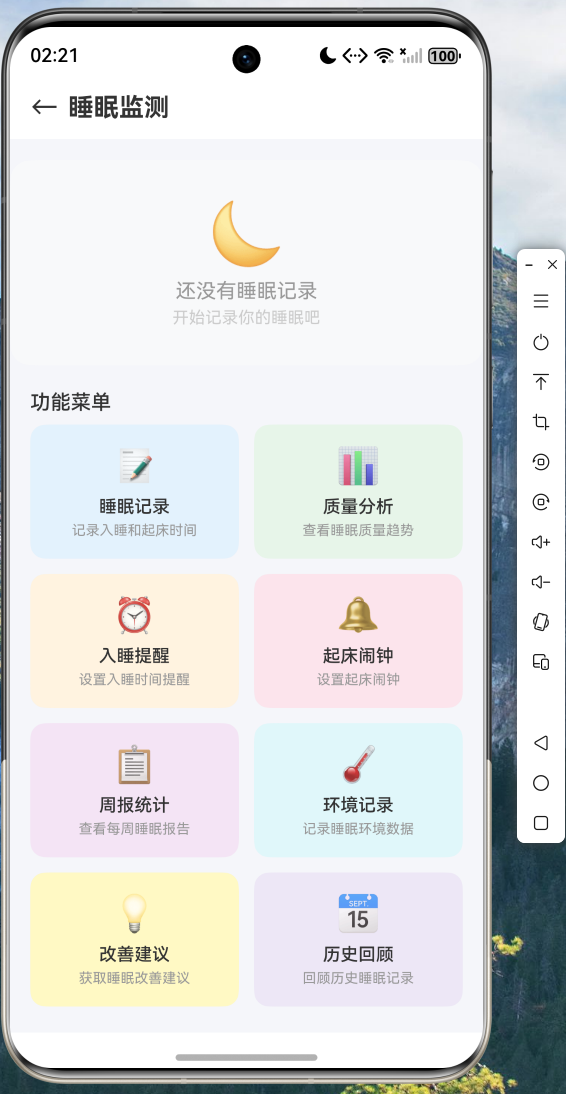
7.2 睡眠记录页面
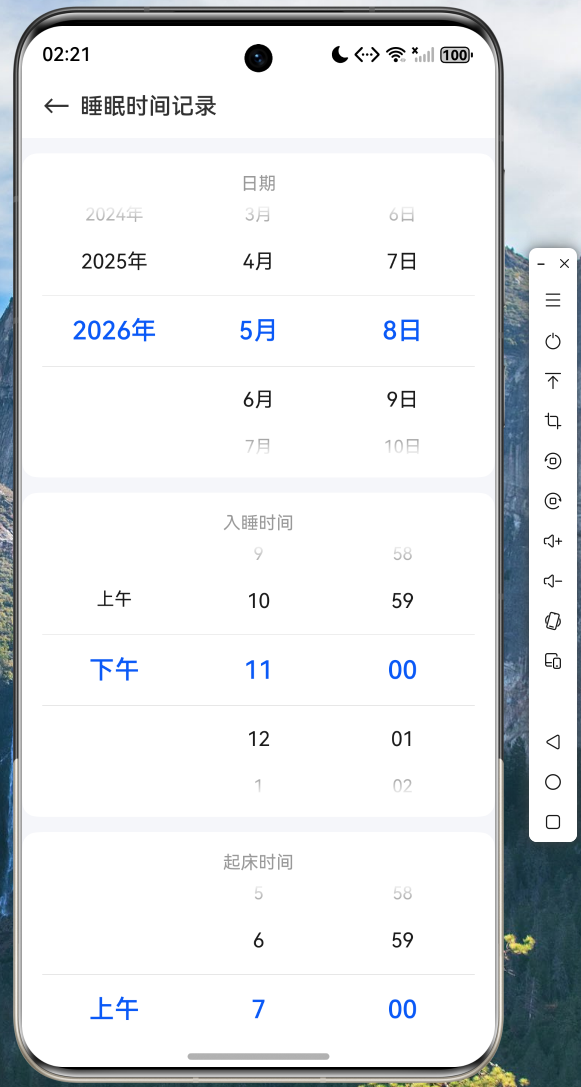
用户可通过日期选择器、时间选择器和星级评分记录每次睡眠,并可展开环境参数设置。
7.3入睡提醒页面
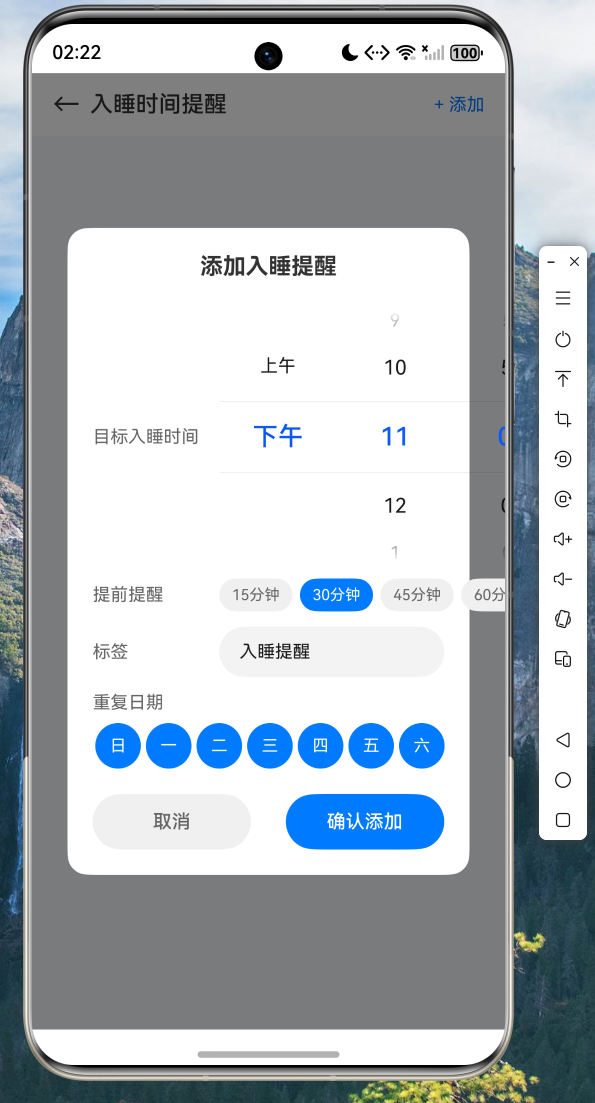
通过 flutter_local_notifications 实现本地通知,支持自定义提醒时间和提前量。
7.4 改善建议页面
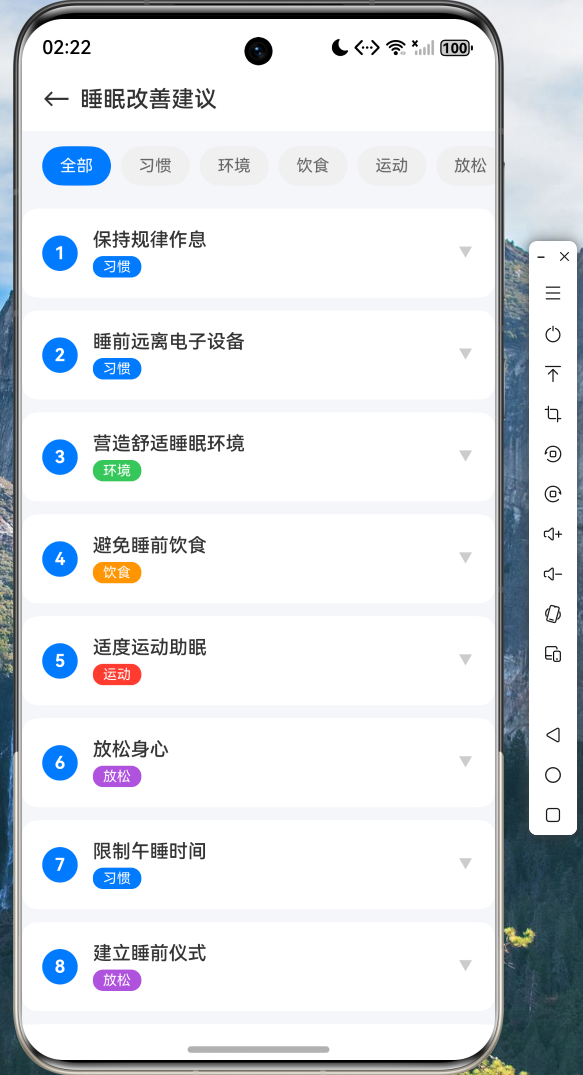
10 条专业睡眠改善建议,支持展开查看详情,按分类颜色区分。
八、项目源码
本文完整项目源码已托管至 AtomGit 平台,欢迎访问获取:
仓库地址: https://atomgit.com/maaath/sleep_monitor_flutter
九、总结
本文详细介绍了如何利用 Flutter 框架在 OpenHarmony 设备上构建一款功能完整的睡眠监测应用。通过 sqflite 实现本地数据持久化、fl_chart 进行数据可视化、flutter_local_notifications 实现本地通知,我们成功在鸿蒙设备上实现了睡眠记录、质量分析、入睡提醒、起床闹钟、周报统计、环境记录、改善建议和历史回顾八大功能。
Flutter for OpenHarmony 的跨平台能力使得开发者可以用一套 Dart 代码同时覆盖 Android、iOS 和鸿蒙设备,大幅降低了开发成本。随着 OpenHarmony 生态的不断完善,Flutter 在鸿蒙平台上的表现也越来越稳定,值得广大开发者深入探索和实践。

开源鸿蒙跨平台开发社区汇聚开发者与厂商,共建“一次开发,多端部署”的开源生态,致力于降低跨端开发门槛,推动万物智联创新。
更多推荐

 6
6 0
0- 0


 已为社区贡献74条内容

所有评论(0)