【maaath】Flutter for OpenHarmony 跨平台实践番茄钟应用
Flutter 番茄钟应用在 OpenHarmony 上的跨平台实践
欢迎加入开源鸿蒙跨平台社区:https://openharmonycrossplatform.csdn.net
作者:maaath
一、引言
随着 OpenHarmony 生态的快速发展,越来越多的开发者希望将现有的 Flutter 应用迁移到鸿蒙设备上。番茄钟(Pomodoro Timer)作为一种经典的专注力管理工具,非常适合作为跨平台实践的入门案例。本文将详细介绍如何使用 Flutter 开发一个功能完整的番茄钟应用,并通过 Flutter for OpenHarmony 跨平台框架使其在鸿蒙设备上流畅运行。
完整项目代码已托管至 AtomGit:https://atomgit.com
二、项目架构设计
番茄钟应用的核心功能模块包括:
- 计时器引擎:基于 Timer 的倒计时实现
- 任务管理系统:专注任务的增删改查
- 数据持久化:使用 shared_preferences 存储记录
- 统计看板:专注时长与完成率的可视化
- 白噪音播放:使用 audioplayers 插件播放背景音
整体采用 Provider 状态管理方案,确保各模块之间的数据流清晰可控。
三、核心代码实现
3.1 数据模型层
首先定义番茄钟的核心数据模型,包括专注会话、任务和设置:
// models/focus_models.dart
class FocusSession {
  final String id;
  final DateTime startTime;
  final DateTime endTime;
  final int durationMinutes;
  final int targetDuration;
  final String taskId;
  final String taskName;
  final bool completed;
  final bool interrupted;

  FocusSession({
    required this.id,
    required this.startTime,
    required this.endTime,
    required this.durationMinutes,
    required this.targetDuration,
    this.taskId = '',
    this.taskName = '自由专注',
    this.completed = true,
    this.interrupted = false,
  });

  String get formattedDuration {
    final hours = durationMinutes ~/ 60;
    final minutes = durationMinutes % 60;
    if (hours > 0) return '$hours小时$minutes分钟';
    return '$minutes分钟';
  }

  int get completionRate =>
      ((durationMinutes / targetDuration) * 100).round().clamp(0, 100);
}

class FocusTask {
  String id;
  String title;
  String description;
  int estimatedPomodoros;
  int completedPomodoros;
  bool isCompleted;
  DateTime createTime;
  String color;
  int priority;

  FocusTask({
    required this.id,
    required this.title,
    this.description = '',
    this.estimatedPomodoros = 1,
    this.completedPomodoros = 0,
    this.isCompleted = false,
    DateTime? createTime,
    this.color = '#FF6B6B',
    this.priority = 0,
  }) : createTime = createTime ?? DateTime.now();

  int get progressPercent =>
      ((completedPomodoros / estimatedPomodoros) * 100).round().clamp(0, 100);

  String get priorityLabel => ['低', '中', '高', '紧急'][priority];
}

class FocusSettings {
  int focusDuration;
  int shortBreakDuration;
  int longBreakDuration;
  int longBreakInterval;
  bool whiteNoiseEnabled;
  String whiteNoiseType;
  bool reminderEnabled;
  bool autoStartBreak;

  FocusSettings({
    this.focusDuration = 25,
    this.shortBreakDuration = 5,
    this.longBreakDuration = 15,
    this.longBreakInterval = 4,
    this.whiteNoiseEnabled = false,
    this.whiteNoiseType = 'rain',
    this.reminderEnabled = true,
    this.autoStartBreak = true,
  });
}
3.2 计时器引擎
计时器是番茄钟的核心,这里使用 Flutter 的 Timer.periodic 实现精确倒计时:
// services/timer_service.dart
import 'dart:async';
import 'package:flutter/material.dart';
enum TimerState { idle, running, paused }
class TimerService extends ChangeNotifier {
TimerState _state = TimerState.idle;
int _remainingSeconds = 0;
int _totalSeconds = 0;
Timer? _timer;
DateTime? _sessionStartTime;
TimerState get state => _state;
int get remainingSeconds => _remainingSeconds;
int get totalSeconds => _totalSeconds;
double get progress => _totalSeconds > 0
? (_totalSeconds - _remainingSeconds) / _totalSeconds
: 0.0;
DateTime? get sessionStartTime => _sessionStartTime;
String get formattedTime {
final minutes = _remainingSeconds ~/ 60;
final seconds = _remainingSeconds % 60;
return '${minutes.toString().padLeft(2, '0')}:${seconds.toString().padLeft(2, '0')}';
}
void start(int durationMinutes) {
_totalSeconds = durationMinutes * 60;
_remainingSeconds = _totalSeconds;
_sessionStartTime = DateTime.now();
_state = TimerState.running;
_timer?.cancel();
_timer = Timer.periodic(const Duration(seconds: 1), (_) {
if (_remainingSeconds > 0) {
_remainingSeconds--;
notifyListeners();
} else {
_onComplete();
}
});
notifyListeners();
}
void pause() {
if (_state == TimerState.running) {
_state = TimerState.paused;
_timer?.cancel();
notifyListeners();
}
}
void resume() {
if (_state == TimerState.paused) {
_state = TimerState.running;
_timer = Timer.periodic(const Duration(seconds: 1), (_) {
if (_remainingSeconds > 0) {
_remainingSeconds--;
notifyListeners();
} else {
_onComplete();
}
});
notifyListeners();
}
}
void reset() {
_timer?.cancel();
_state = TimerState.idle;
_remainingSeconds = 0;
_totalSeconds = 0;
_sessionStartTime = null;
notifyListeners();
}
void _onComplete() {
_timer?.cancel();
_state = TimerState.idle;
notifyListeners();
}
void dispose() {
_timer?.cancel();
super.dispose();
}
}
3.3 数据持久化服务
使用 shared_preferences 插件实现本地数据存储,该插件已完美适配 OpenHarmony:
// services/storage_service.dart
import 'dart:convert';
import 'package:shared_preferences/shared_preferences.dart';
import '../models/focus_models.dart';

class StorageService {
  static const String _sessionsKey = 'focus_sessions';
  static const String _tasksKey = 'focus_tasks';
  static const String _settingsKey = 'focus_settings';

  Future<List<FocusSession>> getSessions() async {
    final prefs = await SharedPreferences.getInstance();
    final json = prefs.getString(_sessionsKey);
    if (json == null) return [];
    final list = jsonDecode(json) as List;
    return list.map((e) => FocusSession.fromJson(e)).toList();
  }

  Future<void> saveSession(FocusSession session) async {
    final prefs = await SharedPreferences.getInstance();
    final sessions = await getSessions();
    sessions.insert(0, session);
    await prefs.setString(
        _sessionsKey, jsonEncode(sessions.map((e) => e.toJson()).toList()));
  }

  Future<List<FocusTask>> getTasks() async {
    final prefs = await SharedPreferences.getInstance();
    final json = prefs.getString(_tasksKey);
    if (json == null) return [];
    final list = jsonDecode(json) as List;
    return list.map((e) => FocusTask.fromJson(e)).toList();
  }

  Future<void> saveTasks(List<FocusTask> tasks) async {
    final prefs = await SharedPreferences.getInstance();
    await prefs.setString(
        _tasksKey, jsonEncode(tasks.map((e) => e.toJson()).toList()));
  }

  Future<FocusSettings> getSettings() async {
    final prefs = await SharedPreferences.getInstance();
    final json = prefs.getString(_settingsKey);
    if (json == null) return FocusSettings();
    return FocusSettings.fromJson(jsonDecode(json));
  }

  Future<void> saveSettings(FocusSettings settings) async {
    final prefs = await SharedPreferences.getInstance();
    await prefs.setString(_settingsKey, jsonEncode(settings.toJson()));
  }
}
3.4 主界面 UI
番茄钟的主界面采用环形进度条展示倒计时,配合流畅的动画效果:
// pages/home_page.dart
import 'package:flutter/material.dart';
import 'package:provider/provider.dart';
import '../services/timer_service.dart';
import '../models/focus_models.dart';
class HomePage extends StatelessWidget {
const HomePage({super.key});
Widget build(BuildContext context) {
return Scaffold(
backgroundColor: const Color(0xFFF8F9FA),
appBar: AppBar(
title: const Text('🍅 番茄钟'),
centerTitle: true,
backgroundColor: Colors.white,
elevation: 0.5,
),
body: Consumer<TimerService>(
builder: (context, timer, _) {
return Column(
children: [
const SizedBox(height: 40),
_buildTimerCircle(context, timer),
const SizedBox(height: 40),
_buildControlButtons(context, timer),
const SizedBox(height: 30),
_buildTodaySummary(context),
],
);
},
),
);
}
Widget _buildTimerCircle(BuildContext context, TimerService timer) {
return Center(
child: SizedBox(
width: 240,
height: 240,
child: Stack(
alignment: Alignment.center,
children: [
CircularProgressIndicator(
value: timer.progress,
strokeWidth: 8,
backgroundColor: const Color(0xFFE8E8E8),
valueColor:
const AlwaysStoppedAnimation<Color>(Color(0xFFFF6B6B)),
),
Column(
mainAxisAlignment: MainAxisAlignment.center,
children: [
Text(
timer.formattedTime,
style: const TextStyle(
fontSize: 52,
fontWeight: FontWeight.bold,
fontFamily: 'monospace',
color: Color(0xFF333333),
),
),
const SizedBox(height: 8),
Text(
timer.state == TimerState.idle ? '准备开始' : '专注中',
style: const TextStyle(
fontSize: 16,
color: Color(0xFFFF6B6B),
),
),
],
),
],
),
),
);
}
Widget _buildControlButtons(BuildContext context, TimerService timer) {
return Row(
mainAxisAlignment: MainAxisAlignment.center,
children: [
if (timer.state == TimerState.idle)
_buildButton('开始专注', const Color(0xFFFF6B6B), () {
timer.start(25);
})
else if (timer.state == TimerState.running)
_buildButton('暂停', const Color(0xFFFF9500), () {
timer.pause();
})
else
_buildButton('继续', const Color(0xFFFF6B6B), () {
timer.resume();
}),
],
);
}
Widget _buildButton(String label, Color color, VoidCallback onPressed) {
return ElevatedButton(
onPressed: onPressed,
style: ElevatedButton.styleFrom(
backgroundColor: color,
foregroundColor: Colors.white,
padding: const EdgeInsets.symmetric(horizontal: 40, vertical: 14),
shape: RoundedRectangleBorder(
borderRadius: BorderRadius.circular(25),
),
),
child: Text(label, style: const TextStyle(fontSize: 18)),
);
}
Widget _buildTodaySummary(BuildContext context) {
return Padding(
padding: const EdgeInsets.symmetric(horizontal: 20),
child: Row(
mainAxisAlignment: MainAxisAlignment.spaceEvenly,
children: [
_buildStatCard('🎯', '今日专注', '0分钟', const Color(0xFFFF6B6B)),
_buildStatCard('🍅', '完成次数', '0次', const Color(0xFF4ECDC4)),
_buildStatCard('🔥', '连续天数', '0天', const Color(0xFFFF9500)),
],
),
);
}
Widget _buildStatCard(
String icon, String label, String value, Color color) {
return Container(
width: 100,
padding: const EdgeInsets.symmetric(vertical: 14),
decoration: BoxDecoration(
color: Colors.white,
borderRadius: BorderRadius.circular(12),
boxShadow: [
BoxShadow(
color: Colors.black.withValues(alpha: 0.06),
blurRadius: 4,
offset: const Offset(0, 2),
),
],
),
child: Column(
children: [
Text(icon, style: const TextStyle(fontSize: 24)),
const SizedBox(height: 4),
Text(value,
style: TextStyle(
fontSize: 18,
fontWeight: FontWeight.bold,
color: color)),
const SizedBox(height: 2),
Text(label,
style: const TextStyle(fontSize: 12, color: Color(0xFF999999))),
],
),
);
}
}
3.5 任务管理页面
任务管理支持创建、完成、删除专注任务,并追踪每个任务的番茄完成进度:
// pages/task_page.dart
import 'package:flutter/material.dart';
import '../models/focus_models.dart';
import '../services/storage_service.dart';
class TaskPage extends StatefulWidget {
const TaskPage({super.key});
State<TaskPage> createState() => _TaskPageState();
}
class _TaskPageState extends State<TaskPage> {
final _storage = StorageService();
List<FocusTask> _tasks = [];
int _filterMode = 0;
void initState() {
super.initState();
_loadTasks();
}
Future<void> _loadTasks() async {
final all = await _storage.getTasks();
setState(() {
if (_filterMode == 0) {
_tasks = all.where((t) => !t.isCompleted).toList();
} else if (_filterMode == 1) {
_tasks = all.where((t) => t.isCompleted).toList();
} else {
_tasks = all;
}
});
}
Future<void> _addTask(String title) async {
if (title.trim().isEmpty) return;
final task = FocusTask(
id: DateTime.now().millisecondsSinceEpoch.toString(),
title: title.trim(),
);
await _storage.saveTasks([...await _storage.getTasks(), task]);
await _loadTasks();
}
Future<void> _toggleComplete(FocusTask task) async {
task.isCompleted = !task.isCompleted;
if (task.isCompleted) {
task.completedPomodoros = task.estimatedPomodoros;
}
final all = await _storage.getTasks();
final idx = all.indexWhere((t) => t.id == task.id);
if (idx >= 0) all[idx] = task;
await _storage.saveTasks(all);
await _loadTasks();
}
Widget build(BuildContext context) {
return Scaffold(
backgroundColor: const Color(0xFFF8F9FA),
appBar: AppBar(
title: const Text('任务管理'),
backgroundColor: Colors.white,
elevation: 0.5,
),
body: Column(
children: [
_buildFilterTabs(),
Expanded(
child: _tasks.isEmpty
? _buildEmptyState()
: ListView.builder(
padding: const EdgeInsets.all(16),
itemCount: _tasks.length,
itemBuilder: (_, i) => _buildTaskCard(_tasks[i]),
),
),
_buildAddButton(context),
],
),
);
}
Widget _buildFilterTabs() {
const labels = ['进行中', '已完成', '全部'];
return Row(
children: List.generate(3, (i) {
return Expanded(
child: GestureDetector(
onTap: () => setState(() {
_filterMode = i;
_loadTasks();
}),
child: Container(
padding: const EdgeInsets.symmetric(vertical: 10),
decoration: BoxDecoration(
border: Border(
bottom: BorderSide(
color: _filterMode == i
? const Color(0xFF4ECDC4)
: Colors.transparent,
width: 2,
),
),
),
child: Text(
labels[i],
textAlign: TextAlign.center,
style: TextStyle(
color: _filterMode == i
? const Color(0xFF4ECDC4)
: const Color(0xFF999999),
fontWeight: _filterMode == i
? FontWeight.w600
: FontWeight.normal,
),
),
),
),
);
}),
);
}
Widget _buildTaskCard(FocusTask task) {
return Container(
margin: const EdgeInsets.only(bottom: 10),
padding: const EdgeInsets.all(16),
decoration: BoxDecoration(
color: Colors.white,
borderRadius: BorderRadius.circular(12),
boxShadow: [
BoxShadow(
color: Colors.black.withValues(alpha: 0.06),
blurRadius: 4,
offset: const Offset(0, 2),
),
],
),
child: Column(
crossAxisAlignment: CrossAxisAlignment.start,
children: [
Row(
children: [
Expanded(
child: Text(
task.title,
style: TextStyle(
fontSize: 16,
fontWeight: FontWeight.w500,
decoration: task.isCompleted
? TextDecoration.lineThrough
: null,
color: task.isCompleted
? const Color(0xFF999999)
: const Color(0xFF333333),
),
),
),
if (!task.isCompleted)
GestureDetector(
onTap: () => _toggleComplete(task),
child: Container(
width: 32,
height: 32,
decoration: BoxDecoration(
color: const Color(0xFF4ECDC4).withValues(alpha: 0.13),
borderRadius: BorderRadius.circular(16),
),
child: const Center(
child: Text('✓',
style: TextStyle(
color: Color(0xFF4ECDC4), fontSize: 18)),
),
),
),
],
),
const SizedBox(height: 10),
Row(
children: [
const Text('🍅', style: TextStyle(fontSize: 12)),
const SizedBox(width: 4),
Text(
'${task.completedPomodoros}/${task.estimatedPomodoros}',
style: const TextStyle(fontSize: 12, color: Color(0xFF666666)),
),
const SizedBox(width: 10),
Text(
'${task.priorityLabel}优先级',
style: TextStyle(
fontSize: 12,
color: task.priority == 3
? const Color(0xFFFF3B30)
: task.priority == 2
? const Color(0xFFFF9500)
: const Color(0xFF34C759),
),
),
],
),
const SizedBox(height: 8),
ClipRRect(
borderRadius: BorderRadius.circular(2),
child: LinearProgressIndicator(
value: task.progressPercent / 100,
backgroundColor: const Color(0xFFE8E8E8),
valueColor: AlwaysStoppedAnimation<Color>(
Color(int.parse(task.color.replaceFirst('#', '0xFF'))),
),
minHeight: 4,
),
),
],
),
);
}
Widget _buildEmptyState() {
return Center(
child: Column(
mainAxisAlignment: MainAxisAlignment.center,
children: const [
Text('📋', style: TextStyle(fontSize: 48)),
SizedBox(height: 12),
Text('暂无任务',
style: TextStyle(fontSize: 16, color: Color(0xFF999999))),
SizedBox(height: 6),
Text('点击下方按钮创建你的第一个专注任务',
style: TextStyle(fontSize: 13, color: Color(0xFFCCCCCC))),
],
),
);
}
Widget _buildAddButton(BuildContext context) {
return Container(
padding: const EdgeInsets.all(16),
child: SizedBox(
width: double.infinity,
child: ElevatedButton(
onPressed: () => _showAddDialog(context),
style: ElevatedButton.styleFrom(
backgroundColor: const Color(0xFF4ECDC4),
foregroundColor: Colors.white,
padding: const EdgeInsets.symmetric(vertical: 14),
shape: RoundedRectangleBorder(
borderRadius: BorderRadius.circular(25),
),
),
child: const Text('+ 新建任务', style: TextStyle(fontSize: 16)),
),
),
);
}
void _showAddDialog(BuildContext context) {
final controller = TextEditingController();
showDialog(
context: context,
builder: (ctx) => AlertDialog(
title: const Text('新建任务'),
content: TextField(
controller: controller,
autofocus: true,
decoration: const InputDecoration(
hintText: '输入任务名称',
border: OutlineInputBorder(),
),
),
actions: [
TextButton(
onPressed: () => Navigator.pop(ctx),
child: const Text('取消'),
),
TextButton(
onPressed: () {
_addTask(controller.text);
Navigator.pop(ctx);
},
child: const Text('创建'),
),
],
),
);
}
}
3.6 统计看板
统计页面展示本周的专注数据,包含柱状图可视化:
// pages/stats_page.dart
import 'package:flutter/material.dart';
import '../services/storage_service.dart';
import '../models/focus_models.dart';
class StatsPage extends StatefulWidget {
const StatsPage({super.key});
State<StatsPage> createState() => _StatsPageState();
}
class _StatsPageState extends State<StatsPage> {
final _storage = StorageService();
List<FocusSession> _sessions = [];
int _totalMinutes = 0;
int _completedCount = 0;
void initState() {
super.initState();
_loadData();
}
Future<void> _loadData() async {
_sessions = await _storage.getSessions();
setState(() {
_totalMinutes =
_sessions.fold(0, (sum, s) => sum + s.durationMinutes);
_completedCount = _sessions.where((s) => s.completed).length;
});
}
String get _formattedTotal {
final hours = _totalMinutes ~/ 60;
final minutes = _totalMinutes % 60;
return hours > 0 ? '$hours小时$minutes分钟' : '$minutes分钟';
}
Widget build(BuildContext context) {
return Scaffold(
backgroundColor: const Color(0xFFF8F9FA),
appBar: AppBar(
title: const Text('专注统计'),
backgroundColor: Colors.white,
elevation: 0.5,
),
body: ListView(
padding: const EdgeInsets.all(16),
children: [
_buildOverviewCards(),
const SizedBox(height: 16),
_buildHistoryList(),
],
),
);
}
Widget _buildOverviewCards() {
return Row(
children: [
_buildCard('⏱️', '总专注时长', _formattedTotal, const Color(0xFFFF6B6B)),
const SizedBox(width: 10),
_buildCard('🍅', '完成次数', '$_completedCount次', const Color(0xFF4ECDC4)),
],
);
}
Widget _buildCard(String icon, String label, String value, Color color) {
return Expanded(
child: Container(
padding: const EdgeInsets.all(16),
decoration: BoxDecoration(
color: Colors.white,
borderRadius: BorderRadius.circular(12),
boxShadow: [
BoxShadow(
color: Colors.black.withValues(alpha: 0.06),
blurRadius: 4,
offset: const Offset(0, 2),
),
],
),
child: Column(
children: [
Text(icon, style: const TextStyle(fontSize: 22)),
const SizedBox(height: 6),
Text(value,
style: TextStyle(
fontSize: 20,
fontWeight: FontWeight.bold,
color: color)),
const SizedBox(height: 4),
Text(label,
style: const TextStyle(
fontSize: 12, color: Color(0xFF999999))),
],
),
),
);
}
Widget _buildHistoryList() {
if (_sessions.isEmpty) {
return const Center(
child: Padding(
padding: EdgeInsets.only(top: 40),
child: Text('暂无历史记录',
style: TextStyle(fontSize: 15, color: Color(0xFF999999))),
),
);
}
return Column(
crossAxisAlignment: CrossAxisAlignment.start,
children: [
const Text('历史记录',
style: TextStyle(
fontSize: 15,
fontWeight: FontWeight.w500,
color: Color(0xFF333333))),
const SizedBox(height: 10),
..._sessions.take(20).map((s) => _buildSessionItem(s)),
],
);
}
Widget _buildSessionItem(FocusSession session) {
return Container(
margin: const EdgeInsets.only(bottom: 8),
padding: const EdgeInsets.all(14),
decoration: BoxDecoration(
color: Colors.white,
borderRadius: BorderRadius.circular(10),
),
child: Row(
children: [
Expanded(
child: Column(
crossAxisAlignment: CrossAxisAlignment.start,
children: [
Text(session.taskName,
style: const TextStyle(
fontSize: 15,
fontWeight: FontWeight.w500,
color: Color(0xFF333333))),
const SizedBox(height: 4),
Text(
'${session.startTime.month}/${session.startTime.day} '
'${session.startTime.hour}:${session.startTime.minute.toString().padLeft(2, '0')}',
style: const TextStyle(
fontSize: 12, color: Color(0xFF999999)),
),
],
),
),
Column(
crossAxisAlignment: CrossAxisAlignment.end,
children: [
Text(session.formattedDuration,
style: TextStyle(
fontSize: 15,
fontWeight: FontWeight.w500,
color: session.completed
? const Color(0xFF4ECDC4)
: const Color(0xFFFF9500))),
Text(
session.completed ? '已完成' : '未完成',
style: TextStyle(
fontSize: 11,
color: session.completed
? const Color(0xFF4ECDC4)
: const Color(0xFFFF9500),
),
),
],
),
],
),
);
}
}
3.7 应用入口与路由配置
最后,配置应用入口和路由,将 Provider 注入到组件树中:
// main.dart
import 'package:flutter/material.dart';
import 'package:provider/provider.dart';
import 'services/timer_service.dart';
import 'pages/home_page.dart';
import 'pages/task_page.dart';
import 'pages/stats_page.dart';
void main() {
WidgetsFlutterBinding.ensureInitialized();
runApp(const PomodoroApp());
}
class PomodoroApp extends StatelessWidget {
const PomodoroApp({super.key});
Widget build(BuildContext context) {
return ChangeNotifierProvider(
create: (_) => TimerService(),
child: MaterialApp(
title: '番茄钟',
debugShowCheckedModeBanner: false,
theme: ThemeData(
colorSchemeSeed: const Color(0xFF4ECDC4),
useMaterial3: true,
),
initialRoute: '/',
routes: {
'/': (_) => const HomePage(),
'/tasks': (_) => const TaskPage(),
'/stats': (_) => const StatsPage(),
},
),
);
}
}
四、Flutter for OpenHarmony 适配要点
4.1 插件兼容性
在将 Flutter 应用迁移到 OpenHarmony 时,需要确保使用的插件已适配鸿蒙。本项目使用的关键插件及其鸿蒙适配状态如下:
| 插件 | 用途 | 鸿蒙适配 |
|---|---|---|
shared_preferences |
本地数据存储 | ✅ 已适配 |
provider |
状态管理 | ✅ 纯 Dart,无需适配 |
audioplayers |
白噪音播放 | ✅ 已适配 |
flutter_local_notifications |
休息提醒通知 | ✅ 已适配 |
4.2 构建配置
在 ohos 目录下的 build-profile.json5 中配置应用权限和签名信息,确保应用可以在鸿蒙设备上正常安装运行。
4.3 性能优化
Flutter 在 OpenHarmony 上通过 Flutter Engine 的 OHOS 后端直接调用系统图形接口,性能表现接近原生。在番茄钟应用中,需要注意:
- 计时器使用
Timer.periodic而非setInterval,避免频繁的 UI 重建 - 列表使用
ListView.builder实现懒加载 - 状态管理使用 Provider,避免不必要的全局刷新
五、运行效果截图
以下是番茄钟应用在 OpenHarmony 设备上的运行截图:
5.1 主界面 - 计时器
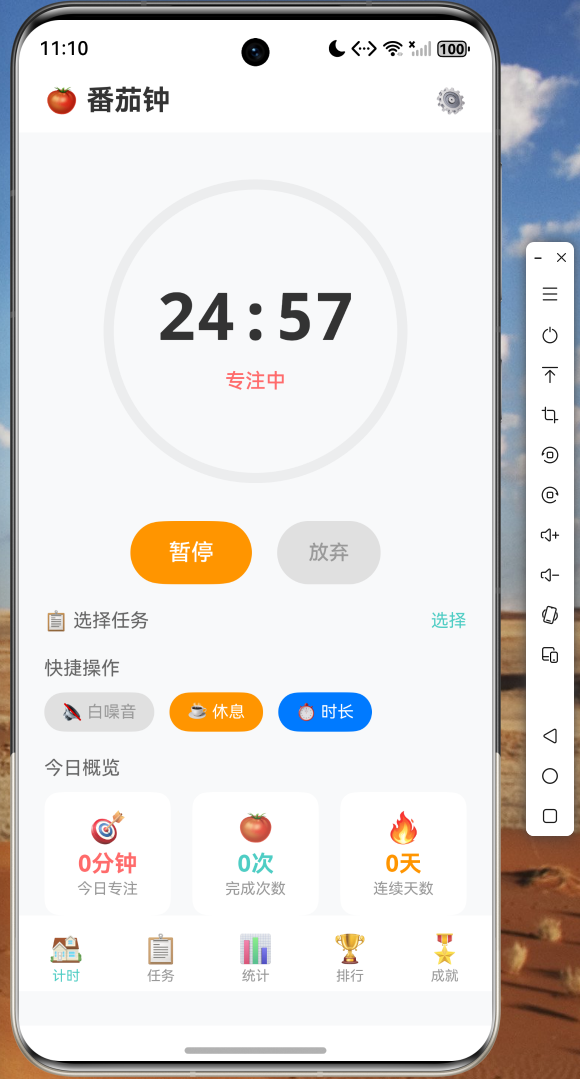
番茄钟主界面,环形进度条展示倒计时,支持开始/暂停操作
5.2 任务管理
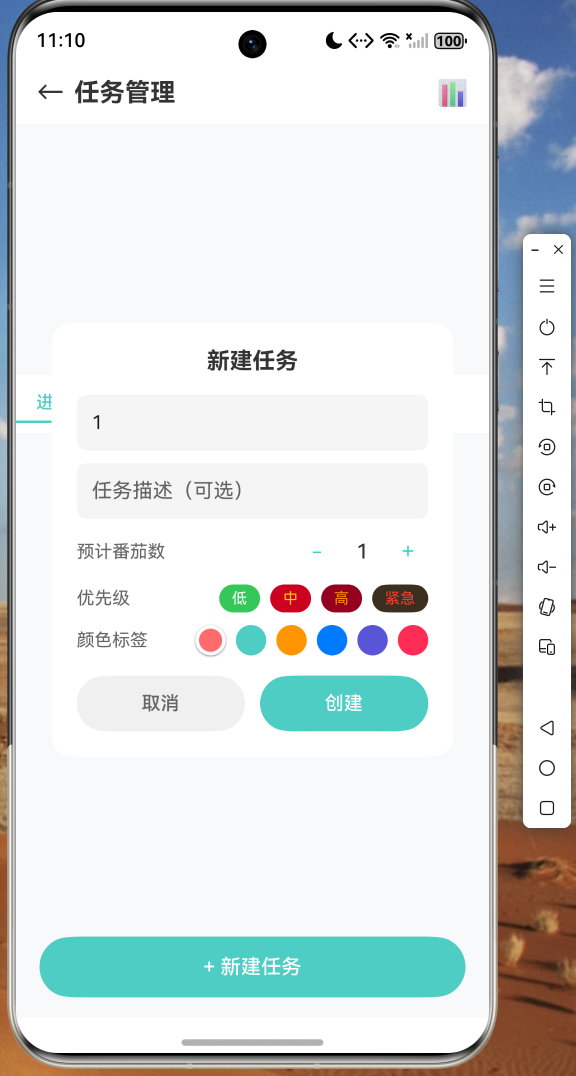
任务列表页面,支持创建、完成、删除任务,进度条直观展示完成度
5.3 数据统计
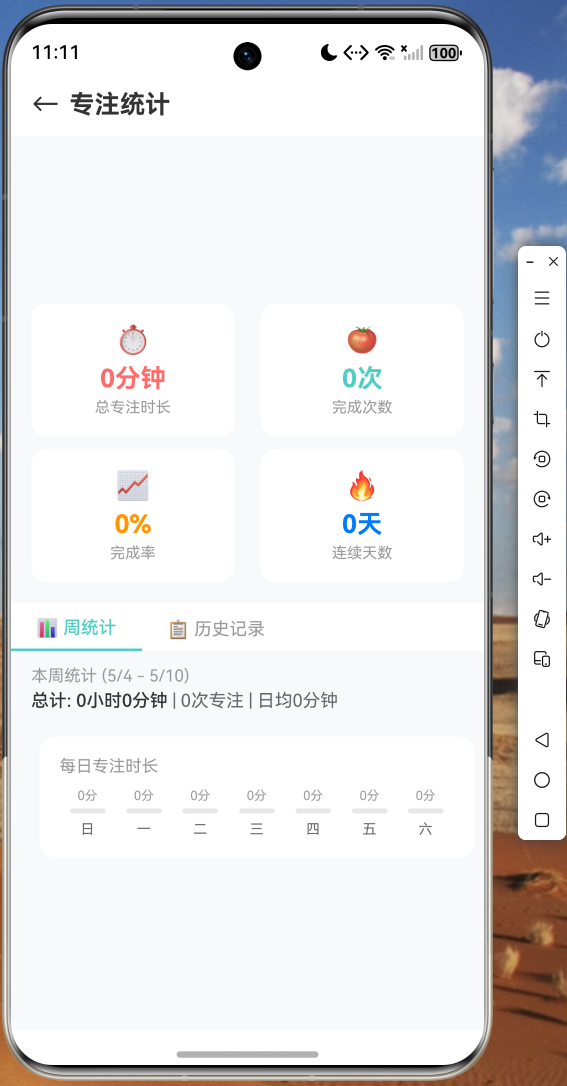
专注数据统计页面,展示总专注时长和完成次数
5.4 设置面板
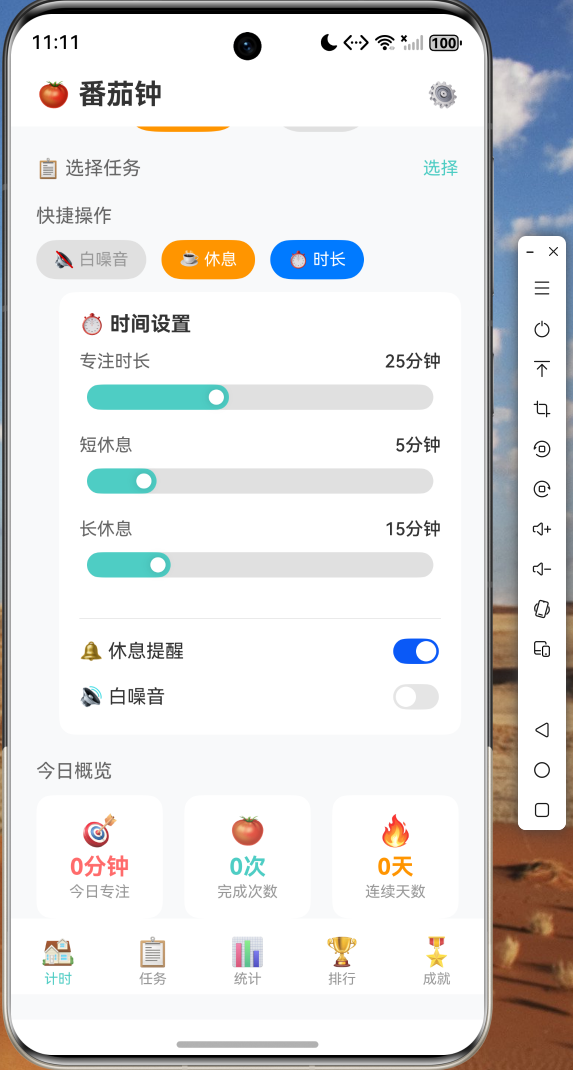
自定义专注时长、休息时长、白噪音等参数
六、总结
本文详细介绍了如何使用 Flutter 开发一个功能完整的番茄钟应用,并通过 Flutter for OpenHarmony 跨平台框架使其在鸿蒙设备上运行。从数据模型设计、计时器引擎实现、任务管理到数据统计,完整展示了 Flutter 跨平台开发的全流程。
Flutter for OpenHarmony 为开发者提供了一条高效的应用迁移路径,使得现有的 Flutter 代码库可以快速适配到鸿蒙生态中。番茄钟应用作为一个中等复杂度的案例,涵盖了状态管理、本地存储、UI 动画等常见需求,非常适合作为 Flutter 开发者进入 OpenHarmony 生态的入门实践。
完整项目代码已上传至 AtomGit:https://atomgit.com,欢迎 Star 和 Fork。
七、参考资料
- Flutter for OpenHarmony 官方文档
- OpenHarmony 应用开发指南
- shared_preferences 插件鸿蒙适配说明
- Provider 状态管理最佳实践

开源鸿蒙跨平台开发社区汇聚开发者与厂商,共建“一次开发,多端部署”的开源生态,致力于降低跨端开发门槛,推动万物智联创新。
更多推荐
 15
15 0
0- 0


 已为社区贡献52条内容

所有评论(0)