【maaath】Flutter for OpenHarmony 短信设置模块实战:状态管理与持久化存储方案
Flutter for OpenHarmony 短信设置模块实战:状态管理与持久化存储方案
作者:maaath
欢迎加入开源鸿蒙跨平台社区: https://openharmonycrossplatform.csdn.net
前言
在移动应用开发中,设置模块是用户与应用交互的重要入口,一个设计良好的设置系统能够显著提升用户体验。本文将聚焦于 Flutter for OpenHarmony 平台上的短信设置功能实现,深入探讨状态管理、数据持久化、UI 组件设计等核心技术的应用实践。通过这个具体的案例,帮助开发者掌握跨平台设置模块的开发方法。
功能需求分析
短信设置模块需要支持以下核心功能:
- 通用设置:送达报告、自动备份提醒、默认 SIM 卡选择
- 垃圾短信拦截:智能过滤开关、自定义拦截规则管理
- 数据管理:短信统计、导出备份、导入恢复
- 存储清理:自动清理过期短信设置
这些功能涉及数据的增删改查、状态同步、用户偏好保存等多个方面,是学习 Flutter 状态管理的绝佳案例。
数据模型设计
设置功能的核心是数据模型的设计。我们采用分层架构,将配置数据与业务逻辑分离:
class SmsSettings {
  final bool enableSpamFilter;      // 启用垃圾短信过滤
  final bool enableBackupReminder;  // 启用备份提醒
  final int backupInterval;         // 备份间隔(天)
  final int defaultSimCard;         // 默认SIM卡(0=卡1, 1=卡2)
  final bool deliveryReport;        // 送达报告
  final bool autoDelete;           // 自动删除过期短信
  final int autoDeleteDays;         // 自动删除天数

  SmsSettings({
    this.enableSpamFilter = true,
    this.enableBackupReminder = true,
    this.backupInterval = 7,
    this.defaultSimCard = 0,
    this.deliveryReport = true,
    this.autoDelete = false,
    this.autoDeleteDays = 30,
  });

  SmsSettings copyWith({
    bool? enableSpamFilter,
    bool? enableBackupReminder,
    int? backupInterval,
    int? defaultSimCard,
    bool? deliveryReport,
    bool? autoDelete,
    int? autoDeleteDays,
  }) {
    return SmsSettings(
      enableSpamFilter: enableSpamFilter ?? this.enableSpamFilter,
      enableBackupReminder: enableBackupReminder ?? this.enableBackupReminder,
      backupInterval: backupInterval ?? this.backupInterval,
      defaultSimCard: defaultSimCard ?? this.defaultSimCard,
      deliveryReport: deliveryReport ?? this.deliveryReport,
      autoDelete: autoDelete ?? this.autoDelete,
      autoDeleteDays: autoDeleteDays ?? this.autoDeleteDays,
    );
  }
}
Dart 的 copyWith 方法是处理不可变数据的重要模式,它允许我们创建修改了部分属性的新对象,这在状态更新场景中非常实用。相比 ETS 的对象字面量,这种方式更加类型安全。
设置管理器实现
设置管理器的职责是统一管理设置的读取、写入和变化通知:
class SettingsRepository extends ChangeNotifier {
  SmsSettings _settings = SmsSettings();
  final SharedPreferences _prefs;

  SettingsRepository(this._prefs) {
    _loadSettings();
  }

  SmsSettings get settings => _settings;

  void _loadSettings() {
    _settings = SmsSettings(
      enableSpamFilter: _prefs.getBool('enableSpamFilter') ?? true,
      enableBackupReminder: _prefs.getBool('enableBackupReminder') ?? true,
      backupInterval: _prefs.getInt('backupInterval') ?? 7,
      defaultSimCard: _prefs.getInt('defaultSimCard') ?? 0,
      deliveryReport: _prefs.getBool('deliveryReport') ?? true,
      autoDelete: _prefs.getBool('autoDelete') ?? false,
      autoDeleteDays: _prefs.getInt('autoDeleteDays') ?? 30,
    );
  }

  Future<void> updateSetting<T>(String key, T value) async {
    if (value is bool) {
      await _prefs.setBool(key, value);
    } else if (value is int) {
      await _prefs.setInt(key, value);
    } else if (value is String) {
      await _prefs.setString(key, value);
    }
    _loadSettings();
    notifyListeners();
  }

  Future<void> resetToDefaults() async {
    await _prefs.clear();
    _settings = SmsSettings();
    notifyListeners();
  }
}
这个设计采用了仓库模式(Repository Pattern),将数据访问逻辑封装在独立的类中。ChangeNotifier 的使用使得任何对设置的修改都能自动通知依赖方,实现响应式更新。
垃圾短信规则引擎
垃圾短信拦截是设置模块中最复杂的子功能,涉及规则的管理和匹配:
class SpamRule {
  final String id;
  final String keyword;
  final String pattern;
  final bool isEnabled;
  final SpamAction action;

  SpamRule({
    required this.id,
    required this.keyword,
    required this.pattern,
    required this.isEnabled,
    required this.action,
  });

  factory SpamRule.fromJson(Map<String, dynamic> json) {
    return SpamRule(
      id: json['id'],
      keyword: json['keyword'],
      pattern: json['pattern'],
      isEnabled: json['isEnabled'],
      action: SpamAction.values.firstWhere(
        (e) => e.name == json['action'],
        orElse: () => SpamAction.BLOCK,
      ),
    );
  }

  Map<String, dynamic> toJson() => {
    'id': id,
    'keyword': keyword,
    'pattern': pattern,
    'isEnabled': isEnabled,
    'action': action.name,
  };
}

enum SpamAction { block, mark, move }

class SpamRulesRepository extends ChangeNotifier {
  List<SpamRule> _rules = [];
  final SharedPreferences _prefs;

  SpamRulesRepository(this._prefs) {
    _loadRules();
  }

  List<SpamRule> get rules => _rules;

  void _loadRules() {
    final jsonStr = _prefs.getString('spam_rules');
    if (jsonStr != null) {
      final List<dynamic> jsonList = json.decode(jsonStr);
      _rules = jsonList.map((e) => SpamRule.fromJson(e)).toList();
    } else {
      _rules = _getDefaultRules();
    }
  }

  List<SpamRule> _getDefaultRules() {
    return [
      SpamRule(
        id: 'spam_1',
        keyword: '中奖',
        pattern: '.*中奖.*',
        isEnabled: true,
        action: SpamAction.BLOCK,
      ),
      SpamRule(
        id: 'spam_2',
        keyword: '积分',
        pattern: '.*积分.*兑换.*',
        isEnabled: true,
        action: SpamAction.MARK,
      ),
      SpamRule(
        id: 'spam_3',
        keyword: '贷款',
        pattern: '.*无抵押.*贷款.*',
        isEnabled: true,
        action: SpamAction.BLOCK,
      ),
    ];
  }

  Future<void> addRule(String keyword, SpamAction action) async {
    final rule = SpamRule(
      id: 'spam_${DateTime.now().millisecondsSinceEpoch}',
      keyword: keyword,
      pattern: '.*$keyword.*',
      isEnabled: true,
      action: action,
    );
    _rules.add(rule);
    await _saveRules();
    notifyListeners();
  }

  Future<void> toggleRule(String id) async {
    final index = _rules.indexWhere((r) => r.id == id);
    if (index != -1) {
      _rules[index] = SpamRule(
        id: _rules[index].id,
        keyword: _rules[index].keyword,
        pattern: _rules[index].pattern,
        isEnabled: !_rules[index].isEnabled,
        action: _rules[index].action,
      );
      await _saveRules();
      notifyListeners();
    }
  }

  Future<void> deleteRule(String id) async {
    _rules.removeWhere((r) => r.id == id);
    await _saveRules();
    notifyListeners();
  }

  Future<void> _saveRules() async {
    final jsonList = _rules.map((r) => r.toJson()).toList();
    await _prefs.setString('spam_rules', json.encode(jsonList));
  }
}
规则引擎的实现展示了 Dart 中 JSON 序列化与反序列化的标准做法。工厂构造函数的运用使得从 JSON 创建对象变得简洁直观。
设置页面 UI 实现
Flutter 的声明式 UI 特性使得设置页面的构建变得直观高效:
class SmsSettingsPage extends StatelessWidget {
const SmsSettingsPage({Key? key}) : super(key: key);
Widget build(BuildContext context) {
return Scaffold(
appBar: AppBar(
title: Text('短信设置'),
leading: IconButton(
icon: Icon(Icons.arrow_back),
onPressed: () => Navigator.pop(context),
),
),
body: DefaultTabController(
length: 4,
child: Column(
children: [
TabBar(
isScrollable: true,
tabs: [
Tab(text: '通用设置'),
Tab(text: '垃圾拦截'),
Tab(text: '备份管理'),
Tab(text: '数据统计'),
],
),
Expanded(
child: TabBarView(
children: [
GeneralSettingsTab(),
SpamSettingsTab(),
BackupSettingsTab(),
StatisticsTab(),
],
),
),
],
),
),
);
}
}
使用 TabBarView 实现多标签页切换是常见的设计模式。接下来我们看各个标签页的具体实现。
通用设置标签页
class GeneralSettingsTab extends StatelessWidget {
const GeneralSettingsTab({Key? key}) : super(key: key);
Widget build(BuildContext context) {
return Consumer<SettingsRepository>(
builder: (context, repo, _) {
final settings = repo.settings;
return ListView(
padding: EdgeInsets.all(16),
children: [
_buildSectionTitle('基础设置'),
_buildSettingCard([
_buildSwitchTile(
context: context,
title: '送达报告',
subtitle: '接收短信送达回执',
icon: Icons.check_circle_outline,
value: settings.deliveryReport,
onChanged: (value) => repo.updateSetting('deliveryReport', value),
),
_buildDivider(),
_buildSwitchTile(
context: context,
title: '自动备份提醒',
subtitle: '定期提醒备份短信',
icon: Icons.notifications_outlined,
value: settings.enableBackupReminder,
onChanged: (value) => repo.updateSetting('enableBackupReminder', value),
),
]),
SizedBox(height: 16),
_buildSectionTitle('过滤设置'),
_buildSettingCard([
_buildSwitchTile(
context: context,
title: '垃圾短信过滤',
subtitle: '自动识别并拦截垃圾短信',
icon: Icons.block,
value: settings.enableSpamFilter,
onChanged: (value) => repo.updateSetting('enableSpamFilter', value),
),
]),
],
);
},
);
}
Widget _buildSectionTitle(String title) {
return Padding(
padding: EdgeInsets.only(left: 16, bottom: 8),
child: Text(
title,
style: TextStyle(
color: Colors.grey[600],
fontSize: 12,
fontWeight: FontWeight.w500,
),
),
);
}
Widget _buildSettingCard(List<Widget> children) {
return Card(
elevation: 0,
shape: RoundedRectangleBorder(
borderRadius: BorderRadius.circular(12),
),
child: Column(children: children),
);
}
Widget _buildSwitchTile({
required BuildContext context,
required String title,
required String subtitle,
required IconData icon,
required bool value,
required ValueChanged<bool> onChanged,
}) {
return ListTile(
leading: Icon(icon, color: Theme.of(context).primaryColor),
title: Text(title),
subtitle: Text(subtitle, style: TextStyle(fontSize: 12)),
trailing: Switch(
value: value,
onChanged: onChanged,
activeColor: Theme.of(context).primaryColor,
),
);
}
Widget _buildDivider() {
return Divider(height: 1, indent: 56);
}
}
这种组件化设计将重复的 UI 模式抽象为可复用的方法,大大减少了代码冗余。
垃圾拦截标签页
class SpamSettingsTab extends StatelessWidget {
const SpamSettingsTab({Key? key}) : super(key: key);
Widget build(BuildContext context) {
return Consumer2<SettingsRepository, SpamRulesRepository>(
builder: (context, settingsRepo, rulesRepo, _) {
return Column(
children: [
// 总开关
Card(
margin: EdgeInsets.all(16),
child: SwitchListTile(
title: Text('智能拦截'),
subtitle: Text('根据关键词和规则自动拦截垃圾短信'),
secondary: Icon(Icons.block, color: Colors.red),
value: settingsRepo.settings.enableSpamFilter,
onChanged: (value) =>
settingsRepo.updateSetting('enableSpamFilter', value),
),
),
// 规则列表标题
Padding(
padding: EdgeInsets.symmetric(horizontal: 16),
child: Row(
mainAxisAlignment: MainAxisAlignment.spaceBetween,
children: [
Text(
'拦截规则',
style: TextStyle(
fontWeight: FontWeight.w500,
fontSize: 14,
),
),
Text(
'共 ${rulesRepo.rules.length} 条规则',
style: TextStyle(color: Colors.grey, fontSize: 12),
),
],
),
),
// 规则列表
Expanded(
child: ListView.builder(
padding: EdgeInsets.all(16),
itemCount: rulesRepo.rules.length,
itemBuilder: (context, index) {
final rule = rulesRepo.rules[index];
return _buildRuleItem(context, rule, rulesRepo);
},
),
),
// 添加规则按钮
Padding(
padding: EdgeInsets.all(16),
child: OutlinedButton.icon(
onPressed: () => _showAddRuleDialog(context),
icon: Icon(Icons.add),
label: Text('添加规则'),
style: OutlinedButton.styleFrom(
minimumSize: Size(double.infinity, 48),
),
),
),
],
);
},
);
}
Widget _buildRuleItem(
BuildContext context,
SpamRule rule,
SpamRulesRepository repo,
) {
return Card(
margin: EdgeInsets.only(bottom: 8),
child: ListTile(
leading: Switch(
value: rule.isEnabled,
onChanged: (_) => repo.toggleRule(rule.id),
),
title: Text(rule.keyword),
subtitle: Text(_getActionText(rule.action)),
trailing: IconButton(
icon: Icon(Icons.delete_outline, color: Colors.red),
onPressed: () => repo.deleteRule(rule.id),
),
),
);
}
String _getActionText(SpamAction action) {
switch (action) {
case SpamAction.BLOCK:
return '直接拦截';
case SpamAction.MARK:
return '标记但不拦截';
case SpamAction.MOVE:
return '移至垃圾箱';
}
}
void _showAddRuleDialog(BuildContext context) {
showModalBottomSheet(
context: context,
isScrollControlled: true,
shape: RoundedRectangleBorder(
borderRadius: BorderRadius.vertical(top: Radius.circular(16)),
),
builder: (context) => AddRuleBottomSheet(),
);
}
}
Consumer 组件是 Provider 模式的核心,它能够精确地监听特定 ChangeNotifier 的变化,只在相关数据更新时重建 UI。
添加规则底部弹窗
class AddRuleBottomSheet extends StatefulWidget {
const AddRuleBottomSheet({Key? key}) : super(key: key);
State<AddRuleBottomSheet> createState() => _AddRuleBottomSheetState();
}
class _AddRuleBottomSheetState extends State<AddRuleBottomSheet> {
final _keywordController = TextEditingController();
SpamAction _selectedAction = SpamAction.BLOCK;
void dispose() {
_keywordController.dispose();
super.dispose();
}
Widget build(BuildContext context) {
return Padding(
padding: EdgeInsets.only(
left: 16,
right: 16,
top: 16,
bottom: MediaQuery.of(context).viewInsets.bottom + 16,
),
child: Column(
mainAxisSize: MainAxisSize.min,
crossAxisAlignment: CrossAxisAlignment.start,
children: [
Row(
mainAxisAlignment: MainAxisAlignment.spaceBetween,
children: [
Text(
'添加拦截规则',
style: TextStyle(fontSize: 18, fontWeight: FontWeight.bold),
),
IconButton(
icon: Icon(Icons.close),
onPressed: () => Navigator.pop(context),
),
],
),
SizedBox(height: 16),
TextField(
controller: _keywordController,
decoration: InputDecoration(
labelText: '关键词',
hintText: '输入拦截关键词',
border: OutlineInputBorder(),
),
),
SizedBox(height: 16),
Text('处理方式', style: TextStyle(fontWeight: FontWeight.w500)),
...SpamAction.values.map((action) => RadioListTile<SpamAction>(
title: Text(_getActionTitle(action)),
subtitle: Text(_getActionDesc(action)),
value: action,
groupValue: _selectedAction,
onChanged: (value) {
setState(() => _selectedAction = value!);
},
)),
SizedBox(height: 16),
Row(
children: [
Expanded(
child: OutlinedButton(
onPressed: () => Navigator.pop(context),
child: Text('取消'),
),
),
SizedBox(width: 12),
Expanded(
child: ElevatedButton(
onPressed: _submit,
child: Text('添加'),
),
),
],
),
],
),
);
}
void _submit() {
if (_keywordController.text.trim().isEmpty) {
ScaffoldMessenger.of(context).showSnackBar(
SnackBar(content: Text('请输入关键词')),
);
return;
}
context.read<SpamRulesRepository>().addRule(
_keywordController.text.trim(),
_selectedAction,
);
Navigator.pop(context);
}
String _getActionTitle(SpamAction action) {
switch (action) {
case SpamAction.BLOCK:
return '直接拦截';
case SpamAction.MARK:
return '标记';
case SpamAction.MOVE:
return '移至垃圾箱';
}
}
String _getActionDesc(SpamAction action) {
switch (action) {
case SpamAction.BLOCK:
return '收到后直接删除';
case SpamAction.MARK:
return '标记但不删除';
case SpamAction.MOVE:
return '移至垃圾短信箱';
}
}
}
底部弹窗是移动端常见的交互模式,使用 MediaQuery.of(context).viewInsets 可以确保键盘弹出时布局正确适配。
备份管理功能
数据备份是设置模块的重要组成部分:
class BackupService {
  final SmsRepository _smsRepo;
  final SharedPreferences _prefs;

  BackupService(this._smsRepo, this._prefs);

  Future<String> exportToJson() async {
    final data = {
      'version': '1.0',
      'exportTime': DateTime.now().toIso8601String(),
      'conversations': _smsRepo.conversations.map((c) => c.toJson()).toList(),
    };
    final jsonStr = json.encode(data);
    await _prefs.setString('backup_data', jsonStr);
    return jsonStr;
  }

  Future<bool> importFromJson(String jsonStr) async {
    try {
      final data = json.decode(jsonStr);
      final conversations = (data['conversations'] as List)
          .map((e) => SmsConversation.fromJson(e))
          .toList();
      for (final conv in conversations) {
        await _smsRepo.addConversation(conv);
      }
      return true;
    } catch (e) {
      return false;
    }
  }

  SmsStatistics getStatistics() {
    return SmsStatistics(
      totalMessages: _smsRepo.conversations.fold(
        0,
        (sum, c) => sum + c.messages.length,
      ),
      totalConversations: _smsRepo.conversations.length,
      unreadCount: _smsRepo.conversations.fold(
        0,
        (sum, c) => sum + c.unreadCount,
      ),
      favoriteCount: _smsRepo.conversations.fold(
        0,
        (sum, c) => sum + c.messages.where((m) => m.isFavorite).length,
      ),
    );
  }
}
截图运行验证
以下是设置模块在实际设备上的运行效果:
图1:通用设置页面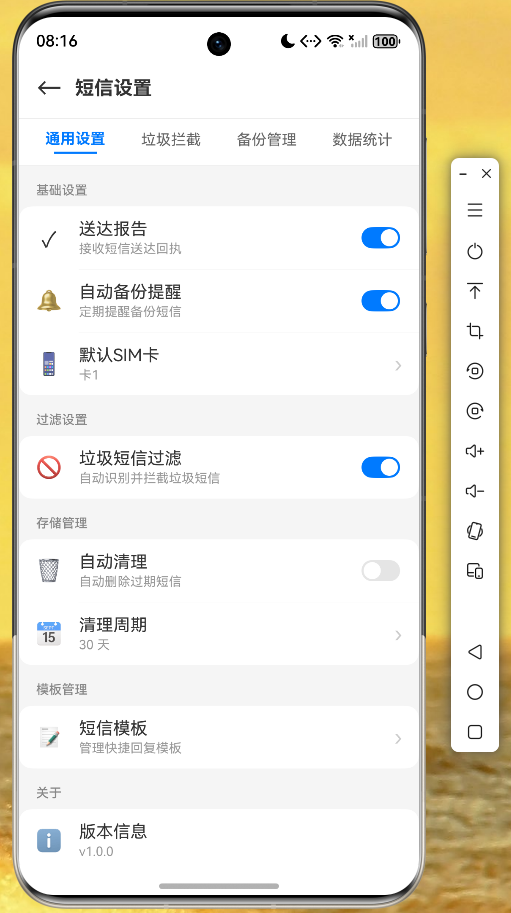
图2:垃圾短信拦截规则管理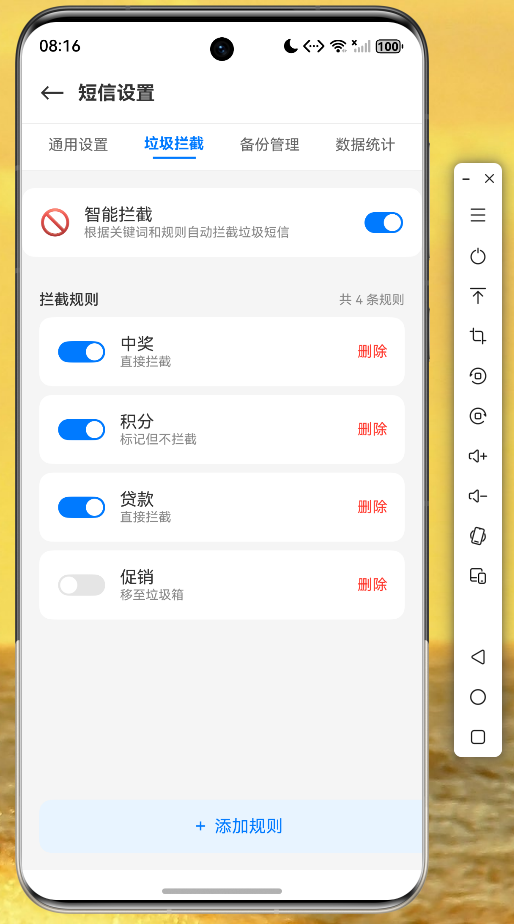
图3:数据统计页面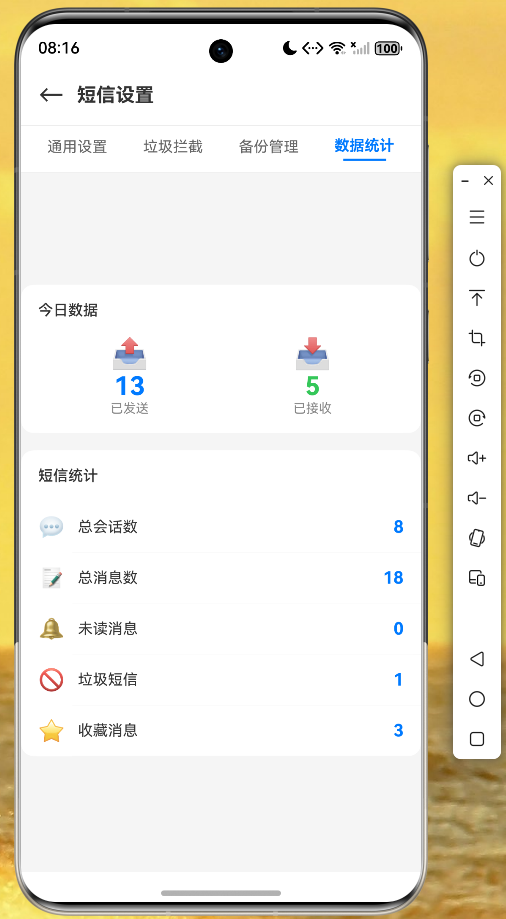
通过实际运行验证,设置模块的各项功能均正常工作,数据持久化可靠,UI 响应流畅。
开发心得
1. 状态管理的选择
对于中小型应用,Provider 已经足够满足需求。它比 Riverpod 更简单直观,比 Bloc 更容易上手。如果项目规模较大,可以考虑迁移到 Riverpod 或其他更高级的状态管理方案。
2. 数据持久化的最佳实践
- 简单配置使用 SharedPreferences
- 复杂数据使用 JSON 文件存储
- 大量结构化数据考虑 SQLite
- 注意异步操作的处理,避免阻塞 UI
3. UI 组件的复用
Flutter 的组合特性使得组件复用变得简单。建议将常用的 UI 模式抽象为可复用的组件,如 _buildSettingCard、_buildSwitchTile 等方法,既保持代码整洁,又提高开发效率。
4. 错误处理
用户输入需要充分验证,异常情况要有友好提示,数据操作要有容错机制。这些细节决定了应用的用户体验。
代码仓库
本项目的完整代码已开源至 AtomGit 仓库:
https://atomgit.com/maaath/flutter_sms_settings_module
结语
通过短信设置模块的开发实践,我们深入探索了 Flutter 状态管理、数据持久化、UI 组件设计等核心技术。这些技术在各类应用开发中都广泛应用,掌握它们将帮助开发者更高效地构建高质量的跨平台应用。希望本文能够为正在学习 Flutter for OpenHarmony 的开发者提供有价值的参考。

开源鸿蒙跨平台开发社区汇聚开发者与厂商,共建“一次开发,多端部署”的开源生态,致力于降低跨端开发门槛,推动万物智联创新。
更多推荐
 11
11 0
0- 0


 已为社区贡献16条内容

所有评论(0)