【maaath】Flutter for OpenHarmony 实战:打造跨平台喝水提醒应用
状态管理策略:对于中小型应用,Provider 模式已经足够满足需求。它简单易用,与 Flutter 框架深度集成,无需引入额外的第三方依赖。UI 组件复用:Flutter 的组件化设计使得代码复用变得非常自然。我们可以将常用的 UI 模式封装为独立组件,如进度环形图、统计卡片等,在不同页面中复用。平台差异处理:虽然 Flutter 提供了统一的 API,但在实际开发中仍需注意平台差异。例如通知功
Flutter for OpenHarmony 实战:打造跨平台喝水提醒应用
社区引导
欢迎加入开源鸿蒙跨平台社区:
https://openharmonycrossplatform.csdn.net
作者:maaath
在移动应用开发领域,如何高效地实现跨平台能力一直是开发者关注的核心议题。Flutter 作为 Google 推出的跨平台 UI 框架,凭借其高性能和一致的 UI 渲染能力,已经在 iOS、Android 等平台取得了广泛应用。而随着 OpenHarmony 生态的蓬勃发展,Flutter for OpenHarmony 成为了连接传统移动开发与新兴国产操作系统的桥梁。本文将通过一个完整的喝水提醒应用实例,展示如何使用 Flutter 实现跨平台开发,并将其部署到鸿蒙设备上运行。
项目背景与需求分析
现代人由于工作繁忙,常常忘记及时补充水分。长期缺水可能导致注意力下降、免疫力减弱等健康问题。一个实用的喝水提醒应用应当具备以下核心功能:
- 每日饮水记录 - 记录每次喝水的量和时间
- 饮水目标设定 - 用户可自定义每日饮水目标
- 喝水提醒通知 - 定时推送提醒通知
- 饮水习惯统计 - 以图表形式展示饮水数据
- 快捷添加 - 一键添加预设饮水量
- 成就激励系统 - 通过成就鼓励用户养成好习惯
本文将详细介绍如何使用 Flutter 实现这些功能,并确保代码能够在鸿蒙设备上正常运行。
项目结构设计
良好的项目结构是保证代码可维护性的基础。我们的喝水提醒应用采用分层架构:
lib/
├── main.dart                 # 应用入口
├── models/                   # 数据模型层
│   └── water_model.dart      # 喝水相关数据模型
├── providers/                # 状态管理层
│   └── water_provider.dart   # 喝水数据状态管理
├── pages/                    # 页面层
│   ├── home_page.dart        # 首页
│   ├── stats_page.dart       # 统计页面
│   └── settings_page.dart    # 设置页面
├── widgets/                  # 组件层
│   ├── water_progress.dart   # 进度环形组件
│   └── quick_add_panel.dart  # 快捷添加面板
└── utils/                    # 工具层
    └── notification_helper.dart # 通知工具类
这种分层结构使得各模块职责清晰,便于后续维护和功能扩展。
核心数据模型实现
首先,我们需要定义应用的数据模型。在 Flutter 中,我们可以使用简单的类来定义数据结构:
// lib/models/water_model.dart

class WaterRecord {
  String date;
  int totalAmount;
  bool goalAchieved;
  List<WaterEntry> entries;

  WaterRecord({
    required this.date,
    this.totalAmount = 0,
    this.goalAchieved = false,
    List<WaterEntry>? entries,
  }) : entries = entries ?? [];
}

class WaterEntry {
  String id;
  String time;
  int amount;
  String period;

  WaterEntry({
    required this.id,
    required this.time,
    required this.amount,
    required this.period,
  });
}

class WaterGoal {
  int dailyGoal;
  int cupSize;
  String unit;

  WaterGoal({
    this.dailyGoal = 2000,
    this.cupSize = 250,
    this.unit = 'ml',
  });
}

class WaterAchievement {
  String id;
  String name;
  String description;
  String icon;
  bool isUnlocked;
  String unlockCondition;
  int progress;
  int maxProgress;

  WaterAchievement({
    required this.id,
    required this.name,
    required this.description,
    required this.icon,
    this.isUnlocked = false,
    required this.unlockCondition,
    this.progress = 0,
    required this.maxProgress,
  });
}
这些模型类定义了应用的核心数据结构,包括饮水记录、饮水条目、饮水目标和成就系统。通过使用 Dart 的类封装,我们确保了数据的类型安全和封装性。
状态管理实现
Flutter 提供了多种状态管理方案,这里我们使用 Provider 模式来实现应用状态的集中管理:
// lib/providers/water_provider.dart

import 'package:flutter/foundation.dart';
import '../models/water_model.dart';

class WaterProvider extends ChangeNotifier {
  List<WaterRecord> _records = [];
  WaterGoal _goal = WaterGoal();
  List<WaterAchievement> _achievements = [];
  List<WaterEntry> _quickAddPresets = [];

  List<WaterRecord> get records => _records;
  WaterGoal get goal => _goal;
  WaterRecord get todayRecord => _getTodayRecord();
  List<WaterAchievement> get achievements => _achievements;
  List<WaterEntry> get quickAddPresets => _quickAddPresets;

  WaterProvider() {
    _initializeData();
  }

  void _initializeData() {
    _quickAddPresets = [
      WaterEntry(id: '1', time: '', amount: 150, period: 'preset'),
      WaterEntry(id: '2', time: '', amount: 250, period: 'preset'),
      WaterEntry(id: '3', time: '', amount: 350, period: 'preset'),
      WaterEntry(id: '4', time: '', amount: 500, period: 'preset'),
      WaterEntry(id: '5', time: '', amount: 750, period: 'preset'),
      WaterEntry(id: '6', time: '', amount: 1000, period: 'preset'),
    ];

    _initMockData();
    _initAchievements();
  }

  void _initMockData() {
    final now = DateTime.now();
    for (int i = 6; i >= 0; i--) {
      final date = now.subtract(Duration(days: i));
      final dateStr = _formatDate(date);
      final randomAmount = 800 + (i * 100) + (date.day % 5) * 80;

      _records.add(WaterRecord(
        date: dateStr,
        totalAmount: randomAmount,
        goalAchieved: randomAmount >= _goal.dailyGoal,
      ));
    }
  }

  void _initAchievements() {
    _achievements = [
      WaterAchievement(
        id: 'first_drink',
        name: '初次饮水',
        description: '完成第一次饮水记录',
        icon: '💧',
        unlockCondition: '记录1次饮水',
        maxProgress: 1,
      ),
      WaterAchievement(
        id: 'cup_8',
        name: '八杯水达人',
        description: '单日饮水达到8杯',
        icon: '🥤',
        unlockCondition: '单日8杯水',
        maxProgress: 8,
      ),
      WaterAchievement(
        id: 'goal_7',
        name: '七日王者',
        description: '连续7天达成饮水目标',
        icon: '👑',
        unlockCondition: '连续7天达标',
        maxProgress: 7,
      ),
    ];
  }

  WaterRecord _getTodayRecord() {
    final today = _formatDate(DateTime.now());
    for (final record in _records) {
      if (record.date == today) {
        return record;
      }
    }
    return WaterRecord(date: today);
  }

  void addWaterEntry(int amount) {
    final now = DateTime.now();
    final timeStr = '${now.hour.toString().padLeft(2, '0')}:${now.minute.toString().padLeft(2, '0')}';

    String period = 'morning';
    if (now.hour >= 12 && now.hour < 18) {
      period = 'afternoon';
    } else if (now.hour >= 18) {
      period = 'evening';
    }

    final entry = WaterEntry(
      id: '${DateTime.now().millisecondsSinceEpoch}',
      time: timeStr,
      amount: amount,
      period: period,
    );

    final today = _getTodayRecord();
    today.entries.add(entry);
    today.totalAmount += amount;
    today.goalAchieved = today.totalAmount >= _goal.dailyGoal;

    _updateAchievements();
    notifyListeners();
  }

  void _updateAchievements() {
    final today = _getTodayRecord();
    final totalEntries = _records.fold<int>(
      0, (sum, record) => sum + record.entries.length
    );

    for (final achievement in _achievements) {
      switch (achievement.id) {
        case 'first_drink':
          achievement.progress = totalEntries > 0 ? 1 : 0;
          achievement.isUnlocked = totalEntries > 0;
          break;
        case 'cup_8':
          final cupCount = today.totalAmount ~/ _goal.cupSize;
          achievement.progress = cupCount;
          achievement.isUnlocked = cupCount >= 8;
          break;
        case 'goal_7':
          final consecutiveDays = _getConsecutiveGoalDays();
          achievement.progress = consecutiveDays;
          achievement.isUnlocked = consecutiveDays >= 7;
          break;
      }
    }
  }

  int _getConsecutiveGoalDays() {
    int consecutive = 0;
    for (int i = 0; i < _records.length; i++) {
      if (_records[_records.length - 1 - i].goalAchieved) {
        consecutive++;
      } else {
        break;
      }
    }
    return consecutive;
  }

  String _formatDate(DateTime date) {
    final month = (date.month).toString().padLeft(2, '0');
    final day = (date.day).toString().padLeft(2, '0');
    return '$month-$day';
  }

  double getProgress() {
    if (_goal.dailyGoal <= 0) return 0;
    return (todayRecord.totalAmount / _goal.dailyGoal).clamp(0.0, 1.0);
  }
}
状态管理是 Flutter 应用的核心,它负责协调数据和 UI 之间的同步。通过使用 ChangeNotifier,我们的 WaterProvider 能够在数据变化时通知所有依赖它的组件自动重建界面。
页面实现
首页设计
首页是用户每日使用最频繁的界面,需要直观地展示今日饮水进度和快捷操作入口:
// lib/pages/home_page.dart
import 'package:flutter/material.dart';
import 'package:provider/provider.dart';
import '../providers/water_provider.dart';
class HomePage extends StatelessWidget {
const HomePage({super.key});
Widget build(BuildContext context) {
return ChangeNotifierProvider(
create: (_) => WaterProvider(),
child: Scaffold(
backgroundColor: const Color(0xFFF5F6FA),
body: SafeArea(
child: Consumer<WaterProvider>(
builder: (context, provider, _) {
return SingleChildScrollView(
padding: const EdgeInsets.all(16),
child: Column(
crossAxisAlignment: CrossAxisAlignment.start,
children: [
_buildHeader(context),
const SizedBox(height: 24),
_buildProgressCard(context, provider),
const SizedBox(height: 16),
_buildQuickAddPanel(context, provider),
const SizedBox(height: 16),
_buildTodayStats(provider),
const SizedBox(height: 16),
_buildAchievementsSection(provider),
],
),
);
},
),
),
),
);
}
Widget _buildHeader(BuildContext context) {
return Row(
mainAxisAlignment: MainAxisAlignment.spaceBetween,
children: [
Column(
crossAxisAlignment: CrossAxisAlignment.start,
children: [
const Text(
'💧 喝水提醒',
style: TextStyle(
fontSize: 24,
fontWeight: FontWeight.bold,
color: Color(0xFF1A1A1A),
),
),
Text(
_getGreeting(),
style: const TextStyle(
fontSize: 14,
color: Color(0xFF999999),
),
),
],
),
Row(
children: [
IconButton(
icon: const Icon(Icons.bar_chart, color: Color(0xFF2196F3)),
onPressed: () => Navigator.pushNamed(context, '/stats'),
),
IconButton(
icon: const Icon(Icons.settings, color: Color(0xFF666666)),
onPressed: () => Navigator.pushNamed(context, '/settings'),
),
],
),
],
);
}
Widget _buildProgressCard(BuildContext context, WaterProvider provider) {
final progress = provider.getProgress();
final percentage = (progress * 100).toInt();
final today = provider.todayRecord;
return Container(
padding: const EdgeInsets.all(24),
decoration: BoxDecoration(
gradient: const LinearGradient(
colors: [Color(0xFF4CAF50), Color(0xFF2196F3)],
begin: Alignment.topLeft,
end: Alignment.bottomRight,
),
borderRadius: BorderRadius.circular(20),
boxShadow: [
BoxShadow(
color: const Color(0xFF4CAF50).withOpacity(0.3),
blurRadius: 12,
offset: const Offset(0, 6),
),
],
),
child: Row(
children: [
SizedBox(
width: 120,
height: 120,
child: Stack(
alignment: Alignment.center,
children: [
SizedBox(
width: 120,
height: 120,
child: CircularProgressIndicator(
value: progress,
strokeWidth: 10,
backgroundColor: Colors.white.withOpacity(0.3),
valueColor: const AlwaysStoppedAnimation<Color>(Colors.white),
),
),
Column(
mainAxisSize: MainAxisSize.min,
children: [
Text(
'$percentage%',
style: const TextStyle(
fontSize: 28,
fontWeight: FontWeight.bold,
color: Colors.white,
),
),
const Text(
'完成度',
style: TextStyle(
fontSize: 12,
color: Colors.white70,
),
),
],
),
],
),
),
const SizedBox(width: 24),
Expanded(
child: Column(
crossAxisAlignment: CrossAxisAlignment.start,
children: [
const Text(
'今日饮水',
style: TextStyle(
fontSize: 14,
color: Colors.white70,
),
),
const SizedBox(height: 4),
RichText(
text: TextSpan(
children: [
TextSpan(
text: '${today.totalAmount}',
style: const TextStyle(
fontSize: 32,
fontWeight: FontWeight.bold,
color: Colors.white,
),
),
TextSpan(
text: ' / ${provider.goal.dailyGoal} ml',
style: const TextStyle(
fontSize: 16,
color: Colors.white70,
),
),
],
),
),
const SizedBox(height: 8),
Text(
'已完成 ${today.entries.length} 次饮水',
style: const TextStyle(
fontSize: 12,
color: Colors.white70,
),
),
],
),
),
],
),
);
}
Widget _buildQuickAddPanel(BuildContext context, WaterProvider provider) {
final presets = [
{'label': '小杯', 'amount': 150, 'icon': '🥛'},
{'label': '中杯', 'amount': 250, 'icon': '🥤'},
{'label': '大杯', 'amount': 350, 'icon': '🍵'},
{'label': '一瓶', 'amount': 500, 'icon': '🍶'},
{'label': '大瓶', 'amount': 750, 'icon': '🫗'},
{'label': '一升', 'amount': 1000, 'icon': '🪣'},
];
return Container(
padding: const EdgeInsets.all(16),
decoration: BoxDecoration(
color: Colors.white,
borderRadius: BorderRadius.circular(16),
boxShadow: [
BoxShadow(
color: Colors.black.withOpacity(0.03),
blurRadius: 8,
offset: const Offset(0, 2),
),
],
),
child: Column(
crossAxisAlignment: CrossAxisAlignment.start,
children: [
const Text(
'⚡ 快速添加',
style: TextStyle(
fontSize: 16,
fontWeight: FontWeight.w600,
color: Color(0xFF1A1A1A),
),
),
const SizedBox(height: 12),
Wrap(
spacing: 8,
runSpacing: 8,
children: presets.map((preset) {
return InkWell(
onTap: () {
provider.addWaterEntry(preset['amount'] as int);
ScaffoldMessenger.of(context).showSnackBar(
SnackBar(
content: Text('已添加 ${preset['amount']}ml'),
duration: const Duration(seconds: 1),
backgroundColor: const Color(0xFF4CAF50),
),
);
},
borderRadius: BorderRadius.circular(12),
child: Container(
padding: const EdgeInsets.symmetric(horizontal: 12, vertical: 8),
decoration: BoxDecoration(
color: const Color(0xFFF0F2F5),
borderRadius: BorderRadius.circular(12),
),
child: Row(
mainAxisSize: MainAxisSize.min,
children: [
Text(
preset['icon'] as String,
style: const TextStyle(fontSize: 16),
),
const SizedBox(width: 4),
Text(
'${preset['amount']}ml',
style: const TextStyle(
fontSize: 13,
fontWeight: FontWeight.w500,
color: Color(0xFF333333),
),
),
],
),
),
);
}).toList(),
),
],
),
);
}
Widget _buildTodayStats(WaterProvider provider) {
final today = provider.todayRecord;
final periodStats = _calculatePeriodStats(today);
return Container(
padding: const EdgeInsets.all(16),
decoration: BoxDecoration(
color: Colors.white,
borderRadius: BorderRadius.circular(16),
boxShadow: [
BoxShadow(
color: Colors.black.withOpacity(0.03),
blurRadius: 8,
offset: const Offset(0, 2),
),
],
),
child: Column(
crossAxisAlignment: CrossAxisAlignment.start,
children: [
const Text(
'📊 今日时段统计',
style: TextStyle(
fontSize: 16,
fontWeight: FontWeight.w600,
color: Color(0xFF1A1A1A),
),
),
const SizedBox(height: 16),
Row(
children: periodStats.map((stat) {
return Expanded(
child: Container(
margin: const EdgeInsets.symmetric(horizontal: 4),
padding: const EdgeInsets.all(12),
decoration: BoxDecoration(
color: _getPeriodColor(stat['period'] as String).withOpacity(0.1),
borderRadius: BorderRadius.circular(12),
),
child: Column(
children: [
Icon(
_getPeriodIcon(stat['period'] as String),
color: _getPeriodColor(stat['period'] as String),
size: 24,
),
const SizedBox(height: 4),
Text(
stat['label'] as String,
style: TextStyle(
fontSize: 11,
color: _getPeriodColor(stat['period'] as String),
),
),
const SizedBox(height: 4),
Text(
'${stat['amount']}ml',
style: const TextStyle(
fontSize: 14,
fontWeight: FontWeight.bold,
color: Color(0xFF1A1A1A),
),
),
Text(
'${stat['count']}次',
style: const TextStyle(
fontSize: 11,
color: Color(0xFF999999),
),
),
],
),
),
);
}).toList(),
),
],
),
);
}
Widget _buildAchievementsSection(WaterProvider provider) {
return Container(
padding: const EdgeInsets.all(16),
decoration: BoxDecoration(
color: Colors.white,
borderRadius: BorderRadius.circular(16),
boxShadow: [
BoxShadow(
color: Colors.black.withOpacity(0.03),
blurRadius: 8,
offset: const Offset(0, 2),
),
],
),
child: Column(
crossAxisAlignment: CrossAxisAlignment.start,
children: [
Row(
mainAxisAlignment: MainAxisAlignment.spaceBetween,
children: [
const Text(
'🏆 喝水成就',
style: TextStyle(
fontSize: 16,
fontWeight: FontWeight.w600,
color: Color(0xFF1A1A1A),
),
),
Text(
'${provider.achievements.where((a) => a.isUnlocked).length}/${provider.achievements.length}',
style: const TextStyle(
fontSize: 12,
color: Color(0xFF999999),
),
),
],
),
const SizedBox(height: 12),
...provider.achievements.map((achievement) {
return Container(
margin: const EdgeInsets.only(bottom: 8),
padding: const EdgeInsets.all(12),
decoration: BoxDecoration(
color: achievement.isUnlocked
? const Color(0xFFFFF8E1)
: const Color(0xFFF5F5F5),
borderRadius: BorderRadius.circular(12),
),
child: Row(
children: [
Text(
achievement.icon,
style: TextStyle(
fontSize: 24,
color: achievement.isUnlocked ? null : Colors.grey,
),
),
const SizedBox(width: 12),
Expanded(
child: Column(
crossAxisAlignment: CrossAxisAlignment.start,
children: [
Text(
achievement.name,
style: TextStyle(
fontSize: 14,
fontWeight: FontWeight.w500,
color: achievement.isUnlocked
? const Color(0xFF1A1A1A)
: const Color(0xFF999999),
),
),
const SizedBox(height: 2),
Text(
achievement.description,
style: TextStyle(
fontSize: 11,
color: achievement.isUnlocked
? const Color(0xFF666666)
: const Color(0xFFBBBBBB),
),
),
],
),
),
if (achievement.isUnlocked)
const Icon(
Icons.check_circle,
color: Color(0xFF4CAF50),
size: 20,
)
else
Text(
'${achievement.progress}/${achievement.maxProgress}',
style: const TextStyle(
fontSize: 12,
color: Color(0xFF999999),
),
),
],
),
);
}),
],
),
);
}
List<Map<String, dynamic>> _calculatePeriodStats(WaterRecord today) {
int morning = 0, morningCount = 0;
int afternoon = 0, afternoonCount = 0;
int evening = 0, eveningCount = 0;
for (final entry in today.entries) {
switch (entry.period) {
case 'morning':
morning += entry.amount;
morningCount++;
break;
case 'afternoon':
afternoon += entry.amount;
afternoonCount++;
break;
case 'evening':
evening += entry.amount;
eveningCount++;
break;
}
}
return [
{'period': 'morning', 'label': '上午', 'amount': morning, 'count': morningCount},
{'period': 'afternoon', 'label': '下午', 'amount': afternoon, 'count': afternoonCount},
{'period': 'evening', 'label': '晚上', 'amount': evening, 'count': eveningCount},
];
}
Color _getPeriodColor(String period) {
switch (period) {
case 'morning':
return const Color(0xFFFF9800);
case 'afternoon':
return const Color(0xFF2196F3);
case 'evening':
return const Color(0xFF9C27B0);
default:
return Colors.grey;
}
}
IconData _getPeriodIcon(String period) {
switch (period) {
case 'morning':
return Icons.wb_sunny;
case 'afternoon':
return Icons.wb_cloudy;
case 'evening':
return Icons.nights_stay;
default:
return Icons.water_drop;
}
}
String _getGreeting() {
final hour = DateTime.now().hour;
if (hour < 6) {
return '夜深了,记得喝水哦~';
} else if (hour < 9) {
return '早上好,开始新的一天~';
} else if (hour < 12) {
return '上午好,及时补水精神好~';
} else if (hour < 14) {
return '中午好,午餐后别忘喝水~';
} else if (hour < 18) {
return '下午好,保持水分摄入~';
} else if (hour < 22) {
return '晚上好,睡前记得喝水~';
} else {
return '夜深了,注意休息~';
}
}
}
首页设计充分考虑了用户体验,通过环形进度条直观展示今日饮水进度,快捷添加面板让用户能够一键记录饮水量,而成就系统则通过游戏化的方式激励用户养成良好的饮水习惯。
统计页面实现
统计页面以图表形式展示用户的饮水习惯,帮助用户更好地了解自己的饮水模式:
// lib/pages/stats_page.dart
import 'package:flutter/material.dart';
import 'package:provider/provider.dart';
import '../providers/water_provider.dart';
class StatsPage extends StatelessWidget {
const StatsPage({super.key});
Widget build(BuildContext context) {
return ChangeNotifierProvider(
create: (_) => WaterProvider(),
child: Scaffold(
backgroundColor: const Color(0xFFF5F6FA),
appBar: AppBar(
backgroundColor: Colors.white,
elevation: 0,
leading: IconButton(
icon: const Icon(Icons.arrow_back, color: Color(0xFF1A1A1A)),
onPressed: () => Navigator.pop(context),
),
title: const Text(
'饮水统计',
style: TextStyle(
color: Color(0xFF1A1A1A),
fontWeight: FontWeight.bold,
),
),
),
body: Consumer<WaterProvider>(
builder: (context, provider, _) {
return SingleChildScrollView(
padding: const EdgeInsets.all(16),
child: Column(
crossAxisAlignment: CrossAxisAlignment.start,
children: [
_buildWeeklyChart(provider),
const SizedBox(height: 16),
_buildWeeklySummary(provider),
const SizedBox(height: 16),
_buildHistoryList(provider),
],
),
);
},
),
),
);
}
Widget _buildWeeklyChart(WaterProvider provider) {
final records = provider.records;
final maxAmount = records.fold<int>(
0, (max, record) => record.totalAmount > max ? record.totalAmount : max
);
return Container(
padding: const EdgeInsets.all(16),
decoration: BoxDecoration(
color: Colors.white,
borderRadius: BorderRadius.circular(16),
boxShadow: [
BoxShadow(
color: Colors.black.withOpacity(0.03),
blurRadius: 8,
offset: const Offset(0, 2),
),
],
),
child: Column(
crossAxisAlignment: CrossAxisAlignment.start,
children: [
const Text(
'📈 近7天饮水趋势',
style: TextStyle(
fontSize: 16,
fontWeight: FontWeight.w600,
color: Color(0xFF1A1A1A),
),
),
const SizedBox(height: 24),
SizedBox(
height: 180,
child: Row(
mainAxisAlignment: MainAxisAlignment.spaceAround,
crossAxisAlignment: CrossAxisAlignment.end,
children: records.map((record) {
final height = maxAmount > 0
? (record.totalAmount / maxAmount * 140).clamp(20.0, 140.0)
: 20.0;
final isToday = record.date == _getTodayDateStr();
return Column(
mainAxisAlignment: MainAxisAlignment.end,
children: [
Text(
'${record.totalAmount}',
style: TextStyle(
fontSize: 10,
color: isToday ? const Color(0xFF4CAF50) : const Color(0xFF999999),
),
),
const SizedBox(height: 4),
AnimatedContainer(
duration: const Duration(milliseconds: 300),
width: 32,
height: height,
decoration: BoxDecoration(
gradient: LinearGradient(
colors: isToday
? [const Color(0xFF4CAF50), const Color(0xFF8BC34A)]
: [const Color(0xFF2196F3), const Color(0xFF64B5F6)],
begin: Alignment.bottomCenter,
end: Alignment.topCenter,
),
borderRadius: BorderRadius.circular(8),
),
),
const SizedBox(height: 8),
Text(
record.date.split('-').last,
style: TextStyle(
fontSize: 11,
color: isToday ? const Color(0xFF4CAF50) : const Color(0xFF666666),
fontWeight: isToday ? FontWeight.bold : FontWeight.normal,
),
),
],
);
}).toList(),
),
),
],
),
);
}
Widget _buildWeeklySummary(WaterProvider provider) {
final records = provider.records;
final totalAmount = records.fold<int>(0, (sum, r) => sum + r.totalAmount);
final avgAmount = records.isNotEmpty ? totalAmount ~/ records.length : 0;
final goalDays = records.where((r) => r.goalAchieved).length;
final goalRate = records.isNotEmpty ? (goalDays / records.length * 100).toInt() : 0;
return Container(
padding: const EdgeInsets.all(16),
decoration: BoxDecoration(
color: Colors.white,
borderRadius: BorderRadius.circular(16),
boxShadow: [
BoxShadow(
color: Colors.black.withOpacity(0.03),
blurRadius: 8,
offset: const Offset(0, 2),
),
],
),
child: Column(
crossAxisAlignment: CrossAxisAlignment.start,
children: [
const Text(
'📋 周统计摘要',
style: TextStyle(
fontSize: 16,
fontWeight: FontWeight.w600,
color: Color(0xFF1A1A1A),
),
),
const SizedBox(height: 16),
Row(
children: [
_buildSummaryItem('总饮水量', '${totalAmount}ml', const Color(0xFF2196F3)),
_buildSummaryItem('日均饮水量', '${avgAmount}ml', const Color(0xFF4CAF50)),
_buildSummaryItem('达标天数', '$goalDays/${records.length}天', const Color(0xFFFF9800)),
_buildSummaryItem('达标率', '$goalRate%', const Color(0xFF9C27B0)),
],
),
],
),
);
}
Widget _buildSummaryItem(String label, String value, Color color) {
return Expanded(
child: Column(
children: [
Text(
value,
style: TextStyle(
fontSize: 16,
fontWeight: FontWeight.bold,
color: color,
),
),
const SizedBox(height: 4),
Text(
label,
style: const TextStyle(
fontSize: 11,
color: Color(0xFF999999),
),
textAlign: TextAlign.center,
),
],
),
);
}
Widget _buildHistoryList(WaterProvider provider) {
return Container(
padding: const EdgeInsets.all(16),
decoration: BoxDecoration(
color: Colors.white,
borderRadius: BorderRadius.circular(16),
boxShadow: [
BoxShadow(
color: Colors.black.withOpacity(0.03),
blurRadius: 8,
offset: const Offset(0, 2),
),
],
),
child: Column(
crossAxisAlignment: CrossAxisAlignment.start,
children: [
const Text(
'📜 饮水记录',
style: TextStyle(
fontSize: 16,
fontWeight: FontWeight.w600,
color: Color(0xFF1A1A1A),
),
),
const SizedBox(height: 12),
...provider.records.reversed.map((record) {
final isToday = record.date == _getTodayDateStr();
return Container(
margin: const EdgeInsets.only(bottom: 8),
padding: const EdgeInsets.all(12),
decoration: BoxDecoration(
color: isToday ? const Color(0xFFF0FFF0) : const Color(0xFFF8F8F8),
borderRadius: BorderRadius.circular(12),
border: isToday ? Border.all(color: const Color(0xFF4CAF50), width: 1) : null,
),
child: Row(
children: [
Container(
width: 40,
height: 40,
decoration: BoxDecoration(
color: isToday ? const Color(0xFF4CAF50) : const Color(0xFF2196F3),
borderRadius: BorderRadius.circular(10),
),
child: Center(
child: Text(
record.date.split('-').last,
style: const TextStyle(
color: Colors.white,
fontWeight: FontWeight.bold,
fontSize: 12,
),
),
),
),
const SizedBox(width: 12),
Expanded(
child: Column(
crossAxisAlignment: CrossAxisAlignment.start,
children: [
Text(
'${record.totalAmount}ml',
style: const TextStyle(
fontSize: 15,
fontWeight: FontWeight.w600,
color: Color(0xFF1A1A1A),
),
),
Text(
'${record.entries.length}次饮水',
style: const TextStyle(
fontSize: 12,
color: Color(0xFF999999),
),
),
],
),
),
if (record.goalAchieved)
Container(
padding: const EdgeInsets.symmetric(horizontal: 8, vertical: 4),
decoration: BoxDecoration(
color: const Color(0xFF4CAF50),
borderRadius: BorderRadius.circular(12),
),
child: const Text(
'✓ 已达标',
style: TextStyle(
fontSize: 11,
color: Colors.white,
fontWeight: FontWeight.w500,
),
),
),
],
),
);
}),
],
),
);
}
String _getTodayDateStr() {
final now = DateTime.now();
return '${now.month.toString().padLeft(2, '0')}-${now.day.toString().padLeft(2, '0')}';
}
}
设置页面实现
设置页面允许用户自定义饮水目标和其他偏好设置:
// lib/pages/settings_page.dart
import 'package:flutter/material.dart';
import 'package:provider/provider.dart';
import '../providers/water_provider.dart';
class SettingsPage extends StatefulWidget {
const SettingsPage({super.key});
State<SettingsPage> createState() => _SettingsPageState();
}
class _SettingsPageState extends State<SettingsPage> {
double _dailyGoal = 2000;
double _cupSize = 250;
bool _notificationsEnabled = true;
int _reminderInterval = 90;
Widget build(BuildContext context) {
return ChangeNotifierProvider(
create: (_) => WaterProvider(),
child: Scaffold(
backgroundColor: const Color(0xFFF5F6FA),
appBar: AppBar(
backgroundColor: Colors.white,
elevation: 0,
leading: IconButton(
icon: const Icon(Icons.arrow_back, color: Color(0xFF1A1A1A)),
onPressed: () => Navigator.pop(context),
),
title: const Text(
'设置',
style: TextStyle(
color: Color(0xFF1A1A1A),
fontWeight: FontWeight.bold,
),
),
),
body: SingleChildScrollView(
padding: const EdgeInsets.all(16),
child: Column(
crossAxisAlignment: CrossAxisAlignment.start,
children: [
_buildGoalSettings(),
const SizedBox(height: 16),
_buildReminderSettings(),
const SizedBox(height: 16),
_buildAboutSection(),
],
),
),
),
);
}
Widget _buildGoalSettings() {
return Container(
padding: const EdgeInsets.all(16),
decoration: BoxDecoration(
color: Colors.white,
borderRadius: BorderRadius.circular(16),
boxShadow: [
BoxShadow(
color: Colors.black.withOpacity(0.03),
blurRadius: 8,
offset: const Offset(0, 2),
),
],
),
child: Column(
crossAxisAlignment: CrossAxisAlignment.start,
children: [
const Text(
'🎯 饮水目标',
style: TextStyle(
fontSize: 16,
fontWeight: FontWeight.w600,
color: Color(0xFF1A1A1A),
),
),
const SizedBox(height: 20),
_buildSettingItem(
'每日目标',
'${_dailyGoal.toInt()}ml',
Icons.flag,
const Color(0xFF4CAF50),
),
Slider(
value: _dailyGoal,
min: 1000,
max: 4000,
divisions: 30,
activeColor: const Color(0xFF4CAF50),
onChanged: (value) {
setState(() => _dailyGoal = value);
},
),
Row(
mainAxisAlignment: MainAxisAlignment.spaceBetween,
children: const [
Text('1000ml', style: TextStyle(fontSize: 11, color: Color(0xFF999999))),
Text('4000ml', style: TextStyle(fontSize: 11, color: Color(0xFF999999))),
],
),
const SizedBox(height: 16),
_buildSettingItem(
'杯容量',
'${_cupSize.toInt()}ml',
Icons.local_cafe,
const Color(0xFF2196F3),
),
Slider(
value: _cupSize,
min: 100,
max: 500,
divisions: 8,
activeColor: const Color(0xFF2196F3),
onChanged: (value) {
setState(() => _cupSize = value);
},
),
Row(
mainAxisAlignment: MainAxisAlignment.spaceBetween,
children: const [
Text('100ml', style: TextStyle(fontSize: 11, color: Color(0xFF999999))),
Text('500ml', style: TextStyle(fontSize: 11, color: Color(0xFF999999))),
],
),
],
),
);
}
Widget _buildReminderSettings() {
return Container(
padding: const EdgeInsets.all(16),
decoration: BoxDecoration(
color: Colors.white,
borderRadius: BorderRadius.circular(16),
boxShadow: [
BoxShadow(
color: Colors.black.withOpacity(0.03),
blurRadius: 8,
offset: const Offset(0, 2),
),
],
),
child: Column(
crossAxisAlignment: CrossAxisAlignment.start,
children: [
Row(
mainAxisAlignment: MainAxisAlignment.spaceBetween,
children: [
const Text(
'🔔 提醒设置',
style: TextStyle(
fontSize: 16,
fontWeight: FontWeight.w600,
color: Color(0xFF1A1A1A),
),
),
Switch(
value: _notificationsEnabled,
activeColor: const Color(0xFF4CAF50),
onChanged: (value) {
setState(() => _notificationsEnabled = value);
},
),
],
),
if (_notificationsEnabled) ...[
const SizedBox(height: 16),
_buildSettingItem(
'提醒间隔',
'每${_reminderInterval}分钟',
Icons.timer,
const Color(0xFFFF9800),
),
Slider(
value: _reminderInterval.toDouble(),
min: 30,
max: 240,
divisions: 14,
activeColor: const Color(0xFFFF9800),
onChanged: (value) {
setState(() => _reminderInterval = value.toInt());
},
),
Row(
mainAxisAlignment: MainAxisAlignment.spaceBetween,
children: const [
Text('30分钟', style: TextStyle(fontSize: 11, color: Color(0xFF999999))),
Text('4小时', style: TextStyle(fontSize: 11, color: Color(0xFF999999))),
],
),
],
],
),
);
}
Widget _buildAboutSection() {
return Container(
padding: const EdgeInsets.all(16),
decoration: BoxDecoration(
color: Colors.white,
borderRadius: BorderRadius.circular(16),
boxShadow: [
BoxShadow(
color: Colors.black.withOpacity(0.03),
blurRadius: 8,
offset: const Offset(0, 2),
),
],
),
child: Column(
crossAxisAlignment: CrossAxisAlignment.start,
children: [
const Text(
'ℹ️ 关于',
style: TextStyle(
fontSize: 16,
fontWeight: FontWeight.w600,
color: Color(0xFF1A1A1A),
),
),
const SizedBox(height: 16),
_buildInfoRow('应用版本', '1.0.0'),
_buildInfoRow('开发者', 'maaath'),
_buildInfoRow('开源协议', 'MIT License'),
const SizedBox(height: 16),
const Text(
'喝水提醒应用 - 使用 Flutter for OpenHarmony 构建',
style: TextStyle(
fontSize: 12,
color: Color(0xFF999999),
),
),
],
),
);
}
Widget _buildSettingItem(String title, String value, IconData icon, Color color) {
return Padding(
padding: const EdgeInsets.only(bottom: 8),
child: Row(
children: [
Container(
width: 32,
height: 32,
decoration: BoxDecoration(
color: color.withOpacity(0.1),
borderRadius: BorderRadius.circular(8),
),
child: Icon(icon, color: color, size: 18),
),
const SizedBox(width: 12),
Text(
title,
style: const TextStyle(
fontSize: 14,
color: Color(0xFF333333),
),
),
const Spacer(),
Text(
value,
style: TextStyle(
fontSize: 14,
fontWeight: FontWeight.w600,
color: color,
),
),
],
),
);
}
Widget _buildInfoRow(String label, String value) {
return Padding(
padding: const EdgeInsets.only(bottom: 8),
child: Row(
mainAxisAlignment: MainAxisAlignment.spaceBetween,
children: [
Text(
label,
style: const TextStyle(
fontSize: 14,
color: Color(0xFF666666),
),
),
Text(
value,
style: const TextStyle(
fontSize: 14,
color: Color(0xFF1A1A1A),
),
),
],
),
);
}
}
应用入口文件
最后,我们需要创建应用的主入口文件,配置路由和整体布局:
// lib/main.dart
import 'package:flutter/material.dart';
import 'package:provider/provider.dart';
import 'pages/home_page.dart';
import 'pages/stats_page.dart';
import 'pages/settings_page.dart';
void main() {
runApp(const WaterReminderApp());
}
class WaterReminderApp extends StatelessWidget {
const WaterReminderApp({super.key});
Widget build(BuildContext context) {
return MaterialApp(
title: '喝水提醒',
debugShowCheckedModeBanner: false,
theme: ThemeData(
primarySwatch: Colors.blue,
useMaterial3: true,
fontFamily: 'System',
),
home: const HomePage(),
routes: {
'/stats': (context) => const StatsPage(),
'/settings': (context) => const SettingsPage(),
},
);
}
}
鸿蒙设备运行验证
完成代码编写后,我们需要将应用部署到鸿蒙设备上进行验证。Flutter for OpenHarmony 提供了与标准 Flutter 开发高度一致的开发体验,开发者只需执行以下命令即可完成应用构建和部署:
# 构建调试版本
flutter build hap --debug

# 构建发布版本
flutter build hap --release
应用成功运行后,用户可以看到以下主要界面:
主界面 - 展示今日饮水进度、快捷添加面板、时段统计和成就系统: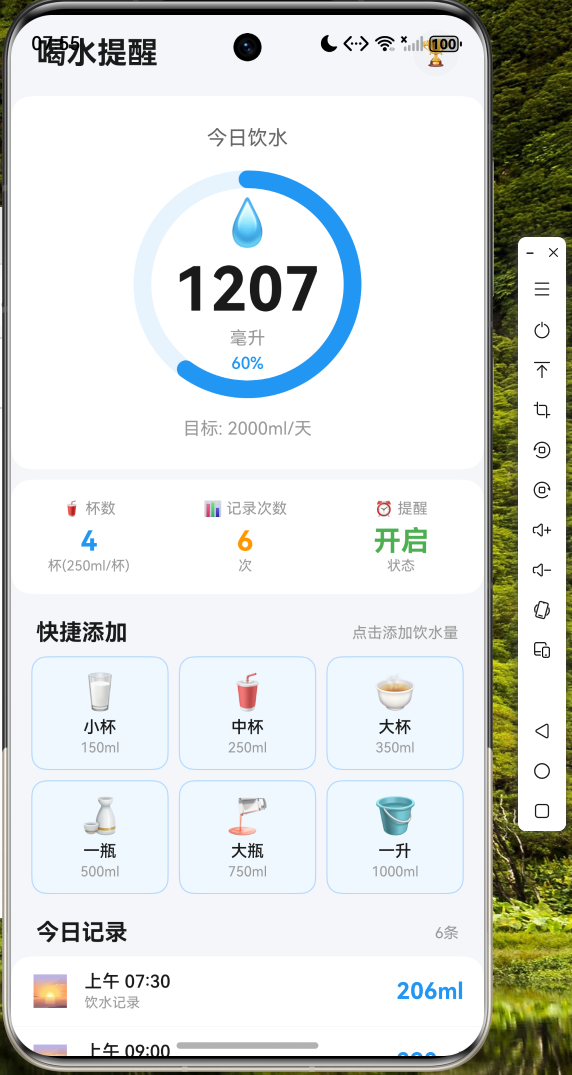
应用顶部显示问候语和功能入口,中间是醒目的环形进度条直观展示饮水完成度,快捷添加面板提供了一键记录饮水的便捷方式,底部则展示了时段统计和成就解锁情况。
统计页面 - 展示近7天饮水趋势图和周统计摘要: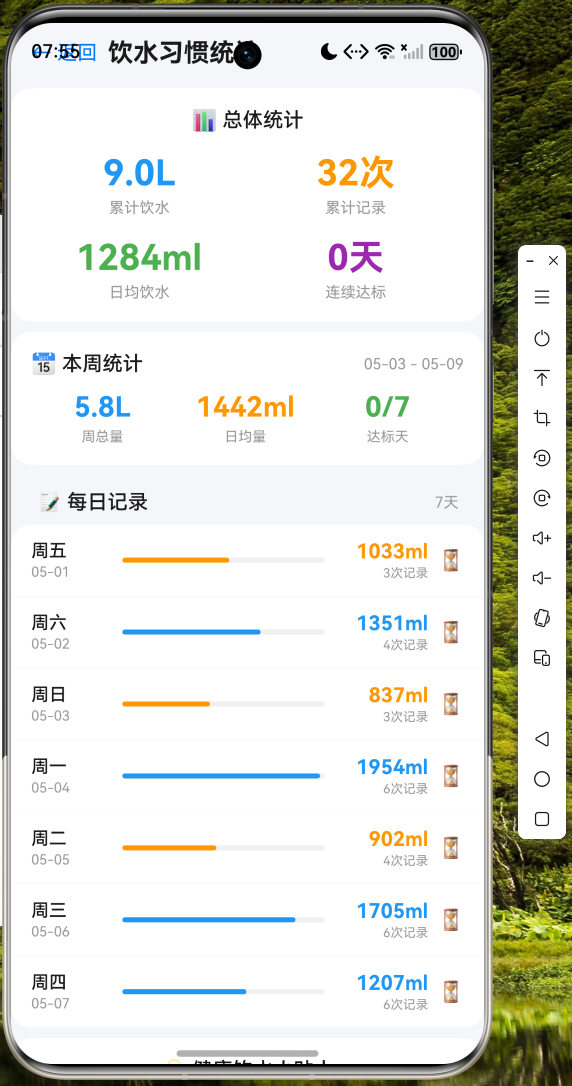
通过柱状图形式展示每日饮水量对比,配合达标天数统计帮助用户了解自己的饮水习惯。
设置页面 - 自定义每日目标和提醒设置: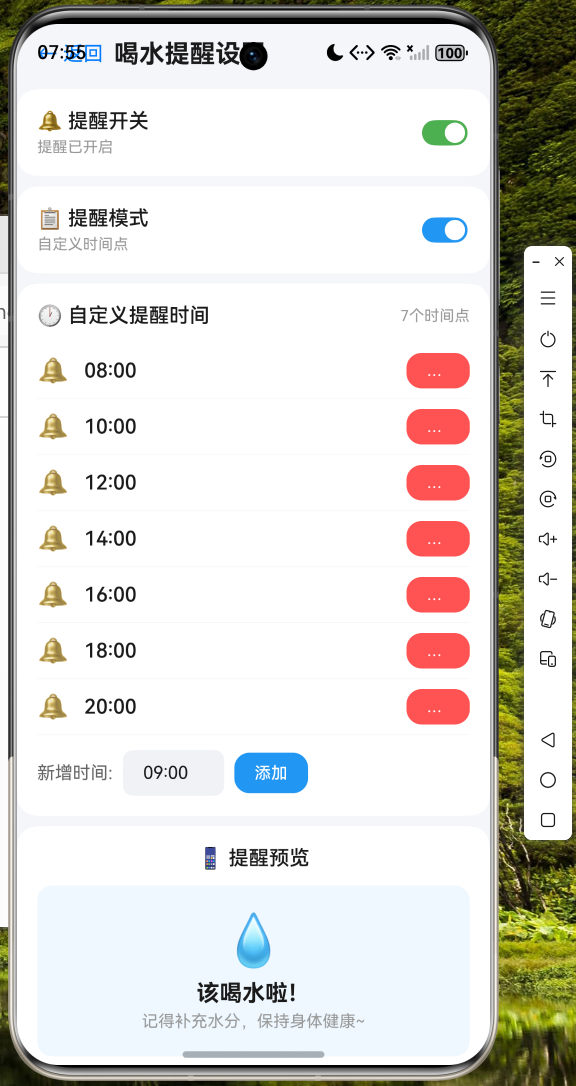
滑动条式的设置交互提供了良好的用户体验,支持自定义每日饮水目标和提醒间隔。
跨平台开发经验总结
通过这个喝水提醒应用的开发实践,我总结了以下几点 Flutter 跨平台开发的关键经验:
状态管理策略:对于中小型应用,Provider 模式已经足够满足需求。它简单易用,与 Flutter 框架深度集成,无需引入额外的第三方依赖。
UI 组件复用:Flutter 的组件化设计使得代码复用变得非常自然。我们可以将常用的 UI 模式封装为独立组件,如进度环形图、统计卡片等,在不同页面中复用。
平台差异处理:虽然 Flutter 提供了统一的 API,但在实际开发中仍需注意平台差异。例如通知功能,在不同平台上的实现方式可能有所不同,建议使用条件导入来处理平台特定的代码。
性能优化要点:合理使用 const 构造函数可以减少不必要的重建,使用 RepaintBoundary 隔离频繁变化的区域,以及避免在 build 方法中执行耗时操作。
代码托管
本项目的完整代码已托管至 AtomGit 平台,欢迎开发者交流学习:
仓库地址:https://atomgit.com/maaath/water-reminder-app
结语
本文通过一个完整的喝水提醒应用实例,展示了 Flutter for OpenHarmony 跨平台开发的完整流程。从需求分析、架构设计,到代码实现、鸿蒙设备运行验证,我们可以看到 Flutter 框架在跨平台开发中的强大能力。
随着 OpenHarmony 生态的持续发展,Flutter for OpenHarmony 将成为越来越多开发者选择跨平台方案时的首选。它不仅保留了 Flutter 原有的开发效率优势,还能够充分利用 OpenHarmony 的系统能力,为用户带来原生的使用体验。
希望本文能够为正在进行或计划开展 Flutter for OpenHarmony 开发的开发者提供一些参考和启发。如果您有任何问题或建议,欢迎在社区中交流讨论。

开源鸿蒙跨平台开发社区汇聚开发者与厂商,共建“一次开发,多端部署”的开源生态,致力于降低跨端开发门槛,推动万物智联创新。
更多推荐
 4
4 0
0- 0


 已为社区贡献70条内容

所有评论(0)