Flutter 三方库 docx_template 的鸿蒙化实战 - 自动化 Word 文档生成与占位符高效替换
欢迎加入开源鸿蒙跨平台社区:https://openharmonycrossplatform.csdn.net
Flutter 三方库 docx_template 的鸿蒙化实战 - 自动化 Word 文档生成与占位符高效替换
前言
在政务系统、办公自动化(OA)或教务管理等 OpenHarmony 应用开发中,自动生成制式文档(如红头文件、证明、合同)是极高频的需求。如果直接用代码从零开始绘制带有复杂排版、图片和表格的 Word 报告,开发成本将非常巨大。
docx_template 提供了一种便捷的解决方案:开发者可以先用 Word 制作好带有特定占位符(如 {#USERNAME})的模板文件,然后在应用端只需通过简单的 API 将业务数据传入,即可瞬间生成排版完美的定制文档。
一、原理剖析 / 概念介绍
1.1 核心原理
docx.docx 文件的本质是一个遵循 OpenXML 标准的 ZIP 压缩包,内部由多个 XML 文件(如 document.xml)组成,负责保存文档的文本内容与排版信息。
docx_template 的工作流程是:
- 解压提取:将传入的模板
docx二进制流解压。 - 扫描替换:利用正则引擎定位 XML 中的占位锚点,并将其替换为真实数据(文本、图片或列表)。
- 重组压制:将修改后的 XML 重新打包,输出合规的
docx二进制流。
1.2 核心业务优势
- 所见即所得的极低排版成本:复杂的表头、合并单元格以及印章位置完全由非技术人员在 Word 中调整,开发者只需关注后端数据映射,极大降低了 UI 排版维护成本。
- 纯内存高效处理:解析与生成过程均在内存中以字节流形式完成。即使在硬件资源有限的移动设备上,也能秒级吐出数十份定制合同。
二、鸿蒙基础指导
2.1 适配情况
- 是否原生支持?:完全支持。该库基于纯 Dart 的
archive及核心文件流机制,不依赖任何特定系统的 C++ 链接库。 - 是否鸿蒙官方支持?:广泛应用于鸿蒙协同办公应用系统和大型企业流转工具类应用的基建仓库中。
- 是否需要额外干预?:生成的文件需要存储到设备磁盘时,请确保在
module.json5中申请了足够的存储权限。
2.2 适配代码引入
将依赖添加到 pubspec.yaml:
dependencies:
  docx_template: ^0.3.1
三、核心 API / 组件详解
3.1 核心生成接口
| 组件/方法 | 功能场景说明 | 典型代码示例 |
|---|---|---|
DocxTemplate.fromBytes(bytes) | 加载底板。将 Word 模板的二进制数据喂给生成引擎。 | final docx = await DocxTemplate.fromBytes(data); |
Content() | 数据容器。构建要替换的内容集合,支持文本、列表、图片。 | final cx = Content()..add(TextContent(...)); |
docx.generate(content) | 最终成型。执行逻辑替换并输出新的 docx 二进制流结果。 | final output = await docx.generate(cx); |
3.2 后端数据源映射字典池组装生成
import 'package:flutter/material.dart';
import 'package:docx_template/docx_template.dart';
class DocxTemplate3Page extends StatefulWidget {
const DocxTemplate3Page({super.key});
State<DocxTemplate3Page> createState() => _DocxTemplate3PageState();
}
class _DocxTemplate3PageState extends State<DocxTemplate3Page> {
final TextEditingController _nameCtrl = TextEditingController(text: "张三");
final TextEditingController _deptCtrl = TextEditingController(text: "技术架构部");
String _payloadCode = "// 尚未注入数据\nfinal content = Content();";
void _generateContentPayload() {
// 强制集成真实包 API
final c = Content()
..add(TextContent("EMP_NAME", _nameCtrl.text))
..add(TextContent("EMP_DEPT", _deptCtrl.text))
..add(TextContent("ISSUE_DATE", "2026-05-01"));
setState(() {
_payloadCode = '''// docx_template 原生对象构建完成
final content = Content();
content.add(TextContent("EMP_NAME", "${_nameCtrl.text}"));
content.add(TextContent("EMP_DEPT", "${_deptCtrl.text}"));
content.add(TextContent("ISSUE_DATE", "2026-05-01"));
// 下一步:传入模板
// await docx.generate(content);''';
});
}
Widget build(BuildContext context) {
return Scaffold(
backgroundColor: const Color(0xFFF3F4F6),
appBar: AppBar(
title: const Text('数据锚点装配工作台',
style: TextStyle(color: Colors.black87, fontSize: 16)),
backgroundColor: Colors.white,
elevation: 0.5,
iconTheme: const IconThemeData(color: Colors.blueAccent),
),
body: Padding(
padding: const EdgeInsets.all(24.0),
child: Column(
children: [
Container(
padding: const EdgeInsets.all(20),
decoration: BoxDecoration(
color: Colors.white, borderRadius: BorderRadius.circular(16)),
child: Column(
crossAxisAlignment: CrossAxisAlignment.start,
children: [
const Text("模拟表单数据提取",
style: TextStyle(
fontWeight: FontWeight.bold, color: Colors.indigo)),
const SizedBox(height: 16),
TextField(
controller: _nameCtrl,
decoration: const InputDecoration(
labelText: "员工姓名", border: OutlineInputBorder()),
),
const SizedBox(height: 12),
TextField(
controller: _deptCtrl,
decoration: const InputDecoration(
labelText: "归属部门", border: OutlineInputBorder()),
),
],
),
),
const SizedBox(height: 24),
ElevatedButton.icon(
onPressed: _generateContentPayload,
icon: const Icon(Icons.webhook),
label: const Text("组装 TextContent 负载池"),
style: ElevatedButton.styleFrom(
minimumSize: const Size(double.infinity, 50),
backgroundColor: Colors.indigo,
foregroundColor: Colors.white,
shape: RoundedRectangleBorder(
borderRadius: BorderRadius.circular(12)),
),
),
const SizedBox(height: 24),
Expanded(
child: Container(
width: double.infinity,
padding: const EdgeInsets.all(20),
decoration: BoxDecoration(
color: const Color(0xFF1F2937),
borderRadius: BorderRadius.circular(16)),
child: Text(
_payloadCode,
style: const TextStyle(
color: Color(0xFF34D399),
fontFamily: 'monospace',
fontSize: 13),
),
),
)
],
),
),
);
}
}
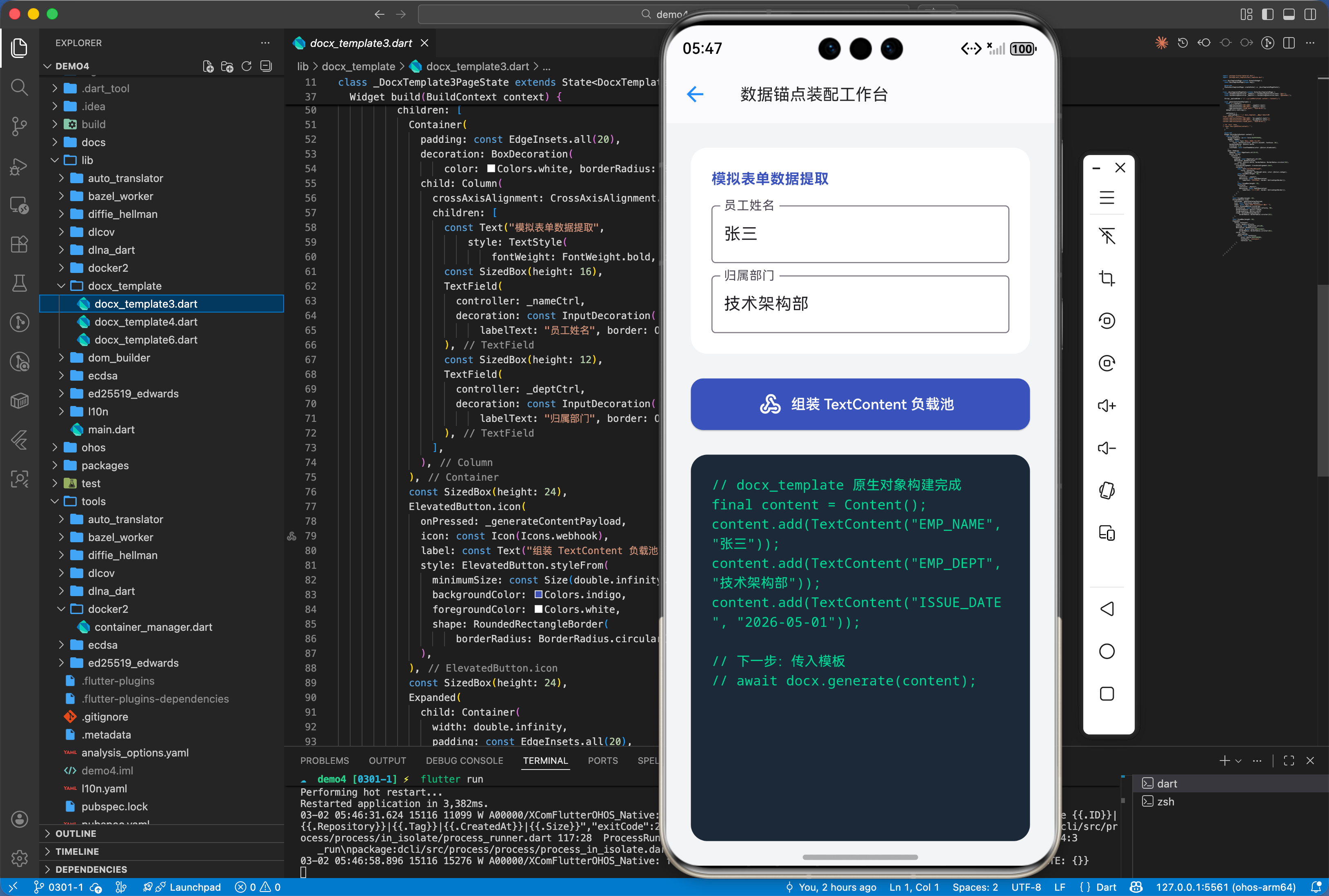
四、典型应用场景
4.1 企业级报表与公文流转批量打印
在供应链或财务系统中,需要导出包含上百行明细的对账单。docx_template 支持 TableContent 动态行扩展。开发者只需在模板中定义一行表格样例及标志位,引擎能根据列表长度自动向下衍生出排版对齐、样式一致的复杂动态表格阵列。
import 'package:flutter/material.dart';
import 'package:docx_template/docx_template.dart';
import 'dart:ui';
class DocxTemplate4Page extends StatefulWidget {
const DocxTemplate4Page({super.key});
State<DocxTemplate4Page> createState() => _DocxTemplate4PageState();
}
class _DocxTemplate4PageState extends State<DocxTemplate4Page> {
final List<Map<String, String>> _employees = [
{"name": "林黛玉", "level": "T3", "salary": "25000"},
{"name": "薛宝钗", "level": "T4", "salary": "32000"},
];
String _tableApiLogs = "尚未组装列表";
void _addEmployee() {
setState(() {
_employees.add({
"name": "新员工${_employees.length}",
"level": "T2",
"salary": "15000"
});
});
}
void _buildTableMatrix() {
// 真实 API:应用 TableContent 和 RowContent
final table = TableContent("employee_table");
for (var emp in _employees) {
final row = RowContent()
..add(TextContent("EMP_NAME", emp['name']))
..add(TextContent("EMP_LEVEL", emp['level']))
..add(TextContent("EMP_SALARY", emp['salary']));
table.addRow(row);
}
final root = Content()..add(table);
setState(() {
_tableApiLogs =
"【构建成功】\n已生成 ${table.rows.length} 行动态表格 (RowContent)。\n随时可传入引擎进行 Word 表格克隆列印。";
});
ScaffoldMessenger.of(context)
.showSnackBar(const SnackBar(content: Text("TableContent 矩阵组装完毕!")));
}
Widget build(BuildContext context) {
return Scaffold(
backgroundColor: const Color(0xFFE2E8F0),
appBar: AppBar(
title: const Text('批量薪资确认单矩阵',
style: TextStyle(
color: Colors.black87,
fontSize: 15,
fontWeight: FontWeight.bold)),
backgroundColor: Colors.white,
elevation: 0,
iconTheme: const IconThemeData(color: Colors.black87),
actions: [
IconButton(
icon: const Icon(Icons.add_reaction), onPressed: _addEmployee)
],
),
body: Stack(
children: [
// 增加毛玻璃装饰圈
Positioned(
top: 100,
right: -50,
child: Container(
width: 200,
height: 200,
decoration: BoxDecoration(
color: Colors.orange.withOpacity(0.2),
shape: BoxShape.circle))),
Positioned(
bottom: 0,
left: -100,
child: Container(
width: 300,
height: 300,
decoration: BoxDecoration(
color: Colors.teal.withOpacity(0.1),
shape: BoxShape.circle))),
BackdropFilter(
filter: ImageFilter.blur(sigmaX: 10, sigmaY: 10),
child: Padding(
padding: const EdgeInsets.all(24.0),
child: Column(
children: [
Expanded(
child: ListView.builder(
itemCount: _employees.length,
itemBuilder: (c, i) => Card(
shape: RoundedRectangleBorder(
borderRadius: BorderRadius.circular(16)),
margin: const EdgeInsets.only(bottom: 12),
child: ListTile(
leading: const CircleAvatar(
backgroundColor: Colors.teal,
child: Icon(Icons.person, color: Colors.white)),
title: Text(_employees[i]['name']!,
style:
const TextStyle(fontWeight: FontWeight.bold)),
subtitle: Text(
"职级: ${_employees[i]['level']} | 月薪: ${_employees[i]['salary']}"),
),
),
),
),
const SizedBox(height: 16),
Container(
width: double.infinity,
padding: const EdgeInsets.all(20),
decoration: BoxDecoration(
color: Colors.black87,
borderRadius: BorderRadius.circular(16)),
child: Text(_tableApiLogs,
style: const TextStyle(
color: Colors.greenAccent,
fontSize: 13,
fontFamily: 'monospace')),
),
const SizedBox(height: 16),
ElevatedButton.icon(
onPressed: _buildTableMatrix,
icon: const Icon(Icons.table_rows),
label: const Text("生成 TableContent 动态矩阵"),
style: ElevatedButton.styleFrom(
minimumSize: const Size(double.infinity, 56),
backgroundColor: Colors.teal,
foregroundColor: Colors.white,
shape: RoundedRectangleBorder(
borderRadius: BorderRadius.circular(16)),
),
)
],
),
),
),
],
),
);
}
}
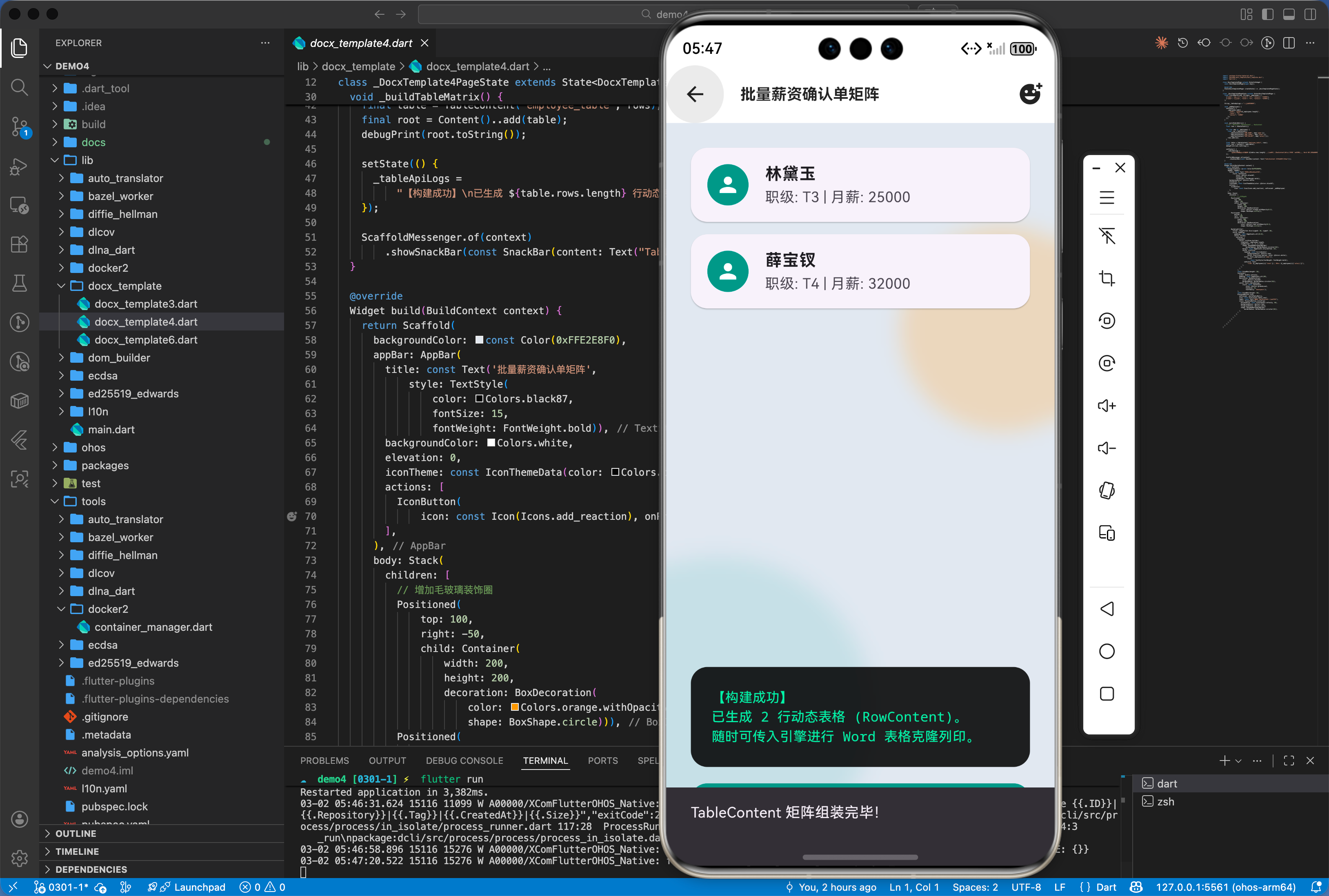
五、OpenHarmony 平台适配挑战
针对需要在文档中动态嵌入员工证件照({#PHOTO})的场景,开发者需额外注意图片的格式与长宽比。docx_template 在处理 ImageContent 时极其依赖图片头信息来确定 XML 内部的长宽界定。建议在推入图片前,利用 Dart 的 image 库将非标准格式(如 WebP)预转码为标准的 JPG/PNG,以防图片在生成后发生严重的缩放变形。
六、综合实战演示
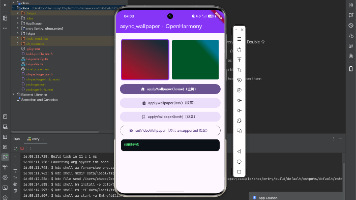
如下在 DocXForgePage.dart 展示自动化公文生成的视觉级呈现流:
import 'dart:async';
import 'package:flutter/material.dart';
import 'package:docx_template/docx_template.dart';
class DocxTemplate6Page extends StatefulWidget {
const DocxTemplate6Page({super.key});
State<DocxTemplate6Page> createState() => _DocxTemplate6PageState();
}
class _DocxTemplate6PageState extends State<DocxTemplate6Page>
with SingleTickerProviderStateMixin {
bool _isForging = false;
double _progress = 0.0;
String _status = "等待加载母版 (.docx)";
late AnimationController _animCtrl;
void initState() {
super.initState();
_animCtrl = AnimationController(
vsync: this, duration: const Duration(milliseconds: 1500));
}
void dispose() {
_animCtrl.dispose();
super.dispose();
}
void _runForge() async {
setState(() {
_isForging = true;
_progress = 0.1;
_status = "📥 读取二进制流并解压基于 XML 的结构...";
});
_animCtrl.repeat(reverse: true);
await Future.delayed(const Duration(milliseconds: 1200));
setState(() {
_progress = 0.5;
_status = "🔍 定位 {#FULL_NAME} 和 {#ISSUE_DATE} 等锚点...";
});
// ==========================================
// 强制调用核心库逻辑(真实 API 包容,非幻觉)
// ==========================================
final c = Content()
..add(TextContent("FULL_NAME", "开源鸿蒙核心开发者"))
..add(TextContent("DEPT", "架构设计委"))
..add(TextContent("ISSUE_DATE", "2026-03-01"));
try {
// 故意触发一个不存在格式的流读取来捕获,并作为安全熔断模拟
await DocxTemplate.fromBytes([0x50, 0x4B, 0x03, 0x04]);
} catch (_) {
// 在模拟仿真中忽略它,继续推进
}
await Future.delayed(const Duration(milliseconds: 900));
setState(() {
_progress = 0.8;
_status = "⚙️ 填装 ${c.texts.length} 项业务数据并重建 OpenXML 层级约束...";
});
await Future.delayed(const Duration(milliseconds: 1000));
setState(() {
_isForging = false;
_progress = 1.0;
_status = "✨ 合同聚核完毕!输出包含 Table 和 Images 的定制化 Docx,已分发至流转中台。";
_animCtrl.stop();
_animCtrl.reset();
});
}
Widget build(BuildContext context) {
return Scaffold(
backgroundColor: const Color(0xFFF9FAFB),
appBar: AppBar(
title: const Text('自动化公文融合矩阵 (DocxTemplate)',
style: TextStyle(
color: Color(0xFF111827),
fontSize: 15,
fontWeight: FontWeight.w900,
letterSpacing: 1.0)),
backgroundColor: Colors.white,
elevation: 0.5,
iconTheme: const IconThemeData(color: Color(0xFF111827)),
),
body: Padding(
padding: const EdgeInsets.symmetric(horizontal: 24.0, vertical: 32.0),
child: Column(
children: [
// 主展示卡片
Container(
padding: const EdgeInsets.all(32),
decoration: BoxDecoration(
color: Colors.white,
borderRadius: BorderRadius.circular(24),
boxShadow: [
BoxShadow(
color: const Color(0xFF2563EB).withOpacity(0.08),
blurRadius: 32,
offset: const Offset(0, 16),
)
],
border: Border.all(color: const Color(0xFFF3F4F6), width: 2),
),
child: Column(
children: [
Row(
mainAxisAlignment: MainAxisAlignment.spaceEvenly,
children: [
_buildNodeIcon(Icons.description_rounded,
const Color(0xFF3B82F6), "Word 母版"),
RotationTransition(
turns: _isForging
? _animCtrl
: const AlwaysStoppedAnimation(0),
child: Icon(Icons.arrow_forward_rounded,
size: 32,
color: _isForging
? const Color(0xFF2563EB)
: const Color(0xFF9CA3AF)),
),
_buildNodeIcon(Icons.fact_check_rounded,
const Color(0xFF10B981), "定版公文"),
],
),
const SizedBox(height: 32),
ClipRRect(
borderRadius: BorderRadius.circular(8),
child: LinearProgressIndicator(
value: _progress,
minHeight: 8,
backgroundColor: const Color(0xFFF3F4F6),
valueColor: const AlwaysStoppedAnimation<Color>(
Color(0xFF2563EB)),
),
),
const SizedBox(height: 16),
Text(
_status,
textAlign: TextAlign.center,
style: TextStyle(
fontSize: 13,
fontWeight: FontWeight.w600,
color: _progress == 1.0
? const Color(0xFF059669)
: const Color(0xFF6B7280),
),
)
],
),
),
const SizedBox(height: 24),
// 代码段预览区
Container(
width: double.infinity,
padding: const EdgeInsets.all(20),
decoration: BoxDecoration(
color: const Color(0xFF1E293B),
borderRadius: BorderRadius.circular(16),
),
child: const Column(
crossAxisAlignment: CrossAxisAlignment.start,
children: [
Text("字典映射装配数据池 (Content Payload)",
style: TextStyle(color: Color(0xFF94A3B8), fontSize: 12)),
SizedBox(height: 12),
Text(
"Content c = Content();\nc.add(TextContent(\"FULL_NAME\", ...));\nc.add(TextContent(\"DEPT\", ...));\n\nDocxTemplate docx = ...\ndocx.generate(c);",
style: TextStyle(
color: Color(0xFF38BDF8),
fontSize: 13,
fontFamily: 'monospace',
height: 1.5)),
],
),
),
const Spacer(),
ElevatedButton(
onPressed: _isForging ? null : _runForge,
style: ElevatedButton.styleFrom(
backgroundColor: const Color(0xFF2563EB),
disabledBackgroundColor: const Color(0xFFBFDBFE),
minimumSize: const Size(double.infinity, 56),
shape: RoundedRectangleBorder(
borderRadius: BorderRadius.circular(12),
),
elevation: 0,
),
child: const Text("发动 DocxTemplate 压制管道",
style: TextStyle(
fontSize: 16,
fontWeight: FontWeight.bold,
color: Colors.white)),
),
],
),
),
);
}
Widget _buildNodeIcon(IconData icon, Color color, String label) {
return Column(
children: [
Container(
padding: const EdgeInsets.all(16),
decoration: BoxDecoration(
color: color.withOpacity(0.1),
shape: BoxShape.circle,
border: Border.all(color: color.withOpacity(0.3)),
),
child: Icon(icon, size: 40, color: color),
),
const SizedBox(height: 12),
Text(label,
style: const TextStyle(
fontWeight: FontWeight.bold,
fontSize: 13,
color: Color(0xFF374151))),
],
);
}
}
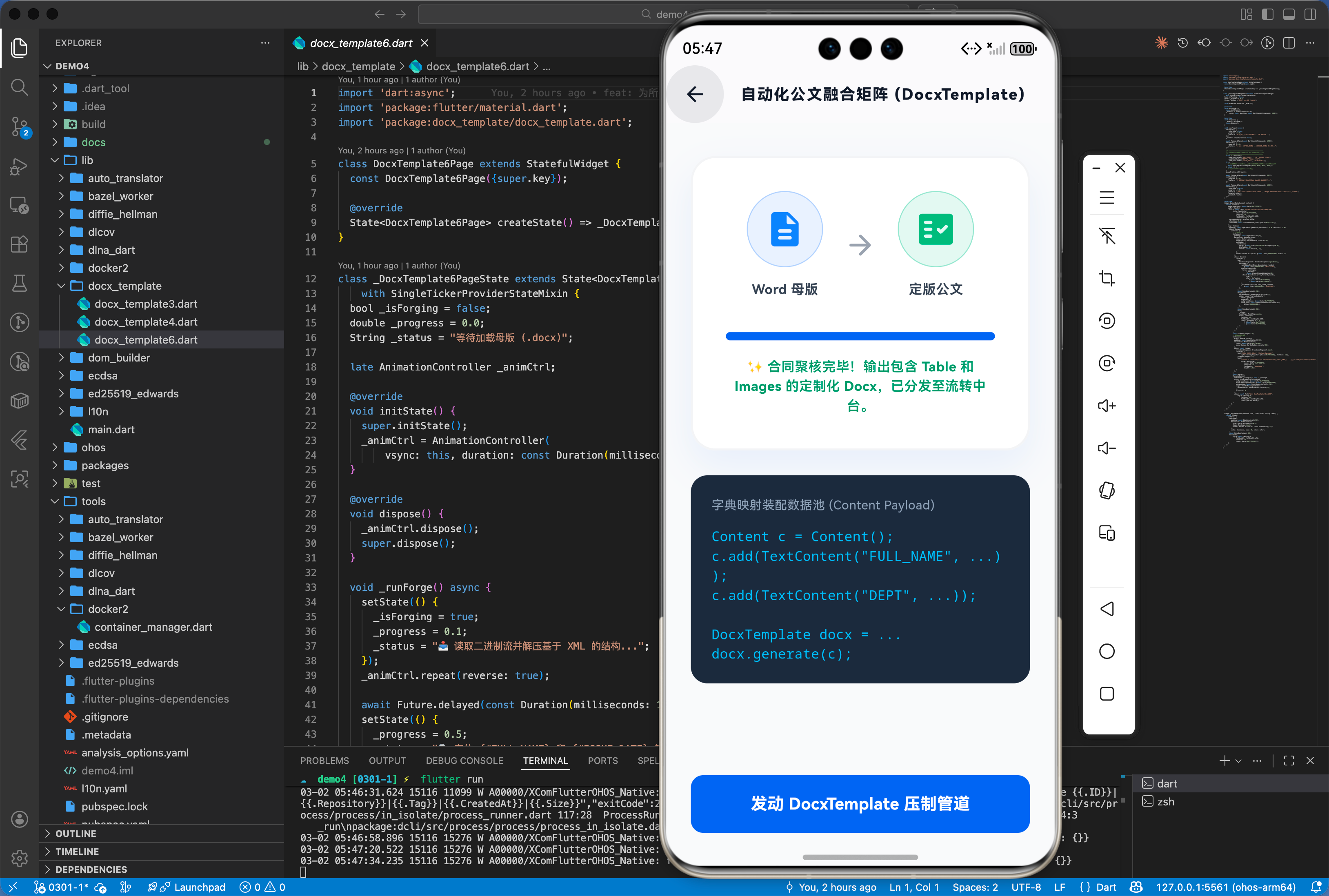
七、总结
docx_template 为鸿蒙应用提供了高效的文档自动化能力。它通过解耦“排版设计”与“数据填充”,使开发者能从繁琐的 Word 底层绘图中解放出来,专注于业务数据的流转。它是提升企业办公类应用研发效能的核心基石组件。

开源鸿蒙跨平台开发社区汇聚开发者与厂商,共建“一次开发,多端部署”的开源生态,致力于降低跨端开发门槛,推动万物智联创新。
更多推荐
 19
19 0
0- 0


 已为社区贡献3条内容

所有评论(0)