React Native鸿蒙跨平台采用组件化架构(如FlatList、TouchableOpacity)与React Hooks状态管理,实现了课程列表渲染、动态样式绑定和响应式布局等功能
本文探讨了基于React Native开发手语课程应用的跨端适配策略,重点分析了其在鸿蒙系统上的实现方案。应用采用组件化架构(如FlatList、TouchableOpacity)与React Hooks状态管理,通过类型定义确保数据模型安全。核心实现了课程列表渲染、动态样式绑定和响应式布局等功能。在鸿蒙适配层面,详细解析了React Native组件到ArkUI组件的映射机制(如View→Div
在移动应用开发领域,跨端技术已成为主流趋势,尤其是随着鸿蒙系统的兴起,如何实现一套代码覆盖多平台(iOS、Android、鸿蒙)成为开发者关注的焦点。本文将深入解析一个基于 React Native 开发的手语课程应用,探讨其架构设计、核心技术实现以及在鸿蒙系统上的跨端适配策略。
组件化
手语课程应用(SignLanguageCourseApp)采用了典型的 React Native 组件化架构,核心组件包括 SafeAreaView、TouchableOpacity、FlatList 和 ScrollView 等。这些组件通过 React Native 的跨端映射机制,能够在鸿蒙系统上无缝转换为对应的 ArkUI 组件,保持一致的开发体验和运行效果。
数据模型
应用定义了三个核心数据类型:
- Course:课程基本信息,包括标题、描述、难度、时长等
- Lesson:课程章节,包含标题、描述、时长和完成状态
- Progress:学习进度,记录已完成课时和完成百分比
使用 TypeScript 进行类型定义,确保了代码的类型安全和可读性,减少了运行时错误。在跨端开发中,严格的类型定义尤为重要,能够提前发现潜在的类型问题,提高代码的可维护性。
Hooks 状态管理
应用使用 React Hooks(useState)管理应用状态,包括课程列表、章节列表和学习进度:
const [courses, setCourses] = useState<Course[]>([ /* 初始数据 */ ]);
const [lessons, setLessons] = useState<Lesson[]>([ /* 初始数据 */ ]);
const [progress, setProgress] = useState<Progress[]>([ /* 初始数据 */ ]);
在鸿蒙系统中,React Native 的 Hook 机制会被转换为对应的 ArkUI 状态管理机制,例如 useState 会映射为 ArkUI 的 @State 装饰器,实现状态的响应式更新。当状态变化时,相关组件会自动重新渲染,无需手动操作 DOM。
数据关联
应用实现了数据关联逻辑,通过 getLessonsForCourse 函数获取特定课程的章节:
const getLessonsForCourse = (courseId: string) => {
  return lessons.filter(lesson => lesson.courseId === courseId);
};
这种基于 JavaScript 数组方法的数据处理,在鸿蒙系统上能够保持一致的执行结果,确保跨平台数据处理的可靠性。
FlatList 高性能渲染
应用使用 FlatList 组件渲染课程列表,这是 React Native 中渲染长列表的最佳实践:
<FlatList
  data={courses}
  renderItem={renderCourseItem}
  keyExtractor={item => item.id}
/>
在鸿蒙系统中,FlatList 会转换为 ArkUI 的 list 组件,保持高效的虚拟滚动性能,只渲染可见区域的内容,减少内存占用和渲染时间。
动态内容
应用实现了动态内容渲染,例如根据课程难度显示不同的难度标签:
<Text style={styles.courseLevel}>{item.level === 'beginner' ? '初级' : item.level === 'intermediate' ? '中级' : '高级'}</Text>
以及根据完成百分比动态生成进度条:
<View style={styles.progressBar}>
  <View
    style={[
      styles.progressFill,
      { width: `${completionPercentage}%`, backgroundColor: completionPercentage > 0 ? '#3b82f6' : '#e2e8f0' }
    ]}
  />
</View>
这种条件渲染和动态样式绑定,在鸿蒙系统上能够正常工作,因为 React Native 的 JSX 语法会被转换为对应的 ArkUI 模板语法。
StyleSheet 样式
应用使用 StyleSheet.create 方法定义样式,将所有样式集中管理:
const styles = StyleSheet.create({
  container: {
    flex: 1,
    backgroundColor: '#f5f5f5',
  },
  // 其他样式定义
});
StyleSheet 是 React Native 的最佳实践,具有以下优势:
- 性能优化:StyleSheet 在编译时会被处理,减少运行时计算
- 类型安全:TypeScript 会检查样式属性
- 模块化:便于样式复用和主题管理
在鸿蒙系统中,React Native 的样式会被转换为 ArkUI 的样式规则,例如:
flex: 1转换为flex-grow: 1backgroundColor: '#f5f5f5'转换为background-color: #f5f5f5borderRadius: 8转换为border-radius: 8px
响应式布局设计
应用使用 Dimensions.get('window') 获取屏幕尺寸,实现响应式布局:
const { width, height } = Dimensions.get('window');
这种方式在不同尺寸的设备上都能保持良好的布局效果。在鸿蒙系统中,Dimensions API 会调用底层的鸿蒙尺寸 API,获取准确的屏幕信息。
React Native 组件到鸿蒙 ArkUI 组件的映射是跨端适配的核心机制。以下是应用中主要组件的映射关系:
| React Native 组件 | 鸿蒙 ArkUI 组件 | 说明 |
|---|---|---|
| SafeAreaView | Stack | 安全区域容器 |
| View | Div | 基础容器组件 |
| Text | Text | 文本组件 |
| TouchableOpacity | Button | 可点击组件 |
| FlatList | List | 高效列表组件 |
| ScrollView | ScrollView | 滚动容器 |
| Alert | AlertDialog | 弹窗组件 |
样式
React Native 的样式系统基于 CSS,但有一些差异。在鸿蒙系统中,React Native 的样式会被转换为 ArkUI 的样式规则,确保跨平台视觉一致性。例如:
flexDirection: 'row'转换为flex-direction: rowjustifyContent: 'space-between'转换为justify-content: space-betweenpaddingHorizontal: 16转换为padding-left: 16px; padding-right: 16px
API 适配机制
React Native 提供了统一的 API 层,封装了不同平台的底层 API,例如 Alert、Dimensions、StyleSheet 等。在鸿蒙系统中,这些 API 会被转换为对应的鸿蒙系统 API 调用,确保跨平台功能的一致性。
应用使用 TouchableOpacity 组件实现点击交互,提供原生的触摸反馈效果:
<TouchableOpacity
  style={styles.courseCard}
  onPress={() => Alert.alert('课程详情', `查看 ${item.title} 课程详情`)}
>
  {/* 课程卡片内容 */}
</TouchableOpacity>
在鸿蒙系统中,TouchableOpacity 会转换为具有点击效果的 ArkUI 组件,通过 stateStyles 实现按压状态的样式变化,保持原生的触摸反馈体验。
弹窗交互
应用使用 Alert.alert 实现弹窗交互,这是 React Native 提供的跨平台 API:
Alert.alert('课程详情', `查看 ${item.title} 课程详情`);
在鸿蒙系统中,Alert.alert 会调用系统原生的弹窗 API,确保弹窗样式与系统一致,提供原生的用户体验。
真实演示案例代码:
// app.tsx
import React, { useState } from 'react';
import { SafeAreaView, View, Text, StyleSheet, TouchableOpacity, ScrollView, Dimensions, Alert, FlatList } from 'react-native';

// Base64 图标库
const ICONS_BASE64 = {
  home: 'data:image/png;base64,iVBORw0KGgoAAAANSUhEUgAAAAEAAAABCAYAAAAfFcSJAAAADUlEQVR42mNkYPhfDwAChwGA60e6kgAAAABJRU5ErkJggg==',
  course: 'data:image/png;base64,iVBORw0KGgoAAAANSUhEUgAAAAEAAAABCAYAAAAfFcSJAAAADUlEQVR42mNkYPhfDwAChwGA60e6kgAAAABJRU5ErkJggg==',
  practice: 'data:image/png;base64,iVBORw0KGgoAAAANSUhEUgAAAAEAAAABCAYAAAAfFcSJAAAADUlEQVR42mNkYPhfDwAChwGA60e6kgAAAABJRU5ErkJggg==',
  video: 'data:image/png;base64,iVBORw0KGgoAAAANSUhEUgAAAAEAAAABCAYAAAAfFcSJAAAADUlEQVR42mNkYPhfDwAChwGA60e6kgAAAABJRU5ErkJggg==',
  bookmark: 'data:image/png;base64,iVBORw0KGgoAAAANSUhEUgAAAAEAAAABCAYAAAAfFcSJAAAADUlEQVR42mNkYPhfDwAChwGA60e6kgAAAABJRU5ErkJggg==',
  search: 'data:image/png;base64,iVBORw0KGgoAAAANSUhEUgAAAAEAAAABCAYAAAAfFcSJAAAADUlEQVR42mNkYPhfDwAChwGA60e6kgAAAABJRU5ErkJggg==',
  profile: 'data:image/png;base64,iVBORw0KGgoAAAANSUhEUgAAAAEAAAABCAYAAAAfFcSJAAAADUlEQVR42mNkYPhfDwAChwGA60e6kgAAAABJRU5ErkJggg==',
  settings: 'data:image/png;base64,iVBORw0KGgoAAAANSUhEUgAAAAEAAAABCAYAAAAfFcSJAAAADUlEQVR42mNkYPhfDwAChwGA60e6kgAAAABJRU5ErkJggg==',
};

const { width, height } = Dimensions.get('window');

// 课程类型
type Course = {
  id: string;
  title: string;
  description: string;
  level: 'beginner' | 'intermediate' | 'advanced';
  duration: number; // minutes
  lessonCount: number;
  instructor: string;
  rating: number;
  thumbnail: string;
};

// 课程章节类型
type Lesson = {
  id: string;
  courseId: string;
  title: string;
  description: string;
  duration: number; // minutes
  order: number;
  isCompleted: boolean;
};

// 学习进度类型
type Progress = {
  userId: string;
  courseId: string;
  completedLessons: number;
  totalLessons: number;
  completionPercentage: number;
};

const SignLanguageCourseApp: React.FC = () => {
  const [courses, setCourses] = useState<Course[]>([
    {
      id: '1',
      title: '基础手语入门',
      description: '学习手语的基础知识和日常用语',
      level: 'beginner',
      duration: 120,
      lessonCount: 10,
      instructor: '李老师',
      rating: 4.8,
      thumbnail: ''
    },
    {
      id: '2',
      title: '日常交流手语',
      description: '掌握日常生活中的基本手语交流技巧',
      level: 'intermediate',
      duration: 180,
      lessonCount: 15,
      instructor: '王老师',
      rating: 4.6,
      thumbnail: ''
    },
    {
      id: '3',
      title: '专业术语手语',
      description: '学习专业领域中的手语表达',
      level: 'advanced',
      duration: 240,
      lessonCount: 20,
      instructor: '张老师',
      rating: 4.9,
      thumbnail: ''
    },
    {
      id: '4',
      title: '情感表达手语',
      description: '通过手语表达各种情感和情绪',
      level: 'intermediate',
      duration: 150,
      lessonCount: 12,
      instructor: '赵老师',
      rating: 4.7,
      thumbnail: ''
    },
  ]);

  const [lessons, setLessons] = useState<Lesson[]>([
    { id: '1', courseId: '1', title: '手语简介', description: '了解手语的历史和发展', duration: 12, order: 1, isCompleted: true },
    { id: '2', courseId: '1', title: '基本手势', description: '学习基础的手势动作', duration: 15, order: 2, isCompleted: true },
    { id: '3', courseId: '1', title: '字母表', description: '掌握手语字母表', duration: 20, order: 3, isCompleted: false },
    { id: '4', courseId: '1', title: '数字表达', description: '学习数字的手语表达', duration: 18, order: 4, isCompleted: false },
    { id: '5', courseId: '2', title: '问候语', description: '日常问候的手语表达', duration: 14, order: 1, isCompleted: false },
    { id: '6', courseId: '2', title: '家庭成员', description: '家庭关系的手语表达', duration: 16, order: 2, isCompleted: false },
  ]);

  const [progress, setProgress] = useState<Progress[]>([
    { userId: 'user1', courseId: '1', completedLessons: 2, totalLessons: 10, completionPercentage: 20 },
    { userId: 'user1', courseId: '2', completedLessons: 0, totalLessons: 15, completionPercentage: 0 },
  ]);

  // 获取特定课程的章节
  const getLessonsForCourse = (courseId: string) => {
    return lessons.filter(lesson => lesson.courseId === courseId);
  };

  // 渲染课程项
  const renderCourseItem = ({ item }: { item: Course }) => {
    const courseProgress = progress.find(p => p.courseId === item.id);
    const completionPercentage = courseProgress ? courseProgress.completionPercentage : 0;

    return (
      <TouchableOpacity
        style={styles.courseCard}
        onPress={() => Alert.alert('课程详情', `查看 ${item.title} 课程详情`)}
      >
        <View style={styles.courseThumbnail}>
          <Text style={styles.courseThumbnailText}>📚</Text>
        </View>
        <View style={styles.courseInfo}>
          <Text style={styles.courseTitle}>{item.title}</Text>
          <Text style={styles.courseDescription}>{item.description}</Text>
          <View style={styles.courseMeta}>
            <Text style={styles.courseLevel}>{item.level === 'beginner' ? '初级' : item.level === 'intermediate' ? '中级' : '高级'}</Text>
            <Text style={styles.courseDuration}>{item.duration} 分钟</Text>
            <Text style={styles.courseLessons}>{item.lessonCount} 课时</Text>
          </View>
          <View style={styles.courseRating}>
            <Text style={styles.ratingText}>⭐ {item.rating}</Text>
            <Text style={styles.instructorText}>讲师: {item.instructor}</Text>
          </View>
        </View>
        <View style={styles.courseProgress}>
          <View style={styles.progressBar}>
            <View
              style={[
                styles.progressFill,
                { width: `${completionPercentage}%`, backgroundColor: completionPercentage > 0 ? '#3b82f6' : '#e2e8f0' }
              ]}
            />
          </View>
          <Text style={styles.progressText}>{completionPercentage}%</Text>
        </View>
      </TouchableOpacity>
    );
  };

  // 渲染章节项
  const renderLessonItem = ({ item }: { item: Lesson }) => {
    return (
      <TouchableOpacity
        style={styles.lessonCard}
        onPress={() => Alert.alert('开始学习', `开始学习 ${item.title}`)}
      >
        <View style={styles.lessonIcon}>
          <Text style={styles.lessonIconText}>{item.isCompleted ? '✅' : '📖'}</Text>
        </View>
        <View style={styles.lessonInfo}>
          <Text style={styles.lessonTitle}>{item.title}</Text>
          <Text style={styles.lessonDescription}>{item.description}</Text>
          <View style={styles.lessonMeta}>
            <Text style={styles.lessonOrder}>第 {item.order} 课</Text>
            <Text style={styles.lessonDuration}>{item.duration} 分钟</Text>
            <Text style={styles.lessonStatus}>{item.isCompleted ? '已完成' : '未完成'}</Text>
          </View>
        </View>
        <View style={styles.lessonAction}>
          <Text style={styles.lessonArrow}>›</Text>
        </View>
      </TouchableOpacity>
    );
  };

  return (
    <SafeAreaView style={styles.container}>
      {/* 头部 */}
      <View style={styles.header}>
        <Text style={styles.title}>手语学习课程</Text>
        <TouchableOpacity
          style={styles.searchButton}
          onPress={() => Alert.alert('搜索', '搜索功能')}
        >
          <Text style={styles.searchIcon}>🔍</Text>
        </TouchableOpacity>
      </View>

      <ScrollView style={styles.content}>
        {/* 欢迎横幅 */}
        <View style={styles.banner}>
          <Text style={styles.bannerTitle}>欢迎来到手语学习平台</Text>
          <Text style={styles.bannerSubtitle}>开始您的手语学习之旅</Text>
          <TouchableOpacity
            style={styles.startButton}
            onPress={() => Alert.alert('开始学习', '选择课程开始学习')}
          >
            <Text style={styles.startButtonText}>开始学习</Text>
          </TouchableOpacity>
        </View>

        {/* 学习统计卡片 */}
        <View style={styles.statsCard}>
          <View style={styles.statItem}>
            <Text style={styles.statNumber}>3</Text>
            <Text style={styles.statLabel}>我的课程</Text>
          </View>
          <View style={styles.statItem}>
            <Text style={styles.statNumber}>5</Text>
            <Text style={styles.statLabel}>已完成</Text>
          </View>
          <View style={styles.statItem}>
            <Text style={styles.statNumber}>82%</Text>
            <Text style={styles.statLabel}>整体进度</Text>
          </View>
        </View>

        {/* 推荐课程 */}
        <View style={styles.section}>
          <View style={styles.sectionHeader}>
            <Text style={styles.sectionTitle}>推荐课程</Text>
            <TouchableOpacity
              style={styles.sectionAction}
              onPress={() => Alert.alert('查看全部', '查看所有课程')}
            >
              <Text style={styles.sectionActionText}>查看全部</Text>
            </TouchableOpacity>
          </View>
          <FlatList
            data={courses}
            renderItem={renderCourseItem}
            keyExtractor={item => item.id}
            showsVerticalScrollIndicator={false}
          />
        </View>

        {/* 继续学习 */}
        <View style={styles.section}>
          <Text style={styles.sectionTitle}>继续学习</Text>
          {lessons.filter(lesson => !lesson.isCompleted).slice(0, 2).map(lesson => {
            const course = courses.find(c => c.id === lesson.courseId);
            return (
              <TouchableOpacity
                key={lesson.id}
                style={styles.continueCard}
                onPress={() => Alert.alert('继续学习', `继续学习 ${lesson.title}`)}
              >
                <View style={styles.continueThumbnail}>
                  <Text style={styles.continueThumbnailText}>▶️</Text>
                </View>
                <View style={styles.continueInfo}>
                  <Text style={styles.continueTitle}>{lesson.title}</Text>
                  <Text style={styles.continueCourse}>{course?.title}</Text>
                  <Text style={styles.continueDuration}>{lesson.duration} 分钟 • 进度 40%</Text>
                </View>
                <View style={styles.continueAction}>
                  <Text style={styles.continueArrow}>›</Text>
                </View>
              </TouchableOpacity>
            );
          })}
        </View>

        {/* 课程分类 */}
        <View style={styles.section}>
          <Text style={styles.sectionTitle}>课程分类</Text>
          <View style={styles.categoryGrid}>
            <TouchableOpacity
              style={styles.categoryItem}
              onPress={() => Alert.alert('基础课程', '查看基础课程')}
            >
              <Text style={styles.categoryIcon}>👋</Text>
              <Text style={styles.categoryText}>基础入门</Text>
            </TouchableOpacity>
            <TouchableOpacity
              style={styles.categoryItem}
              onPress={() => Alert.alert('日常交流', '查看日常交流课程')}
            >
              <Text style={styles.categoryIcon}>💬</Text>
              <Text style={styles.categoryText}>日常交流</Text>
            </TouchableOpacity>
            <TouchableOpacity
              style={styles.categoryItem}
              onPress={() => Alert.alert('专业术语', '查看专业术语课程')}
            >
              <Text style={styles.categoryIcon}>💼</Text>
              <Text style={styles.categoryText}>专业术语</Text>
            </TouchableOpacity>
            <TouchableOpacity
              style={styles.categoryItem}
              onPress={() => Alert.alert('情感表达', '查看情感表达课程')}
            >
              <Text style={styles.categoryIcon}>😊</Text>
              <Text style={styles.categoryText}>情感表达</Text>
            </TouchableOpacity>
          </View>
        </View>

        {/* 学习资源 */}
        <View style={styles.resourcesCard}>
          <Text style={styles.resourcesTitle}>学习资源</Text>
          <View style={styles.resourceItems}>
            <TouchableOpacity
              style={styles.resourceItem}
              onPress={() => Alert.alert('词汇表', '查看手语词汇表')}
            >
              <Text style={styles.resourceIcon}>📖</Text>
              <Text style={styles.resourceText}>词汇表</Text>
            </TouchableOpacity>
            <TouchableOpacity
              style={styles.resourceItem}
              onPress={() => Alert.alert('练习册', '查看练习册')}
            >
              <Text style={styles.resourceIcon}>📝</Text>
              <Text style={styles.resourceText}>练习册</Text>
            </TouchableOpacity>
            <TouchableOpacity
              style={styles.resourceItem}
              onPress={() => Alert.alert('视频库', '查看视频库')}
            >
              <Text style={styles.resourceIcon}>🎥</Text>
              <Text style={styles.resourceText}>视频库</Text>
            </TouchableOpacity>
            <TouchableOpacity
              style={styles.resourceItem}
              onPress={() => Alert.alert('测验', '参加测验')}
            >
              <Text style={styles.resourceIcon}>📝</Text>
              <Text style={styles.resourceText}>测验</Text>
            </TouchableOpacity>
          </View>
        </View>

        {/* 学习技巧 */}
        <View style={styles.tipCard}>
          <Text style={styles.tipTitle}>学习技巧</Text>
          <Text style={styles.tipText}>• 每天坚持练习15-20分钟</Text>
          <Text style={styles.tipText}>• 观看视频时注意手势细节</Text>
          <Text style={styles.tipText}>• 多与他人交流实践</Text>
          <Text style={styles.tipText}>• 记录学习笔记加深记忆</Text>
        </View>
      </ScrollView>

      {/* 底部导航 */}
      <View style={styles.bottomNav}>
        <TouchableOpacity
          style={[styles.navItem, styles.activeNavItem]}
          onPress={() => Alert.alert('首页')}
        >
          <Text style={styles.navIcon}>🏠</Text>
          <Text style={styles.navText}>首页</Text>
        </TouchableOpacity>

        <TouchableOpacity
          style={styles.navItem}
          onPress={() => Alert.alert('课程')}
        >
          <Text style={styles.navIcon}>📚</Text>
          <Text style={styles.navText}>课程</Text>
        </TouchableOpacity>

        <TouchableOpacity
          style={styles.navItem}
          onPress={() => Alert.alert('练习')}
        >
          <Text style={styles.navIcon}>💪</Text>
          <Text style={styles.navText}>练习</Text>
        </TouchableOpacity>

        <TouchableOpacity
          style={styles.navItem}
          onPress={() => Alert.alert('我的')}
        >
          <Text style={styles.navIcon}>👤</Text>
          <Text style={styles.navText}>我的</Text>
        </TouchableOpacity>
      </View>
    </SafeAreaView>
  );
};

const styles = StyleSheet.create({
  container: {
    flex: 1,
    backgroundColor: '#f8fafc',
  },
  header: {
    flexDirection: 'row',
    alignItems: 'center',
    justifyContent: 'space-between',
    padding: 20,
    backgroundColor: '#ffffff',
    borderBottomWidth: 1,
    borderBottomColor: '#e2e8f0',
  },
  title: {
    fontSize: 20,
    fontWeight: 'bold',
    color: '#1e293b',
  },
  searchButton: {
    width: 36,
    height: 36,
    borderRadius: 18,
    backgroundColor: '#f1f5f9',
    alignItems: 'center',
    justifyContent: 'center',
  },
  searchIcon: {
    fontSize: 18,
    color: '#64748b',
  },
  content: {
    flex: 1,
    padding: 16,
  },
  banner: {
    backgroundColor: '#3b82f6',
    borderRadius: 12,
    padding: 20,
    marginBottom: 16,
  },
  bannerTitle: {
    fontSize: 18,
    fontWeight: 'bold',
    color: '#ffffff',
    marginBottom: 4,
  },
  bannerSubtitle: {
    fontSize: 14,
    color: '#dbeafe',
    marginBottom: 16,
  },
  startButton: {
    backgroundColor: '#ffffff',
    paddingHorizontal: 16,
    paddingVertical: 10,
    borderRadius: 8,
    alignSelf: 'flex-start',
  },
  startButtonText: {
    color: '#3b82f6',
    fontWeight: '500',
  },
  statsCard: {
    backgroundColor: '#ffffff',
    borderRadius: 12,
    padding: 16,
    flexDirection: 'row',
    justifyContent: 'space-around',
    marginBottom: 16,
    elevation: 1,
    shadowColor: '#000',
    shadowOffset: { width: 0, height: 1 },
    shadowOpacity: 0.1,
    shadowRadius: 2,
  },
  statItem: {
    alignItems: 'center',
  },
  statNumber: {
    fontSize: 18,
    fontWeight: 'bold',
    color: '#3b82f6',
  },
  statLabel: {
    fontSize: 12,
    color: '#64748b',
    marginTop: 4,
  },
  section: {
    backgroundColor: '#ffffff',
    borderRadius: 12,
    marginBottom: 16,
    overflow: 'hidden',
    elevation: 1,
    shadowColor: '#000',
    shadowOffset: { width: 0, height: 1 },
    shadowOpacity: 0.1,
    shadowRadius: 2,
  },
  sectionHeader: {
    flexDirection: 'row',
    justifyContent: 'space-between',
    alignItems: 'center',
    padding: 16,
    borderBottomWidth: 1,
    borderBottomColor: '#e2e8f0',
  },
  sectionTitle: {
    fontSize: 16,
    fontWeight: 'bold',
    color: '#1e293b',
  },
  sectionAction: {
    padding: 4,
  },
  sectionActionText: {
    fontSize: 14,
    color: '#3b82f6',
  },
  courseCard: {
    flexDirection: 'row',
    padding: 16,
    borderBottomWidth: 1,
    borderBottomColor: '#e2e8f0',
  },
  courseThumbnail: {
    width: 60,
    height: 60,
    borderRadius: 8,
    backgroundColor: '#e2e8f0',
    alignItems: 'center',
    justifyContent: 'center',
    marginRight: 12,
  },
  courseThumbnailText: {
    fontSize: 24,
  },
  courseInfo: {
    flex: 1,
  },
  courseTitle: {
    fontSize: 16,
    fontWeight: 'bold',
    color: '#1e293b',
    marginBottom: 4,
  },
  courseDescription: {
    fontSize: 14,
    color: '#64748b',
    marginBottom: 8,
  },
  courseMeta: {
    flexDirection: 'row',
    marginBottom: 4,
  },
  courseLevel: {
    fontSize: 12,
    color: '#10b981',
    backgroundColor: '#ecfdf5',
    paddingHorizontal: 6,
    paddingVertical: 2,
    borderRadius: 4,
    marginRight: 8,
  },
  courseDuration: {
    fontSize: 12,
    color: '#64748b',
    marginRight: 8,
  },
  courseLessons: {
    fontSize: 12,
    color: '#64748b',
  },
  courseRating: {
    flexDirection: 'row',
    justifyContent: 'space-between',
  },
  ratingText: {
    fontSize: 12,
    color: '#f59e0b',
  },
  instructorText: {
    fontSize: 12,
    color: '#64748b',
  },
  courseProgress: {
    alignItems: 'flex-end',
    justifyContent: 'center',
    width: 60,
  },
  progressBar: {
    width: 50,
    height: 6,
    backgroundColor: '#e2e8f0',
    borderRadius: 3,
    marginBottom: 4,
  },
  progressFill: {
    height: '100%',
    borderRadius: 3,
  },
  progressText: {
    fontSize: 12,
    color: '#64748b',
  },
  lessonCard: {
    flexDirection: 'row',
    alignItems: 'center',
    padding: 16,
    borderBottomWidth: 1,
    borderBottomColor: '#e2e8f0',
  },
  lessonIcon: {
    width: 40,
    height: 40,
    borderRadius: 20,
    backgroundColor: '#e2e8f0',
    alignItems: 'center',
    justifyContent: 'center',
    marginRight: 12,
  },
  lessonIconText: {
    fontSize: 20,
  },
  lessonInfo: {
    flex: 1,
  },
  lessonTitle: {
    fontSize: 16,
    fontWeight: 'bold',
    color: '#1e293b',
    marginBottom: 4,
  },
  lessonDescription: {
    fontSize: 14,
    color: '#64748b',
    marginBottom: 4,
  },
  lessonMeta: {
    flexDirection: 'row',
    justifyContent: 'space-between',
  },
  lessonOrder: {
    fontSize: 12,
    color: '#64748b',
  },
  lessonDuration: {
    fontSize: 12,
    color: '#64748b',
  },
  lessonStatus: {
    fontSize: 12,
    color: '#10b981',
  },
  lessonAction: {
    justifyContent: 'center',
  },
  lessonArrow: {
    fontSize: 16,
    color: '#94a3b8',
  },
  continueCard: {
    flexDirection: 'row',
    alignItems: 'center',
    padding: 16,
    backgroundColor: '#f8fafc',
  },
  continueThumbnail: {
    width: 50,
    height: 50,
    borderRadius: 8,
    backgroundColor: '#e2e8f0',
    alignItems: 'center',
    justifyContent: 'center',
    marginRight: 12,
  },
  continueThumbnailText: {
    fontSize: 20,
  },
  continueInfo: {
    flex: 1,
  },
  continueTitle: {
    fontSize: 16,
    fontWeight: 'bold',
    color: '#1e293b',
    marginBottom: 2,
  },
  continueCourse: {
    fontSize: 14,
    color: '#64748b',
    marginBottom: 2,
  },
  continueDuration: {
    fontSize: 12,
    color: '#94a3b8',
  },
  continueAction: {
    justifyContent: 'center',
  },
  continueArrow: {
    fontSize: 16,
    color: '#94a3b8',
  },
  categoryGrid: {
    flexDirection: 'row',
    flexWrap: 'wrap',
    padding: 8,
  },
  categoryItem: {
    flex: 1,
    alignItems: 'center',
    padding: 16,
    minWidth: '50%',
  },
  categoryIcon: {
    fontSize: 24,
    marginBottom: 8,
  },
  categoryText: {
    fontSize: 14,
    color: '#1e293b',
  },
  resourcesCard: {
    backgroundColor: '#ffffff',
    borderRadius: 12,
    padding: 16,
    marginBottom: 16,
    elevation: 1,
    shadowColor: '#000',
    shadowOffset: { width: 0, height: 1 },
    shadowOpacity: 0.1,
    shadowRadius: 2,
  },
  resourcesTitle: {
    fontSize: 16,
    fontWeight: 'bold',
    color: '#1e293b',
    marginBottom: 12,
  },
  resourceItems: {
    flexDirection: 'row',
    justifyContent: 'space-between',
  },
  resourceItem: {
    alignItems: 'center',
    flex: 1,
    padding: 8,
  },
  resourceIcon: {
    fontSize: 24,
    marginBottom: 4,
  },
  resourceText: {
    fontSize: 12,
    color: '#1e293b',
  },
  tipCard: {
    backgroundColor: '#ffffff',
    borderRadius: 12,
    padding: 16,
    elevation: 1,
    shadowColor: '#000',
    shadowOffset: { width: 0, height: 1 },
    shadowOpacity: 0.1,
    shadowRadius: 2,
  },
  tipTitle: {
    fontSize: 16,
    fontWeight: 'bold',
    color: '#1e293b',
    marginBottom: 12,
  },
  tipText: {
    fontSize: 14,
    color: '#64748b',
    lineHeight: 22,
    marginBottom: 8,
  },
  bottomNav: {
    flexDirection: 'row',
    justifyContent: 'space-around',
    backgroundColor: '#ffffff',
    borderTopWidth: 1,
    borderTopColor: '#e2e8f0',
    paddingVertical: 12,
  },
  navItem: {
    alignItems: 'center',
    flex: 1,
  },
  activeNavItem: {
    paddingTop: 4,
    borderTopWidth: 2,
    borderTopColor: '#3b82f6',
  },
  navIcon: {
    fontSize: 20,
    color: '#94a3b8',
    marginBottom: 4,
  },
  activeNavIcon: {
    color: '#3b82f6',
  },
  navText: {
    fontSize: 12,
    color: '#94a3b8',
  },
  activeNavText: {
    color: '#3b82f6',
  },
});

export default SignLanguageCourseApp;
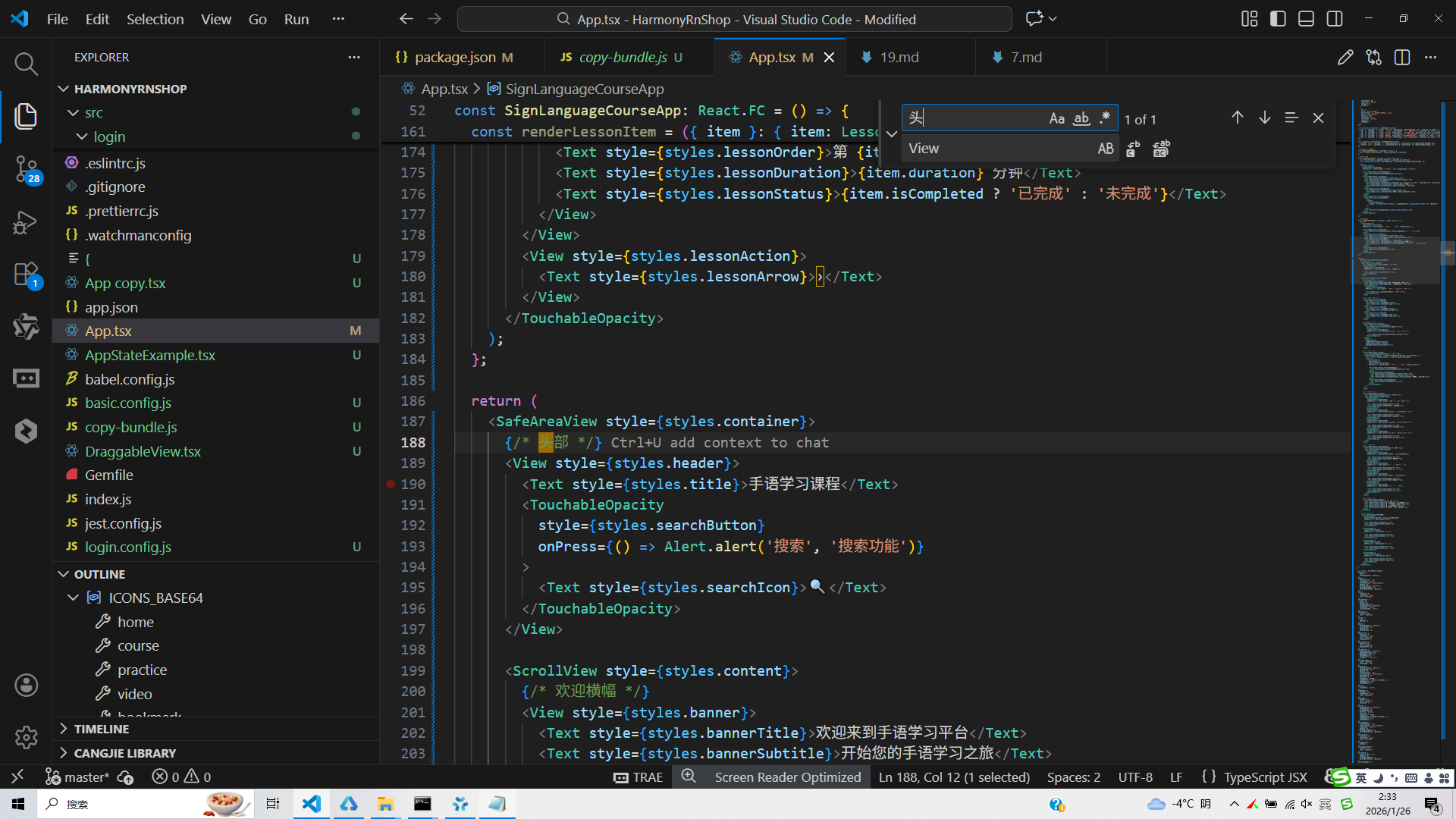
打包
接下来通过打包命令npn run harmony将reactNative的代码打包成为bundle,这样可以进行在开源鸿蒙OpenHarmony中进行使用。

打包之后再将打包后的鸿蒙OpenHarmony文件拷贝到鸿蒙的DevEco-Studio工程目录去:

最后运行效果图如下显示:
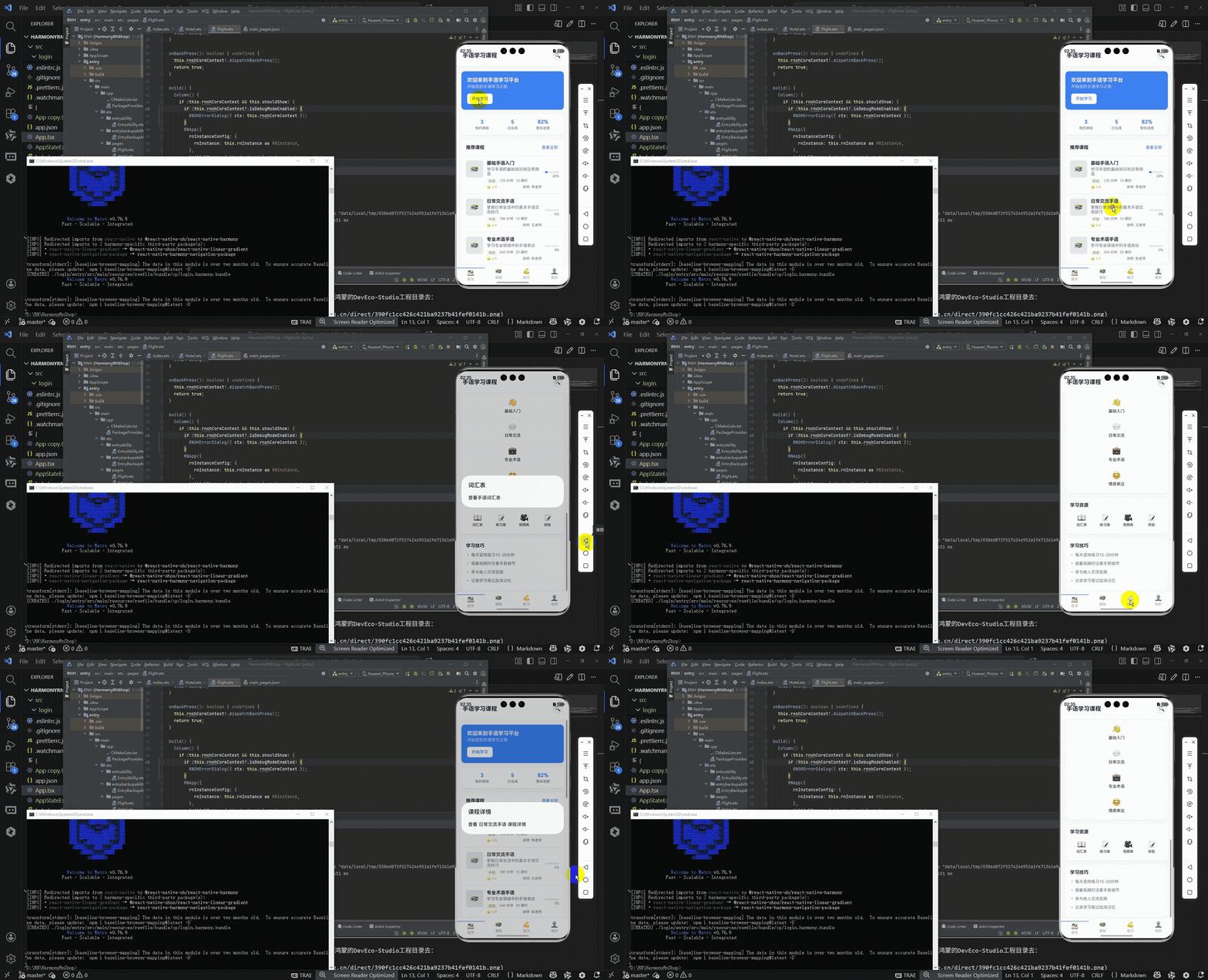
本文探讨了基于React Native开发手语课程应用的跨端适配策略,重点分析了其在鸿蒙系统上的实现方案。应用采用组件化架构(如FlatList、TouchableOpacity)与React Hooks状态管理,通过类型定义确保数据模型安全。核心实现了课程列表渲染、动态样式绑定和响应式布局等功能。在鸿蒙适配层面,详细解析了React Native组件到ArkUI组件的映射机制(如View→Div)、样式转换规则以及API适配原理。该方案验证了React Native技术在多平台(iOS/Android/鸿蒙)的可行性,为跨端开发提供了实践参考。
欢迎大家加入开源鸿蒙跨平台开发者社区,一起共建开源鸿蒙跨平台生态。

开源鸿蒙跨平台开发社区汇聚开发者与厂商,共建“一次开发,多端部署”的开源生态,致力于降低跨端开发门槛,推动万物智联创新。
更多推荐


 19
19 0
0- 0


 已为社区贡献33条内容

所有评论(0)