【maaath】Flutter for OpenHarmony 简历模板应用实战
简历模板应用是一款帮助用户快速创建和管理简历的工具。用户可以通过选择精美的模板,快速生成专业美观的个人简历。本项目采用 Flutter 框架开发,通过命令创建项目,并配置 OpenHarmony 平台支持,实现一次开发、多端运行的目标。首先,我们需要定义应用的核心数据模型。// 简历模板数据模型String id;this.id,this.name,// 简历数据模型String id;// 个人
Flutter for OpenHarmony 简历模板应用实战:从跨平台开发到鸿蒙设备部署
作者:maaath
欢迎加入开源鸿蒙跨平台社区: https://openharmonycrossplatform.csdn.net
一、引言
在移动应用开发领域,跨平台技术一直是开发者关注的焦点。Flutter 作为 Google 推出的跨平台 UI 框架,凭借其高性能和一致的 UI 渲染能力,已经在 iOS、Android、Web 等平台取得了广泛应用。而随着 OpenHarmony(开源鸿蒙)操作系统的快速发展,Flutter for OpenHarmony 成为了一个新的技术热点,为开发者提供了在鸿蒙设备上实现跨平台应用的可能。
本文将通过一个实际的简历模板应用案例,详细介绍如何使用 Flutter 开发跨平台应用,并将其部署到鸿蒙设备上运行。文章将重点展示核心业务逻辑的实现,包括模板列表展示、简历编辑、分类筛选等功能模块。
二、项目概述
2.1 项目背景
简历模板应用是一款帮助用户快速创建和管理简历的工具。用户可以通过选择精美的模板,快速生成专业美观的个人简历。本项目采用 Flutter 框架开发,通过 flutter create 命令创建项目,并配置 OpenHarmony 平台支持,实现一次开发、多端运行的目标。
2.2 核心功能模块
本应用主要包含以下核心功能:
- 模板浏览:展示各类简历模板,支持分类筛选和搜索功能
- 模板预览:全屏预览模板效果,查看详细信息
- 简历编辑:多步骤表单编辑个人信息、工作经历、教育背景等
- 简历导出:支持多种格式导出简历
- 我的简历:管理已创建的简历,支持编辑和删除
三、核心代码实现
3.1 数据模型定义
首先,我们需要定义应用的核心数据模型。以下是简历模板和简历数据的 Dart 代码实现:
// 简历模板数据模型
class ResumeTemplateModel {
  String id;
  String name;
  String category;
  String categoryId;
  String thumbnailUrl;
  String previewUrl;
  bool isVipOnly;
  bool isFavorite;
  int useCount;
  double rating;
  String primaryColor;
  String style;

  ResumeTemplateModel(
    this.id,
    this.name,
    this.category,
    this.categoryId,
    this.thumbnailUrl,
    this.previewUrl,
    this.isVipOnly,
    this.isFavorite,
    this.useCount,
    this.rating,
    this.primaryColor,
    this.style,
  );
}

// 简历数据模型
class ResumeDataModel {
  String id;
  String templateId;
  String templateName;
  PersonalInfoModel personalInfo;
  List<WorkExperienceModel> workExperience;
  List<EducationModel> education;
  List<ProjectModel> projects;
  List<String> skills;
  String selfEvaluation;
  int createTime;
  int updateTime;

  ResumeDataModel() {
    personalInfo = PersonalInfoModel();
    workExperience = [];
    education = [];
    projects = [];
    skills = [];
    createTime = DateTime.now().millisecondsSinceEpoch;
    updateTime = DateTime.now().millisecondsSinceEpoch;
  }
}

// 个人信息模型
class PersonalInfoModel {
  String name;
  String gender;
  int age;
  String phone;
  String email;
  String address;
  String jobIntention;
  String salary;
  int workYears;
  String maritalStatus;

  PersonalInfoModel() {
    name = '';
    gender = '';
    age = 0;
    phone = '';
    email = '';
    address = '';
    jobIntention = '';
    salary = '';
    workYears = 0;
    maritalStatus = '';
  }
}

// 工作经验模型
class WorkExperienceModel {
  String id;
  String company;
  String position;
  String startDate;
  String endDate;
  String description;
  bool isCurrent;

  WorkExperienceModel() {
    id = DateTime.now().millisecondsSinceEpoch.toString();
    company = '';
    position = '';
    startDate = '';
    endDate = '';
    description = '';
    isCurrent = false;
  }
}

// 教育经历模型
class EducationModel {
  String id;
  String school;
  String major;
  String degree;
  String startDate;
  String endDate;
  String gpa;
  String description;

  EducationModel() {
    id = DateTime.now().millisecondsSinceEpoch.toString();
    school = '';
    major = '';
    degree = '';
    startDate = '';
    endDate = '';
    gpa = '';
    description = '';
  }
}

// 项目经验模型
class ProjectModel {
  String id;
  String name;
  String role;
  String startDate;
  String endDate;
  String description;

  ProjectModel() {
    id = DateTime.now().millisecondsSinceEpoch.toString();
    name = '';
    role = '';
    startDate = '';
    endDate = '';
    description = '';
  }
}
3.2 模板服务层实现
服务层负责提供模板数据查询和管理功能。下面的代码展示了如何实现模板的分类筛选、搜索和收藏功能:
// 简历服务类
class ResumeService {
  // 获取模板列表
  static Future<List<ResumeTemplateModel>> getTemplateList({
    String categoryId = 'all',
    int page = 1,
    int pageSize = 10,
  }) async {
    await Future.delayed(Duration(milliseconds: 500));
    return _getMockTemplates(categoryId, page, pageSize);
  }

  // 搜索模板
  static Future<List<ResumeTemplateModel>> searchTemplates(String keyword) async {
    await Future.delayed(Duration(milliseconds: 400));
    final templates = _getMockTemplates('all', 1, 50);
    return templates.where((t) =>
      t.name.contains(keyword) || t.category.contains(keyword)
    ).toList();
  }

  // 获取收藏模板
  static Future<List<ResumeTemplateModel>> getFavoriteTemplates() async {
    await Future.delayed(Duration(milliseconds: 300));
    final templates = _getMockTemplates('all', 1, 50);
    return templates.where((t) => t.isFavorite).toList();
  }

  // 切换收藏状态
  static Future<bool> toggleFavorite(String templateId) async {
    await Future.delayed(Duration(milliseconds: 200));
    return true;
  }

  // 保存简历
  static Future<bool> saveResume(ResumeDataModel resume) async {
    await Future.delayed(Duration(milliseconds: 500));
    resume.updateTime = DateTime.now().millisecondsSinceEpoch;
    return true;
  }

  // 获取我的简历列表
  static Future<List<ResumeDataModel>> getMyResumes() async {
    await Future.delayed(Duration(milliseconds: 400));
    return _getMockMyResumes();
  }

  // 模拟数据生成方法
  static List<ResumeTemplateModel> _getMockTemplates(
    String categoryId,
    int page,
    int pageSize,
  ) {
    final allTemplates = [
      ResumeTemplateModel('t1', '经典蓝白', '经典简约', 'classic',
        'https://picsum.photos/seed/resume1/200/280',
        'https://picsum.photos/seed/resume1/600/800',
        false, true, 12580, 4.8, '#5B8DEF', 'classic'),
      ResumeTemplateModel('t2', '简约灰调', '经典简约', 'classic',
        'https://picsum.photos/seed/resume2/200/280',
        'https://picsum.photos/seed/resume2/600/800',
        false, false, 9860, 4.6, '#636E72', 'classic'),
      ResumeTemplateModel('t3', '商务黑金', '经典简约', 'classic',
        'https://picsum.photos/seed/resume3/200/280',
        'https://picsum.photos/seed/resume3/600/800',
        true, false, 15600, 4.9, '#2D3436', 'classic'),
      ResumeTemplateModel('t4', '渐变炫彩', '现代时尚', 'modern',
        'https://picsum.photos/seed/resume4/200/280',
        'https://picsum.photos/seed/resume4/600/800',
        false, true, 18920, 4.7, '#7C4DFF', 'modern'),
      ResumeTemplateModel('t5', '极简线条', '现代时尚', 'modern',
        'https://picsum.photos/seed/resume5/200/280',
        'https://picsum.photos/seed/resume5/600/800',
        false, false, 11200, 4.5, '#00C9A7', 'modern'),
      ResumeTemplateModel('t6', '清新薄荷', '现代时尚', 'modern',
        'https://picsum.photos/seed/resume6/200/280',
        'https://picsum.photos/seed/resume6/600/800',
        true, false, 8900, 4.4, '#00BFA5', 'modern'),
      ResumeTemplateModel('t7', '创意撞色', '创意个性', 'creative',
        'https://picsum.photos/seed/resume7/200/280',
        'https://picsum.photos/seed/resume7/600/800',
        false, false, 7680, 4.3, '#FF6B6B', 'creative'),
      ResumeTemplateModel('t8', '几何图案', '创意个性', 'creative',
        'https://picsum.photos/seed/resume8/200/280',
        'https://picsum.photos/seed/resume8/600/800',
        true, true, 6450, 4.6, '#FFB300', 'creative'),
      ResumeTemplateModel('t9', '手绘风格', '创意个性', 'creative',
        'https://picsum.photos/seed/resume9/200/280',
        'https://picsum.photos/seed/resume9/600/800',
        false, false, 5200, 4.2, '#FF8A65', 'creative'),
      ResumeTemplateModel('t10', '专业蓝调', '专业商务', 'professional',
        'https://picsum.photos/seed/resume10/200/280',
        'https://picsum.photos/seed/resume10/600/800',
        false, true, 25600, 4.9, '#1565C0', 'professional'),
      ResumeTemplateModel('t11', '律师风格', '专业商务', 'professional',
        'https://picsum.photos/seed/resume11/200/280',
        'https://picsum.photos/seed/resume11/600/800',
        true, false, 12300, 4.7, '#37474F', 'professional'),
      ResumeTemplateModel('t12', '金融精英', '专业商务', 'professional',
        'https://picsum.photos/seed/resume12/200/280',
        'https://picsum.photos/seed/resume12/600/800',
        true, false, 9800, 4.8, '#4E342E', 'professional'),
      ResumeTemplateModel('t13', '程序员蓝', '技术开发', 'tech',
        'https://picsum.photos/seed/resume13/200/280',
        'https://picsum.photos/seed/resume13/600/800',
        false, false, 32400, 4.9, '#0D47A1', 'tech'),
      ResumeTemplateModel('t14', '代码风格', '技术开发', 'tech',
        'https://picsum.photos/seed/resume14/200/280',
        'https://picsum.photos/seed/resume14/600/800',
        false, true, 28900, 4.8, '#263238', 'tech'),
      ResumeTemplateModel('t15', 'GitHub风格', '技术开发', 'tech',
        'https://picsum.photos/seed/resume15/200/280',
        'https://picsum.photos/seed/resume15/600/800',
        false, false, 21500, 4.7, '#212121', 'tech'),
    ];

    List<ResumeTemplateModel> filtered = allTemplates;
    if (categoryId != 'all') {
      filtered = allTemplates.where((t) => t.categoryId == categoryId).toList();
    }

    final start = (page - 1) * pageSize;
    final end = start + pageSize;
    return filtered.sublist(start, end.clamp(0, filtered.length));
  }

  static List<ResumeDataModel> _getMockMyResumes() {
    final resumes = <ResumeDataModel>[];

    final resume1 = ResumeDataModel();
    resume1.id = 'r1';
    resume1.templateId = 't1';
    resume1.templateName = '经典蓝白';
    resume1.personalInfo.name = '张三';
    resume1.personalInfo.gender = '男';
    resume1.personalInfo.age = 28;
    resume1.personalInfo.phone = '13800138000';
    resume1.personalInfo.email = 'zhangsan@example.com';
    resume1.personalInfo.jobIntention = '高级前端开发工程师';
    resume1.personalInfo.salary = '30K-50K';
    resume1.workExperience = [
      WorkExperienceModel()
        ..company = '字节跳动'
        ..position = '高级前端工程师'
        ..startDate = '2021-03'
        ..isCurrent = true
        ..description = '负责抖音Web端开发',
    ];
    resume1.education = [
      EducationModel()
        ..school = '清华大学'
        ..major = '计算机科学与技术'
        ..degree = '本科'
        ..startDate = '2015-09'
        ..endDate = '2019-06',
    ];
    resume1.skills = ['Vue', 'React', 'TypeScript', 'Node.js'];
    resumes.add(resume1);

    return resumes;
  }
}
3.3 模板列表页面实现
模板列表页面是应用的核心页面之一,负责展示所有简历模板并支持分类筛选。以下是使用 Flutter Widget 实现的模板列表组件:
class TemplateListWidget extends StatefulWidget {
const TemplateListWidget({Key? key}) : super(key: key);
State<TemplateListWidget> createState() => _TemplateListWidgetState();
}
class _TemplateListWidgetState extends State<TemplateListWidget> {
List<ResumeTemplateModel> _templates = [];
bool _isLoading = true;
String _selectedCategory = 'all';
final List<Map<String, String>> _categories = [
{'id': 'all', 'name': '全部'},
{'id': 'classic', 'name': '经典简约'},
{'id': 'modern', 'name': '现代时尚'},
{'id': 'creative', 'name': '创意个性'},
{'id': 'professional', 'name': '专业商务'},
{'id': 'tech', 'name': '技术开发'},
];
void initState() {
super.initState();
_loadTemplates();
}
Future<void> _loadTemplates() async {
setState(() => _isLoading = true);
final templates = await ResumeService.getTemplateList(
categoryId: _selectedCategory,
);
setState(() {
_templates = templates;
_isLoading = false;
});
}
void _onCategoryChanged(String categoryId) {
setState(() => _selectedCategory = categoryId);
_loadTemplates();
}
Widget build(BuildContext context) {
return Column(
children: [
// 分类筛选栏
SizedBox(
height: 44,
child: ListView.builder(
scrollDirection: Axis.horizontal,
padding: EdgeInsets.symmetric(horizontal: 16),
itemCount: _categories.length,
itemBuilder: (context, index) {
final category = _categories[index];
final isSelected = category['id'] == _selectedCategory;
return Padding(
padding: EdgeInsets.only(right: 8),
child: FilterChip(
label: Text(category['name']!),
selected: isSelected,
onSelected: (_) => _onCategoryChanged(category['id']!),
backgroundColor: Colors.grey[200],
selectedColor: Color(0xFF5B8DEF),
labelStyle: TextStyle(
color: isSelected ? Colors.white : Colors.grey[700],
),
),
);
},
),
),
// 模板列表
Expanded(
child: _isLoading
? Center(child: CircularProgressIndicator())
: GridView.builder(
padding: EdgeInsets.all(16),
gridDelegate: SliverGridDelegateWithFixedCrossAxisCount(
crossAxisCount: 2,
childAspectRatio: 0.7,
crossAxisSpacing: 12,
mainAxisSpacing: 12,
),
itemCount: _templates.length,
itemBuilder: (context, index) {
final template = _templates[index];
return _buildTemplateCard(template);
},
),
),
],
);
}
Widget _buildTemplateCard(ResumeTemplateModel template) {
return GestureDetector(
onTap: () => _showTemplateDetail(template),
child: Container(
decoration: BoxDecoration(
color: Colors.white,
borderRadius: BorderRadius.circular(12),
boxShadow: [
BoxShadow(
color: Colors.black.withOpacity(0.08),
blurRadius: 8,
offset: Offset(0, 2),
),
],
),
child: Column(
crossAxisAlignment: CrossAxisAlignment.start,
children: [
// 模板缩略图
Expanded(
child: Container(
decoration: BoxDecoration(
color: Color(int.parse(
template.primaryColor.replaceFirst('#', '0xFF'),
)).withOpacity(0.1),
borderRadius: BorderRadius.vertical(top: Radius.circular(12)),
),
child: Center(
child: Icon(
Icons.description_outlined,
size: 48,
color: Color(int.parse(
template.primaryColor.replaceFirst('#', '0xFF'),
)),
),
),
),
),
// 模板信息
Padding(
padding: EdgeInsets.all(12),
child: Column(
crossAxisAlignment: CrossAxisAlignment.start,
children: [
Row(
children: [
Expanded(
child: Text(
template.name,
style: TextStyle(
fontSize: 14,
fontWeight: FontWeight.bold,
),
maxLines: 1,
overflow: TextOverflow.ellipsis,
),
),
if (template.isVipOnly)
Container(
padding: EdgeInsets.symmetric(
horizontal: 6,
vertical: 2,
),
decoration: BoxDecoration(
color: Colors.amber,
borderRadius: BorderRadius.circular(4),
),
child: Text(
'VIP',
style: TextStyle(
fontSize: 10,
color: Colors.white,
),
),
),
],
),
SizedBox(height: 4),
Text(
template.category,
style: TextStyle(
fontSize: 12,
color: Colors.grey[600],
),
),
SizedBox(height: 4),
Row(
children: [
Icon(Icons.star, size: 14, color: Colors.amber),
SizedBox(width: 2),
Text(
template.rating.toString(),
style: TextStyle(fontSize: 12),
),
Spacer(),
Text(
'${(template.useCount / 1000).toStringAsFixed(1)}K人使用',
style: TextStyle(
fontSize: 11,
color: Colors.grey[500],
),
),
],
),
],
),
),
],
),
),
);
}
void _showTemplateDetail(ResumeTemplateModel template) {
// 跳转到模板详情页
Navigator.push(
context,
MaterialPageRoute(
builder: (context) => TemplateDetailPage(template: template),
),
);
}
}
3.4 简历编辑表单实现
简历编辑页面采用多步骤表单设计,引导用户逐步填写个人信息、工作经历等。以下是编辑表单的核心组件实现:
class ResumeEditForm extends StatefulWidget {
final ResumeDataModel? initialData;
const ResumeEditForm({Key? key, this.initialData}) : super(key: key);
State<ResumeEditForm> createState() => _ResumeEditFormState();
}
class _ResumeEditFormState extends State<ResumeEditForm> {
int _currentStep = 0;
late ResumeDataModel _resume;
final int _totalSteps = 5;
final List<String> _stepNames = [
'基本信息',
'工作经历',
'教育经历',
'项目经验',
'技能评价',
];
void initState() {
super.initState();
_resume = widget.initialData ?? ResumeDataModel();
}
void _nextStep() {
if (_currentStep < _totalSteps - 1) {
setState(() => _currentStep++);
}
}
void _prevStep() {
if (_currentStep > 0) {
setState(() => _currentStep--);
} else {
Navigator.pop(context);
}
}
Widget build(BuildContext context) {
return Scaffold(
backgroundColor: Color(0xFFF5F7FA),
appBar: AppBar(
title: Text(_stepNames[_currentStep]),
backgroundColor: Colors.white,
foregroundColor: Color(0xFF2D3436),
elevation: 0,
actions: [
TextButton(
onPressed: _saveResume,
child: Text('保存', style: TextStyle(color: Color(0xFF5B8DEF))),
),
],
),
body: Column(
children: [
// 步骤指示器
_buildStepIndicator(),
// 表单内容
Expanded(
child: _buildStepContent(),
),
// 底部按钮
_buildBottomButtons(),
],
),
);
}
Widget _buildStepIndicator() {
return Container(
color: Colors.white,
padding: EdgeInsets.symmetric(vertical: 12),
child: Row(
children: List.generate(_totalSteps, (index) {
final isCompleted = index < _currentStep;
final isCurrent = index == _currentStep;
return Expanded(
child: Row(
children: [
Container(
width: 28,
height: 28,
decoration: BoxDecoration(
shape: BoxShape.circle,
color: isCompleted || isCurrent
? Color(0xFF5B8DEF)
: Color(0xFFE0E0E0),
),
child: Center(
child: isCompleted
? Icon(Icons.check, size: 16, color: Colors.white)
: Text(
'${index + 1}',
style: TextStyle(
fontSize: 12,
color: isCurrent ? Colors.white : Colors.grey,
),
),
),
),
if (index < _totalSteps - 1)
Expanded(
child: Container(
height: 2,
color: isCompleted
? Color(0xFF5B8DEF)
: Color(0xFFE0E0E0),
),
),
],
),
);
}),
),
);
}
Widget _buildStepContent() {
switch (_currentStep) {
case 0:
return _buildPersonalInfoForm();
case 1:
return _buildWorkExperienceForm();
case 2:
return _buildEducationForm();
case 3:
return _buildProjectForm();
case 4:
return _buildSkillsForm();
default:
return SizedBox();
}
}
Widget _buildPersonalInfoForm() {
return SingleChildScrollView(
padding: EdgeInsets.all(16),
child: Column(
children: [
_buildFormCard([
_buildTextField(
label: '姓名',
value: _resume.personalInfo.name,
onChanged: (v) => _resume.personalInfo.name = v,
),
_buildTextField(
label: '性别',
value: _resume.personalInfo.gender,
onChanged: (v) => _resume.personalInfo.gender = v,
),
_buildTextField(
label: '手机号码',
value: _resume.personalInfo.phone,
onChanged: (v) => _resume.personalInfo.phone = v,
keyboardType: TextInputType.phone,
),
_buildTextField(
label: '电子邮箱',
value: _resume.personalInfo.email,
onChanged: (v) => _resume.personalInfo.email = v,
keyboardType: TextInputType.emailAddress,
),
]),
SizedBox(height: 16),
_buildFormCard([
_buildTextField(
label: '期望职位',
value: _resume.personalInfo.jobIntention,
onChanged: (v) => _resume.personalInfo.jobIntention = v,
),
_buildTextField(
label: '期望薪资',
value: _resume.personalInfo.salary,
onChanged: (v) => _resume.personalInfo.salary = v,
),
]),
],
),
);
}
Widget _buildWorkExperienceForm() {
return ListView.builder(
padding: EdgeInsets.all(16),
itemCount: _resume.workExperience.length + 1,
itemBuilder: (context, index) {
if (index == _resume.workExperience.length) {
return _buildAddButton('添加工作经历', () {
setState(() {
_resume.workExperience.add(WorkExperienceModel());
});
});
}
final exp = _resume.workExperience[index];
return _buildFormCard([
_buildTextField(
label: '公司名称',
value: exp.company,
onChanged: (v) => exp.company = v,
),
_buildTextField(
label: '职位名称',
value: exp.position,
onChanged: (v) => exp.position = v,
),
_buildTextField(
label: '工作时间',
value: '${exp.startDate} - ${exp.isCurrent ? "至今" : exp.endDate}',
onChanged: (v) => exp.startDate = v,
),
_buildTextField(
label: '工作描述',
value: exp.description,
onChanged: (v) => exp.description = v,
maxLines: 3,
),
]);
},
);
}
Widget _buildEducationForm() {
return ListView.builder(
padding: EdgeInsets.all(16),
itemCount: _resume.education.length + 1,
itemBuilder: (context, index) {
if (index == _resume.education.length) {
return _buildAddButton('添加教育经历', () {
setState(() {
_resume.education.add(EducationModel());
});
});
}
final edu = _resume.education[index];
return _buildFormCard([
_buildTextField(
label: '学校名称',
value: edu.school,
onChanged: (v) => edu.school = v,
),
_buildTextField(
label: '专业',
value: edu.major,
onChanged: (v) => edu.major = v,
),
_buildTextField(
label: '学历',
value: edu.degree,
onChanged: (v) => edu.degree = v,
),
]);
},
);
}
Widget _buildProjectForm() {
return ListView.builder(
padding: EdgeInsets.all(16),
itemCount: _resume.projects.length + 1,
itemBuilder: (context, index) {
if (index == _resume.projects.length) {
return _buildAddButton('添加项目经验', () {
setState(() {
_resume.projects.add(ProjectModel());
});
});
}
final project = _resume.projects[index];
return _buildFormCard([
_buildTextField(
label: '项目名称',
value: project.name,
onChanged: (v) => project.name = v,
),
_buildTextField(
label: '项目角色',
value: project.role,
onChanged: (v) => project.role = v,
),
_buildTextField(
label: '项目描述',
value: project.description,
onChanged: (v) => project.description = v,
maxLines: 3,
),
]);
},
);
}
Widget _buildSkillsForm() {
return SingleChildScrollView(
padding: EdgeInsets.all(16),
child: Column(
children: [
_buildFormCard([
Padding(
padding: EdgeInsets.all(16),
child: Text('专业技能', style: TextStyle(fontSize: 15)),
),
Divider(height: 1),
Padding(
padding: EdgeInsets.all(16),
child: Wrap(
spacing: 8,
runSpacing: 8,
children: [
..._resume.skills.asMap().entries.map((entry) {
return Chip(
label: Text(entry.value),
deleteIcon: Icon(Icons.close, size: 16),
onDeleted: () {
setState(() {
_resume.skills.removeAt(entry.key);
});
},
);
}),
],
),
),
]),
],
),
);
}
Widget _buildFormCard(List<Widget> children) {
return Container(
margin: EdgeInsets.only(bottom: 16),
decoration: BoxDecoration(
color: Colors.white,
borderRadius: BorderRadius.circular(8),
),
child: Column(children: children),
);
}
Widget _buildTextField({
required String label,
required String value,
required Function(String) onChanged,
int maxLines = 1,
TextInputType? keyboardType,
}) {
return Padding(
padding: EdgeInsets.symmetric(horizontal: 16, vertical: 12),
child: Row(
crossAxisAlignment:
maxLines > 1 ? CrossAxisAlignment.start : CrossAxisAlignment.center,
children: [
SizedBox(
width: 80,
child: Text(
label,
style: TextStyle(fontSize: 13, color: Color(0xFF636E72)),
),
),
Expanded(
child: TextField(
controller: TextEditingController(text: value),
onChanged: onChanged,
maxLines: maxLines,
keyboardType: keyboardType,
style: TextStyle(fontSize: 14),
decoration: InputDecoration(
border: InputBorder.none,
hintText: '请输入',
isDense: true,
contentPadding: EdgeInsets.zero,
),
),
),
],
),
);
}
Widget _buildAddButton(String text, VoidCallback onTap) {
return GestureDetector(
onTap: onTap,
child: Container(
padding: EdgeInsets.all(16),
decoration: BoxDecoration(
color: Colors.white,
borderRadius: BorderRadius.circular(8),
),
child: Center(
child: Text(
'+ $text',
style: TextStyle(fontSize: 14, color: Color(0xFF5B8DEF)),
),
),
),
);
}
Widget _buildBottomButtons() {
return Container(
padding: EdgeInsets.fromLTRB(16, 12, 16, 32),
color: Colors.white,
child: Row(
children: [
if (_currentStep > 0)
Expanded(
child: OutlinedButton(
onPressed: _prevStep,
style: OutlinedButton.styleFrom(
foregroundColor: Color(0xFF5B8DEF),
side: BorderSide(color: Color(0xFF5B8DEF)),
padding: EdgeInsets.symmetric(vertical: 12),
),
child: Text('上一步'),
),
)
else
Expanded(child: SizedBox()),
SizedBox(width: 16),
Expanded(
flex: 2,
child: ElevatedButton(
onPressed: _currentStep < _totalSteps - 1 ? _nextStep : _saveResume,
style: ElevatedButton.styleFrom(
backgroundColor: Color(0xFF5B8DEF),
foregroundColor: Colors.white,
padding: EdgeInsets.symmetric(vertical: 12),
),
child: Text(_currentStep < _totalSteps - 1 ? '下一步' : '保存简历'),
),
),
],
),
);
}
Future<void> _saveResume() async {
// 保存简历逻辑
await ResumeService.saveResume(_resume);
if (mounted) {
Navigator.pop(context);
}
}
}
四、鸿蒙设备运行截图
4.1 应用启动页面
应用启动时展示带有动画效果的启动页,包含应用Logo和Slogan。启动动画包括Logo缩放、文字渐入等效果,持续约2.5秒后自动跳转到主页面。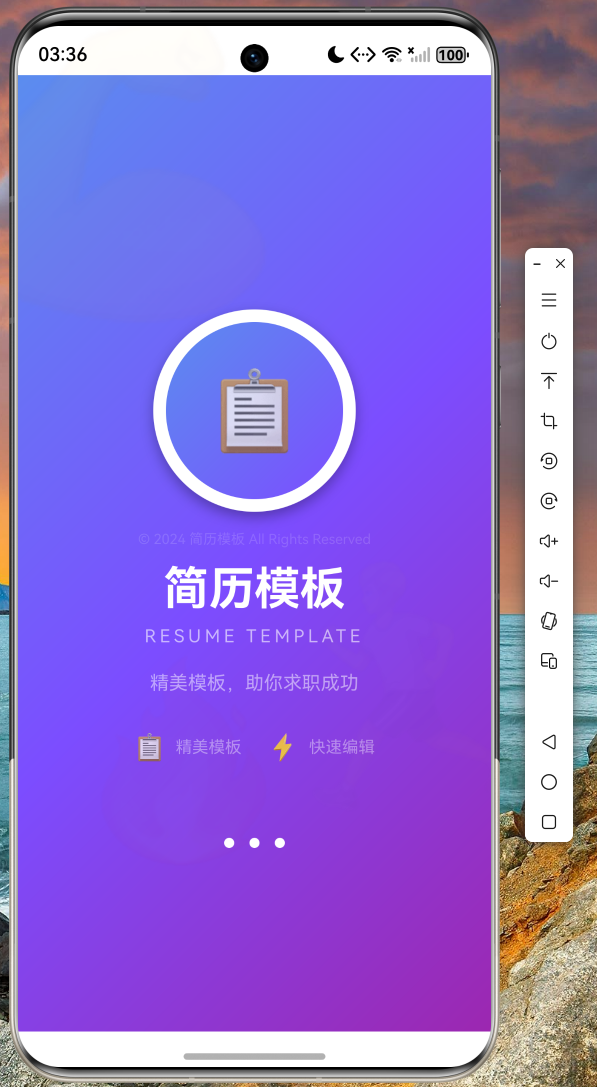
4.2 模板浏览页面
主页面底部包含四个选项卡:模板、编辑、导出、我的。模板页面顶部显示分类筛选标签栏,下方以网格形式展示简历模板卡片。每个卡片包含模板缩略图、名称、分类标签、使用人数和评分信息。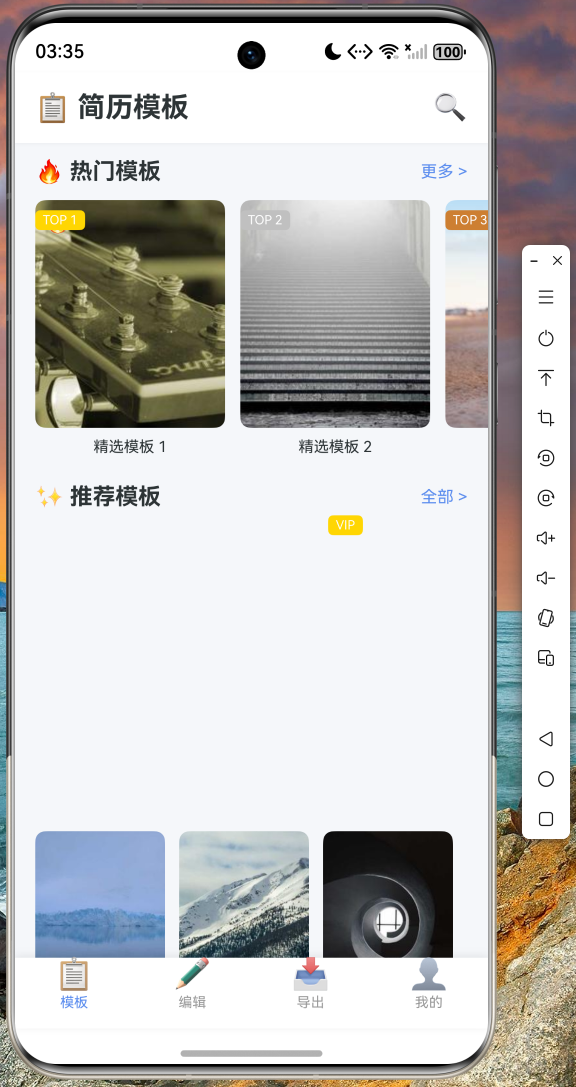
4.3 简历编辑页面
简历编辑采用多步骤表单设计,共五个步骤:基本信息、工作经历、教育经历、项目经验、技能评价。每完成一步可点击下一步继续,或返回上一步修改。编辑完成后点击保存即可生成简历。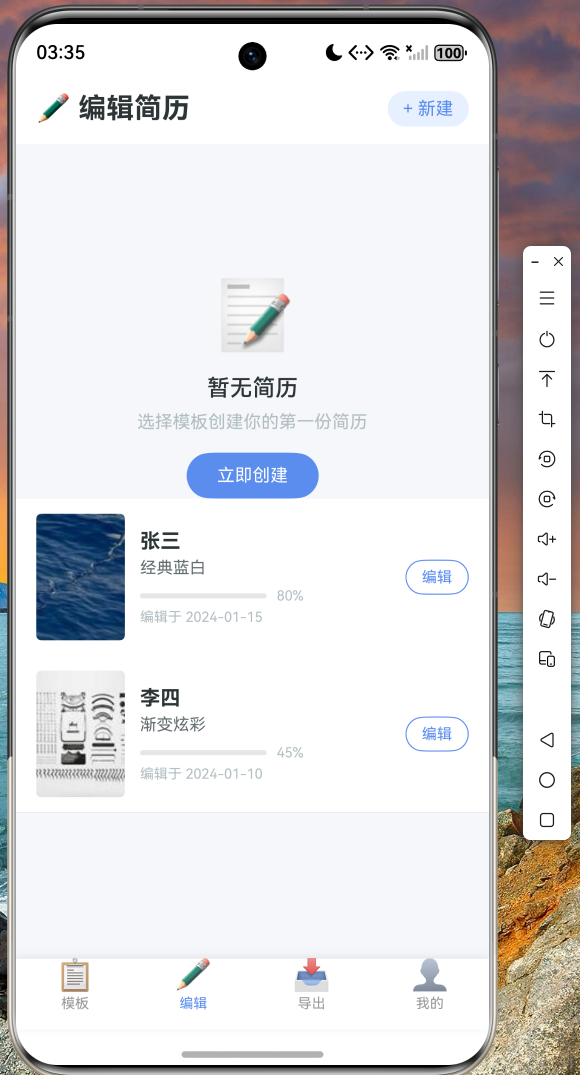
4.4 我的简历页面
我的简历页面展示用户已创建的简历列表,支持查看详情、编辑和删除操作。用户可以管理多份简历,方便随时修改和更新。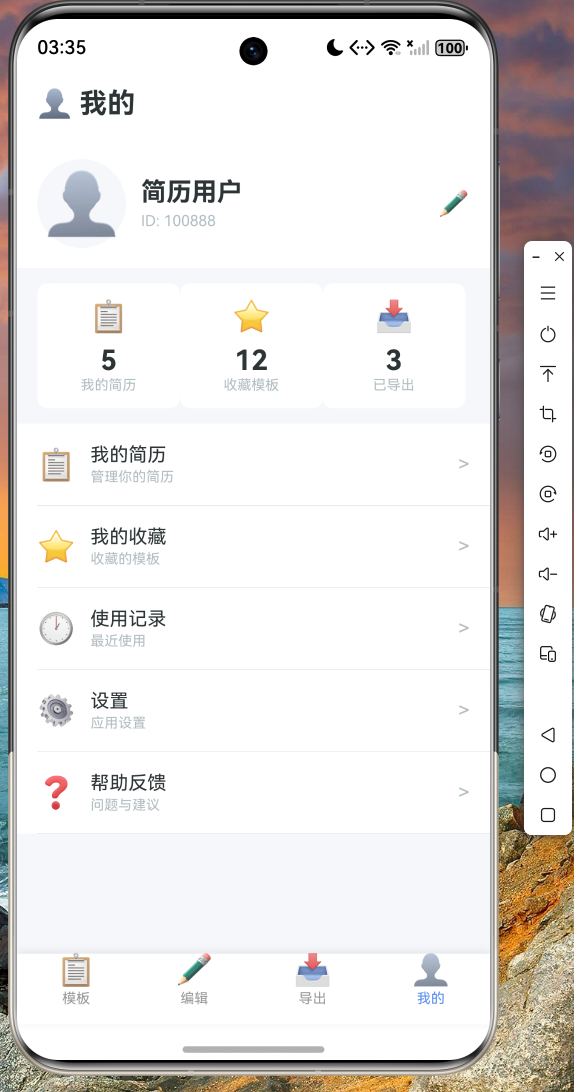
五、代码仓库
本项目完整源代码已托管至 AtomGit 平台,仓库地址如下:
仓库链接:https://atomgit.com/maaath/resume-template-flutter
仓库中包含完整的 Flutter 项目代码,包括数据模型、服务层、页面组件等,开发者可直接克隆进行学习和二次开发。
六、总结与展望
本文通过简历模板应用案例,详细介绍了 Flutter for OpenHarmony 跨平台开发的完整流程。从数据模型定义到服务层封装,再到 UI 组件实现,展示了如何使用 Dart 语言开发高质量的跨平台应用。
通过 Flutter 框架,开发者可以一次编写代码,同时部署到 iOS、Android、Web 以及 OpenHarmony 等多个平台,大大提高了开发效率。Flutter 提供的声明式 UI 范式和热重载功能,使得开发过程更加流畅和高效。
未来,随着 OpenHarmony 生态的持续发展,Flutter for OpenHarmony 将支持更多原生能力,为跨平台开发者提供更广阔的应用场景。建议感兴趣的开发者持续关注 Flutter 官方和 OpenHarmony 社区的动态,探索更多跨平台开发的可能性。
参考链接:
- Flutter 官方文档:https://flutter.dev
- OpenHarmony 开发者官网:https://www.openharmony.cn
- AtomGit 代码托管平台:https://atomgit.com

开源鸿蒙跨平台开发社区汇聚开发者与厂商,共建“一次开发,多端部署”的开源生态,致力于降低跨端开发门槛,推动万物智联创新。
更多推荐

 7
7 0
0- 0


 已为社区贡献12条内容

所有评论(0)