基础入门 Flutter for OpenHarmony:RangeSlider 范围滑块组件详解
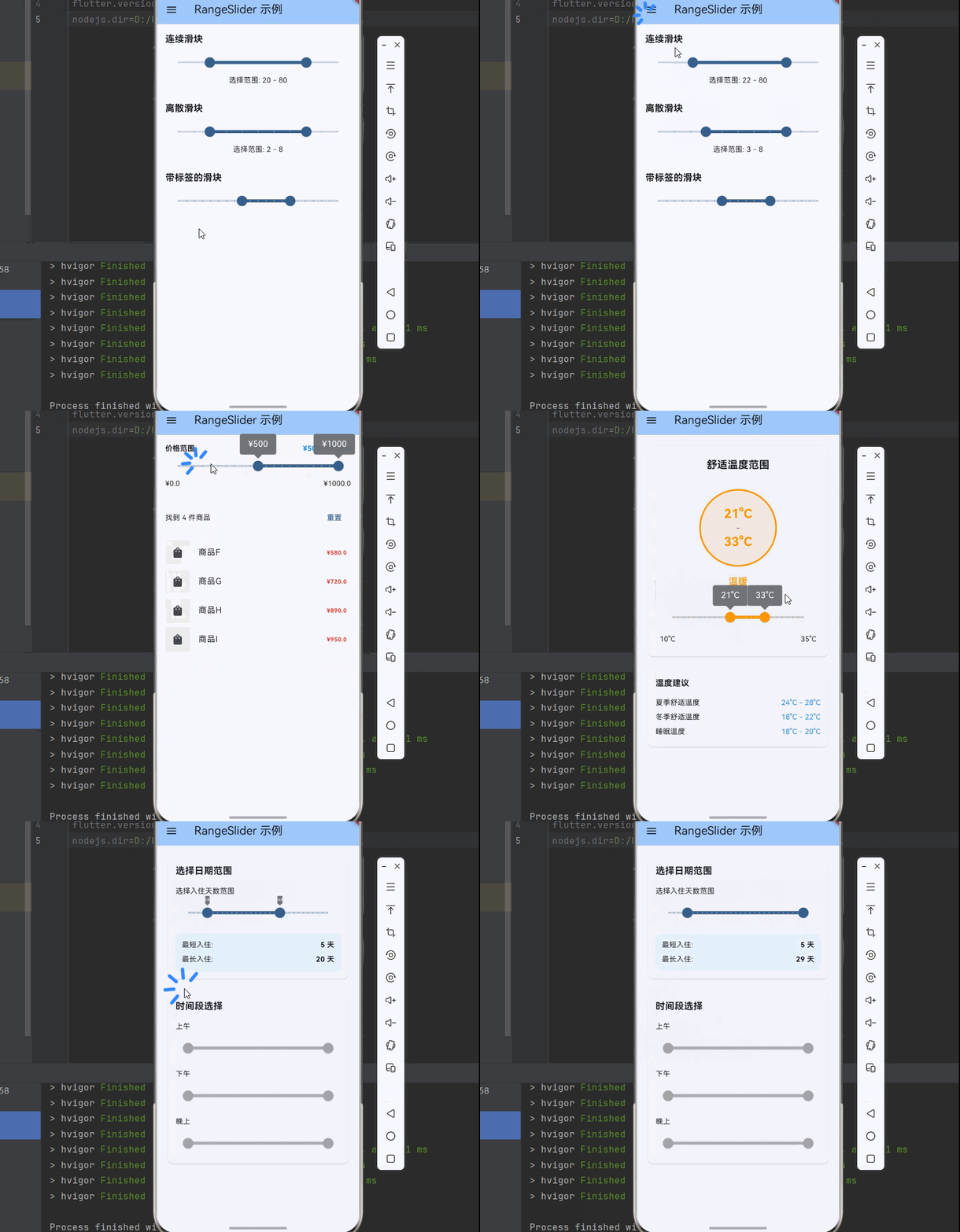
在移动应用开发中,范围选择是一种常见的交互模式。用户可以通过拖动两个滑块来选择一个数值范围,这种设计常用于价格筛选、时间范围选择、年龄筛选等场景。Flutter 提供了 RangeSlider 组件,专门用于实现这种双滑块的范围选择功能。通过),),),),),min: 0,max: 100,),});},),形状说明圆形滑块自定义形状),),),),),选项说明仅离散滑块显示仅连续滑块显示alw
欢迎加入开源鸿蒙跨平台社区:https://openharmonycrossplatform.csdn.net
🎯 欢迎来到 Flutter for OpenHarmony 社区!本文将深入讲解 Flutter 中 RangeSlider 范围滑块组件的使用方法,带你从基础到精通,掌握范围选择、价格筛选等常见交互模式。
一、RangeSlider 组件概述
在移动应用开发中,范围选择是一种常见的交互模式。用户可以通过拖动两个滑块来选择一个数值范围,这种设计常用于价格筛选、时间范围选择、年龄筛选等场景。Flutter 提供了 RangeSlider 组件,专门用于实现这种双滑块的范围选择功能。
📋 RangeSlider 组件特点
| 特点 | 说明 |
|---|---|
| 双滑块设计 | 支持选择一个范围而非单个值 |
| 自定义范围 | 支持设置最小值和最大值 |
| 分段显示 | 支持离散值和连续值 |
| 标签显示 | 支持显示当前选择的值 |
| 自定义样式 | 支持自定义滑块和轨道的颜色 |
| Material 设计 | 遵循 Material Design 设计规范 |
RangeSlider 与 Slider 的区别
Flutter 提供了两个滑块相关的组件:
| 特性 | Slider | RangeSlider |
|---|---|---|
| 滑块数量 | 1个 | 2个 |
| 选择方式 | 选择单个值 | 选择一个范围 |
| 适用场景 | 音量、亮度调节 | 价格、时间范围筛选 |
| 回调参数 | 单个值 | RangeValues |
💡 使用场景:RangeSlider 适合需要选择范围的场景,如价格筛选、年龄范围、时间范围等。如果只需要选择单个值,可以使用 Slider 组件。
二、RangeSlider 基础用法
RangeSlider 的使用需要定义范围值和回调函数。让我们从最基础的用法开始学习。
2.1 最简单的 RangeSlider
最基础的 RangeSlider 需要设置 min、max、values 和 onChanged 参数:
class BasicRangeSlider extends StatefulWidget {
const BasicRangeSlider({super.key});
State<BasicRangeSlider> createState() => _BasicRangeSliderState();
}
class _BasicRangeSliderState extends State<BasicRangeSlider> {
RangeValues _values = const RangeValues(20, 80);
Widget build(BuildContext context) {
return Column(
children: [
RangeSlider(
values: _values,
min: 0,
max: 100,
onChanged: (values) {
setState(() {
_values = values;
});
},
),
Text('选择范围: ${_values.start.round()} - ${_values.end.round()}'),
],
);
}
}
代码解析:
values:当前选择的范围值,是一个 RangeValues 对象min:最小值max:最大值onChanged:值变化时的回调函数RangeValues:包含 start 和 end 两个属性
2.2 设置分段数
通过 divisions 参数设置分段数,使滑块在离散值之间移动:
RangeSlider(
  values: _values,
  min: 0,
  max: 100,
  divisions: 10,
  onChanged: (values) {
    setState(() {
      _values = values;
    });
  },
)
2.3 显示标签
通过 labels 参数显示当前选择的值标签:
RangeSlider(
  values: _values,
  min: 0,
  max: 100,
  divisions: 10,
  labels: RangeLabels(
    _values.start.round().toString(),
    _values.end.round().toString(),
  ),
  onChanged: (values) {
    setState(() {
      _values = values;
    });
  },
)
2.4 完整示例
下面是一个完整的可运行示例,展示了 RangeSlider 的基础用法:
class RangeSliderExample extends StatefulWidget {
const RangeSliderExample({super.key});
State<RangeSliderExample> createState() => _RangeSliderExampleState();
}
class _RangeSliderExampleState extends State<RangeSliderExample> {
RangeValues _priceRange = const RangeValues(100, 500);
RangeValues _ageRange = const RangeValues(18, 60);
Widget build(BuildContext context) {
return Scaffold(
appBar: AppBar(title: const Text('RangeSlider 示例')),
body: Padding(
padding: const EdgeInsets.all(16),
child: Column(
crossAxisAlignment: CrossAxisAlignment.start,
children: [
_buildSection(
'价格范围',
'¥${_priceRange.start.round()} - ¥${_priceRange.end.round()}',
RangeSlider(
values: _priceRange,
min: 0,
max: 1000,
divisions: 20,
labels: RangeLabels(
'¥${_priceRange.start.round()}',
'¥${_priceRange.end.round()}',
),
onChanged: (values) {
setState(() {
_priceRange = values;
});
},
),
),
const SizedBox(height: 32),
_buildSection(
'年龄范围',
'${_ageRange.start.round()} - ${_ageRange.end.round()} 岁',
RangeSlider(
values: _ageRange,
min: 0,
max: 100,
divisions: 10,
labels: RangeLabels(
'${_ageRange.start.round()}岁',
'${_ageRange.end.round()}岁',
),
activeColor: Colors.green,
inactiveColor: Colors.green[100],
onChanged: (values) {
setState(() {
_ageRange = values;
});
},
),
),
],
),
),
);
}
Widget _buildSection(String title, String value, Widget slider) {
return Column(
crossAxisAlignment: CrossAxisAlignment.start,
children: [
Row(
mainAxisAlignment: MainAxisAlignment.spaceBetween,
children: [
Text(
title,
style: const TextStyle(
fontSize: 16,
fontWeight: FontWeight.bold,
),
),
Text(
value,
style: TextStyle(
fontSize: 14,
color: Colors.grey[600],
),
),
],
),
const SizedBox(height: 8),
slider,
],
);
}
}
三、RangeSlider 样式定制
RangeSlider 提供了丰富的样式定制选项。
3.1 颜色设置
通过 activeColor 和 inactiveColor 设置滑块颜色:
RangeSlider(
  values: _values,
  min: 0,
  max: 100,
  activeColor: Colors.blue,
  inactiveColor: Colors.blue[100],
  onChanged: (values) {
    setState(() {
      _values = values;
    });
  },
)
3.2 使用 SliderTheme 自定义样式
通过 SliderTheme 可以更精细地控制滑块样式:
SliderTheme(
  data: SliderTheme.of(context).copyWith(
    rangeThumbShape: const RoundRangeSliderThumbShape(
      enabledThumbRadius: 12,
      elevation: 4,
    ),
    overlayShape: const RoundSliderOverlayShape(
      overlayRadius: 24,
    ),
    rangeTickMarkShape: const RoundRangeSliderTickMarkShape(
      tickMarkRadius: 4,
    ),
    rangeTrackShape: const RoundedRectRangeSliderTrackShape(),
    showValueIndicator: ShowValueIndicator.always,
    valueIndicatorShape: const PaddleSliderValueIndicatorShape(),
    valueIndicatorColor: Colors.blue,
    valueIndicatorTextStyle: const TextStyle(
      color: Colors.white,
      fontSize: 12,
    ),
  ),
  child: RangeSlider(
    values: _values,
    min: 0,
    max: 100,
    divisions: 10,
    labels: RangeLabels(
      _values.start.round().toString(),
      _values.end.round().toString(),
    ),
    onChanged: (values) {
      setState(() {
        _values = values;
      });
    },
  ),
)
📊 SliderTheme 属性速查表
| 属性 | 说明 |
|---|---|
| rangeThumbShape | 滑块形状 |
| overlayShape | 按下时的覆盖层形状 |
| rangeTrackShape | 轨道形状 |
| rangeTickMarkShape | 刻度标记形状 |
| showValueIndicator | 值指示器显示时机 |
| valueIndicatorShape | 值指示器形状 |
| valueIndicatorColor | 值指示器颜色 |
| thumbColor | 滑块颜色 |
| activeTrackColor | 激活轨道颜色 |
| inactiveTrackColor | 非激活轨道颜色 |
四、RangeValues 和 RangeLabels
4.1 RangeValues - 范围值
RangeValues 用于表示范围滑块的当前值:
RangeValues values = const RangeValues(20, 80);

double start = values.start;
double end = values.end;
4.2 RangeLabels - 范围标签
RangeLabels 用于显示滑块的标签:
RangeLabels labels = RangeLabels(
  values.start.round().toString(),
  values.end.round().toString(),
);
五、RangeSlider 实际应用场景
RangeSlider 在实际开发中有着广泛的应用,让我们通过具体示例来学习。
5.1 价格筛选
使用 RangeSlider 实现价格筛选功能:
class PriceFilterPage extends StatefulWidget {
const PriceFilterPage({super.key});
State<PriceFilterPage> createState() => _PriceFilterPageState();
}
class _PriceFilterPageState extends State<PriceFilterPage> {
RangeValues _priceRange = const RangeValues(0, 1000);
final double _minPrice = 0;
final double _maxPrice = 2000;
final List<Product> _products = [
Product(name: '商品A', price: 99),
Product(name: '商品B', price: 199),
Product(name: '商品C', price: 299),
Product(name: '商品D', price: 499),
Product(name: '商品E', price: 699),
Product(name: '商品F', price: 999),
Product(name: '商品G', price: 1299),
Product(name: '商品H', price: 1599),
];
List<Product> get _filteredProducts {
return _products.where((p) =>
p.price >= _priceRange.start && p.price <= _priceRange.end
).toList();
}
Widget build(BuildContext context) {
return Scaffold(
appBar: AppBar(
title: const Text('价格筛选'),
actions: [
TextButton(
onPressed: () {
setState(() {
_priceRange = RangeValues(_minPrice, _maxPrice);
});
},
child: const Text('重置'),
),
],
),
body: Column(
children: [
Container(
padding: const EdgeInsets.all(16),
color: Colors.grey[100],
child: Column(
children: [
Row(
mainAxisAlignment: MainAxisAlignment.spaceBetween,
children: [
Text(
'¥${_priceRange.start.round()}',
style: const TextStyle(
fontSize: 18,
fontWeight: FontWeight.bold,
),
),
Text(
'¥${_priceRange.end.round()}',
style: const TextStyle(
fontSize: 18,
fontWeight: FontWeight.bold,
),
),
],
),
RangeSlider(
values: _priceRange,
min: _minPrice,
max: _maxPrice,
divisions: 20,
labels: RangeLabels(
'¥${_priceRange.start.round()}',
'¥${_priceRange.end.round()}',
),
activeColor: Colors.orange,
inactiveColor: Colors.orange[100],
onChanged: (values) {
setState(() {
_priceRange = values;
});
},
),
Text(
'共找到 ${_filteredProducts.length} 件商品',
style: TextStyle(color: Colors.grey[600]),
),
],
),
),
Expanded(
child: ListView.builder(
itemCount: _filteredProducts.length,
itemBuilder: (context, index) {
final product = _filteredProducts[index];
return ListTile(
title: Text(product.name),
trailing: Text(
'¥${product.price}',
style: const TextStyle(
color: Colors.orange,
fontWeight: FontWeight.bold,
),
),
);
},
),
),
],
),
);
}
}
class Product {
final String name;
final double price;
Product({required this.name, required this.price});
}
5.2 时间范围选择
使用 RangeSlider 实现时间范围选择:
class TimeRangeSelector extends StatefulWidget {
const TimeRangeSelector({super.key});
State<TimeRangeSelector> createState() => _TimeRangeSelectorState();
}
class _TimeRangeSelectorState extends State<TimeRangeSelector> {
RangeValues _timeRange = const RangeValues(9, 18);
String _formatTime(double value) {
final hour = value.floor();
final minute = ((value - hour) * 60).round();
return '${hour.toString().padLeft(2, '0')}:${minute.toString().padLeft(2, '0')}';
}
Widget build(BuildContext context) {
return Scaffold(
appBar: AppBar(title: const Text('时间范围选择')),
body: Padding(
padding: const EdgeInsets.all(16),
child: Column(
crossAxisAlignment: CrossAxisAlignment.start,
children: [
const Text(
'选择营业时间',
style: TextStyle(
fontSize: 18,
fontWeight: FontWeight.bold,
),
),
const SizedBox(height: 24),
Container(
padding: const EdgeInsets.all(16),
decoration: BoxDecoration(
color: Colors.blue[50],
borderRadius: BorderRadius.circular(12),
),
child: Column(
children: [
Row(
mainAxisAlignment: MainAxisAlignment.center,
children: [
Container(
padding: const EdgeInsets.symmetric(
horizontal: 16,
vertical: 8,
),
decoration: BoxDecoration(
color: Colors.blue,
borderRadius: BorderRadius.circular(8),
),
child: Text(
_formatTime(_timeRange.start),
style: const TextStyle(
color: Colors.white,
fontSize: 20,
fontWeight: FontWeight.bold,
),
),
),
const Padding(
padding: EdgeInsets.symmetric(horizontal: 16),
child: Icon(Icons.arrow_forward, color: Colors.blue),
),
Container(
padding: const EdgeInsets.symmetric(
horizontal: 16,
vertical: 8,
),
decoration: BoxDecoration(
color: Colors.blue,
borderRadius: BorderRadius.circular(8),
),
child: Text(
_formatTime(_timeRange.end),
style: const TextStyle(
color: Colors.white,
fontSize: 20,
fontWeight: FontWeight.bold,
),
),
),
],
),
const SizedBox(height: 16),
RangeSlider(
values: _timeRange,
min: 0,
max: 24,
divisions: 48,
labels: RangeLabels(
_formatTime(_timeRange.start),
_formatTime(_timeRange.end),
),
activeColor: Colors.blue,
inactiveColor: Colors.blue[100],
onChanged: (values) {
setState(() {
_timeRange = values;
});
},
),
const Row(
mainAxisAlignment: MainAxisAlignment.spaceBetween,
children: [
Text('00:00'),
Text('24:00'),
],
),
],
),
),
const SizedBox(height: 24),
Text(
'营业时长: ${(_timeRange.end - _timeRange.start).toStringAsFixed(1)} 小时',
style: const TextStyle(fontSize: 16),
),
],
),
),
);
}
}
5.3 温度范围设置
使用 RangeSlider 设置温度范围:
class TemperatureRangePage extends StatefulWidget {
const TemperatureRangePage({super.key});
State<TemperatureRangePage> createState() => _TemperatureRangePageState();
}
class _TemperatureRangePageState extends State<TemperatureRangePage> {
RangeValues _tempRange = const RangeValues(18, 26);
Widget build(BuildContext context) {
return Scaffold(
appBar: AppBar(title: const Text('温度设置')),
body: Padding(
padding: const EdgeInsets.all(16),
child: Column(
crossAxisAlignment: CrossAxisAlignment.start,
children: [
const Text(
'空调温度范围',
style: TextStyle(
fontSize: 18,
fontWeight: FontWeight.bold,
),
),
const SizedBox(height: 24),
Container(
padding: const EdgeInsets.all(24),
decoration: BoxDecoration(
gradient: LinearGradient(
colors: [Colors.blue[300]!, Colors.red[300]!],
begin: Alignment.centerLeft,
end: Alignment.centerRight,
),
borderRadius: BorderRadius.circular(16),
),
child: Column(
children: [
Row(
mainAxisAlignment: MainAxisAlignment.spaceBetween,
children: [
_buildTempDisplay(_tempRange.start, '最低'),
_buildTempDisplay(_tempRange.end, '最高'),
],
),
const SizedBox(height: 24),
SliderTheme(
data: SliderTheme.of(context).copyWith(
rangeThumbShape: const RoundRangeSliderThumbShape(
enabledThumbRadius: 16,
),
overlayShape: const RoundSliderOverlayShape(
overlayRadius: 28,
),
),
child: RangeSlider(
values: _tempRange,
min: 16,
max: 30,
divisions: 14,
labels: RangeLabels(
'${_tempRange.start.round()}°C',
'${_tempRange.end.round()}°C',
),
activeColor: Colors.white,
inactiveColor: Colors.white30,
onChanged: (values) {
setState(() {
_tempRange = values;
});
},
),
),
],
),
),
const SizedBox(height: 24),
_buildInfoCard(
Icons.ac_unit,
'制冷模式',
'当温度高于 ${_tempRange.end.round()}°C 时启动',
Colors.blue,
),
const SizedBox(height: 12),
_buildInfoCard(
Icons.whatshot,
'制热模式',
'当温度低于 ${_tempRange.start.round()}°C 时启动',
Colors.orange,
),
],
),
),
);
}
Widget _buildTempDisplay(double temp, String label) {
return Column(
children: [
Text(
label,
style: const TextStyle(
color: Colors.white70,
fontSize: 12,
),
),
const SizedBox(height: 4),
Text(
'${temp.round()}°C',
style: const TextStyle(
color: Colors.white,
fontSize: 32,
fontWeight: FontWeight.bold,
),
),
],
);
}
Widget _buildInfoCard(IconData icon, String title, String subtitle, Color color) {
return Container(
padding: const EdgeInsets.all(16),
decoration: BoxDecoration(
color: color.withOpacity(0.1),
borderRadius: BorderRadius.circular(12),
border: Border.all(color: color.withOpacity(0.3)),
),
child: Row(
children: [
Icon(icon, color: color, size: 32),
const SizedBox(width: 16),
Expanded(
child: Column(
crossAxisAlignment: CrossAxisAlignment.start,
children: [
Text(
title,
style: const TextStyle(
fontWeight: FontWeight.bold,
fontSize: 16,
),
),
Text(
subtitle,
style: TextStyle(
color: Colors.grey[600],
fontSize: 12,
),
),
],
),
),
],
),
);
}
}
六、SliderTheme 详解
SliderTheme 用于自定义滑块的外观和行为。
6.1 继承和修改
SliderTheme(
  data: SliderTheme.of(context).copyWith(
    thumbColor: Colors.blue,
    activeTrackColor: Colors.blue,
    inactiveTrackColor: Colors.blue[100],
  ),
  child: RangeSlider(...),
)
6.2 自定义滑块形状
Flutter 提供了多种滑块形状:
| 形状 | 说明 |
|---|---|
| RoundRangeSliderThumbShape | 圆形滑块 |
| CustomRangeSliderThumbShape | 自定义形状 |
SliderTheme(
  data: SliderTheme.of(context).copyWith(
    rangeThumbShape: const RoundRangeSliderThumbShape(
      enabledThumbRadius: 12,
      disabledThumbRadius: 8,
      elevation: 4,
      pressedElevation: 8,
    ),
  ),
  child: RangeSlider(...),
)
6.3 自定义轨道形状
SliderTheme(
  data: SliderTheme.of(context).copyWith(
    rangeTrackShape: const RoundedRectRangeSliderTrackShape(),
  ),
  child: RangeSlider(...),
)
6.4 自定义值指示器
SliderTheme(
  data: SliderTheme.of(context).copyWith(
    showValueIndicator: ShowValueIndicator.always,
    valueIndicatorShape: const PaddleSliderValueIndicatorShape(),
    valueIndicatorColor: Colors.blue,
    valueIndicatorTextStyle: const TextStyle(
      color: Colors.white,
      fontSize: 12,
    ),
  ),
  child: RangeSlider(...),
)
ShowValueIndicator 选项:
| 选项 | 说明 |
|---|---|
| showOnlyForDiscrete | 仅离散滑块显示 |
| showOnlyForContinuous | 仅连续滑块显示 |
| always | 总是显示 |
| never | 从不显示 |
七、最佳实践
7.1 性能优化
| 建议 | 说明 |
|---|---|
| 合理设置分段数 | 避免过多的 divisions |
| 避免频繁重建 | 使用 const 构造函数 |
| 懒加载 | 大数据量时延迟过滤 |
7.2 样式设计
| 建议 | 说明 |
|---|---|
| 清晰的范围显示 | 显示当前选择的最小值和最大值 |
| 合理的颜色 | 使用与应用主题一致的颜色 |
| 适当的分段 | 根据业务需求设置合理的分段数 |
7.3 交互设计
| 建议 | 说明 |
|---|---|
| 提供重置按钮 | 允许用户一键重置到默认范围 |
| 实时反馈 | 滑动时实时显示筛选结果 |
| 合理的默认值 | 设置合理的默认范围 |
八、总结
RangeSlider 是 Flutter 中用于范围选择的组件,适合需要选择数值范围的场景。通过本文的学习,你应该已经掌握了:
- RangeSlider 的基本用法和核心概念
- 如何自定义滑块的样式和颜色
- SliderTheme 的详细配置
- 实际应用场景中的最佳实践
在实际开发中,RangeSlider 常用于价格筛选、时间范围选择、温度设置等场景。如果只需要选择单个值,可以使用更简单的 Slider 组件。
八、完整示例代码
下面是一个完整的可运行示例,展示了 RangeSlider 的各种用法:
import 'package:flutter/material.dart';
void main() {
runApp(const MyApp());
}
class MyApp extends StatelessWidget {
const MyApp({super.key});
Widget build(BuildContext context) {
return MaterialApp(
title: 'RangeSlider 示例',
theme: ThemeData(
colorScheme: ColorScheme.fromSeed(seedColor: Colors.blue),
useMaterial3: true,
),
home: const RangeSliderDemoPage(),
);
}
}
class RangeSliderDemoPage extends StatefulWidget {
const RangeSliderDemoPage({super.key});
State<RangeSliderDemoPage> createState() => _RangeSliderDemoPageState();
}
class _RangeSliderDemoPageState extends State<RangeSliderDemoPage> {
int _selectedIndex = 0;
Widget build(BuildContext context) {
return Scaffold(
appBar: AppBar(
title: const Text('RangeSlider 示例'),
backgroundColor: Theme.of(context).colorScheme.inversePrimary,
),
drawer: Drawer(
child: ListView(
children: [
const DrawerHeader(
decoration: BoxDecoration(color: Colors.blue),
child: Text(
'RangeSlider 示例',
style: TextStyle(color: Colors.white, fontSize: 24),
),
),
ListTile(
leading: const Icon(Icons.tune),
title: const Text('基础用法'),
selected: _selectedIndex == 0,
onTap: () {
setState(() => _selectedIndex = 0);
Navigator.pop(context);
},
),
ListTile(
leading: const Icon(Icons.shopping_bag),
title: const Text('价格筛选'),
selected: _selectedIndex == 1,
onTap: () {
setState(() => _selectedIndex = 1);
Navigator.pop(context);
},
),
ListTile(
leading: const Icon(Icons.calendar_today),
title: const Text('日期范围'),
selected: _selectedIndex == 2,
onTap: () {
setState(() => _selectedIndex = 2);
Navigator.pop(context);
},
),
ListTile(
leading: const Icon(Icons.thermostat),
title: const Text('温度设置'),
selected: _selectedIndex == 3,
onTap: () {
setState(() => _selectedIndex = 3);
Navigator.pop(context);
},
),
ListTile(
leading: const Icon(Icons.palette),
title: const Text('自定义样式'),
selected: _selectedIndex == 4,
onTap: () {
setState(() => _selectedIndex = 4);
Navigator.pop(context);
},
),
],
),
),
body: _buildPage(),
);
}
Widget _buildPage() {
switch (_selectedIndex) {
case 0:
return const BasicRangeSliderPage();
case 1:
return const PriceFilterPage();
case 2:
return const DateRangePage();
case 3:
return const TemperatureSettingPage();
case 4:
return const CustomStylePage();
default:
return const BasicRangeSliderPage();
}
}
}
class BasicRangeSliderPage extends StatefulWidget {
const BasicRangeSliderPage({super.key});
State<BasicRangeSliderPage> createState() => _BasicRangeSliderPageState();
}
class _BasicRangeSliderPageState extends State<BasicRangeSliderPage> {
RangeValues _continuousValues = const RangeValues(20, 80);
RangeValues _discreteValues = const RangeValues(2, 8);
RangeValues _labeledValues = const RangeValues(40, 70);
Widget build(BuildContext context) {
return ListView(
padding: const EdgeInsets.all(16),
children: [
const Text(
'连续滑块',
style: TextStyle(fontSize: 18, fontWeight: FontWeight.bold),
),
const SizedBox(height: 8),
RangeSlider(
values: _continuousValues,
min: 0,
max: 100,
onChanged: (values) {
setState(() {
_continuousValues = values;
});
},
),
Text(
'选择范围: ${_continuousValues.start.round()} - ${_continuousValues.end.round()}',
textAlign: TextAlign.center,
),
const SizedBox(height: 32),
const Text(
'离散滑块',
style: TextStyle(fontSize: 18, fontWeight: FontWeight.bold),
),
const SizedBox(height: 8),
RangeSlider(
values: _discreteValues,
min: 0,
max: 10,
divisions: 10,
labels: RangeLabels(
_discreteValues.start.round().toString(),
_discreteValues.end.round().toString(),
),
onChanged: (values) {
setState(() {
_discreteValues = values;
});
},
),
Text(
'选择范围: ${_discreteValues.start.round()} - ${_discreteValues.end.round()}',
textAlign: TextAlign.center,
),
const SizedBox(height: 32),
const Text(
'带标签的滑块',
style: TextStyle(fontSize: 18, fontWeight: FontWeight.bold),
),
const SizedBox(height: 8),
RangeSlider(
values: _labeledValues,
min: 0,
max: 100,
divisions: 20,
labels: RangeLabels(
'${_labeledValues.start.round()}%',
'${_labeledValues.end.round()}%',
),
onChanged: (values) {
setState(() {
_labeledValues = values;
});
},
),
],
);
}
}
class PriceFilterPage extends StatefulWidget {
const PriceFilterPage({super.key});
State<PriceFilterPage> createState() => _PriceFilterPageState();
}
class _PriceFilterPageState extends State<PriceFilterPage> {
RangeValues _priceRange = const RangeValues(100, 500);
final double _minPrice = 0;
final double _maxPrice = 1000;
final List<Product> _allProducts = [
Product(name: '商品A', price: 50),
Product(name: '商品B', price: 120),
Product(name: '商品C', price: 250),
Product(name: '商品D', price: 380),
Product(name: '商品E', price: 450),
Product(name: '商品F', price: 580),
Product(name: '商品G', price: 720),
Product(name: '商品H', price: 890),
Product(name: '商品I', price: 950),
];
List<Product> get _filteredProducts {
return _allProducts
.where((p) => p.price >= _priceRange.start && p.price <= _priceRange.end)
.toList();
}
Widget build(BuildContext context) {
return Column(
children: [
Container(
padding: const EdgeInsets.all(16),
color: Colors.grey[100],
child: Column(
children: [
Row(
mainAxisAlignment: MainAxisAlignment.spaceBetween,
children: [
const Text('价格范围', style: TextStyle(fontWeight: FontWeight.bold)),
Text(
'¥${_priceRange.start.round()} - ¥${_priceRange.end.round()}',
style: const TextStyle(color: Colors.blue, fontWeight: FontWeight.bold),
),
],
),
RangeSlider(
values: _priceRange,
min: _minPrice,
max: _maxPrice,
divisions: 20,
labels: RangeLabels(
'¥${_priceRange.start.round()}',
'¥${_priceRange.end.round()}',
),
onChanged: (values) {
setState(() {
_priceRange = values;
});
},
),
Row(
mainAxisAlignment: MainAxisAlignment.spaceBetween,
children: [
Text('¥$_minPrice'),
Text('¥$_maxPrice'),
],
),
],
),
),
Padding(
padding: const EdgeInsets.all(16),
child: Row(
mainAxisAlignment: MainAxisAlignment.spaceBetween,
children: [
Text('找到 ${_filteredProducts.length} 件商品'),
TextButton(
onPressed: () {
setState(() {
_priceRange = RangeValues(_minPrice, _maxPrice);
});
},
child: const Text('重置'),
),
],
),
),
Expanded(
child: ListView.builder(
itemCount: _filteredProducts.length,
itemBuilder: (context, index) {
final product = _filteredProducts[index];
return ListTile(
leading: Container(
width: 48,
height: 48,
color: Colors.grey[200],
child: const Icon(Icons.shopping_bag),
),
title: Text(product.name),
trailing: Text(
'¥${product.price}',
style: const TextStyle(
color: Colors.red,
fontWeight: FontWeight.bold,
),
),
);
},
),
),
],
);
}
}
class Product {
final String name;
final double price;
Product({required this.name, required this.price});
}
class DateRangePage extends StatefulWidget {
const DateRangePage({super.key});
State<DateRangePage> createState() => _DateRangePageState();
}
class _DateRangePageState extends State<DateRangePage> {
RangeValues _dayRange = const RangeValues(5, 20);
Widget build(BuildContext context) {
return ListView(
padding: const EdgeInsets.all(16),
children: [
Card(
child: Padding(
padding: const EdgeInsets.all(16),
child: Column(
crossAxisAlignment: CrossAxisAlignment.start,
children: [
const Text(
'选择日期范围',
style: TextStyle(fontSize: 18, fontWeight: FontWeight.bold),
),
const SizedBox(height: 16),
const Text('选择入住天数范围'),
const SizedBox(height: 8),
RangeSlider(
values: _dayRange,
min: 1,
max: 30,
divisions: 29,
labels: RangeLabels(
'${_dayRange.start.round()}天',
'${_dayRange.end.round()}天',
),
onChanged: (values) {
setState(() {
_dayRange = values;
});
},
),
const SizedBox(height: 16),
Container(
padding: const EdgeInsets.all(12),
decoration: BoxDecoration(
color: Colors.blue[50],
borderRadius: BorderRadius.circular(8),
),
child: Column(
children: [
Row(
mainAxisAlignment: MainAxisAlignment.spaceBetween,
children: [
const Text('最短入住:'),
Text(
'${_dayRange.start.round()} 天',
style: const TextStyle(fontWeight: FontWeight.bold),
),
],
),
const SizedBox(height: 8),
Row(
mainAxisAlignment: MainAxisAlignment.spaceBetween,
children: [
const Text('最长入住:'),
Text(
'${_dayRange.end.round()} 天',
style: const TextStyle(fontWeight: FontWeight.bold),
),
],
),
],
),
),
],
),
),
),
const SizedBox(height: 16),
Card(
child: Padding(
padding: const EdgeInsets.all(16),
child: Column(
crossAxisAlignment: CrossAxisAlignment.start,
children: [
const Text(
'时间段选择',
style: TextStyle(fontSize: 18, fontWeight: FontWeight.bold),
),
const SizedBox(height: 16),
_buildTimeRangeSelector('上午', 6, 12),
const SizedBox(height: 16),
_buildTimeRangeSelector('下午', 12, 18),
const SizedBox(height: 16),
_buildTimeRangeSelector('晚上', 18, 24),
],
),
),
),
],
);
}
Widget _buildTimeRangeSelector(String label, int minHour, int maxHour) {
return Column(
crossAxisAlignment: CrossAxisAlignment.start,
children: [
Text(label),
const SizedBox(height: 8),
RangeSlider(
values: RangeValues(minHour.toDouble(), maxHour.toDouble()),
min: minHour.toDouble(),
max: maxHour.toDouble(),
divisions: maxHour - minHour,
labels: RangeLabels(
'$minHour:00',
'$maxHour:00',
),
onChanged: null,
),
],
);
}
}
class TemperatureSettingPage extends StatefulWidget {
const TemperatureSettingPage({super.key});
State<TemperatureSettingPage> createState() => _TemperatureSettingPageState();
}
class _TemperatureSettingPageState extends State<TemperatureSettingPage> {
RangeValues _comfortRange = const RangeValues(20, 26);
String get _comfortLevel {
final avg = (_comfortRange.start + _comfortRange.end) / 2;
if (avg < 18) return '偏冷';
if (avg < 24) return '舒适';
if (avg < 28) return '温暖';
return '偏热';
}
Color get _temperatureColor {
final avg = (_comfortRange.start + _comfortRange.end) / 2;
if (avg < 18) return Colors.blue;
if (avg < 24) return Colors.green;
if (avg < 28) return Colors.orange;
return Colors.red;
}
Widget build(BuildContext context) {
return ListView(
padding: const EdgeInsets.all(16),
children: [
Card(
child: Padding(
padding: const EdgeInsets.all(24),
child: Column(
children: [
const Text(
'舒适温度范围',
style: TextStyle(fontSize: 20, fontWeight: FontWeight.bold),
),
const SizedBox(height: 32),
Container(
width: 150,
height: 150,
decoration: BoxDecoration(
shape: BoxShape.circle,
color: _temperatureColor.withOpacity(0.1),
border: Border.all(
color: _temperatureColor,
width: 3,
),
),
child: Center(
child: Column(
mainAxisSize: MainAxisSize.min,
children: [
Text(
'${_comfortRange.start.round()}°C',
style: TextStyle(
fontSize: 24,
fontWeight: FontWeight.bold,
color: _temperatureColor,
),
),
const Text('-'),
Text(
'${_comfortRange.end.round()}°C',
style: TextStyle(
fontSize: 24,
fontWeight: FontWeight.bold,
color: _temperatureColor,
),
),
],
),
),
),
const SizedBox(height: 16),
Text(
_comfortLevel,
style: TextStyle(
fontSize: 18,
color: _temperatureColor,
fontWeight: FontWeight.w500,
),
),
const SizedBox(height: 32),
RangeSlider(
values: _comfortRange,
min: 10,
max: 35,
divisions: 25,
labels: RangeLabels(
'${_comfortRange.start.round()}°C',
'${_comfortRange.end.round()}°C',
),
activeColor: _temperatureColor,
onChanged: (values) {
setState(() {
_comfortRange = values;
});
},
),
const SizedBox(height: 8),
const Row(
mainAxisAlignment: MainAxisAlignment.spaceBetween,
children: [
Text('10°C'),
Text('35°C'),
],
),
],
),
),
),
const SizedBox(height: 16),
Card(
child: Padding(
padding: const EdgeInsets.all(16),
child: Column(
crossAxisAlignment: CrossAxisAlignment.start,
children: [
const Text(
'温度建议',
style: TextStyle(fontSize: 16, fontWeight: FontWeight.bold),
),
const SizedBox(height: 12),
_buildTip('夏季舒适温度', '24°C - 28°C'),
_buildTip('冬季舒适温度', '18°C - 22°C'),
_buildTip('睡眠温度', '18°C - 20°C'),
],
),
),
),
],
);
}
Widget _buildTip(String title, String range) {
return Padding(
padding: const EdgeInsets.symmetric(vertical: 4),
child: Row(
mainAxisAlignment: MainAxisAlignment.spaceBetween,
children: [
Text(title),
Text(range, style: const TextStyle(color: Colors.blue)),
],
),
);
}
}
class CustomStylePage extends StatefulWidget {
const CustomStylePage({super.key});
State<CustomStylePage> createState() => _CustomStylePageState();
}
class _CustomStylePageState extends State<CustomStylePage> {
RangeValues _values1 = const RangeValues(30, 70);
RangeValues _values2 = const RangeValues(2, 8);
RangeValues _values3 = const RangeValues(40, 60);
RangeValues _values4 = const RangeValues(50, 80);
Widget build(BuildContext context) {
return ListView(
padding: const EdgeInsets.all(16),
children: [
const Text(
'自定义颜色',
style: TextStyle(fontSize: 18, fontWeight: FontWeight.bold),
),
const SizedBox(height: 8),
RangeSlider(
values: _values1,
min: 0,
max: 100,
divisions: 10,
activeColor: Colors.purple,
inactiveColor: Colors.purple[100],
labels: RangeLabels(
_values1.start.round().toString(),
_values1.end.round().toString(),
),
onChanged: (values) {
setState(() {
_values1 = values;
});
},
),
const SizedBox(height: 24),
const Text(
'使用 SliderTheme',
style: TextStyle(fontSize: 18, fontWeight: FontWeight.bold),
),
const SizedBox(height: 8),
SliderTheme(
data: SliderTheme.of(context).copyWith(
activeTrackColor: Colors.green[700],
inactiveTrackColor: Colors.green[100],
overlayColor: Colors.green.withOpacity(0.2),
thumbColor: Colors.green,
showValueIndicator: ShowValueIndicator.always,
valueIndicatorColor: Colors.green,
valueIndicatorTextStyle: const TextStyle(
color: Colors.white,
fontSize: 12,
),
),
child: RangeSlider(
values: _values2,
min: 0,
max: 10,
divisions: 10,
labels: RangeLabels(
_values2.start.round().toString(),
_values2.end.round().toString(),
),
onChanged: (values) {
setState(() {
_values2 = values;
});
},
),
),
const SizedBox(height: 24),
const Text(
'自定义滑块大小',
style: TextStyle(fontSize: 18, fontWeight: FontWeight.bold),
),
const SizedBox(height: 8),
SliderTheme(
data: SliderTheme.of(context).copyWith(
rangeThumbShape: const RoundRangeSliderThumbShape(
enabledThumbRadius: 16,
),
overlayShape: const RoundSliderOverlayShape(
overlayRadius: 24,
),
),
child: RangeSlider(
values: _values3,
min: 0,
max: 100,
divisions: 10,
activeColor: Colors.orange,
inactiveColor: Colors.orange[100],
labels: RangeLabels(
_values3.start.round().toString(),
_values3.end.round().toString(),
),
onChanged: (values) {
setState(() {
_values3 = values;
});
},
),
),
const SizedBox(height: 24),
const Text(
'渐变色轨道',
style: TextStyle(fontSize: 18, fontWeight: FontWeight.bold),
),
const SizedBox(height: 8),
Container(
height: 40,
decoration: BoxDecoration(
gradient: const LinearGradient(
colors: [Colors.blue, Colors.purple, Colors.pink],
),
borderRadius: BorderRadius.circular(20),
),
child: SliderTheme(
data: SliderTheme.of(context).copyWith(
activeTrackColor: Colors.transparent,
inactiveTrackColor: Colors.transparent,
thumbColor: Colors.white,
overlayColor: Colors.white.withOpacity(0.3),
),
child: RangeSlider(
values: _values4,
min: 0,
max: 100,
onChanged: (values) {
setState(() {
_values4 = values;
});
},
),
),
),
],
);
}
}
参考资料

开源鸿蒙跨平台开发社区汇聚开发者与厂商,共建“一次开发,多端部署”的开源生态,致力于降低跨端开发门槛,推动万物智联创新。
更多推荐
 3
3 0
0- 0


 已为社区贡献31条内容

所有评论(0)