rn_for_openharmony_steam资讯app实战-新品上架实现
本文介绍了如何使用 React Native for OpenHarmony 实现 Steam 资讯 App 的新品上架页面。该页面与其他列表页面(特惠、热销)具有相同的开发模式:获取数据、显示加载状态、渲染列表和跳转详情。文章分析了 featuredcategories 接口的数据结构,重点介绍了 new_releases 分类的数据特点,并展示了页面实现代码。通过比较多个列表页面的相似性,提出
React Native for OpenHarmony 实战:Steam 资讯 App 新品上架页面
案例开源地址:https://atomgit.com/nutpi/rn_openharmony_steam
新品上架是 Steam 玩家发现新游戏的重要入口。每天都有大量新游戏上线,这个页面帮助用户快速了解最近发布的游戏。这篇文章来实现新品上架页面,同时回顾一下我们这几篇文章积累的列表页面开发模式。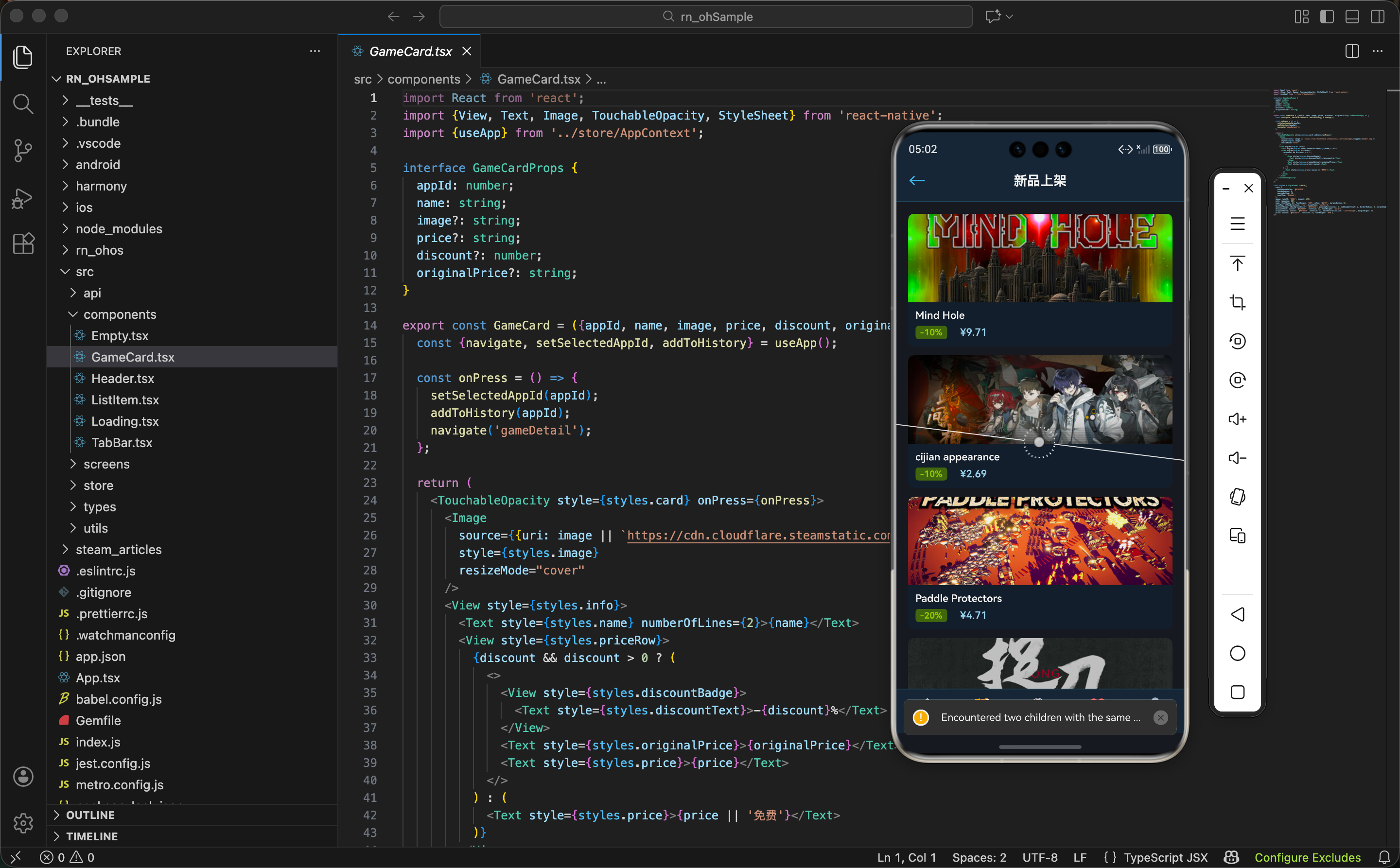
从需求看本质
新品上架页面的需求很简单:展示最近发布的游戏列表。
但如果你跟着前几篇文章一路做下来,会发现这个页面和精选、特惠、热销页面的结构几乎一模一样。都是:
- 页面加载时请求数据
- 显示 Loading 状态
- 数据返回后渲染列表
- 点击卡片跳转详情
这不是巧合,而是列表页面的通用模式。掌握了这个模式,以后遇到类似需求就能快速实现。
featuredcategories 接口的四大分类
我们已经用 featuredcategories 接口实现了三个页面(特惠、热销、新品),这里系统梳理一下这个接口返回的数据结构:
export const getFeaturedCategories = async () => {
  const res = await fetch(`${STORE_API}/featuredcategories`);
  return res.json();
};
接口返回的主要分类:
{
  "specials": {
    "id": "specials",
    "name": "特惠",
    "items": [...]
  },
  "coming_soon": {
    "id": "coming_soon",
    "name": "即将推出",
    "items": [...]
  },
  "top_sellers": {
    "id": "top_sellers",
    "name": "热销商品",
    "items": [...]
  },
  "new_releases": {
    "id": "new_releases",
    "name": "新品",
    "items": [...]
  }
}
四个分类对应四个页面:
specials→ 特惠游戏页面(第 03 篇)top_sellers→ 热销榜页面(第 04 篇)new_releases→ 新品上架页面(本篇)coming_soon→ 即将推出页面(下一篇)
开发技巧:当你发现一个接口能支撑多个页面时,可以考虑在首次请求后缓存数据,避免每个页面都重复请求。不过这个优化我们暂时不做,保持代码简单。
new_releases 数据结构
新品上架的数据在 new_releases.items 中,每个游戏对象的结构:
{
  "id": 2358720,
  "name": "Black Myth: Wukong",
  "discounted": true,
  "discount_percent": 10,
  "original_price": 26800,
  "final_price": 24120,
  "header_image": "https://cdn.cloudflare.steamstatic.com/steam/apps/2358720/header.jpg"
}
和其他分类的数据结构基本一致,处理方式也相同。
新品游戏有个特点:很多会有首发折扣。所以 discounted 为 true 的比例比热销榜高。我们的 GameCard 组件已经能正确处理折扣显示,不需要额外改动。
新品上架页面实现
直接看代码,你会发现和前几个页面非常相似:
引入依赖:
import React, {useEffect, useState} from 'react';
import {View, ScrollView, StyleSheet} from 'react-native';
import {Header} from '../components/Header';
import {TabBar} from '../components/TabBar';
import {GameCard} from '../components/GameCard';
import {Loading} from '../components/Loading';
import {getFeaturedCategories} from '../api/steam';
这些引入在特惠、热销页面都见过了,完全一样。
组件定义和状态:
export const NewReleasesScreen = () => {
  const [games, setGames] = useState<any[]>([]);
  const [loading, setLoading] = useState(true);
两个状态:games 存数据,loading 控制加载状态。这个模式已经用了好几次了。
数据加载:
  useEffect(() => {
    getFeaturedCategories().then(data => {
      setGames(data?.new_releases?.items || []);
      setLoading(false);
    }).catch(() => setLoading(false));
  }, []);
唯一的区别是数据提取路径:data?.new_releases?.items。
对比一下三个页面的数据提取:
// 特惠页面
setGames(data?.specials?.items || []);

// 热销页面
setGames(data?.top_sellers?.items || []);

// 新品页面
setGames(data?.new_releases?.items || []);
只有字段名不同,其他逻辑完全一样。
页面渲染:
  return (
    <View style={styles.container}>
      <Header title="新品上架" showBack />
      {loading ? <Loading /> : (
        <ScrollView style={styles.content}>
          {games.map((game: any) => (
            <GameCard
              key={game.id}
              appId={game.id}
              name={game.name}
              image={game.header_image}
              price={game.final_price ? `¥${(game.final_price / 100).toFixed(2)}` : '免费'}
              discount={game.discount_percent}
            />
          ))}
        </ScrollView>
      )}
      <TabBar />
    </View>
  );
};
渲染逻辑也是标准模板,只有 Header 的 title 不同。
样式定义:
const styles = StyleSheet.create({
  container: {flex: 1, backgroundColor: '#171a21'},
  content: {flex: 1, padding: 16},
});
样式完全一样,保持视觉统一。
代码复用的思考
写到这里,你可能会想:这几个页面这么像,能不能抽象成一个通用组件?
答案是可以的。我们可以创建一个 GameListScreen 组件:
interface GameListScreenProps {
  title: string;
  dataKey: 'specials' | 'top_sellers' | 'new_releases' | 'coming_soon';
  showRank?: boolean;
}

export const GameListScreen = ({title, dataKey, showRank}: GameListScreenProps) => {
  const [games, setGames] = useState<any[]>([]);
  const [loading, setLoading] = useState(true);

  useEffect(() => {
    getFeaturedCategories().then(data => {
      setGames(data?.[dataKey]?.items || []);
      setLoading(false);
    }).catch(() => setLoading(false));
  }, [dataKey]);

  return (
    <View style={styles.container}>
      <Header title={title} showBack />
      {loading ? <Loading /> : (
        <ScrollView style={styles.content}>
          {games.map((game: any, index: number) => (
            <GameCard
              key={game.id}
              appId={game.id}
              name={showRank ? `#${index + 1} ${game.name}` : game.name}
              image={game.header_image}
              price={game.final_price ? `¥${(game.final_price / 100).toFixed(2)}` : '免费'}
              discount={game.discount_percent}
            />
          ))}
        </ScrollView>
      )}
      <TabBar />
    </View>
  );
};
然后各个页面就变成了简单的配置:
// 特惠页面
export const SpecialsScreen = () => (
  <GameListScreen title="特惠游戏" dataKey="specials" />
);

// 热销页面
export const TopSellersScreen = () => (
  <GameListScreen title="热销榜" dataKey="top_sellers" showRank />
);

// 新品页面
export const NewReleasesScreen = () => (
  <GameListScreen title="新品上架" dataKey="new_releases" />
);
这种抽象的好处是减少重复代码,修改逻辑时只需要改一个地方。
但也有缺点:灵活性降低。如果某个页面需要特殊处理(比如热销榜要显示排名),就需要加参数,参数多了组件会变得复杂。
我们的项目选择保持各页面独立,因为:
- 代码量不大,重复可以接受
- 各页面可能有不同的演进方向
- 对于教程来说,独立的代码更容易理解
实际项目建议:如果页面数量多且逻辑相似,抽象成通用组件是值得的;如果只有几个页面,保持独立更简单。
新品游戏的业务特点
从业务角度看,新品上架页面有几个特点值得注意:
时效性强
新品列表每天都在变化,今天的新品明天可能就不在列表里了。如果你的 App 有缓存机制,新品页面的缓存时间应该设置得比较短。
首发折扣常见
很多游戏会在发售初期提供折扣吸引玩家,所以新品列表里打折游戏的比例比较高。我们的 UI 已经能正确显示折扣信息。
质量参差不齐
Steam 每天上架的游戏很多,质量参差不齐。如果想做得更好,可以考虑加入评分、评测数量等信息帮助用户筛选。不过这需要额外调用游戏详情接口,会增加复杂度。
完整代码
import React, {useEffect, useState} from 'react';
import {View, ScrollView, StyleSheet} from 'react-native';
import {Header} from '../components/Header';
import {TabBar} from '../components/TabBar';
import {GameCard} from '../components/GameCard';
import {Loading} from '../components/Loading';
import {getFeaturedCategories} from '../api/steam';

export const NewReleasesScreen = () => {
  const [games, setGames] = useState<any[]>([]);
  const [loading, setLoading] = useState(true);

  useEffect(() => {
    getFeaturedCategories().then(data => {
      setGames(data?.new_releases?.items || []);
      setLoading(false);
    }).catch(() => setLoading(false));
  }, []);

  return (
    <View style={styles.container}>
      <Header title="新品上架" showBack />
      {loading ? <Loading /> : (
        <ScrollView style={styles.content}>
          {games.map((game: any) => (
            <GameCard
              key={game.id}
              appId={game.id}
              name={game.name}
              image={game.header_image}
              price={game.final_price ? `¥${(game.final_price / 100).toFixed(2)}` : '免费'}
              discount={game.discount_percent}
            />
          ))}
        </ScrollView>
      )}
      <TabBar />
    </View>
  );
};

const styles = StyleSheet.create({
  container: {flex: 1, backgroundColor: '#171a21'},
  content: {flex: 1, padding: 16},
});
列表页面开发模式总结
经过精选、特惠、热销、新品四个页面的实现,我们可以总结出一套列表页面的开发模式:
状态设计
const [data, setData] = useState<any[]>([]);  // 列表数据
const [loading, setLoading] = useState(true);  // 加载状态
数据加载
useEffect(() => {
  fetchData()
    .then(res => {
      setData(res?.xxx?.items || []);
      setLoading(false);
    })
    .catch(() => setLoading(false));
}, []);
条件渲染
{loading ? <Loading /> : (
  <ScrollView>
    {data.map(item => <ItemComponent key={item.id} {...item} />)}
  </ScrollView>
)}
页面结构
<View style={styles.container}>
  <Header title="xxx" showBack />
  {/* 内容区 */}
  <TabBar />
</View>
掌握了这个模式,以后遇到类似的列表页面需求,套用模板就能快速实现。
小结
新品上架页面的实现非常简单,因为我们已经有了成熟的模式和组件。这篇文章的重点不是代码本身,而是:
- 识别模式:发现多个页面的共同点
- 权衡抽象:思考是否需要抽取通用组件
- 理解业务:了解新品页面的业务特点
下一篇我们来实现"即将推出"页面,这是 featuredcategories 接口的最后一个分类。之后会进入游戏详情相关的页面开发,内容会更加丰富,敬请期待。
欢迎加入开源鸿蒙跨平台社区:https://openharmonycrossplatform.csdn.net

开源鸿蒙跨平台开发社区汇聚开发者与厂商,共建“一次开发,多端部署”的开源生态,致力于降低跨端开发门槛,推动万物智联创新。
更多推荐

 12
12 0
0- 0


 已为社区贡献30条内容

所有评论(0)