旅行记录应用旅行模板 - Cordova & OpenHarmony 混合开发实战
欢迎大家加入开源鸿蒙跨平台开发者社区,一起共建开源鸿蒙跨平台生态。
📌 概述
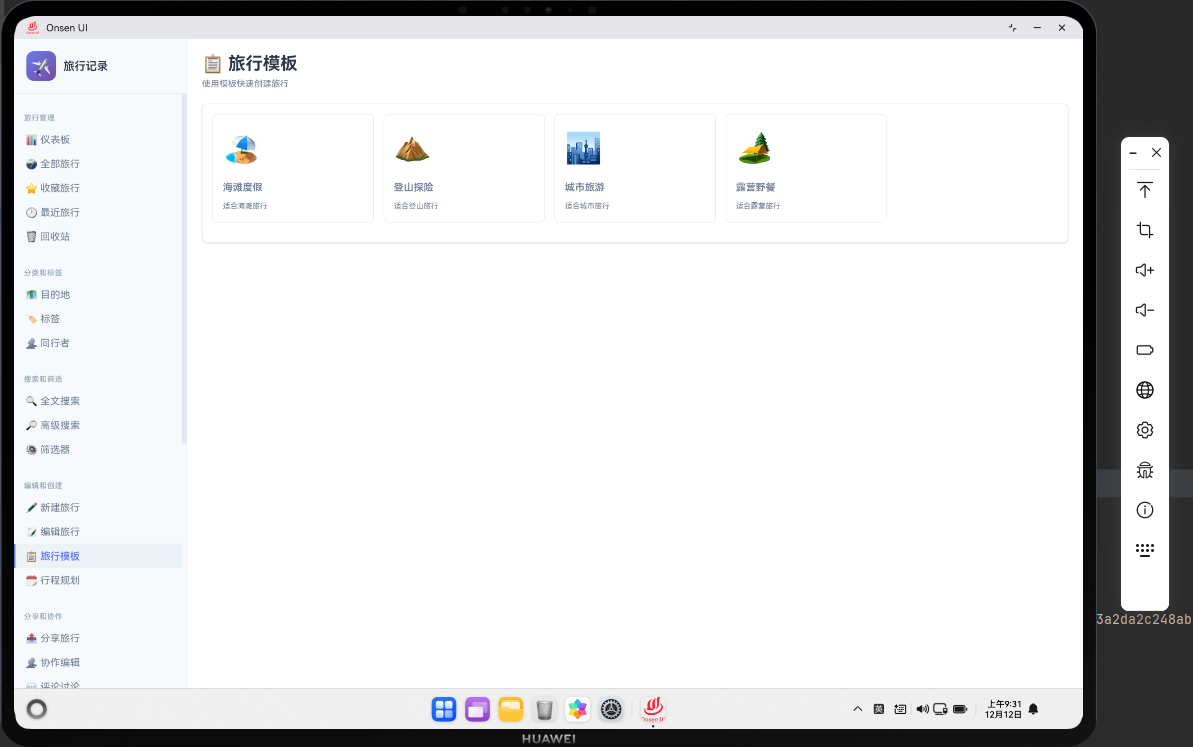
旅行模板功能允许用户保存旅行的模板,快速创建类似的旅行记录。用户可以创建多个模板,每个模板包含旅行的基本信息如目的地、标签、同行者等。旅行模板提高了用户的创建效率。在 Cordova 与 OpenHarmony 的混合开发框架中,旅行模板需要实现模板的保存、加载和应用功能。
🔗 完整流程
第一步:模板数据模型设计
旅行模板需要保存旅行的基本信息,但不包括日期和花费等变化的信息。模板需要有名称和描述,便于用户识别。模板还需要记录创建时间和使用次数。
第二步:模板列表展示与操作
模板管理页面需要展示所有保存的模板。用户可以查看模板的详细信息,也可以进行编辑、删除、应用等操作。模板可以按名称、使用次数等进行排序。
第三步:原生层模板缓存与快速应用
OpenHarmony 原生层可以缓存常用的模板,提高应用速度。原生层还可以实现模板的快速应用,减少计算时间。
🔧 Web 代码实现
旅行模板页面 HTML 结构
<div id="trip-template-page" class="page">
    <div class="page-header">
        <h1>旅行模板</h1>
        <button class="btn btn-primary" onclick="openTemplateModal()">
            ➕ 新建模板
        </button>
    </div>

    <div class="templates-container">
        <div class="templates-list" id="templatesList">
            <!-- 模板列表动态加载 -->
        </div>
    </div>
</div>
HTML 结构包含模板列表和新建模板按钮。
加载模板列表函数
async function loadTemplates() {
    try {
        // 从数据库查询所有模板
        const templates = await db.getAllTripTemplates();

        // 按使用次数排序
        templates.sort((a, b) => (b.usageCount || 0) - (a.usageCount || 0));

        // 渲染模板列表
        renderTemplatesList(templates);
    } catch (error) {
        console.error('Error loading templates:', error);
        showToast('加载模板失败');
    }
}
这个函数从数据库查询所有模板,按使用次数排序。
模板列表渲染函数
function renderTemplatesList(templates) {
    const container = document.getElementById('templatesList');
    container.innerHTML = '';

    templates.forEach(template => {
        const templateElement = document.createElement('div');
        templateElement.className = 'template-item';
        templateElement.id = `template-${template.id}`;
        templateElement.innerHTML = `
            <div class="template-header">
                <h3>${template.name}</h3>
                <span class="template-count">${template.usageCount || 0}次使用</span>
            </div>
            <div class="template-body">
                <p class="template-description">${template.description || '暂无描述'}</p>
                <div class="template-info">
                    <span>📍 ${template.destination}</span>
                    <span>🏷️ ${template.tags ? template.tags.length : 0}个标签</span>
                </div>
            </div>
            <div class="template-footer">
                <button class="btn-small" onclick="applyTemplate(${template.id})">
                    使用
                </button>
                <button class="btn-small" onclick="editTemplate(${template.id})">
                    编辑
                </button>
                <button class="btn-small btn-danger" onclick="deleteTemplate(${template.id})">
                    删除
                </button>
            </div>
        `;
        container.appendChild(templateElement);
    });
}
模板列表渲染函数为每个模板创建一个 DOM 元素。
保存模板函数
async function saveTemplate(templateData) {
    try {
        // 验证数据
        if (!templateData.name || templateData.name.trim() === '') {
            showToast('模板名称不能为空');
            return;
        }

        if (!templateData.destination || templateData.destination.trim() === '') {
            showToast('目的地不能为空');
            return;
        }

        // 创建模板对象
        const template = {
            id: templateData.id || Date.now(),
            name: templateData.name,
            description: templateData.description,
            destination: templateData.destination,
            tags: templateData.tags || [],
            companions: templateData.companions || [],
            createdAt: templateData.createdAt || new Date().toISOString(),
            updatedAt: new Date().toISOString(),
            usageCount: templateData.usageCount || 0
        };

        // 保存到数据库
        if (templateData.id) {
            await db.updateTripTemplate(template);
            showToast('模板已更新');
        } else {
            await db.addTripTemplate(template);
            showToast('模板已创建');
        }

        // 关闭模态框
        closeModal();

        // 重新加载列表
        loadTemplates();

        // 通知原生层
        if (window.cordova) {
            cordova.exec(
                (result) => console.log('Template saved:', result),
                (error) => console.error('Save error:', error),
                'TemplatePlugin',
                'onTemplateSaved',
                [{ templateId: template.id, timestamp: Date.now() }]
            );
        }
    } catch (error) {
        console.error('Error saving template:', error);
        showToast('保存失败,请重试');
    }
}
保存模板函数创建或更新模板,然后保存到数据库。
应用模板函数
async function applyTemplate(templateId) {
    try {
        // 获取模板数据
        const template = await db.getTripTemplate(templateId);

        if (template) {
            // 更新使用次数
            template.usageCount = (template.usageCount || 0) + 1;
            await db.updateTripTemplate(template);

            // 创建新旅行
            const newTrip = {
                id: Date.now(),
                destination: template.destination,
                startDate: new Date().toISOString().split('T')[0],
                endDate: new Date().toISOString().split('T')[0],
                tags: template.tags,
                companions: template.companions,
                expense: 0,
                description: '',
                isFavorite: false,
                isDeleted: false,
                createdAt: new Date().toISOString(),
                updatedAt: new Date().toISOString()
            };

            // 保存新旅行
            await db.addTrip(newTrip);

            showToast(`已使用模板: ${template.name}`);

            // 导航到编辑页面
            navigateTo('edit-trip', newTrip.id);
        }
    } catch (error) {
        console.error('Error applying template:', error);
        showToast('应用模板失败');
    }
}
应用模板函数使用模板创建新的旅行记录。applyTemplate 函数是模板应用的核心函数。函数首先从数据库获取要应用的模板数据。然后更新模板的使用次数,这样可以追踪模板的使用频率。接着创建一个新的旅行对象,从模板中复制目的地、标签和同行者等信息。新旅行的日期默认设置为今天,花费和描述为空,用户可以在编辑页面中填写。新旅行保存到数据库后,函数导航到编辑页面,用户可以继续编辑旅行的详细信息。通过这个函数,用户可以快速创建类似的旅行记录,提高了创建效率。
删除模板函数
async function deleteTemplate(templateId) {
    if (!confirm('确定要删除这个模板吗?')) {
        return;
    }

    try {
        // 从数据库删除
        await db.deleteTripTemplate(templateId);

        showToast('模板已删除');

        // 从列表移除
        const element = document.getElementById(`template-${templateId}`);
        if (element) {
            element.remove();
        }

        // 通知原生层
        if (window.cordova) {
            cordova.exec(
                (result) => console.log('Template deleted:', result),
                (error) => console.error('Delete error:', error),
                'TemplatePlugin',
                'onTemplateDeleted',
                [{ templateId: templateId, timestamp: Date.now() }]
            );
        }
    } catch (error) {
        console.error('Error deleting template:', error);
        showToast('删除失败,请重试');
    }
}
删除模板函数从数据库中删除模板。
🔌 OpenHarmony 原生代码实现
模板缓存插件
// TemplatePlugin.ets
import { BusinessError } from '@ohos.base';

export class TemplatePlugin {
    private templateCache: Map<number, any> = new Map();

    // 处理模板保存事件
    onTemplateSaved(args: any, callback: Function): void {
        try {
            const templateId = args[0].templateId;
            const timestamp = args[0].timestamp;

            // 清除缓存
            this.templateCache.clear();

            console.log(`[Template] Saved: ${templateId} at ${timestamp}`);

            callback({ success: true, message: '模板已保存' });
        } catch (error) {
            callback({ success: false, error: error.message });
        }
    }

    // 处理模板删除事件
    onTemplateDeleted(args: any, callback: Function): void {
        try {
            const templateId = args[0].templateId;

            // 清除缓存
            this.templateCache.delete(templateId);

            console.log(`[Template] Deleted: ${templateId}`);

            callback({ success: true, message: '模板已删除' });
        } catch (error) {
            callback({ success: false, error: error.message });
        }
    }
}
模板缓存插件在原生层管理模板缓存。
📝 总结
旅行模板功能展示了如何在 Cordova 与 OpenHarmony 框架中实现一个模板管理系统。Web 层负责 UI 渲染和模板操作,原生层负责缓存管理。通过旅行模板,用户可以快速创建类似的旅行记录,提高了创建效率。

开源鸿蒙跨平台开发社区汇聚开发者与厂商,共建“一次开发,多端部署”的开源生态,致力于降低跨端开发门槛,推动万物智联创新。
更多推荐


 18
18 0
0- 0


 已为社区贡献23条内容

所有评论(0)