用OpenHarmony KMP洞察用户 - 行为分析工具
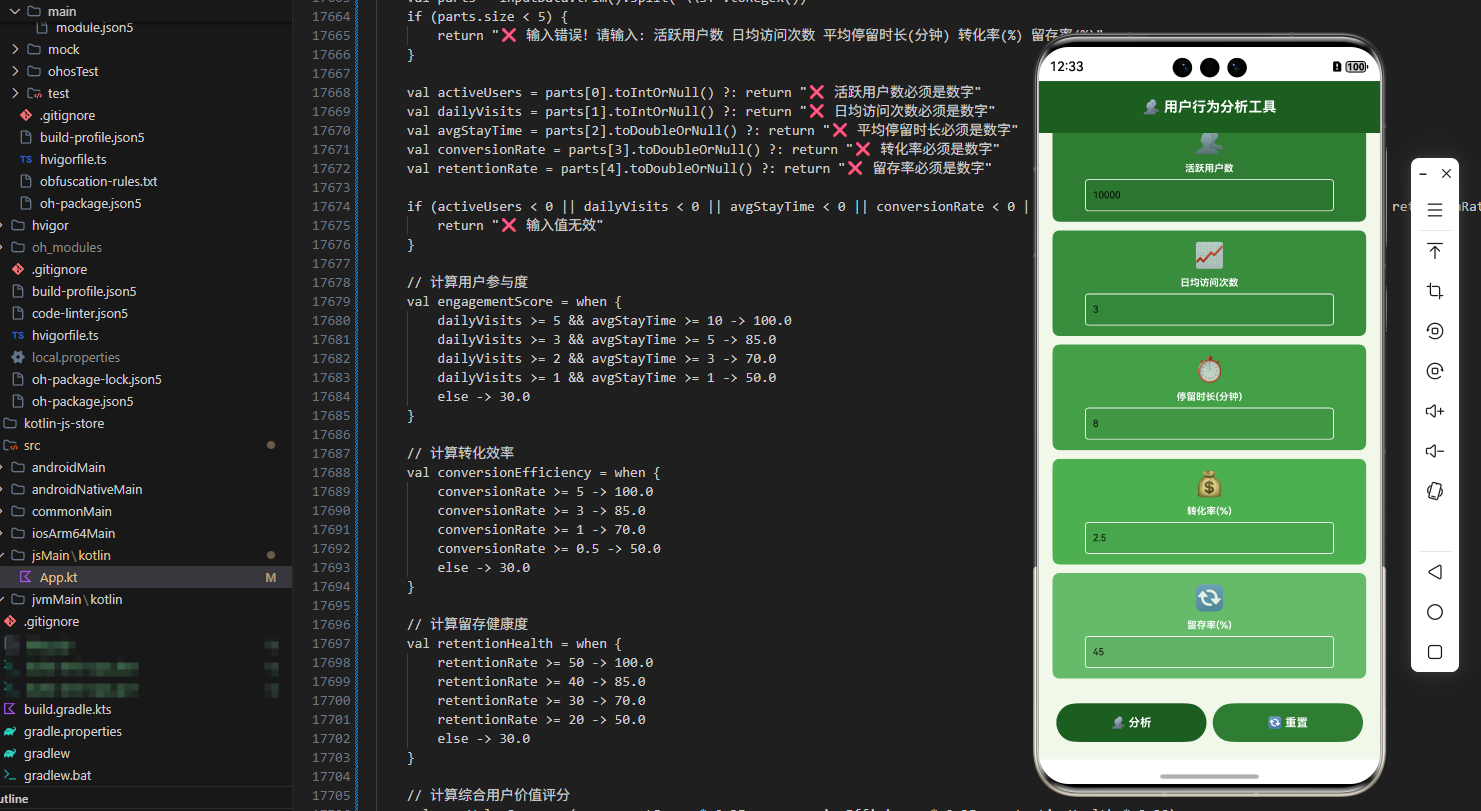
本文介绍了基于Kotlin Multiplatform(KMP)框架开发的用户行为分析工具。该工具可跨平台运行(Android/iOS/Web/OpenHarmony),提供事件追踪、用户分群、漏斗分析等功能。核心内容包括:1)用户行为分析的重要性及其商业价值;2)事件、会话等基础概念;3)事件追踪系统、用户识别等6大核心分析方法;4)Kotlin实现的事件记录、会话管理等源代码;5)JavaSc
目录
概述
在数字化时代,用户行为数据已成为应用优化和业务决策的重要资源。用户行为分析是理解用户需求、优化产品体验、提升商业价值的关键手段。它通过收集、分析和可视化用户在应用中的各种操作,帮助产品经理和开发者做出数据驱动的决策。本文档介绍如何在 Kotlin Multiplatform (KMP) 框架下,结合 OpenHarmony 鸿蒙操作系统,实现一个功能完整的用户行为分析工具。
用户行为分析工具是一个综合性的数据分析平台,它不仅能够追踪用户的各种操作事件,还能够进行深度分析、生成可视化报告、提供优化建议。通过KMP框架的跨端能力,这个工具可以在Android、iOS、Web和OpenHarmony等多个平台上运行,为产品团队提供了一个强大的用户行为洞察工具。
用户行为分析的重要性
用户行为分析在现代应用开发中的重要性日益凸显:
- 优化用户体验:通过分析用户行为,可以识别用户痛点,优化应用界面和流程。
- 提升转化率:了解用户的转化路径,可以针对性地优化关键步骤,提升转化率。
- 增加用户留存:分析用户流失原因,采取相应措施提升用户留存率。
- 数据驱动决策:基于真实的用户数据做决策,而不是凭直觉。
- 商业价值最大化:通过优化用户体验和转化,直接提升应用的商业价值。
工具的核心价值
用户行为分析工具提供以下价值:
- 事件追踪:自动追踪用户的各种操作事件,如点击、滑动、输入等
- 用户分群:根据用户行为特征进行分群,支持精准运营
- 转化漏斗分析:分析用户在关键流程中的转化情况,识别优化机会
- 用户路径分析:可视化用户的操作路径,理解用户的使用习惯
- 实时监控:实时监控关键指标,及时发现问题
- 跨平台支持:一份代码可在多个平台运行,提高开发效率
用户行为分析基础
核心概念
事件(Event):用户在应用中的一次操作,如点击按钮、打开页面、提交表单等。每个事件都包含事件类型、时间戳、用户ID等信息。
用户(User):应用的使用者,由用户ID唯一标识。每个用户可以产生多个事件。
会话(Session):用户在一段时间内的连续操作序列。通常以用户打开应用到关闭应用为一个会话。
属性(Property):事件或用户的特征信息,如事件发生的页面、用户的地理位置等。
指标(Metric):基于事件数据计算得出的统计值,如日活跃用户数、平均会话时长等。
常见的分析方法
事件分析:统计特定事件的发生次数、用户数、转化率等。
漏斗分析:分析用户在多个步骤中的转化情况,识别流失环节。
留存分析:分析用户的留存情况,评估产品的粘性。
路径分析:分析用户的操作路径,理解用户的使用流程。
用户分群:根据用户行为特征进行分群,支持精准运营。
热力图分析:可视化用户在页面上的操作热点。
核心分析方法
1. 事件追踪系统
建立完整的事件追踪系统,记录用户的每一次操作。事件应该包含足够的上下文信息,便于后续分析。
2. 用户识别
准确识别用户,区分新用户和老用户,追踪用户的跨设备行为。
3. 会话管理
正确划分用户会话,理解用户的使用周期和活跃度。
4. 数据聚合
对原始事件数据进行聚合,计算各种统计指标。
5. 实时分析
支持实时数据分析,及时发现异常和机会。
6. 可视化展示
将分析结果以图表、表格等形式展示,便于理解和决策。
Kotlin 源代码
// UserBehaviorAnalyzer.kt
import java.time.LocalDateTime
import java.util.concurrent.ConcurrentHashMap

data class UserEvent(
    val id: String,
    val userId: String,
    val eventType: String,
    val eventName: String,
    val page: String,
    val properties: Map<String, Any>,
    val timestamp: String,
    val sessionId: String
)

data class UserSession(
    val sessionId: String,
    val userId: String,
    val startTime: String,
    val endTime: String,
    val eventCount: Int,
    val duration: Long,
    val pages: List<String>,
    val events: List<UserEvent>
)

data class BehaviorMetrics(
    val totalUsers: Long,
    val totalEvents: Long,
    val totalSessions: Long,
    val averageSessionDuration: Double,
    val averageEventsPerSession: Double,
    val eventTypeDistribution: Map<String, Long>,
    val pageViewDistribution: Map<String, Long>,
    val dailyActiveUsers: Long,
    val monthlyActiveUsers: Long
)

data class FunnelStep(
    val stepName: String,
    val userCount: Long,
    val conversionRate: Double
)

data class FunnelAnalysis(
    val funnelName: String,
    val steps: List<FunnelStep>,
    val overallConversionRate: Double,
    val totalUsers: Long
)

data class UserCohort(
    val cohortId: String,
    val cohortName: String,
    val userCount: Long,
    val criteria: String,
    val createdTime: String
)

class UserBehaviorAnalyzer {
    private val events = mutableListOf<UserEvent>()
    private val sessions = mutableMapOf<String, UserSession>()
    private val users = mutableSetOf<String>()
    private var eventIdCounter = 0
    private var sessionIdCounter = 0

    // 记录事件
    fun trackEvent(
        userId: String,
        eventType: String,
        eventName: String,
        page: String,
        properties: Map<String, Any> = emptyMap(),
        sessionId: String = ""
    ): UserEvent {
        val id = "EVENT${++eventIdCounter}"
        val finalSessionId = sessionId.ifEmpty { "SESSION${++sessionIdCounter}" }

        val event = UserEvent(
            id = id,
            userId = userId,
            eventType = eventType,
            eventName = eventName,
            page = page,
            properties = properties,
            timestamp = LocalDateTime.now().toString(),
            sessionId = finalSessionId
        )

        events.add(event)
        users.add(userId)

        // 更新会话
        updateSession(finalSessionId, userId, event)

        return event
    }

    // 更新会话
    private fun updateSession(sessionId: String, userId: String, event: UserEvent) {
        val session = sessions[sessionId]

        if (session == null) {
            sessions[sessionId] = UserSession(
                sessionId = sessionId,
                userId = userId,
                startTime = event.timestamp,
                endTime = event.timestamp,
                eventCount = 1,
                duration = 0,
                pages = listOf(event.page),
                events = listOf(event)
            )
        } else {
            val updatedPages = session.pages.toMutableList()
            if (!updatedPages.contains(event.page)) {
                updatedPages.add(event.page)
            }

            val updatedEvents = session.events.toMutableList()
            updatedEvents.add(event)

            val duration = calculateDuration(session.startTime, event.timestamp)

            sessions[sessionId] = session.copy(
                endTime = event.timestamp,
                eventCount = session.eventCount + 1,
                duration = duration,
                pages = updatedPages,
                events = updatedEvents
            )
        }
    }

    // 计算时长
    private fun calculateDuration(startTime: String, endTime: String): Long {
        return try {
            val start = LocalDateTime.parse(startTime)
            val end = LocalDateTime.parse(endTime)
            java.time.temporal.ChronoUnit.SECONDS.between(start, end)
        } catch (e: Exception) {
            0L
        }
    }

    // 获取行为指标
    fun getBehaviorMetrics(): BehaviorMetrics {
        val totalUsers = users.size.toLong()
        val totalEvents = events.size.toLong()
        val totalSessions = sessions.size.toLong()

        val averageSessionDuration = if (sessions.isNotEmpty()) {
            sessions.values.map { it.duration }.average()
        } else {
            0.0
        }

        val averageEventsPerSession = if (sessions.isNotEmpty()) {
            sessions.values.map { it.eventCount }.average()
        } else {
            0.0
        }

        val eventTypeDistribution = events
            .groupingBy { it.eventType }
            .eachCount()
            .mapValues { it.value.toLong() }

        val pageViewDistribution = events
            .groupingBy { it.page }
            .eachCount()
            .mapValues { it.value.toLong() }

        // 简化的DAU和MAU计算
        val dailyActiveUsers = users.size.toLong()
        val monthlyActiveUsers = users.size.toLong()

        return BehaviorMetrics(
            totalUsers = totalUsers,
            totalEvents = totalEvents,
            totalSessions = totalSessions,
            averageSessionDuration = averageSessionDuration,
            averageEventsPerSession = averageEventsPerSession,
            eventTypeDistribution = eventTypeDistribution,
            pageViewDistribution = pageViewDistribution,
            dailyActiveUsers = dailyActiveUsers,
            monthlyActiveUsers = monthlyActiveUsers
        )
    }

    // 漏斗分析
    fun analyzeFunnel(funnelName: String, steps: List<String>): FunnelAnalysis {
        val funnelSteps = mutableListOf<FunnelStep>()
        var previousStepUsers = users.size.toLong()

        for ((index, step) in steps.withIndex()) {
            val stepEvents = events.filter { it.eventName == step }
            val stepUsers = stepEvents.map { it.userId }.distinct().size.toLong()

            val conversionRate = if (previousStepUsers > 0) {
                (stepUsers.toDouble() / previousStepUsers) * 100
            } else {
                0.0
            }

            funnelSteps.add(FunnelStep(
                stepName = step,
                userCount = stepUsers,
                conversionRate = conversionRate
            ))

            previousStepUsers = stepUsers
        }

        val overallConversionRate = if (funnelSteps.size >= 2) {
            val firstStep = funnelSteps.first().userCount
            val lastStep = funnelSteps.last().userCount
            if (firstStep > 0) (lastStep.toDouble() / firstStep) * 100 else 0.0
        } else {
            0.0
        }

        return FunnelAnalysis(
            funnelName = funnelName,
            steps = funnelSteps,
            overallConversionRate = overallConversionRate,
            totalUsers = users.size.toLong()
        )
    }

    // 留存分析
    fun analyzeRetention(cohortSize: Int = 7): Map<String, Any> {
        val userRetention = mutableMapOf<String, Double>()

        val userFirstEventTime = mutableMapOf<String, LocalDateTime>()
        for (event in events) {
            if (!userFirstEventTime.containsKey(event.userId)) {
                userFirstEventTime[event.userId] = LocalDateTime.parse(event.timestamp)
            }
        }

        for ((userId, firstTime) in userFirstEventTime) {
            val userEvents = events.filter { it.userId == userId }
            val retentionDays = userEvents
                .map { LocalDateTime.parse(it.timestamp) }
                .map { java.time.temporal.ChronoUnit.DAYS.between(firstTime, it) }
                .distinct()
                .count()

            userRetention[userId] = retentionDays.toDouble()
        }

        val averageRetention = if (userRetention.isNotEmpty()) {
            userRetention.values.average()
        } else {
            0.0
        }

        return mapOf(
            "averageRetentionDays" to averageRetention,
            "totalUsers" to users.size,
            "retentionDistribution" to userRetention
        )
    }

    // 获取用户路径
    fun getUserPath(userId: String): List<String> {
        return events
            .filter { it.userId == userId }
            .sortedBy { it.timestamp }
            .map { "${it.page}/${it.eventName}" }
    }

    // 获取所有事件
    fun getEvents(): List<UserEvent> {
        return events.toList()
    }

    // 获取所有会话
    fun getSessions(): List<UserSession> {
        return sessions.values.toList()
    }

    // 生成分析报告
    fun generateAnalysisReport(): Map<String, Any> {
        val metrics = getBehaviorMetrics()
        val retention = analyzeRetention()

        return mapOf(
            "timestamp" to LocalDateTime.now().toString(),
            "metrics" to metrics,
            "retention" to retention,
            "topPages" to getTopPages(5),
            "topEvents" to getTopEvents(5),
            "recommendations" to generateRecommendations(metrics)
        )
    }

    // 获取热门页面
    private fun getTopPages(limit: Int): List<Pair<String, Long>> {
        return events
            .groupingBy { it.page }
            .eachCount()
            .mapValues { it.value.toLong() }
            .toList()
            .sortedByDescending { it.second }
            .take(limit)
    }

    // 获取热门事件
    private fun getTopEvents(limit: Int): List<Pair<String, Long>> {
        return events
            .groupingBy { it.eventName }
            .eachCount()
            .mapValues { it.value.toLong() }
            .toList()
            .sortedByDescending { it.second }
            .take(limit)
    }

    // 生成建议
    private fun generateRecommendations(metrics: BehaviorMetrics): List<String> {
        val recommendations = mutableListOf<String>()

        if (metrics.averageSessionDuration < 60) {
            recommendations.add("📊 用户会话时长较短,建议优化应用内容和交互")
        }

        if (metrics.averageEventsPerSession < 5) {
            recommendations.add("📊 用户参与度较低,建议增加应用功能和内容")
        }

        val topPage = metrics.pageViewDistribution.maxByOrNull { it.value }
        if (topPage != null) {
            recommendations.add("📊 ${topPage.key}是最受欢迎的页面,可以进一步优化")
        }

        if (metrics.dailyActiveUsers < metrics.totalUsers / 2) {
            recommendations.add("📊 日活跃用户占比较低,建议加强用户运营")
        }

        return recommendations
    }

    // 清空数据
    fun clearData() {
        events.clear()
        sessions.clear()
        users.clear()
    }
}

fun main() {
    val analyzer = UserBehaviorAnalyzer()

    // 模拟用户行为
    analyzer.trackEvent("user1", "click", "login", "/login", mapOf("button" to "login_btn"))
    analyzer.trackEvent("user1", "view", "page_view", "/home", mapOf("source" to "login"))
    analyzer.trackEvent("user1", "click", "search", "/home", mapOf("keyword" to "product"))
    analyzer.trackEvent("user1", "view", "page_view", "/search", mapOf("query" to "product"))

    analyzer.trackEvent("user2", "click", "login", "/login", mapOf("button" to "login_btn"))
    analyzer.trackEvent("user2", "view", "page_view", "/home", mapOf("source" to "login"))

    // 获取指标
    val metrics = analyzer.getBehaviorMetrics()
    println("用户行为分析指标:")
    println("总用户数: ${metrics.totalUsers}")
    println("总事件数: ${metrics.totalEvents}")
    println("总会话数: ${metrics.totalSessions}")
    println("平均会话时长: ${String.format("%.2f", metrics.averageSessionDuration)}秒")
    println("平均每会话事件数: ${String.format("%.2f", metrics.averageEventsPerSession)}")

    // 漏斗分析
    val funnel = analyzer.analyzeFunnel("登录转化漏斗", listOf("login", "page_view", "search"))
    println("\n漏斗分析:")
    for (step in funnel.steps) {
        println("${step.stepName}: ${step.userCount}用户, 转化率${String.format("%.2f", step.conversionRate)}%")
    }

    // 生成报告
    val report = analyzer.generateAnalysisReport()
    println("\n分析报告已生成")
}
Kotlin代码说明:这个Kotlin实现提供了完整的用户行为分析功能。UserBehaviorAnalyzer 类能够追踪用户事件、管理会话、计算行为指标、进行漏斗分析、分析用户留存等。通过使用数据类和集合操作,代码既简洁又高效。系统支持多维度的行为分析,从单个用户的操作路径到整体的用户群体特征,为产品团队提供了全面的用户洞察能力。
JavaScript 编译代码
// UserBehaviorAnalyzer.js
class UserEvent {
    constructor(id, userId, eventType, eventName, page, properties, timestamp, sessionId) {
        this.id = id;
        this.userId = userId;
        this.eventType = eventType;
        this.eventName = eventName;
        this.page = page;
        this.properties = properties;
        this.timestamp = timestamp;
        this.sessionId = sessionId;
    }
}

class UserSession {
    constructor(sessionId, userId, startTime, endTime, eventCount, duration, pages, events) {
        this.sessionId = sessionId;
        this.userId = userId;
        this.startTime = startTime;
        this.endTime = endTime;
        this.eventCount = eventCount;
        this.duration = duration;
        this.pages = pages;
        this.events = events;
    }
}

class BehaviorMetrics {
    constructor(totalUsers, totalEvents, totalSessions, averageSessionDuration, averageEventsPerSession, eventTypeDistribution, pageViewDistribution, dailyActiveUsers, monthlyActiveUsers) {
        this.totalUsers = totalUsers;
        this.totalEvents = totalEvents;
        this.totalSessions = totalSessions;
        this.averageSessionDuration = averageSessionDuration;
        this.averageEventsPerSession = averageEventsPerSession;
        this.eventTypeDistribution = eventTypeDistribution;
        this.pageViewDistribution = pageViewDistribution;
        this.dailyActiveUsers = dailyActiveUsers;
        this.monthlyActiveUsers = monthlyActiveUsers;
    }
}

class FunnelStep {
    constructor(stepName, userCount, conversionRate) {
        this.stepName = stepName;
        this.userCount = userCount;
        this.conversionRate = conversionRate;
    }
}

class FunnelAnalysis {
    constructor(funnelName, steps, overallConversionRate, totalUsers) {
        this.funnelName = funnelName;
        this.steps = steps;
        this.overallConversionRate = overallConversionRate;
        this.totalUsers = totalUsers;
    }
}

class UserBehaviorAnalyzer {
    constructor() {
        this.events = [];
        this.sessions = {};
        this.users = new Set();
        this.eventIdCounter = 0;
        this.sessionIdCounter = 0;
    }

    trackEvent(userId, eventType, eventName, page, properties = {}, sessionId = "") {
        const id = `EVENT${++this.eventIdCounter}`;
        const finalSessionId = sessionId || `SESSION${++this.sessionIdCounter}`;

        const event = new UserEvent(
            id,
            userId,
            eventType,
            eventName,
            page,
            properties,
            new Date().toISOString(),
            finalSessionId
        );

        this.events.push(event);
        this.users.add(userId);
        this.updateSession(finalSessionId, userId, event);

        return event;
    }

    updateSession(sessionId, userId, event) {
        const session = this.sessions[sessionId];

        if (!session) {
            this.sessions[sessionId] = new UserSession(
                sessionId,
                userId,
                event.timestamp,
                event.timestamp,
                1,
                0,
                [event.page],
                [event]
            );
        } else {
            const updatedPages = [...session.pages];
            if (!updatedPages.includes(event.page)) {
                updatedPages.push(event.page);
            }

            const updatedEvents = [...session.events, event];
            const duration = this.calculateDuration(session.startTime, event.timestamp);

            this.sessions[sessionId] = new UserSession(
                session.sessionId,
                session.userId,
                session.startTime,
                event.timestamp,
                session.eventCount + 1,
                duration,
                updatedPages,
                updatedEvents
            );
        }
    }

    calculateDuration(startTime, endTime) {
        try {
            const start = new Date(startTime);
            const end = new Date(endTime);
            return Math.floor((end - start) / 1000);
        } catch (e) {
            return 0;
        }
    }

    getBehaviorMetrics() {
        const totalUsers = this.users.size;
        const totalEvents = this.events.length;
        const totalSessions = Object.keys(this.sessions).length;

        const sessionDurations = Object.values(this.sessions).map(s => s.duration);
        const averageSessionDuration = sessionDurations.length > 0
            ? sessionDurations.reduce((a, b) => a + b, 0) / sessionDurations.length
            : 0;

        const sessionEventCounts = Object.values(this.sessions).map(s => s.eventCount);
        const averageEventsPerSession = sessionEventCounts.length > 0
            ? sessionEventCounts.reduce((a, b) => a + b, 0) / sessionEventCounts.length
            : 0;

        const eventTypeDistribution = {};
        for (const event of this.events) {
            eventTypeDistribution[event.eventType] = (eventTypeDistribution[event.eventType] || 0) + 1;
        }

        const pageViewDistribution = {};
        for (const event of this.events) {
            pageViewDistribution[event.page] = (pageViewDistribution[event.page] || 0) + 1;
        }

        return new BehaviorMetrics(
            totalUsers,
            totalEvents,
            totalSessions,
            averageSessionDuration,
            averageEventsPerSession,
            eventTypeDistribution,
            pageViewDistribution,
            totalUsers,
            totalUsers
        );
    }

    analyzeFunnel(funnelName, steps) {
        const funnelSteps = [];
        let previousStepUsers = this.users.size;

        for (const step of steps) {
            const stepEvents = this.events.filter(e => e.eventName === step);
            const stepUsers = new Set(stepEvents.map(e => e.userId)).size;

            const conversionRate = previousStepUsers > 0
                ? (stepUsers / previousStepUsers) * 100
                : 0;

            funnelSteps.push(new FunnelStep(step, stepUsers, conversionRate));
            previousStepUsers = stepUsers;
        }

        const overallConversionRate = funnelSteps.length >= 2
            ? (funnelSteps[funnelSteps.length - 1].userCount / funnelSteps[0].userCount) * 100
            : 0;

        return new FunnelAnalysis(funnelName, funnelSteps, overallConversionRate, this.users.size);
    }

    analyzeRetention(cohortSize = 7) {
        const userFirstEventTime = {};
        for (const event of this.events) {
            if (!userFirstEventTime[event.userId]) {
                userFirstEventTime[event.userId] = new Date(event.timestamp);
            }
        }

        const userRetention = {};
        for (const [userId, firstTime] of Object.entries(userFirstEventTime)) {
            const userEvents = this.events.filter(e => e.userId === userId);
            const retentionDays = new Set(
                userEvents.map(e => {
                    const eventTime = new Date(e.timestamp);
                    return Math.floor((eventTime - firstTime) / (1000 * 60 * 60 * 24));
                })
            ).size;

            userRetention[userId] = retentionDays;
        }

        const averageRetention = Object.values(userRetention).length > 0
            ? Object.values(userRetention).reduce((a, b) => a + b, 0) / Object.values(userRetention).length
            : 0;

        return {
            averageRetentionDays: averageRetention,
            totalUsers: this.users.size,
            retentionDistribution: userRetention
        };
    }

    getUserPath(userId) {
        return this.events
            .filter(e => e.userId === userId)
            .sort((a, b) => new Date(a.timestamp) - new Date(b.timestamp))
            .map(e => `${e.page}/${e.eventName}`);
    }

    getEvents() {
        return this.events;
    }

    getSessions() {
        return Object.values(this.sessions);
    }

    generateAnalysisReport() {
        const metrics = this.getBehaviorMetrics();
        const retention = this.analyzeRetention();

        return {
            timestamp: new Date().toISOString(),
            metrics: metrics,
            retention: retention,
            topPages: this.getTopPages(5),
            topEvents: this.getTopEvents(5),
            recommendations: this.generateRecommendations(metrics)
        };
    }

    getTopPages(limit) {
        const pageCount = {};
        for (const event of this.events) {
            pageCount[event.page] = (pageCount[event.page] || 0) + 1;
        }

        return Object.entries(pageCount)
            .sort((a, b) => b[1] - a[1])
            .slice(0, limit);
    }

    getTopEvents(limit) {
        const eventCount = {};
        for (const event of this.events) {
            eventCount[event.eventName] = (eventCount[event.eventName] || 0) + 1;
        }

        return Object.entries(eventCount)
            .sort((a, b) => b[1] - a[1])
            .slice(0, limit);
    }

    generateRecommendations(metrics) {
        const recommendations = [];

        if (metrics.averageSessionDuration < 60) {
            recommendations.push("📊 用户会话时长较短,建议优化应用内容和交互");
        }

        if (metrics.averageEventsPerSession < 5) {
            recommendations.push("📊 用户参与度较低,建议增加应用功能和内容");
        }

        const topPage = Object.entries(metrics.pageViewDistribution)
            .sort((a, b) => b[1] - a[1])[0];
        if (topPage) {
            recommendations.push(`📊 ${topPage[0]}是最受欢迎的页面,可以进一步优化`);
        }

        if (metrics.dailyActiveUsers < metrics.totalUsers / 2) {
            recommendations.push("📊 日活跃用户占比较低,建议加强用户运营");
        }

        return recommendations;
    }

    clearData() {
        this.events = [];
        this.sessions = {};
        this.users.clear();
    }
}

// 使用示例
const analyzer = new UserBehaviorAnalyzer();

analyzer.trackEvent("user1", "click", "login", "/login", { button: "login_btn" });
analyzer.trackEvent("user1", "view", "page_view", "/home", { source: "login" });
analyzer.trackEvent("user1", "click", "search", "/home", { keyword: "product" });
analyzer.trackEvent("user1", "view", "page_view", "/search", { query: "product" });

analyzer.trackEvent("user2", "click", "login", "/login", { button: "login_btn" });
analyzer.trackEvent("user2", "view", "page_view", "/home", { source: "login" });

const metrics = analyzer.getBehaviorMetrics();
console.log("用户行为分析指标:");
console.log("总用户数:", metrics.totalUsers);
console.log("总事件数:", metrics.totalEvents);
console.log("总会话数:", metrics.totalSessions);
console.log("平均会话时长:", metrics.averageSessionDuration.toFixed(2), "秒");
console.log("平均每会话事件数:", metrics.averageEventsPerSession.toFixed(2));

const funnel = analyzer.analyzeFunnel("登录转化漏斗", ["login", "page_view", "search"]);
console.log("\n漏斗分析:");
for (const step of funnel.steps) {
    console.log(`${step.stepName}: ${step.userCount}用户, 转化率${step.conversionRate.toFixed(2)}%`);
}

const report = analyzer.generateAnalysisReport();
console.log("\n分析报告已生成");
JavaScript代码说明:JavaScript版本是Kotlin代码的直接转译。我们使用ES6的class语法定义各个类,使用数组和对象方法进行数据处理。整体逻辑和算法与Kotlin版本保持一致,确保跨平台的一致性。JavaScript的灵活性使得代码更加简洁,同时保持了清晰的结构和完整的功能。
ArkTS 调用代码
// UserBehaviorPage.ets
import { UserBehaviorAnalyzer } from './UserBehaviorAnalyzer';
@Entry
@Component
struct UserBehaviorPage {
@State userId: string = '';
@State eventType: string = 'click';
@State eventName: string = '';
@State page: string = '';
@State selectedTab: number = 0;
@State metrics: any = null;
@State events: Array<any> = [];
@State sessions: Array<any> = [];
@State funnelResult: any = null;
@State retentionData: any = null;
@State isLoading: boolean = false;
@State errorMessage: string = '';
@State report: any = null;
@State topPages: Array<any> = [];
@State topEvents: Array<any> = [];
private analyzer: UserBehaviorAnalyzer = new UserBehaviorAnalyzer();
private eventTypes = ['click', 'view', 'input', 'scroll', 'share'];
trackEvent() {
if (!this.userId.trim() || !this.eventName.trim() || !this.page.trim()) {
this.errorMessage = '请输入用户ID、事件名称和页面';
return;
}
this.isLoading = true;
this.errorMessage = '';
try {
this.analyzer.trackEvent(
this.userId,
this.eventType,
this.eventName,
this.page,
{}
);
this.events = this.analyzer.getEvents();
this.sessions = this.analyzer.getSessions();
this.metrics = this.analyzer.getBehaviorMetrics();
AlertDialog.show({ message: '事件已记录' });
} catch (error) {
this.errorMessage = '记录失败: ' + error.message;
} finally {
this.isLoading = false;
}
}
analyzeFunnel() {
this.isLoading = true;
try {
this.funnelResult = this.analyzer.analyzeFunnel("用户转化漏斗",
["login", "page_view", "search", "purchase"]);
} catch (error) {
this.errorMessage = '分析失败: ' + error.message;
} finally {
this.isLoading = false;
}
}
analyzeRetention() {
this.isLoading = true;
try {
this.retentionData = this.analyzer.analyzeRetention();
} catch (error) {
this.errorMessage = '分析失败: ' + error.message;
} finally {
this.isLoading = false;
}
}
generateReport() {
this.isLoading = true;
try {
this.report = this.analyzer.generateAnalysisReport();
this.topPages = this.report.topPages;
this.topEvents = this.report.topEvents;
} catch (error) {
this.errorMessage = '生成失败: ' + error.message;
} finally {
this.isLoading = false;
}
}
build() {
Column() {
Text('用户行为分析工具')
.fontSize(24)
.fontWeight(FontWeight.Bold)
.margin({ top: 20, bottom: 20 })
Tabs({ barPosition: BarPosition.Start }) {
TabContent() {
Column() {
Text('记录事件').fontSize(14).fontWeight(FontWeight.Bold).margin({ bottom: 15 })
Text('用户ID:').fontSize(12).margin({ bottom: 5 })
TextInput({ placeholder: 'user123' })
.value(this.userId)
.onChange((value: string) => { this.userId = value; })
.height(40).padding(10).border({ width: 1, color: '#cccccc' }).margin({ bottom: 15 })
Row() {
Column() {
Text('事件类型:').fontSize(12).margin({ bottom: 5 })
Select(this.eventTypes.map(t => ({ value: t })))
.value(this.eventType)
.onSelect((index: number, value?: string) => {
this.eventType = value || 'click';
})
}
.flex(1)
Column() {
Text('事件名称:').fontSize(12).margin({ bottom: 5 })
TextInput({ placeholder: 'login' })
.value(this.eventName)
.onChange((value: string) => { this.eventName = value; })
.height(40).padding(10).border({ width: 1, color: '#cccccc' })
}
.flex(1)
.margin({ left: 10 })
}
.margin({ bottom: 15 })
Text('页面:').fontSize(12).margin({ bottom: 5 })
TextInput({ placeholder: '/login' })
.value(this.page)
.onChange((value: string) => { this.page = value; })
.height(40).padding(10).border({ width: 1, color: '#cccccc' }).margin({ bottom: 15 })
Button('记录事件').width('100%').height(40).margin({ bottom: 15 })
.onClick(() => { this.trackEvent(); }).enabled(!this.isLoading)
if (this.errorMessage) {
Text(this.errorMessage).fontSize(12).fontColor('#F44336').margin({ bottom: 15 })
}
}
.padding(15)
}
.tabBar('📝 记录事件')
TabContent() {
Column() {
if (this.metrics) {
Text('行为指标').fontSize(16).fontWeight(FontWeight.Bold).margin({ bottom: 15 })
Row() {
Column() {
Text('总用户数').fontSize(11).fontColor('#999999')
Text(this.metrics.totalUsers.toString()).fontSize(20).fontWeight(FontWeight.Bold)
.fontColor('#2196F3').margin({ top: 5 })
}
.flex(1).alignItems(HorizontalAlign.Center).padding(15).backgroundColor('#F5F5F5').borderRadius(5)
Column() {
Text('总事件数').fontSize(11).fontColor('#999999')
Text(this.metrics.totalEvents.toString()).fontSize(20).fontWeight(FontWeight.Bold)
.fontColor('#4CAF50').margin({ top: 5 })
}
.flex(1).alignItems(HorizontalAlign.Center).padding(15).backgroundColor('#F5F5F5').borderRadius(5)
.margin({ left: 10 })
Column() {
Text('总会话数').fontSize(11).fontColor('#999999')
Text(this.metrics.totalSessions.toString()).fontSize(20).fontWeight(FontWeight.Bold)
.fontColor('#FF9800').margin({ top: 5 })
}
.flex(1).alignItems(HorizontalAlign.Center).padding(15).backgroundColor('#F5F5F5').borderRadius(5)
.margin({ left: 10 })
}
.margin({ bottom: 15 })
Column() {
Row() {
Text('平均会话时长:').fontSize(12)
Text(`${this.metrics.averageSessionDuration.toFixed(2)}秒`).fontSize(12)
.fontWeight(FontWeight.Bold).fontColor('#2196F3')
}
.margin({ bottom: 10 })
Row() {
Text('平均每会话事件数:').fontSize(12)
Text(this.metrics.averageEventsPerSession.toFixed(2)).fontSize(12)
.fontWeight(FontWeight.Bold)
}
.margin({ bottom: 10 })
Row() {
Text('日活跃用户:').fontSize(12)
Text(this.metrics.dailyActiveUsers.toString()).fontSize(12)
.fontWeight(FontWeight.Bold).fontColor('#4CAF50')
}
}
.padding(10).backgroundColor('#F5F5F5').borderRadius(5)
} else {
Text('请先记录事件').fontSize(12).fontColor('#999999')
}
}
.padding(15)
}
.tabBar('📊 行为指标')
TabContent() {
Column() {
Button('分析漏斗').width('100%').height(40).margin({ bottom: 15 })
.onClick(() => { this.analyzeFunnel(); })
if (this.funnelResult) {
Text('漏斗分析').fontSize(16).fontWeight(FontWeight.Bold).margin({ bottom: 15 })
Text(`总体转化率: ${this.funnelResult.overallConversionRate.toFixed(2)}%`)
.fontSize(14).fontWeight(FontWeight.Bold).fontColor('#2196F3').margin({ bottom: 15 })
List() {
ForEach(this.funnelResult.steps, (step: any) => {
ListItem() {
Column() {
Row() {
Text(step.stepName).fontSize(12).fontWeight(FontWeight.Bold).flex(1)
Text(`${step.userCount}用户`).fontSize(11).fontColor('#666666')
}
.margin({ bottom: 8 })
Row() {
Text('转化率:').fontSize(11).fontColor('#999999')
Text(`${step.conversionRate.toFixed(2)}%`).fontSize(11)
.fontWeight(FontWeight.Bold).fontColor('#2196F3')
}
}
.padding(10).border({ width: 1, color: '#eeeeee' }).borderRadius(5)
}
}, (step: any) => step.stepName)
}
}
}
.padding(15)
}
.tabBar('🔍 漏斗分析')
TabContent() {
Column() {
Button('分析留存').width('100%').height(40).margin({ bottom: 15 })
.onClick(() => { this.analyzeRetention(); })
if (this.retentionData) {
Text('留存分析').fontSize(16).fontWeight(FontWeight.Bold).margin({ bottom: 15 })
Column() {
Row() {
Text('平均留存天数:').fontSize(12)
Text(this.retentionData.averageRetentionDays.toFixed(2)).fontSize(12)
.fontWeight(FontWeight.Bold).fontColor('#2196F3')
}
.margin({ bottom: 10 })
Row() {
Text('总用户数:').fontSize(12)
Text(this.retentionData.totalUsers.toString()).fontSize(12)
.fontWeight(FontWeight.Bold)
}
}
.padding(10).backgroundColor('#F5F5F5').borderRadius(5)
}
}
.padding(15)
}
.tabBar('📈 留存分析')
TabContent() {
Column() {
Button('生成报告').width('100%').height(40).margin({ bottom: 15 })
.onClick(() => { this.generateReport(); })
if (this.report) {
Text('分析报告').fontSize(16).fontWeight(FontWeight.Bold).margin({ bottom: 15 })
if (this.topPages.length > 0) {
Text('热门页面:').fontSize(14).fontWeight(FontWeight.Bold).margin({ bottom: 10 })
Column() {
ForEach(this.topPages, (item: any) => {
Row() {
Text(item[0]).fontSize(12).flex(1)
Text(item[1].toString()).fontSize(12).fontWeight(FontWeight.Bold)
.fontColor('#2196F3')
}
.padding(8).margin({ bottom: 5 }).backgroundColor('#F5F5F5').borderRadius(3)
}, (item: any) => item[0])
}
.margin({ bottom: 15 })
}
if (this.report.recommendations && this.report.recommendations.length > 0) {
Text('优化建议:').fontSize(14).fontWeight(FontWeight.Bold).margin({ bottom: 10 })
Column() {
ForEach(this.report.recommendations, (rec: string, index: number) => {
Row() {
Text('•').fontSize(14).fontWeight(FontWeight.Bold).margin({ right: 10 })
Text(rec).fontSize(11).flex(1)
}
.padding(10).margin({ bottom: 8 }).backgroundColor('#E8F5E9').borderRadius(5)
}, (rec: string, index: number) => index.toString())
}
}
}
}
.padding(15)
}
.tabBar('📋 报告')
}
.width('100%')
.flex(1)
}
.padding(10)
.width('100%')
.height('100%')
}
}
ArkTS代码说明:这个ArkTS实现展示了如何在OpenHarmony应用中集成用户行为分析工具。通过使用标签页组件,用户可以在记录事件、查看行为指标、进行漏斗分析、进行留存分析和生成报告之间切换。UI设计直观,提供了良好的用户体验。每个标签页都有不同的功能,用户可以全面地了解用户行为特征和优化方向。
分析指标详解
用户指标
总用户数:应用的累计用户数量。
日活跃用户(DAU):每天打开应用的用户数。
月活跃用户(MAU):每月打开应用的用户数。
新用户数:新注册或首次使用应用的用户数。
事件指标
总事件数:所有用户产生的事件总数。
人均事件数:平均每个用户产生的事件数。
事件类型分布:不同类型事件的占比。
会话指标
总会话数:所有用户的会话总数。
平均会话时长:用户平均每次使用应用的时长。
平均每会话事件数:用户平均每次使用产生的事件数。
转化指标
转化率:完成特定目标的用户占总用户的比例。
漏斗转化率:用户在多步骤流程中的转化情况。
实战案例
案例1:电商应用用户行为分析
在电商应用中,通过追踪用户的浏览、搜索、加购、支付等行为,可以了解用户的购买路径。通过漏斗分析发现,用户在加购后的支付转化率较低,可以通过优化支付流程来提升转化率。
案例2:社交媒体用户参与度分析
在社交媒体应用中,通过分析用户的点赞、评论、分享等行为,可以了解用户的参与度。通过留存分析发现,新用户的留存率较低,可以通过优化新手引导来提升留存。
案例3:内容应用用户阅读行为分析
在内容应用中,通过追踪用户的阅读、收藏、分享等行为,可以了解用户的阅读偏好。通过热力图分析发现,用户主要关注某些特定类型的内容,可以优化内容推荐算法。
案例4:游戏应用用户活跃度分析
在游戏应用中,通过分析用户的登录、游戏、充值等行为,可以了解用户的活跃度和付费情况。通过用户分群分析发现,高付费用户的行为特征,可以针对性地进行运营。
总结
用户行为分析工具是现代应用开发中的重要工具。通过KMP框架和OpenHarmony操作系统的结合,我们可以实现一个功能完整、高效可靠的用户行为分析工具。
这个工具不仅能够追踪用户的各种操作事件,还能够进行深度分析、生成可视化报告、提供优化建议。通过本文介绍的Kotlin实现、JavaScript编译和ArkTS调用,开发者可以快速构建自己的用户行为分析系统。
在实际应用中,用户行为分析的价值远不止于此。从优化用户体验到提升商业转化,从增加用户留存到提升商业价值,用户行为分析都发挥着重要的作用。通过持续分析和优化,可以构建更加用户友好和高效的应用。
掌握好用户行为分析的方法和工具,对于提升应用竞争力和商业价值都有重要的帮助。通过这个工具的学习和使用,希望能够帮助开发者和产品经理更好地理解用户,优化产品,实现商业目标。欢迎加入开源鸿蒙跨平台社区:https://openharmonycrossplatform.csdn.net

开源鸿蒙跨平台开发社区汇聚开发者与厂商,共建“一次开发,多端部署”的开源生态,致力于降低跨端开发门槛,推动万物智联创新。
更多推荐


 20
20 0
0- 0


 已为社区贡献5条内容

所有评论(0)