Flutter for OpenHarmony 实战: mango_shop 购物车模块的状态同步与本地缓存处理
提高代码可维护性:使用 Riverpod 进行状态管理,代码结构更清晰增强数据持久性:实现购物车数据的本地缓存,确保应用重启后数据不丢失提升用户体验:优化购物车操作的响应速度和流畅度增强跨平台兼容性:针对 OpenHarmony 平台进行专门的适配简化开发流程:封装购物车服务,减少重复代码云同步:实现购物车数据的云端同步,支持多设备共享购物车离线购物:增强离线购物体验,在网络恢复后自动同步智能推荐
·
Flutter for OpenHarmony 实战: mango_shop 购物车模块的状态同步与本地缓存处理

作者:爱吃大芒果
个人主页 爱吃大芒果
本文所属专栏Flutter
更多专栏
Ascend C 算子开发教程(进阶)
鸿蒙集成
OpenAgents
openJiuwen
从0到1自学C++
购物车模块现状分析
通过对 mango_shop 项目的分析,我们发现:
-
当前实现:
- 使用
CartView组件接收购物车数据 - 通过回调函数与父组件通信,更新购物车数据
- 实现了基本的购物车功能:选择商品、修改数量、删除商品、清空购物车、结算
- 购物车数据存储在
Mainpage组件的状态中,没有持久化存储
- 使用
-
存在问题:
- 应用重启后购物车数据会丢失
- 使用回调函数传递数据,代码耦合度高
- 没有实现跨设备同步
- 没有针对 OpenHarmony 平台的特殊适配
购物车模块优化方案
1. 状态管理优化
1.1 购物车状态管理
使用 Riverpod 进行购物车状态管理:
// lib/providers/cart_provider.dart
import 'package:flutter_riverpod/flutter_riverpod.dart';
import 'package:mango_shop/models/cart_item.dart';
import 'package:mango_shop/services/cart_service.dart';

// 购物车状态
class CartState {
  final List<CartItem> items;
  final bool isLoading;
  final String? errorMessage;

  const CartState({
    required this.items,
    this.isLoading = false,
    this.errorMessage,
  });

  // 计算购物车总数量
  int get totalCount {
    return items.fold(0, (sum, item) => sum + item.quantity);
  }

  // 计算选中商品数量
  int get selectedCount {
    return items
        .where((item) => item.isSelected)
        .fold(0, (sum, item) => sum + item.quantity);
  }

  // 计算选中商品总价
  double get totalPrice {
    return items
        .where((item) => item.isSelected)
        .fold(0, (sum, item) => sum + item.price * item.quantity);
  }

  // 是否全选
  bool get isAllSelected {
    return items.isNotEmpty && items.every((item) => item.isSelected);
  }
}

// 购物车状态提供者
class CartNotifier extends StateNotifier<CartState> {
  final CartService _cartService;

  CartNotifier(this._cartService) : super(const CartState(items: [])) {
    // 初始化时加载购物车数据
    _loadCart();
  }

  // 加载购物车数据
  Future<void> _loadCart() async {
    state = state.copyWith(isLoading: true);

    try {
      final cartItems = await _cartService.getCart();
      state = CartState(items: cartItems);
    } catch (e) {
      state = state.copyWith(
        isLoading: false,
        errorMessage: e.toString(),
      );
    }
  }

  // 添加商品到购物车
  Future<void> addToCart(CartItem item) async {
    state = state.copyWith(isLoading: true);

    try {
      final updatedItems = await _cartService.addToCart(item);
      state = CartState(items: updatedItems);
    } catch (e) {
      state = state.copyWith(
        isLoading: false,
        errorMessage: e.toString(),
      );
    }
  }

  // 更新商品数量
  Future<void> updateQuantity(String itemId, int quantity) async {
    state = state.copyWith(isLoading: true);

    try {
      final updatedItems = await _cartService.updateQuantity(itemId, quantity);
      state = CartState(items: updatedItems);
    } catch (e) {
      state = state.copyWith(
        isLoading: false,
        errorMessage: e.toString(),
      );
    }
  }

  // 切换商品选中状态
  Future<void> toggleItemSelection(String itemId) async {
    state = state.copyWith(isLoading: true);

    try {
      final updatedItems = await _cartService.toggleItemSelection(itemId);
      state = CartState(items: updatedItems);
    } catch (e) {
      state = state.copyWith(
        isLoading: false,
        errorMessage: e.toString(),
      );
    }
  }

  // 切换全选状态
  Future<void> toggleAllSelection() async {
    state = state.copyWith(isLoading: true);

    try {
      final updatedItems = await _cartService.toggleAllSelection();
      state = CartState(items: updatedItems);
    } catch (e) {
      state = state.copyWith(
        isLoading: false,
        errorMessage: e.toString(),
      );
    }
  }

  // 删除商品
  Future<void> removeItem(String itemId) async {
    state = state.copyWith(isLoading: true);

    try {
      final updatedItems = await _cartService.removeItem(itemId);
      state = CartState(items: updatedItems);
    } catch (e) {
      state = state.copyWith(
        isLoading: false,
        errorMessage: e.toString(),
      );
    }
  }

  // 清空购物车
  Future<void> clearCart() async {
    state = state.copyWith(isLoading: true);

    try {
      await _cartService.clearCart();
      state = const CartState(items: []);
    } catch (e) {
      state = state.copyWith(
        isLoading: false,
        errorMessage: e.toString(),
      );
    }
  }

  // 结算购物车
  Future<void> checkout() async {
    state = state.copyWith(isLoading: true);

    try {
      final selectedItems = state.items.where((item) => item.isSelected).toList();
      await _cartService.checkout(selectedItems);

      // 从购物车中移除已结算的商品
      final remainingItems = state.items.where((item) => !item.isSelected).toList();
      await _cartService.saveCart(remainingItems);

      state = CartState(items: remainingItems);
    } catch (e) {
      state = state.copyWith(
        isLoading: false,
        errorMessage: e.toString(),
      );
    }
  }
}

// 创建购物车状态提供者
final cartProvider = StateNotifierProvider<CartNotifier, CartState>((ref) {
  final cartService = CartService();
  return CartNotifier(cartService);
});

// 便捷获取购物车商品数量的提供者
final cartCountProvider = Provider<int>((ref) {
  return ref.watch(cartProvider).totalCount;
});

// 便捷获取购物车选中商品数量的提供者
final cartSelectedCountProvider = Provider<int>((ref) {
  return ref.watch(cartProvider).selectedCount;
});

// 便捷获取购物车总价的提供者
final cartTotalPriceProvider = Provider<double>((ref) {
  return ref.watch(cartProvider).totalPrice;
});

// 便捷获取购物车是否全选的提供者
final cartIsAllSelectedProvider = Provider<bool>((ref) {
  return ref.watch(cartProvider).isAllSelected;
});
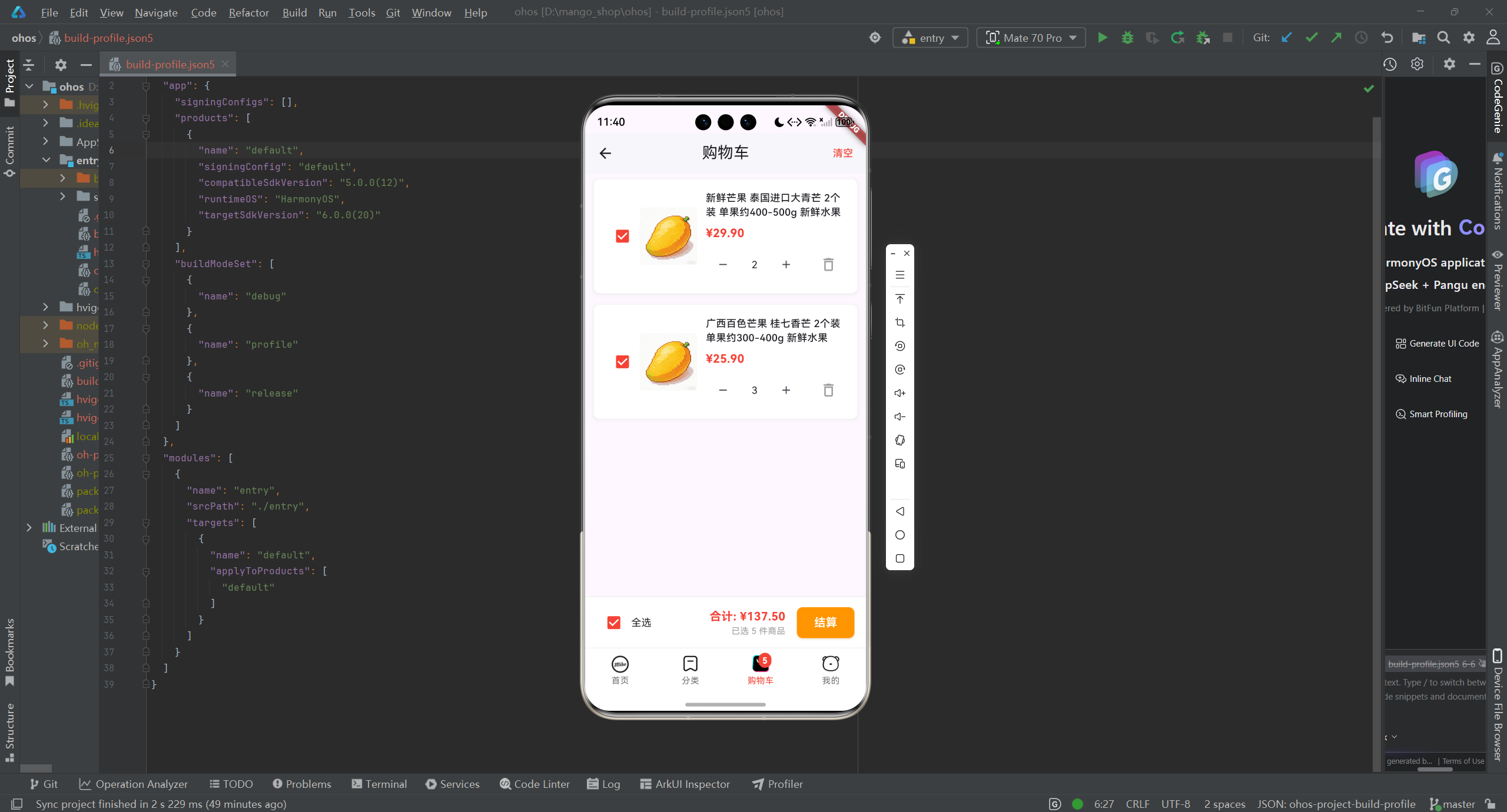
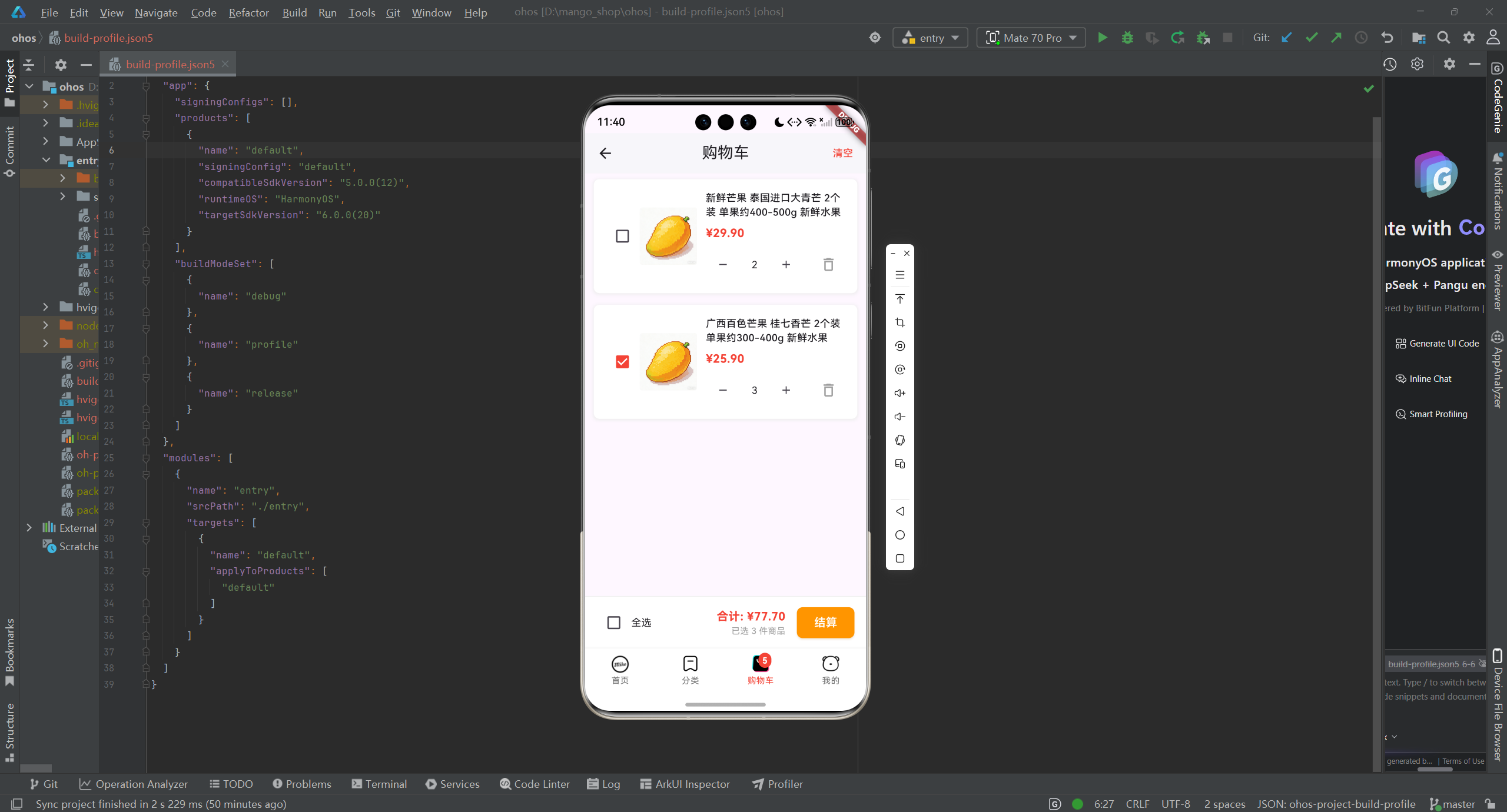
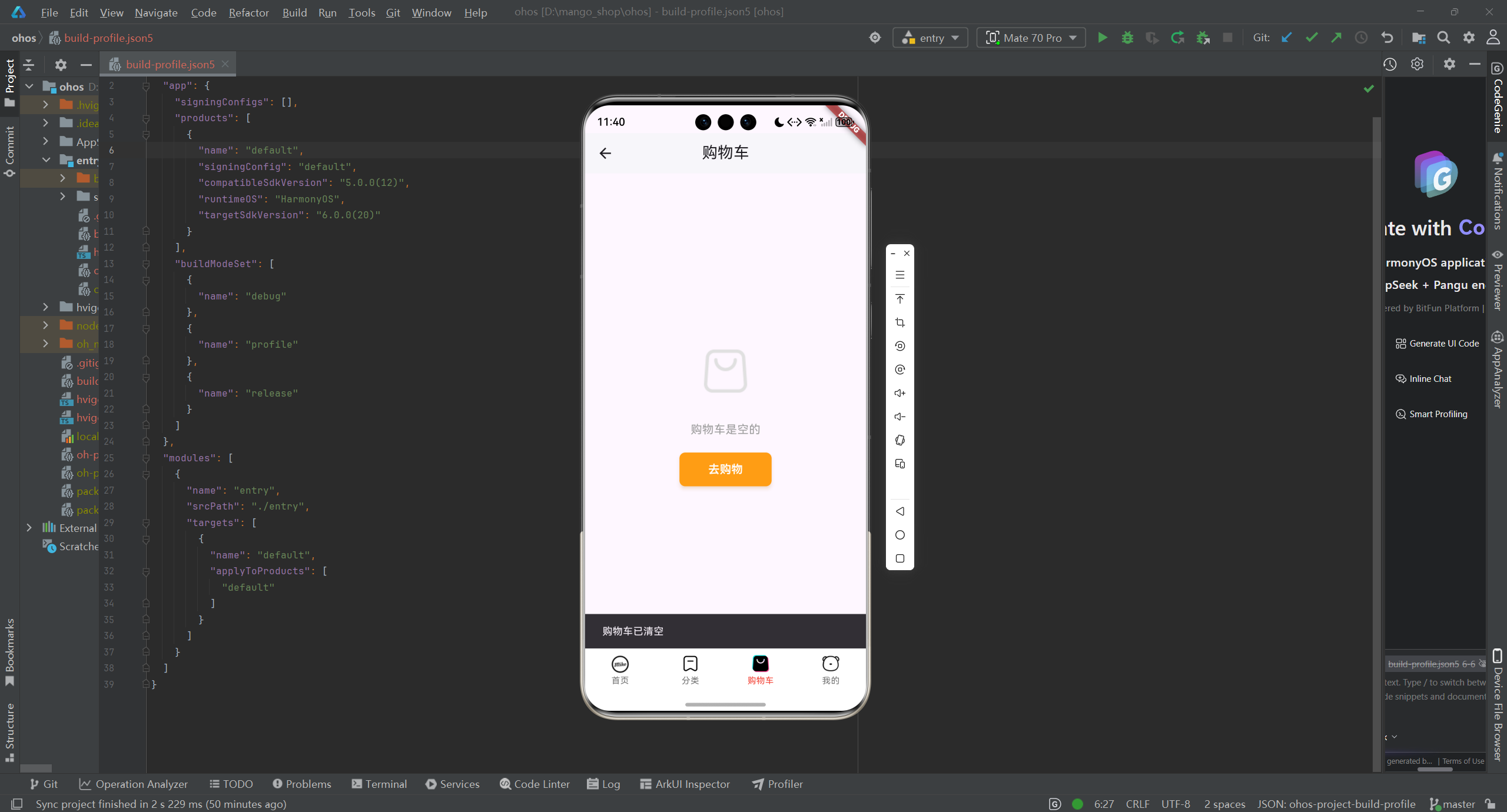
1.2 购物车商品模型
// lib/models/cart_item.dart
class CartItem {
  final String id;
  final String name;
  final String image;
  final double price;
  int quantity;
  bool isSelected;

  CartItem({
    required this.id,
    required this.name,
    required this.image,
    required this.price,
    required this.quantity,
    this.isSelected = true,
  });

  // 从 JSON 创建购物车项实例
  factory CartItem.fromJson(Map<String, dynamic> json) {
    return CartItem(
      id: json['id'] ?? '',
      name: json['name'] ?? '',
      image: json['image'] ?? '',
      price: json['price'] ?? 0.0,
      quantity: json['quantity'] ?? 1,
      isSelected: json['isSelected'] ?? true,
    );
  }

  // 转换为 JSON
  Map<String, dynamic> toJson() {
    return {
      'id': id,
      'name': name,
      'image': image,
      'price': price,
      'quantity': quantity,
      'isSelected': isSelected,
    };
  }
}
2. 本地缓存实现
2.1 购物车服务
// lib/services/cart_service.dart
import 'dart:convert';
import 'package:mango_shop/models/cart_item.dart';
import 'package:mango_shop/services/secure_storage_service.dart';
import 'package:mango_shop/utils/platform/adapter.dart';

class CartService {
  static const String _cartKey = 'mango_shop_cart';
  final SecureStorageService _storage = SecureStorageService();

  // 获取购物车数据
  Future<List<CartItem>> getCart() async {
    try {
      final cartJson = await _storage.read(_cartKey);
      if (cartJson == null) {
        return [];
      }

      final List<dynamic> cartList = jsonDecode(cartJson);
      return cartList.map((item) => CartItem.fromJson(item)).toList();
    } catch (e) {
      print('获取购物车数据失败: $e');
      return [];
    }
  }

  // 保存购物车数据
  Future<void> saveCart(List<CartItem> cartItems) async {
    try {
      final cartJson = jsonEncode(cartItems.map((item) => item.toJson()).toList());
      await _storage.write(_cartKey, cartJson);
    } catch (e) {
      print('保存购物车数据失败: $e');
    }
  }

  // 添加商品到购物车
  Future<List<CartItem>> addToCart(CartItem item) async {
    final cartItems = await getCart();

    // 检查商品是否已在购物车中
    final existingItemIndex = cartItems.indexWhere((cartItem) => cartItem.id == item.id);

    if (existingItemIndex != -1) {
      // 商品已存在,增加数量
      cartItems[existingItemIndex].quantity += item.quantity;
    } else {
      // 商品不存在,添加到购物车
      cartItems.add(item);
    }

    await saveCart(cartItems);
    return cartItems;
  }

  // 更新商品数量
  Future<List<CartItem>> updateQuantity(String itemId, int quantity) async {
    final cartItems = await getCart();

    final itemIndex = cartItems.indexWhere((item) => item.id == itemId);
    if (itemIndex != -1) {
      if (quantity > 0) {
        cartItems[itemIndex].quantity = quantity;
      } else {
        // 数量为0,移除商品
        cartItems.removeAt(itemIndex);
      }
    }

    await saveCart(cartItems);
    return cartItems;
  }

  // 切换商品选中状态
  Future<List<CartItem>> toggleItemSelection(String itemId) async {
    final cartItems = await getCart();

    final itemIndex = cartItems.indexWhere((item) => item.id == itemId);
    if (itemIndex != -1) {
      cartItems[itemIndex].isSelected = !cartItems[itemIndex].isSelected;
    }

    await saveCart(cartItems);
    return cartItems;
  }

  // 切换全选状态
  Future<List<CartItem>> toggleAllSelection() async {
    final cartItems = await getCart();

    if (cartItems.isEmpty) {
      return cartItems;
    }

    // 检查当前是否全选
    final isAllSelected = cartItems.every((item) => item.isSelected);

    // 切换所有商品的选中状态
    for (final item in cartItems) {
      item.isSelected = !isAllSelected;
    }

    await saveCart(cartItems);
    return cartItems;
  }

  // 删除商品
  Future<List<CartItem>> removeItem(String itemId) async {
    final cartItems = await getCart();

    cartItems.removeWhere((item) => item.id == itemId);

    await saveCart(cartItems);
    return cartItems;
  }

  // 清空购物车
  Future<void> clearCart() async {
    await _storage.delete(_cartKey);
  }

  // 结算
  Future<void> checkout(List<CartItem> items) async {
    // 这里可以添加结算逻辑,如调用支付 API 等
    print('结算商品: ${items.length} 件');
    // 模拟结算过程
    await Future.delayed(const Duration(seconds: 1));
  }
}
2.2 安全存储服务
// lib/services/secure_storage_service.dart
import 'dart:io';
import 'package:flutter_secure_storage/flutter_secure_storage.dart';

class SecureStorageService {
  static final SecureStorageService _instance = SecureStorageService._internal();
  factory SecureStorageService() => _instance;

  late FlutterSecureStorage _storage;

  SecureStorageService._internal() {
    // 根据平台创建不同的存储实例
    if (Platform.isOpenHarmony) {
      // OpenHarmony 平台特定配置
      _storage = FlutterSecureStorage(
        aOptions: AndroidOptions(
          encryptedSharedPreferences: true,
        ),
      );
    } else if (Platform.isAndroid) {
      _storage = FlutterSecureStorage(
        aOptions: AndroidOptions(
          encryptedSharedPreferences: true,
        ),
      );
    } else if (Platform.isIOS) {
      _storage = FlutterSecureStorage(
        iOptions: IOSOptions(
          accessibility: IOSAccessibility.first_unlock,
        ),
      );
    } else {
      // 其他平台配置
      _storage = FlutterSecureStorage();
    }
  }

  // 存储数据
  Future<void> write(String key, String value) async {
    await _storage.write(key: key, value: value);
  }

  // 读取数据
  Future<String?> read(String key) async {
    return await _storage.read(key: key);
  }

  // 删除数据
  Future<void> delete(String key) async {
    await _storage.delete(key: key);
  }

  // 删除所有数据
  Future<void> deleteAll() async {
    await _storage.deleteAll();
  }

  // 检查键是否存在
  Future<bool> containsKey(String key) async {
    final value = await _storage.read(key: key);
    return value != null;
  }
}
3. 购物车组件优化
3.1 购物车页面
// lib/pages/Cart/index.dart
import 'package:flutter/material.dart';
import 'package:flutter_riverpod/flutter_riverpod.dart';
import 'package:mango_shop/providers/cart_provider.dart';
import 'package:mango_shop/utils/colors.dart';
import 'package:mango_shop/utils/text_styles.dart';
class CartView extends ConsumerWidget {
const CartView({Key? key}) : super(key: key);
Widget build(BuildContext context, WidgetRef ref) {
final cartState = ref.watch(cartProvider);
final cartNotifier = ref.read(cartProvider.notifier);
return Scaffold(
appBar: AppBar(
title: const Text('购物车'),
centerTitle: true,
backgroundColor: Colors.white,
elevation: 1,
actions: [
if (cartState.items.isNotEmpty)
TextButton(
onPressed: () {
// 显示确认对话框
showDialog(
context: context,
builder: (BuildContext context) {
return AlertDialog(
title: const Text('确认清空'),
content: const Text('确定要清空购物车吗?'),
actions: [
TextButton(
onPressed: () {
Navigator.of(context).pop();
},
child: const Text('取消'),
),
TextButton(
onPressed: () async {
await cartNotifier.clearCart();
Navigator.of(context).pop();
// 显示清空成功提示
ScaffoldMessenger.of(context).showSnackBar(
const SnackBar(content: Text('购物车已清空')),
);
},
child: const Text('确定', style: TextStyle(color: Colors.red)),
),
],
);
},
);
},
child: const Text('清空', style: TextStyle(color: Colors.red)),
),
],
),
body: cartState.items.isEmpty
? _buildEmptyCart()
: Column(
children: [
Expanded(
child: ListView.builder(
itemCount: cartState.items.length,
itemBuilder: (context, index) {
final item = cartState.items[index];
return _buildCartItem(context, item, cartNotifier);
},
),
),
_buildCheckoutBar(context, ref, cartNotifier),
],
),
);
}
Widget _buildEmptyCart() {
return Center(
child: Column(
mainAxisAlignment: MainAxisAlignment.center,
children: [
Image.asset(
'lib/assets/ic_public_cart_normal.png',
width: 100,
height: 100,
color: Colors.grey[300],
),
const SizedBox(height: 20),
const Text('购物车是空的', style: TextStyle(color: Colors.grey, fontSize: 16)),
const SizedBox(height: 20),
ElevatedButton(
onPressed: () {
// 跳转到首页
Navigator.pushNamed(context, '/');
},
child: const Text('去购物'),
style: ElevatedButton.styleFrom(
backgroundColor: AppColors.primary,
foregroundColor: AppColors.white,
padding: const EdgeInsets.symmetric(horizontal: 40, vertical: 12),
elevation: 2,
shadowColor: AppColors.primary.withOpacity(0.3),
shape: RoundedRectangleBorder(
borderRadius: BorderRadius.circular(8),
),
),
),
],
),
);
}
Widget _buildCartItem(BuildContext context, CartItem item, CartNotifier notifier) {
return Container(
padding: const EdgeInsets.all(16),
margin: const EdgeInsets.symmetric(horizontal: 12, vertical: 8),
decoration: BoxDecoration(
color: Colors.white,
borderRadius: BorderRadius.circular(8),
boxShadow: [
BoxShadow(
color: Colors.grey[200]!,
spreadRadius: 1,
blurRadius: 3,
offset: const Offset(0, 1),
),
],
),
child: Row(
children: [
// 选择框
Checkbox(
value: item.isSelected,
onChanged: (value) => notifier.toggleItemSelection(item.id),
activeColor: Colors.red,
),
// 商品图片
Container(
width: 80,
height: 80,
decoration: BoxDecoration(
borderRadius: BorderRadius.circular(4),
image: DecorationImage(
image: AssetImage(item.image),
fit: BoxFit.cover,
),
),
),
const SizedBox(width: 12),
// 商品信息
Expanded(
child: Column(
crossAxisAlignment: CrossAxisAlignment.start,
children: [
Text(
item.name,
maxLines: 2,
overflow: TextOverflow.ellipsis,
style: const TextStyle(fontSize: 14, fontWeight: FontWeight.w500),
),
const SizedBox(height: 8),
Text(
'¥${item.price.toStringAsFixed(2)}',
style: const TextStyle(
fontSize: 16,
fontWeight: FontWeight.bold,
color: Colors.red,
),
),
const SizedBox(height: 8),
Row(
mainAxisAlignment: MainAxisAlignment.spaceBetween,
children: [
// 数量控制
Row(
children: [
IconButton(
onPressed: () => notifier.updateQuantity(item.id, item.quantity - 1),
icon: const Icon(Icons.remove, size: 18),
constraints: const BoxConstraints(minWidth: 30),
),
Container(
width: 40,
alignment: Alignment.center,
child: Text(item.quantity.toString()),
),
IconButton(
onPressed: () => notifier.updateQuantity(item.id, item.quantity + 1),
icon: const Icon(Icons.add, size: 18),
constraints: const BoxConstraints(minWidth: 30),
),
],
),
// 删除按钮
IconButton(
onPressed: () => notifier.removeItem(item.id),
icon: const Icon(Icons.delete_outline, color: Colors.grey),
),
],
),
],
),
),
],
),
);
}
Widget _buildCheckoutBar(BuildContext context, WidgetRef ref, CartNotifier notifier) {
final totalPrice = ref.watch(cartTotalPriceProvider);
final selectedCount = ref.watch(cartSelectedCountProvider);
final isAllSelected = ref.watch(cartIsAllSelectedProvider);
return Container(
padding: const EdgeInsets.symmetric(horizontal: 16, vertical: 12),
decoration: BoxDecoration(
color: Colors.white,
border: Border(top: BorderSide(color: Colors.grey[200]!)),
),
child: Row(
children: [
// 全选
Row(
children: [
Checkbox(
value: isAllSelected,
onChanged: (value) => notifier.toggleAllSelection(),
activeColor: Colors.red,
),
const Text('全选'),
],
),
Expanded(
child: Row(
mainAxisAlignment: MainAxisAlignment.end,
children: [
// 总价
Column(
crossAxisAlignment: CrossAxisAlignment.end,
children: [
Text(
'合计: ¥${totalPrice.toStringAsFixed(2)}',
style: const TextStyle(
fontSize: 16,
fontWeight: FontWeight.bold,
color: Colors.red,
),
),
Text(
'已选 ${selectedCount} 件商品',
style: const TextStyle(fontSize: 12, color: Colors.grey),
),
],
),
const SizedBox(width: 16),
// 结算按钮
ElevatedButton(
onPressed: selectedCount > 0
? () async {
// 显示结算确认对话框
showDialog(
context: context,
builder: (BuildContext context) {
return AlertDialog(
title: const Text('确认结算'),
content: Column(
mainAxisSize: MainAxisSize.min,
crossAxisAlignment: CrossAxisAlignment.start,
children: [
Text('共 ${selectedCount} 件商品'),
const SizedBox(height: 8),
Text('合计:¥${totalPrice.toStringAsFixed(2)}'),
],
),
actions: [
TextButton(
onPressed: () {
Navigator.of(context).pop();
},
child: const Text('取消'),
style: TextButton.styleFrom(
padding: const EdgeInsets.symmetric(horizontal: 16, vertical: 8),
),
),
TextButton(
onPressed: () async {
Navigator.of(context).pop();
try {
await notifier.checkout();
// 显示结算成功提示
ScaffoldMessenger.of(context).showSnackBar(
const SnackBar(content: Text('结算成功!')),
);
} catch (e) {
// 显示结算失败提示
ScaffoldMessenger.of(context).showSnackBar(
SnackBar(content: Text('结算失败:$e')),
);
}
},
child: const Text('确认结算', style: TextStyle(color: Colors.red)),
),
],
);
},
);
}
: null,
child: const Text('结算'),
style: ElevatedButton.styleFrom(
backgroundColor: AppColors.primary,
foregroundColor: AppColors.white,
padding: const EdgeInsets.symmetric(horizontal: 24, vertical: 10),
elevation: 2,
shadowColor: AppColors.primary.withOpacity(0.3),
shape: RoundedRectangleBorder(
borderRadius: BorderRadius.circular(8),
),
),
),
],
),
),
],
),
);
}
}
3.2 主页面集成
// lib/pages/Main/index.dart
import 'package:flutter/material.dart';
import 'package:flutter_riverpod/flutter_riverpod.dart';
import 'package:mango_shop/pages/Cart/index.dart';
import 'package:mango_shop/pages/Category/index.dart';
import 'package:mango_shop/pages/Home/index.dart';
import 'package:mango_shop/pages/Mine/index.dart';
import 'package:mango_shop/providers/cart_provider.dart';
import 'package:mango_shop/utils/colors.dart';
class Mainpage extends ConsumerWidget {
const Mainpage({Key? key}) : super(key: key);
Widget build(BuildContext context, WidgetRef ref) {
final cartCount = ref.watch(cartCountProvider);
int _currentIndex = 0;
// 定义Tab栏数据
final List<Map<String, dynamic>> _tablist = [
{
"icon": "lib/assets/ic_public_home_normal.png",
"activeIcon": "lib/assets/ic_public_home_active.png",
"text": "首页",
"page": const HomeView(),
},
{
"icon": "lib/assets/ic_public_pro_normal.png",
"activeIcon": "lib/assets/ic_public_pro_active.png",
"text": "分类",
"page": const categoryView(),
},
{
"icon": "lib/assets/ic_public_cart_normal.png",
"activeIcon": "lib/assets/ic_public_cart_active.png",
"text": "购物车",
"page": const CartView(),
},
{
"icon": "lib/assets/ic_public_my_normal.png",
"activeIcon": "lib/assets/ic_public_my_active.png",
"text": "我的",
"page": const MineView(),
},
];
return Scaffold(
body: IndexedStack(
index: _currentIndex,
children: _tablist.map((tab) => tab["page"] as Widget).toList(),
),
bottomNavigationBar: BottomNavigationBar(
showUnselectedLabels: true,
selectedItemColor: Colors.red,
unselectedItemColor: Colors.grey[600],
selectedFontSize: 12,
unselectedFontSize: 12,
type: BottomNavigationBarType.fixed,
elevation: 8,
backgroundColor: Colors.white,
onTap: (int index) {
setState(() {
_currentIndex = index;
});
},
currentIndex: _currentIndex,
items: _tablist.asMap().entries.map((entry) {
int index = entry.key;
Map<String, dynamic> tab = entry.value;
return BottomNavigationBarItem(
icon: _buildTabIcon(index, false, cartCount),
activeIcon: _buildTabIcon(index, true, cartCount),
label: tab["text"],
);
}).toList(),
),
);
}
// 构建Tab栏图标
Widget _buildTabIcon(int index, bool isActive, int cartCount) {
// 根据是否选中使用不同的图标
String iconPath = isActive
? _tablist[index]["activeIcon"]!
: _tablist[index]["icon"]!;
Widget icon = Image.asset(
iconPath,
width: 30,
height: 30,
);
// 购物车图标添加数量显示
if (index == 2) {
return Stack(
alignment: Alignment.topRight,
children: [
icon,
if (cartCount > 0)
Container(
padding: const EdgeInsets.all(2),
decoration: BoxDecoration(
color: Colors.red,
borderRadius: BorderRadius.circular(10),
),
constraints: const BoxConstraints(
minWidth: 18,
minHeight: 18,
),
child: Text(
cartCount > 99 ? '99+' : cartCount.toString(),
style: const TextStyle(
color: Colors.white,
fontSize: 12,
fontWeight: FontWeight.bold,
),
textAlign: TextAlign.center,
),
),
],
);
}
return icon;
}
}
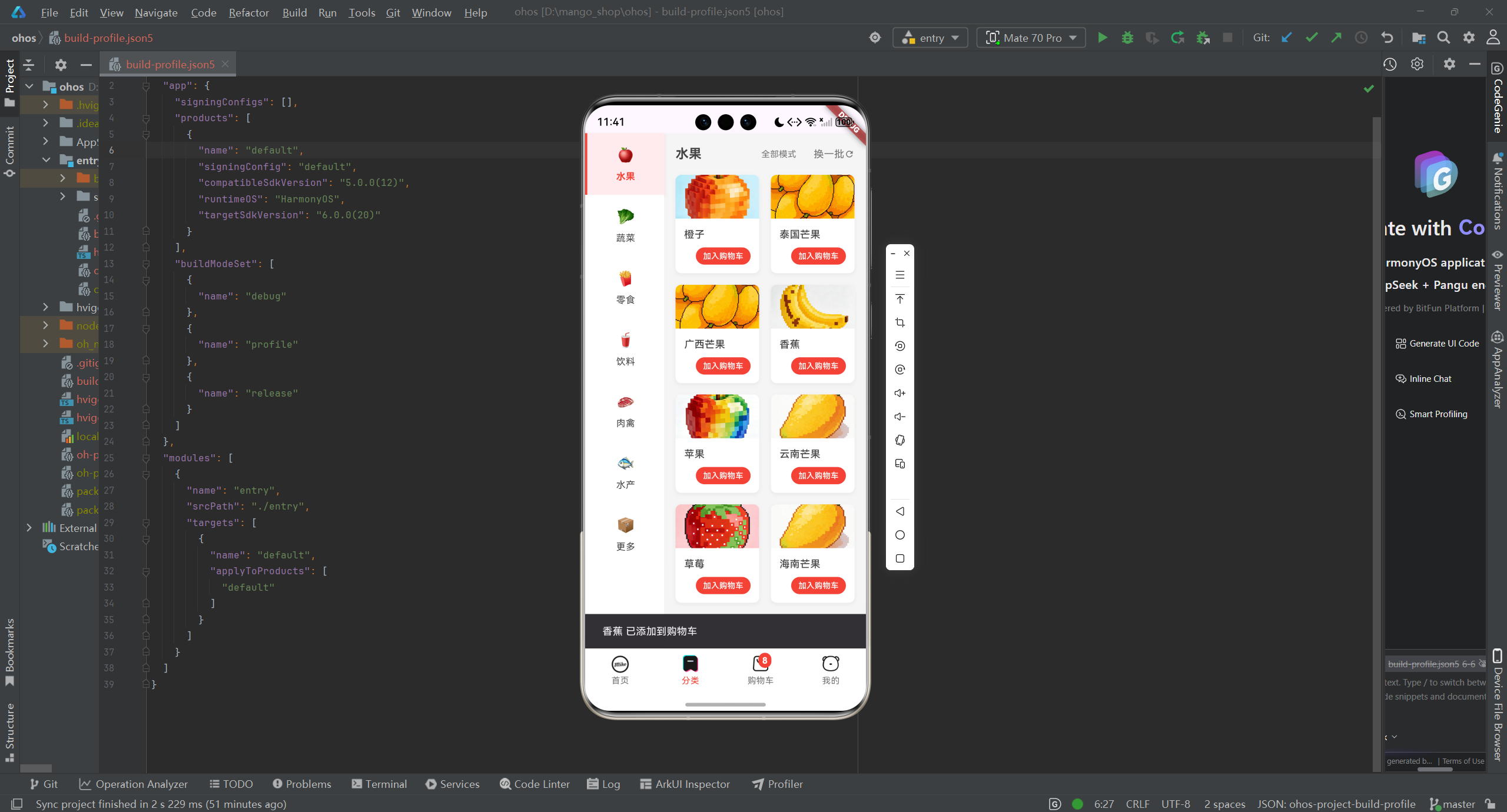
4. 跨平台适配
4.1 OpenHarmony 平台适配
针对 OpenHarmony 平台,我们需要进行以下适配:
-
存储适配:
- OpenHarmony 平台的存储机制与其他平台有所不同,需要使用特定的存储 API
- 实现平台感知的存储策略
-
性能优化:
- 针对 OpenHarmony 平台的性能特性,优化购物车数据的加载和更新
- 减少不必要的 UI 重建
-
平台感知实现:
// lib/utils/platform/adapter.dart
import 'dart:io';

class PlatformAdapter {
  // 判断当前平台
  static bool get isOpenHarmony {
    return Platform.environment.containsKey('OHOS') ||
           Platform.operatingSystem.toLowerCase() == 'openharmony';
  }

  // 获取平台特定的存储策略
  static bool useSecureStorage {
    return !isOpenHarmony; // OpenHarmony 平台使用普通存储
  }

  // 获取平台特定的购物车数据同步策略
  static bool useRealTimeSync {
    return !isOpenHarmony; // OpenHarmony 平台使用定时同步
  }

  // 获取平台特定的缓存大小限制
  static int get cartCacheSizeLimit {
    return isOpenHarmony ? 100 : 200; // OpenHarmony 平台限制更小
  }
}
- OpenHarmony 特定的存储实现:
// lib/services/ohos_storage_adapter.dart
import 'dart:convert';
import 'dart:io';
import 'package:flutter/foundation.dart';
import 'package:mango_shop/utils/platform/adapter.dart';
import 'package:path_provider/path_provider.dart';

class OhosStorageAdapter {
  static final OhosStorageAdapter _instance = OhosStorageAdapter._internal();
  factory OhosStorageAdapter() => _instance;

  OhosStorageAdapter._internal();

  // 检查是否为 OpenHarmony 平台
  bool get isOpenHarmony => PlatformAdapter.isOpenHarmony;

  // OpenHarmony 平台的存储路径
  Future<String> get _storagePath async {
    if (isOpenHarmony) {
      final directory = await getApplicationDocumentsDirectory();
      return '${directory.path}/mango_shop';
    }
    throw UnsupportedError('Not OpenHarmony platform');
  }

  // 确保存储目录存在
  Future<void> _ensureDirectoryExists() async {
    if (isOpenHarmony) {
      final path = await _storagePath;
      final directory = Directory(path);
      if (!directory.existsSync()) {
        directory.createSync(recursive: true);
      }
    }
  }

  // 保存数据到 OpenHarmony 存储
  Future<void> save(String key, dynamic value) async {
    if (isOpenHarmony) {
      try {
        await _ensureDirectoryExists();
        final path = await _storagePath;
        final file = File('$path/$key.json');
        final jsonValue = jsonEncode(value);
        await file.writeAsString(jsonValue);
        if (kDebugMode) {
          print('OpenHarmony: Saved $key to storage');
        }
      } catch (e) {
        if (kDebugMode) {
          print('OpenHarmony storage error: $e');
        }
      }
    }
  }

  // 从 OpenHarmony 存储读取数据
  Future<dynamic> read(String key) async {
    if (isOpenHarmony) {
      try {
        await _ensureDirectoryExists();
        final path = await _storagePath;
        final file = File('$path/$key.json');
        if (file.existsSync()) {
          final jsonValue = await file.readAsString();
          if (kDebugMode) {
            print('OpenHarmony: Read $key from storage');
          }
          return jsonDecode(jsonValue);
        }
      } catch (e) {
        if (kDebugMode) {
          print('OpenHarmony storage error: $e');
        }
      }
    }
    return null;
  }

  // 删除 OpenHarmony 存储中的数据
  Future<void> delete(String key) async {
    if (isOpenHarmony) {
      try {
        await _ensureDirectoryExists();
        final path = await _storagePath;
        final file = File('$path/$key.json');
        if (file.existsSync()) {
          await file.delete();
          if (kDebugMode) {
            print('OpenHarmony: Deleted $key from storage');
          }
        }
      } catch (e) {
        if (kDebugMode) {
          print('OpenHarmony storage error: $e');
        }
      }
    }
  }
}
测试与调试
1. 购物车功能测试
-
功能测试:
- 测试添加商品到购物车
- 测试修改商品数量
- 测试删除商品
- 测试清空购物车
- 测试结算功能
- 测试应用重启后购物车数据是否保留
-
性能测试:
- 测试购物车数据加载性能
- 测试购物车数据更新性能
- 测试大量商品时的性能表现
-
跨平台测试:
- 确保在所有平台上购物车功能表现一致
- 特别测试 OpenHarmony 平台的适配情况
2. 调试工具
-
日志调试:
- 添加购物车操作的详细日志,便于调试
- 使用不同级别的日志,区分正常操作和错误情况
-
性能分析:
- 使用 Flutter DevTools 分析购物车操作的性能
- 监控内存使用和 UI 渲染性能
-
存储调试:
- 添加存储操作的日志,了解数据存储情况
- 提供查看当前存储内容的工具
总结与展望
通过本文介绍的购物车模块优化方案,我们可以:
- 提高代码可维护性:使用 Riverpod 进行状态管理,代码结构更清晰
- 增强数据持久性:实现购物车数据的本地缓存,确保应用重启后数据不丢失
- 提升用户体验:优化购物车操作的响应速度和流畅度
- 增强跨平台兼容性:针对 OpenHarmony 平台进行专门的适配
- 简化开发流程:封装购物车服务,减少重复代码
未来,可以考虑:
- 云同步:实现购物车数据的云端同步,支持多设备共享购物车
- 离线购物:增强离线购物体验,在网络恢复后自动同步
- 智能推荐:基于购物车内容提供个性化商品推荐
- 购物车分析:分析用户购物习惯,优化商品展示和促销策略
Flutter for OpenHarmony 为跨平台应用开发提供了新的可能性,通过合理的购物车模块设计和跨平台适配,可以构建出在所有平台上表现出色的应用。
欢迎加入开源鸿蒙跨平台社区:开源鸿蒙跨平台开发者社区

开源鸿蒙跨平台开发社区汇聚开发者与厂商,共建“一次开发,多端部署”的开源生态,致力于降低跨端开发门槛,推动万物智联创新。
更多推荐


 4
4 0
0- 0


 已为社区贡献22条内容

所有评论(0)