08_flutter中如何优雅的提前获取child的宽高
08_flutter中如何优雅的提前获取child的宽高
一. 先上效果
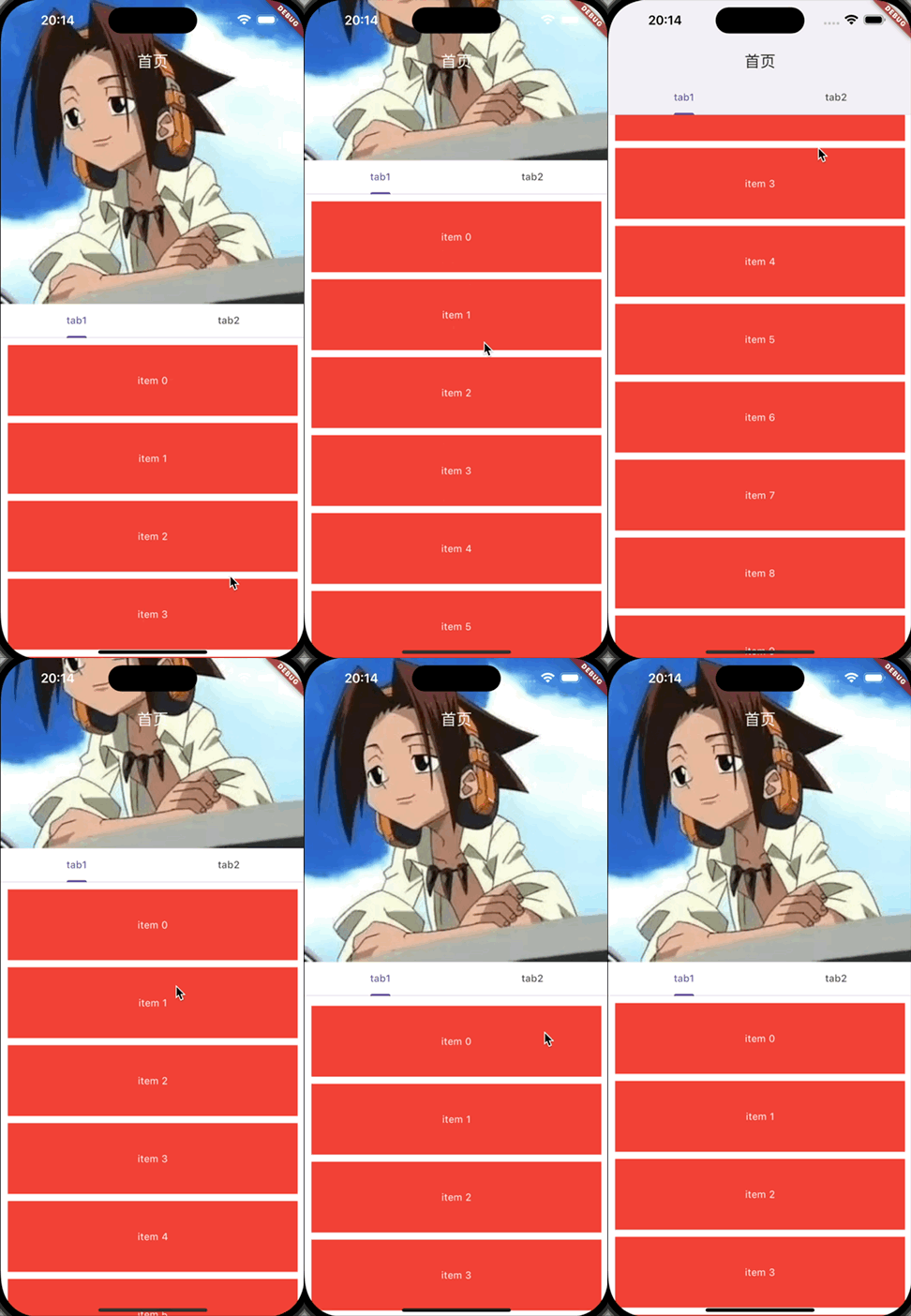
最近在使用SliverAppBar实现可以折叠的标题栏时发现,在设置子SliverAppBar的展开高度时,需要显式的指定展开的高度,显得不够灵活,以下面代码为例:
CustomScrollView(
  slivers: [
    SliverAppBar(
      pinned: true,
      collapsedHeight: kToolbarHeight,
      expandedHeight: 300 - MediaQuery.paddingOf(context).top,
      centerTitle: true,
      title: Builder(builder: (context) {
        final FlexibleSpaceBarSettings? settings = context.dependOnInheritedWidgetOfExactType<FlexibleSpaceBarSettings>();
        bool isScrolledUnder = settings?.isScrolledUnder ?? false;
        Color? titleColor = isScrolledUnder ? Theme.of(context).appBarTheme.foregroundColor:Colors.white;
        return Text(
          "首页",
          style: TextStyle(
            color: titleColor
          ),
        );
      }),
      backgroundColor: MaterialStateColor.resolveWith((states) {
        if(states.contains(MaterialState.scrolledUnder)) {
          return Theme.of(context).appBarTheme.backgroundColor ?? Colors.white;
        }
        return Colors.transparent;
      }),
      flexibleSpace: FlexibleSpaceBar(
        collapseMode: CollapseMode.pin,
        background: InkResponse(
          onTap: () {
            debugPrint("click");
          },
          child: Padding(
            padding: const EdgeInsets.only(bottom: 48),
            child: Image.asset(
              "assets/user.jpeg",
              fit: BoxFit.fitWidth,
            ),
          ),
        ),
      ),
      bottom: const TabBar(
        tabs: [
          Tab(
            text: "tab1",
          ),
          Tab(
            text: "tab2",
          )
        ],
      )
    ),

    SliverPadding(
      padding: const EdgeInsets.all(5),
      sliver: SliverList.list(
        children: List<Widget>.generate(10, (index) {
          return Container(
            height: 100,
            color: Colors.red,
            margin: const EdgeInsets.all(5),
            alignment: Alignment.center,
            child: Text(
              "item $index",
              style: const TextStyle(
                color: Colors.white
              ),
            ),
          );
        })
      ),
    )
  ],
)
我希望通过指定expandedHeight的值,保证标题栏能够完全显示出Image的内容,同时Image不会被裁剪。这个时候我们就需要提前知道flexibleSpace中的background以及bottom的高度flexibleHeight,然后设置expandedHeight的值为flexibleHeight - MediaQuery.paddingOf(context).top,那么,怎么样才能提前获取到background以及bottom的高度呢?
二.实现思路
-
方案一
自己计算,适用于当折叠内容的布局比较简单时,比如只用到了文本以及
padding和margin,那么可以先借助TextPainter计算文本的高度,再叠加上padding和margin,这样做不能重用,且有局限性,还容易计算错误,所以不推荐。 -
方案二
重新实现一个
SliverPersistentHeader和SliverAppBar,在SliverPersistentHeader对应的RenderObject中,重写performLayout来提前调整SliverPersistentHeader的maxExtent,这样做呢,貌似没什么问题,也能复用。但是假如Flutter SDK对SliverPersistentHeader和SliverAppBar做了调整,那么咱们自己实现的组件也得跟着变,而且要变的东西很多,牵一发而动全身了,所以也不推荐。 -
方案三
参考了内置组件
SliverPrototypeExtentList的实现,自定义RenderObjectWidget、RenderObjectElement和RenderObject,在RenderObject中额外挂载一个原型widget,原型widget只参与layout,不参与paint,相当于原型widget只是为了layout之后计算宽高,并不会显示到屏幕上去,所以也就不会有性能的损耗。然后重写
RenderObject的performLayout,先layout原型widget,再根据原型widget的尺寸,去构建实际需要渲染的child。最后使用如下:
SliverPrototypeBuilder(
  prototype: Container(
    height: 200,
    color: Colors.red,
  ),
  sliverBuilder: (context, mainAxisChildExtent, crossAxisChildExtent) {
    return SliverToBoxAdapter(
      child: Container(
        height: mainAxisChildExtent,
        color: Colors.red,
      ),
    );
  }
)
这种方式易扩展,支持复用,我们可以将这个组件作用于任何的
Sliver组件,同样也可以配套实现一个普通RenderBox的版本,作用于普通的widget,同时使用简单也足够优雅,不需要重写sdk提供的widget,推荐使用这种方式,本文也将采用这种方式实现。
三.RenderObjectWidget、RenderObjectElement、RenderObject各自负责什么。
-
RenderObjectWidget
定义组件的尺寸约束、颜色等配置信息,负责创建
RenderObjectElement和RenderObject对象,是一个不可变对象,要改变配置,只能重新去创建对象,由RenderObjectElement控制重建。 -
RenderObjectElement
Flutter中随处可见的BuildContext就是一个RenderObjectElement对象,负责创建RenderObjectWidget对象,从而递归创建子组件的RenderObjectWidget、RenderObjectElement、RenderObject,以及挂载子组件child对应的RenderObject到当前RenderObject上,同时控制RenderObjectWidget的重新创建以及指挥当前RenderObject去更新和干活(layout、paint…),Flutter中的三棵树就是这样形成的,RenderObjectElement是连接RenderObjectWidget和RenderObject的桥梁。 -
RenderObject
RenderObject才是真正负责干活的大冤种,负责确定widget的宽高(layout),以及调用渲染引擎把结果显示到屏幕上(paint),此过程同样是递归,layout过程遵循向下传递布局约束,向上传递child尺寸,父级根据子组件传递的尺寸以及自身的布局约束,确定自身的尺寸。
四.自定义RenderObjectElement类
-
创建
_SliverPrototypeBuilderElement类继承RenderObjectElementclass _SliverPrototypeBuilderElement extends RenderObjectElement { _SliverPrototypeBuilderElement(SliverPrototypeBuilder super.widget); } -
重写
visitChildren、forgetChild、mount、update、insertRenderObjectChild、moveRenderObjectChild、removeRenderObjectChild方法,把自身引用传递给RenderObject,RenderObject可以通过这个应用通知构建真正需要渲染的child对应的RenderObjectWidget,读取RenderObjectWidget的配置,通知RenderObjectWidget创建prototype对应的RenderObjectWidget以及挂载prototype原型widget对应的RenderBox。class _SliverPrototypeBuilderElement extends RenderObjectElement { _SliverPrototypeBuilderElement(SliverPrototypeBuilder super.widget); _RenderSliverPrototypeBuilder get renderObject => super.renderObject as _RenderSliverPrototypeBuilder; Element? _prototype; static final Object _prototypeSlot = Object(); Element? _child; void visitChildren(ElementVisitor visitor) { // 暂时不知道是什么意思,依葫芦画了个瓢 if (_prototype != null) { visitor(_prototype!); } if (_child != null) { visitor(_child!); } } void forgetChild(Element child) { if(_prototype == child) { // 卸载prototype _prototype = null; } else { // 卸载真实渲染的child _child = null; } super.forgetChild(child); } void mount(Element? parent, Object? newSlot) { super.mount(parent, newSlot); // 创建prototype对应的RenderObjectWidget、RenderObject、RenderObjectElement _prototype = updateChild(_prototype, (widget as SliverPrototypeBuilder).prototype, _prototypeSlot); // 由于真正需要渲染的child依赖prototype的尺寸,所以我们先不自动创建它,等到RenderObject中prototype的尺寸确定了,再通知创建 // 把自身引用传递给RenderObject,RenderObject可以通过这个引用通知RenderObjectElement构建真正需要渲染的child对应的RenderObjectWidget renderObject._element = this; } void update(SliverPrototypeBuilder newWidget) { super.update(newWidget); assert(widget == newWidget); // 重建prototype _prototype = updateChild(_prototype, newWidget.prototype, _prototypeSlot); // 通知renderObject,prototype对应的RenderObjectWidget被重建了,请您重新执行layout过程更新 renderObject.markNeedsLayout(); } void insertRenderObjectChild(RenderObject child, Object? slot) { if (slot == _prototypeSlot) { // 将prototype对应的RenderBox挂载到renderObject assert(child is RenderBox); renderObject.prototype = child as RenderBox; } else { // 将真正需要渲染的child对应的RenderBox挂载到renderObject final RenderObjectWithChildMixin<RenderObject> renderObject = this.renderObject; assert(renderObject.debugValidateChild(child)); renderObject.child = child; } } void moveRenderObjectChild(RenderObject child, Object? oldSlot, Object? newSlot) { // 单子容器组件无需实现。 assert(false); } void removeRenderObjectChild(RenderObject child, Object? slot) { if (slot == _prototypeSlot) { // 将prototype对应的RenderBox从renderObject移除 renderObject.prototype = null; } else { // 将真正需要渲染的child对应的RenderBox从renderObject移除 renderObject.child = null; } } } -
提供一个
_build方法,当计算出prototype的尺寸后,创建和更新真正需要渲染的child对应的RenderObjectWidget、RenderObject、RenderObjectElement。// mainAxisChildExtent:prototype在主轴方向的尺寸 // crossAxisChildExtent:prototype在交叉轴方向的尺寸 // 注:上下滚动时,主轴为垂直方向,mainAxisChildExtent代表height,crossAxisChildExtent代表width void _build(double mainAxisChildExtent, double crossAxisChildExtent) { owner!.buildScope(this, () { final SliverPrototypeBuilder renderObjectWidget = widget as SliverPrototypeBuilder; _child = updateChild( _child, renderObjectWidget.sliverBuilder(this, mainAxisChildExtent, crossAxisChildExtent), null, ); }); }
五.自定义RenderObject类
-
创建
_RenderSliverPrototypeBuilder继承RenderProxySliver,通过继承RenderProxySliver后,我们只用重写performLayout的实现,其他的沿用系统的实现即可。class _RenderSliverPrototypeBuilder extends RenderProxySliver {} -
定义
prototype对应的RenderBoxclass _RenderSliverPrototypeBuilder extends RenderProxySliver { RenderBox? _prototype; RenderBox? get prototype => _prototype; set prototype(RenderBox? value) { // 先卸载 if (_prototype != null) { dropChild(_prototype!); } _prototype = value; // 再挂载 if (_prototype != null) { adoptChild(_prototype!); } // 重新layout markNeedsLayout(); } void attach(PipelineOwner owner) { super.attach(owner); if (_prototype != null) { _prototype!.attach(owner); } } void detach() { super.detach(); if (_prototype != null) { _prototype!.detach(); } } void redepthChildren() { if (_prototype != null) { redepthChild(_prototype!); } super.redepthChildren(); } void visitChildren(RenderObjectVisitor visitor) { if (_prototype != null) { visitor(_prototype!); } super.visitChildren(visitor); } } -
重写
performLayout,计算prototype的尺寸。class _RenderSliverPrototypeBuilder extends RenderProxySliver { ... Size _computePrototypeSize({required ChildLayouter layoutChild, required BoxConstraints constraints}) { if (prototype != null) { if (!constraints.hasTightHeight) { final double height = prototype!.getMaxIntrinsicHeight(constraints.maxWidth); assert(height.isFinite); constraints = constraints.tighten(height: height); } if(!constraints.hasTightWidth) { final double width = prototype!.getMaxIntrinsicWidth(constraints.maxHeight); assert(width.isFinite); constraints = constraints.tighten(width: width); } return layoutChild(prototype!, constraints); } else { return constraints.smallest; } } void performLayout() { // layout prototype... final SliverConstraints constraints = this.constraints; Size prototypeSize = _computePrototypeSize( layoutChild: ChildLayoutHelper.layoutChild, constraints: constraints.asBoxConstraints(), ); ... super.performLayout(); } } -
prototype尺寸确定后,通知RenderObjectElement去创建实际需要渲染的child对应的RenderObjectWidget、RenderObjectElement、RenderObject,并把尺寸信息传递出去。class _RenderSliverPrototypeBuilder extends RenderProxySliver { ... bool _needsUpdateChild = true; double? _lastMainAxisChildExtent; double? _lastCrossAxisChildExtent; _SliverPrototypeBuilderElement? _element; void markNeedsLayout() { _needsUpdateChild = true; super.markNeedsLayout(); } void updateChild(Size size) { double mainAxisChildExtent = 0; double crossAxisChildExtent = 0; if(constraints.axis == Axis.vertical) { mainAxisChildExtent = size.height; crossAxisChildExtent = size.width; } else { mainAxisChildExtent = size.width; crossAxisChildExtent = size.height; } if (_needsUpdateChild || _lastMainAxisChildExtent != mainAxisChildExtent || _lastCrossAxisChildExtent != crossAxisChildExtent) { invokeLayoutCallback<SliverConstraints>((SliverConstraints constraints) { assert(constraints == this.constraints); assert(_element != null); _element!._build(mainAxisChildExtent, crossAxisChildExtent); }); _lastMainAxisChildExtent = mainAxisChildExtent; _lastCrossAxisChildExtent = crossAxisChildExtent; _needsUpdateChild = false; } } void performLayout() { // layout prototype... final SliverConstraints constraints = this.constraints; Size prototypeSize = _computePrototypeSize( layoutChild: ChildLayoutHelper.layoutChild, constraints: constraints.asBoxConstraints(), ); updateChild(prototypeSize); super.performLayout(); } }
六.自定义RenderObjectWidget类
-
比较简单,直接上代码了就。
typedef SliverPrototypeWidgetBuilder = Widget Function(BuildContext context, double mainAxisChildExtent, double crossAxisChildExtent); class SliverPrototypeBuilder extends RenderObjectWidget { final Widget? prototype; final SliverPrototypeWidgetBuilder sliverBuilder; const SliverPrototypeBuilder({ super.key, this.prototype, required this.sliverBuilder }); RenderObjectElement createElement() => _SliverPrototypeBuilderElement(this); RenderObject createRenderObject(BuildContext context) => _RenderSliverPrototypeBuilder(); }
七.组件源码
import 'package:flutter/material.dart';
import 'package:flutter/rendering.dart';
typedef SliverPrototypeWidgetBuilder = Widget Function(BuildContext context, double mainAxisChildExtent, double crossAxisChildExtent);
class SliverPrototypeBuilder extends RenderObjectWidget {
final Widget? prototype;
final SliverPrototypeWidgetBuilder sliverBuilder;
const SliverPrototypeBuilder({
super.key,
this.prototype,
required this.sliverBuilder
});
RenderObjectElement createElement() => _SliverPrototypeBuilderElement(this);
RenderObject createRenderObject(BuildContext context) => _RenderSliverPrototypeBuilder();
}
class _SliverPrototypeBuilderElement extends RenderObjectElement {
_SliverPrototypeBuilderElement(SliverPrototypeBuilder super.widget);
_RenderSliverPrototypeBuilder get renderObject => super.renderObject as _RenderSliverPrototypeBuilder;
Element? _prototype;
static final Object _prototypeSlot = Object();
Element? _child;
void visitChildren(ElementVisitor visitor) {
/// 暂时不知道是什么意思,依葫芦画的瓢
if (_prototype != null) {
visitor(_prototype!);
}
if (_child != null) {
visitor(_child!);
}
}
void forgetChild(Element child) {
/// 卸载prototype
if(_prototype == child) {
_prototype = null;
} else {
_child = null;
}
super.forgetChild(child);
}
void mount(Element? parent, Object? newSlot) {
super.mount(parent, newSlot);
/// 创建prototype对应的RenderObjectWidget
_prototype = updateChild(_prototype, (widget as SliverPrototypeBuilder).prototype, _prototypeSlot);
/// 由于真正需要渲染的child依赖prototype的尺寸,所以我们先不自动创建它,等到prototype的尺寸确定了,在通知创建
/// 把自身引用传递给RenderObject,RenderObject可以通过这个应用通知构建真正需要渲染的child对应的RenderObjectWidget
renderObject._element = this;
}
void update(SliverPrototypeBuilder newWidget) {
super.update(newWidget);
assert(widget == newWidget);
/// 重建prototype
_prototype = updateChild(_prototype, newWidget.prototype, _prototypeSlot);
/// 通知renderObject,prototype对应的RenderObjectWidget被重建了,重写执行layout过程更新
renderObject.markNeedsLayout();
}
void insertRenderObjectChild(RenderObject child, Object? slot) {
if (slot == _prototypeSlot) {
/// 将prototype对应的RenderBox挂载到renderObject
assert(child is RenderBox);
renderObject.prototype = child as RenderBox;
} else {
/// 将真正需要渲染的child对应的RenderBox挂载到renderObject
final RenderObjectWithChildMixin<RenderObject> renderObject = this.renderObject;
assert(renderObject.debugValidateChild(child));
renderObject.child = child;
}
}
void moveRenderObjectChild(RenderObject child, Object? oldSlot, Object? newSlot) {
/// 单子容器组件无需实现。
assert(false);
}
void removeRenderObjectChild(RenderObject child, Object? slot) {
if (slot == _prototypeSlot) {
/// 将prototype对应的RenderBox从renderObject移除
renderObject.prototype = null;
} else {
/// 将真正需要渲染的child对应的RenderBox从renderObject移除
renderObject.child = null;
}
}
/// mainAxisChildExtent:prototype在主轴方向的尺寸
/// crossAxisChildExtent:prototype在交叉轴方向的尺寸
/// 注:上下滚动时,主轴为垂直方向,mainAxisChildExtent代表height,crossAxisChildExtent代表width
void _build(double mainAxisChildExtent, double crossAxisChildExtent) {
owner!.buildScope(this, () {
final SliverPrototypeBuilder renderObjectWidget = widget as SliverPrototypeBuilder;
_child = updateChild(
_child,
renderObjectWidget.sliverBuilder(this, mainAxisChildExtent, crossAxisChildExtent),
null,
);
});
}
}
class _RenderSliverPrototypeBuilder extends RenderProxySliver {
bool _needsUpdateChild = true;
double? _lastMainAxisChildExtent;
double? _lastCrossAxisChildExtent;
_SliverPrototypeBuilderElement? _element;
RenderBox? _prototype;
RenderBox? get prototype => _prototype;
set prototype(RenderBox? value) {
if (_prototype != null) {
dropChild(_prototype!);
}
_prototype = value;
if (_prototype != null) {
adoptChild(_prototype!);
}
markNeedsLayout();
}
void attach(PipelineOwner owner) {
super.attach(owner);
if (_prototype != null) {
_prototype!.attach(owner);
}
}
void detach() {
super.detach();
if (_prototype != null) {
_prototype!.detach();
}
}
void redepthChildren() {
if (_prototype != null) {
redepthChild(_prototype!);
}
super.redepthChildren();
}
void visitChildren(RenderObjectVisitor visitor) {
if (_prototype != null) {
visitor(_prototype!);
}
super.visitChildren(visitor);
}
/// prototype尺寸确定后,
/// 通知RenderObjectElement去创建实际需要渲染的child对应的
/// RenderObjectWidget、RenderObjectElement、RenderObject,并把prototype的尺寸信息传递出去。
void updateChild(Size size) {
double mainAxisChildExtent = 0;
double crossAxisChildExtent = 0;
if(constraints.axis == Axis.vertical) {
mainAxisChildExtent = size.height;
crossAxisChildExtent = size.width;
} else {
mainAxisChildExtent = size.width;
crossAxisChildExtent = size.height;
}
if (_needsUpdateChild || _lastMainAxisChildExtent != mainAxisChildExtent || _lastCrossAxisChildExtent != crossAxisChildExtent) {
invokeLayoutCallback<SliverConstraints>((SliverConstraints constraints) {
assert(constraints == this.constraints);
assert(_element != null);
_element!._build(mainAxisChildExtent, crossAxisChildExtent);
});
_lastMainAxisChildExtent = mainAxisChildExtent;
_lastCrossAxisChildExtent = crossAxisChildExtent;
_needsUpdateChild = false;
}
}
void markNeedsLayout() {
_needsUpdateChild = true;
super.markNeedsLayout();
}
/// 计算prototype的尺寸信息
Size _computePrototypeSize({required ChildLayouter layoutChild, required BoxConstraints constraints}) {
if (prototype != null) {
if (!constraints.hasTightHeight) {
final double height = prototype!.getMaxIntrinsicHeight(constraints.maxWidth);
assert(height.isFinite);
constraints = constraints.tighten(height: height);
}
if(!constraints.hasTightWidth) {
final double width = prototype!.getMaxIntrinsicWidth(constraints.maxHeight);
assert(width.isFinite);
constraints = constraints.tighten(width: width);
}
return layoutChild(prototype!, constraints);
} else {
return constraints.smallest;
}
}
void performLayout() {
/// layout prototype...
final SliverConstraints constraints = this.constraints;
Size prototypeSize = _computePrototypeSize(
layoutChild: ChildLayoutHelper.layoutChild,
constraints: constraints.asBoxConstraints(),
);
updateChild(prototypeSize);
super.performLayout();
}
}
八.例子
Widget build(BuildContext context) {
return Scaffold(
body: DefaultTabController(
initialIndex: 0,
length: 2,
child: CustomScrollView(
slivers: [
SliverPrototypeBuilder(
prototype: Padding(
padding: const EdgeInsets.only(bottom: 48),
child: Image.asset(
"assets/user.jpeg",
fit: BoxFit.fitWidth,
),
),
sliverBuilder: (context, mainAxisChildExtent, crossAxisChildExtent) {
return SliverAppBar(
pinned: true,
collapsedHeight: kToolbarHeight,
expandedHeight: mainAxisChildExtent - MediaQuery.paddingOf(context).top,
centerTitle: true,
title: Builder(builder: (context) {
final FlexibleSpaceBarSettings? settings = context.dependOnInheritedWidgetOfExactType<FlexibleSpaceBarSettings>();
bool isScrolledUnder = settings?.isScrolledUnder ?? false;
Color? titleColor = isScrolledUnder ? Theme.of(context).appBarTheme.foregroundColor:Colors.white;
return Text(
"首页",
style: TextStyle(
color: titleColor
),
);
}),
backgroundColor: MaterialStateColor.resolveWith((states) {
if(states.contains(MaterialState.scrolledUnder)) {
return Theme.of(context).appBarTheme.backgroundColor ?? Colors.white;
}
return Colors.transparent;
}),
flexibleSpace: FlexibleSpaceBar(
collapseMode: CollapseMode.pin,
background: InkResponse(
onTap: () {
debugPrint("click");
},
child: Padding(
padding: const EdgeInsets.only(bottom: 48),
child: Image.asset(
"assets/user.jpeg",
fit: BoxFit.fitWidth,
),
),
),
),
bottom: const TabBar(
tabs: [
Tab(
text: "tab1",
),
Tab(
text: "tab2",
)
],
)
);
}
),
SliverPadding(
padding: const EdgeInsets.all(5),
sliver: SliverList.list(
children: List<Widget>.generate(10, (index) {
return Container(
height: 100,
color: Colors.red,
margin: const EdgeInsets.all(5),
alignment: Alignment.center,
child: Text(
"item $index",
style: const TextStyle(
color: Colors.white
),
),
);
})
),
)
],
),
),
);
}
九.附上普通RenderBox版本源码
import 'package:flutter/material.dart';
import 'package:flutter/rendering.dart';
typedef PrototypeWidgetBuilder = Widget Function(BuildContext context, double width, double height);
class PrototypeBuilder extends RenderObjectWidget {
final Widget? prototype;
final PrototypeWidgetBuilder builder;
const PrototypeBuilder({
super.key,
this.prototype,
required this.builder
});
RenderObjectElement createElement() => _PrototypeBuilderElement(this);
RenderObject createRenderObject(BuildContext context) => _RenderPrototypeBuilder();
}
class _PrototypeBuilderElement extends RenderObjectElement {
_PrototypeBuilderElement(PrototypeBuilder super.widget);
_RenderPrototypeBuilder get renderObject => super.renderObject as _RenderPrototypeBuilder;
Element? _prototype;
static final Object _prototypeSlot = Object();
Element? _child;
void visitChildren(ElementVisitor visitor) {
if (_prototype != null) {
visitor(_prototype!);
}
if (_child != null) {
visitor(_child!);
}
}
void forgetChild(Element child) {
if(_prototype == child) {
_prototype = null;
} else {
_child = null;
}
super.forgetChild(child);
}
void mount(Element? parent, Object? newSlot) {
super.mount(parent, newSlot);
_prototype = updateChild(_prototype, (widget as PrototypeBuilder).prototype, _prototypeSlot);
renderObject._element = this;
}
void update(PrototypeBuilder newWidget) {
super.update(newWidget);
assert(widget == newWidget);
_prototype = updateChild(_prototype, newWidget.prototype, _prototypeSlot);
renderObject.markNeedsLayout();
}
void insertRenderObjectChild(RenderObject child, Object? slot) {
if (slot == _prototypeSlot) {
assert(child is RenderBox);
renderObject.prototype = child as RenderBox;
} else {
final RenderObjectWithChildMixin<RenderObject> renderObject = this.renderObject;
assert(renderObject.debugValidateChild(child));
renderObject.child = child;
}
}
void moveRenderObjectChild(RenderObject child, Object? oldSlot, Object? newSlot) {
assert(false);
}
void removeRenderObjectChild(RenderObject child, Object? slot) {
if (slot == _prototypeSlot) {
renderObject.prototype = null;
} else {
renderObject.child = null;
}
}
void _build(double width, double height) {
owner!.buildScope(this, () {
final PrototypeBuilder renderObjectWidget = widget as PrototypeBuilder;
_child = updateChild(
_child,
renderObjectWidget.builder(this, width, height),
null,
);
});
}
}
class _RenderPrototypeBuilder extends RenderProxyBox {
bool _needsUpdateChild = true;
double? _lastWidth;
double? _lastHeight;
_PrototypeBuilderElement? _element;
RenderBox? _prototype;
RenderBox? get prototype => _prototype;
set prototype(RenderBox? value) {
if (_prototype != null) {
dropChild(_prototype!);
}
_prototype = value;
if (_prototype != null) {
adoptChild(_prototype!);
}
markNeedsLayout();
}
void attach(PipelineOwner owner) {
super.attach(owner);
if (_prototype != null) {
_prototype!.attach(owner);
}
}
void detach() {
super.detach();
if (_prototype != null) {
_prototype!.detach();
}
}
void redepthChildren() {
if (_prototype != null) {
redepthChild(_prototype!);
}
super.redepthChildren();
}
void visitChildren(RenderObjectVisitor visitor) {
if (_prototype != null) {
visitor(_prototype!);
}
super.visitChildren(visitor);
}
void updateChild(Size size) {
double width = size.width;
double height = size.height;
if (_needsUpdateChild || _lastWidth != width || _lastHeight != height) {
invokeLayoutCallback<BoxConstraints>((BoxConstraints constraints) {
assert(constraints == this.constraints);
assert(_element != null);
_element!._build(width, height);
});
_lastWidth = width;
_lastHeight = height;
_needsUpdateChild = false;
}
}
void markNeedsLayout() {
_needsUpdateChild = true;
super.markNeedsLayout();
}
Size _computePrototypeSize({required ChildLayouter layoutChild, required BoxConstraints constraints}) {
if (prototype != null) {
if (!constraints.hasTightHeight) {
final double height = prototype!.getMaxIntrinsicHeight(constraints.maxWidth);
assert(height.isFinite);
constraints = constraints.tighten(height: height);
}
if(!constraints.hasTightWidth) {
final double width = prototype!.getMaxIntrinsicWidth(constraints.maxHeight);
assert(width.isFinite);
constraints = constraints.tighten(width: width);
}
return layoutChild(prototype!, constraints);
} else {
return constraints.smallest;
}
}
void performLayout() {
// layout prototype...
Size prototypeSize = _computePrototypeSize(
layoutChild: ChildLayoutHelper.layoutChild,
constraints: constraints,
);
updateChild(prototypeSize);
super.performLayout();
}
}

开源鸿蒙跨平台开发社区汇聚开发者与厂商,共建“一次开发,多端部署”的开源生态,致力于降低跨端开发门槛,推动万物智联创新。
更多推荐

 7
7 0
0- 0


 已为社区贡献6条内容

所有评论(0)