flutter_for_openharmony口腔护理app实战+我的成就实现
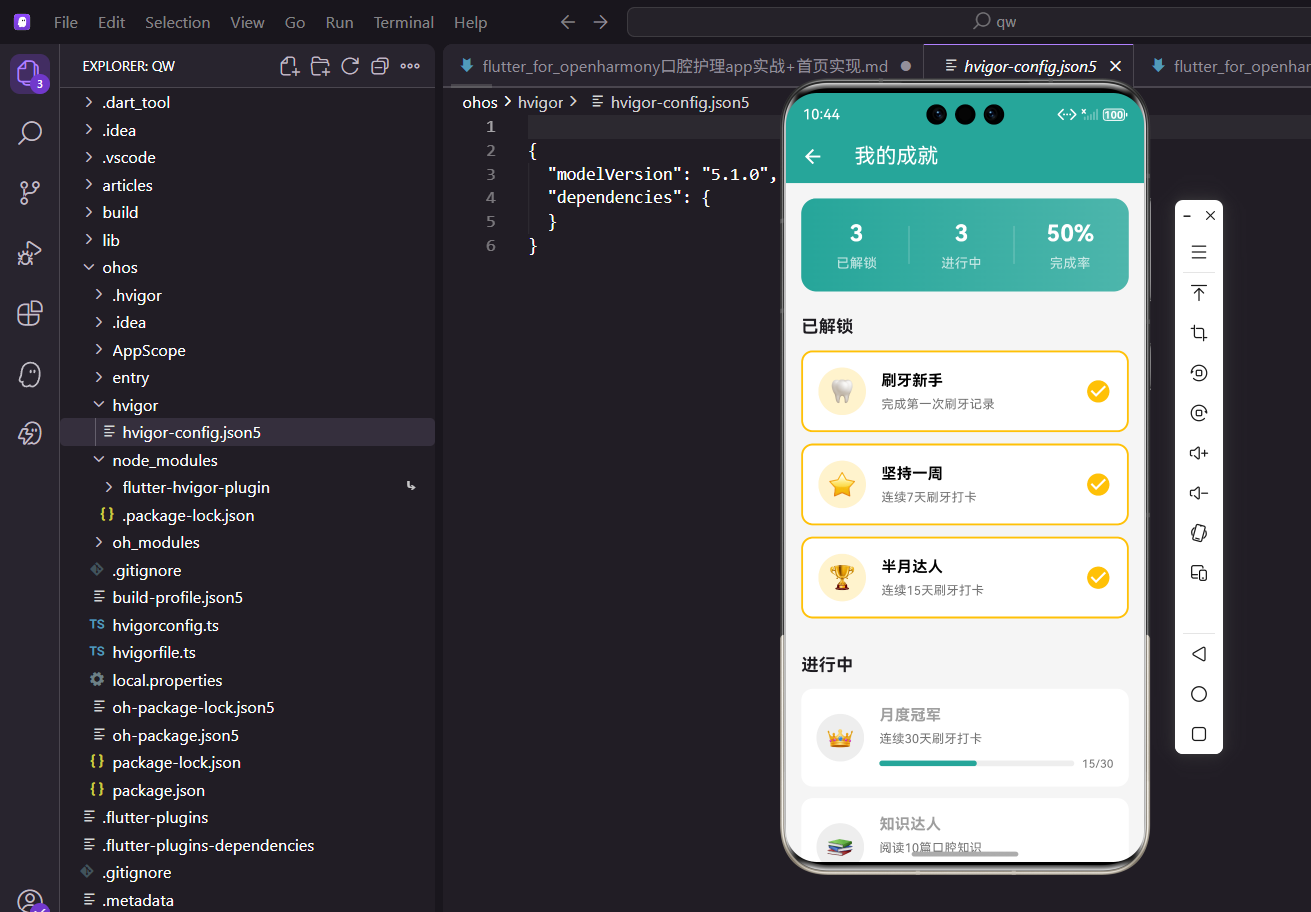
Flutter成就系统页面设计摘要:本文介绍了一个基于Flutter的成就系统实现方案,主要包含统计概览和分类展示两大功能模块。页面顶部采用渐变背景卡片展示已解锁成就数、进行中成就数和完成率三项关键指标。主体部分将成就分为"已解锁"和"进行中"两类展示,已解锁成就使用金色边框和背景突出显示,未解锁成就则展示进度状态。采用StatelessWidget构建页面
前言
成就系统是提升用户粘性的有效手段。通过设置各种成就目标,激励用户坚持口腔护理习惯,当用户达成目标时给予成就奖励,可以有效提升用户的参与感和成就感。
本文将介绍如何在 Flutter 中实现一个带有进度展示的成就系统页面。
功能设计
成就页面需要实现以下功能:
- 统计概览:展示已解锁、进行中的成就数量和完成率
- 分类展示:将成就分为已解锁和进行中两类
- 进度显示:未解锁的成就显示当前进度
- 视觉设计:使用图标和颜色区分成就状态
页面基础结构
成就页面使用 StatelessWidget 实现:
class AchievementPage extends StatelessWidget {
const AchievementPage({super.key});
Widget build(BuildContext context) {
return Scaffold(
appBar: AppBar(title: const Text('我的成就')),
body: Consumer<AppProvider>(
builder: (context, provider, _) {
final unlocked = provider.achievements
.where((a) => a.isUnlocked).toList();
final locked = provider.achievements
.where((a) => !a.isUnlocked).toList();
使用 Consumer 监听数据变化,将成就按解锁状态分类。
统计概览卡片
页面顶部展示统计信息:
          return SingleChildScrollView(
            padding: const EdgeInsets.all(16),
            child: Column(
              crossAxisAlignment: CrossAxisAlignment.start,
              children: [
                Container(
                  padding: const EdgeInsets.all(20),
                  decoration: BoxDecoration(
                    gradient: const LinearGradient(
                      colors: [Color(0xFF26A69A), Color(0xFF4DB6AC)],
                    ),
                    borderRadius: BorderRadius.circular(16),
                  ),
                  child: Row(
                    mainAxisAlignment: MainAxisAlignment.spaceAround,
                    children: [
                      _buildStatItem('已解锁', '${unlocked.length}'),
                      Container(width: 1, height: 40, color: Colors.white30),
                      _buildStatItem('进行中', '${locked.length}'),
                      Container(width: 1, height: 40, color: Colors.white30),
                      _buildStatItem('完成率',
                          '${(unlocked.length / provider.achievements.length * 100).toInt()}%'),
                    ],
                  ),
                ),
使用渐变背景的卡片展示三项统计数据,白色分隔线区分各项。
统计项组件:
Widget _buildStatItem(String label, String value) {
  return Column(
    children: [
      Text(value, style: const TextStyle(fontSize: 24,
          fontWeight: FontWeight.bold, color: Colors.white)),
      const SizedBox(height: 4),
      Text(label, style: const TextStyle(color: Colors.white70)),
    ],
  );
}
数值使用大号白色加粗字体,标签使用半透明白色。
已解锁成就列表
展示已解锁的成就:
                const SizedBox(height: 24),
                if (unlocked.isNotEmpty) ...[
                  const Text('已解锁',
                      style: TextStyle(fontSize: 18, fontWeight: FontWeight.bold)),
                  const SizedBox(height: 12),
                  ...unlocked.map((a) => _buildAchievementCard(a, true)),
                  const SizedBox(height: 24),
                ],
使用条件渲染,只有存在已解锁成就时才显示该分类。
进行中成就列表
展示进行中的成就:
                if (locked.isNotEmpty) ...[
                  const Text('进行中',
                      style: TextStyle(fontSize: 18, fontWeight: FontWeight.bold)),
                  const SizedBox(height: 12),
                  ...locked.map((a) => _buildAchievementCard(a, false)),
                ],
              ],
            ),
          );
        },
      ),
    );
  }
进行中的成就会显示进度条。
成就卡片组件
成就卡片根据状态显示不同样式:
Widget _buildAchievementCard(dynamic achievement, bool isUnlocked) {
  return Container(
    margin: const EdgeInsets.only(bottom: 12),
    padding: const EdgeInsets.all(16),
    decoration: BoxDecoration(
      color: Colors.white,
      borderRadius: BorderRadius.circular(12),
      border: isUnlocked ? Border.all(color: Colors.amber, width: 2) : null,
    ),
    child: Row(
      children: [
        Container(
          width: 50,
          height: 50,
          decoration: BoxDecoration(
            color: isUnlocked
                ? Colors.amber.withOpacity(0.2)
                : Colors.grey.shade200,
            shape: BoxShape.circle,
          ),
          child: Center(
            child: Text(
              achievement.icon,
              style: TextStyle(
                fontSize: 24,
                color: isUnlocked ? null : Colors.grey,
              ),
            ),
          ),
        ),
已解锁的成就使用金色边框和背景,未解锁的使用灰色。成就图标使用 emoji 表情。
成就名称和描述:
        const SizedBox(width: 16),
        Expanded(
          child: Column(
            crossAxisAlignment: CrossAxisAlignment.start,
            children: [
              Text(
                achievement.name,
                style: TextStyle(
                  fontWeight: FontWeight.bold,
                  fontSize: 16,
                  color: isUnlocked ? Colors.black : Colors.grey,
                ),
              ),
              const SizedBox(height: 4),
              Text(
                achievement.description,
                style: TextStyle(color: Colors.grey.shade600, fontSize: 13),
              ),
未解锁的成就名称使用灰色,已解锁的使用黑色。
进度条显示:
              if (!isUnlocked) ...[
                const SizedBox(height: 8),
                LinearPercentIndicator(
                  lineHeight: 6,
                  percent: achievement.progress / achievement.target,
                  backgroundColor: Colors.grey.shade200,
                  progressColor: const Color(0xFF26A69A),
                  barRadius: const Radius.circular(3),
                  padding: EdgeInsets.zero,
                  trailing: Padding(
                    padding: const EdgeInsets.only(left: 8),
                    child: Text(
                      '${achievement.progress}/${achievement.target}',
                      style: TextStyle(color: Colors.grey.shade600, fontSize: 12),
                    ),
                  ),
                ),
              ],
            ],
          ),
        ),
使用 percent_indicator 包的 LinearPercentIndicator 组件显示进度,右侧显示当前进度和目标值。
已解锁标识:
        if (isUnlocked)
          const Icon(Icons.check_circle, color: Colors.amber, size: 28),
      ],
    ),
  );
}
已解锁的成就右侧显示金色勾选图标。
数据模型定义
成就的数据模型:
class Achievement {
  final String id;
  final String name;
  final String description;
  final String icon;
  final int target;
  final int progress;
  final bool isUnlocked;
  final DateTime? unlockedDate;

  Achievement({
    String? id,
    required this.name,
    required this.description,
    required this.icon,
    required this.target,
    this.progress = 0,
    this.isUnlocked = false,
    this.unlockedDate,
  }) : id = id ?? DateTime.now().millisecondsSinceEpoch.toString();
}
模型包含名称、描述、图标、目标值、当前进度、解锁状态和解锁时间等字段。
Provider 数据管理
在 AppProvider 中管理成就数据:
List<Achievement> _achievements = [];
List<Achievement> get achievements => _achievements;

void initAchievements() {
  _achievements = [
    Achievement(
      name: '初次刷牙',
      description: '完成第一次刷牙记录',
      icon: '🦷',
      target: 1,
      progress: 1,
      isUnlocked: true,
    ),
    Achievement(
      name: '坚持一周',
      description: '连续7天完成刷牙',
      icon: '🔥',
      target: 7,
      progress: 5,
    ),
    Achievement(
      name: '护理达人',
      description: '累计刷牙100次',
      icon: '🏆',
      target: 100,
      progress: 45,
    ),
  ];
}
初始化成就列表,包含已解锁和未解锁的成就。
成就解锁逻辑
检查并解锁成就:
void checkAchievements() {
  for (int i = 0; i < _achievements.length; i++) {
    final a = _achievements[i];
    if (!a.isUnlocked && a.progress >= a.target) {
      _achievements[i] = Achievement(
        id: a.id,
        name: a.name,
        description: a.description,
        icon: a.icon,
        target: a.target,
        progress: a.progress,
        isUnlocked: true,
        unlockedDate: DateTime.now(),
      );
    }
  }
  notifyListeners();
}
当进度达到目标时自动解锁成就。
更新成就进度
更新特定成就的进度:
void updateAchievementProgress(String id, int progress) {
  final index = _achievements.indexWhere((a) => a.id == id);
  if (index != -1) {
    final old = _achievements[index];
    _achievements[index] = Achievement(
      id: old.id,
      name: old.name,
      description: old.description,
      icon: old.icon,
      target: old.target,
      progress: progress,
      isUnlocked: progress >= old.target,
      unlockedDate: progress >= old.target ? DateTime.now() : null,
    );
    notifyListeners();
  }
}
更新进度时自动检查是否达成目标。
成就解锁通知
解锁成就时显示通知:
void showAchievementUnlocked(BuildContext context, Achievement achievement) {
  showDialog(
    context: context,
    builder: (ctx) => AlertDialog(
      content: Column(
        mainAxisSize: MainAxisSize.min,
        children: [
          Container(
            width: 80,
            height: 80,
            decoration: BoxDecoration(
              color: Colors.amber.withOpacity(0.2),
              shape: BoxShape.circle,
            ),
            child: Center(
              child: Text(achievement.icon, style: const TextStyle(fontSize: 40)),
            ),
          ),
          const SizedBox(height: 16),
          const Text('🎉 成就解锁!',
              style: TextStyle(fontSize: 20, fontWeight: FontWeight.bold)),
          const SizedBox(height: 8),
          Text(achievement.name,
              style: const TextStyle(fontSize: 18)),
          const SizedBox(height: 4),
          Text(achievement.description,
              style: TextStyle(color: Colors.grey.shade600)),
        ],
      ),
      actions: [
        ElevatedButton(
          onPressed: () => Navigator.pop(ctx),
          style: ElevatedButton.styleFrom(backgroundColor: Colors.amber),
          child: const Text('太棒了!'),
        ),
      ],
    ),
  );
}
使用对话框展示解锁的成就信息。
成就分类
可以按类型对成就进行分类:
final achievementCategories = {
  '日常护理': ['初次刷牙', '坚持一周', '护理达人'],
  '知识学习': ['知识达人', '百科全书'],
  '社交互动': ['分享达人', '邀请好友'],
};
按分类展示成就,让用户更清晰地了解成就体系。
成就详情页
点击成就查看详情:
void _showAchievementDetail(BuildContext context, Achievement achievement) {
  showModalBottomSheet(
    context: context,
    shape: const RoundedRectangleBorder(
      borderRadius: BorderRadius.vertical(top: Radius.circular(20)),
    ),
    builder: (context) => Container(
      padding: const EdgeInsets.all(24),
      child: Column(
        mainAxisSize: MainAxisSize.min,
        children: [
          Container(
            width: 80,
            height: 80,
            decoration: BoxDecoration(
              color: achievement.isUnlocked
                  ? Colors.amber.withOpacity(0.2)
                  : Colors.grey.shade200,
              shape: BoxShape.circle,
            ),
            child: Center(
              child: Text(achievement.icon, style: const TextStyle(fontSize: 40)),
            ),
          ),
          const SizedBox(height: 16),
          Text(achievement.name,
              style: const TextStyle(fontSize: 20, fontWeight: FontWeight.bold)),
          const SizedBox(height: 8),
          Text(achievement.description,
              style: TextStyle(color: Colors.grey.shade600)),
          const SizedBox(height: 16),
          if (achievement.isUnlocked && achievement.unlockedDate != null)
            Text('解锁时间:${DateFormat('yyyy-MM-dd').format(achievement.unlockedDate!)}',
                style: TextStyle(color: Colors.grey.shade500, fontSize: 12)),
          if (!achievement.isUnlocked)
            Text('进度:${achievement.progress}/${achievement.target}',
                style: TextStyle(color: Colors.grey.shade500)),
        ],
      ),
    ),
  );
}
详情弹窗展示成就的完整信息。
成就分享功能
分享已解锁的成就:
void _shareAchievement(Achievement achievement) {
  Share.share(
    '我在口腔护理App中解锁了"${achievement.name}"成就!${achievement.description}',
    subject: '成就分享',
  );
}
用户可以分享自己的成就到社交平台。
成就排行榜
展示成就排行:
Container(
  padding: const EdgeInsets.all(16),
  child: Column(
    crossAxisAlignment: CrossAxisAlignment.start,
    children: [
      const Text('成就排行',
          style: TextStyle(fontWeight: FontWeight.bold)),
      const SizedBox(height: 12),
      ...topUsers.asMap().entries.map((entry) => ListTile(
        leading: CircleAvatar(
          backgroundColor: entry.key < 3
              ? [Colors.amber, Colors.grey, Colors.brown][entry.key]
              : Colors.grey.shade300,
          child: Text('${entry.key + 1}'),
        ),
        title: Text(entry.value.name),
        trailing: Text('${entry.value.achievementCount}个成就'),
      )),
    ],
  ),
)
展示解锁成就最多的用户排行。
空状态处理
没有成就时显示空状态:
if (provider.achievements.isEmpty) {
  return Center(
    child: Column(
      mainAxisAlignment: MainAxisAlignment.center,
      children: [
        Icon(Icons.emoji_events, size: 64, color: Colors.grey.shade300),
        const SizedBox(height: 16),
        Text('暂无成就', style: TextStyle(color: Colors.grey.shade500)),
        const SizedBox(height: 8),
        Text('开始你的口腔护理之旅吧',
             style: TextStyle(color: Colors.grey.shade400, fontSize: 12)),
      ],
    ),
  );
}
友好的空状态提示。
总结
本文详细介绍了口腔护理 App 中成就系统功能的实现。通过进度展示和视觉反馈,我们构建了一个激励用户的成就页面。核心技术点包括:
- 使用渐变背景的统计卡片
- 通过
LinearPercentIndicator显示进度 - 使用金色边框和图标标识已解锁成就
- 条件渲染处理不同状态的成就
成就系统是提升用户粘性的有效手段,希望本文的实现对你有所帮助。
欢迎加入开源鸿蒙跨平台社区:https://openharmonycrossplatform.csdn.net

开源鸿蒙跨平台开发社区汇聚开发者与厂商,共建“一次开发,多端部署”的开源生态,致力于降低跨端开发门槛,推动万物智联创新。
更多推荐
 7
7 0
0- 0


 已为社区贡献22条内容

所有评论(0)