Flutter for OpenHarmony《智慧字典》 App 主页深度优化解析:从视觉动效到交互体验的全面升级
Flutter for OpenHarmony《智慧字典》 App 主页深度优化解析:从视觉动效到交互体验的全面升级
Flutter for OpenHarmony《智慧字典》 App 主页深度优化解析:从视觉动效到交互体验的全面升级
在移动应用竞争日益激烈的今天,第一印象和交互流畅度直接决定了用户的留存率。本文将聚焦于您提供的《智慧字典》App 主页
(DictionaryHomeScreen) 的优化代码,深入剖析其如何通过
精致的视觉设计、流畅的动画效果和人性化的交互逻辑,将一个基础的工具类应用,蜕变为一款令人眼前一亮的精品。我们将从 整体视觉风格、核心交互区域、空状态设计、搜索历史浮层 四个维度,逐一拆解其实现细节与设计哲学。
完整效果展示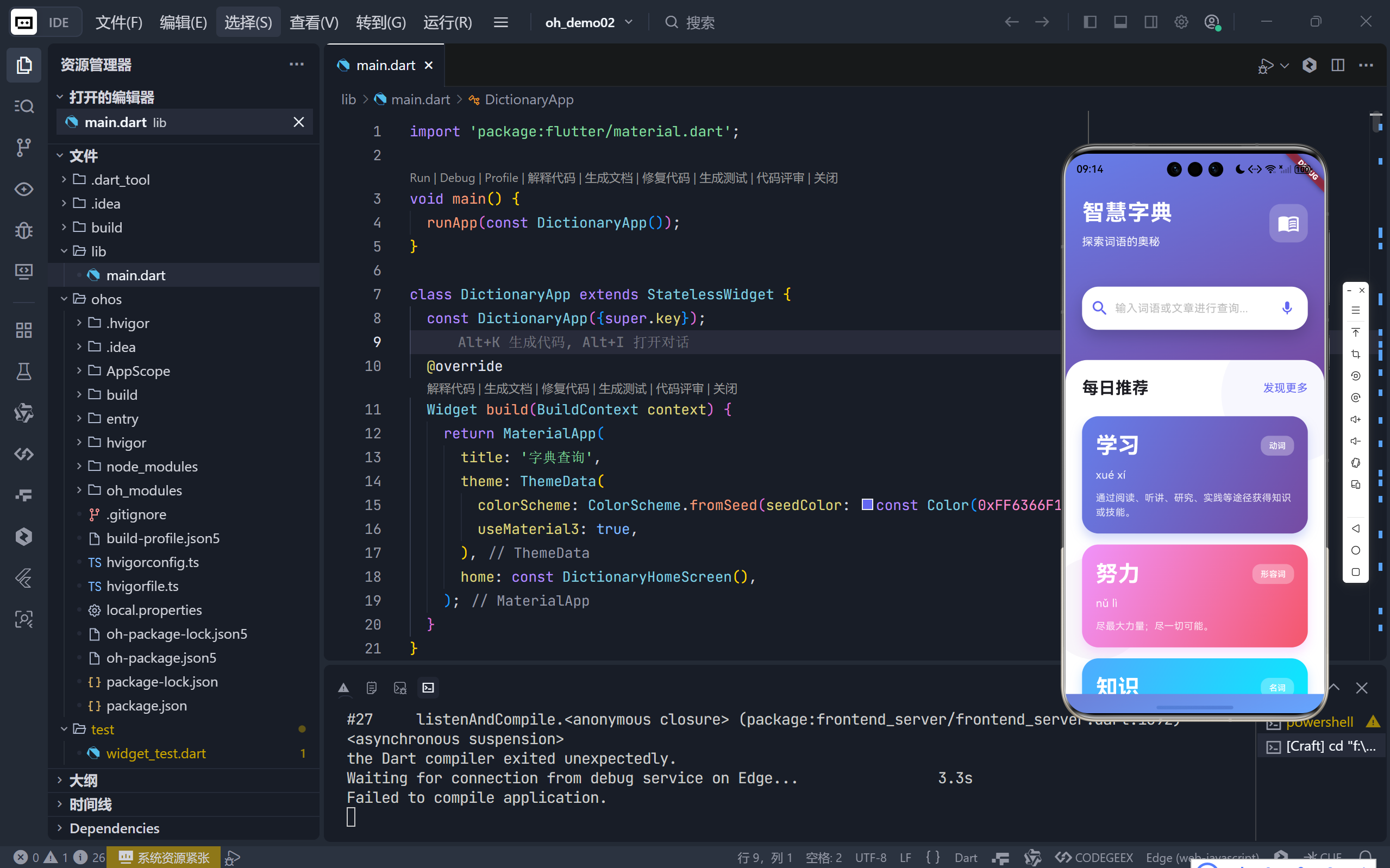
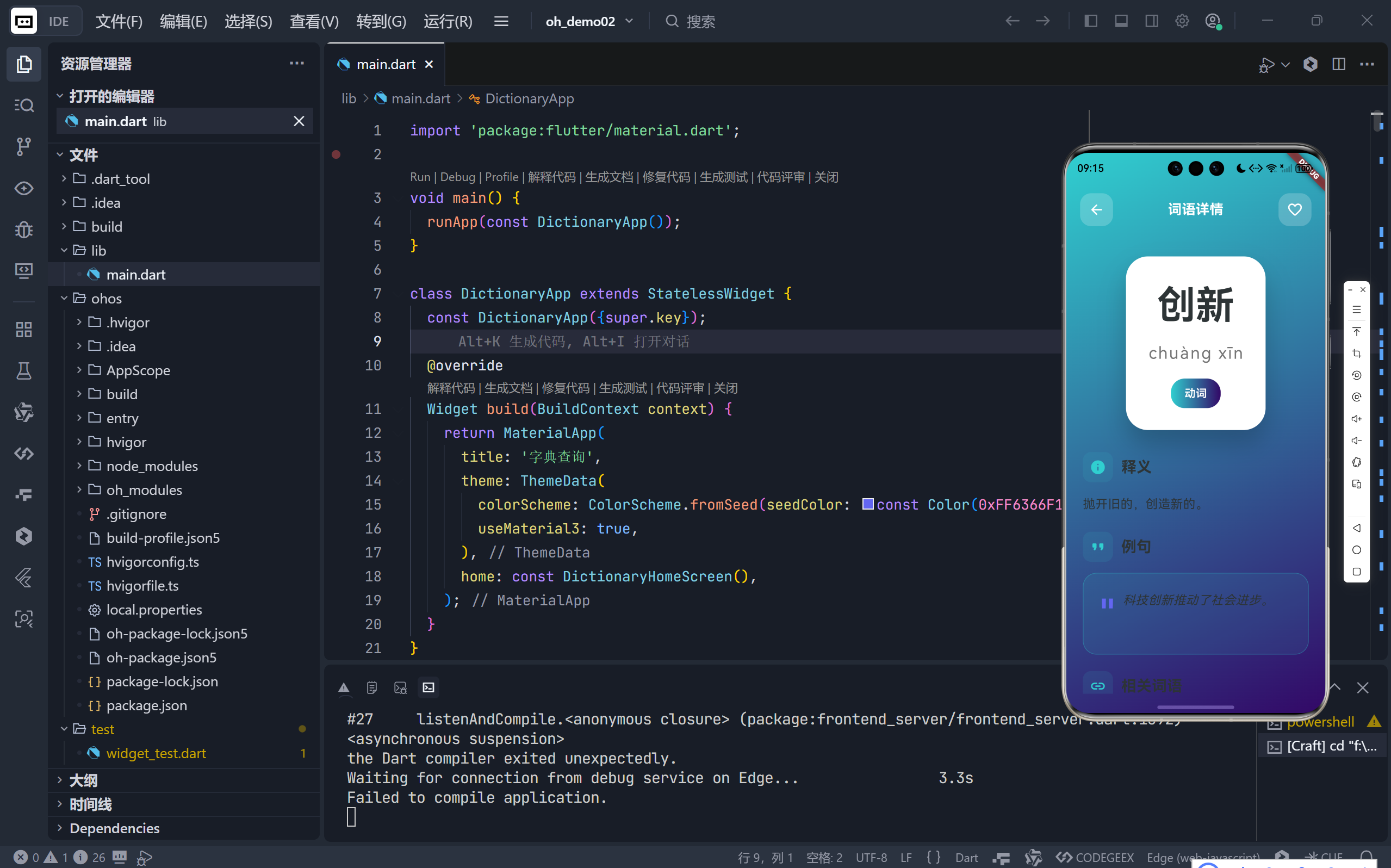
一、整体视觉风格:沉浸式渐变美学
新版主页彻底摒弃了传统的纯色背景,转而采用 全屏渐变,营造出沉浸式的视觉体验。
1.1 全局渐变背景
body: Container(
  decoration: BoxDecoration(
    gradient: LinearGradient(
      begin: Alignment.topLeft,
      end: Alignment.bottomRight,
      colors: [
        const Color(0xFF667EEA),
        const Color(0xFF764BA2),
        const Color(0xFF66A6FF),
      ],
      stops: const [0.0, 0.5, 1.0],
    ),
  ),
  // ... SafeArea and Column
)
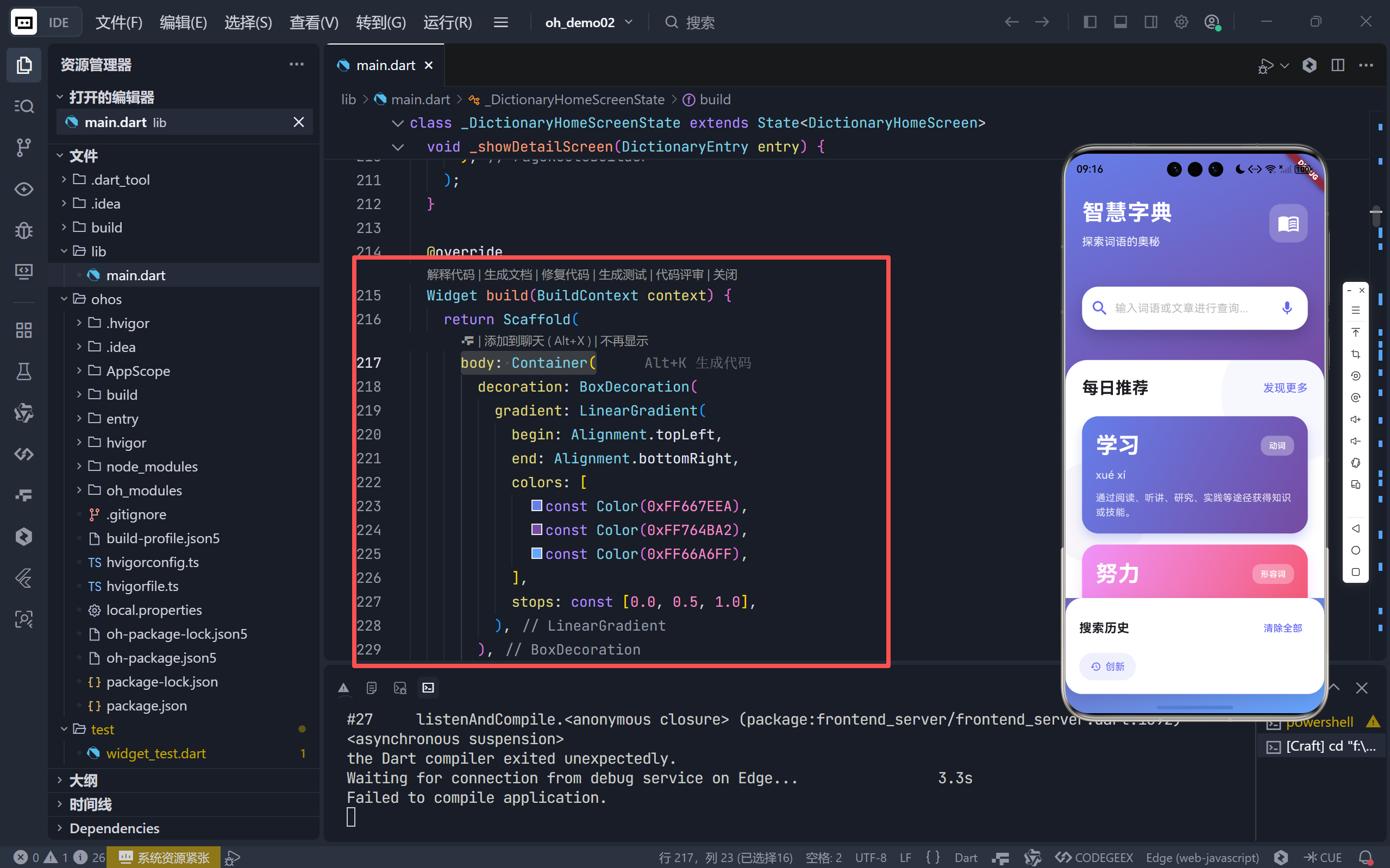
- 三色渐变:从左上角的蓝紫色 (
0xFF667EEA) 到右下角的亮蓝色 (0xFF66A6FF),中间过渡自然,科技感与优雅感并存。 - 对角线方向 (
topLefttobottomRight):比垂直或水平渐变更具动感和现代感。
1.2 动画驱动的标题栏
利用 SingleTickerProviderStateMixin 和 AnimationController,为主标题添加了 淡入动画。
// initState 中初始化
_animationController = AnimationController(...);
_fadeInAnimation = Tween<double>(begin: 0.0, end: 1.0).animate(...);

// build 方法中使用
FadeTransition(
  opacity: _fadeInAnimation,
  child: Column(...), // 标题和副标题
)
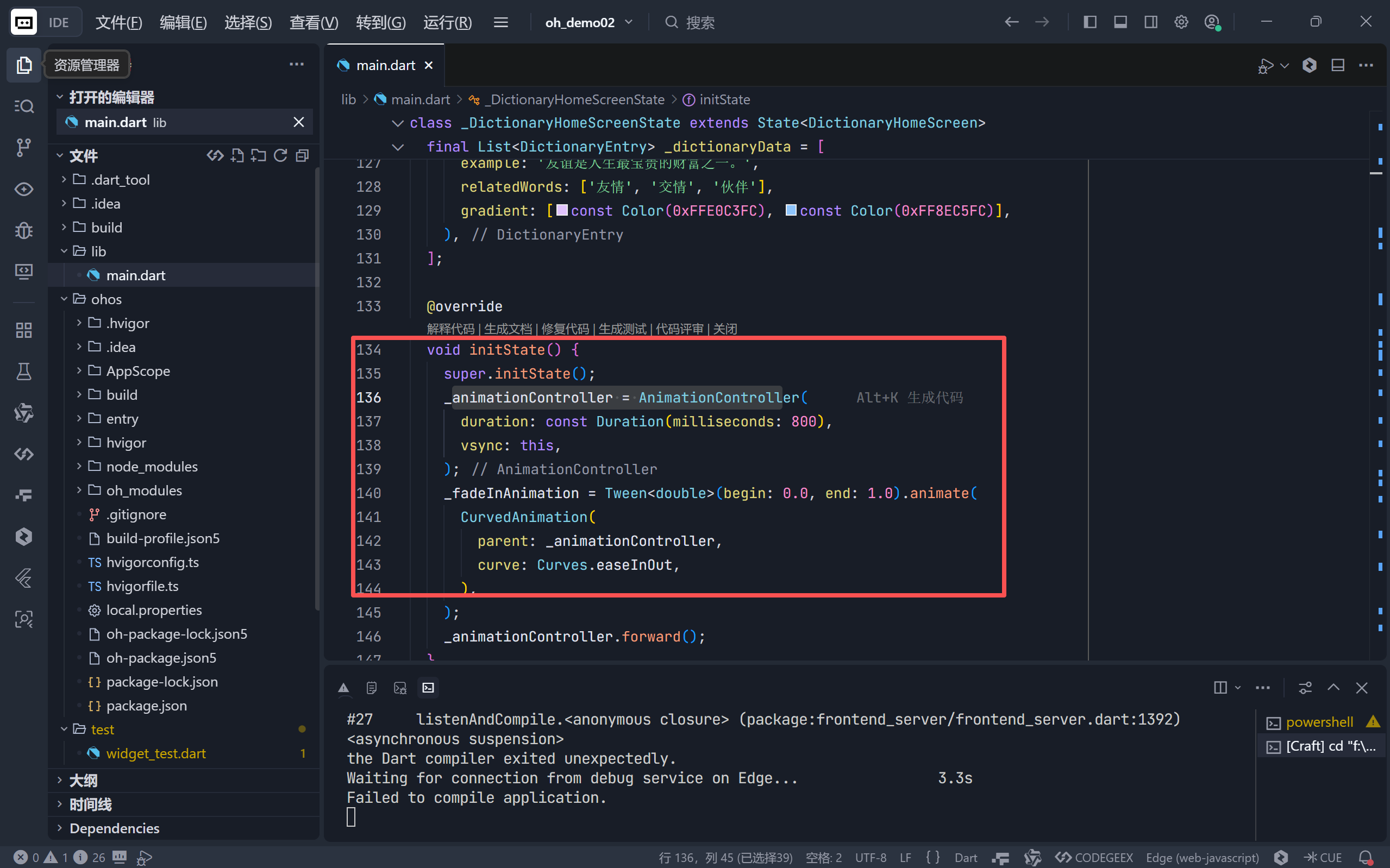
- 用户体验价值:页面加载时,标题优雅地淡入,避免了生硬的“闪现”,提升了应用的精致感和专业度。
二、核心交互区域:搜索栏的极致打磨
搜索栏是字典 App 的心脏,新版对其进行了全方位的视觉和交互升级。
2.1 视觉重塑
- 超大圆角 (
borderRadius: 24):柔和的曲线符合现代 UI 趋势。- 深度阴影 (
blurRadius: 20, offset: (0, 10)):强烈的 Z 轴层次感,使其从背景中“浮”出来,成为视觉焦点。- 图标定制:
- 前缀图标:使用
search_rounded,尺寸更大 (size: 28),主色调 (0xFF6366F1) 高亮。- 后缀图标:动态切换。有输入时显示 圆形关闭图标 (
close_rounded);无输入时显示 麦克风图标 (mic_rounded),暗示语音输入功能(虽未实现,但为未来扩展预留了入口)。
2.2 交互优化
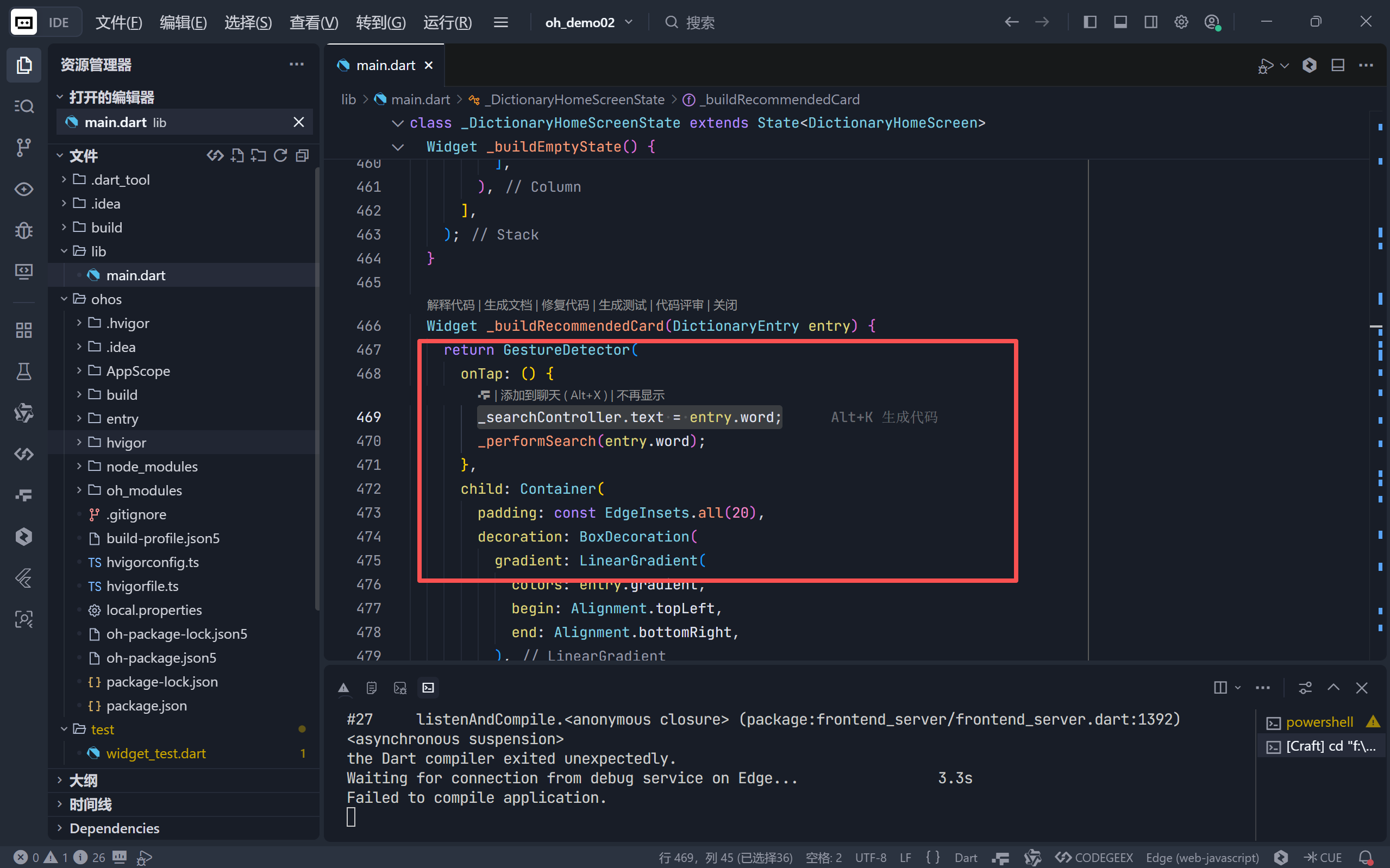
- 点击推荐词自动填充:在“每日推荐”卡片中,点击任意词语会自动将其填入搜索框并触发搜索,极大简化了用户操作路径。
onTap: () {
  _searchController.text = entry.word;
  _performSearch(entry.word);
}
三、空状态设计:从“无结果”到“主动引导”
旧版的空状态仅是一个静态提示,新版则将其升级为一个 主动的内容推荐平台 —— “每日推荐”。
3.1 结构化布局
Widget _buildEmptyState() {
  return Stack(
    children: [
      // 背景装饰圆圈
      Positioned(...),
      Positioned(...),

      // 推荐内容主体
      Column(
        children: [
          // 标题栏:“每日推荐” + “发现更多”
          Padding(...),
          // 推荐列表
          Expanded(child: ListView.builder(...)),
        ],
      ),
    ],
  );
}
Stack布局:巧妙地在内容背后叠加了两个半透明的圆形装饰 (BoxShape.circle),增加了画面的丰富度和呼吸感,避免了大面积留白的单调。
3.2 推荐卡片 (_buildRecommendedCard)
每个推荐卡片本身就是一个 微型详情页,信息密度高且极具吸引力。
- 专属渐变:每个词语 (
DictionaryEntry) 都绑定了自己的gradient,卡片背景即为此渐变,视觉上独一无二。 - 信息层级清晰:
- 主词:超大白色字体 (
fontSize: 32),加粗。 - 词性:白色小标签,置于右上角。
- 拼音 & 释义:次级白色文字,释义截断两行。
- 主词:超大白色字体 (
- 微交互:整个卡片可点击,点击后自动填充搜索框。
🎯 商业/产品价值:这不仅是 UI 优化,更是 用户增长策略。它能有效引导新用户探索字典内容,降低冷启动时的流失率。
四、搜索结果:信息卡片的精致呈现
当有搜索结果时,列表项的设计同样体现了对细节的追求。
4.1 左侧渐变指示条
Container(
  width: 6,
  decoration: BoxDecoration(
    gradient: LinearGradient(colors: entry.gradient, ...),
  ),
)
- 视觉锚点:一条 6px 宽的左侧竖条,使用该词语的专属渐变色,瞬间建立起结果项与词语本身的强关联。
- 品牌一致性:与详情页、推荐卡片的渐变风格完全统一。
4.2 内容区与箭头
- 内容区:标准的
ListTile信息结构(词语、词性、拼音、释义),排版清晰。 - 右侧箭头:使用
chevron_right_rounded图标,并且 颜色与该词语的渐变主色一致 (entry.gradient[0]),形成完美的视觉闭环。
五、搜索历史:创新的浮层交互
新版将搜索历史从页面底部的固定区域,改造为一个 悬浮在内容之上的浮层。
5.1 浮层定位
if (_searchHistory.isNotEmpty && _searchController.text.isEmpty)
  Positioned(
    bottom: 20,
    left: 20,
    right: 20,
    child: _buildSearchHistory(),
  )
Positioned:使其脱离正常的文档流,悬浮于结果列表之上。- 条件渲染:仅在无搜索输入时显示,避免干扰当前搜索。
5.2 浮层设计 (_buildSearchHistory)
- 独立容器:拥有自己的圆角 (
borderRadius: 24) 和深度阴影 (blurRadius: 20),看起来像一个独立的模态面板。 - 历史项样式:
- 不再是简单的
Chip,而是带有 浅色渐变背景 的容器。 - 左侧历史图标 (
history_rounded):明确标识其为历史记录。 - 主色调文字:文字和图标均为应用主色 (
0xFF6366F1),保持品牌一致性。
- 不再是简单的
- 交互:点击历史项,同样会自动填充搜索框并执行搜索。
💡 优势:这种设计让搜索历史 随时可用,又不喧宾夺主,极大地提升了高频用户的操作效率。
六、总结:超越功能的体验设计
通过对《智慧字典》主页优化代码的逐层剖析,我们可以看到,一次成功的 UI/UX 升级绝不仅仅是“换个颜色”或“加个动画”那么简单。它是一套 系统性的思考:
- 建立统一的视觉语言:通过全局渐变、专属配色 (
gradient) 和一致的圆角/阴影,构建了强烈的品牌识别度。 - 用动效讲述故事:从标题的淡入到页面的滑动进入 (
PageRouteBuilder),每一个动画都在无声地提升应用的品质感。 - 化被动为主动:将空状态转化为内容推荐位,变“等待用户输入”为“主动引导用户”,这是产品思维的体现。
- 细节决定成败:左侧的 6px 渐变条、历史项的图标、按钮的圆角值… 正是这些看似微不足道的细节,共同铸就了卓越的用户体验。
这个优化后的主页,已经不再仅仅是一个“查询入口”,而是一个 集美观、高效、引导于一体的智能交互中心。它完美诠释了 Flutter 在构建高性能、高颜值移动应用方面的强大能力,也为所有开发者提供了一个值得借鉴的优秀范例。
🌐 加入社区
欢迎加入 开源鸿蒙跨平台开发者社区,获取最新资源与技术支持:
👉 开源鸿蒙跨平台开发者社区
技术因分享而进步,生态因共建而繁荣。
—— 晚霞的不甘 · 与您共赴鸿蒙跨平台开发之旅
完整代码展示
import 'package:flutter/material.dart';
void main() {
runApp(const DictionaryApp());
}
class DictionaryApp extends StatelessWidget {
const DictionaryApp({super.key});
@override
Widget build(BuildContext context) {
return MaterialApp(
title: '字典查询',
theme: ThemeData(
colorScheme: ColorScheme.fromSeed(seedColor: const Color(0xFF6366F1)),
useMaterial3: true,
),
home: const DictionaryHomeScreen(),
);
}
}
class DictionaryHomeScreen extends StatefulWidget {
const DictionaryHomeScreen({super.key});
@override
State<DictionaryHomeScreen> createState() => _DictionaryHomeScreenState();
}
class _DictionaryHomeScreenState extends State<DictionaryHomeScreen>
with SingleTickerProviderStateMixin {
final TextEditingController _searchController = TextEditingController();
List<DictionaryEntry> _searchResults = [];
bool _isSearching = false;
List<String> _searchHistory = [];
late AnimationController _animationController;
late Animation<double> _fadeInAnimation;
// 模拟字典数据
final List<DictionaryEntry> _dictionaryData = [
DictionaryEntry(
word: '学习',
pinyin: 'xué xí',
partOfSpeech: '动词',
definition: '通过阅读、听讲、研究、实践等途径获得知识或技能。',
example: '我们要努力学习科学文化知识。',
relatedWords: ['自学', '研习', '进修'],
gradient: [const Color(0xFF667EEA), const Color(0xFF764BA2)],
),
DictionaryEntry(
word: '努力',
pinyin: 'nǔ lì',
partOfSpeech: '形容词',
definition: '尽最大力量;尽一切可能。',
example: '他工作非常努力。',
relatedWords: ['勤奋', '刻苦', '尽力'],
gradient: [const Color(0xFFF093FB), const Color(0xFFF5576C)],
),
DictionaryEntry(
word: '知识',
pinyin: 'zhī shi',
partOfSpeech: '名词',
definition: '人们在认识世界、改造世界的过程中积累起来的经验。',
example: '知识就是力量。',
relatedWords: ['常识', '学识', '见识'],
gradient: [const Color(0xFF4FACFE), const Color(0xFF00F2FE)],
),
DictionaryEntry(
word: '文化',
pinyin: 'wén huà',
partOfSpeech: '名词',
definition: '人类在社会实践中所创造的物质财富和精神财富的总和。',
example: '中华文明历史悠久,文化灿烂。',
relatedWords: ['文明', '艺术', '传统'],
gradient: [const Color(0xFFFA709A), const Color(0xFFFEE140)],
),
DictionaryEntry(
word: '创新',
pinyin: 'chuàng xīn',
partOfSpeech: '动词',
definition: '抛开旧的,创造新的。',
example: '科技创新推动了社会进步。',
relatedWords: ['改革', '创造', '发明'],
gradient: [const Color(0xFF30CFD0), const Color(0xFF330867)],
),
DictionaryEntry(
word: '发展',
pinyin: 'fā zhǎn',
partOfSpeech: '动词',
definition: '事物由小到大、由简到繁、由低级到高级的变化。',
example: '经济持续健康发展。',
relatedWords: ['进步', '增长', '扩展'],
gradient: [const Color(0xFFA8FF78), const Color(0xFF78FFA8)],
),
DictionaryEntry(
word: '理想',
pinyin: 'lǐ xiǎng',
partOfSpeech: '名词',
definition: '对未来事物的想象或希望。',
example: '每个人都有自己的理想。',
relatedWords: ['梦想', '抱负', '目标'],
gradient: [const Color(0xFFFF9A9E), const Color(0xFFFECFEF)],
),
DictionaryEntry(
word: '坚持',
pinyin: 'jiān chí',
partOfSpeech: '动词',
definition: '坚决保持、维持或进行。',
example: '坚持就是胜利。',
relatedWords: ['坚守', '执着', '持续'],
gradient: [const Color(0xFFFFF9C), const Color(0xFFFFB199)],
),
DictionaryEntry(
word: '成功',
pinyin: 'chéng gōng',
partOfSpeech: '名词',
definition: '达到预期的目的或结果。',
example: '经过不懈努力,他终于成功了。',
relatedWords: ['胜利', '成就', '收获'],
gradient: [const Color(0xFF89F7FE), const Color(0xFF66A6FF)],
),
DictionaryEntry(
word: '友谊',
pinyin: 'yǒu yì',
partOfSpeech: '名词',
definition: '朋友之间的交情。',
example: '友谊是人生最宝贵的财富之一。',
relatedWords: ['友情', '交情', '伙伴'],
gradient: [const Color(0xFFE0C3FC), const Color(0xFF8EC5FC)],
),
];
@override
void initState() {
super.initState();
_animationController = AnimationController(
duration: const Duration(milliseconds: 800),
vsync: this,
);
_fadeInAnimation = Tween<double>(begin: 0.0, end: 1.0).animate(
CurvedAnimation(
parent: _animationController,
curve: Curves.easeInOut,
),
);
_animationController.forward();
}
@override
void dispose() {
_searchController.dispose();
_animationController.dispose();
super.dispose();
}
void _performSearch(String query) {
if (query.trim().isEmpty) {
setState(() {
_searchResults = [];
});
return;
}
setState(() {
_isSearching = true;
});
Future.delayed(const Duration(milliseconds: 400), () {
final results = _dictionaryData.where((entry) {
return entry.word.contains(query) ||
entry.pinyin.toLowerCase().contains(query.toLowerCase()) ||
entry.definition.contains(query);
}).toList();
if (query.isNotEmpty && !_searchHistory.contains(query)) {
setState(() {
_searchHistory.insert(0, query);
if (_searchHistory.length > 10) {
_searchHistory.removeLast();
}
});
}
setState(() {
_searchResults = results;
_isSearching = false;
});
});
}
void _showDetailScreen(DictionaryEntry entry) {
Navigator.push(
context,
PageRouteBuilder(
pageBuilder: (context, animation, secondaryAnimation) =>
DictionaryDetailScreen(entry: entry),
transitionsBuilder: (context, animation, secondaryAnimation, child) {
const begin = Offset(1.0, 0.0);
const end = Offset.zero;
const curve = Curves.ease;
var tween =
Tween(begin: begin, end: end).chain(CurveTween(curve: curve));
return SlideTransition(
position: animation.drive(tween),
child: child,
);
},
),
);
}
@override
Widget build(BuildContext context) {
return Scaffold(
body: Container(
decoration: BoxDecoration(
gradient: LinearGradient(
begin: Alignment.topLeft,
end: Alignment.bottomRight,
colors: [
const Color(0xFF667EEA),
const Color(0xFF764BA2),
const Color(0xFF66A6FF),
],
stops: const [0.0, 0.5, 1.0],
),
),
child: SafeArea(
child: Column(
children: [
// 顶部标题和装饰
Padding(
padding: const EdgeInsets.all(24),
child: FadeTransition(
opacity: _fadeInAnimation,
child: Column(
children: [
Row(
mainAxisAlignment: MainAxisAlignment.spaceBetween,
children: [
Column(
crossAxisAlignment: CrossAxisAlignment.start,
children: [
const Text(
'智慧字典',
style: TextStyle(
fontSize: 32,
fontWeight: FontWeight.bold,
color: Colors.white,
letterSpacing: 1,
),
),
const SizedBox(height: 8),
Text(
'探索词语的奥秘',
style: TextStyle(
fontSize: 16,
color: Colors.white.withOpacity(0.9),
),
),
],
),
Container(
padding: const EdgeInsets.all(12),
decoration: BoxDecoration(
color: Colors.white.withOpacity(0.2),
borderRadius: BorderRadius.circular(16),
),
child: const Icon(
Icons.menu_book_outlined,
size: 32,
color: Colors.white,
),
),
],
),
const SizedBox(height: 30),
],
),
),
),
// 搜索栏
Padding(
padding: const EdgeInsets.symmetric(horizontal: 24),
child: Container(
decoration: BoxDecoration(
color: Colors.white,
borderRadius: BorderRadius.circular(24),
boxShadow: [
BoxShadow(
color: Colors.black.withOpacity(0.2),
blurRadius: 20,
offset: const Offset(0, 10),
),
],
),
child: TextField(
controller: _searchController,
style: const TextStyle(fontSize: 18),
decoration: InputDecoration(
hintText: '输入词语或文章进行查询...',
hintStyle: TextStyle(
color: Colors.grey[400],
fontSize: 16,
),
prefixIcon: Container(
margin: const EdgeInsets.only(left: 8, right: 4),
child: const Icon(
Icons.search_rounded,
color: Color(0xFF6366F1),
size: 28,
),
),
suffixIcon: _searchController.text.isNotEmpty
? Container(
margin: const EdgeInsets.only(right: 8),
child: IconButton(
icon: const Icon(Icons.close_rounded),
onPressed: () {
_searchController.clear();
setState(() {
_searchResults = [];
});
},
),
)
: Container(
margin: const EdgeInsets.only(right: 12),
child: const Icon(
Icons.mic_rounded,
color: Color(0xFF6366F1),
size: 24,
),
),
border: InputBorder.none,
contentPadding: const EdgeInsets.symmetric(
vertical: 18,
horizontal: 16,
),
),
onChanged: (value) {
_performSearch(value);
},
onSubmitted: (value) {
_performSearch(value);
},
),
),
),
const SizedBox(height: 24),
// 搜索结果或推荐区域
Expanded(
child: Container(
margin: const EdgeInsets.only(top: 20),
decoration: const BoxDecoration(
color: Colors.white,
borderRadius: BorderRadius.only(
topLeft: Radius.circular(32),
topRight: Radius.circular(32),
),
),
child: _isSearching
? const Center(
child: CircularProgressIndicator(),
)
: _searchResults.isEmpty
? _buildEmptyState()
: _buildSearchResults(),
),
),
// 搜索历史浮层
if (_searchHistory.isNotEmpty && _searchController.text.isEmpty)
Positioned(
bottom: 20,
left: 20,
right: 20,
child: _buildSearchHistory(),
),
],
),
),
),
);
}
Widget _buildEmptyState() {
return Stack(
children: [
// 背景装饰
Positioned(
top: -50,
right: -50,
child: Container(
width: 200,
height: 200,
decoration: BoxDecoration(
shape: BoxShape.circle,
color: const Color(0xFF6366F1).withOpacity(0.05),
),
),
),
Positioned(
bottom: 50,
left: -30,
child: Container(
width: 150,
height: 150,
decoration: BoxDecoration(
shape: BoxShape.circle,
color: const Color(0xFF764BA2).withOpacity(0.05),
),
),
),
// 推荐词汇
Column(
children: [
const Padding(
padding: EdgeInsets.all(24),
child: Row(
mainAxisAlignment: MainAxisAlignment.spaceBetween,
children: [
Text(
'每日推荐',
style: TextStyle(
fontSize: 24,
fontWeight: FontWeight.bold,
),
),
Text(
'发现更多',
style: TextStyle(
fontSize: 16,
color: Color(0xFF6366F1),
),
),
],
),
),
Expanded(
child: ListView.builder(
padding: const EdgeInsets.symmetric(horizontal: 24),
itemCount: _dictionaryData.take(5).length,
itemBuilder: (context, index) {
return Padding(
padding: const EdgeInsets.only(bottom: 16),
child: _buildRecommendedCard(
_dictionaryData[index],
),
);
},
),
),
],
),
],
);
}
Widget _buildRecommendedCard(DictionaryEntry entry) {
return GestureDetector(
onTap: () {
_searchController.text = entry.word;
_performSearch(entry.word);
},
child: Container(
padding: const EdgeInsets.all(20),
decoration: BoxDecoration(
gradient: LinearGradient(
colors: entry.gradient,
begin: Alignment.topLeft,
end: Alignment.bottomRight,
),
borderRadius: BorderRadius.circular(24),
boxShadow: [
BoxShadow(
color: entry.gradient[0].withOpacity(0.3),
blurRadius: 12,
offset: const Offset(0, 8),
),
],
),
child: Column(
crossAxisAlignment: CrossAxisAlignment.start,
children: [
Row(
mainAxisAlignment: MainAxisAlignment.spaceBetween,
children: [
Text(
entry.word,
style: const TextStyle(
fontSize: 32,
fontWeight: FontWeight.bold,
color: Colors.white,
),
),
Container(
padding: const EdgeInsets.symmetric(
horizontal: 12,
vertical: 6,
),
decoration: BoxDecoration(
color: Colors.white.withOpacity(0.3),
borderRadius: BorderRadius.circular(12),
),
child: Text(
entry.partOfSpeech,
style: const TextStyle(
color: Colors.white,
fontWeight: FontWeight.w500,
fontSize: 12,
),
),
),
],
),
const SizedBox(height: 8),
Text(
entry.pinyin,
style: TextStyle(
fontSize: 16,
color: Colors.white.withOpacity(0.9),
),
),
const SizedBox(height: 12),
Text(
entry.definition,
maxLines: 2,
overflow: TextOverflow.ellipsis,
style: TextStyle(
fontSize: 14,
color: Colors.white.withOpacity(0.8),
height: 1.5,
),
),
],
),
),
);
}
Widget _buildSearchResults() {
return ListView.builder(
padding: const EdgeInsets.all(24),
itemCount: _searchResults.length,
itemBuilder: (context, index) {
return Padding(
padding: const EdgeInsets.only(bottom: 16),
child: _buildResultCard(_searchResults[index]),
);
},
);
}
Widget _buildResultCard(DictionaryEntry entry) {
return GestureDetector(
onTap: () => _showDetailScreen(entry),
child: Container(
decoration: BoxDecoration(
color: Colors.white,
borderRadius: BorderRadius.circular(20),
boxShadow: [
BoxShadow(
color: Colors.grey.withOpacity(0.1),
blurRadius: 12,
offset: const Offset(0, 4),
),
],
),
child: ClipRRect(
borderRadius: BorderRadius.circular(20),
child: Row(
children: [
// 左侧渐变条
Container(
width: 6,
decoration: BoxDecoration(
gradient: LinearGradient(
colors: entry.gradient,
begin: Alignment.topCenter,
end: Alignment.bottomCenter,
),
),
),
// 内容区域
Expanded(
child: Padding(
padding: const EdgeInsets.all(20),
child: Column(
crossAxisAlignment: CrossAxisAlignment.start,
children: [
Row(
mainAxisAlignment: MainAxisAlignment.spaceBetween,
children: [
Text(
entry.word,
style: const TextStyle(
fontSize: 24,
fontWeight: FontWeight.bold,
),
),
Container(
padding: const EdgeInsets.symmetric(
horizontal: 10,
vertical: 4,
),
decoration: BoxDecoration(
color: entry.gradient[0].withOpacity(0.1),
borderRadius: BorderRadius.circular(8),
),
child: Text(
entry.partOfSpeech,
style: TextStyle(
color: entry.gradient[0],
fontSize: 12,
fontWeight: FontWeight.w500,
),
),
),
],
),
const SizedBox(height: 4),
Text(
entry.pinyin,
style: TextStyle(
fontSize: 14,
color: Colors.grey[600],
),
),
const SizedBox(height: 8),
Text(
entry.definition,
maxLines: 2,
overflow: TextOverflow.ellipsis,
style: TextStyle(
fontSize: 14,
color: Colors.grey[700],
height: 1.5,
),
),
],
),
),
),
// 箭头图标
Container(
padding: const EdgeInsets.all(16),
child: Icon(
Icons.chevron_right_rounded,
color: entry.gradient[0],
size: 24,
),
),
],
),
),
),
);
}
Widget _buildSearchHistory() {
return Container(
padding: const EdgeInsets.all(20),
decoration: BoxDecoration(
color: Colors.white,
borderRadius: BorderRadius.circular(24),
boxShadow: [
BoxShadow(
color: Colors.black.withOpacity(0.1),
blurRadius: 20,
offset: const Offset(0, 10),
),
],
),
child: Column(
crossAxisAlignment: CrossAxisAlignment.start,
children: [
Row(
mainAxisAlignment: MainAxisAlignment.spaceBetween,
children: [
const Text(
'搜索历史',
style: TextStyle(
fontSize: 18,
fontWeight: FontWeight.bold,
),
),
TextButton(
onPressed: () {
setState(() {
_searchHistory.clear();
});
},
style: TextButton.styleFrom(
foregroundColor: const Color(0xFF6366F1),
),
child: const Text('清除全部'),
),
],
),
const SizedBox(height: 12),
Wrap(
spacing: 10,
runSpacing: 10,
children: _searchHistory.take(6).map((term) {
return InkWell(
onTap: () {
_searchController.text = term;
_performSearch(term);
},
borderRadius: BorderRadius.circular(20),
child: Container(
padding: const EdgeInsets.symmetric(
horizontal: 16,
vertical: 10,
),
decoration: BoxDecoration(
gradient: LinearGradient(
colors: [
const Color(0xFF6366F1).withOpacity(0.1),
const Color(0xFF667EEA).withOpacity(0.1),
],
),
borderRadius: BorderRadius.circular(20),
),
child: Row(
mainAxisSize: MainAxisSize.min,
children: [
Icon(
Icons.history_rounded,
size: 16,
color: const Color(0xFF6366F1),
),
const SizedBox(width: 6),
Text(
term,
style: const TextStyle(
color: Color(0xFF6366F1),
fontSize: 14,
),
),
],
),
),
);
}).toList(),
),
],
),
);
}
}
// 词语详情页面
class DictionaryDetailScreen extends StatelessWidget {
final DictionaryEntry entry;
const DictionaryDetailScreen({super.key, required this.entry});
@override
Widget build(BuildContext context) {
return Scaffold(
body: Container(
decoration: BoxDecoration(
gradient: LinearGradient(
begin: Alignment.topLeft,
end: Alignment.bottomRight,
colors: [
entry.gradient[0],
entry.gradient[1],
],
),
),
child: SafeArea(
child: Column(
children: [
// 顶部导航
Padding(
padding: const EdgeInsets.all(20),
child: Row(
mainAxisAlignment: MainAxisAlignment.spaceBetween,
children: [
Container(
decoration: BoxDecoration(
color: Colors.white.withOpacity(0.2),
borderRadius: BorderRadius.circular(16),
),
child: IconButton(
onPressed: () => Navigator.pop(context),
icon: const Icon(
Icons.arrow_back_rounded,
color: Colors.white,
),
),
),
const Text(
'词语详情',
style: TextStyle(
fontSize: 20,
fontWeight: FontWeight.bold,
color: Colors.white,
),
),
Container(
decoration: BoxDecoration(
color: Colors.white.withOpacity(0.2),
borderRadius: BorderRadius.circular(16),
),
child: IconButton(
onPressed: () {
ScaffoldMessenger.of(context).showSnackBar(
const SnackBar(
content: Text('已添加到收藏'),
backgroundColor: Colors.green,
),
);
},
icon: const Icon(
Icons.favorite_border_rounded,
color: Colors.white,
),
),
),
],
),
),
// 词语卡片
Expanded(
child: SingleChildScrollView(
padding: const EdgeInsets.all(24),
child: Column(
children: [
// 主卡片
Container(
padding: const EdgeInsets.all(32),
decoration: BoxDecoration(
color: Colors.white,
borderRadius: BorderRadius.circular(32),
boxShadow: [
BoxShadow(
color: Colors.black.withOpacity(0.2),
blurRadius: 30,
offset: const Offset(0, 20),
),
],
),
child: Column(
children: [
Text(
entry.word,
style: const TextStyle(
fontSize: 56,
fontWeight: FontWeight.bold,
color: Color(0xFF2D3436),
),
),
const SizedBox(height: 12),
Text(
entry.pinyin,
style: TextStyle(
fontSize: 24,
color: Colors.grey[600],
letterSpacing: 2,
),
),
const SizedBox(height: 20),
Container(
padding: const EdgeInsets.symmetric(
horizontal: 20,
vertical: 10,
),
decoration: BoxDecoration(
gradient: LinearGradient(
colors: entry.gradient,
),
borderRadius: BorderRadius.circular(20),
),
child: Text(
entry.partOfSpeech,
style: const TextStyle(
color: Colors.white,
fontSize: 16,
fontWeight: FontWeight.w600,
),
),
),
],
),
),
const SizedBox(height: 32),
// 释义
_buildDetailSection(
'释义',
Icons.info_rounded,
entry.gradient[0],
Text(
entry.definition,
style: const TextStyle(
fontSize: 18,
height: 1.8,
color: Color(0xFF2D3436),
),
),
),
const SizedBox(height: 24),
// 例句
_buildDetailSection(
'例句',
Icons.format_quote_rounded,
entry.gradient[0],
Container(
padding: const EdgeInsets.all(24),
decoration: BoxDecoration(
color: entry.gradient[0].withOpacity(0.1),
borderRadius: BorderRadius.circular(20),
border: Border.all(
color: entry.gradient[0].withOpacity(0.3),
),
),
child: Row(
crossAxisAlignment: CrossAxisAlignment.start,
children: [
const Text(
'"',
style: TextStyle(
fontSize: 48,
color: Color(0xFF6366F1),
fontWeight: FontWeight.bold,
),
),
const SizedBox(width: 12),
Expanded(
child: Text(
entry.example,
style: const TextStyle(
fontSize: 18,
fontStyle: FontStyle.italic,
height: 1.6,
color: Color(0xFF2D3436),
),
),
),
],
),
),
),
const SizedBox(height: 24),
// 相关词语
_buildDetailSection(
'相关词语',
Icons.link_rounded,
entry.gradient[0],
Wrap(
spacing: 12,
runSpacing: 12,
children: entry.relatedWords.map((word) {
return GestureDetector(
onTap: () {
Navigator.pushReplacement(
context,
MaterialPageRoute(
builder: (context) =>
DictionaryDetailScreen(
entry: DictionaryEntry(
word: word,
pinyin: '',
partOfSpeech: '相关词',
definition: '点击查看详情',
example: '',
relatedWords: [],
gradient: entry.gradient,
),
),
),
);
},
child: Container(
padding: const EdgeInsets.symmetric(
horizontal: 20,
vertical: 12,
),
decoration: BoxDecoration(
color: entry.gradient[0].withOpacity(0.1),
borderRadius: BorderRadius.circular(24),
border: Border.all(
color: entry.gradient[0].withOpacity(0.3),
),
),
child: Row(
mainAxisSize: MainAxisSize.min,
children: [
CircleAvatar(
radius: 12,
backgroundColor: entry.gradient[0],
child: Text(
word[0],
style: const TextStyle(
color: Colors.white,
fontSize: 14,
fontWeight: FontWeight.bold,
),
),
),
const SizedBox(width: 10),
Text(
word,
style: TextStyle(
color: entry.gradient[0],
fontSize: 16,
fontWeight: FontWeight.w600,
),
),
],
),
),
);
}).toList(),
),
),
const SizedBox(height: 40),
// 操作按钮
Row(
children: [
Expanded(
child: _buildActionButton(
Icons.share_rounded,
'分享',
() {
ScaffoldMessenger.of(context).showSnackBar(
const SnackBar(
content: Text('分享成功'),
backgroundColor: Colors.green,
),
);
},
),
),
const SizedBox(width: 16),
Expanded(
child: _buildActionButton(
Icons.copy_rounded,
'复制',
() {
ScaffoldMessenger.of(context).showSnackBar(
const SnackBar(
content: Text('已复制到剪贴板'),
backgroundColor: Colors.green,
),
);
},
),
),
],
),
],
),
),
),
],
),
),
),
);
}
Widget _buildDetailSection(
String title,
IconData icon,
Color color,
Widget content,
) {
return Column(
crossAxisAlignment: CrossAxisAlignment.start,
children: [
Row(
children: [
Container(
padding: const EdgeInsets.all(10),
decoration: BoxDecoration(
color: color.withOpacity(0.1),
borderRadius: BorderRadius.circular(12),
),
child: Icon(
icon,
color: color,
size: 24,
),
),
const SizedBox(width: 12),
Text(
title,
style: const TextStyle(
fontSize: 22,
fontWeight: FontWeight.bold,
color: Color(0xFF2D3436),
),
),
],
),
const SizedBox(height: 16),
content,
],
);
}
Widget _buildActionButton(IconData icon, String label, VoidCallback onTap) {
return GestureDetector(
onTap: onTap,
child: Container(
padding: const EdgeInsets.symmetric(vertical: 16),
decoration: BoxDecoration(
color: Colors.white,
borderRadius: BorderRadius.circular(16),
boxShadow: [
BoxShadow(
color: Colors.grey.withOpacity(0.2),
blurRadius: 10,
offset: const Offset(0, 4),
),
],
),
child: Row(
mainAxisAlignment: MainAxisAlignment.center,
children: [
Icon(
icon,
color: const Color(0xFF6366F1),
),
const SizedBox(width: 8),
const Text(
'label',
style: TextStyle(
fontSize: 16,
fontWeight: FontWeight.w600,
color: Color(0xFF2D3436),
),
),
],
),
),
);
}
}
// 字典条目数据模型
class DictionaryEntry {
final String word;
final String pinyin;
final String partOfSpeech;
final String definition;
final String example;
final List<String> relatedWords;
final List<Color> gradient;
DictionaryEntry({
required this.word,
required this.pinyin,
required this.partOfSpeech,
required this.definition,
required this.example,
required this.relatedWords,
required this.gradient,
});
}

开源鸿蒙跨平台开发社区汇聚开发者与厂商,共建“一次开发,多端部署”的开源生态,致力于降低跨端开发门槛,推动万物智联创新。
更多推荐

 18
18 0
0- 0


 已为社区贡献96条内容

所有评论(0)