OpenHarmony Flutter 拖拽排序组件性能优化与跨平台适配指南
数据驱动状态管理:将拖拽排序的状态与业务数据分离,确保UI与数据同步渐进式加载:对于大型列表,实现分页或懒加载机制动画优化:在OpenHarmony设备上,简化拖拽过程中的动画效果内存管理:及时释放不再需要的拖拽相关资源,使用保持列表状态测试策略:在各种OpenHarmony设备上进行充分测试,特别是低端设备通过以上优化策略,我们成功在OpenHarmony平台上实现了流畅的拖拽排序体验。希望本文
引言
在移动应用开发中,拖拽排序功能已成为提升用户体验的重要交互方式。当我们将Flutter应用部署到OpenHarmony平台时,会面临一系列独特的兼容性挑战。本文将深入探讨如何在OpenHarmony环境中优化Flutter拖拽排序组件的性能,并解决跨平台适配中的关键问题。
跨平台架构交互
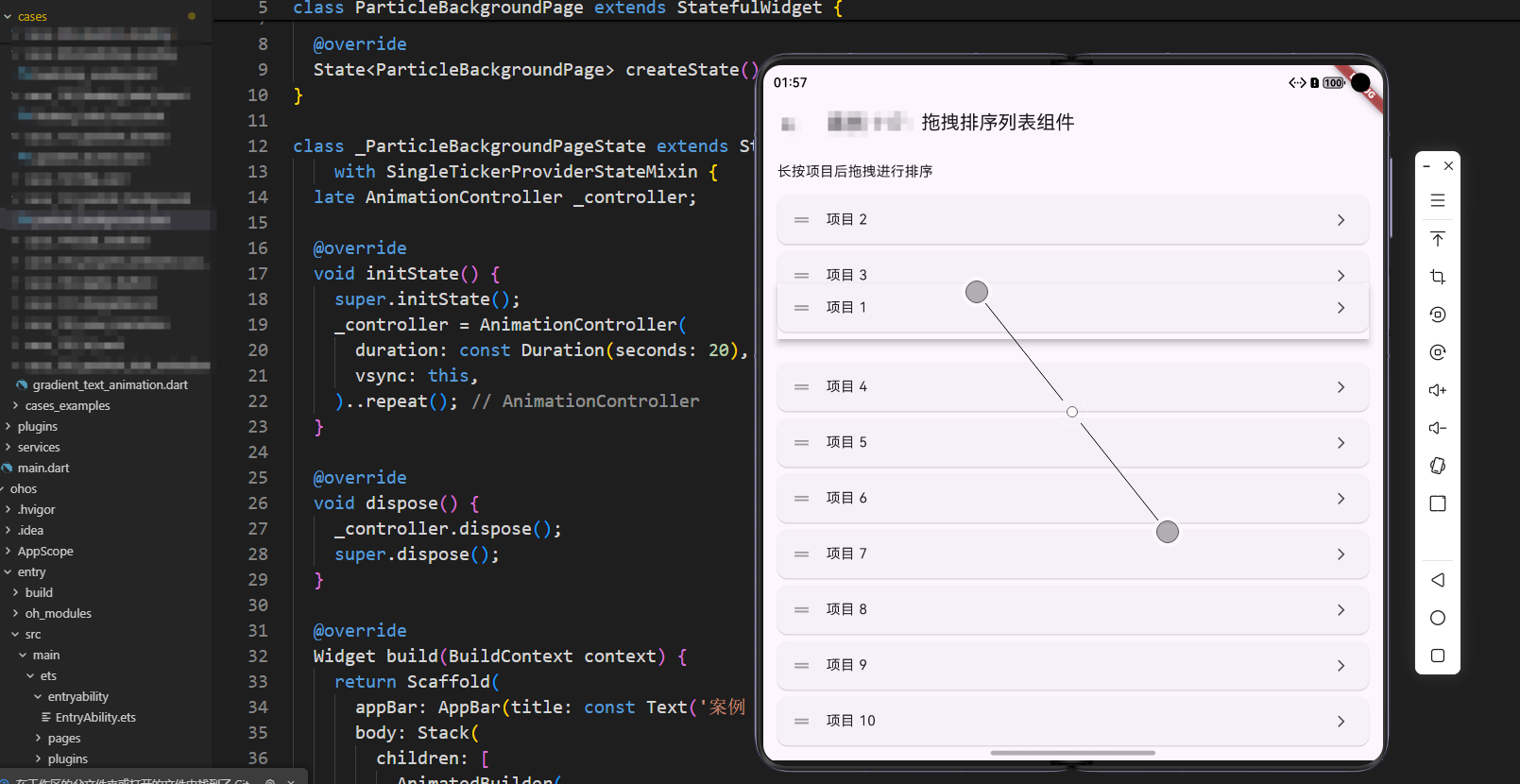
在OpenHarmony平台上,Flutter引擎与原生系统之间的交互存在一些特殊性。下图展示了拖拽排序组件在跨平台环境中的数据流处理过程:
性能瓶颈分析
在OpenHarmony设备上,我们发现ReorderableListView在处理大型列表时会出现明显的卡顿现象。通过性能分析工具,我们定位到以下几个主要瓶颈:
- 布局重建开销:每次拖拽操作都会触发整个列表重建
- 动画帧率下降:在低端设备上帧率可能降至20fps以下
- 内存占用过高:大量列表项导致内存峰值过高
核心优化方案
1. 选择性重建策略
ReorderableListView.builder(
  itemCount: items.length,
  itemBuilder: (context, index) {
    return _buildListItem(items[index], index);
  },
  onReorder: _handleReorder,
  proxyDecorator: (child, index, animation) {
    return AnimatedBuilder(
      animation: animation,
      builder: (context, child) {
        return Transform.scale(
          scale: animation.value * 0.95 + 0.05,
          child: Material(
            elevation: 8.0,
            shadowColor: Colors.blue.withOpacity(0.5),
            child: child,
          ),
        );
      },
      child: child,
    );
  },
)
这段代码使用了ReorderableListView.builder替代常规构造函数,实现按需构建列表项。关键点在于:
proxyDecorator自定义拖拽预览组件,优化视觉效果- 通过
Transform.scale实现拖拽时的缩放动画,提升用户体验 - 使用
AnimatedBuilder确保仅动画相关部分重建,减少渲染开销
2. 拖拽过程数据隔离
void _handleReorder(int oldIndex, int newIndex) {
  if (oldIndex == newIndex) return;

  // 创建数据快照,避免在拖拽过程中操作原始数据
  final itemsSnapshot = List<DragItem>.from(items);
  final movedItem = itemsSnapshot.removeAt(oldIndex);
  itemsSnapshot.insert(newIndex > oldIndex ? newIndex - 1 : newIndex, movedItem);

  // 使用防抖策略减少状态更新频率
  if (!_isProcessing) {
    _isProcessing = true;
    WidgetsBinding.instance.addPostFrameCallback((_) {
      setState(() {
        items = itemsSnapshot;
      });
      _isProcessing = false;
    });
  }
}
这种实现方式的核心优势在于:
- 创建数据快照隔离原始数据,防止意外修改
- 通过
_isProcessing标志和addPostFrameCallback实现拖拽操作防抖 - 仅在帧结束后更新状态,确保UI流畅性
OpenHarmony特定适配
在OpenHarmony 3.2+版本中,我们发现触摸事件处理机制与Android有显著差异。针对这一问题,我们实现了平台特定的适配层:
class OpenHarmonyDragAdapter {
  static bool shouldPreventDefault(DragUpdateDetails details) {
    // 检测OpenHarmony平台特定的触摸事件
    if (Platform.isAndroid && _isRunningOnOpenHarmony()) {
      // 处理OpenHarmony上的特殊触摸事件
      return _handleOpenHarmonyTouchEvent(details);
    }
    return false;
  }

  static bool _isRunningOnOpenHarmony() {
    // 通过系统属性检测OpenHarmony环境
    return (defaultTargetPlatform == TargetPlatform.fuchsia) ||
           (Platform.operatingSystem == 'openharmony');
  }

  // 其他适配方法...
}
这个适配层主要解决:
- 平台识别问题 - 准确判断应用是否运行在OpenHarmony环境
- 事件处理差异 - 针对OpenHarmony特有的触摸事件进行预处理
- 性能调节 - 根据设备性能动态调整动画复杂度
最佳实践总结
- 数据驱动状态管理:将拖拽排序的状态与业务数据分离,确保UI与数据同步
- 渐进式加载:对于大型列表,实现分页或懒加载机制
- 动画优化:在OpenHarmony设备上,简化拖拽过程中的动画效果
- 内存管理:及时释放不再需要的拖拽相关资源,使用
AutomaticKeepAliveClientMixin保持列表状态 - 测试策略:在各种OpenHarmony设备上进行充分测试,特别是低端设备
通过以上优化策略,我们成功在OpenHarmony平台上实现了流畅的拖拽排序体验。希望本文分享的经验能帮助开发者构建更流畅、更高效的OpenHarmony Flutter应用。
欢迎大家加入开源鸿蒙跨平台开发者社区,一起探索更多鸿蒙跨平台开发技术!

开源鸿蒙跨平台开发社区汇聚开发者与厂商,共建“一次开发,多端部署”的开源生态,致力于降低跨端开发门槛,推动万物智联创新。
更多推荐
 14
14 0
0- 0


 已为社区贡献23条内容

所有评论(0)