Cordova与OpenHarmony应用设置管理
本文介绍了基于Cordova框架和OpenHarmony的跨平台应用设置管理系统。通过AppSettings类实现了统一管理用户配置的功能,包括个人资料、通知、隐私、显示和数据备份等多种设置项。文章详细展示了如何通过JavaScript代码实现设置界面的动态渲染和更新,为用户提供灵活的自定义选项。该系统设计合理,可扩展性强,适用于各类跨平台应用开发。
欢迎大家加入开源鸿蒙跨平台开发者社区,一起共建开源鸿蒙跨平台生态。
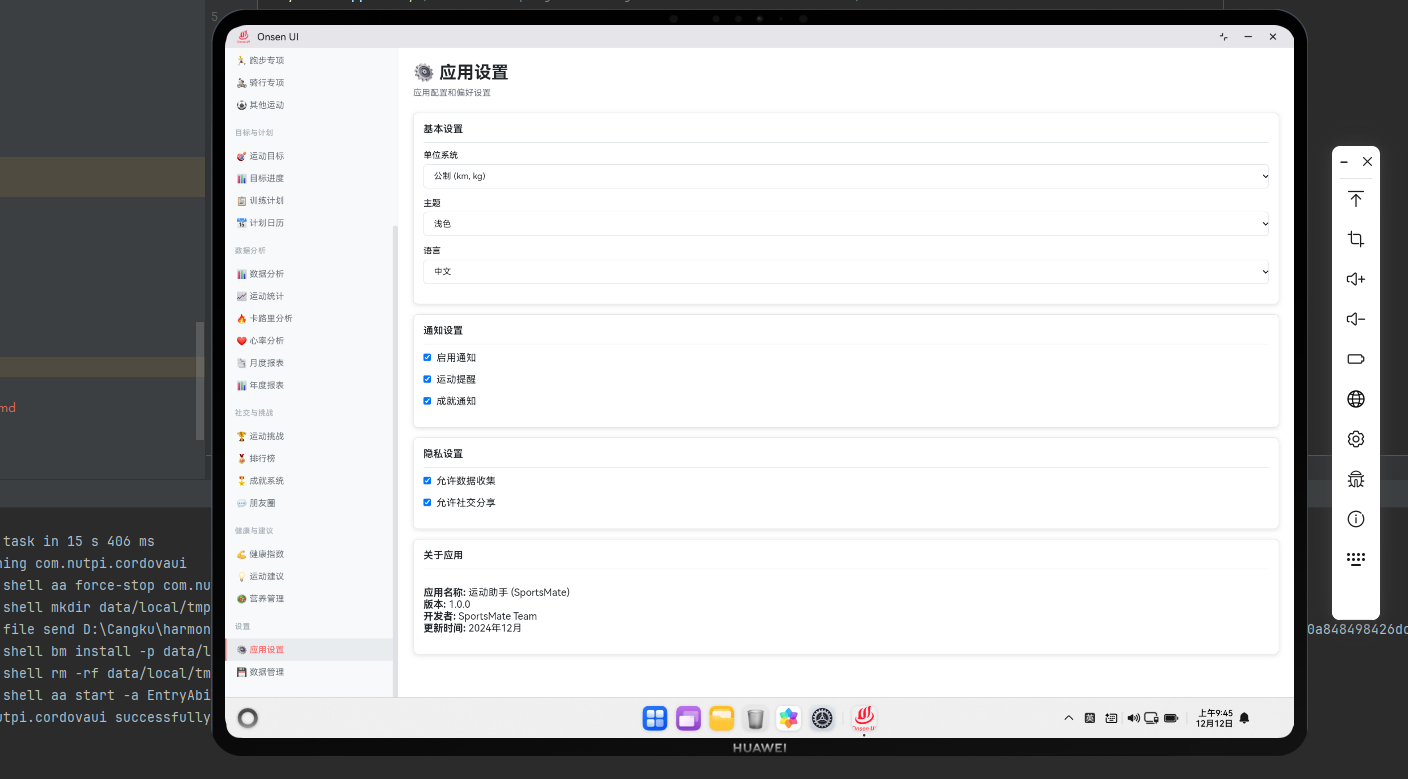
设置管理的重要性
应用设置允许用户根据自己的需求定制应用。通过Cordova框架与OpenHarmony的配置管理能力,我们可以构建一个完整的设置系统。本文将介绍如何实现这一功能。
设置数据模型
class AppSettings {
  constructor(userId) {
    this.userId = userId;
    this.settings = {
      profile: {
        name: '',
        age: 0,
        gender: 'male',
        weight: 0,
        height: 0,
        activityLevel: 'moderate'
      },
      notifications: {
        enabled: true,
        workoutReminders: true,
        goalReminders: true,
        socialNotifications: true,
        soundEnabled: true,
        vibrationEnabled: true
      },
      privacy: {
        profileVisibility: 'public',
        workoutVisibility: 'friends',
        shareData: false,
        allowTracking: true
      },
      display: {
        theme: 'light',
        language: 'zh-CN',
        unitSystem: 'metric',
        dateFormat: 'YYYY-MM-DD'
      },
      data: {
        autoBackup: true,
        backupFrequency: 'weekly',
        cloudSync: true
      }
    };
  }

  updateSetting(path, value) {
    const keys = path.split('.');
    let obj = this.settings;

    for (let i = 0; i < keys.length - 1; i++) {
      obj = obj[keys[i]];
    }

    obj[keys[keys.length - 1]] = value;
    this.saveSetting(path, value);
  }

  getSetting(path) {
    const keys = path.split('.');
    let obj = this.settings;

    for (const key of keys) {
      obj = obj[key];
    }

    return obj;
  }
}
AppSettings类管理应用的所有设置。通过updateSetting和getSetting方法,用户可以修改和获取设置。
个人资料设置
function renderProfileSettings(settings) {
  const container = document.getElementById('profile-settings');

  const html = `
    <div class="settings-section">
      <h3>个人资料</h3>
      <div class="setting-item">
        <label>姓名</label>
        <input type="text" value="${settings.profile.name}"
               onchange="updateSetting('profile.name', this.value)">
      </div>
      <div class="setting-item">
        <label>年龄</label>
        <input type="number" value="${settings.profile.age}"
               onchange="updateSetting('profile.age', this.value)">
      </div>
      <div class="setting-item">
        <label>性别</label>
        <select onchange="updateSetting('profile.gender', this.value)">
          <option value="male" ${settings.profile.gender === 'male' ? 'selected' : ''}>男</option>
          <option value="female" ${settings.profile.gender === 'female' ? 'selected' : ''}>女</option>
        </select>
      </div>
      <div class="setting-item">
        <label>体重(kg)</label>
        <input type="number" value="${settings.profile.weight}"
               onchange="updateSetting('profile.weight', this.value)">
      </div>
      <div class="setting-item">
        <label>身高(cm)</label>
        <input type="number" value="${settings.profile.height}"
               onchange="updateSetting('profile.height', this.value)">
      </div>
      <div class="setting-item">
        <label>活动水平</label>
        <select onchange="updateSetting('profile.activityLevel', this.value)">
          <option value="sedentary" ${settings.profile.activityLevel === 'sedentary' ? 'selected' : ''}>久坐</option>
          <option value="light" ${settings.profile.activityLevel === 'light' ? 'selected' : ''}>轻度</option>
          <option value="moderate" ${settings.profile.activityLevel === 'moderate' ? 'selected' : ''}>中度</option>
          <option value="active" ${settings.profile.activityLevel === 'active' ? 'selected' : ''}>活跃</option>
          <option value="veryActive" ${settings.profile.activityLevel === 'veryActive' ? 'selected' : ''}>非常活跃</option>
        </select>
      </div>
    </div>
  `;

  container.innerHTML = html;
}
个人资料设置允许用户编辑自己的基本信息。这个函数创建了一个表单,用户可以修改个人资料。
通知设置
function renderNotificationSettings(settings) {
  const container = document.getElementById('notification-settings');

  const html = `
    <div class="settings-section">
      <h3>通知设置</h3>
      <div class="setting-item">
        <label>启用通知</label>
        <input type="checkbox" ${settings.notifications.enabled ? 'checked' : ''}
               onchange="updateSetting('notifications.enabled', this.checked)">
      </div>
      <div class="setting-item">
        <label>运动提醒</label>
        <input type="checkbox" ${settings.notifications.workoutReminders ? 'checked' : ''}
               onchange="updateSetting('notifications.workoutReminders', this.checked)">
      </div>
      <div class="setting-item">
        <label>目标提醒</label>
        <input type="checkbox" ${settings.notifications.goalReminders ? 'checked' : ''}
               onchange="updateSetting('notifications.goalReminders', this.checked)">
      </div>
      <div class="setting-item">
        <label>社交通知</label>
        <input type="checkbox" ${settings.notifications.socialNotifications ? 'checked' : ''}
               onchange="updateSetting('notifications.socialNotifications', this.checked)">
      </div>
      <div class="setting-item">
        <label>声音</label>
        <input type="checkbox" ${settings.notifications.soundEnabled ? 'checked' : ''}
               onchange="updateSetting('notifications.soundEnabled', this.checked)">
      </div>
      <div class="setting-item">
        <label>振动</label>
        <input type="checkbox" ${settings.notifications.vibrationEnabled ? 'checked' : ''}
               onchange="updateSetting('notifications.vibrationEnabled', this.checked)">
      </div>
    </div>
  `;

  container.innerHTML = html;
}
通知设置允许用户控制应用的通知行为。这个函数创建了通知设置的UI。
隐私设置
function renderPrivacySettings(settings) {
  const container = document.getElementById('privacy-settings');

  const html = `
    <div class="settings-section">
      <h3>隐私设置</h3>
      <div class="setting-item">
        <label>个人资料可见性</label>
        <select onchange="updateSetting('privacy.profileVisibility', this.value)">
          <option value="public" ${settings.privacy.profileVisibility === 'public' ? 'selected' : ''}>公开</option>
          <option value="friends" ${settings.privacy.profileVisibility === 'friends' ? 'selected' : ''}>仅朋友</option>
          <option value="private" ${settings.privacy.profileVisibility === 'private' ? 'selected' : ''}>私密</option>
        </select>
      </div>
      <div class="setting-item">
        <label>运动数据可见性</label>
        <select onchange="updateSetting('privacy.workoutVisibility', this.value)">
          <option value="public" ${settings.privacy.workoutVisibility === 'public' ? 'selected' : ''}>公开</option>
          <option value="friends" ${settings.privacy.workoutVisibility === 'friends' ? 'selected' : ''}>仅朋友</option>
          <option value="private" ${settings.privacy.workoutVisibility === 'private' ? 'selected' : ''}>私密</option>
        </select>
      </div>
      <div class="setting-item">
        <label>分享数据</label>
        <input type="checkbox" ${settings.privacy.shareData ? 'checked' : ''}
               onchange="updateSetting('privacy.shareData', this.checked)">
        <p class="help-text">允许我们分享您的数据用于改进服务</p>
      </div>
      <div class="setting-item">
        <label>允许追踪</label>
        <input type="checkbox" ${settings.privacy.allowTracking ? 'checked' : ''}
               onchange="updateSetting('privacy.allowTracking', this.checked)">
        <p class="help-text">允许我们追踪您的使用情况以改进应用</p>
      </div>
    </div>
  `;

  container.innerHTML = html;
}
隐私设置允许用户控制自己的数据隐私。这个函数创建了隐私设置的UI。
显示设置
function renderDisplaySettings(settings) {
  const container = document.getElementById('display-settings');

  const html = `
    <div class="settings-section">
      <h3>显示设置</h3>
      <div class="setting-item">
        <label>主题</label>
        <select onchange="updateSetting('display.theme', this.value)">
          <option value="light" ${settings.display.theme === 'light' ? 'selected' : ''}>浅色</option>
          <option value="dark" ${settings.display.theme === 'dark' ? 'selected' : ''}>深色</option>
          <option value="auto" ${settings.display.theme === 'auto' ? 'selected' : ''}>自动</option>
        </select>
      </div>
      <div class="setting-item">
        <label>语言</label>
        <select onchange="updateSetting('display.language', this.value)">
          <option value="zh-CN" ${settings.display.language === 'zh-CN' ? 'selected' : ''}>简体中文</option>
          <option value="en-US" ${settings.display.language === 'en-US' ? 'selected' : ''}>English</option>
          <option value="ja-JP" ${settings.display.language === 'ja-JP' ? 'selected' : ''}>日本語</option>
        </select>
      </div>
      <div class="setting-item">
        <label>单位系统</label>
        <select onchange="updateSetting('display.unitSystem', this.value)">
          <option value="metric" ${settings.display.unitSystem === 'metric' ? 'selected' : ''}>公制</option>
          <option value="imperial" ${settings.display.unitSystem === 'imperial' ? 'selected' : ''}>英制</option>
        </select>
      </div>
      <div class="setting-item">
        <label>日期格式</label>
        <select onchange="updateSetting('display.dateFormat', this.value)">
          <option value="YYYY-MM-DD" ${settings.display.dateFormat === 'YYYY-MM-DD' ? 'selected' : ''}>YYYY-MM-DD</option>
          <option value="DD/MM/YYYY" ${settings.display.dateFormat === 'DD/MM/YYYY' ? 'selected' : ''}>DD/MM/YYYY</option>
          <option value="MM/DD/YYYY" ${settings.display.dateFormat === 'MM/DD/YYYY' ? 'selected' : ''}>MM/DD/YYYY</option>
        </select>
      </div>
    </div>
  `;

  container.innerHTML = html;
}
显示设置允许用户自定义应用的外观和语言。这个函数创建了显示设置的UI。
数据管理设置
function renderDataSettings(settings) {
  const container = document.getElementById('data-settings');

  const html = `
    <div class="settings-section">
      <h3>数据管理</h3>
      <div class="setting-item">
        <label>自动备份</label>
        <input type="checkbox" ${settings.data.autoBackup ? 'checked' : ''}
               onchange="updateSetting('data.autoBackup', this.checked)">
      </div>
      <div class="setting-item">
        <label>备份频率</label>
        <select onchange="updateSetting('data.backupFrequency', this.value)">
          <option value="daily" ${settings.data.backupFrequency === 'daily' ? 'selected' : ''}>每天</option>
          <option value="weekly" ${settings.data.backupFrequency === 'weekly' ? 'selected' : ''}>每周</option>
          <option value="monthly" ${settings.data.backupFrequency === 'monthly' ? 'selected' : ''}>每月</option>
        </select>
      </div>
      <div class="setting-item">
        <label>云同步</label>
        <input type="checkbox" ${settings.data.cloudSync ? 'checked' : ''}
               onchange="updateSetting('data.cloudSync', this.checked)">
      </div>
      <div class="setting-item">
        <button onclick="manualBackup()">立即备份</button>
        <button onclick="restoreBackup()">恢复备份</button>
        <button onclick="exportData()">导出数据</button>
        <button onclick="deleteAllData()">删除所有数据</button>
      </div>
    </div>
  `;

  container.innerHTML = html;
}
数据管理设置允许用户管理自己的数据。这个函数创建了数据管理的UI,包括备份、恢复和导出功能。
设置保存
function saveSetting(path, value) {
  const settingRecord = {
    userId: getCurrentUserId(),
    path: path,
    value: value,
    timestamp: new Date().getTime()
  };

  // 保存到本地存储
  localStorage.setItem(`setting_${path}`, JSON.stringify(value));

  // 保存到数据库
  saveToDatabase('settings', settingRecord);

  // 应用设置
  applySetting(path, value);
}

function applySetting(path, value) {
  if (path === 'display.theme') {
    applyTheme(value);
  } else if (path === 'display.language') {
    applyLanguage(value);
  } else if (path === 'display.unitSystem') {
    applyUnitSystem(value);
  }
}
设置保存将用户的设置保存到本地存储和数据库。这个函数还应用了相应的设置。
总结
应用设置管理通过Cordova与OpenHarmony的结合,提供了完整的设置管理功能。从个人资料到通知设置,从隐私控制到显示自定义,这个系统为用户提供了全面的应用定制选项。通过这些功能,用户能够根据自己的需求定制应用,获得最佳的使用体验。
欢迎加入开源鸿蒙跨平台社区:https://openharmonycrossplatform.csdn.net

开源鸿蒙跨平台开发社区汇聚开发者与厂商,共建“一次开发,多端部署”的开源生态,致力于降低跨端开发门槛,推动万物智联创新。
更多推荐
 11
11 0
0- 0


 已为社区贡献6条内容

所有评论(0)