Android Kotlin自定义ViewGroup 一
第一种自定义ViewGroup布局父容器的大小确定,子控件的大小不确定思路分析:1.父容器大小确定,因此设置父容器的尺寸,帮助后来确定子控件的大小super.onMeasure(widthMeasureSpec, heightMeasureSpec)2.上一步之后,可以获取父容器的尺寸3.按照规则,计算子控件的尺寸4.设置子控件的模式5.尺寸 模式确定之后,封装成MeasureSpec6.最后设置
·
第一种自定义ViewGroup布局
父容器的大小确定,子控件的大小不确定
思路分析:
1.父容器大小确定,因此设置父容器的测量结果,帮助后来确定子控件的大小
super.onMeasure(widthMeasureSpec, heightMeasureSpec)
2.上一步之后,可以获取父容器的尺寸
3.按照规则,计算子控件的尺寸
4.设置子控件的模式
5.尺寸 模式确定之后,封装成MeasureSpec
6.最后设置子控件
child.measure(wMeasureS,hMeasureS)
7.子控件的大小设置好之后,在Layout进行布局
child.layout(left,top,right,bottom)
Kotlin代码
class MyViewGroup:ViewGroup {
    val space = 30
    constructor(context: Context, attrs: AttributeSet):super(context, attrs){}

    override fun onMeasure(widthMeasureSpec: Int, heightMeasureSpec: Int) {
        // 父容器的size 自己的
        super.onMeasure(widthMeasureSpec, heightMeasureSpec)

        // 获得父容器的宽高
        val parentWidth = MeasureSpec.getSize(widthMeasureSpec)
        val parentHeight = MeasureSpec.getSize(heightMeasureSpec)
        //Log.v("gss","$parentWidth  $parentHeight")

        // 计算子控件的宽高
        var rWidth = 0
        var rHeight = 0
        if ((childCount+1)/2 == 1){
            rWidth = parentWidth - 2*space
            rHeight = parentHeight - 2*space
        }else{
            val row = (childCount+1)/2
            rWidth = (parentWidth - 3*space)/2
            rHeight = (parentHeight - (row+1)*space)/row
        }
        //Log.v("gss","$rWidth  $rHeight")
        val wMeasureS = MeasureSpec.makeMeasureSpec(rWidth,MeasureSpec.EXACTLY)
        val hMeasureS = MeasureSpec.makeMeasureSpec(rHeight,MeasureSpec.EXACTLY)

        for (i in 0 until childCount){
            val child = getChildAt(i)
            child.measure(wMeasureS,hMeasureS)
        }
    }
    override fun onLayout(changed: Boolean, l: Int, t: Int, r: Int, b: Int) {
        var left = 0
        var top = 0
        // 不在上面告诉child去measure设置尺寸,得到的child.measuredWidth为0,
        var right = 0
        var bottom = 0

        for (i in 0 until childCount){
            val child = getChildAt(i)
            val row = i%2
            val column = i/2
            left = space + row*(child.measuredWidth + space)
            top = space + column*(child.measuredHeight + space)
            // Log.v("gss","$right  $height")
            right = left + child.measuredWidth
            bottom = top + child.measuredHeight
            child.layout(left,top,right,bottom)
        }
    }

}
xml代码
<?xml version="1.0" encoding="utf-8"?>
<androidx.constraintlayout.widget.ConstraintLayout xmlns:android="http://schemas.android.com/apk/res/android"
    xmlns:app="http://schemas.android.com/apk/res-auto"
    xmlns:tools="http://schemas.android.com/tools"
    android:layout_width="match_parent"
    android:layout_height="match_parent"
    tools:context=".MainActivity">

    <com.example.myviewgroup2.MyViewGroup
        android:layout_width="match_parent"
        android:layout_height="match_parent"
        app:layout_constraintBottom_toBottomOf="parent"
        app:layout_constraintLeft_toLeftOf="parent"
        app:layout_constraintRight_toRightOf="parent"
        app:layout_constraintTop_toTopOf="parent">
        <View
            android:layout_width="wrap_content"
            android:layout_height="wrap_content"
            android:background="@color/colorPrimary"
            />
        <View
            android:layout_width="wrap_content"
            android:layout_height="wrap_content"
            android:background="@color/colorPrimary"
            />
        <View
            android:layout_width="wrap_content"
            android:layout_height="wrap_content"
            android:background="@color/colorPrimary"
            />
        <View
            android:layout_width="wrap_content"
            android:layout_height="wrap_content"
            android:background="@color/colorPrimary"
            />
        <View
            android:layout_width="wrap_content"
            android:layout_height="wrap_content"
            android:background="@color/colorPrimary"
            />
        <View
            android:layout_width="wrap_content"
            android:layout_height="wrap_content"
            android:background="@color/colorPrimary"
            />
        <View
            android:layout_width="wrap_content"
            android:layout_height="wrap_content"
            android:background="@color/colorPrimary"
            />
        <View
            android:layout_width="wrap_content"
            android:layout_height="wrap_content"
            android:background="@color/colorPrimary"
            />
    </com.example.myviewgroup2.MyViewGroup>

</androidx.constraintlayout.widget.ConstraintLayout>
在xml里面添加了View的个数不同,布局会呈现不同的样式,这就是我自己定义的规则。
八个的时候: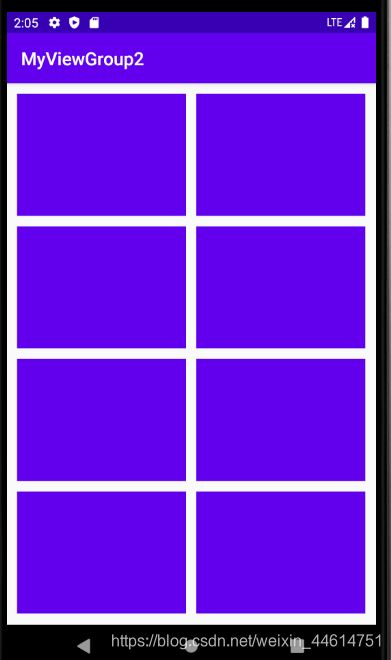
三个的时候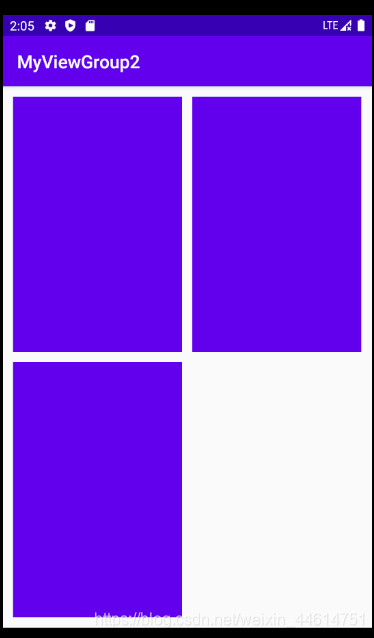

开源鸿蒙跨平台开发社区汇聚开发者与厂商,共建“一次开发,多端部署”的开源生态,致力于降低跨端开发门槛,推动万物智联创新。
更多推荐


 0
0 0
0- 0


 已为社区贡献3条内容

所有评论(0)