React Native for OpenHarmony 实战:生肖查询实现
本文介绍了一个使用 React Native 实现的生肖查询工具。该工具通过年份查询对应的生肖及其性格特征,主要功能包括: 数据存储:使用包含12生肖信息的数组,每个生肖包含名称、表情符号、对应年份和性格特征 核心算法:通过年份计算生肖索引((y-1900)%12),处理负数情况 交互设计: 默认显示当前年份 输入年份查询(1900-2100年) 点击生肖网格直接查看 动画效果: 网格元素依次延迟
今天我们用 React Native 实现一个生肖查询工具,根据年份查询对应的生肖和性格特征。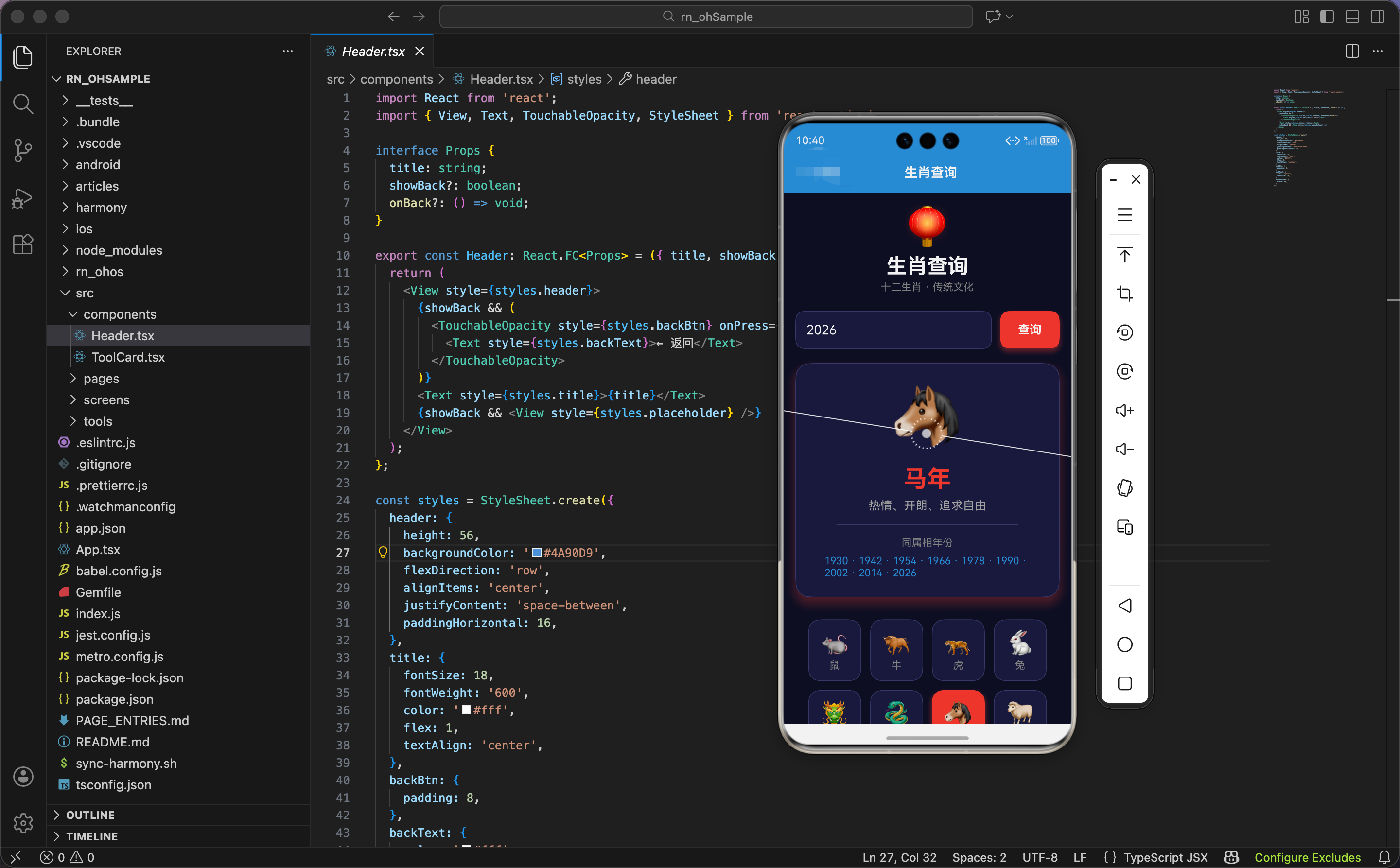
生肖数据
import React, { useState, useRef, useEffect } from 'react';
import { View, Text, TextInput, TouchableOpacity, StyleSheet, ScrollView, Animated } from 'react-native';

const zodiacData = [
  { name: '鼠', emoji: '🐀', years: [1924, 1936, 1948, 1960, 1972, 1984, 1996, 2008, 2020], traits: '机智、灵活、善于社交' },
  { name: '牛', emoji: '🐂', years: [1925, 1937, 1949, 1961, 1973, 1985, 1997, 2009, 2021], traits: '勤劳、踏实、有耐心' },
  { name: '虎', emoji: '🐅', years: [1926, 1938, 1950, 1962, 1974, 1986, 1998, 2010, 2022], traits: '勇敢、自信、有魄力' },
  { name: '兔', emoji: '🐇', years: [1927, 1939, 1951, 1963, 1975, 1987, 1999, 2011, 2023], traits: '温和、善良、细心' },
  { name: '龙', emoji: '🐲', years: [1928, 1940, 1952, 1964, 1976, 1988, 2000, 2012, 2024], traits: '热情、有活力、有领导力' },
  { name: '蛇', emoji: '🐍', years: [1929, 1941, 1953, 1965, 1977, 1989, 2001, 2013, 2025], traits: '智慧、神秘、有洞察力' },
  { name: '马', emoji: '🐴', years: [1930, 1942, 1954, 1966, 1978, 1990, 2002, 2014, 2026], traits: '热情、开朗、追求自由' },
  { name: '羊', emoji: '🐑', years: [1931, 1943, 1955, 1967, 1979, 1991, 2003, 2015, 2027], traits: '温顺、善良、有艺术感' },
  { name: '猴', emoji: '🐵', years: [1932, 1944, 1956, 1968, 1980, 1992, 2004, 2016, 2028], traits: '聪明、机灵、多才多艺' },
  { name: '鸡', emoji: '🐔', years: [1933, 1945, 1957, 1969, 1981, 1993, 2005, 2017, 2029], traits: '勤奋、守时、注重细节' },
  { name: '狗', emoji: '🐕', years: [1934, 1946, 1958, 1970, 1982, 1994, 2006, 2018, 2030], traits: '忠诚、正直、有责任感' },
  { name: '猪', emoji: '🐷', years: [1935, 1947, 1959, 1971, 1983, 1995, 2007, 2019, 2031], traits: '善良、宽容、乐观' },
];
生肖数据数组,包含 12 个生肖的信息。
每个生肖的属性:
name:生肖名称emoji:生肖 emojiyears:对应的年份数组(列举部分年份)traits:性格特征
为什么用数组存储年份?因为每个生肖对应多个年份,用数组能清楚地列出所有年份。比如鼠年有 1924、1936、1948 等。
状态设计
export const ChineseZodiac: React.FC = () => {
  const [year, setYear] = useState(new Date().getFullYear().toString());
  const [result, setResult] = useState<typeof zodiacData[0] | null>(null);
  const scaleAnim = useRef(new Animated.Value(0)).current;
  const rotateAnim = useRef(new Animated.Value(0)).current;
  const gridAnims = useRef(zodiacData.map(() => new Animated.Value(0))).current;
状态设计包含年份、查询结果、动画值。
年份:year 是字符串类型,默认值是当前年份。
查询结果:result 是生肖对象或 null。
三个动画值:
scaleAnim:结果卡片的缩放动画rotateAnim:生肖 emoji 的旋转动画gridAnims:生肖网格的动画数组,12 个元素
为什么默认值是当前年份?因为用户最常查询的是当前年份的生肖。用 new Date().getFullYear() 获取当前年份,转成字符串。
网格动画初始化
  useEffect(() => {
    gridAnims.forEach((anim, index) => {
      Animated.timing(anim, { toValue: 1, duration: 400, delay: index * 50, useNativeDriver: true }).start();
    });
  }, []);
组件挂载时,初始化生肖网格的动画。
遍历动画数组:用 forEach 遍历 gridAnims,index 是索引。
延迟动画:每个动画延迟 index * 50 毫秒启动。第一个延迟 0ms,第二个延迟 50ms,第三个延迟 100ms,依次类推。
时间动画:从 0 到 1,持续 400ms。
为什么用延迟动画?因为要让生肖网格依次出现,营造"加载"效果。如果同时出现,会很突兀。
生肖计算
  const getZodiac = (y: number) => {
    const index = (y - 1900) % 12;
    return zodiacData[index >= 0 ? index : index + 12];
  };
根据年份计算生肖。
计算索引:(y - 1900) % 12,用年份减去 1900,再对 12 取余。
处理负数:如果索引小于 0(年份小于 1900),加上 12。
返回生肖:根据索引从 zodiacData 数组中获取生肖对象。
为什么用 1900 作为基准?因为 1900 年是鼠年(生肖数组的第一个)。用 1900 作为基准,可以简化计算。
为什么对 12 取余?因为生肖是 12 年一个循环。鼠、牛、虎、兔、龙、蛇、马、羊、猴、鸡、狗、猪,12 个生肖循环往复。
举例:计算 2024 年的生肖。
- index = (2024 - 1900) % 12 = 124 % 12 = 4
- zodiacData[4] = { name: ‘龙’, … }
- 2024 年是龙年
查询函数
  const search = () => {
    const y = parseInt(year);
    if (y >= 1900 && y <= 2100) {
      scaleAnim.setValue(0);
      rotateAnim.setValue(0);
      setResult(getZodiac(y));
      Animated.parallel([
        Animated.spring(scaleAnim, { toValue: 1, friction: 4, useNativeDriver: true }),
        Animated.timing(rotateAnim, { toValue: 1, duration: 600, useNativeDriver: true }),
      ]).start();
    }
  };
查询按钮点击时,计算生肖,触发动画。
解析年份:parseInt(year) 把字符串转成整数。
验证年份:只处理 1900-2100 年的年份。
重置动画值:把缩放和旋转动画值都设为 0。
设置结果:调用 getZodiac(y) 计算生肖,设置到状态中。
并行动画:
- 缩放动画:从 0 到 1,弹簧动画
- 旋转动画:从 0 到 1,持续 600ms
为什么用并行动画?因为要同时触发缩放和旋转,让结果卡片从小到大出现,同时生肖 emoji 旋转一圈。并行动画比序列动画更快,用户体验更好。
选择生肖
  const selectZodiac = (z: typeof zodiacData[0]) => {
    scaleAnim.setValue(0);
    rotateAnim.setValue(0);
    setResult(z);
    Animated.parallel([
      Animated.spring(scaleAnim, { toValue: 1, friction: 4, useNativeDriver: true }),
      Animated.timing(rotateAnim, { toValue: 1, duration: 600, useNativeDriver: true }),
    ]).start();
  };

  const spin = rotateAnim.interpolate({ inputRange: [0, 1], outputRange: ['0deg', '360deg'] });
点击生肖网格时,直接显示该生肖的信息。
逻辑同查询函数:重置动画值,设置结果,触发并行动画。
旋转插值:把动画值 0-1 映射到旋转角度 0-360 度。生肖 emoji 旋转一圈。
界面渲染:头部和输入
  return (
    <ScrollView style={styles.container}>
      <View style={styles.header}>
        <Text style={styles.headerEmoji}>🏮</Text>
        <Text style={styles.headerTitle}>生肖查询</Text>
        <Text style={styles.headerSubtitle}>十二生肖 · 传统文化</Text>
      </View>

      <View style={styles.inputSection}>
        <TextInput style={styles.input} value={year} onChangeText={setYear} keyboardType="numeric" placeholder="输入年份" placeholderTextColor="#666" />
        <TouchableOpacity style={styles.btn} onPress={search}>
          <Text style={styles.btnText}>查询</Text>
        </TouchableOpacity>
      </View>
头部显示标题和副标题,输入区域包含输入框和按钮。
头部:
- 图标:🏮 灯笼(中国传统元素)
- 标题:生肖查询
- 副标题:十二生肖 · 传统文化
输入区域:
- 输入框:占满剩余空间,
keyboardType="numeric"弹出数字键盘 - 按钮:红色背景(中国红),带阴影
为什么用红色按钮?因为红色是中国传统的吉祥色,符合生肖查询的主题。红色 + 阴影让按钮更醒目。
结果显示
      {result && (
        <Animated.View style={[styles.result, { transform: [{ scale: scaleAnim }, { perspective: 1000 }] }]}>
          <Animated.Text style={[styles.emoji, { transform: [{ rotate: spin }] }]}>{result.emoji}</Animated.Text>
          <Text style={styles.name}>{result.name}年</Text>
          <Text style={styles.traits}>{result.traits}</Text>
          <View style={styles.divider} />
          <Text style={styles.yearsTitle}>同属相年份</Text>
          <Text style={styles.years}>{result.years.join(' · ')}</Text>
        </Animated.View>
      )}
结果卡片显示生肖信息。
条件渲染:只有 result 不为 null 时才显示。
卡片动画:
- 缩放:从 0 到 1
- 透视:
perspective: 1000让缩放有 3D 效果
生肖 emoji:
- 字号 80,很大
- 应用旋转动画,旋转一圈
生肖名称:
- 红色文字,字号 32,加粗
- 显示"X年",比如"龙年"
性格特征:
- 灰色文字,字号 16,居中对齐
分隔线:
- 宽度 80%,高度 1,灰色
同属相年份:
- 标题:灰色小字
- 年份:蓝色文字,用
join(' · ')连接,比如"1924 · 1936 · 1948"
为什么显示同属相年份?因为用户可能想知道"哪些年份是同一个生肖"。比如查询 2024 年是龙年,显示所有龙年的年份,用户可以看到"我爸爸是 1988 年出生,也是龙年"。
生肖网格
      <View style={styles.grid}>
        {zodiacData.map((z, i) => (
          <Animated.View key={i} style={{ opacity: gridAnims[i], transform: [{ scale: gridAnims[i] }, { translateY: gridAnims[i].interpolate({ inputRange: [0, 1], outputRange: [20, 0] }) }] }}>
            <TouchableOpacity style={[styles.gridItem, result?.name === z.name && styles.gridItemActive]} onPress={() => selectZodiac(z)} activeOpacity={0.7}>
              <Text style={styles.gridEmoji}>{z.emoji}</Text>
              <Text style={[styles.gridName, result?.name === z.name && styles.gridNameActive]}>{z.name}</Text>
            </TouchableOpacity>
          </Animated.View>
        ))}
      </View>
    </ScrollView>
  );
};
生肖网格显示所有 12 个生肖。
网格布局:flexDirection: 'row' 和 flexWrap: 'wrap' 让卡片自动换行。
卡片动画:
- 透明度:从 0 到 1
- 缩放:从 0 到 1
- Y 轴位移:从 20 到 0(从下往上出现)
卡片内容:
- 生肖 emoji:字号 32
- 生肖名称:灰色,字号 14
激活状态:
- 选中的卡片用红色背景,带阴影
- 选中的卡片文字用白色
为什么用网格布局?因为 12 个生肖卡片很多,网格布局能充分利用空间。每个卡片宽度 72,间距 6,一行可以显示 4 个。
鸿蒙 ArkTS 对比:生肖计算
@State year: string = new Date().getFullYear().toString()
@State result: any = null

getZodiac(y: number) {
  const index = (y - 1900) % 12
  return zodiacData[index >= 0 ? index : index + 12]
}

search() {
  const y = parseInt(this.year)
  if (y >= 1900 && y <= 2100) {
    this.result = this.getZodiac(y)
  }
}

build() {
  Column() {
    Text('生肖查询')
      .fontSize(28)
      .fontWeight(FontWeight.Bold)

    Row() {
      TextInput({ text: this.year, placeholder: '输入年份' })
        .type(InputType.Number)
        .onChange((value: string) => {
          this.year = value
        })

      Button('查询')
        .backgroundColor('#e74c3c')
        .onClick(() => {
          this.search()
        })
    }

    if (this.result) {
      Column() {
        Text(this.result.emoji)
          .fontSize(80)
        Text(`${this.result.name}年`)
          .fontSize(32)
          .fontWeight(FontWeight.Bold)
          .fontColor('#e74c3c')
        Text(this.result.traits)
          .fontSize(16)
          .fontColor('#aaa')
        Text('同属相年份')
          .fontSize(14)
          .fontColor('#888')
        Text(this.result.years.join(' · '))
          .fontSize(14)
          .fontColor('#4A90D9')
      }
    }

    Grid() {
      ForEach(zodiacData, (z: any) => {
        GridItem() {
          Column() {
            Text(z.emoji).fontSize(32)
            Text(z.name).fontSize(14).fontColor('#888')
          }
          .backgroundColor(this.result?.name === z.name ? '#e74c3c' : '#1a1a3e')
          .onClick(() => {
            this.result = z
          })
        }
      })
    }
    .columnsTemplate('1fr 1fr 1fr 1fr')
  }
}
ArkTS 中的生肖计算逻辑完全一样。核心是公式:(年份 - 1900) % 12。parseInt()、join() 都是标准 JavaScript API,跨平台通用。
样式定义
const styles = StyleSheet.create({
  container: { flex: 1, backgroundColor: '#0f0f23', padding: 16 },
  header: { alignItems: 'center', marginBottom: 24 },
  headerEmoji: { fontSize: 50, marginBottom: 8 },
  headerTitle: { fontSize: 28, fontWeight: '700', color: '#fff' },
  headerSubtitle: { fontSize: 14, color: '#888', marginTop: 4 },
  inputSection: { flexDirection: 'row', marginBottom: 20 },
  input: { flex: 1, backgroundColor: '#1a1a3e', padding: 14, borderRadius: 12, fontSize: 18, marginRight: 12, color: '#fff', borderWidth: 1, borderColor: '#3a3a6a' },
  btn: { backgroundColor: '#e74c3c', paddingHorizontal: 24, borderRadius: 12, justifyContent: 'center', shadowColor: '#e74c3c', shadowOffset: { width: 0, height: 4 }, shadowOpacity: 0.4, shadowRadius: 8, elevation: 6 },
  btnText: { color: '#fff', fontWeight: '700', fontSize: 16 },
  result: { backgroundColor: '#1a1a3e', padding: 24, borderRadius: 20, alignItems: 'center', marginBottom: 24, borderWidth: 1, borderColor: '#3a3a6a', shadowColor: '#e74c3c', shadowOffset: { width: 0, height: 8 }, shadowOpacity: 0.3, shadowRadius: 16, elevation: 10 },
  emoji: { fontSize: 80, marginBottom: 12 },
  name: { fontSize: 32, fontWeight: '700', color: '#e74c3c', marginVertical: 8 },
  traits: { fontSize: 16, color: '#aaa', textAlign: 'center' },
  divider: { width: '80%', height: 1, backgroundColor: '#3a3a6a', marginVertical: 16 },
  yearsTitle: { fontSize: 14, color: '#888', marginBottom: 8 },
  years: { fontSize: 14, color: '#4A90D9' },
  grid: { flexDirection: 'row', flexWrap: 'wrap', justifyContent: 'center' },
  gridItem: { width: 72, margin: 6, backgroundColor: '#1a1a3e', padding: 12, borderRadius: 16, alignItems: 'center', borderWidth: 1, borderColor: '#3a3a6a' },
  gridItemActive: { backgroundColor: '#e74c3c', borderColor: '#e74c3c', shadowColor: '#e74c3c', shadowOffset: { width: 0, height: 4 }, shadowOpacity: 0.5, shadowRadius: 8, elevation: 6 },
  gridEmoji: { fontSize: 32 },
  gridName: { fontSize: 14, color: '#888', marginTop: 4 },
  gridNameActive: { color: '#fff', fontWeight: '600' },
});
容器用深蓝黑色背景。按钮用红色背景,带阴影。结果卡片居中对齐,生肖 emoji 字号 80。生肖网格用网格布局,每个卡片宽度 72。选中的卡片用红色背景,带阴影。
小结
这个生肖查询工具展示了生肖计算和动画效果的实现。用公式 (年份 - 1900) % 12 计算生肖,旋转动画让生肖 emoji 旋转一圈。网格布局显示 12 个生肖,依次出现动画营造加载效果。
欢迎加入开源鸿蒙跨平台社区:https://openharmonycrossplatform.csdn.net

开源鸿蒙跨平台开发社区汇聚开发者与厂商,共建“一次开发,多端部署”的开源生态,致力于降低跨端开发门槛,推动万物智联创新。
更多推荐


 15
15 0
0- 0


 已为社区贡献23条内容

所有评论(0)