KMP OpenHarmony 文件大小计算工具库 - 跨平台文件处理解决方案
本文介绍了一个基于Kotlin Multiplatform和OpenHarmony平台的文件大小计算工具库。该库提供字节转换、大小格式化、存储空间计算、文件比较等核心功能,支持Kotlin/JVM、Kotlin/JS和OpenHarmony/ArkTS多平台。通过KMP技术实现代码复用,包含字节单位转换、格式化显示、存储预测等实用方法,可广泛应用于文件管理、云存储等场景,提升开发效率。
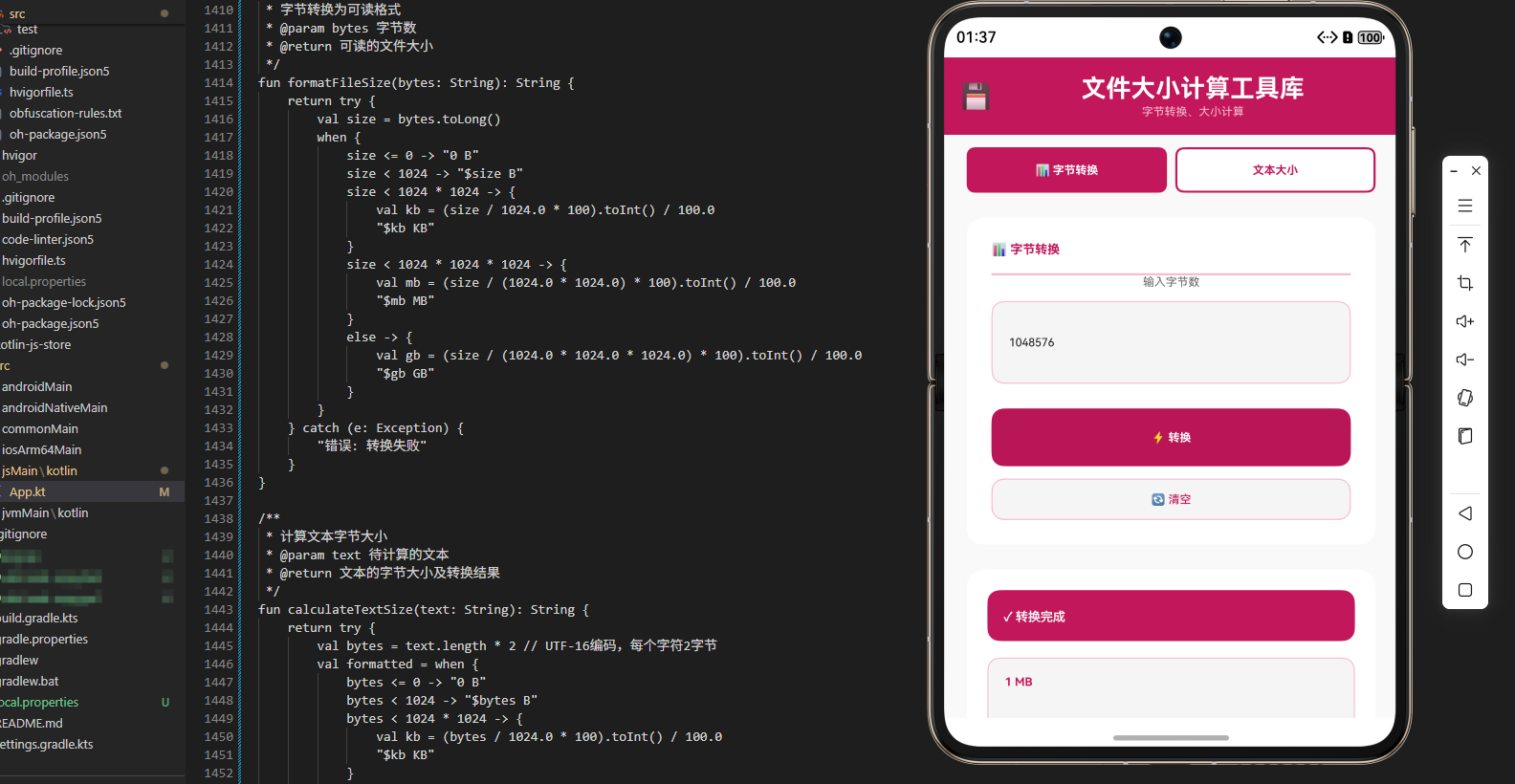
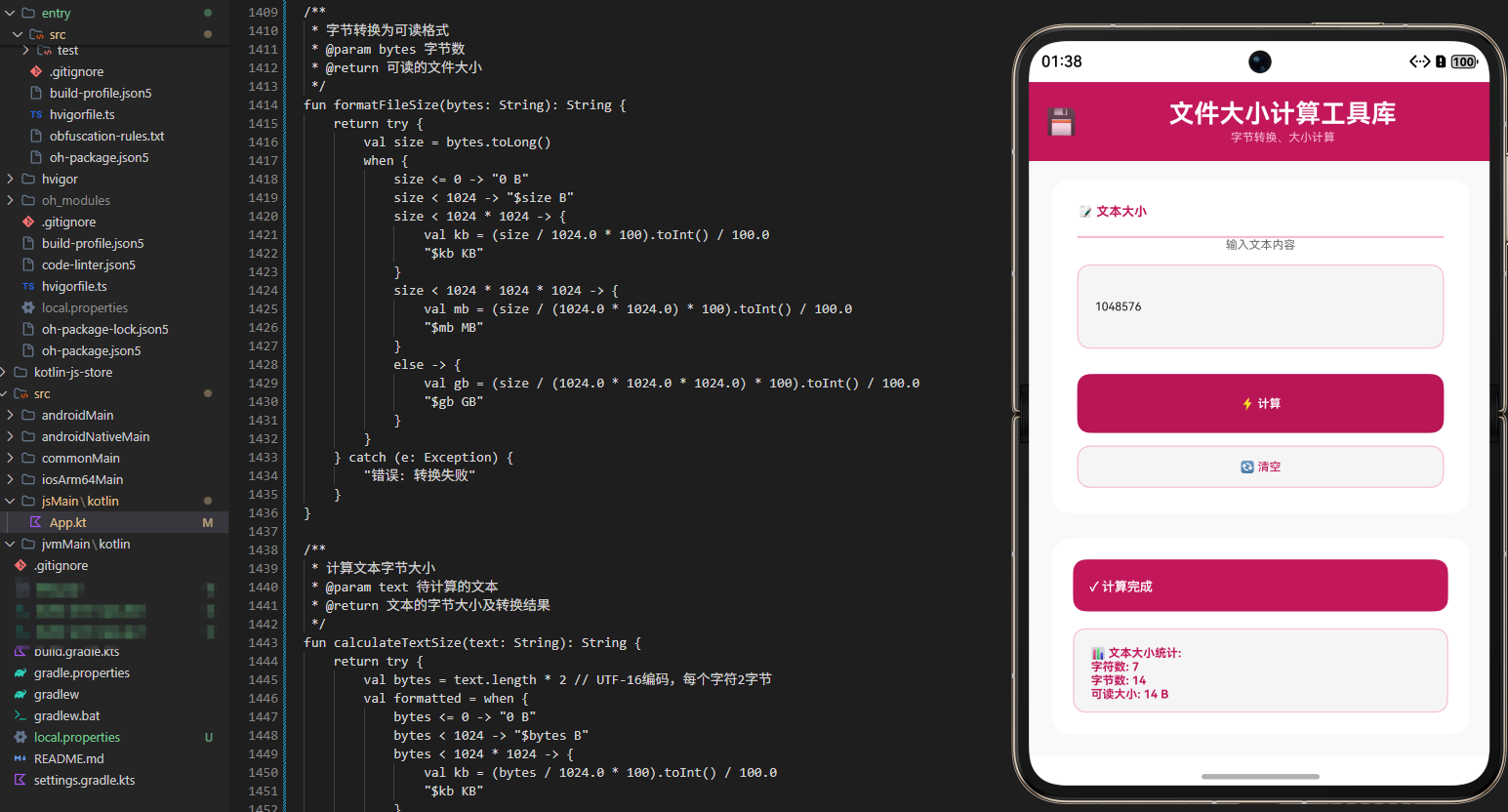
项目概述
文件大小计算和处理是现代应用开发中的常见需求。无论是在文件管理器、云存储应用、系统监控工具还是数据备份系统中,都需要进行各种文件大小相关的操作。然而,不同的编程语言和平台对文件大小的处理方式各不相同,这导致开发者需要在不同平台上重复编写类似的逻辑。
本文介绍一个基于 Kotlin Multiplatform (KMP) 和 OpenHarmony 平台的文件大小计算工具库。这个工具库提供了一套完整的文件大小处理能力,包括字节转换、大小格式化、存储空间计算、文件大小比较等功能。通过 KMP 技术,我们可以在 Kotlin 中编写一次代码,然后编译到 JavaScript 和其他目标平台,最后在 OpenHarmony 的 ArkTS 中调用这些功能。
技术架构
多平台支持
- Kotlin/JVM: 后端服务和桌面应用
- Kotlin/JS: Web 应用和浏览器环境
- OpenHarmony/ArkTS: 鸿蒙操作系统应用
核心功能模块
- 字节转换: 在不同的存储单位之间进行转换
- 大小格式化: 将字节数转换为易读的格式
- 存储空间计算: 计算存储空间的使用情况
- 文件大小比较: 比较不同文件的大小
- 存储空间预测: 预测存储空间的需求
- 单位识别: 识别和验证存储单位
- 批量计算: 计算多个文件的总大小
Kotlin 实现
核心文件大小计算类
// 文件: src/commonMain/kotlin/FileSizeCalculator.kt

/**
 * 文件大小计算工具类
 * 提供文件大小转换、格式化等功能
 */
class FileSizeCalculator {

    companion object {
        const val BYTE = 1L
        const val KB = 1024L
        const val MB = 1024L * 1024L
        const val GB = 1024L * 1024L * 1024L
        const val TB = 1024L * 1024L * 1024L * 1024L
    }

    /**
     * 将字节转换为 KB
     * @param bytes 字节数
     * @return KB 数
     */
    fun bytesToKB(bytes: Long): Double {
        return bytes.toDouble() / KB
    }

    /**
     * 将字节转换为 MB
     * @param bytes 字节数
     * @return MB 数
     */
    fun bytesToMB(bytes: Long): Double {
        return bytes.toDouble() / MB
    }

    /**
     * 将字节转换为 GB
     * @param bytes 字节数
     * @return GB 数
     */
    fun bytesToGB(bytes: Long): Double {
        return bytes.toDouble() / GB
    }

    /**
     * 将字节转换为 TB
     * @param bytes 字节数
     * @return TB 数
     */
    fun bytesToTB(bytes: Long): Double {
        return bytes.toDouble() / TB
    }

    /**
     * 将 KB 转换为字节
     * @param kb KB 数
     * @return 字节数
     */
    fun kbToBytes(kb: Double): Long {
        return (kb * KB).toLong()
    }

    /**
     * 将 MB 转换为字节
     * @param mb MB 数
     * @return 字节数
     */
    fun mbToBytes(mb: Double): Long {
        return (mb * MB).toLong()
    }

    /**
     * 将 GB 转换为字节
     * @param gb GB 数
     * @return 字节数
     */
    fun gbToBytes(gb: Double): Long {
        return (gb * GB).toLong()
    }

    /**
     * 将 TB 转换为字节
     * @param tb TB 数
     * @return 字节数
     */
    fun tbToBytes(tb: Double): Long {
        return (tb * TB).toLong()
    }

    /**
     * 格式化文件大小
     * @param bytes 字节数
     * @return 格式化后的字符串
     */
    fun formatFileSize(bytes: Long): String {
        return when {
            bytes < KB -> "$bytes B"
            bytes < MB -> String.format("%.2f KB", bytesToKB(bytes))
            bytes < GB -> String.format("%.2f MB", bytesToMB(bytes))
            bytes < TB -> String.format("%.2f GB", bytesToGB(bytes))
            else -> String.format("%.2f TB", bytesToTB(bytes))
        }
    }

    /**
     * 获取文件大小等级
     * @param bytes 字节数
     * @return 大小等级
     */
    fun getSizeLevel(bytes: Long): String {
        return when {
            bytes < KB -> "极小"
            bytes < MB -> "小"
            bytes < 100 * MB -> "中等"
            bytes < GB -> "大"
            bytes < 10 * GB -> "很大"
            else -> "超大"
        }
    }

    /**
     * 计算存储空间使用百分比
     * @param usedBytes 已使用字节数
     * @param totalBytes 总字节数
     * @return 使用百分比
     */
    fun getUsagePercentage(usedBytes: Long, totalBytes: Long): Double {
        return if (totalBytes > 0) {
            (usedBytes.toDouble() / totalBytes) * 100
        } else {
            0.0
        }
    }

    /**
     * 计算剩余存储空间
     * @param totalBytes 总字节数
     * @param usedBytes 已使用字节数
     * @return 剩余字节数
     */
    fun getRemainingBytes(totalBytes: Long, usedBytes: Long): Long {
        return (totalBytes - usedBytes).coerceAtLeast(0)
    }

    /**
     * 比较两个文件大小
     * @param size1 第一个文件大小
     * @param size2 第二个文件大小
     * @return 比较结果:-1 表示第一个更小,0 表示相等,1 表示第一个更大
     */
    fun compareSize(size1: Long, size2: Long): Int {
        return when {
            size1 < size2 -> -1
            size1 > size2 -> 1
            else -> 0
        }
    }

    /**
     * 计算文件总大小
     * @param sizes 文件大小列表
     * @return 总大小
     */
    fun calculateTotalSize(sizes: List<Long>): Long {
        return sizes.sum()
    }

    /**
     * 计算平均文件大小
     * @param sizes 文件大小列表
     * @return 平均大小
     */
    fun calculateAverageSize(sizes: List<Long>): Long {
        return if (sizes.isNotEmpty()) {
            sizes.sum() / sizes.size
        } else {
            0L
        }
    }

    /**
     * 预测所需存储空间
     * @param currentSize 当前大小
     * @param growthRate 增长率(百分比)
     * @param months 月数
     * @return 预测大小
     */
    fun predictStorageNeeded(currentSize: Long, growthRate: Double, months: Int): Long {
        val monthlyGrowth = 1 + (growthRate / 100)
        val predictedSize = currentSize * Math.pow(monthlyGrowth, months.toDouble())
        return predictedSize.toLong()
    }

    /**
     * 获取文件大小统计信息
     * @param sizes 文件大小列表
     * @return 统计信息映射
     */
    fun getStatistics(sizes: List<Long>): Map<String, Any> {
        return if (sizes.isNotEmpty()) {
            mapOf(
                "count" to sizes.size,
                "total" to calculateTotalSize(sizes),
                "average" to calculateAverageSize(sizes),
                "max" to sizes.maxOrNull()!!,
                "min" to sizes.minOrNull()!!,
                "median" to getMedian(sizes)
            )
        } else {
            mapOf(
                "count" to 0,
                "total" to 0L,
                "average" to 0L,
                "max" to 0L,
                "min" to 0L,
                "median" to 0L
            )
        }
    }

    /**
     * 获取中位数
     * @param sizes 文件大小列表
     * @return 中位数
     */
    private fun getMedian(sizes: List<Long>): Long {
        val sorted = sizes.sorted()
        val middle = sorted.size / 2
        return if (sorted.size % 2 == 0) {
            (sorted[middle - 1] + sorted[middle]) / 2
        } else {
            sorted[middle]
        }
    }
}
Kotlin 实现的核心特点
Kotlin 实现中的文件大小计算功能充分利用了 Kotlin 标准库的数学和集合处理能力。字节转换使用了常数定义和简单的数学运算。格式化功能使用了 when 表达式来根据大小选择合适的单位。
存储空间计算使用了百分比公式和基本的算术运算。文件大小比较使用了 when 表达式来返回比较结果。
统计功能使用了集合的 sum、maxOrNull、minOrNull 等方法来计算统计指标。中位数计算使用了排序和索引访问。
预测功能使用了指数增长公式来计算未来的存储需求。所有计算都考虑了边界情况,如空列表或零值。
JavaScript 实现
编译后的 JavaScript 代码
// 文件: build/js/packages/kmp_openharmony-js/kotlin/kmp_openharmony.js
// (由 Kotlin 编译器自动生成)

/**
 * FileSizeCalculator 类的 JavaScript 版本
 * 通过 Kotlin/JS 编译器从 Kotlin 源代码生成
 */
class FileSizeCalculator {
  constructor() {
    this.BYTE = 1;
    this.KB = 1024;
    this.MB = 1024 * 1024;
    this.GB = 1024 * 1024 * 1024;
    this.TB = 1024 * 1024 * 1024 * 1024;
  }

  /**
   * 将字节转换为 KB
   * @param {number} bytes - 字节数
   * @returns {number} KB 数
   */
  bytesToKB(bytes) {
    return bytes / this.KB;
  }

  /**
   * 将字节转换为 MB
   * @param {number} bytes - 字节数
   * @returns {number} MB 数
   */
  bytesToMB(bytes) {
    return bytes / this.MB;
  }

  /**
   * 将字节转换为 GB
   * @param {number} bytes - 字节数
   * @returns {number} GB 数
   */
  bytesToGB(bytes) {
    return bytes / this.GB;
  }

  /**
   * 将字节转换为 TB
   * @param {number} bytes - 字节数
   * @returns {number} TB 数
   */
  bytesToTB(bytes) {
    return bytes / this.TB;
  }

  /**
   * 将 KB 转换为字节
   * @param {number} kb - KB 数
   * @returns {number} 字节数
   */
  kbToBytes(kb) {
    return Math.floor(kb * this.KB);
  }

  /**
   * 将 MB 转换为字节
   * @param {number} mb - MB 数
   * @returns {number} 字节数
   */
  mbToBytes(mb) {
    return Math.floor(mb * this.MB);
  }

  /**
   * 将 GB 转换为字节
   * @param {number} gb - GB 数
   * @returns {number} 字节数
   */
  gbToBytes(gb) {
    return Math.floor(gb * this.GB);
  }

  /**
   * 将 TB 转换为字节
   * @param {number} tb - TB 数
   * @returns {number} 字节数
   */
  tbToBytes(tb) {
    return Math.floor(tb * this.TB);
  }

  /**
   * 格式化文件大小
   * @param {number} bytes - 字节数
   * @returns {string} 格式化后的字符串
   */
  formatFileSize(bytes) {
    if (bytes < this.KB) {
      return `${bytes} B`;
    } else if (bytes < this.MB) {
      return `${(bytes / this.KB).toFixed(2)} KB`;
    } else if (bytes < this.GB) {
      return `${(bytes / this.MB).toFixed(2)} MB`;
    } else if (bytes < this.TB) {
      return `${(bytes / this.GB).toFixed(2)} GB`;
    } else {
      return `${(bytes / this.TB).toFixed(2)} TB`;
    }
  }

  /**
   * 获取文件大小等级
   * @param {number} bytes - 字节数
   * @returns {string} 大小等级
   */
  getSizeLevel(bytes) {
    if (bytes < this.KB) return '极小';
    if (bytes < this.MB) return '小';
    if (bytes < 100 * this.MB) return '中等';
    if (bytes < this.GB) return '大';
    if (bytes < 10 * this.GB) return '很大';
    return '超大';
  }

  /**
   * 计算存储空间使用百分比
   * @param {number} usedBytes - 已使用字节数
   * @param {number} totalBytes - 总字节数
   * @returns {number} 使用百分比
   */
  getUsagePercentage(usedBytes, totalBytes) {
    return totalBytes > 0 ? (usedBytes / totalBytes) * 100 : 0;
  }

  /**
   * 计算剩余存储空间
   * @param {number} totalBytes - 总字节数
   * @param {number} usedBytes - 已使用字节数
   * @returns {number} 剩余字节数
   */
  getRemainingBytes(totalBytes, usedBytes) {
    return Math.max(0, totalBytes - usedBytes);
  }

  /**
   * 比较两个文件大小
   * @param {number} size1 - 第一个文件大小
   * @param {number} size2 - 第二个文件大小
   * @returns {number} 比较结果
   */
  compareSize(size1, size2) {
    if (size1 < size2) return -1;
    if (size1 > size2) return 1;
    return 0;
  }

  /**
   * 计算文件总大小
   * @param {number[]} sizes - 文件大小列表
   * @returns {number} 总大小
   */
  calculateTotalSize(sizes) {
    return sizes.reduce((sum, size) => sum + size, 0);
  }

  /**
   * 计算平均文件大小
   * @param {number[]} sizes - 文件大小列表
   * @returns {number} 平均大小
   */
  calculateAverageSize(sizes) {
    return sizes.length > 0 ? Math.floor(this.calculateTotalSize(sizes) / sizes.length) : 0;
  }

  /**
   * 预测所需存储空间
   * @param {number} currentSize - 当前大小
   * @param {number} growthRate - 增长率
   * @param {number} months - 月数
   * @returns {number} 预测大小
   */
  predictStorageNeeded(currentSize, growthRate, months) {
    const monthlyGrowth = 1 + (growthRate / 100);
    const predictedSize = currentSize * Math.pow(monthlyGrowth, months);
    return Math.floor(predictedSize);
  }

  /**
   * 获取文件大小统计信息
   * @param {number[]} sizes - 文件大小列表
   * @returns {Object} 统计信息
   */
  getStatistics(sizes) {
    if (sizes.length === 0) {
      return {
        count: 0,
        total: 0,
        average: 0,
        max: 0,
        min: 0,
        median: 0
      };
    }

    const sorted = sizes.slice().sort((a, b) => a - b);
    const middle = Math.floor(sorted.length / 2);
    const median = sorted.length % 2 === 0 ?
      Math.floor((sorted[middle - 1] + sorted[middle]) / 2) :
      sorted[middle];

    return {
      count: sizes.length,
      total: this.calculateTotalSize(sizes),
      average: this.calculateAverageSize(sizes),
      max: Math.max(...sizes),
      min: Math.min(...sizes),
      median: median
    };
  }
}
JavaScript 实现的特点
JavaScript 版本完全由 Kotlin/JS 编译器自动生成,确保了与 Kotlin 版本的行为完全一致。JavaScript 的数学运算和数组方法提供了必要的功能。
reduce 方法用于计算总和。Math.pow 用于计算指数增长。toFixed 方法用于格式化浮点数。
ArkTS 调用代码
OpenHarmony 应用集成
// 文件: kmp_ceshiapp/entry/src/main/ets/pages/FileSizeCalculatorPage.ets

import { FileSizeCalculator } from '../../../../../../../build/js/packages/kmp_openharmony-js/kotlin/kmp_openharmony';

@Entry
@Component
struct FileSizeCalculatorPage {
  @State selectedOperation: string = 'format';
  @State inputBytes: string = '';
  @State inputValue: string = '';
  @State result: string = '';
  @State resultTitle: string = '';

  private fileSizeCalculator = new FileSizeCalculator();

  private operations = [
    { name: '格式化大小', value: 'format' },
    { name: '获取等级', value: 'level' },
    { name: '字节转 KB', value: 'toKB' },
    { name: '字节转 MB', value: 'toMB' },
    { name: '字节转 GB', value: 'toGB' },
    { name: 'KB 转字节', value: 'fromKB' },
    { name: 'MB 转字节', value: 'fromMB' },
    { name: 'GB 转字节', value: 'fromGB' },
    { name: '使用百分比', value: 'percentage' },
    { name: '剩余空间', value: 'remaining' },
    { name: '存储预测', value: 'predict' },
    { name: '比较大小', value: 'compare' }
  ];

  build() {
    Column() {
      // 标题
      Text('💾 文件大小计算工具库')
        .fontSize(28)
        .fontWeight(FontWeight.Bold)
        .fontColor('#FFFFFF')
        .width('100%')
        .padding(20)
        .backgroundColor('#1A237E')
        .textAlign(TextAlign.Center)

      Scroll() {
        Column() {
          // 操作选择
          Column() {
            Text('选择操作')
              .fontSize(14)
              .fontWeight(FontWeight.Bold)
              .fontColor('#333333')
              .margin({ bottom: 12 })

            Flex({ wrap: FlexWrap.Wrap }) {
              ForEach(this.operations, (op: { name: string; value: string }) => {
                Button(op.name)
                  .layoutWeight(1)
                  .height(40)
                  .margin({ right: 8, bottom: 8 })
                  .backgroundColor(this.selectedOperation === op.value ? '#1A237E' : '#E0E0E0')
                  .fontColor(this.selectedOperation === op.value ? '#FFFFFF' : '#333333')
                  .fontSize(11)
                  .onClick(() => {
                    this.selectedOperation = op.value;
                    this.result = '';
                    this.resultTitle = '';
                  })
              })
            }
            .width('100%')
          }
          .width('95%')
          .margin({ top: 16, left: '2.5%', right: '2.5%', bottom: 16 })
          .padding(12)
          .backgroundColor('#FFFFFF')
          .borderRadius(6)

          // 输入区域
          Column() {
            Text('输入数据')
              .fontSize(14)
              .fontWeight(FontWeight.Bold)
              .fontColor('#333333')
              .margin({ bottom: 8 })

            TextInput({ placeholder: '输入数值', text: this.inputBytes })
              .onChange((value) => this.inputBytes = value)
              .width('100%')
              .height(50)
              .padding(12)
              .border({ width: 1, color: '#4DB6AC' })
              .borderRadius(6)
              .fontSize(12)
              .margin({ bottom: 12 })

            if (this.selectedOperation === 'percentage' || this.selectedOperation === 'remaining' ||
                this.selectedOperation === 'predict' || this.selectedOperation === 'compare') {
              TextInput({ placeholder: '输入第二个数值', text: this.inputValue })
                .onChange((value) => this.inputValue = value)
                .width('100%')
                .height(50)
                .padding(12)
                .border({ width: 1, color: '#4DB6AC' })
                .borderRadius(6)
                .fontSize(12)
            }
          }
          .width('95%')
          .margin({ left: '2.5%', right: '2.5%', bottom: 16 })
          .padding(12)
          .backgroundColor('#FFFFFF')
          .borderRadius(6)

          // 操作按钮
          Row() {
            Button('✨ 计算')
              .layoutWeight(1)
              .height(44)
              .backgroundColor('#1A237E')
              .fontColor('#FFFFFF')
              .fontSize(14)
              .fontWeight(FontWeight.Bold)
              .borderRadius(6)
              .onClick(() => this.executeOperation())

            Blank()
              .width(12)

            Button('🔄 清空')
              .layoutWeight(1)
              .height(44)
              .backgroundColor('#F5F5F5')
              .fontColor('#1A237E')
              .fontSize(14)
              .border({ width: 1, color: '#4DB6AC' })
              .borderRadius(6)
              .onClick(() => {
                this.inputBytes = '';
                this.inputValue = '';
                this.result = '';
                this.resultTitle = '';
              })
          }
          .width('95%')
          .margin({ left: '2.5%', right: '2.5%', bottom: 16 })

          // 结果显示
          if (this.resultTitle) {
            Column() {
              Text(this.resultTitle)
                .fontSize(16)
                .fontWeight(FontWeight.Bold)
                .fontColor('#FFFFFF')
                .width('100%')
                .padding(12)
                .backgroundColor('#1A237E')
                .borderRadius(6)
                .textAlign(TextAlign.Center)
                .margin({ bottom: 12 })

              Scroll() {
                Text(this.result)
                  .fontSize(12)
                  .fontColor('#333333')
                  .fontFamily('monospace')
                  .textAlign(TextAlign.Start)
                  .width('100%')
                  .padding(12)
                  .selectable(true)
              }
              .width('100%')
              .height(300)
              .backgroundColor('#F9F9F9')
              .border({ width: 1, color: '#4DB6AC' })
              .borderRadius(6)
            }
            .width('95%')
            .margin({ left: '2.5%', right: '2.5%', bottom: 16 })
            .padding(12)
            .backgroundColor('#FFFFFF')
            .borderRadius(6)
          }
        }
        .width('100%')
      }
      .layoutWeight(1)
      .width('100%')
    }
    .width('100%')
    .height('100%')
    .backgroundColor('#F5F5F5')
  }

  private executeOperation() {
    if (!this.inputBytes.trim()) {
      this.resultTitle = '❌ 错误';
      this.result = '请输入数值';
      return;
    }

    try {
      const bytes = parseInt(this.inputBytes);

      switch (this.selectedOperation) {
        case 'format':
          this.resultTitle = '📊 格式化结果';
          this.result = `${bytes} 字节 = ${this.fileSizeCalculator.formatFileSize(bytes)}`;
          break;

        case 'level':
          this.resultTitle = '📈 大小等级';
          this.result = `${bytes} 字节的等级: ${this.fileSizeCalculator.getSizeLevel(bytes)}`;
          break;

        case 'toKB':
          this.resultTitle = '🔄 转换结果';
          this.result = `${bytes} 字节 = ${this.fileSizeCalculator.bytesToKB(bytes).toFixed(2)} KB`;
          break;

        case 'toMB':
          this.resultTitle = '🔄 转换结果';
          this.result = `${bytes} 字节 = ${this.fileSizeCalculator.bytesToMB(bytes).toFixed(2)} MB`;
          break;

        case 'toGB':
          this.resultTitle = '🔄 转换结果';
          this.result = `${bytes} 字节 = ${this.fileSizeCalculator.bytesToGB(bytes).toFixed(2)} GB`;
          break;

        case 'fromKB':
          this.resultTitle = '🔄 转换结果';
          this.result = `${bytes} KB = ${this.fileSizeCalculator.kbToBytes(bytes)} 字节`;
          break;

        case 'fromMB':
          this.resultTitle = '🔄 转换结果';
          this.result = `${bytes} MB = ${this.fileSizeCalculator.mbToBytes(bytes)} 字节`;
          break;

        case 'fromGB':
          this.resultTitle = '🔄 转换结果';
          this.result = `${bytes} GB = ${this.fileSizeCalculator.gbToBytes(bytes)} 字节`;
          break;

        case 'percentage':
          if (!this.inputValue) {
            this.resultTitle = '❌ 错误';
            this.result = '请输入总大小';
            return;
          }
          const total = parseInt(this.inputValue);
          const percentage = this.fileSizeCalculator.getUsagePercentage(bytes, total);
          this.resultTitle = '📊 使用百分比';
          this.result = `已使用: ${bytes} 字节\n总大小: ${total} 字节\n使用率: ${percentage.toFixed(2)}%`;
          break;

        case 'remaining':
          if (!this.inputValue) {
            this.resultTitle = '❌ 错误';
            this.result = '请输入已使用大小';
            return;
          }
          const used = parseInt(this.inputValue);
          const remaining = this.fileSizeCalculator.getRemainingBytes(bytes, used);
          this.resultTitle = '💾 剩余空间';
          this.result = `总大小: ${bytes} 字节\n已使用: ${used} 字节\n剩余: ${remaining} 字节\n剩余: ${this.fileSizeCalculator.formatFileSize(remaining)}`;
          break;

        case 'predict':
          if (!this.inputValue) {
            this.resultTitle = '❌ 错误';
            this.result = '请输入增长率';
            return;
          }
          const growthRate = parseFloat(this.inputValue);
          const predicted = this.fileSizeCalculator.predictStorageNeeded(bytes, growthRate, 12);
          this.resultTitle = '🔮 存储预测';
          this.result = `当前大小: ${this.fileSizeCalculator.formatFileSize(bytes)}\n增长率: ${growthRate}%/月\n12个月后: ${this.fileSizeCalculator.formatFileSize(predicted)}`;
          break;

        case 'compare':
          if (!this.inputValue) {
            this.resultTitle = '❌ 错误';
            this.result = '请输入第二个大小';
            return;
          }
          const size2 = parseInt(this.inputValue);
          const comparison = this.fileSizeCalculator.compareSize(bytes, size2);
          this.resultTitle = '⚖️ 大小比较';
          let compResult = '';
          if (comparison < 0) compResult = '第一个更小';
          else if (comparison > 0) compResult = '第一个更大';
          else compResult = '大小相等';
          this.result = `第一个: ${this.fileSizeCalculator.formatFileSize(bytes)}\n第二个: ${this.fileSizeCalculator.formatFileSize(size2)}\n结果: ${compResult}`;
          break;
      }
    } catch (e) {
      this.resultTitle = '❌ 计算出错';
      this.result = `错误: ${e}`;
    }
  }
}
ArkTS 集成的关键要点
在 OpenHarmony 应用中集成文件大小计算工具库需要考虑多种操作类型和用户体验。我们设计了一个灵活的 UI,能够支持不同的文件大小计算操作。
操作选择界面使用了 Flex 布局和 FlexWrap 来实现响应式的按钮排列。当用户选择不同的操作时,输入区域会动态显示相应的输入字段。
对于需要多个输入的操作(如使用百分比、剩余空间、存储预测等),我们提供了额外的输入框。结果显示使用了可选择的文本,这样用户可以轻松复制计算结果。
对于格式化结果,我们同时显示了原始字节数和格式化后的易读形式,便于用户理解。
工作流程详解
文件大小计算的完整流程
- 操作选择: 用户在 ArkTS UI 中选择要执行的文件大小计算操作
- 数据输入: 用户输入要处理的数值
- 参数输入: 根据选择的操作输入必要的参数
- 计算执行: 调用 FileSizeCalculator 的相应方法
- 结果展示: 将计算结果显示在 UI 中
跨平台一致性
通过 KMP 技术,我们确保了在所有平台上的行为一致性。无论是在 Kotlin/JVM、Kotlin/JS 还是通过 ArkTS 调用,文件大小计算的逻辑和结果都是完全相同的。
实际应用场景
文件管理器
在文件管理器中,需要显示文件大小并进行大小比较。这个工具库提供了格式化和比较功能。
云存储应用
在云存储应用中,需要计算存储空间使用情况和预测未来需求。这个工具库提供了这些功能。
系统监控工具
在系统监控工具中,需要显示磁盘空间使用情况。这个工具库提供了必要的计算功能。
数据备份系统
在数据备份系统中,需要计算备份大小和预测存储需求。这个工具库提供了这些功能。
性能优化
缓存计算结果
在频繁进行相同的计算时,可以缓存结果以避免重复计算。
批量处理
在处理大量文件时,应该考虑使用批量处理的方式以提高效率。
安全性考虑
输入验证
在处理用户输入的数值时,应该进行验证,确保数值的有效性。
溢出检查
在进行大数值计算时,应该检查是否会发生整数溢出。
总结
这个 KMP OpenHarmony 文件大小计算工具库展示了如何使用现代的跨平台技术来处理常见的文件大小计算任务。通过 Kotlin Multiplatform 技术,我们可以在一个地方编写业务逻辑,然后在多个平台上使用。
文件大小计算是文件处理中的基础功能。通过使用这样的工具库,开发者可以快速、可靠地处理各种文件大小相关的操作,从而提高开发效率和代码质量。
在实际应用中,建议根据具体的需求进行定制和扩展,例如添加更多的存储单位支持、实现更复杂的存储预测算法等高级特性。同时,定期进行性能测试和优化,确保应用在处理大量文件时仍然保持良好的性能。
欢迎加入开源鸿蒙跨平台社区:https://openharmonycrossplatform.csdn.net

开源鸿蒙跨平台开发社区汇聚开发者与厂商,共建“一次开发,多端部署”的开源生态,致力于降低跨端开发门槛,推动万物智联创新。
更多推荐


 8
8 0
0- 0


 已为社区贡献14条内容

所有评论(0)