Flutter 框架跨平台鸿蒙开发 - 月亮同步
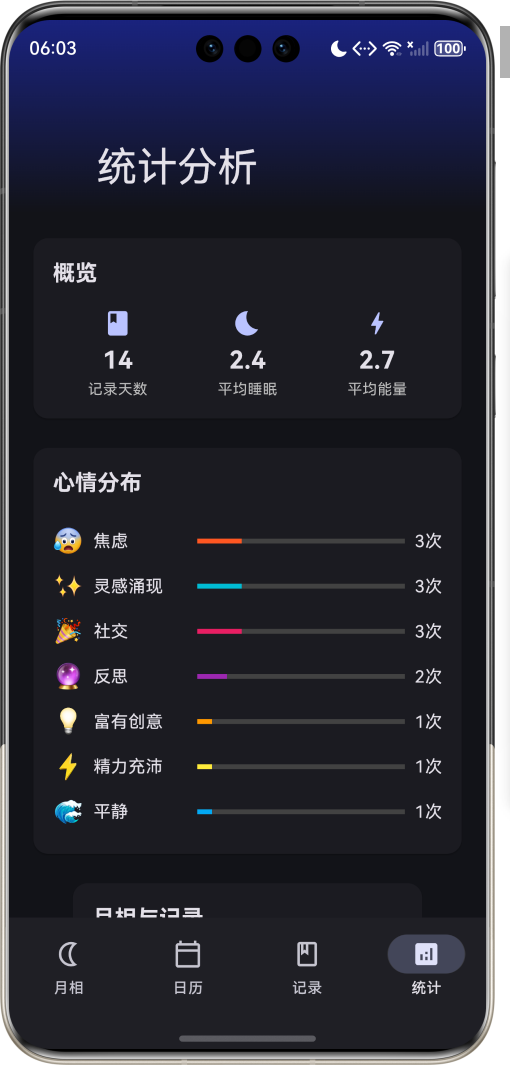
运行效果图月亮同步应用是一款独特的身心健康管理工具,基于古老智慧与现代科学的结合。应用通过精确计算月相变化,为用户提供个性化的作息建议、情绪管理和活动推荐。月相对地球上的生物有着深远的影响,从潮汐变化到生物节律,月亮的周期性变化与我们的生活息息相关。应用以深邃的夜空为主题,采用深色背景配合星空渐变,营造宁静神秘的氛围。涵盖月相追踪、日历视图、个人记录、统计分析四大模块,帮助用户了解月相对自身的影响
月亮同步应用
欢迎加入开源鸿蒙跨平台社区:
https://openharmonycrossplatform.csdn.net
一、项目概述
运行效果图
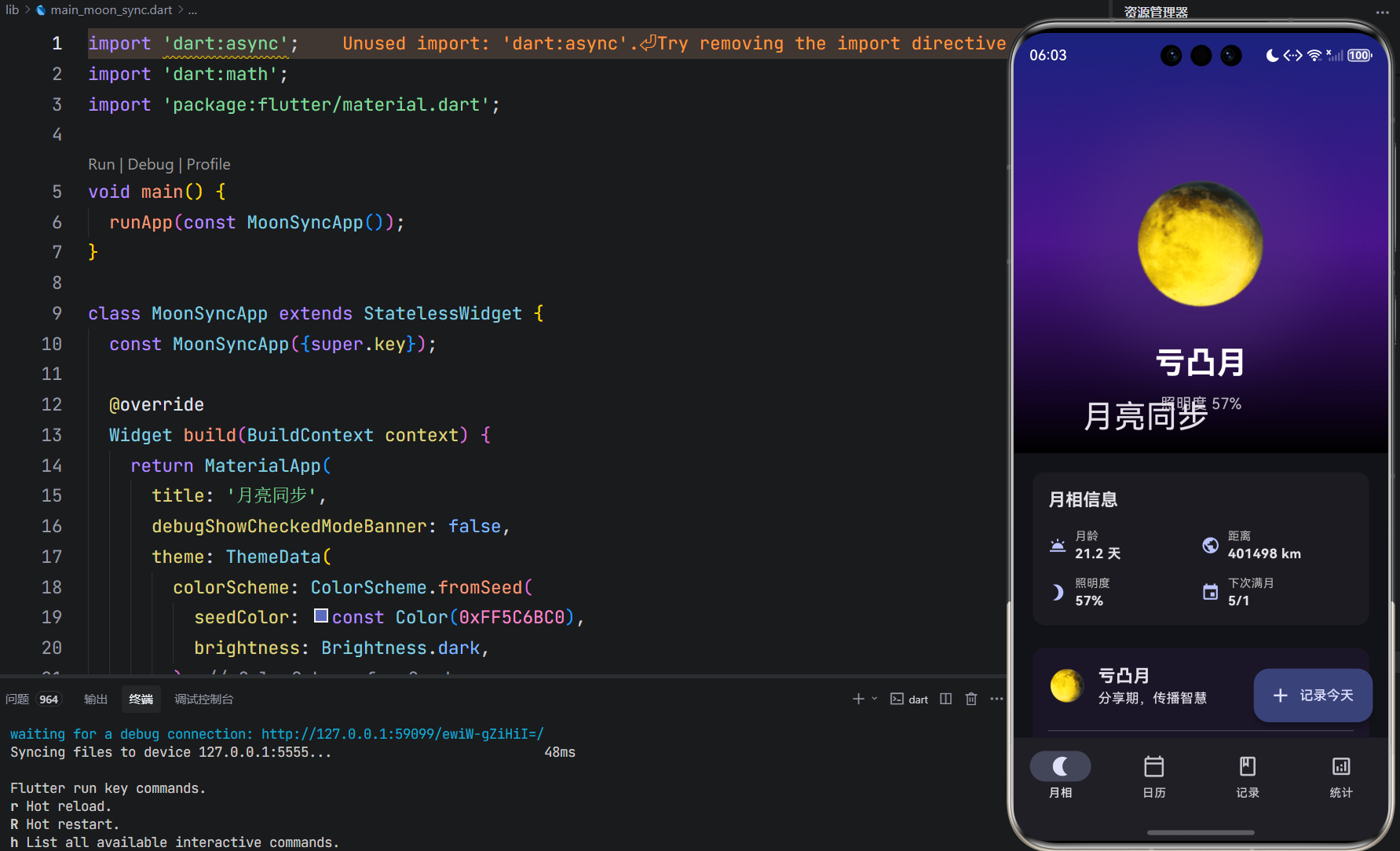
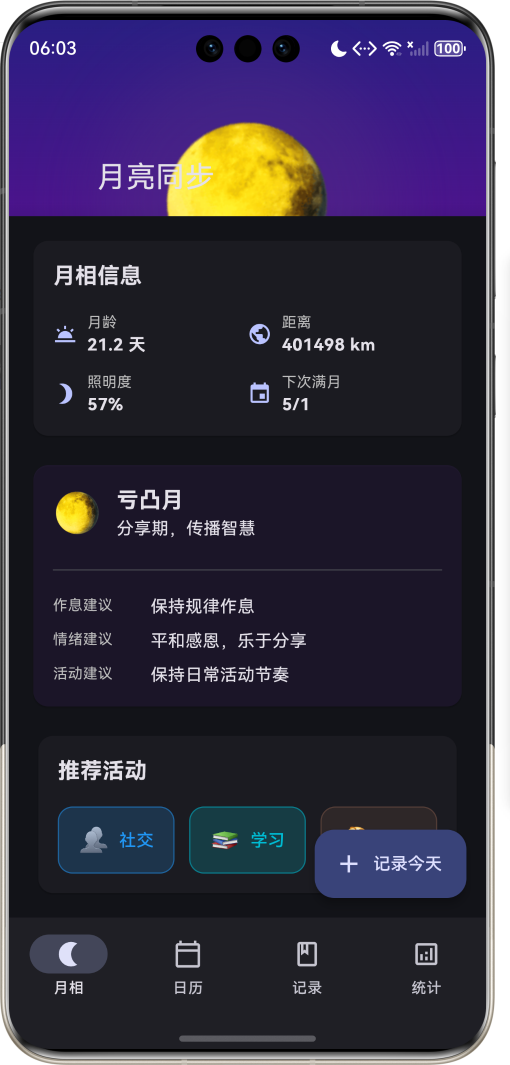
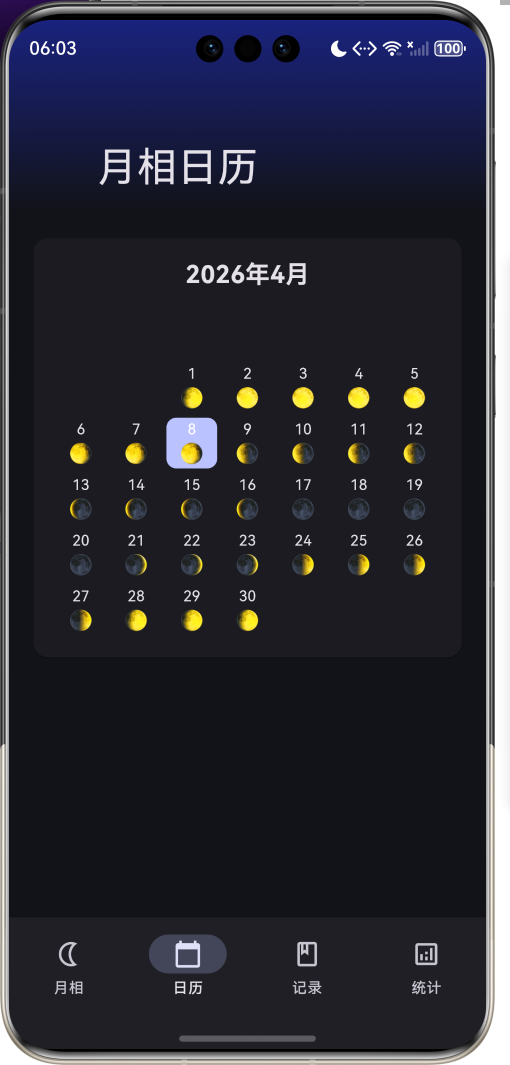
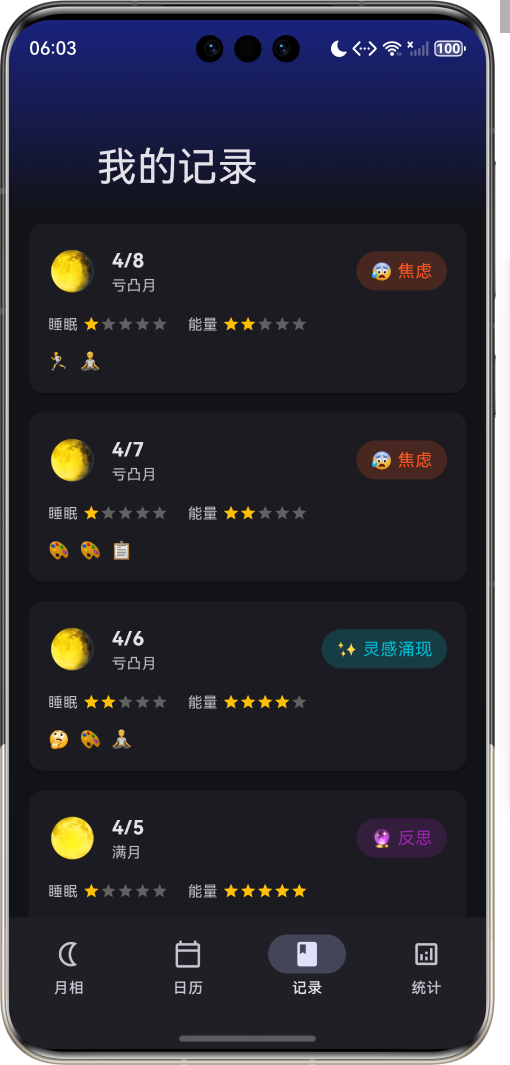
1.1 应用简介
月亮同步应用是一款独特的身心健康管理工具,基于古老智慧与现代科学的结合。应用通过精确计算月相变化,为用户提供个性化的作息建议、情绪管理和活动推荐。月相对地球上的生物有着深远的影响,从潮汐变化到生物节律,月亮的周期性变化与我们的生活息息相关。
应用以深邃的夜空为主题,采用深色背景配合星空渐变,营造宁静神秘的氛围。涵盖月相追踪、日历视图、个人记录、统计分析四大模块,帮助用户了解月相对自身的影响,实现与自然节律的和谐同步。
1.2 核心功能
| 功能模块 | 功能描述 | 实现方式 |
|---|---|---|
| 月相追踪 | 实时显示当前月相 | 天文算法计算 |
| 月相信息 | 显示月龄、距离、照明度 | 数学计算 |
| 作息建议 | 根据月相提供建议 | 规则引擎 |
| 活动推荐 | 推荐适合当前月相的活动 | 匹配算法 |
| 月相日历 | 展示整月月相变化 | 网格布局 |
| 个人记录 | 记录每日状态和活动 | 表单输入 |
| 统计分析 | 分析月相与状态关联 | 数据可视化 |
1.3 月相类型定义
| 序号 | 月相名称 | Emoji | 主题色 | 特点描述 |
|---|---|---|---|---|
| 1 | 新月 | 🌑 | #1A1A2E | 新的开始,设定目标 |
| 2 | 蛾眉月 | 🌒 | #16213E | 成长期,积累能量 |
| 3 | 上弦月 | 🌓 | #0F3460 | 行动期,付诸实践 |
| 4 | 盈凸月 | 🌔 | #533483 | 完善期,调整优化 |
| 5 | 满月 | 🌕 | #E94560 | 高峰期,释放能量 |
| 6 | 亏凸月 | 🌖 | #533483 | 分享期,传播智慧 |
| 7 | 下弦月 | 🌗 | #0F3460 | 清理期,放下执念 |
| 8 | 残月 | 🌘 | #16213E | 休息期,内省反思 |
1.4 活动类型定义
| 序号 | 活动名称 | Emoji | 主题色 | 适合月相 |
|---|---|---|---|---|
| 1 | 冥想 | 🧘 | #9C27B0 | 新月、残月 |
| 2 | 运动 | 🏃 | #4CAF50 | 上弦月、满月 |
| 3 | 创作 | 🎨 | #FF9800 | 盈凸月、满月 |
| 4 | 社交 | 👥 | #2196F3 | 满月、亏凸月 |
| 5 | 休息 | 😴 | #607D8B | 残月、新月 |
| 6 | 学习 | 📚 | #00BCD4 | 蛾眉月、盈凸月 |
| 7 | 反思 | 🤔 | #795548 | 下弦月、残月 |
| 8 | 规划 | 📋 | #E91E63 | 新月 |
1.5 心情类型定义
| 序号 | 心情名称 | Emoji | 主题色 | 常见月相 |
|---|---|---|---|---|
| 1 | 精力充沛 | ⚡ | #FFEB3B | 满月 |
| 2 | 平静 | 🌊 | #03A9F4 | 新月 |
| 3 | 富有创意 | 💡 | #FF9800 | 盈凸月 |
| 4 | 反思 | 🔮 | #9C27B0 | 下弦月 |
| 5 | 社交 | 🎉 | #E91E63 | 满月 |
| 6 | 疲惫 | 😴 | #607D8B | 残月 |
| 7 | 焦虑 | 😰 | #FF5722 | 满月前后 |
| 8 | 灵感涌现 | ✨ | #00BCD4 | 盈凸月 |
1.6 技术栈
| 技术领域 | 技术选型 | 版本要求 |
|---|---|---|
| 开发框架 | Flutter | >= 3.0.0 |
| 编程语言 | Dart | >= 2.17.0 |
| 设计规范 | Material Design 3 | - |
| 动画控制 | AnimationController | - |
| 天文计算 | 数学算法 | - |
| 状态管理 | setState | - |
| 目标平台 | 鸿蒙OS / Web | API 21+ |
1.7 项目结构
lib/
└── main_moon_sync.dart
    ├── MoonSyncApp                 # 应用入口
    ├── MoonPhase                   # 月相枚举
    ├── ActivityType                # 活动类型枚举
    ├── MoodType                    # 心情类型枚举
    ├── MoonData                    # 月相数据模型
    ├── DailyRecord                 # 每日记录模型
    ├── MoonSyncHomePage            # 主页面(底部导航)
    ├── _buildMoonPage              # 月相页面
    ├── _buildCalendarPage          # 日历页面
    ├── _buildRecordsPage           # 记录页面
    └── _buildStatsPage             # 统计页面
二、系统架构
2.1 整体架构图
2.2 类图设计
2.3 页面导航流程
2.4 月相计算流程
三、核心模块设计
3.1 数据模型设计
3.1.1 月相枚举 (MoonPhase)
enum MoonPhase {
  newMoon('新月', '🌑', '新的开始,设定目标', Color(0xFF1A1A2E)),
  waxingCrescent('蛾眉月', '🌒', '成长期,积累能量', Color(0xFF16213E)),
  firstQuarter('上弦月', '🌓', '行动期,付诸实践', Color(0xFF0F3460)),
  waxingGibbous('盈凸月', '🌔', '完善期,调整优化', Color(0xFF533483)),
  fullMoon('满月', '🌕', '高峰期,释放能量', Color(0xFFE94560)),
  waningGibbous('亏凸月', '🌖', '分享期,传播智慧', Color(0xFF533483)),
  lastQuarter('下弦月', '🌗', '清理期,放下执念', Color(0xFF0F3460)),
  waningCrescent('残月', '🌘', '休息期,内省反思', Color(0xFF16213E));

  final String label;
  final String emoji;
  final String advice;
  final Color color;

  const MoonPhase(this.label, this.emoji, this.advice, this.color);
}
3.1.2 活动类型枚举 (ActivityType)
enum ActivityType {
  meditation('冥想', '🧘', Color(0xFF9C27B0)),
  exercise('运动', '🏃', Color(0xFF4CAF50)),
  creative('创作', '🎨', Color(0xFFFF9800)),
  social('社交', '👥', Color(0xFF2196F3)),
  rest('休息', '😴', Color(0xFF607D8B)),
  learning('学习', '📚', Color(0xFF00BCD4)),
  reflection('反思', '🤔', Color(0xFF795548)),
  planning('规划', '📋', Color(0xFFE91E63));

  final String label;
  final String emoji;
  final Color color;

  const ActivityType(this.label, this.emoji, this.color);
}
3.1.3 心情类型枚举 (MoodType)
enum MoodType {
  energetic('精力充沛', '⚡', Color(0xFFFFEB3B)),
  calm('平静', '🌊', Color(0xFF03A9F4)),
  creative('富有创意', '💡', Color(0xFFFF9800)),
  reflective('反思', '🔮', Color(0xFF9C27B0)),
  social('社交', '🎉', Color(0xFFE91E63)),
  tired('疲惫', '😴', Color(0xFF607D8B)),
  anxious('焦虑', '😰', Color(0xFFFF5722)),
  inspired('灵感涌现', '✨', Color(0xFF00BCD4));

  final String label;
  final String emoji;
  final Color color;

  const MoodType(this.label, this.emoji, this.color);
}
3.1.4 月相数据模型 (MoonData)
class MoonData {
  final DateTime date;          // 日期
  final MoonPhase phase;        // 月相
  final double illumination;    // 照明度
  final double age;             // 月龄(天数)
  final double distance;        // 月地距离(km)
}
3.1.5 每日记录模型 (DailyRecord)
class DailyRecord {
  final String id;                      // 唯一标识
  final DateTime date;                  // 日期
  final MoonPhase moonPhase;            // 当日月相
  final MoodType mood;                  // 心情状态
  final List<ActivityType> activities;  // 活动列表
  final String? notes;                  // 备注
  final int sleepQuality;               // 睡眠质量(1-5)
  final int energyLevel;                // 能量水平(1-5)
}
3.1.6 月相周期分布
3.2 页面结构设计
3.2.1 主页面布局
3.2.2 月相页面结构
3.2.3 日历页面结构
3.2.4 记录页面结构
3.3 月相计算算法
3.4 建议生成逻辑
四、UI设计规范
4.1 配色方案
应用以深邃的夜空为主题,采用深色背景:
| 颜色类型 | 色值 | 用途 |
|---|---|---|
| 主色 | #5C6BC0 (Indigo 400) | 导航、强调元素 |
| 背景渐变1 | Indigo 900 | 顶部背景 |
| 背景渐变2 | Purple 900 | 中间背景 |
| 背景渐变3 | Black | 底部背景 |
| 新月色 | #1A1A2E | 新月标识 |
| 蛾眉月色 | #16213E | 蛾眉月标识 |
| 上弦月色 | #0F3460 | 上弦月标识 |
| 盈凸月色 | #533483 | 盈凸月标识 |
| 满月色 | #E94560 | 满月标识 |
4.2 字体规范
| 元素 | 字号 | 字重 | 颜色 |
|---|---|---|---|
| 页面标题 | 24px | Bold | 白色 |
| 月相名称 | 32px | Bold | 白色 |
| 照明度 | 16px | Regular | 白色70% |
| 建议标题 | 18px | Bold | 白色 |
| 建议内容 | 14px | Regular | 白色 |
| 日期 | 16px | Bold | 白色 |
| 标签文字 | 12px | Regular | 类型色 |
4.3 组件规范
4.3.1 月相显示组件
┌─────────────────────────────────────┐
│                                     │
│         [渐变背景]                  │
│                                     │
│              🌕                     │
│           (旋转动画)                │
│                                     │
│            满月                     │
│         照明度 100%                 │
│                                     │
└─────────────────────────────────────┘
4.3.2 月相信息卡片
┌─────────────────────────────────────┐
│  月相信息                           │
│                                     │
│  🌅 月龄: 14.5天    🌍 距离: 384400km│
│  🌙 照明度: 100%    📅 下次满月: 未知│
│                                     │
└─────────────────────────────────────┘
4.3.3 建议卡片
┌─────────────────────────────────────┐
│  🌕 满月                            │
│     高峰期,释放能量                │
│  ─────────────────────────────────  │
│  作息建议:可能睡眠较浅,注意放松    │
│  情绪建议:情绪高涨,注意控制        │
│  活动建议:适合社交、创作、展示自我  │
└─────────────────────────────────────┘
4.3.4 活动推荐卡片
┌─────────────────────────────────────┐
│  推荐活动                           │
│                                     │
│  [👥 社交]  [🎨 创作]  [🏃 运动]   │
│                                     │
└─────────────────────────────────────┘
4.3.5 记录卡片
┌─────────────────────────────────────┐
│  🌕         4/8                     │
│             满月      [⚡ 精力充沛] │
│                                     │
│  睡眠 ⭐⭐⭐⭐☆    能量 ⭐⭐⭐⭐⭐  │
│                                     │
│  🏃 🎨 👥                           │
│                                     │
│  今天感觉很好,完成了很多事情...    │
└─────────────────────────────────────┘
五、核心功能实现
5.1 月相计算实现
MoonData _calculateMoonData(DateTime date) {
  final year = date.year;
  final month = date.month;
  final day = date.day;

  int c = 0, eInt = 0;
  double jd = 0, b = 0;

  if (month < 3) {
    c = year - 1;
    eInt = month + 12;
  } else {
    c = year;
    eInt = month;
  }

  jd = (365.25 * c) + (30.6001 * (eInt + 1)) + day - 694039.09;
  jd /= 29.5305882;
  b = (jd - jd.floor());
  jd = b * 29.5305882;

  final phaseIndex = (b * 8).floor() % 8;
  final phase = MoonPhase.values[phaseIndex];
  final illumination = (1 - (b - 0.5).abs() * 2).abs();
  final age = jd;
  final distance = 384400 + (sin(jd * 0.1) * 20000);

  return MoonData(
    date: date,
    phase: phase,
    illumination: illumination,
    age: age,
    distance: distance,
  );
}
5.2 建议生成实现
String _getSleepAdvice() {
  switch (_currentMoonData.phase) {
    case MoonPhase.newMoon:
      return '适合早睡早起,恢复体力';
    case MoonPhase.fullMoon:
      return '可能睡眠较浅,注意放松';
    case MoonPhase.waningCrescent:
      return '多休息,减少夜间活动';
    default:
      return '保持规律作息';
  }
}

String _getMoodAdvice() {
  switch (_currentMoonData.phase) {
    case MoonPhase.newMoon:
      return '情绪稳定,适合内省';
    case MoonPhase.fullMoon:
      return '情绪高涨,注意控制';
    case MoonPhase.waxingCrescent:
      return '积极向上,充满希望';
    case MoonPhase.waningGibbous:
      return '平和感恩,乐于分享';
    default:
      return '保持平和心态';
  }
}
5.3 活动推荐实现
List<ActivityType> _getActivitySuggestions() {
  switch (_currentMoonData.phase) {
    case MoonPhase.newMoon:
      return [ActivityType.planning, ActivityType.meditation, ActivityType.reflection];
    case MoonPhase.waxingCrescent:
      return [ActivityType.learning, ActivityType.exercise, ActivityType.creative];
    case MoonPhase.firstQuarter:
      return [ActivityType.exercise, ActivityType.creative, ActivityType.social];
    case MoonPhase.waxingGibbous:
      return [ActivityType.creative, ActivityType.learning, ActivityType.social];
    case MoonPhase.fullMoon:
      return [ActivityType.social, ActivityType.creative, ActivityType.exercise];
    case MoonPhase.waningGibbous:
      return [ActivityType.social, ActivityType.learning, ActivityType.reflection];
    case MoonPhase.lastQuarter:
      return [ActivityType.reflection, ActivityType.rest, ActivityType.meditation];
    case MoonPhase.waningCrescent:
      return [ActivityType.rest, ActivityType.meditation, ActivityType.reflection];
  }
}
5.4 记录保存实现
void _showAddRecordDialog() {
  MoodType selectedMood = MoodType.calm;
  final selectedActivities = <ActivityType>[];
  int sleepQuality = 3;
  int energyLevel = 3;
  final notesController = TextEditingController();

  showDialog(
    context: context,
    builder: (context) => StatefulBuilder(
      builder: (context, setState) => AlertDialog(
        title: const Text('记录今天'),
        content: SingleChildScrollView(
          child: Column(
            children: [
              // 心情选择
              Wrap(
                children: MoodType.values.map((mood) =>
                  ChoiceChip(
                    label: Text('${mood.emoji} ${mood.label}'),
                    selected: selectedMood == mood,
                    onSelected: (selected) {
                      setState(() => selectedMood = mood);
                    },
                  ),
                ).toList(),
              ),
              // 活动选择、评分等...
            ],
          ),
        ),
        actions: [
          TextButton(
            onPressed: () => Navigator.pop(context),
            child: const Text('取消'),
          ),
          FilledButton(
            onPressed: () {
              final record = DailyRecord(
                id: DateTime.now().millisecondsSinceEpoch.toString(),
                date: DateTime.now(),
                moonPhase: _currentMoonData.phase,
                mood: selectedMood,
                activities: selectedActivities,
                sleepQuality: sleepQuality,
                energyLevel: energyLevel,
              );
              setState(() => _records.insert(0, record));
              Navigator.pop(context);
            },
            child: const Text('保存'),
          ),
        ],
      ),
    ),
  );
}
5.5 动画效果实现
void initState() {
super.initState();
_moonRotationController = AnimationController(
vsync: this,
duration: const Duration(seconds: 30),
)..repeat();
_glowController = AnimationController(
vsync: this,
duration: const Duration(seconds: 2),
)..repeat(reverse: true);
}
Widget _buildMoonDisplay() {
return Stack(
children: [
// 光晕效果
AnimatedBuilder(
animation: _glowController,
builder: (context, child) {
return Container(
width: 200 + _glowController.value * 20,
height: 200 + _glowController.value * 20,
decoration: BoxDecoration(
shape: BoxShape.circle,
boxShadow: [
BoxShadow(
color: _currentMoonData.phase.color
.withValues(alpha: 0.3 + _glowController.value * 0.2),
blurRadius: 50,
spreadRadius: 20,
),
],
),
);
},
),
// 旋转的月相
AnimatedBuilder(
animation: _moonRotationController,
builder: (context, child) {
return Transform.rotate(
angle: _moonRotationController.value * 2 * pi,
child: Text(
_currentMoonData.phase.emoji,
style: const TextStyle(fontSize: 120),
),
);
},
),
],
);
}
六、交互设计
6.1 记录流程
6.2 日历浏览流程
6.3 统计分析流程
七、扩展功能规划
7.1 后续版本规划
7.2 功能扩展建议
7.2.1 月相提醒
智能提醒功能:
- 满月睡眠提醒
- 新月规划提醒
- 重要月相通知
- 个性化提醒设置
7.2.2 数据分析
深度分析功能:
- 月相与睡眠关联分析
- 月相与情绪关联分析
- 月相与活动关联分析
- 个性化报告生成
7.2.3 社交功能
分享交流功能:
- 月相日记分享
- 月相社区
- 月相打卡
- 月相活动组织
八、注意事项
8.1 开发注意事项
-
月相计算精度:使用标准天文算法确保计算准确
-
动画性能:AnimationController需要在dispose时释放
-
数据持久化:记录数据需要本地存储
-
时区处理:月相计算需要考虑时区差异
-
建议合理性:建议内容需要科学依据
8.2 常见问题
| 问题 | 原因 | 解决方案 |
|---|---|---|
| 月相不准确 | 算法参数错误 | 核对天文算法 |
| 动画卡顿 | Controller未释放 | 在dispose中释放 |
| 记录丢失 | 未保存数据 | 实现本地存储 |
| 时区错误 | 未处理时区 | 使用本地时间 |
8.3 设计理念
🌙 月亮同步理念 🌙
自古以来,
人类就与月亮共生。
月亮影响潮汐,
也影响我们的身心。
满月时精力充沛,
新月时适合内省。
通过月亮同步,
我们回归自然节律,
与宇宙和谐共处。
让月相指引生活,
让身心与自然同步。
与月相同步,与自然和谐
九、运行说明
9.1 环境要求
| 环境 | 版本要求 |
|---|---|
| Flutter SDK | >= 3.0.0 |
| Dart SDK | >= 2.17.0 |
| 鸿蒙OS | API 21+ |
9.2 运行命令
# 查看可用设备
flutter devices

# 运行到Web服务器
flutter run -d web-server -t lib/main_moon_sync.dart --web-port 8123

# 运行到鸿蒙设备
flutter run -d 127.0.0.1:5555 lib/main_moon_sync.dart

# 运行到Windows
flutter run -d windows -t lib/main_moon_sync.dart

# 代码分析
flutter analyze lib/main_moon_sync.dart
十、总结
月亮同步应用通过月相追踪、日历视图、个人记录、统计分析四大模块,为用户提供了一个独特的身心健康管理平台。应用基于精确的天文算法计算月相,为用户提供个性化的作息建议、情绪管理和活动推荐。
核心功能涵盖月相计算、建议生成、记录管理、数据分析四大模块。月相计算使用标准天文算法,精确计算月龄、照明度、月地距离等数据;建议生成系统根据月相类型提供作息、情绪、活动三方面的建议;记录管理支持心情、活动、睡眠质量、能量水平的全面记录;数据分析通过可视化图表展示月相与个人状态的关联。
应用采用Material Design 3设计规范,以深邃的夜空为主题,配合旋转动画和光晕效果,营造宁静神秘的氛围。通过本应用,希望能够帮助用户了解月相对自身的影响,实现与自然节律的和谐同步。
与月相同步,与自然和谐

开源鸿蒙跨平台开发社区汇聚开发者与厂商,共建“一次开发,多端部署”的开源生态,致力于降低跨端开发门槛,推动万物智联创新。
更多推荐
 11
11 0
0- 0


 已为社区贡献28条内容

所有评论(0)