【flutter for open harmony】第三方库Flutter 鸿蒙版 秒表应用 实战指南(适配 1.0.0)✨
·
【flutter for open harmony】第三方库Flutter 鸿蒙版 秒表应用 实战指南(适配 1.0.0)✨
Flutter 三方库 cached_network_image 的鸿蒙化适配与实战指南
欢迎加入开源鸿蒙跨平台社区: https://openharmonycrossplatform.csdn.net
本文详细介绍如何在Flutter鸿蒙应用中实现秒表应用功能,支持精确计时和圈数记录。
一、前言
秒表是运动训练、科学实验等场景中常用的计时工具。本文将带领大家使用Flutter开发一个功能完善的秒表应用,支持精确计时和圈数记录。
二、效果展示
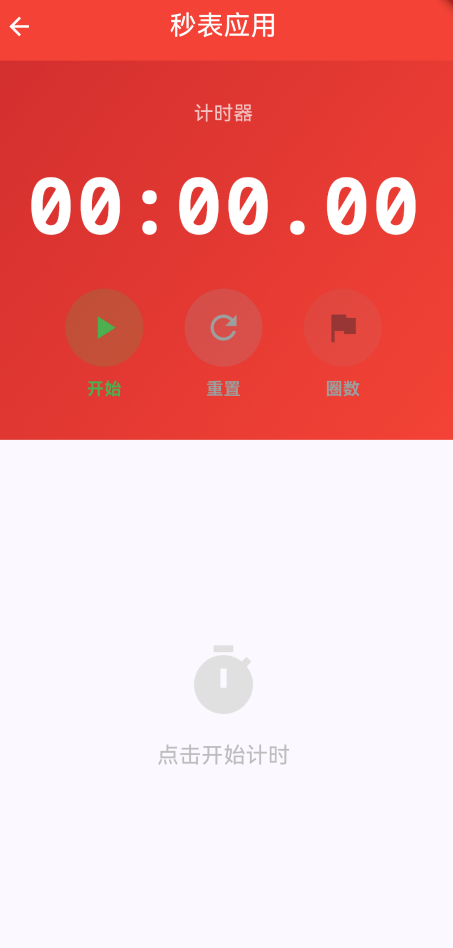
2.1 功能特性
| 功能 | 描述 |
|---|---|
| 精确计时 | 精确到毫秒级别 |
| 圈数记录 | 支持记录多圈时间 |
| 最快最慢标记 | 自动标记最快和最慢圈 |
| 暂停/重置 | 支持暂停和重置功能 |
三、技术架构设计
3.1 核心技术
- Stopwatch: 精确计时器
- Timer: UI更新定时器
- ListView: 圈数列表展示
3.2 实现原理
使用Stopwatch类进行精确计时,Timer定时更新UI,List保存圈数记录。
四、详细实现
4.1 核心代码
class _StopwatchPageState extends State<StopwatchPage> {
  Timer? _timer;
  final Stopwatch _stopwatch = Stopwatch();
  final List<LapRecord> _laps = [];

  void _startStopwatch() {
    setState(() {
      _stopwatch.start();
    });

    _timer = Timer.periodic(const Duration(milliseconds: 10), (timer) {
      setState(() {});
    });
  }

  void _pauseStopwatch() {
    _stopwatch.stop();
    _timer?.cancel();
    setState(() {});
  }

  void _resetStopwatch() {
    _stopwatch.stop();
    _stopwatch.reset();
    _timer?.cancel();
    setState(() {
      _laps.clear();
    });
  }

  void _addLap() {
    if (_stopwatch.isRunning) {
      setState(() {
        _laps.add(LapRecord(
          lapNumber: _laps.length + 1,
          lapTime: _stopwatch.elapsed,
          totalTime: _stopwatch.elapsed,
        ));
      });
    }
  }

  String _formatTime(Duration duration) {
    final minutes = duration.inMinutes.toString().padLeft(2, '0');
    final seconds = (duration.inSeconds % 60).toString().padLeft(2, '0');
    final milliseconds = ((duration.inMilliseconds % 1000) ~/ 10).toString().padLeft(2, '0');
    return '$minutes:$seconds.$milliseconds';
  }
}
五、核心功能解析
5.1 精确计时
使用Stopwatch类:
final Stopwatch _stopwatch = Stopwatch();
_stopwatch.start();
_stopwatch.stop();
_stopwatch.reset();
5.2 时间格式化
格式化为 MM:SS.ms:
String _formatTime(Duration duration) {
  final minutes = duration.inMinutes.toString().padLeft(2, '0');
  final seconds = (duration.inSeconds % 60).toString().padLeft(2, '0');
  final milliseconds = ((duration.inMilliseconds % 1000) ~/ 10).toString().padLeft(2, '0');
  return '$minutes:$seconds.$milliseconds';
}
5.3 最快最慢标记
final isFastest = _laps.length > 1 &&
    lap.lapTime == _laps.map((l) => l.lapTime).reduce((a, b) => a < b ? a : b);
final isSlowest = _laps.length > 1 &&
    lap.lapTime == _laps.map((l) => l.lapTime).reduce((a, b) => a > b ? a : b);
六、实际应用场景
- 运动训练:记录跑步、游泳等运动时间
- 实验计时:科学实验、化学反应计时
- 比赛计时:各类比赛、游戏计时
七、优化建议
- 数据保存:保存计时记录
- 导出功能:导出计时数据
- 多种模式:添加倒计时模式
八、常见问题与解决方案
8.1 长时间运行精度
问题:长时间运行后秒表不准确
解决方案:使用Stopwatch类而不是累计Timer
8.2 内存泄漏
问题:忘记取消Timer导致内存泄漏
解决方案:
void dispose() {
_timer?.cancel();
super.dispose();
}
九、总结
本文详细介绍了Flutter鸿蒙秒表应用的实现,包括精确计时、圈数记录等核心技术。通过本实例,掌握了Stopwatch和Timer的使用方法。
十、参考资料

开源鸿蒙跨平台开发社区汇聚开发者与厂商,共建“一次开发,多端部署”的开源生态,致力于降低跨端开发门槛,推动万物智联创新。
更多推荐

 9
9 0
0- 0


 已为社区贡献22条内容

所有评论(0)