Flutter 框架跨平台鸿蒙开发 - 搬家打包助手
搬家打包助手应用
欢迎加入开源鸿蒙跨平台社区:
https://openharmonycrossplatform.csdn.net
一、项目概述
运行效果图
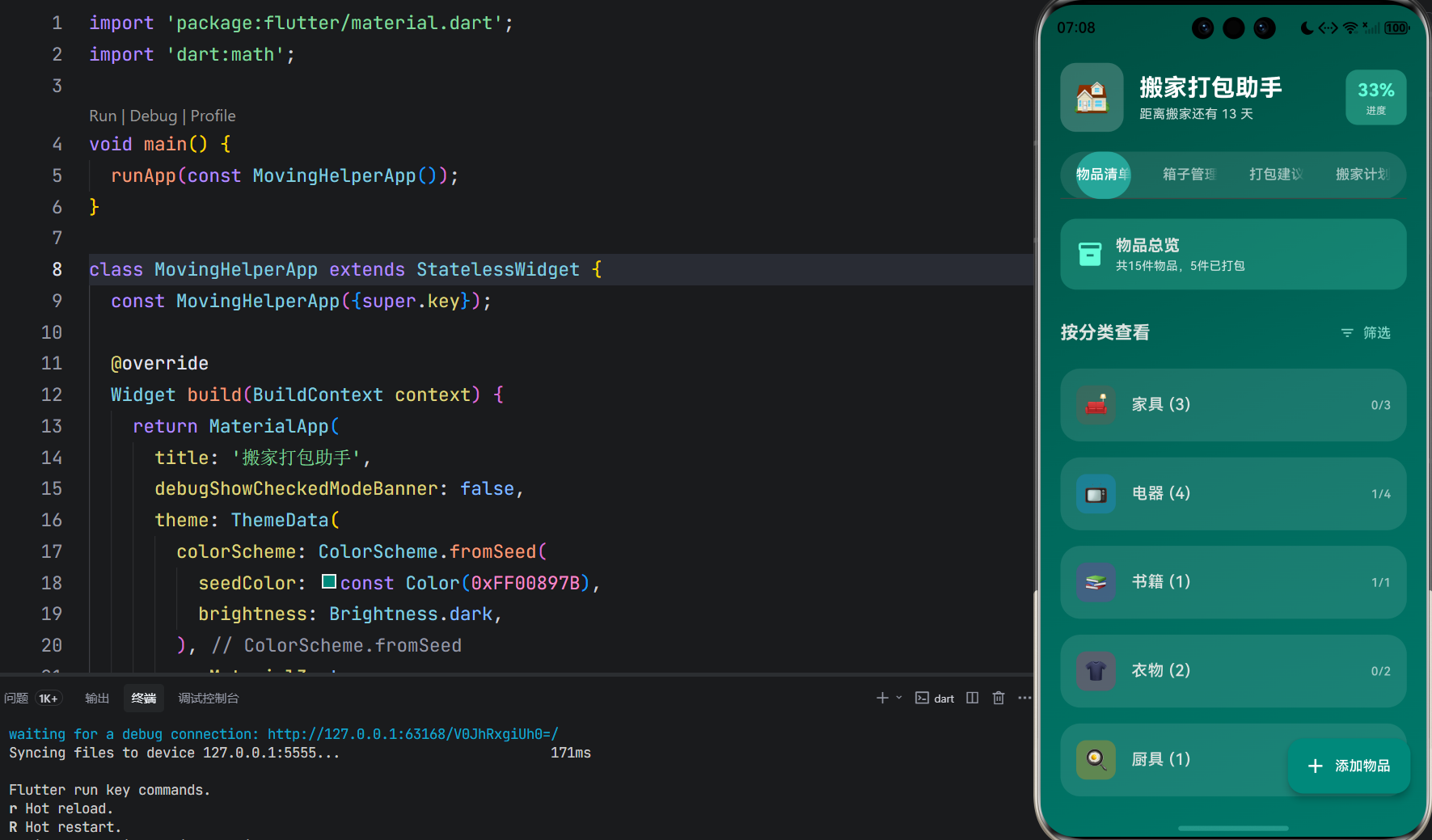
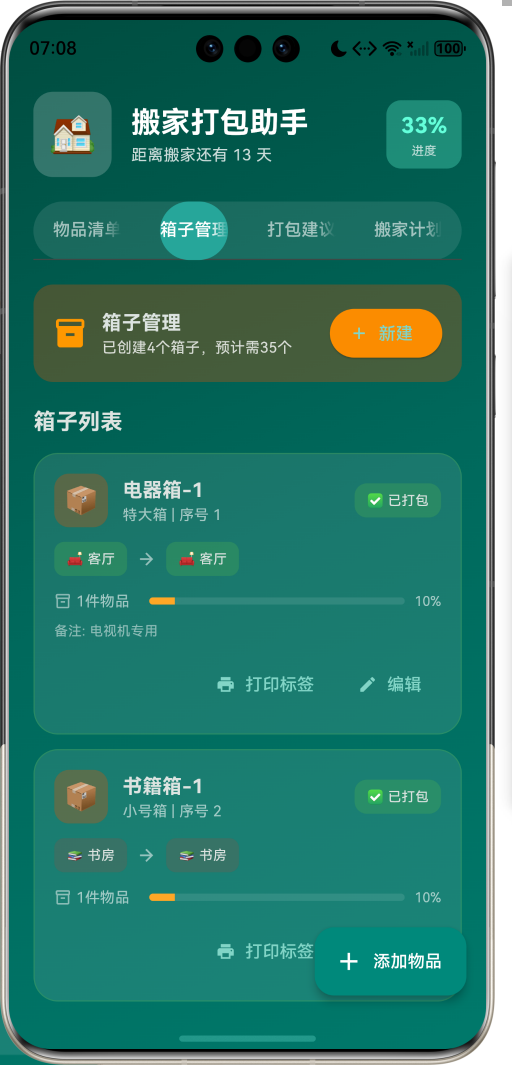
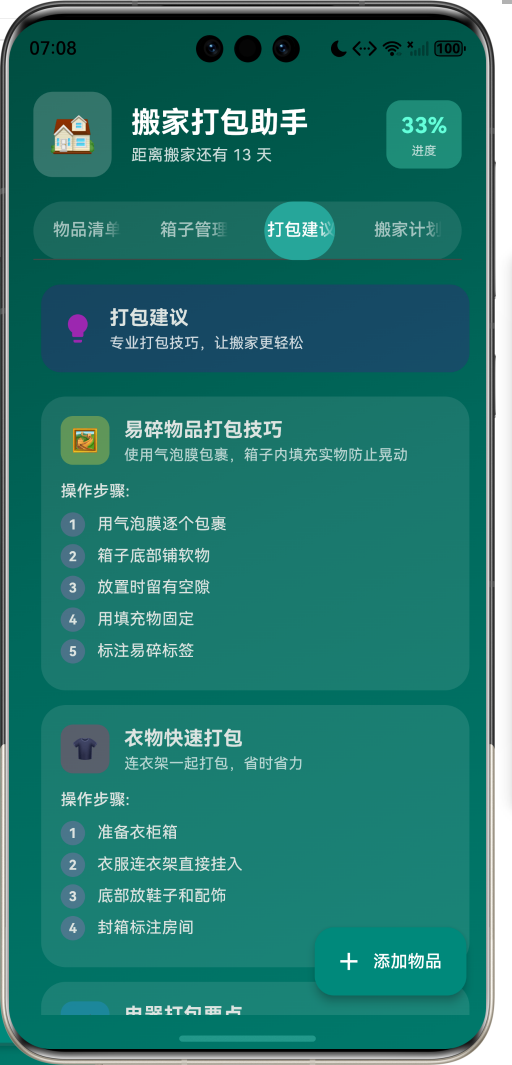
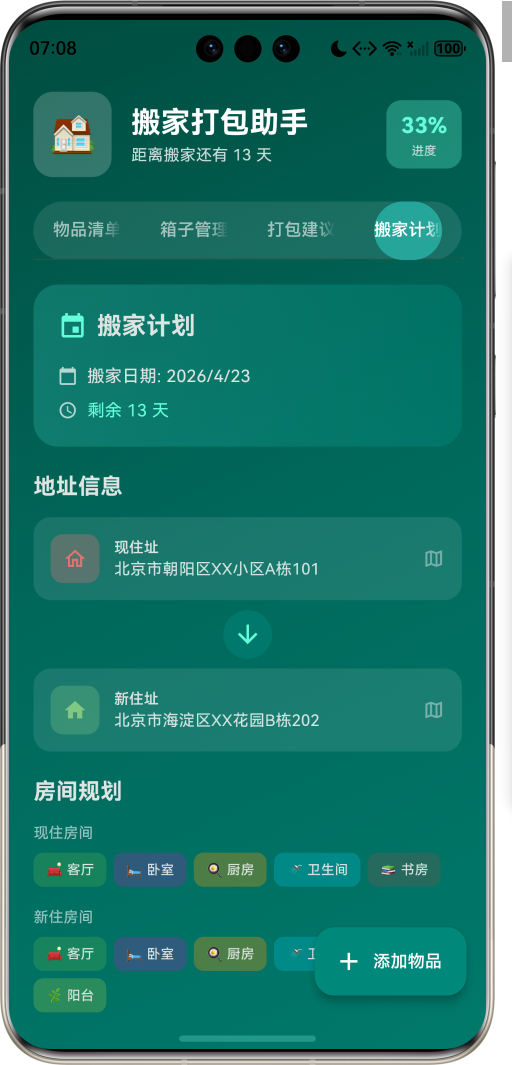
1.1 应用简介
搬家打包助手是一款生活服务类应用,致力于让搬家过程变得井然有序。通过物品清单管理、智能打包建议、箱子标签打印、新家位置规划四大核心功能,帮助用户轻松应对搬家挑战。从物品登记到新家安置,全程陪伴,让搬家不再慌乱。
应用核心理念:智能规划,搬家不慌。
搬家是人生中的大事,往往伴随着繁杂的物品整理和混乱的打包过程。搬家打包助手将复杂的搬家流程拆解为可管理的步骤,通过智能化的工具帮助用户高效完成搬家准备。
1.2 核心功能
| 功能模块 | 功能描述 | 实现方式 |
|---|---|---|
| 物品清单 | 登记和管理所有物品 | 分类列表 + 状态追踪 |
| 箱子管理 | 创建箱子并分配物品 | 箱子卡片 + 标签打印 |
| 打包建议 | 提供专业打包技巧 | 步骤指南 + 分类建议 |
| 搬家计划 | 规划搬家时间和地址 | 计划卡片 + 房间规划 |
1.3 物品分类
| 序号 | 分类 | Emoji | 颜色代码 | 描述 |
|---|---|---|---|---|
| 1 | 家具 | 🛋️ | #795548 | 大型家具物品 |
| 2 | 电器 | 📺 | #2196F3 | 家用电器设备 |
| 3 | 衣物 | 👕 | #E91E63 | 服装鞋帽 |
| 4 | 书籍 | 📚 | #9C27B0 | 书籍文档 |
| 5 | 厨具 | 🍳 | #FF9800 | 厨房用品 |
| 6 | 卫浴 | 🚿 | #00BCD4 | 卫生间用品 |
| 7 | 床品 | 🛏️ | #673AB7 | 床上用品 |
| 8 | 装饰 | 🖼️ | #FFEB3B | 装饰摆件 |
| 9 | 证件 | 📄 | #F44336 | 重要证件 |
| 10 | 贵重品 | 💎 | #E040FB | 贵重物品 |
| 11 | 其他 | 📦 | #78909C | 其他物品 |
1.4 打包状态
| 状态 | Emoji | 颜色 | 描述 |
|---|---|---|---|
| 未打包 | 📦 | 灰色 | 尚未开始打包 |
| 打包中 | 📋 | 橙色 | 正在打包 |
| 已打包 | ✅ | 绿色 | 打包完成 |
| 已搬运 | 🚚 | 蓝色 | 已运至新家 |
| 已拆包 | 🏠 | 浅绿 | 已在新家拆包 |
1.5 箱子规格
| 规格 | 尺寸(cm) | 容积(L) | 适用物品 |
|---|---|---|---|
| 小号箱 | 30×20×20 | 12 | 书籍、小物件 |
| 中号箱 | 50×35×35 | 61 | 衣物、日用品 |
| 大号箱 | 70×50×50 | 175 | 被褥、大件物品 |
| 特大箱 | 100×70×70 | 490 | 大型家电配件 |
| 衣柜箱 | 120×50×50 | 300 | 挂式衣物 |
| 易碎箱 | 40×30×30 | 36 | 易碎物品专用 |
1.6 房间类型
| 类型 | Emoji | 颜色 | 描述 |
|---|---|---|---|
| 客厅 | 🛋️ | 绿色 | 起居空间 |
| 卧室 | 🛏️ | 紫色 | 睡眠空间 |
| 厨房 | 🍳 | 橙色 | 烹饪空间 |
| 卫生间 | 🚿 | 青色 | 洗漱空间 |
| 书房 | 📚 | 棕色 | 工作空间 |
| 阳台 | 🌿 | 浅绿 | 休闲空间 |
| 储物间 | 📦 | 灰蓝 | 存储空间 |
| 餐厅 | 🍽️ | 红色 | 用餐空间 |
1.7 技术栈
| 技术领域 | 技术选型 | 版本要求 |
|---|---|---|
| 开发框架 | Flutter | >= 3.0.0 |
| 编程语言 | Dart | >= 2.17.0 |
| 设计规范 | Material Design 3 | - |
| 状态管理 | setState | - |
| 导航控制 | TabController | - |
| 目标平台 | 鸿蒙OS / Web | API 21+ |
二、项目结构
lib/
├── main_moving_helper.dart      # 应用主入口(~1050行)
│   ├── MovingHelperApp          # 根应用组件
│   ├── ItemCategory             # 物品分类枚举
│   ├── PackStatus               # 打包状态枚举
│   ├── BoxSize                  # 箱子规格枚举
│   ├── RoomType                 # 房间类型枚举
│   ├── Priority                 # 优先级枚举
│   ├── MovingItem               # 物品模型
│   ├── PackingBox               # 箱子模型
│   ├── MovingPlan               # 搬家计划模型
│   ├── PackingTip               # 打包建议模型
│   └── MovingHelperHomePage     # 主页面
三、数据模型
3.1 物品分类枚举 (ItemCategory)
enum ItemCategory {
  furniture('家具', '🛋️', Color(0xFF795548)),
  electronics('电器', '📺', Color(0xFF2196F3)),
  clothes('衣物', '👕', Color(0xFFE91E63)),
  books('书籍', '📚', Color(0xFF9C27B0)),
  kitchen('厨具', '🍳', Color(0xFFFF9800)),
  bathroom('卫浴', '🚿', Color(0xFF00BCD4)),
  bedding('床品', '🛏️', Color(0xFF673AB7)),
  decoration('装饰', '🖼️', Color(0xFFFFEB3B)),
  documents('证件', '📄', Color(0xFFF44336)),
  valuables('贵重品', '💎', Color(0xFFE040FB)),
  others('其他', '📦', Color(0xFF78909C));

  final String label;
  final String icon;
  final Color color;
}
3.2 打包状态枚举 (PackStatus)
enum PackStatus {
  unpacked('未打包', '📦', Color(0xFF9E9E9E)),
  packing('打包中', '📋', Color(0xFFFF9800)),
  packed('已打包', '✅', Color(0xFF4CAF50)),
  moved('已搬运', '🚚', Color(0xFF2196F3)),
  unpacked_new('已拆包', '🏠', Color(0xFF8BC34A));

  final String label;
  final String icon;
  final Color color;
}
状态转换流程:
3.3 箱子规格枚举 (BoxSize)
enum BoxSize {
  small('小号箱', '📦', 30, 20, 20, '书籍、小物件'),
  medium('中号箱', '📦', 50, 35, 35, '衣物、日用品'),
  large('大号箱', '📦', 70, 50, 50, '被褥、大件物品'),
  extraLarge('特大箱', '📦', 100, 70, 70, '大型家电配件'),
  wardrobe('衣柜箱', '👔', 120, 50, 50, '挂式衣物'),
  fragile('易碎箱', '⚠️', 40, 30, 30, '易碎物品专用');

  final String label;
  final String icon;
  final int length;
  final int width;
  final int height;
  final String usage;

  int get volume => length * width * height;
}
箱子容积计算公式:
Volume=Length×Width×Height Volume = Length \times Width \times Height Volume=Length×Width×Height
3.4 物品数据模型 (MovingItem)
class MovingItem {
  final String id;
  final String name;
  final ItemCategory category;
  final PackStatus status;
  final Priority priority;
  final String? boxId;
  final String? targetRoom;
  final String? notes;
  final bool isFragile;
  final double? weight;
  final String? photo;
}
3.5 箱子数据模型 (PackingBox)
class PackingBox {
  final String id;
  final String label;
  final BoxSize size;
  final RoomType sourceRoom;
  final RoomType targetRoom;
  final List<String> itemIds;
  final PackStatus status;
  final int sequence;
  final String? notes;

  double get fillRate => itemIds.length / 10.0;
}
3.6 搬家计划模型 (MovingPlan)
class MovingPlan {
  final String id;
  final DateTime movingDate;
  final String fromAddress;
  final String toAddress;
  final List<RoomType> sourceRooms;
  final List<RoomType> targetRooms;
  final int estimatedBoxes;
  final DateTime createdAt;

  int get daysRemaining => movingDate.difference(DateTime.now()).inDays;
}
剩余天数计算:
Daysremaining=MovingDate−CurrentDate Days_{remaining} = MovingDate - CurrentDate Daysremaining=MovingDate−CurrentDate
四、功能架构
4.1 功能模块图
4.2 数据流程图
4.3 用户交互流程
五、界面设计
5.1 整体布局
应用采用 四标签页 架构,通过 TabController 实现页面切换:
| 标签页 | 功能定位 | 主要组件 |
|---|---|---|
| 物品清单 | 物品管理中心 | 分类列表 + 物品卡片 |
| 箱子管理 | 箱子创建与标签 | 箱子卡片 + 打印功能 |
| 打包建议 | 技巧指导中心 | 建议卡片 + 步骤列表 |
| 搬家计划 | 计划规划中心 | 计划卡片 + 统计面板 |
5.2 视觉设计规范
5.2.1 配色方案
应用采用 青绿色系 作为主色调,营造清新、有序的视觉感受:
LinearGradient(
  colors: [
    Color(0xFF004D40),  // 深青
    Color(0xFF00695C),  // 主青
    Color(0xFF00796B),  // 浅青
  ],
)
色彩心理学分析:
| 颜色 | RGB值 | 心理暗示 | 应用场景 |
|---|---|---|---|
| 深青 | #004D40 | 稳重、可靠 | 背景渐变 |
| 主青 | #00695C | 清新、有序 | 主题色 |
| 浅青 | #00796B | 舒适、自然 | 辅助色 |
| 青绿 | #64FFDA | 活力、完成 | 强调元素 |
5.2.2 组件圆角规范
Rcomponent={25px标签栏容器20px卡片组件16px按钮组件12px信息标签8px小型元素 R_{component} = \begin{cases} 25px & \text{标签栏容器} \\ 20px & \text{卡片组件} \\ 16px & \text{按钮组件} \\ 12px & \text{信息标签} \\ 8px & \text{小型元素} \end{cases} Rcomponent=⎩ ⎨ ⎧25px20px16px12px8px标签栏容器卡片组件按钮组件信息标签小型元素
5.3 页面详解
5.3.1 物品清单页
页面结构:
┌─────────────────────────────────┐
│  物品总览提醒卡片                 │
├─────────────────────────────────┤
│  按分类查看          筛选按钮    │
│  ┌─────────────────────────────┐│
│  │ 🛋️ 家具 (3)          1/3   ││
│  │   ┌─────────────────────┐  ││
│  │   │ 状态图标 物品名称    │  ││
│  │   │ 优先级 → 目标房间   │  ││
│  │   └─────────────────────┘  ││
│  └─────────────────────────────┘│
│  ┌─────────────────────────────┐│
│  │ ...更多分类                 ││
│  └─────────────────────────────┘│
└─────────────────────────────────┘
5.3.2 箱子管理页
箱子卡片结构:
┌─────────────────────────────────┐
│ 📦 箱子名称            状态标签 │
│    规格 | 序号                  │
│ ┌─────┐ ┌─────┐                │
│ │来源 │→│目标 │                │
│ └─────┘ └─────┘                │
│ 物品数量 | 填充进度条 | XX%     │
│ 备注: ...                       │
│            打印标签 | 编辑      │
└─────────────────────────────────┘
5.3.3 打包建议页
建议卡片结构:
┌─────────────────────────────────┐
│ 图标 标题                        │
│      简要描述                    │
│ 操作步骤:                        │
│ ① 步骤一                        │
│ ② 步骤二                        │
│ ③ 步骤三                        │
│ ...                             │
└─────────────────────────────────┘
5.3.4 搬家计划页
计划卡片结构:
┌─────────────────────────────────┐
│ 📅 搬家计划                      │
│ 搬家日期: YYYY/MM/DD            │
│ 剩余 XX 天                      │
├─────────────────────────────────┤
│ 地址信息                        │
│ 🏠 现住址: XXXXX                │
│      ↓                          │
│ 🏠 新住址: XXXXX                │
├─────────────────────────────────┤
│ 房间规划                        │
│ 现住房间: [标签列表]            │
│ 新住房间: [标签列表]            │
├─────────────────────────────────┤
│ 搬家统计                        │
│ 📦 物品总数 | 📋 箱子数量       │
│ ✅ 已打包   | ⚠️ 易碎品         │
└─────────────────────────────────┘
六、核心功能实现
6.1 物品管理
6.1.1 物品添加流程
void _addItem() {
  showDialog(
    context: context,
    builder: (context) => AlertDialog(
      title: const Row(
        children: [
          Icon(Icons.add_box, color: Colors.tealAccent),
          SizedBox(width: 8),
          Text('添加物品'),
        ],
      ),
      content: Column(
        mainAxisSize: MainAxisSize.min,
        children: [
          TextField(decoration: InputDecoration(hintText: '物品名称')),
          DropdownButtonFormField<ItemCategory>(
            decoration: InputDecoration(hintText: '选择分类'),
            items: ItemCategory.values.map((c) =>
              DropdownMenuItem(value: c, child: Text('${c.icon} ${c.label}'))
            ).toList(),
            onChanged: (value) {},
          ),
          DropdownButtonFormField<RoomType>(
            decoration: InputDecoration(hintText: '目标房间'),
            items: RoomType.values.map((r) =>
              DropdownMenuItem(value: r, child: Text('${r.icon} ${r.label}'))
            ).toList(),
            onChanged: (value) {},
          ),
        ],
      ),
    ),
  );
}
6.1.2 分类统计计算
Progresscategory=ItemspackedItemstotal×100% Progress_{category} = \frac{Items_{packed}}{Items_{total}} \times 100\% Progresscategory=ItemstotalItemspacked×100%
6.2 箱子管理
6.2.1 箱子创建流程
6.2.2 填充率计算
FillRate=ItemscountMaxCapacity FillRate = \frac{Items_{count}}{MaxCapacity} FillRate=MaxCapacityItemscount
其中 MaxCapacityMaxCapacityMaxCapacity 为箱子最大容量估算值。
6.3 标签打印
6.3.1 标签内容设计
标签包含以下信息:
| 信息项 | 说明 |
|---|---|
| 箱子编号 | 唯一标识 |
| 来源房间 | 原房间位置 |
| 目标房间 | 新房间位置 |
| 二维码 | 快速扫描识别 |
| 序号 | 搬运顺序 |
| 备注 | 特殊说明 |
6.3.2 标签打印流程
void _printLabel(PackingBox box) {
  showDialog(
    context: context,
    builder: (context) => AlertDialog(
      title: const Row(
        children: [
          Icon(Icons.print, color: Colors.tealAccent),
          SizedBox(width: 8),
          Text('箱子标签'),
        ],
      ),
      content: Container(
        padding: const EdgeInsets.all(16),
        decoration: BoxDecoration(color: Colors.white),
        child: Column(
          children: [
            Text(box.label),
            Row(
              children: [
                Text('${box.sourceRoom.icon} ${box.sourceRoom.label}'),
                Icon(Icons.arrow_forward),
                Text('${box.targetRoom.icon} ${box.targetRoom.label}'),
              ],
            ),
            Text('二维码区域'),
            Text('序号: ${box.sequence}'),
          ],
        ),
      ),
    ),
  );
}
6.4 打包建议
6.4.1 建议分类体系
6.4.2 建议优先级排序
KaTeX parse error: Undefined control sequence: \item at position 64: …Category + w_3 \̲i̲t̲e̲m̲ ̲Complexity
七、数据管理
7.1 数据流向
7.2 状态管理策略
当前采用 setState 进行状态管理,适用于单页面场景。未来可扩展为:
class MovingHelperProvider extends ChangeNotifier {
  List<MovingItem> _items = [];
  List<PackingBox> _boxes = [];
  MovingPlan? _movingPlan;

  List<MovingItem> get items => _items;
  List<PackingBox> get boxes => _boxes;
  MovingPlan? get movingPlan => _movingPlan;

  void addItem(MovingItem item) {
    _items.add(item);
    notifyListeners();
  }

  void updateItemStatus(String itemId, PackStatus status) {
    final index = _items.indexWhere((i) => i.id == itemId);
    if (index != -1) {
      // 更新逻辑
      notifyListeners();
    }
  }
}
7.3 数据持久化方案
| 存储类型 | 适用场景 | 推荐方案 |
|---|---|---|
| 物品数据 | 物品清单 | SQLite / Hive |
| 箱子数据 | 箱子信息 | SQLite / Hive |
| 计划数据 | 搬家计划 | 云端同步 |
| 用户偏好 | 应用设置 | SharedPreferences |
八、扩展功能规划
8.1 功能路线图
8.2 智能推荐算法
8.2.1 箱子数量估算
Boxesestimated=∑i=1nVolumeiVolumebox×SafetyFactor Boxes_{estimated} = \sum_{i=1}^{n} \frac{Volume_i}{Volume_{box}} \times SafetyFactor Boxesestimated=i=1∑nVolumeboxVolumei×SafetyFactor
其中 SafetyFactorSafetyFactorSafetyFactor 为安全系数,通常取 1.2。
8.2.2 打包顺序建议
KaTeX parse error: Undefined control sequence: \item at position 51: …iority + \beta \̲i̲t̲e̲m̲ ̲Frequency + \ga…
排序因素说明:
| 因素 | 权重 | 说明 |
|---|---|---|
| 优先级 | 40% | 用户设置的优先级 |
| 使用频率 | 30% | 物品使用频率 |
| 易碎程度 | 30% | 是否易碎物品 |
九、性能优化
9.1 渲染性能
9.1.1 列表优化
ListView.builder(
  itemCount: items.length,
  itemBuilder: (context, index) {
    return ItemCard(item: items[index]);
  },
)
9.1.2 分类展开优化
使用 ExpansionTile 实现懒加载:
ExpansionTile(
  title: Text('${category.label} (${items.length})'),
  children: items.map((item) => ItemTile(item)).toList(),
)
9.2 内存管理
| 优化项 | 实施方式 | 预期效果 |
|---|---|---|
| 大对象释放 | 及时置空引用 | 减少内存峰值 |
| 分页加载 | 物品列表分页 | 降低内存占用 |
| 图片压缩 | 物品照片压缩 | 减少存储空间 |
十、安全与隐私
10.1 数据安全
10.2 隐私保护措施
| 保护措施 | 实施细节 |
|---|---|
| 数据最小化 | 仅收集必要信息 |
| 本地优先 | 优先本地处理 |
| 权限控制 | 按需申请相机、存储权限 |
| 透明告知 | 明确告知数据用途 |
十一、测试策略
11.1 测试覆盖
void main() {
  group('MovingItem Tests', () {
    test('Item creation', () {
      final item = MovingItem(
        id: '1',
        name: '沙发',
        category: ItemCategory.furniture,
        status: PackStatus.unpacked,
        priority: Priority.high,
      );
      expect(item.name, equals('沙发'));
      expect(item.isFragile, isFalse);
    });
  });

  group('PackingBox Tests', () {
    test('Fill rate calculation', () {
      final box = PackingBox(
        itemIds: ['1', '2', '3'],
      );
      expect(box.fillRate, equals(0.3));
    });
  });
}
11.2 测试矩阵
| 测试类型 | 覆盖范围 | 工具 |
|---|---|---|
| 单元测试 | 数据模型、业务逻辑 | flutter_test |
| Widget测试 | UI组件 | flutter_test |
| 集成测试 | 完整流程 | integration_test |
| 性能测试 | 渲染性能 | Flutter DevTools |
十二、部署与发布
12.1 构建配置
# Android构建
flutter build apk --release

# iOS构建
flutter build ios --release

# Web构建
flutter build web --release
12.2 版本管理
采用语义化版本规范:
Version=Major.Minor.Patch Version = Major.Minor.Patch Version=Major.Minor.Patch
- Major: 不兼容的API变更
- Minor: 向后兼容的功能新增
- Patch: 向后兼容的问题修复
十三、总结与展望
13.1 项目成果
搬家打包助手通过物品清单、箱子管理、打包建议、搬家计划四大核心功能,有效解决了搬家过程中的混乱问题。应用采用现代化的Flutter框架开发,具备良好的跨平台能力和扩展潜力。青绿色主题营造了清新有序的视觉体验,让搬家变得轻松愉快。
13.2 未来展望
| 发展方向 | 具体规划 |
|---|---|
| 智能化 | AI物品识别、智能打包建议 |
| 服务对接 | 搬家公司对接、价格比较 |
| 社交化 | 搬家经验分享、社区互助 |
| 数据化 | 搬家成本分析、效率统计 |

开源鸿蒙跨平台开发社区汇聚开发者与厂商,共建“一次开发,多端部署”的开源生态,致力于降低跨端开发门槛,推动万物智联创新。
更多推荐


 8
8 0
0- 0


 已为社区贡献25条内容

所有评论(0)