Flutter for OpenHarmony 第三方库实战:使用 flutter_slidable 构建消息中心滑动管理应用
在移动应用开发中,消息列表是很常见的页面。例如通知中心、邮件列表、任务提醒、聊天记录、系统公告等,都需要对列表项进行管理。如果每条消息都放很多按钮,页面会显得很拥挤。用户只是想看几条通知,结果每一行都挤满按钮,看起来像软件把控制台搬进了手机屏幕。这样的页面能用,但不够清爽。滑动操作可以解决这个问题。平时只显示消息内容,需要操作时再通过左滑或右滑露出按钮。这样既节省空间,又符合移动端交互习惯。因此本
欢迎加入开源鸿蒙跨平台社区:
https://openharmonycrossplatform.csdn.net
项目效果
本文实现的是一个基于 Flutter for OpenHarmony 的消息中心滑动管理应用。项目中使用 Flutter 第三方库 flutter_slidable 实现消息列表左滑和右滑操作,用于完成标记已读、收藏、归档和删除等常见消息管理功能。
最终运行效果如下:
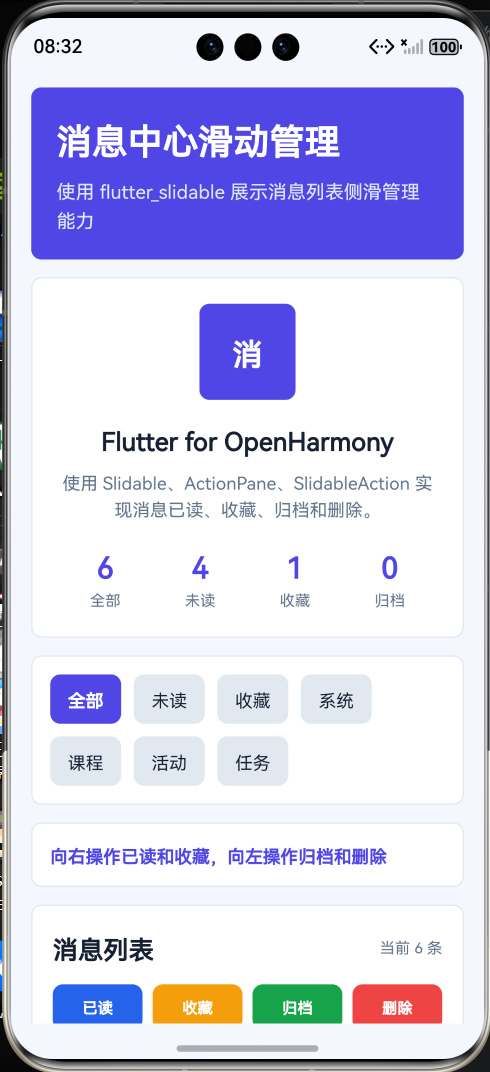
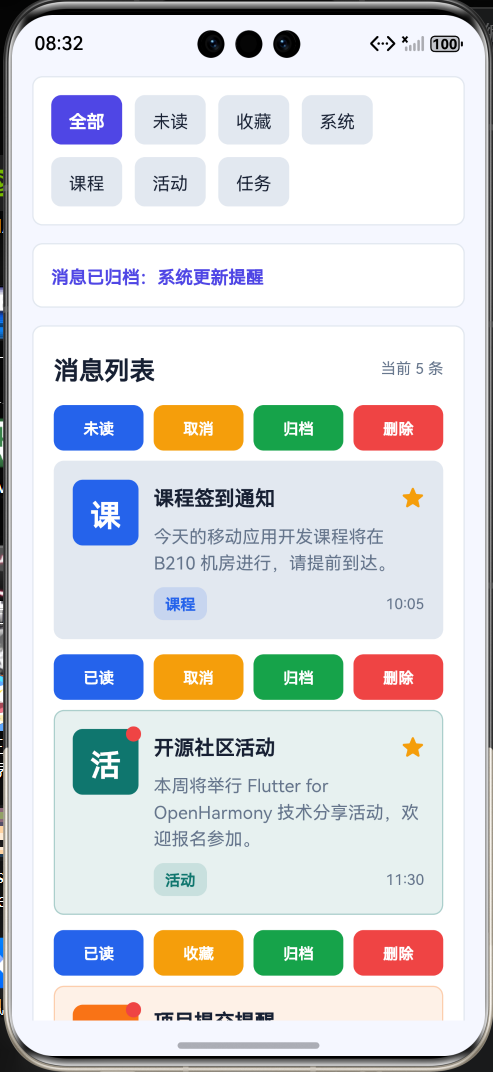
页面主要包含以下内容:
- 顶部标题栏;
- 消息中心概览卡片;
- 消息类型筛选按钮;
- 可滑动消息列表;
- 左滑显示归档和删除操作;
- 右滑显示已读和收藏操作;
- 消息状态统计;
- 第三方库使用说明;
- 页面整体采用 Flutter Material 风格布局。
本文重点是演示如何在 Flutter for OpenHarmony 项目中使用 Flutter 第三方库 flutter_slidable。项目代码写在 lib/main.dart 中,依赖配置写在 pubspec.yaml 中,符合 Flutter for OpenHarmony 第三方库实践方向。
前言
在移动应用开发中,消息列表是很常见的页面。例如通知中心、邮件列表、任务提醒、聊天记录、系统公告等,都需要对列表项进行管理。
如果每条消息都放很多按钮,页面会显得很拥挤。用户只是想看几条通知,结果每一行都挤满按钮,看起来像软件把控制台搬进了手机屏幕。这样的页面能用,但不够清爽。
滑动操作可以解决这个问题。平时只显示消息内容,需要操作时再通过左滑或右滑露出按钮。这样既节省空间,又符合移动端交互习惯。
因此本文选择使用 Flutter 第三方库 flutter_slidable 来实现列表项滑动操作。它可以快速给列表项添加侧滑菜单,并支持不同方向的操作按钮,适合用于消息中心、邮件管理、任务列表和收藏管理等场景。
本项目以“消息中心滑动管理应用”为例,使用 flutter_slidable 实现消息列表滑动操作,并结合 Flutter 状态管理实现消息筛选、已读、收藏、归档和删除功能。
一、项目目标
本次实践主要实现以下目标:
- 创建 Flutter for OpenHarmony 项目;
- 在
pubspec.yaml中添加第三方库flutter_slidable; - 使用
flutter pub get获取依赖; - 在
lib/main.dart中引入flutter_slidable; - 使用
Slidable构建可滑动列表项; - 使用
ActionPane配置滑动操作区域; - 使用
SlidableAction实现操作按钮; - 使用
ScrollMotion和DrawerMotion实现不同滑动效果; - 实现消息已读、收藏、归档和删除功能;
- 使用 Flutter Material 组件构建完整页面;
- 将应用运行到 OpenHarmony 设备或模拟器中。
二、技术栈
| 类型 | 内容 |
|---|---|
| 开发方向 | Flutter for OpenHarmony |
| 开发语言 | Dart |
| UI 框架 | Flutter |
| 第三方库 | flutter_slidable |
| 功能场景 | 滑动列表 / 消息管理 / 侧滑操作 |
| 核心组件 | Slidable / ActionPane / SlidableAction |
| 项目入口 | lib/main.dart |
| 依赖配置 | pubspec.yaml |
| 运行平台 | OpenHarmony 设备或模拟器 |
三、为什么选择 flutter_slidable
在实际开发中,滑动列表可以用于很多场景,例如:
- 消息通知管理;
- 邮件列表管理;
- 待办事项处理;
- 收藏内容管理;
- 文件列表操作;
- 购物车商品管理;
- 聊天会话置顶;
- 下载任务删除;
- 课程提醒归档。
如果自己用 Flutter 原生手写侧滑列表,需要处理手势识别、滑动距离、按钮显示、滑动动画、列表状态同步和删除动画等细节。理论上可以写,但为了实现一个左滑删除就把自己拖进手势处理泥潭,属实没必要。
flutter_slidable 已经封装好了常见滑动列表能力,可以让开发者更快实现列表项操作。
在本项目中,flutter_slidable 主要完成以下工作:
- 给每条消息添加可滑动操作;
- 右滑显示“已读”和“收藏”;
- 左滑显示“归档”和“删除”;
- 使用不同 motion 展示滑动动画;
- 配合状态管理更新消息列表;
- 提升消息中心页面交互体验。
四、创建 Flutter for OpenHarmony 项目
在已经配置好 Flutter for OpenHarmony 开发环境的前提下,可以创建一个 Flutter 项目。
示例项目名称:
flutter create slidable_message_demo
进入项目目录:
cd slidable_message_demo
项目创建完成后,主要关注两个文件:
slidable_message_demo
 ├── pubspec.yaml
 └── lib
     └── main.dart
其中:
| 文件 | 作用 |
|---|---|
| pubspec.yaml | 配置 Flutter 项目依赖 |
| lib/main.dart | 编写 Flutter 页面和业务逻辑 |
五、添加 flutter_slidable 第三方库
打开项目根目录下的 pubspec.yaml 文件,在 dependencies 中添加 flutter_slidable。
示例配置如下:
dependencies:
  flutter:
    sdk: flutter

  flutter_slidable: ^4.0.3
完整结构大致如下:
name: slidable_message_demo
description: A Flutter for OpenHarmony slidable message demo.
publish_to: 'none'

version: 1.0.0+1

environment:
  sdk: '>=3.6.0 <4.0.0'

dependencies:
  flutter:
    sdk: flutter

  flutter_slidable: ^4.0.3

dev_dependencies:
  flutter_test:
    sdk: flutter

flutter:
  uses-material-design: true
添加完成后,在终端执行:
flutter pub get
执行成功后,就可以在 Dart 代码中使用 flutter_slidable 了。
六、项目结构
本项目主要修改 lib/main.dart 文件:
lib
 └── main.dart
本项目不需要编写 OpenHarmony 原生 ArkTS 页面,也不需要修改 Index.ets。
因为这是 Flutter for OpenHarmony 项目,页面主体应该是 Flutter 代码。审核重点会看:
- 是否使用
pubspec.yaml添加 Flutter 第三方库; - 是否在 Dart 文件中
import package; - 是否在
lib/main.dart中实际调用第三方库; - 是否属于 Flutter for OpenHarmony 项目。
看到 pubspec.yaml、lib/main.dart、import 'package:flutter_slidable/flutter_slidable.dart';,这才是正确方向。别把 ArkTS 页面换个标题就叫 Flutter,审核员只是累,不是瞎。
七、核心实现思路
本项目的核心流程如下:
- 在
pubspec.yaml中添加flutter_slidable; - 在
main.dart中引入第三方库; - 定义消息数据模型;
- 准备多条模拟消息数据;
- 使用
Slidable包裹每条消息; - 使用
startActionPane配置右滑操作; - 使用
endActionPane配置左滑操作; - 使用
SlidableAction构建已读、收藏、归档、删除按钮; - 使用
setState()更新消息状态; - 使用 Flutter Material 组件构建完整页面。
第三方库引入代码如下:
import 'package:flutter_slidable/flutter_slidable.dart';
可滑动列表项核心代码如下:
Slidable(
  key: ValueKey(message.id),
  startActionPane: ActionPane(
    motion: const ScrollMotion(),
    children: [
      SlidableAction(
        onPressed: (_) => _toggleRead(message),
        icon: Icons.mark_email_read,
        label: '已读',
      ),
    ],
  ),
  endActionPane: ActionPane(
    motion: const DrawerMotion(),
    children: [
      SlidableAction(
        onPressed: (_) => _archiveMessage(message),
        icon: Icons.archive,
        label: '归档',
      ),
    ],
  ),
  child: ListTile(
    title: Text(message.title),
  ),
)
这段代码是本文的重点,说明项目确实使用了 Flutter 第三方库实现滑动列表操作。
八、main.dart 完整代码
打开文件:
lib/main.dart
将其中内容替换为下面代码:
import 'package:flutter/material.dart';
import 'package:flutter_slidable/flutter_slidable.dart';
void main() {
runApp(const SlidableMessageApp());
}
class SlidableMessageApp extends StatelessWidget {
const SlidableMessageApp({super.key});
Widget build(BuildContext context) {
return MaterialApp(
title: 'Slidable Message Demo',
debugShowCheckedModeBanner: false,
theme: ThemeData(
colorScheme: ColorScheme.fromSeed(
seedColor: Colors.indigo,
brightness: Brightness.light,
),
useMaterial3: true,
),
home: const MessageCenterPage(),
);
}
}
enum MessageType {
system,
course,
activity,
task,
}
class MessageItem {
MessageItem({
required this.id,
required this.title,
required this.content,
required this.time,
required this.type,
required this.icon,
required this.color,
this.isRead = false,
this.isStarred = false,
this.isArchived = false,
});
final int id;
final String title;
final String content;
final String time;
final MessageType type;
final IconData icon;
final Color color;
bool isRead;
bool isStarred;
bool isArchived;
}
class MessageCenterPage extends StatefulWidget {
const MessageCenterPage({super.key});
State<MessageCenterPage> createState() => _MessageCenterPageState();
}
class _MessageCenterPageState extends State<MessageCenterPage> {
final List<String> _filters = const [
'全部',
'未读',
'收藏',
'系统',
'课程',
'活动',
'任务',
];
String _selectedFilter = '全部';
final List<MessageItem> _messages = [
MessageItem(
id: 1,
title: '系统更新提醒',
content: 'Flutter for OpenHarmony 项目环境已完成更新,请及时检查依赖配置。',
time: '09:20',
type: MessageType.system,
icon: Icons.system_update,
color: Colors.indigo,
isRead: false,
),
MessageItem(
id: 2,
title: '课程签到通知',
content: '今天的移动应用开发课程将在 B210 机房进行,请提前到达。',
time: '10:05',
type: MessageType.course,
icon: Icons.school,
color: Colors.blue,
isRead: true,
),
MessageItem(
id: 3,
title: '开源社区活动',
content: '本周将举行 Flutter for OpenHarmony 技术分享活动,欢迎报名参加。',
time: '11:30',
type: MessageType.activity,
icon: Icons.event_available,
color: Colors.teal,
isRead: false,
isStarred: true,
),
MessageItem(
id: 4,
title: '项目提交提醒',
content: '第三方库实践文章需要包含依赖配置、核心代码和运行效果截图。',
time: '13:45',
type: MessageType.task,
icon: Icons.assignment,
color: Colors.orange,
isRead: false,
),
MessageItem(
id: 5,
title: '依赖安装完成',
content: 'flutter_slidable 依赖获取成功,可以在 main.dart 中导入使用。',
time: '15:10',
type: MessageType.system,
icon: Icons.done_all,
color: Colors.green,
isRead: true,
),
MessageItem(
id: 6,
title: '实训报告检查',
content: '请确认文章中是否明确说明使用的是 Flutter 第三方库,而不是原生鸿蒙库。',
time: '16:25',
type: MessageType.task,
icon: Icons.fact_check,
color: Colors.redAccent,
isRead: false,
),
];
List<MessageItem> get _visibleMessages {
return _messages.where((message) {
if (message.isArchived) {
return false;
}
if (_selectedFilter == '全部') {
return true;
}
if (_selectedFilter == '未读') {
return !message.isRead;
}
if (_selectedFilter == '收藏') {
return message.isStarred;
}
if (_selectedFilter == '系统') {
return message.type == MessageType.system;
}
if (_selectedFilter == '课程') {
return message.type == MessageType.course;
}
if (_selectedFilter == '活动') {
return message.type == MessageType.activity;
}
if (_selectedFilter == '任务') {
return message.type == MessageType.task;
}
return true;
}).toList();
}
int get _unreadCount {
return _messages.where((message) {
return !message.isRead && !message.isArchived;
}).length;
}
int get _starredCount {
return _messages.where((message) {
return message.isStarred && !message.isArchived;
}).length;
}
int get _archivedCount {
return _messages.where((message) {
return message.isArchived;
}).length;
}
void _selectFilter(String filter) {
setState(() {
_selectedFilter = filter;
});
}
void _toggleRead(MessageItem message) {
setState(() {
message.isRead = !message.isRead;
});
_showSnackBar(
message.isRead ? '已标记为已读' : '已标记为未读',
);
}
void _toggleStar(MessageItem message) {
setState(() {
message.isStarred = !message.isStarred;
});
_showSnackBar(
message.isStarred ? '已加入收藏' : '已取消收藏',
);
}
void _archiveMessage(MessageItem message) {
setState(() {
message.isArchived = true;
});
_showSnackBar('消息已归档');
}
void _deleteMessage(MessageItem message) {
setState(() {
_messages.removeWhere((item) {
return item.id == message.id;
});
});
_showSnackBar('消息已删除');
}
void _markAllRead() {
setState(() {
for (final MessageItem message in _messages) {
if (!message.isArchived) {
message.isRead = true;
}
}
});
_showSnackBar('全部消息已标记为已读');
}
void _restoreArchived() {
setState(() {
for (final MessageItem message in _messages) {
message.isArchived = false;
}
});
_showSnackBar('已恢复归档消息');
}
void _showSnackBar(String text) {
ScaffoldMessenger.of(context)
..clearSnackBars()
..showSnackBar(
SnackBar(
content: Text(text),
behavior: SnackBarBehavior.floating,
duration: const Duration(milliseconds: 1400),
),
);
}
String _typeText(MessageType type) {
switch (type) {
case MessageType.system:
return '系统';
case MessageType.course:
return '课程';
case MessageType.activity:
return '活动';
case MessageType.task:
return '任务';
}
}
Widget build(BuildContext context) {
final ThemeData theme = Theme.of(context);
final List<MessageItem> visibleMessages = _visibleMessages;
return Scaffold(
appBar: AppBar(
title: const Text('消息中心滑动管理'),
centerTitle: true,
),
body: SafeArea(
child: ListView(
padding: const EdgeInsets.all(16),
children: [
_buildOverviewCard(theme),
const SizedBox(height: 16),
_buildFilterCard(theme),
const SizedBox(height: 16),
_buildMessageListCard(theme, visibleMessages),
const SizedBox(height: 16),
_buildActionCard(theme),
const SizedBox(height: 16),
_buildTipsCard(theme),
const SizedBox(height: 16),
_buildLibraryCard(theme),
],
),
),
);
}
Widget _buildOverviewCard(ThemeData theme) {
return Card(
elevation: 3,
shape: RoundedRectangleBorder(
borderRadius: BorderRadius.circular(22),
),
child: Padding(
padding: const EdgeInsets.all(24),
child: Column(
children: [
Container(
width: 76,
height: 76,
decoration: BoxDecoration(
color: theme.colorScheme.primaryContainer,
borderRadius: BorderRadius.circular(24),
),
child: Icon(
Icons.notifications_active,
size: 42,
color: theme.colorScheme.onPrimaryContainer,
),
),
const SizedBox(height: 18),
Text(
'Flutter for OpenHarmony',
style: theme.textTheme.headlineSmall?.copyWith(
fontWeight: FontWeight.bold,
),
textAlign: TextAlign.center,
),
const SizedBox(height: 8),
Text(
'使用 flutter_slidable 构建支持侧滑操作的消息中心列表',
style: theme.textTheme.bodyMedium?.copyWith(
color: theme.colorScheme.onSurfaceVariant,
height: 1.5,
),
textAlign: TextAlign.center,
),
const SizedBox(height: 20),
Row(
children: [
_buildStatItem(
theme,
title: '全部消息',
value: '${_messages.length}',
icon: Icons.mail,
),
_buildStatItem(
theme,
title: '未读',
value: '$_unreadCount',
icon: Icons.mark_email_unread,
),
_buildStatItem(
theme,
title: '收藏',
value: '$_starredCount',
icon: Icons.star,
),
_buildStatItem(
theme,
title: '归档',
value: '$_archivedCount',
icon: Icons.archive,
),
],
),
],
),
),
);
}
Widget _buildStatItem(
ThemeData theme, {
required String title,
required String value,
required IconData icon,
}) {
return Expanded(
child: Column(
children: [
Icon(
icon,
color: theme.colorScheme.primary,
),
const SizedBox(height: 6),
Text(
value,
style: theme.textTheme.titleLarge?.copyWith(
fontWeight: FontWeight.bold,
color: theme.colorScheme.primary,
),
),
const SizedBox(height: 2),
Text(
title,
style: theme.textTheme.bodySmall?.copyWith(
color: theme.colorScheme.onSurfaceVariant,
),
),
],
),
);
}
Widget _buildFilterCard(ThemeData theme) {
return Card(
elevation: 2,
shape: RoundedRectangleBorder(
borderRadius: BorderRadius.circular(18),
),
child: Padding(
padding: const EdgeInsets.all(16),
child: Wrap(
spacing: 10,
runSpacing: 10,
children: _filters.map((filter) {
final bool selected = filter == _selectedFilter;
return ChoiceChip(
label: Text(filter),
selected: selected,
selectedColor: theme.colorScheme.primaryContainer,
labelStyle: TextStyle(
color: selected
? theme.colorScheme.onPrimaryContainer
: theme.colorScheme.onSurface,
fontWeight: selected ? FontWeight.bold : FontWeight.normal,
),
onSelected: (_) {
_selectFilter(filter);
},
);
}).toList(),
),
),
);
}
Widget _buildMessageListCard(
ThemeData theme,
List<MessageItem> visibleMessages,
) {
return Card(
elevation: 2,
shape: RoundedRectangleBorder(
borderRadius: BorderRadius.circular(18),
),
child: Padding(
padding: const EdgeInsets.fromLTRB(16, 20, 16, 8),
child: Column(
crossAxisAlignment: CrossAxisAlignment.start,
children: [
Row(
children: [
Expanded(
child: Text(
'消息列表',
style: theme.textTheme.titleLarge?.copyWith(
fontWeight: FontWeight.bold,
),
),
),
Text(
'当前 ${visibleMessages.length} 条',
style: theme.textTheme.bodyMedium?.copyWith(
color: theme.colorScheme.primary,
fontWeight: FontWeight.bold,
),
),
],
),
const SizedBox(height: 14),
if (visibleMessages.isEmpty)
Padding(
padding: const EdgeInsets.all(24),
child: Center(
child: Text(
'当前筛选条件下暂无消息',
style: theme.textTheme.bodyMedium?.copyWith(
color: theme.colorScheme.onSurfaceVariant,
),
),
),
),
...visibleMessages.map((message) {
return _buildSlidableMessageItem(theme, message);
}),
],
),
),
);
}
Widget _buildSlidableMessageItem(ThemeData theme, MessageItem message) {
return Container(
margin: const EdgeInsets.only(bottom: 12),
child: Slidable(
key: ValueKey(message.id),
startActionPane: ActionPane(
motion: const ScrollMotion(),
extentRatio: 0.48,
children: [
SlidableAction(
onPressed: (_) {
_toggleRead(message);
},
backgroundColor: Colors.blue,
foregroundColor: Colors.white,
icon: message.isRead
? Icons.mark_email_unread
: Icons.mark_email_read,
label: message.isRead ? '未读' : '已读',
borderRadius: const BorderRadius.horizontal(
left: Radius.circular(18),
),
),
SlidableAction(
onPressed: (_) {
_toggleStar(message);
},
backgroundColor: Colors.amber,
foregroundColor: Colors.white,
icon: message.isStarred ? Icons.star_border : Icons.star,
label: message.isStarred ? '取消' : '收藏',
),
],
),
endActionPane: ActionPane(
motion: const DrawerMotion(),
extentRatio: 0.48,
children: [
SlidableAction(
onPressed: (_) {
_archiveMessage(message);
},
backgroundColor: Colors.green,
foregroundColor: Colors.white,
icon: Icons.archive,
label: '归档',
),
SlidableAction(
onPressed: (_) {
_deleteMessage(message);
},
backgroundColor: Colors.redAccent,
foregroundColor: Colors.white,
icon: Icons.delete,
label: '删除',
borderRadius: const BorderRadius.horizontal(
right: Radius.circular(18),
),
),
],
),
child: Container(
padding: const EdgeInsets.all(14),
decoration: BoxDecoration(
color: message.isRead
? theme.colorScheme.surfaceContainerHighest
: message.color.withOpacity(0.10),
borderRadius: BorderRadius.circular(18),
border: Border.all(
color: message.isRead
? Colors.transparent
: message.color.withOpacity(0.28),
),
),
child: Row(
crossAxisAlignment: CrossAxisAlignment.start,
children: [
Stack(
clipBehavior: Clip.none,
children: [
Container(
width: 52,
height: 52,
decoration: BoxDecoration(
color: message.color.withOpacity(0.16),
borderRadius: BorderRadius.circular(18),
),
child: Icon(
message.icon,
color: message.color,
),
),
if (!message.isRead)
Positioned(
top: -2,
right: -2,
child: Container(
width: 12,
height: 12,
decoration: const BoxDecoration(
color: Colors.redAccent,
shape: BoxShape.circle,
),
),
),
],
),
const SizedBox(width: 14),
Expanded(
child: Column(
crossAxisAlignment: CrossAxisAlignment.start,
children: [
Row(
children: [
Expanded(
child: Text(
message.title,
style: theme.textTheme.titleMedium?.copyWith(
fontWeight: message.isRead
? FontWeight.w600
: FontWeight.bold,
),
),
),
if (message.isStarred)
const Icon(
Icons.star,
size: 18,
color: Colors.amber,
),
],
),
const SizedBox(height: 6),
Text(
message.content,
style: theme.textTheme.bodyMedium?.copyWith(
color: theme.colorScheme.onSurfaceVariant,
height: 1.45,
),
),
const SizedBox(height: 10),
Row(
children: [
Container(
padding: const EdgeInsets.symmetric(
horizontal: 9,
vertical: 4,
),
decoration: BoxDecoration(
color: message.color.withOpacity(0.14),
borderRadius: BorderRadius.circular(12),
),
child: Text(
_typeText(message.type),
style: theme.textTheme.bodySmall?.copyWith(
color: message.color,
fontWeight: FontWeight.bold,
),
),
),
const Spacer(),
Text(
message.time,
style: theme.textTheme.bodySmall?.copyWith(
color: theme.colorScheme.onSurfaceVariant,
),
),
],
),
],
),
),
],
),
),
),
);
}
Widget _buildActionCard(ThemeData theme) {
return Card(
elevation: 2,
shape: RoundedRectangleBorder(
borderRadius: BorderRadius.circular(18),
),
child: Padding(
padding: const EdgeInsets.all(20),
child: Row(
children: [
Expanded(
child: ElevatedButton.icon(
onPressed: _markAllRead,
icon: const Icon(Icons.done_all),
label: const Text('全部已读'),
),
),
const SizedBox(width: 12),
Expanded(
child: OutlinedButton.icon(
onPressed: _restoreArchived,
icon: const Icon(Icons.restore),
label: const Text('恢复归档'),
),
),
],
),
),
);
}
Widget _buildTipsCard(ThemeData theme) {
return Card(
elevation: 2,
shape: RoundedRectangleBorder(
borderRadius: BorderRadius.circular(18),
),
child: Padding(
padding: const EdgeInsets.all(20),
child: Row(
crossAxisAlignment: CrossAxisAlignment.start,
children: [
Icon(
Icons.swipe,
color: theme.colorScheme.primary,
size: 30,
),
const SizedBox(width: 14),
Expanded(
child: Text(
'操作提示:向右滑动消息可以标记已读或收藏,向左滑动消息可以归档或删除。把按钮藏进滑动操作里,页面终于不再像按钮批发市场。',
style: theme.textTheme.bodyMedium?.copyWith(
color: theme.colorScheme.onSurfaceVariant,
height: 1.6,
),
),
),
],
),
),
);
}
Widget _buildLibraryCard(ThemeData theme) {
return Card(
elevation: 2,
shape: RoundedRectangleBorder(
borderRadius: BorderRadius.circular(18),
),
child: Padding(
padding: const EdgeInsets.all(20),
child: Column(
crossAxisAlignment: CrossAxisAlignment.start,
children: [
Text(
'第三方库说明',
style: theme.textTheme.titleLarge?.copyWith(
fontWeight: FontWeight.bold,
),
),
const SizedBox(height: 12),
_buildLibraryInfoRow(
theme,
title: '库名称',
value: 'flutter_slidable',
),
_buildLibraryInfoRow(
theme,
title: '配置文件',
value: 'pubspec.yaml',
),
_buildLibraryInfoRow(
theme,
title: '导入方式',
value: "import 'package:flutter_slidable/flutter_slidable.dart';",
),
_buildLibraryInfoRow(
theme,
title: '核心组件',
value: 'Slidable / ActionPane / SlidableAction',
),
_buildLibraryInfoRow(
theme,
title: '核心能力',
value: '侧滑菜单、滑动操作、归档删除、列表项管理',
),
_buildLibraryInfoRow(
theme,
title: '应用场景',
value: '消息中心、邮件列表、任务管理、文件列表、收藏管理',
),
],
),
),
);
}
Widget _buildLibraryInfoRow(
ThemeData theme, {
required String title,
required String value,
}) {
return Padding(
padding: const EdgeInsets.only(bottom: 10),
child: Row(
crossAxisAlignment: CrossAxisAlignment.start,
children: [
SizedBox(
width: 82,
child: Text(
title,
style: theme.textTheme.bodyMedium?.copyWith(
fontWeight: FontWeight.bold,
),
),
),
Expanded(
child: Text(
value,
style: theme.textTheme.bodyMedium?.copyWith(
color: theme.colorScheme.onSurfaceVariant,
height: 1.5,
),
),
),
],
),
);
}
}
九、代码实现说明
1. 引入 flutter_slidable 第三方库
代码开头引入第三方库:
import 'package:flutter_slidable/flutter_slidable.dart';
这说明项目确实使用了 Flutter 第三方库,而不是 OpenHarmony 原生库。
本项目中主要使用以下组件:
Slidable
ActionPane
SlidableAction
ScrollMotion
DrawerMotion
其中:
| 组件 | 作用 |
|---|---|
| Slidable | 包裹可滑动的列表项 |
| ActionPane | 配置滑动后显示的操作区域 |
| SlidableAction | 配置具体操作按钮 |
| ScrollMotion | 滑动时操作按钮跟随滚动 |
| DrawerMotion | 滑动时操作按钮像抽屉一样展开 |
2. 定义消息数据模型
项目中定义了消息模型:
class MessageItem {
  MessageItem({
    required this.id,
    required this.title,
    required this.content,
    required this.time,
    required this.type,
    required this.icon,
    required this.color,
    this.isRead = false,
    this.isStarred = false,
    this.isArchived = false,
  });

  final int id;
  final String title;
  final String content;
  final String time;
  final MessageType type;
  final IconData icon;
  final Color color;
  bool isRead;
  bool isStarred;
  bool isArchived;
}
字段说明如下:
| 字段 | 作用 |
|---|---|
| id | 消息唯一编号 |
| title | 消息标题 |
| content | 消息内容 |
| time | 消息时间 |
| type | 消息类型 |
| icon | 消息图标 |
| color | 消息主题色 |
| isRead | 是否已读 |
| isStarred | 是否收藏 |
| isArchived | 是否归档 |
其中 isRead、isStarred、isArchived 是可变化状态,用于控制消息展示和筛选结果。
3. 使用 Slidable 包裹消息列表项
每一条消息都使用 Slidable 包裹:
Slidable(
  key: ValueKey(message.id),
  startActionPane: ActionPane(...),
  endActionPane: ActionPane(...),
  child: Container(...),
)
其中:
| 参数 | 作用 |
|---|---|
| key | 区分不同列表项 |
| startActionPane | 起始方向滑动操作 |
| endActionPane | 结束方向滑动操作 |
| child | 默认状态下显示的消息内容 |
这里使用:
key: ValueKey(message.id)
可以帮助 Flutter 正确识别每一条消息,避免列表更新时出现状态混乱。
4. 配置右滑操作区域
右滑操作使用 startActionPane:
startActionPane: ActionPane(
  motion: const ScrollMotion(),
  extentRatio: 0.48,
  children: [
    SlidableAction(...),
    SlidableAction(...),
  ],
)
本项目中,右滑显示两个操作:
- 标记已读 / 未读;
- 收藏 / 取消收藏。
extentRatio 用于控制操作区域占列表项宽度的比例。
5. 配置左滑操作区域
左滑操作使用 endActionPane:
endActionPane: ActionPane(
  motion: const DrawerMotion(),
  extentRatio: 0.48,
  children: [
    SlidableAction(...),
    SlidableAction(...),
  ],
)
本项目中,左滑显示两个操作:
- 归档;
- 删除。
这样用户可以根据操作习惯从不同方向滑动消息。右边处理状态,左边处理移除,逻辑比较清楚。
6. 使用 SlidableAction 构建操作按钮
操作按钮使用 SlidableAction:
SlidableAction(
  onPressed: (_) {
    _deleteMessage(message);
  },
  backgroundColor: Colors.redAccent,
  foregroundColor: Colors.white,
  icon: Icons.delete,
  label: '删除',
)
参数说明如下:
| 参数 | 作用 |
|---|---|
| onPressed | 点击按钮后执行的方法 |
| backgroundColor | 按钮背景色 |
| foregroundColor | 图标和文字颜色 |
| icon | 按钮图标 |
| label | 按钮文字 |
SlidableAction 可以直接放在 ActionPane 中使用,写法比自己手写按钮和滑动动画简单很多。
7. 实现标记已读功能
标记已读方法如下:
void _toggleRead(MessageItem message) {
  setState(() {
    message.isRead = !message.isRead;
  });

  _showSnackBar(
    message.isRead ? '已标记为已读' : '已标记为未读',
  );
}
如果当前消息未读,点击后变成已读。
如果当前消息已读,点击后变成未读。
页面中的未读小红点、背景颜色和统计数字都会跟着更新。
8. 实现收藏功能
收藏方法如下:
void _toggleStar(MessageItem message) {
  setState(() {
    message.isStarred = !message.isStarred;
  });

  _showSnackBar(
    message.isStarred ? '已加入收藏' : '已取消收藏',
  );
}
收藏后的消息会显示星标图标,也可以通过“收藏”筛选条件单独查看。
9. 实现归档和删除功能
归档方法如下:
void _archiveMessage(MessageItem message) {
  setState(() {
    message.isArchived = true;
  });

  _showSnackBar('消息已归档');
}
归档不会从数据列表中彻底删除,只是让消息不再显示在普通列表中。
删除方法如下:
void _deleteMessage(MessageItem message) {
  setState(() {
    _messages.removeWhere((item) {
      return item.id == message.id;
    });
  });

  _showSnackBar('消息已删除');
}
删除会直接从消息列表中移除。
归档像是“先收起来”,删除才是真的“别让我再看见它”。人类对信息的控制欲,终于在两个按钮里得到了体现。
10. 实现消息筛选功能
页面中提供了多个筛选条件:
final List<String> _filters = const [
  '全部',
  '未读',
  '收藏',
  '系统',
  '课程',
  '活动',
  '任务',
];
筛选逻辑如下:
List<MessageItem> get _visibleMessages {
  return _messages.where((message) {
    if (message.isArchived) {
      return false;
    }

    if (_selectedFilter == '全部') {
      return true;
    }

    if (_selectedFilter == '未读') {
      return !message.isRead;
    }

    if (_selectedFilter == '收藏') {
      return message.isStarred;
    }

    return true;
  }).toList();
}
这样可以根据消息状态和消息类型动态显示不同内容。
11. 使用 setState 刷新页面
当消息状态发生变化时,需要调用:
setState(() {
  message.isRead = true;
});
Flutter 中,状态变化后必须通过 setState() 通知页面重新构建。
如果不调用 setState(),数据虽然变了,但页面不会刷新。Flutter 是框架,不是读心术机器,别指望它凭空理解人类的意图。
十、运行项目
完成代码后,在终端执行:
flutter pub get
然后连接 OpenHarmony 设备或启动 OpenHarmony 模拟器。
查看设备:
flutter devices
运行项目:
flutter run
如果环境配置正确,应用会运行到 OpenHarmony 设备或模拟器中。
运行成功后,页面会显示“消息中心滑动管理”。用户可以向右滑动消息进行已读和收藏操作,也可以向左滑动消息进行归档和删除操作。
十一、开发中遇到的问题
1. flutter_slidable 依赖没有生效
如果代码中出现找不到 flutter_slidable 的问题,可以检查 pubspec.yaml 中是否添加了:
flutter_slidable: ^4.0.3
然后重新执行:
flutter pub get
如果还是不行,可以重启编辑器。编辑器有时像刚睡醒,依赖明明装好了,它还一脸陌生,经典软件表演。
2. import 导入报错
如果下面代码报错:
import 'package:flutter_slidable/flutter_slidable.dart';
通常有几种原因:
pubspec.yaml中没有添加依赖;- 没有执行
flutter pub get; - YAML 缩进错误;
- 包名写错;
- 编辑器没有刷新依赖。
其中 YAML 缩进最容易出问题。依赖必须写在 dependencies 下面,并且缩进要正确。一个空格就能让项目闹脾气,编程世界真是精致得让人疲惫。
3. 列表项不能滑动
如果消息列表不能滑动,可以检查:
- 是否使用了
Slidable包裹列表项; - 是否配置了
startActionPane或endActionPane; ActionPane中是否有SlidableAction;- 外层滚动组件是否影响了手势;
- 项目是否成功运行。
基础结构如下:
Slidable(
  startActionPane: ActionPane(
    motion: const ScrollMotion(),
    children: [
      SlidableAction(
        onPressed: (_) {},
        icon: Icons.archive,
        label: '归档',
      ),
    ],
  ),
  child: const ListTile(
    title: Text('消息内容'),
  ),
)
4. 操作按钮没有显示
如果滑动后按钮没有显示,可以检查:
children: [
  SlidableAction(...)
]
是否正确写在 ActionPane 中。
同时确认 extentRatio 不要设置得太小,否则按钮区域可能显示不完整。
5. 点击操作按钮后页面没有变化
如果点击“已读”“收藏”“归档”“删除”后页面没有变化,可以检查是否调用了:
setState(() {
  ...
});
状态修改必须放在 setState() 中,页面才会重新构建。
6. 删除后列表显示异常
如果删除消息后列表状态错乱,可以检查是否给每个 Slidable 添加了唯一 key:
key: ValueKey(message.id)
列表删除和更新时,唯一 key 可以帮助 Flutter 正确识别每个列表项。
7. 左滑和右滑方向混乱
在 flutter_slidable 中:
startActionPane
表示起始方向操作区域。
endActionPane
表示结束方向操作区域。
在常见横向布局中,可以理解为一个方向显示一组按钮,另一个方向显示另一组按钮。具体方向会受到文本方向影响,因此实际运行时可以根据页面效果调整操作分组。
8. 运行不到 OpenHarmony 设备
如果项目无法运行到 OpenHarmony 设备或模拟器,可以检查:
- Flutter for OpenHarmony 环境是否配置完成;
- 设备是否连接成功;
flutter devices是否能识别设备;- 是否执行了
flutter pub get; - 是否选择了正确的运行设备;
- 项目是否为 Flutter 项目,而不是原生鸿蒙项目。
如果 flutter devices 都识别不到设备,那应该先处理环境问题,而不是盯着侧滑代码怀疑人生。滑动列表很无辜,至少这次大概率是。
十二、本文和原生鸿蒙项目的区别
本文是 Flutter for OpenHarmony 第三方库实践,不是 OpenHarmony 原生 ArkTS 项目。
主要区别如下:
| 对比项 | 本文写法 | 原生鸿蒙写法 |
|---|---|---|
| UI 技术 | Flutter | ArkUI |
| 主要语言 | Dart | ArkTS |
| 页面入口 | lib/main.dart | Index.ets |
| 依赖配置 | pubspec.yaml | oh-package.json5 |
| 依赖安装 | flutter pub get | ohpm install |
| 第三方库 | flutter_slidable | OpenHarmony 原生库 |
| 页面组件 | MaterialApp / Scaffold / Slidable | @Entry / @Component |
因此本文符合 Flutter for OpenHarmony 第三方库实践方向。
十三、总结
本篇完成了一个基于 flutter_slidable 的 Flutter for OpenHarmony 消息中心滑动管理应用。项目通过 Flutter 第三方库实现消息列表侧滑操作,并结合消息状态管理完成已读、收藏、归档、删除和筛选功能。
通过本次实践,我主要完成了以下内容:
- 创建 Flutter for OpenHarmony 项目;
- 在
pubspec.yaml中添加flutter_slidable依赖; - 使用
flutter pub get获取第三方库; - 在
lib/main.dart中引入flutter_slidable; - 使用
Slidable构建可滑动消息列表项; - 使用
ActionPane配置滑动操作区域; - 使用
SlidableAction构建已读、收藏、归档和删除按钮; - 使用
ScrollMotion和DrawerMotion设置滑动动画; - 使用
setState()实现消息状态更新; - 使用 Flutter Material 组件构建完整页面;
- 将项目运行到 OpenHarmony 设备或模拟器中。
这个项目虽然只是一个基础消息中心页面,但完整展示了 Flutter for OpenHarmony 项目中第三方库的使用流程。
后续可以在这个基础上继续扩展,例如:
- 添加真实消息接口;
- 添加消息详情页;
- 添加消息搜索;
- 添加消息置顶;
- 添加批量删除;
- 添加撤销删除;
- 添加本地数据保存;
- 添加消息推送;
- 添加暗色主题;
- 添加多端同步。
整体来看,flutter_slidable 可以帮助 Flutter 开发者快速实现滑动列表操作。通过这个项目,可以理解 Flutter for OpenHarmony 中第三方库依赖配置、侧滑列表组件使用、消息状态更新和页面交互之间的基本关系。

开源鸿蒙跨平台开发社区汇聚开发者与厂商,共建“一次开发,多端部署”的开源生态,致力于降低跨端开发门槛,推动万物智联创新。
更多推荐
 9
9 0
0- 0


 已为社区贡献10条内容

所有评论(0)