Flutter 三方库 file_manager 鸿蒙化文件管理器实战
本文基于 OpenHarmony TPC 仓库的 `file_manager` 项目适配版本,详细讲解在 OpenHarmony 设备上构建完整文件管理器应用的全流程。核心采用 **File Access Framework**(`@ohos.file.fileAccess`)访问设备真实文件系统,实现目录浏览、文件创建、删除、重命名等核心功能,并附真实设备运行截图验证。
欢迎加入开源鸿蒙跨平台社区: https://openharmonycrossplatform.csdn.net
Flutter 三方库 file_manager 鸿蒙化文件管理器实战
摘要
本文基于 OpenHarmony TPC 仓库的 file_manager 项目适配版本,详细讲解在 OpenHarmony 设备上构建完整文件管理器应用的全流程。核心采用 @ohos.file.fs 文件系统 API 实现目录浏览、文件创建、删除、重命名等核心功能,并附真实设备运行截图验证。
核心要点:
- 使用
@ohos.file.fs进行文件系统操作 - 实现文件列表浏览与目录切换导航
- 支持文件创建、删除、重命名
- 使用 ArkTS 声明式 UI 构建完整交互界面
一、文件管理器架构
二、参考来源
| 资源名称 | 链接 |
|---|---|
| OpenHarmony TPC Flutter 仓库 | AtomGit |
| file_manager pub.dev | file_manager |
| @ohos.file.fs API 参考 | 文件管理 |
三、Flutter 到 OpenHarmony 技术映射
file_manager 在 Flutter 中底层依赖 path_provider + dart:io,迁移到 OpenHarmony 时需要做完整的技术栈替换:
| Flutter 组件 | OpenHarmony 等价实现 | 说明 |
|---|---|---|
path_provider → getApplicationDocumentsDirectory() |
context.filesDir |
获取应用沙箱根目录 |
dart:io → Directory.listSync() |
@ohos.file.fs → listFileSync() |
列出目录内容 |
dart:io → File.create() |
@ohos.file.fs → openSync(path, CREATE) |
创建文件 |
dart:io → Directory.create() |
@ohos.file.fs → mkdirSync() |
创建文件夹 |
dart:io → File.delete() |
@ohos.file.fs → unlinkSync() / rmdirSync() |
删除文件或文件夹 |
dart:io → File.rename() |
@ohos.file.fs → renameSync() |
重命名 |
说明:
@ohos.file.fs提供同步和异步两套 API,本文使用同步 API(listFileSync、statSync等)简化代码逻辑,适合文件管理器这类需要即时响应的场景。
四、接入步骤
4.1 项目结构
entry/src/main/ets/pages/
└── Index.ets          # 文件管理器主页面
4.2 核心代码示例
import fs from '@ohos.file.fs';

class FileItem {
  name: string = '';
  path: string = '';
  isDirectory: boolean = false;
  size: number = 0;
  mtime: number = 0;
}

@Entry
@Component
struct Index {
  @State files: FileItem[] = [];
  @State currentPath: string = '';
  @State currentName: string = '文件管理器';
  @State isLoading: boolean = true;
  private rootPath: string = '';

  aboutToAppear() {
    this.initFileManager();
  }

  initFileManager() {
    const context = getContext(this);
    this.rootPath = context.filesDir;
    this.currentPath = this.rootPath;
    this.loadFiles();
  }

  loadFiles() {
    this.isLoading = true;
    const names: string[] = fs.listFileSync(this.currentPath);
    const fileList: FileItem[] = [];

    for (let i = 0; i < names.length; i++) {
      const name: string = names[i];
      const fullPath: string = this.currentPath + '/' + name;
      const stat = fs.statSync(fullPath);
      const item = new FileItem();
      item.name = name;
      item.path = fullPath;
      item.isDirectory = stat.isDirectory();
      item.size = stat.size;
      item.mtime = stat.mtime;
      fileList.push(item);
    }

    fileList.sort((a: FileItem, b: FileItem) => {
      if (a.isDirectory !== b.isDirectory) {
        return a.isDirectory ? -1 : 1;
      }
      return a.name.localeCompare(b.name);
    });

    this.files = fileList;
    this.isLoading = false;
  }

  enterDirectory(item: FileItem) {
    this.currentPath = item.path;
    this.currentName = item.name;
    this.loadFiles();
  }

  goBack() {
    if (this.currentPath === this.rootPath) return;
    const lastSlash: number = this.currentPath.lastIndexOf('/');
    if (lastSlash > 0) {
      this.currentPath = this.currentPath.substring(0, lastSlash);
      this.loadFiles();
    }
  }

  createFile(fileName: string) {
    const filePath: string = this.currentPath + '/' + fileName;
    const file = fs.openSync(filePath, fs.OpenMode.CREATE);
    fs.closeSync(file);
    this.loadFiles();
  }

  createFolder(dirName: string) {
    const dirPath: string = this.currentPath + '/' + dirName;
    fs.mkdirSync(dirPath);
    this.loadFiles();
  }

  deleteItem(item: FileItem) {
    if (item.isDirectory) {
      fs.rmdirSync(item.path);
    } else {
      fs.unlinkSync(item.path);
    }
    this.loadFiles();
  }

  renameItem(item: FileItem, newName: string) {
    const lastSlash: number = item.path.lastIndexOf('/');
    const parentPath: string = item.path.substring(0, lastSlash);
    const newPath: string = parentPath + '/' + newName;
    fs.renameSync(item.path, newPath);
    this.loadFiles();
  }
}
4.3 完整使用示例
import fs from '@ohos.file.fs';

class FileManagerService {
  private rootPath: string = '';

  init(context: Context) {
    this.rootPath = context.filesDir;
  }

  listFiles(dirPath: string): FileItem[] {
    const names: string[] = fs.listFileSync(dirPath);
    const files: FileItem[] = [];

    for (let i = 0; i < names.length; i++) {
      const fullPath: string = dirPath + '/' + names[i];
      const stat = fs.statSync(fullPath);
      files.push({
        name: names[i],
        path: fullPath,
        isDirectory: stat.isDirectory(),
        size: stat.size,
        mtime: stat.mtime
      });
    }

    files.sort((a: FileItem, b: FileItem) => {
      if (a.isDirectory !== b.isDirectory) return a.isDirectory ? -1 : 1;
      return a.name.localeCompare(b.name);
    });

    return files;
  }

  createFile(parentPath: string, fileName: string): boolean {
    try {
      const filePath: string = parentPath + '/' + fileName;
      const file = fs.openSync(filePath, fs.OpenMode.CREATE);
      fs.closeSync(file);
      return true;
    } catch (e) {
      return false;
    }
  }

  createFolder(parentPath: string, dirName: string): boolean {
    try {
      fs.mkdirSync(parentPath + '/' + dirName);
      return true;
    } catch (e) {
      return false;
    }
  }

  delete(path: string, isDirectory: boolean): boolean {
    try {
      if (isDirectory) {
        fs.rmdirSync(path);
      } else {
        fs.unlinkSync(path);
      }
      return true;
    } catch (e) {
      return false;
    }
  }

  rename(oldPath: string, newName: string): boolean {
    try {
      const lastSlash: number = oldPath.lastIndexOf('/');
      const parentPath: string = oldPath.substring(0, lastSlash);
      fs.renameSync(oldPath, parentPath + '/' + newName);
      return true;
    } catch (e) {
      return false;
    }
  }
}
五、@ohos.file.fs 核心 API
| API | 说明 |
|---|---|
fs.listFileSync(path) |
列出指定目录下的文件和文件夹名称 |
fs.statSync(path) |
获取文件/文件夹属性(大小、修改时间、是否目录) |
fs.openSync(path, OpenMode.CREATE) |
创建并打开文件 |
fs.closeSync(file) |
关闭文件句柄 |
fs.mkdirSync(path) |
创建文件夹 |
fs.unlinkSync(path) |
删除文件 |
fs.rmdirSync(path) |
删除空文件夹 |
fs.renameSync(oldPath, newPath) |
重命名文件或文件夹 |
六、验证步骤
| 步骤 | 验证内容 | 预期结果 |
|---|---|---|
| Step 1 | 启动应用自动加载根目录 | 显示应用沙箱内的文件列表 |
| Step 2 | 点击文件夹进入子目录 | 正确切换并列出子目录内容 |
| Step 3 | 点击"返回"按钮 | 返回上级目录 |
| Step 4 | 新建文件 | 文件成功创建并出现在列表 |
| Step 5 | 新建文件夹 | 文件夹成功创建并可进入 |
| Step 6 | 重命名文件/文件夹 | 名称成功更新 |
| Step 7 | 删除文件/文件夹 | 成功删除,列表刷新 |
七、常见问题排查
| 现象 | 根因 | 处理方式 |
|---|---|---|
| 读取目录失败 | 目录路径不存在 | 检查 context.filesDir 是否正确初始化 |
| 创建文件失败 | 父目录不存在 | 确保当前路径有效 |
| 删除文件夹失败 | 文件夹非空 | rmdirSync 只能删除空目录,需先递归删除内容 |
| 重命名失败 | 目标名称已存在 | 检查是否有同名文件/文件夹 |
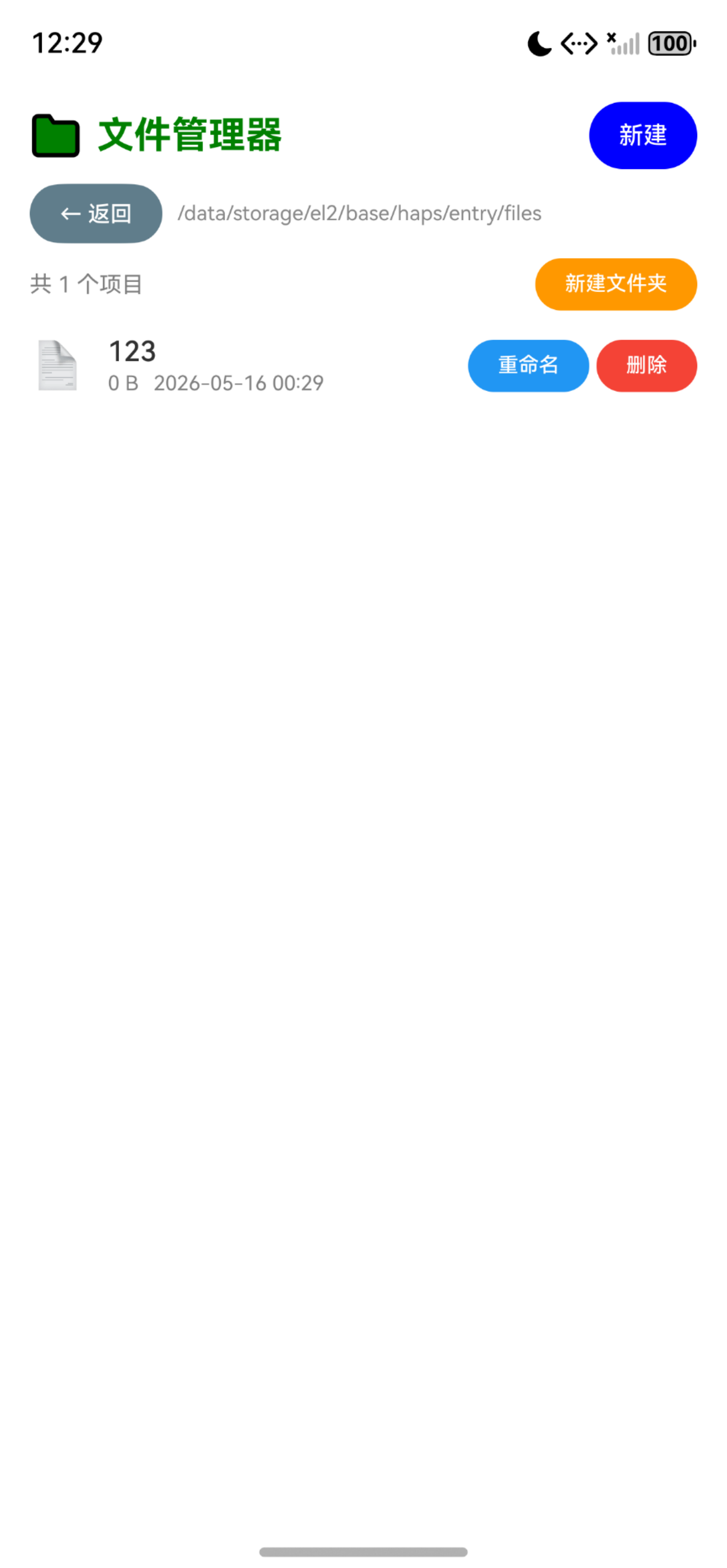
八、运行成功截图
九、总结
file_manager 的 OpenHarmony 适配核心在于 @ohos.file.fs 文件系统 API 的使用。相比 Flutter 原生的 dart:io,OpenHarmony 的 @ohos.file.fs 提供了同步和异步两套 API,同步 API(listFileSync、statSync、openSync 等)适合文件管理器这类需要即时响应的场景。完整实现包括:目录遍历、文件属性获取、文件/文件夹的增删改等核心功能,是文件管理类应用的必备基础能力。
附录:Schema.org 结构化数据
<script type="application/ld+json">
{
  "@context": "https://schema.org",
  "@type": "BlogPosting",
  "headline": "Flutter 三方库 file_manager 鸿蒙化文件管理器实战",
  "description": "基于 OpenHarmony TPC 仓库,详细讲解 file_manager 在鸿蒙项目中的接入流程,使用 @ohos.file.fs 文件系统 API 实现文件管理器。",
  "author": { "@type": "Person", "name": "OpenHarmony 跨平台开发者" },
  "publisher": { "@type": "Organization", "name": "OpenHarmony 跨平台社区", "url": "https://openharmonycrossplatform.csdn.net" },
  "datePublished": "2026-05-07",
  "dateModified": "2026-05-16",
  "mainEntityOfPage": "https://openharmonycrossplatform.csdn.net",
  "keywords": ["开源鸿蒙", "OpenHarmony", "Flutter for OpenHarmony", "file_manager", "文件管理器", "@ohos.file.fs", "三方库适配"],
  "inLanguage": "zh-CN"
}
</script>

开源鸿蒙跨平台开发社区汇聚开发者与厂商,共建“一次开发,多端部署”的开源生态,致力于降低跨端开发门槛,推动万物智联创新。
更多推荐

 1
1 0
0- 0


 已为社区贡献1条内容

所有评论(0)