【Flutter for OpenHarmony】实战 - Day 3(1):课表页功能完善总结
·
欢迎加入开源鸿蒙跨平台社区:https://openharmonycrossplatform.csdn.net
一、本日目标
- 实现课表列表视图与日期选择器
- 添加周次选择器,支持周次与日期联动
- 实现课程增删改查功能
- 完善课程卡片点击交互(查看详情、编辑、删除)
二、文件变更
lib/
├── models/
│   └── course.dart                    # 课程数据模型
├── data/
│   └── mock_course_data.dart          # 静态课程数据
├── widgets/
│   ├── course_card.dart               # 课程卡片组件(增强)
│   ├── date_selector.dart             # 日期选择器组件(增强)
│   ├── add_course_dialog.dart         # 添加/编辑课程弹窗(新增)
│   └── course_detail_dialog.dart      # 课程详情弹窗(新增)
└── pages/
    └── home_page.dart                 # 课表主页(重构)
三、核心代码实现
3.1 课程数据模型 (lib/models/course.dart)
class Course {
  final String id;
  final String name;        // 课程名称
  final String teacher;     // 授课教师
  final String location;    // 上课地点
  final int weekday;        // 周几 (1-7,周一为1)
  final int startWeek;      // 起始周
  final int endWeek;        // 结束周
  final int startSection;   // 开始节次
  final int endSection;     // 结束节次
  final String colorHex;    // 课程颜色

  Course({
    required this.id,
    required this.name,
    required this.teacher,
    required this.location,
    required this.weekday,
    required this.startWeek,
    required this.endWeek,
    required this.startSection,
    required this.endSection,
    required this.colorHex,
  });
}
3.2 日期选择器增强 (lib/widgets/date_selector.dart)
支持传入基准日期,实时计算每天的具体日期:
class DateSelector extends StatelessWidget {
final int selectedWeekday;
final Function(int) onWeekdaySelected;
final DateTime baseDate; // 当前周周一的日期
const DateSelector({
super.key,
required this.selectedWeekday,
required this.onWeekdaySelected,
required this.baseDate,
});
Widget build(BuildContext context) {
final weekdays = ['一', '二', '三', '四', '五', '六', '日'];
final monday = _getMondayOfWeek(baseDate);
final dates = <int, String>{};
for (int i = 0; i < 7; i++) {
final date = monday.add(Duration(days: i));
dates[i + 1] = '${date.month}/${date.day}';
}
return Container(
padding: const EdgeInsets.symmetric(vertical: 12),
child: Row(
mainAxisAlignment: MainAxisAlignment.spaceEvenly,
children: List.generate(7, (index) {
final weekday = index + 1;
final isSelected = selectedWeekday == weekday;
return GestureDetector(
onTap: () => onWeekdaySelected(weekday),
child: Column(
children: [
Text(dates[weekday] ?? '', style: TextStyle(fontSize: 12, color: isSelected ? Colors.blue : Colors.grey[600])),
const SizedBox(height: 4),
Container(
width: 42, height: 42,
decoration: BoxDecoration(shape: BoxShape.circle, color: isSelected ? Colors.blue : Colors.transparent),
child: Center(child: Text(weekdays[index], style: TextStyle(fontSize: 18, fontWeight: isSelected ? FontWeight.bold : FontWeight.normal, color: isSelected ? Colors.white : Colors.grey[800]))),
),
],
),
);
}),
),
);
}
DateTime _getMondayOfWeek(DateTime date) {
final weekday = date.weekday;
return date.subtract(Duration(days: weekday - 1));
}
}
3.3 周次选择器 (lib/pages/home_page.dart 部分)
// 左上角周次选择按钮
Widget _buildWeekSelector() {
  return GestureDetector(
    onTap: _showWeekPicker,
    child: Container(
      padding: const EdgeInsets.symmetric(horizontal: 10, vertical: 5),
      margin: const EdgeInsets.only(left: 8),
      decoration: BoxDecoration(
        color: Colors.white.withOpacity(0.2),
        borderRadius: BorderRadius.circular(16),
      ),
      child: Row(
        mainAxisSize: MainAxisSize.min,  // 关键:防止溢出
        children: [
          const Icon(Icons.calendar_today, size: 16, color: Colors.white),
          const SizedBox(width: 4),
          Text('第$_selectedWeek周', style: const TextStyle(fontSize: 13, color: Colors.white)),
          const Icon(Icons.arrow_drop_down, size: 18, color: Colors.white),
        ],
      ),
    ),
  );
}

// 底部弹窗选择周次
void _showWeekPicker() {
  showModalBottomSheet(
    context: context,
    shape: const RoundedRectangleBorder(borderRadius: BorderRadius.vertical(top: Radius.circular(20))),
    builder: (context) {
      return Container(
        height: 400,
        padding: const EdgeInsets.symmetric(vertical: 16),
        child: Column(
          children: [
            Container(width: 40, height: 4, decoration: BoxDecoration(color: Colors.grey[300], borderRadius: BorderRadius.circular(2))),
            const SizedBox(height: 16),
            const Text('选择周次', style: TextStyle(fontSize: 18, fontWeight: FontWeight.bold)),
            const SizedBox(height: 16),
            Expanded(
              child: GridView.builder(
                gridDelegate: const SliverGridDelegateWithFixedCrossAxisCount(
                  crossAxisCount: 5,
                  childAspectRatio: 1.4,
                  crossAxisSpacing: 12,
                  mainAxisSpacing: 12,
                ),
                itemCount: 20,
                itemBuilder: (context, index) {
                  final weekNum = index + 1;
                  final isSelected = _selectedWeek == weekNum;
                  return InkWell(
                    onTap: () => _selectWeek(context, weekNum),
                    child: Container(
                      decoration: BoxDecoration(
                        color: isSelected ? AppColors.primary : Colors.grey[100],
                        borderRadius: BorderRadius.circular(12),
                        border: Border.all(color: isSelected ? AppColors.primary : Colors.grey[300]!, width: 1),
                      ),
                      child: Center(
                        child: Column(
                          mainAxisAlignment: MainAxisAlignment.center,
                          children: [
                            Text('$weekNum', style: TextStyle(fontSize: 18, fontWeight: isSelected ? FontWeight.bold : FontWeight.normal, color: isSelected ? Colors.white : Colors.black87)),
                            const SizedBox(height: 4),
                            Text('周', style: TextStyle(fontSize: 12, color: isSelected ? Colors.white70 : Colors.grey[600])),
                          ],
                        ),
                      ),
                    ),
                  );
                },
              ),
            ),
          ],
        ),
      );
    },
  );
}
3.4 周次与日期联动
// 学期起始日期(第1周周一的日期)
final DateTime _semesterStart = DateTime(2026, 9, 1);

// 根据周次计算该周周一的日期
DateTime _getMondayOfWeek(int week) {
  return _semesterStart.add(Duration(days: (week - 1) * 7));
}

// 使用
Widget _buildBody() {
  final mondayOfSelectedWeek = _getMondayOfWeek(_selectedWeek);
  return _CourseContent(
    baseDate: mondayOfSelectedWeek,
    // ...
  );
}
3.5 课程卡片组件增强 (lib/widgets/course_card.dart)
class CourseCard extends StatelessWidget {
final Course course;
final VoidCallback? onTap; // 点击回调
const CourseCard({super.key, required this.course, this.onTap});
Widget build(BuildContext context) {
return Container(
margin: const EdgeInsets.only(bottom: 12),
decoration: BoxDecoration(
color: Colors.white,
borderRadius: BorderRadius.circular(12),
boxShadow: [BoxShadow(color: Colors.grey.withOpacity(0.1), blurRadius: 8)],
),
child: Material(
borderRadius: BorderRadius.circular(12),
child: InkWell(
onTap: onTap,
borderRadius: BorderRadius.circular(12),
child: Container(
padding: const EdgeInsets.all(12),
decoration: BoxDecoration(
borderRadius: BorderRadius.circular(12),
border: Border(left: BorderSide(color: Color(int.parse(course.colorHex.replaceFirst('#', '0xFF'))), width: 4)),
),
child: Column(
crossAxisAlignment: CrossAxisAlignment.start,
children: [
Text(course.name, style: const TextStyle(fontSize: 16, fontWeight: FontWeight.bold)),
const SizedBox(height: 4),
Row(children: [
Icon(Icons.person_outline, size: 14, color: Colors.grey[600]),
const SizedBox(width: 4),
Text(course.teacher, style: TextStyle(fontSize: 13, color: Colors.grey[700])),
const SizedBox(width: 12),
Icon(Icons.room_outlined, size: 14, color: Colors.grey[600]),
const SizedBox(width: 4),
Text(course.location, style: TextStyle(fontSize: 13, color: Colors.grey[700])),
]),
const SizedBox(height: 4),
Text('第${course.startWeek}-${course.endWeek}周 第${course.startSection}-${course.endSection}节', style: TextStyle(fontSize: 12, color: Colors.grey[500])),
],
),
),
),
),
);
}
}
3.6 课程详情弹窗 (lib/widgets/course_detail_dialog.dart)
class CourseDetailDialog extends StatelessWidget {
final Course course;
final VoidCallback onEdit;
final VoidCallback onDelete;
const CourseDetailDialog({super.key, required this.course, required this.onEdit, required this.onDelete});
Widget build(BuildContext context) {
final weekdays = ['周一', '周二', '周三', '周四', '周五', '周六', '周日'];
final color = Color(int.parse(course.colorHex.replaceFirst('#', '0xFF')));
return Dialog(
shape: RoundedRectangleBorder(borderRadius: BorderRadius.circular(16)),
child: Container(
padding: const EdgeInsets.all(20),
child: Column(
mainAxisSize: MainAxisSize.min,
children: [
Row(children: [
Container(width: 8, height: 40, decoration: BoxDecoration(color: color, borderRadius: BorderRadius.circular(4))),
const SizedBox(width: 12),
Expanded(child: Text(course.name, style: const TextStyle(fontSize: 20, fontWeight: FontWeight.bold))),
IconButton(icon: const Icon(Icons.edit), onPressed: onEdit),
IconButton(icon: const Icon(Icons.delete, color: AppColors.error), onPressed: onDelete),
]),
const SizedBox(height: 20),
_buildInfoRow(Icons.person, '授课教师', course.teacher),
_buildInfoRow(Icons.room, '上课地点', course.location),
_buildInfoRow(Icons.schedule, '上课时间', '${weekdays[course.weekday - 1]} 第${course.startSection}-${course.endSection}节'),
_buildInfoRow(Icons.calendar_today, '教学周', '第${course.startWeek}-${course.endWeek}周'),
],
),
),
);
}
Widget _buildInfoRow(IconData icon, String label, String value) {
return Padding(
padding: const EdgeInsets.only(bottom: 12),
child: Row(
crossAxisAlignment: CrossAxisAlignment.start,
children: [
Icon(icon, size: 20, color: Colors.grey[600]),
const SizedBox(width: 12),
SizedBox(width: 80, child: Text(label, style: TextStyle(fontSize: 14, color: Colors.grey[600]))),
const SizedBox(width: 12),
Expanded(child: Text(value, style: const TextStyle(fontSize: 14))),
],
),
);
}
}
3.7 课表主页交互实现 (lib/pages/home_page.dart 部分)
// 课程列表构建
ListView.builder(
  padding: const EdgeInsets.all(16),
  itemCount: filteredCourses.length,
  itemBuilder: (context, index) {
    final course = filteredCourses[index];
    return CourseCard(
      course: course,
      onTap: () => _showCourseDetail(course),
    );
  },
)

// 显示课程详情弹窗
void _showCourseDetail(Course course) {
  showDialog(
    context: context,
    builder: (context) => CourseDetailDialog(
      course: course,
      onEdit: () => _editCourse(course),
      onDelete: () => _deleteCourse(course),
    ),
  );
}

// 编辑课程
void _editCourse(Course oldCourse) async {
  final result = await showDialog<Course>(
    context: context,
    builder: (context) => AddCourseDialog(course: oldCourse),
  );
  if (result != null) {
    setState(() {
      final index = _courses.indexWhere((c) => c.id == oldCourse.id);
      if (index != -1) _courses[index] = result;
    });
    ScaffoldMessenger.of(context).showSnackBar(const SnackBar(content: Text('课程已更新')));
  }
}

// 删除课程
void _deleteCourse(Course course) {
  showDialog(
    context: context,
    builder: (context) => AlertDialog(
      title: const Text('删除课程'),
      content: Text('确定要删除课程"${course.name}"吗?'),
      actions: [
        TextButton(onPressed: () => Navigator.pop(context), child: const Text('取消')),
        TextButton(
          onPressed: () {
            Navigator.pop(context);
            setState(() => _courses.removeWhere((c) => c.id == course.id));
            ScaffoldMessenger.of(context).showSnackBar(const SnackBar(content: Text('课程已删除')));
          },
          child: const Text('删除', style: TextStyle(color: AppColors.error)),
        ),
      ],
    ),
  );
}
四、本日成果
| 成果 | 说明 |
|---|---|
| ✅ 课程数据模型 | 定义 Course 类,包含完整课程字段 |
| ✅ 静态课程数据 | mock_course_data.dart 包含周一至周五课程 |
| ✅ 课程卡片组件 | 展示课程详情,左侧彩色边框,支持点击回调 |
| ✅ 日期选择器 | 横向星期选择,支持周次联动显示具体日期 |
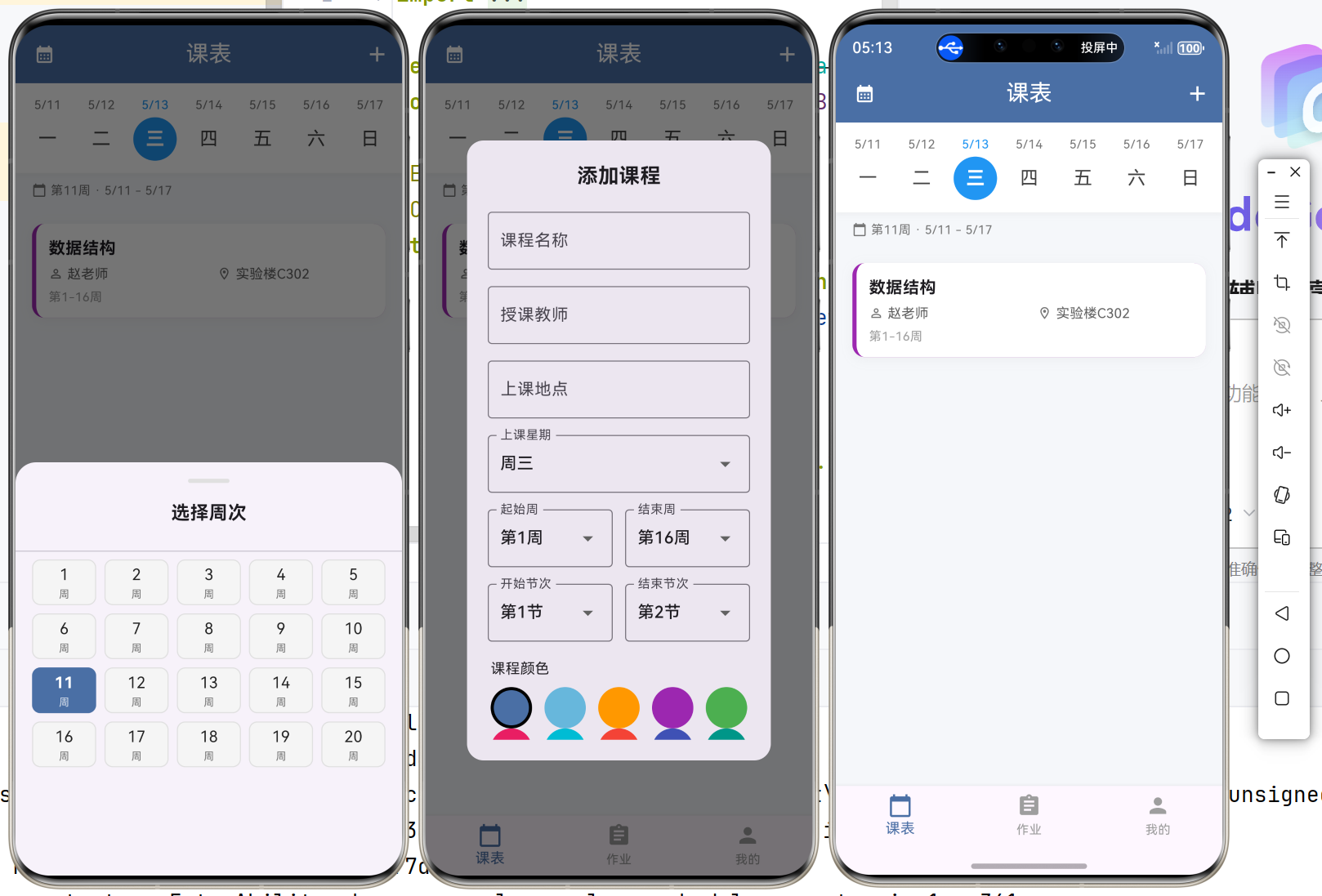
| ✅ 周次选择器 | 左上角按钮,底部弹窗选择1-20周 |
| ✅ 周次与日期联动 | 切换周次时日期自动更新 |
| ✅ 添加课程 | 右上角➕按钮,弹窗表单填写 |
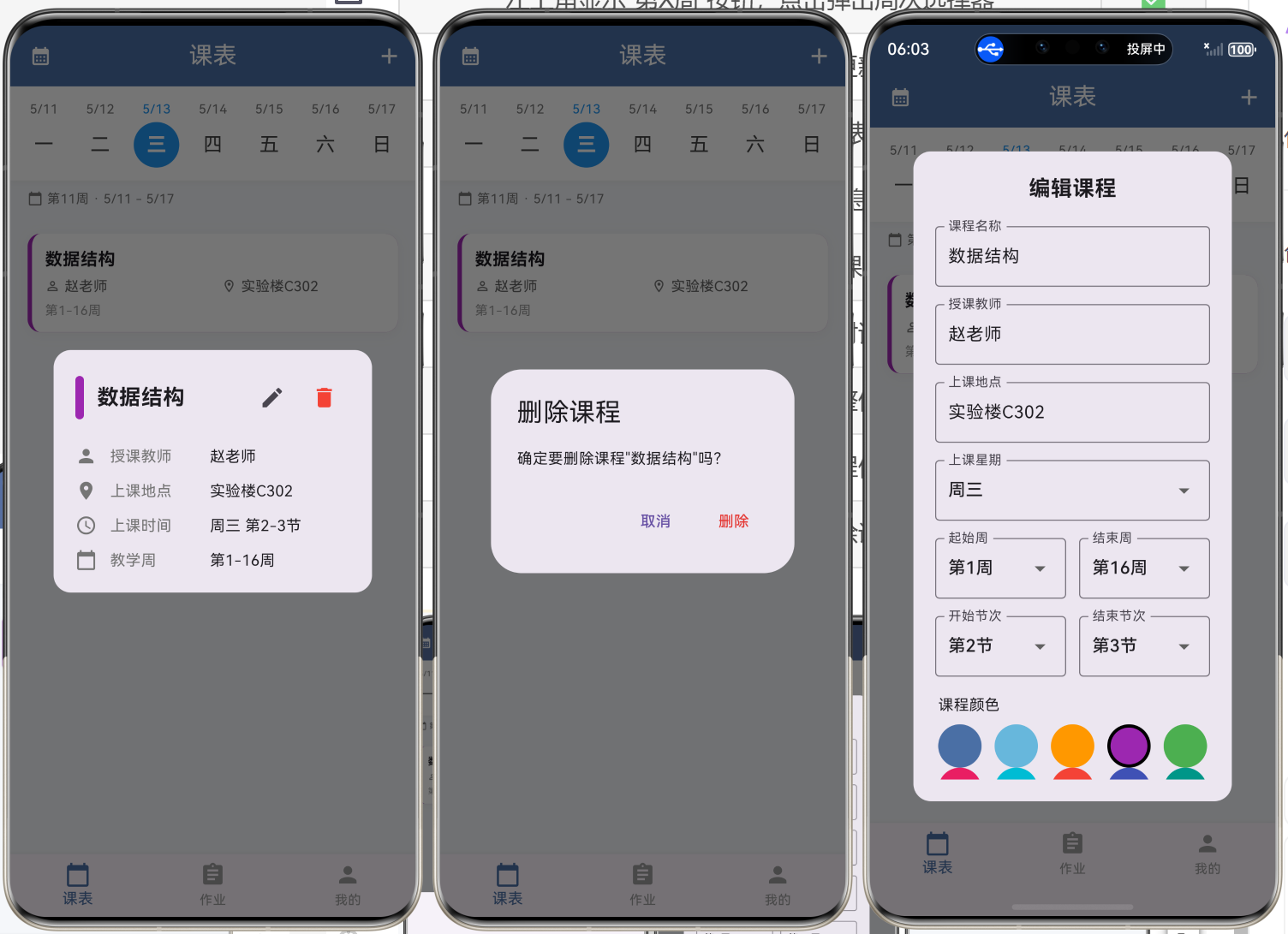
| ✅ 编辑课程 | 详情弹窗编辑按钮,修改后实时更新 |
| ✅ 删除课程 | 详情弹窗删除按钮,确认后移除 |
| ✅ 细节优化 | 修复布局溢出,添加操作反馈提示 |
五、交互流程图
┌─────────────────────────────────────────────────────────────────────┐
│                           课表页交互流程                              │
├─────────────────────────────────────────────────────────────────────┤
│                                                                      │
│  左上角周次按钮 ──→ 底部弹窗 ──→ 选择周次 ──→ 课程列表更新            │
│       │                                          │                   │
│       │                                          ↓                   │
│       │                                    日期联动更新               │
│       │
│  右上角➕按钮 ──→ 添加课程弹窗 ──→ 填写表单 ──→ 课程列表新增            │
│                                                                      │
│  点击课程卡片 ──→ 详情弹窗                                           │
│                      │                                               │
│                      ├── 点击编辑 ──→ 编辑表单 ──→ 保存 ──→ 列表更新   │
│                      │                                               │
│                      └── 点击删除 ──→ 确认对话框 ──→ 确认 ──→ 列表移除 │
│                                                                      │
└─────────────────────────────────────────────────────────────────────┘
六、运行验证
flutter run
| 预期效果 | 状态 |
|---|---|
| 顶部显示星期选择器,默认选中当前星期 | ✅ |
| 左上角显示"第X周"按钮,点击弹出周次选择器 | ✅ |
| 切换周次后日期自动更新 | ✅ |
| 点击日期切换课程列表 | ✅ |
| 课程卡片完整展示信息 | ✅ |
| 右上角➕按钮可添加课程 | ✅ |
| 点击课程卡片弹出详情对话框 | ✅ |
| 详情对话框显示课程完整信息 | ✅ |
| 点击编辑图标可修改课程信息 | ✅ |
| 点击删除图标确认后删除课程 | ✅ |
七、遇到的问题与解决
| 问题 | 原因 | 解决方案 |
|---|---|---|
| 周次选择器布局溢出 | GridView 卡片宽高比过大 | 调整 childAspectRatio: 1.4 |
| 周次按钮超边界 | Row 未设置 mainAxisSize.min | 添加 mainAxisSize: MainAxisSize.min |
| 周次与日期不联动 | 日期选择器未接收周次参数 | 传入 baseDate,动态计算每天日期 |
八、下一步计划
| 任务 | 优先级 |
|---|---|
| 数据持久化(shared_preferences/sqflite) | 高 |
| 作业管理页面完善 | 高 |
| 个人页面完善 | 中 |
| 课表导入(拍照识别OCR) | 低 |
本日完成:课表页功能完整实现,支持周次选择、日期联动、课程增删改查。课程管理功能已完善,下一步将实现数据持久化。

开源鸿蒙跨平台开发社区汇聚开发者与厂商,共建“一次开发,多端部署”的开源生态,致力于降低跨端开发门槛,推动万物智联创新。
更多推荐
 9
9 0
0- 0


 已为社区贡献9条内容

所有评论(0)