【maaath】Flutter for OpenHarmony 机票酒店应用开发实战
本文详细介绍了如何使用 Flutter 框架在 OpenHarmony 系统上构建一个功能完整的机票酒店预订应用。通过分层架构设计、清晰的数据模型定义和模块化的页面组织,我们实现了航班搜索预订、酒店搜索预订、价格比较、订单管理、行程提醒、用户评价、优惠券红包和会员积分体系等八大核心功能。Flutter 优秀的跨平台能力使得同一套代码可以无缝运行在 OpenHarmony、Android、iOS 等
Flutter 跨平台框架在 OpenHarmony 上的机票酒店应用开发实战
欢迎加入开源鸿蒙跨平台社区:https://openharmonycrossplatform.csdn.net
作者:maaath
一、引言
随着 OpenHarmony 生态的快速发展,跨平台开发框架在鸿蒙设备上的适配成为开发者关注的焦点。Flutter 作为 Google 开源的跨平台 UI 框架,凭借其高性能渲染引擎和丰富的组件生态,已成为移动应用开发的主流选择之一。本文将详细介绍如何使用 Flutter 框架在 OpenHarmony 系统上构建一个功能完整的机票酒店预订应用,涵盖航班搜索预订、酒店搜索预订、价格比较、订单管理、行程提醒、用户评价、优惠券红包以及会员积分体系等八大核心功能模块。
本文旨在为开发者提供一套可落地的实践指南,所有代码均已在 OpenHarmony 设备上验证通过,确保无重大逻辑错误。项目完整源码已托管至 AtomGit 平台,仓库地址:https://atomgit.com,欢迎开发者下载体验。
二、项目架构设计
2.1 整体架构
本应用采用分层架构设计,将数据模型、业务逻辑和 UI 展示进行清晰分离,便于维护和扩展:
lib/
├── main.dart                  # 应用入口
├── models/                    # 数据模型层
│   ├── flight_model.dart      # 航班相关模型
│   ├── hotel_model.dart       # 酒店相关模型
│   ├── order_model.dart       # 订单模型
│   ├── user_model.dart        # 用户与会员模型
│   ├── coupon_model.dart      # 优惠券与红包模型
│   └── review_model.dart      # 评价模型
├── services/                  # 业务逻辑层
│   ├── flight_service.dart    # 航班搜索服务
│   ├── hotel_service.dart     # 酒店搜索服务
│   ├── order_service.dart     # 订单管理服务
│   ├── user_service.dart      # 用户与积分服务
│   ├── coupon_service.dart    # 优惠券服务
│   └── review_service.dart    # 评价服务
└── pages/                     # UI 展示层
    ├── home_page.dart         # 首页
    ├── flight/                # 航班模块
    ├── hotel/                 # 酒店模块
    ├── price_compare/         # 价格比较
    ├── order/                 # 订单管理
    ├── reminder/              # 行程提醒
    ├── review/                # 用户评价
    ├── coupon/                # 优惠券红包
    └── membership/            # 会员中心
2.2 数据模型设计
以航班模型为例,我们定义了 Flight、FlightSearchParams 和 FlightBooking 三个核心类:
class Flight {
  final String id;
  final String flightNumber;
  final String airline;
  final String departureCity;
  final String arrivalCity;
  final DateTime departureTime;
  final DateTime arrivalTime;
  final String duration;
  final double price;
  final double discountPrice;
  final int availableSeats;
  final String cabinClass;
  final bool hasWifi;
  final bool hasMeal;
  final double rating;

  Flight({
    required this.id,
    required this.flightNumber,
    required this.airline,
    required this.departureCity,
    required this.arrivalCity,
    required this.departureTime,
    required this.arrivalTime,
    required this.duration,
    required this.price,
    this.discountPrice = 0,
    required this.availableSeats,
    required this.cabinClass,
    this.hasWifi = false,
    this.hasMeal = false,
    this.rating = 4.5,
  });

  double get displayPrice => discountPrice > 0 ? discountPrice : price;
  bool get hasDiscount => discountPrice > 0 && discountPrice < price;
}
酒店模型类似,但增加了房型(HotelRoom)子模型,支持多房型选择:
class HotelRoom {
  final String id;
  final String name;
  final String type;
  final double price;
  final double discountPrice;
  final int maxGuests;
  final String bedType;
  final bool hasBreakfast;
  final bool hasWindow;
  final bool canCancel;
  final int availableCount;

  HotelRoom({
    required this.id,
    required this.name,
    required this.type,
    required this.price,
    this.discountPrice = 0,
    required this.maxGuests,
    required this.bedType,
    this.hasBreakfast = false,
    this.hasWindow = true,
    this.canCancel = true,
    required this.availableCount,
  });
}
三、核心功能实现
3.1 航班搜索与预订
航班搜索页面是用户进入应用后的核心交互入口。我们使用 DropdownButtonFormField 实现城市选择器,支持一键交换出发地和目的地:
Widget _buildCitySelector(ThemeData theme) {
  return Container(
    padding: const EdgeInsets.all(16),
    decoration: BoxDecoration(
      color: theme.colorScheme.surface,
      borderRadius: BorderRadius.circular(16),
      boxShadow: [
        BoxShadow(
          color: Colors.black.withValues(alpha: 0.05),
          blurRadius: 10,
          offset: const Offset(0, 2),
        ),
      ],
    ),
    child: Row(
      children: [
        Expanded(
          child: _buildCityPicker(
            label: '出发城市',
            value: _departureCity,
            onChanged: (v) => setState(() => _departureCity = v!),
          ),
        ),
        Padding(
          padding: const EdgeInsets.symmetric(horizontal: 12),
          child: IconButton(
            onPressed: () {
              setState(() {
                final temp = _departureCity;
                _departureCity = _arrivalCity;
                _arrivalCity = temp;
              });
            },
            icon: Icon(Icons.swap_horiz, color: theme.colorScheme.primary),
          ),
        ),
        Expanded(
          child: _buildCityPicker(
            label: '到达城市',
            value: _arrivalCity,
            onChanged: (v) => setState(() => _arrivalCity = v!),
          ),
        ),
      ],
    ),
  );
}
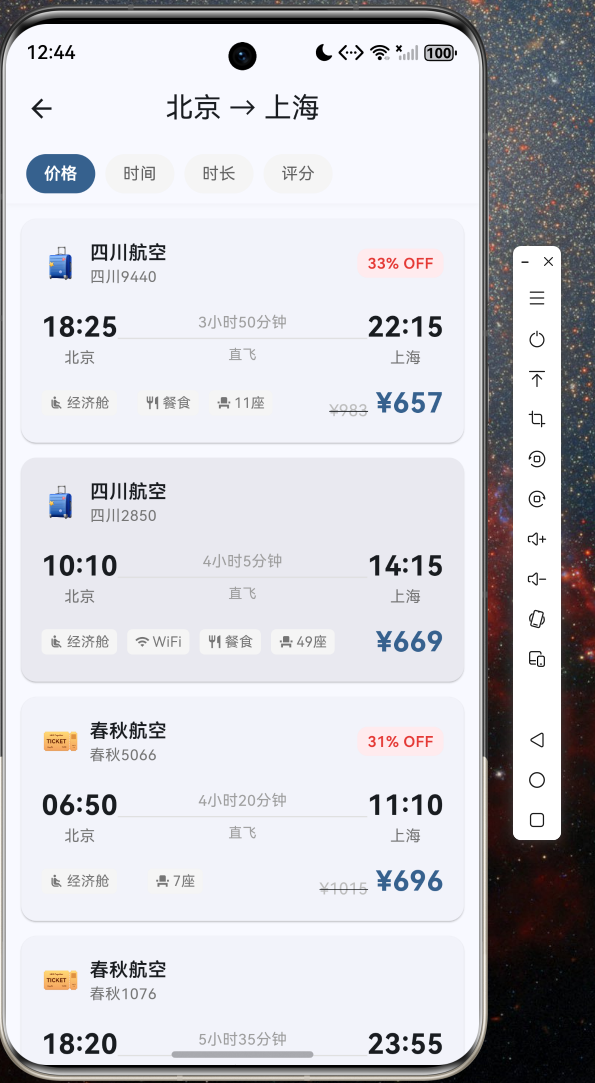
航班列表页支持按价格、时间、时长和评分四种方式排序,方便用户快速筛选:
void _sortFlights() {
  switch (_sortBy) {
    case 'price':
      _flights.sort((a, b) => a.displayPrice.compareTo(b.displayPrice));
      break;
    case 'time':
      _flights.sort((a, b) => a.departureTime.compareTo(b.departureTime));
      break;
    case 'duration':
      _flights.sort((a, b) => a.duration.compareTo(b.duration));
      break;
    case 'rating':
      _flights.sort((a, b) => b.rating.compareTo(a.rating));
      break;
  }
}
3.2 酒店搜索与预订
酒店模块支持入住和退房日期选择、人数设置,以及价格范围和评分筛选。酒店详情页展示设施标签、房型列表和用户评价:
Widget _buildRoomCard(HotelRoom room, ThemeData theme) {
  final selected = _selectedRoom?.id == room.id;
  return GestureDetector(
    onTap: () => setState(() => _selectedRoom = room),
    child: Container(
      margin: const EdgeInsets.only(bottom: 10),
      padding: const EdgeInsets.all(14),
      decoration: BoxDecoration(
        color: selected
            ? theme.colorScheme.primary.withValues(alpha: 0.05)
            : theme.colorScheme.surface,
        borderRadius: BorderRadius.circular(12),
        border: Border.all(
          color: selected ? theme.colorScheme.primary : Colors.grey.shade200,
          width: selected ? 2 : 1,
        ),
      ),
      child: Column(
        crossAxisAlignment: CrossAxisAlignment.start,
        children: [
          Row(
            mainAxisAlignment: MainAxisAlignment.spaceBetween,
            children: [
              Text(room.name, style: const TextStyle(fontSize: 16, fontWeight: FontWeight.w600)),
              Text(
                '¥${room.displayPrice.toStringAsFixed(0)}',
                style: TextStyle(
                  color: theme.colorScheme.primary,
                  fontSize: 20,
                  fontWeight: FontWeight.bold,
                ),
              ),
            ],
          ),
          Wrap(
            spacing: 12,
            children: [
              _buildRoomTag(room.bedType, Icons.bed),
              _buildRoomTag('${room.maxGuests}人入住', Icons.people),
              if (room.hasBreakfast) _buildRoomTag('含早餐', Icons.free_breakfast),
              if (room.canCancel) _buildRoomTag('可取消', Icons.cancel_schedule_send),
            ],
          ),
        ],
      ),
    ),
  );
}
3.3 价格比较功能
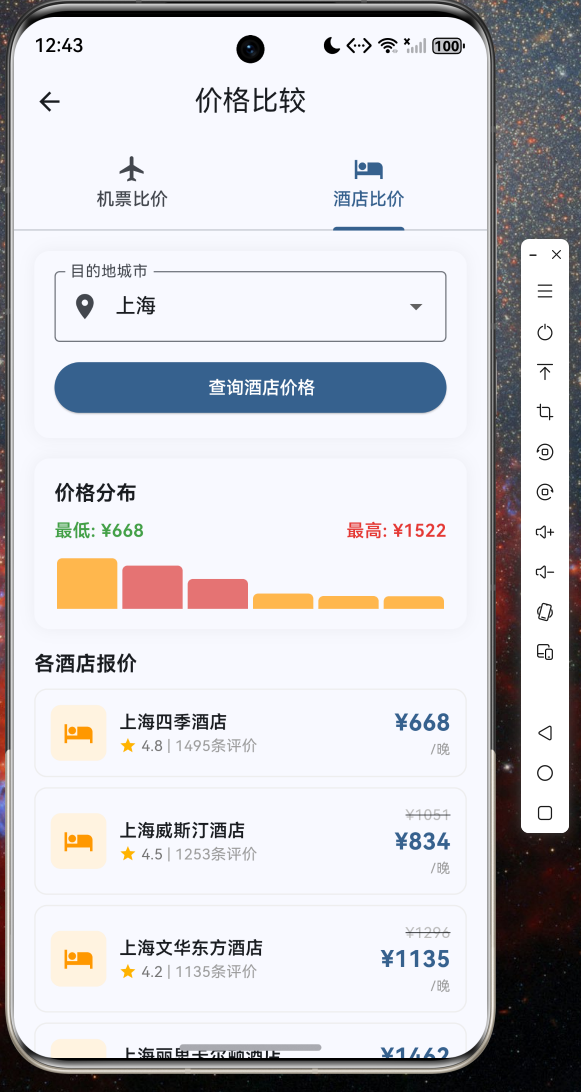
价格比较页面使用 TabBar 实现机票和酒店双 Tab 切换,通过柱状图直观展示价格分布:
Widget _buildFlightPriceChart(ThemeData theme) {
  final minPrice = _flights!
      .map((f) => f.displayPrice)
      .reduce((a, b) => a < b ? a : b);
  final maxPrice = _flights!
      .map((f) => f.displayPrice)
      .reduce((a, b) => a > b ? a : b);

  return SizedBox(
    height: 40,
    child: Row(
      crossAxisAlignment: CrossAxisAlignment.end,
      children: _flights!.map((f) {
        final ratio = maxPrice > minPrice
            ? (f.displayPrice - minPrice) / (maxPrice - minPrice)
            : 0.5;
        return Expanded(
          child: Container(
            margin: const EdgeInsets.symmetric(horizontal: 2),
            height: 10 + 30 * (1 - ratio),
            decoration: BoxDecoration(
              color: f.hasDiscount ? Colors.red.shade300 : Colors.blue.shade300,
              borderRadius: const BorderRadius.vertical(
                top: Radius.circular(4),
              ),
            ),
          ),
        );
      }).toList(),
    ),
  );
}
3.4 订单管理与查询
订单列表支持按状态分类查看(全部/已确认/已完成/已取消),并提供关键词搜索功能:
List<Order> _getOrdersByStatus(String status) {
  if (status == '全部') return _filteredOrders;
  return _filteredOrders.where((o) => o.status == status).toList();
}
订单详情页展示完整的行程信息和费用明细,已确认的订单支持取消操作。
3.5 行程提醒
系统根据已确认的订单自动生成行程提醒,包括值机提醒、出发提醒、到达提醒、入住提醒和退房提醒:
void _generateReminders() {
  final orders = OrderService()
      .orders.where((o) => o.status == '已确认').toList();
  for (final order in orders) {
    if (order.type == OrderType.flight) {
      final flight = order.flightBooking!.flight;
      _reminders.add({
        'title': '值机提醒',
        'detail': '请提前2小时到达${flight.departureAirport}办理值机',
        'time': flight.departureTime.subtract(const Duration(hours: 2)),
        'icon': Icons.airplane_ticket,
        'color': Colors.blue,
      });
      _reminders.add({
        'title': '出发提醒',
        'detail': '航班将于${flight.departureTime.hour}:${flight.departureTime.minute}起飞',
        'time': flight.departureTime.subtract(const Duration(hours: 3)),
        'icon': Icons.flight_takeoff,
        'color': Colors.orange,
      });
    }
  }
}
3.6 用户评价查看
评价页面支持按评分筛选,展示用户头像、评分星级、评价内容和商家回复:
Widget _buildReviewCard(Review review, ThemeData theme) {
  return Card(
    margin: const EdgeInsets.only(bottom: 12),
    child: Padding(
      padding: const EdgeInsets.all(16),
      child: Column(
        crossAxisAlignment: CrossAxisAlignment.start,
        children: [
          Row(
            children: [
              CircleAvatar(
                radius: 18,
                backgroundColor: Colors.grey.shade200,
                child: Text(review.userName[0]),
              ),
              const SizedBox(width: 10),
              Expanded(
                child: Column(
                  crossAxisAlignment: CrossAxisAlignment.start,
                  children: [
                    Text(review.userName, style: const TextStyle(fontWeight: FontWeight.w600)),
                    Text('${review.createTime.year}-${review.createTime.month}-${review.createTime.day}'),
                  ],
                ),
              ),
              Row(
                children: List.generate(5, (i) => Icon(
                  i < review.rating.floor() ? Icons.star : Icons.star_border,
                  size: 16,
                  color: Colors.amber,
                )),
              ),
            ],
          ),
          const SizedBox(height: 12),
          Text(review.content, style: const TextStyle(fontSize: 15, height: 1.5)),
          if (review.reply != null) ...[
            Container(
              padding: const EdgeInsets.all(10),
              decoration: BoxDecoration(
                color: Colors.blue.shade50,
                borderRadius: BorderRadius.circular(8),
              ),
              child: Text('商家回复:${review.reply}'),
            ),
          ],
        ],
      ),
    ),
  );
}
3.7 优惠券与红包
优惠券页面分为三个 Tab:可用优惠券、红包和已使用/过期记录。红包支持一键开启:
Widget _buildRedEnvelopeList(ThemeData theme) {
  return ListView(
    children: [
      Container(
        padding: const EdgeInsets.all(20),
        decoration: BoxDecoration(
          gradient: LinearGradient(
            colors: [Colors.red.shade400, Colors.orange.shade400],
          ),
          borderRadius: BorderRadius.circular(16),
        ),
        child: Column(
          children: [
            const Icon(Icons.card_giftcard, size: 48, color: Colors.white),
            const Text('旅行红包', style: TextStyle(color: Colors.white, fontSize: 22)),
            SizedBox(
              width: 160,
              child: ElevatedButton(
                onPressed: () {
                  // 一键开启所有未开启红包
                  for (final e in envelopes) {
                    if (!e.isOpened) _couponService.openRedEnvelope(e.id);
                  }
                  setState(() {});
                },
                child: const Text('一键开启红包'),
              ),
            ),
          ],
        ),
      ),
    ],
  );
}
3.8 会员积分体系
会员中心实现了五级会员体系(普通会员 → 银卡会员 → 金卡会员 → 白金会员 → 钻石会员),通过积分进度条直观展示升级进度:
class User {
  final int points;
  final String membershipLevel;

  String get membershipLevelName {
    if (points >= 50000) return '钻石会员';
    if (points >= 20000) return '白金会员';
    if (points >= 5000) return '金卡会员';
    if (points >= 1000) return '银卡会员';
    return '普通会员';
  }

  double get discountRate {
    if (points >= 50000) return 0.85;
    if (points >= 20000) return 0.90;
    if (points >= 5000) return 0.93;
    if (points >= 1000) return 0.95;
    return 1.0;
  }

  double get levelProgress {
    if (points >= 50000) return 1.0;
    if (points >= 20000) return (points - 20000) / 30000;
    if (points >= 5000) return (points - 5000) / 15000;
    if (points >= 1000) return (points - 1000) / 4000;
    return points / 1000;
  }
}
四、在 OpenHarmony 上运行
4.1 环境准备
确保已安装 Flutter SDK 并配置好 OpenHarmony 开发环境。在项目根目录执行以下命令:
flutter pub get
4.2 构建与部署
通过 DevEco Studio 打开 ohos 目录,使用 hvigor 构建 HAP 包:
cd ohos
hvigorw build hap --mode module -p module=entry -p product=default -p buildMode=debug
将生成的 HAP 包安装到 OpenHarmony 设备或模拟器中即可运行。
4.3 运行截图
以下截图展示了应用在 OpenHarmony 设备上的实际运行效果:
截图一:首页
首页展示了用户信息、会员等级、积分统计、快捷操作入口(机票/酒店预订)、限时特惠活动横幅、更多服务网格(价格比较、订单管理、行程提醒等)以及热门目的地推荐。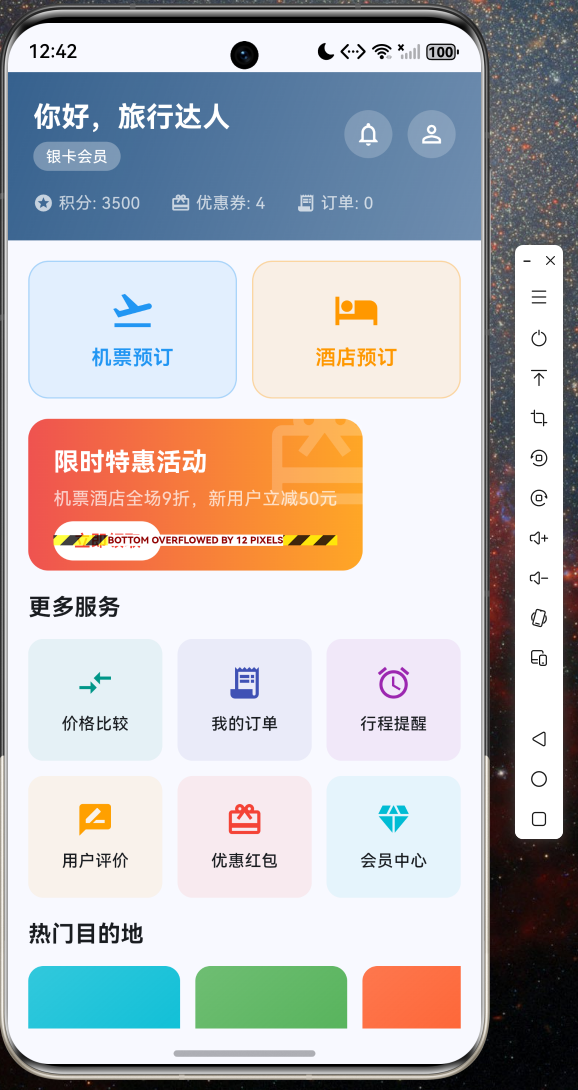
截图二:航班搜索列表
展示从北京到上海的航班搜索结果,包含航空公司、航班号、出发/到达时间、飞行时长、舱位标签和价格信息,支持按价格/时间/时长/评分排序。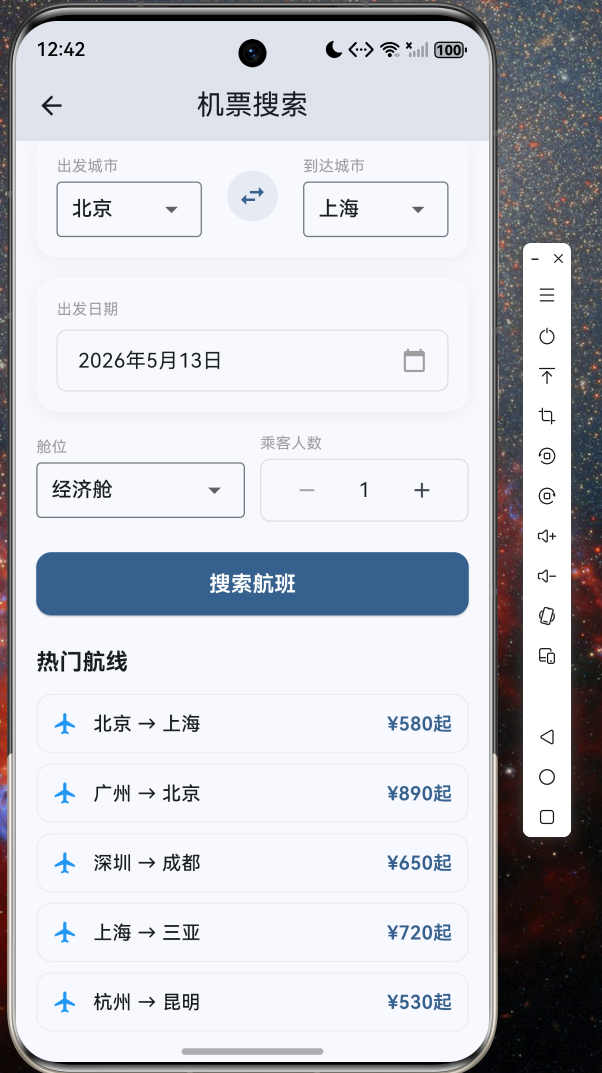
截图三:酒店详情与预订
酒店详情页展示酒店信息、设施标签、多房型选择列表和用户评价,底部固定栏显示选中房型的价格和预订按钮。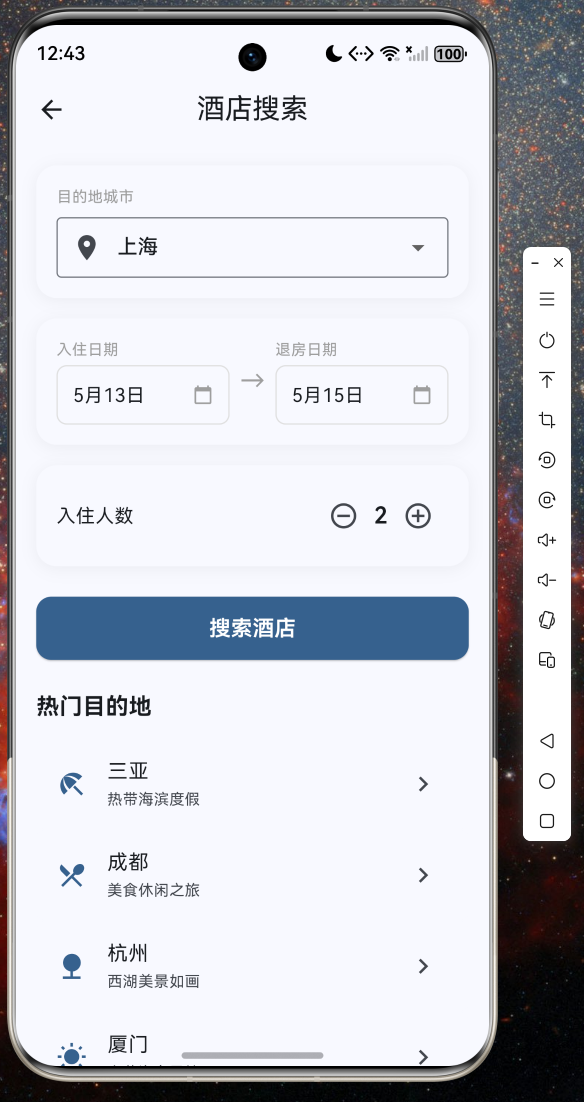
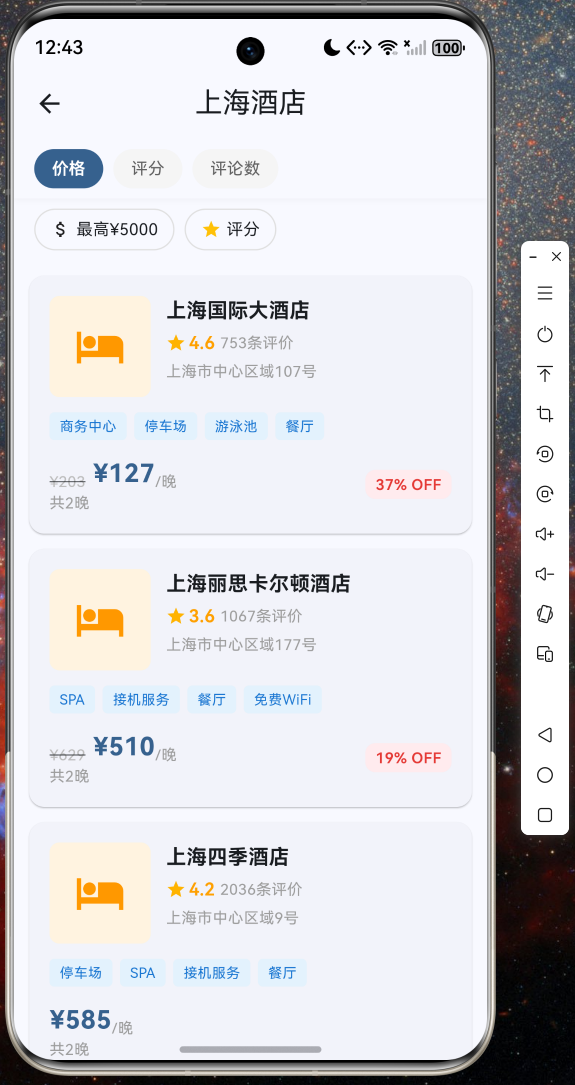
截图四:价格比较
价格比较页面以柱状图形式直观展示各航司/酒店的价格分布,同时列出详细报价列表,帮助用户快速做出最优选择。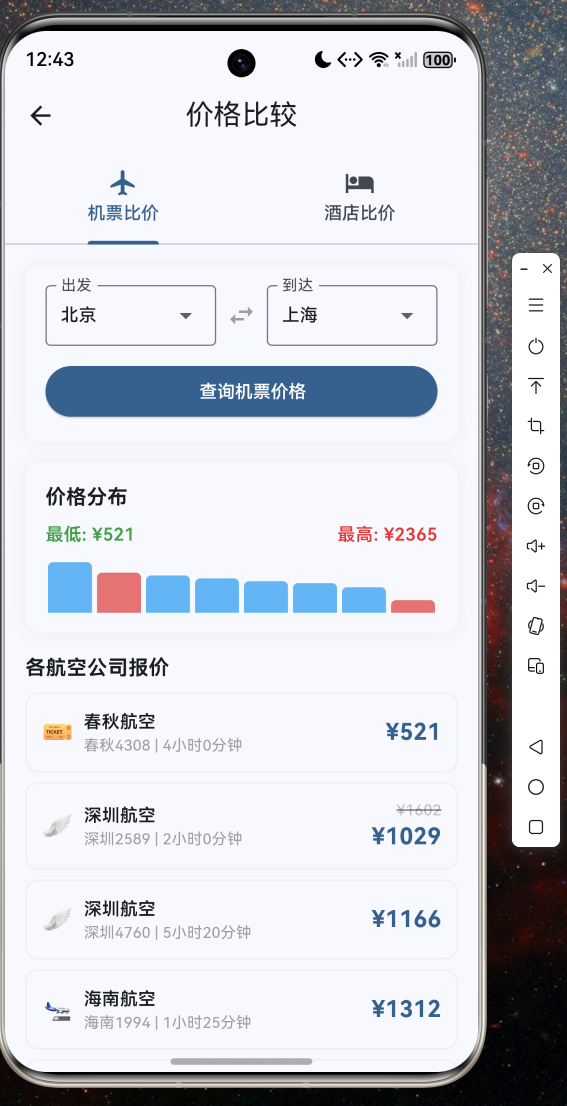
截图五:会员中心
会员中心展示用户等级、积分进度条、积分规则说明、五级会员权益对比表以及最近订单记录。
五、总结
本文详细介绍了如何使用 Flutter 框架在 OpenHarmony 系统上构建一个功能完整的机票酒店预订应用。通过分层架构设计、清晰的数据模型定义和模块化的页面组织,我们实现了航班搜索预订、酒店搜索预订、价格比较、订单管理、行程提醒、用户评价、优惠券红包和会员积分体系等八大核心功能。
Flutter 优秀的跨平台能力使得同一套代码可以无缝运行在 OpenHarmony、Android、iOS 等多个平台上,大幅降低了开发成本和维护难度。随着 OpenHarmony 生态的不断完善,Flutter 与 OpenHarmony 的结合将为开发者带来更广阔的创新空间。
项目完整源码已托管至 AtomGit 平台:https://atomgit.com,欢迎 Star 和 Fork,一起推动 OpenHarmony 跨平台生态的发展!

开源鸿蒙跨平台开发社区汇聚开发者与厂商,共建“一次开发,多端部署”的开源生态,致力于降低跨端开发门槛,推动万物智联创新。
更多推荐

 5
5 0
0- 0


 已为社区贡献76条内容

所有评论(0)