Day7_开源鸿蒙_Flutter_for_OpenHarmony_sqflite实战_笔记置顶排序
摘要: 本文介绍了在开源鸿蒙Flutter应用中使用sqflite实现笔记置顶功能的完整流程。通过新增pinned字段并配合updated_at时间戳,实现了置顶笔记的排序(pinned DESC, updated_at DESC)。关键实现包括:数据库查询/更新接口封装、SQLite索引优化(版本升级至4)、UI交互设计(星标按钮+轻提示)及自测验证。代码注重健壮性,如写操作队列化、参数化查询,
开源鸿蒙 Flutter for OpenHarmony:sqflite 实战(笔记置顶+排序)
欢迎加入开源鸿蒙跨平台社区:https://openharmonycrossplatform.csdn.net
笔记类应用有个很常见的小需求:置顶。
例如:账号信息、常用链接、工作 TODO,永远希望排在列表最前面。
Day7 只围绕 sqflite 做一件事:把“置顶”做成闭环,而且代码要足够干净,后续做“归档/分类/标签”也能沿用这个写法。
- 列表排序:
pinned DESC, updated_at DESC - 置顶写库:
db.update(...)更新 pinned + updated_at - 数据库迁移:新增
idx_notes_pinned索引(version 升级到 4)
1. 今天用到的第三方库:sqflite(为什么它就够了)
置顶本质就是两个动作:
- 存一个字段:
pinned(0/1) - 按这个字段排序,并提供更新入口
这些都属于 SQLite 的基本能力,sqflite 刚好提供最顺手的接口:
db.query(...):排序、where、limit 这些都直接是参数db.update(...):更新字段无需手写完整 SQL
2. 先把“排序规则”写对:pinned 优先,再按更新时间
目标很明确:
- 置顶的永远在最上面
- 置顶内部也要按最近编辑排序
- 未置顶同理按最近编辑排序
对应 orderBy 就是两列排序:
pinned DESC, updated_at DESC
📌 文件:lib/features/note/data/note_dao.dart
2.1 列表查询 listNotes
Future<List<Note>> listNotes({int limit = 100, int offset = 0}) async {
  final db = await _db.database;
  final rows = await db.query(
    'notes',
    where: 'is_deleted = ?',
    whereArgs: const [0],
    orderBy: 'pinned DESC, updated_at DESC',
    limit: limit,
    offset: offset,
  );
  return rows.map(_fromRow).toList(growable: false);
}
2.2 搜索查询 searchNotes
搜索也要遵守同一套排序规则,否则体验会割裂:
“为什么我置顶了,搜出来反而在下面?”
Future<List<Note>> searchNotes(String keyword, {int limit = 100}) async {
  final db = await _db.database;
  final k = '%${keyword.trim()}%';
  final rows = await db.query(
    'notes',
    where: 'is_deleted = ? AND (title LIKE ? OR content LIKE ?)',
    whereArgs: [0, k, k],
    orderBy: 'pinned DESC, updated_at DESC',
    limit: limit,
  );
  return rows.map(_fromRow).toList(growable: false);
}
📷
3. 写库接口:一键置顶/取消置顶(db.update)
置顶不是“只改 pinned”就结束了。
如果不更新 updated_at,列表里会出现一个很奇怪的现象:你刚点了置顶,但它的“更新时间”没变,后面按更新时间排序也会不符合直觉。
📌 文件:lib/features/note/data/note_dao.dart
Future<int> setPinned({required int id, required bool pinned}) async {
  return _db.write(
    (db) => db.update(
      'notes',
      {
        'pinned': pinned ? 1 : 0,
        'updated_at': DateTime.now().millisecondsSinceEpoch,
      },
      where: 'id = ?',
      whereArgs: [id],
    ),
  );
}
这里有两个关键点:
✅ 1)写操作必须走 Day3 的写入队列 _db.write(...)
避免和自动保存/删除同时写库时发生锁库问题。
✅ 2)whereArgs 绑定参数
不要拼字符串,排查更容易,也更安全。
4. 给置顶加一个索引:DB version 升到 4
当数据量大了以后,ORDER BY pinned DESC 会频繁参与排序,给 pinned 建索引会更稳。
📌 文件:lib/features/note/data/app_database.dart
4.1 新装用户:onCreate 直接建索引
await db.execute('CREATE INDEX idx_notes_pinned ON notes(pinned)');
4.2 老用户升级:onUpgrade 做迁移
if (oldVersion < 4) {
  await db.execute(
    'CREATE INDEX IF NOT EXISTS idx_notes_pinned ON notes(pinned)',
  );
}
同时把 openDatabase 的版本号升到 4:
return openDatabase(
  path,
  version: 4,
  ...
);
5. UI:列表页给每条笔记一个“星标按钮”
📌 文件:lib/features/note/ui/notes_list_page.dart
5.1 列表右侧:锁图标 + 星标按钮
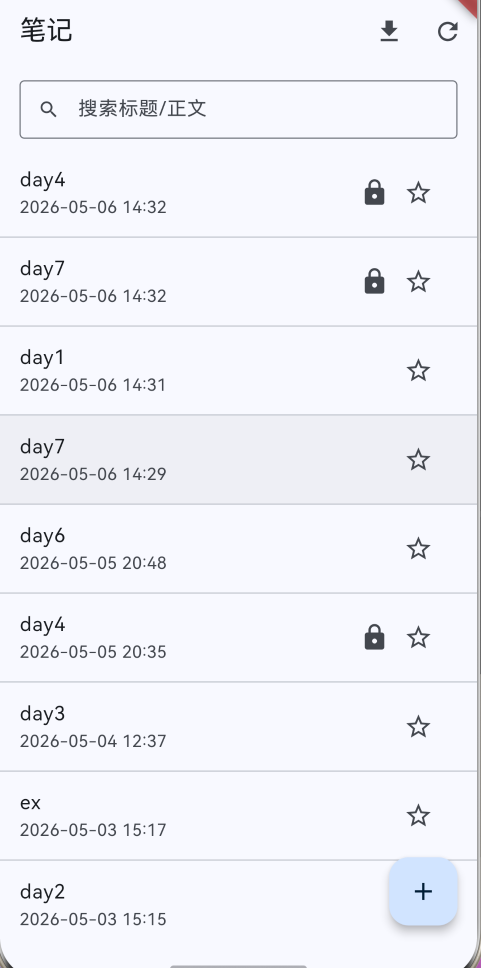
私密笔记本来就有 🔒,现在再加 ⭐,所以用一个 Row 放多个小图标:
trailing: Row(
  mainAxisSize: MainAxisSize.min,
  children: [
    if (note.isPrivate) const Icon(Icons.lock),
    IconButton(
      onPressed: () => _togglePinned(note),
      icon: Icon(
        note.pinned ? Icons.star : Icons.star_border,
        color: note.pinned ? Colors.amber : null,
      ),
      tooltip: note.pinned ? '取消置顶' : '置顶',
    ),
  ],
),
5.2 点一下就写库 + 轻提示 + 刷新列表
Future<void> _togglePinned(Note note) async {
  final id = note.id;
  if (id == null) return;
  final next = !note.pinned;
  try {
    await _repo.setPinned(id: id, pinned: next);
    await showToast(next ? '已置顶' : '已取消置顶');
  } catch (e) {
    await showToast('操作失败:$e');
  }
  if (mounted) _reload();
}
showToast 是 Day1 就接入的三方库 fluttertoast,这里继续用它做轻提示,体验会更像“真实 App”。
6. 自测清单(Day7)
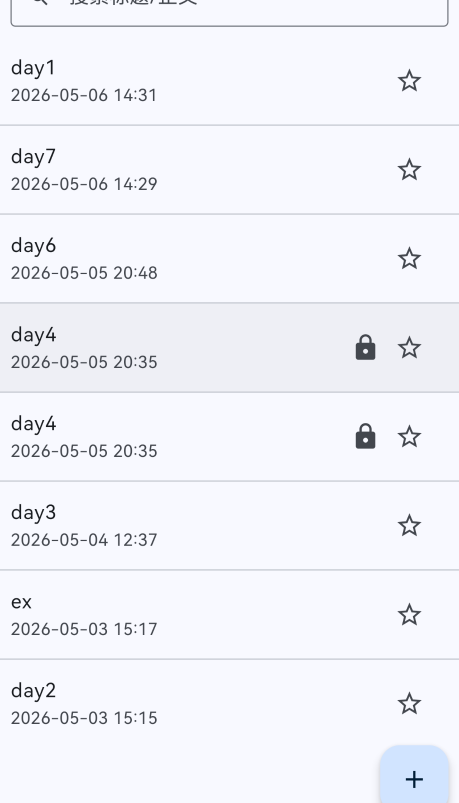
- 新建 3 条笔记,随便编辑一下更新时间
- 点其中 1 条“置顶” → 它必须立刻跑到列表最上面
- 再置顶第 2 条 → 两条都在顶部,且按最近操作/编辑排序
- 搜索关键字 → 置顶规则依然有效(置顶的优先显示)
- 私密笔记也能置顶:🔒 + ⭐ 同时出现

开源鸿蒙跨平台开发社区汇聚开发者与厂商,共建“一次开发,多端部署”的开源生态,致力于降低跨端开发门槛,推动万物智联创新。
更多推荐


 3
3 0
0- 0


 已为社区贡献8条内容

所有评论(0)