Flutter鸿蒙开发:汇率趋势分析实战教程 - OpenHarmony跨平台指南
汇率查询是出国旅行、海外购物等场景中常用的功能,通过汇率趋势分析应用可以实时了解汇率变化。本文将介绍如何使用Flutter开发汇率趋势分析应用,支持多种货币和趋势图表展示。货币选择模块:支持多种货币选择和切换汇率展示模块:显示当前汇率和涨跌幅趋势图表模块:绘制汇率走势图换算计算模块:实现货币换算功能本文详细介绍了Flutter鸿蒙汇率趋势分析的实现方法,包括货币选择、趋势图表、汇率换算等功能。通过
Flutter鸿蒙开发:汇率趋势分析实战教程 - OpenHarmony跨平台指南
Flutter 三方库 cached_network_image 的鸿蒙化适配与实战指南
欢迎加入开源鸿蒙跨平台社区: https://openharmonycrossplatform.csdn.net
本文详细介绍如何在Flutter鸿蒙应用中实现汇率趋势分析功能,包含货币选择、趋势图表、汇率换算等功能。
一、前言
汇率查询是出国旅行、海外购物等场景中常用的功能,通过汇率趋势分析应用可以实时了解汇率变化。本文将介绍如何使用Flutter开发汇率趋势分析应用,支持多种货币和趋势图表展示。
二、效果展示
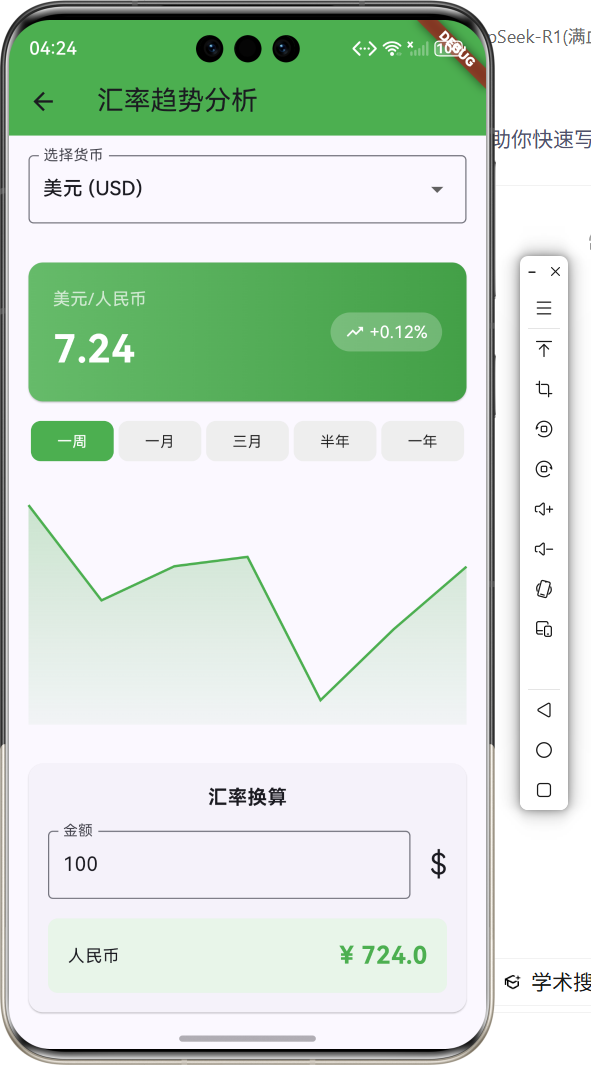
2.1 功能特性
| 功能 | 描述 |
|---|---|
| 货币选择 | 支持美元、欧元、日元等多种货币 |
| 实时汇率 | 显示当前汇率和涨跌幅 |
| 趋势图表 | 可视化汇率走势图 |
| 时间周期 | 支持一周、一月、三月等周期 |
| 汇率换算 | 快速计算货币兑换金额 |
| 热门货币 | 展示热门货币汇率列表 |
三、项目背景与目标
3.1 项目背景
随着全球化的发展,跨境交易和旅行越来越频繁,用户对汇率信息的需求也越来越大。汇率趋势分析应用可以帮助用户了解汇率变化,做出更好的决策。
3.2 项目目标
- 实现多货币汇率查询
- 提供汇率趋势图表展示
- 支持汇率换算计算
- 展示热门货币列表
四、技术架构设计
4.1 架构概述
汇率趋势分析应用采用Flutter跨平台框架开发,主要包含以下模块:
- 货币选择模块:支持多种货币选择和切换
- 汇率展示模块:显示当前汇率和涨跌幅
- 趋势图表模块:绘制汇率走势图
- 换算计算模块:实现货币换算功能
4.2 技术原理
使用CustomPainter绘制趋势图表,通过模拟数据生成汇率走势,LinearGradient实现图表渐变填充效果。
五、详细实现
5.1 Flutter端实现
import 'package:flutter/material.dart';
import 'dart:math';
class ExchangeRateTrendPage extends StatefulWidget {
const ExchangeRateTrendPage({super.key});
State<ExchangeRateTrendPage> createState() => _ExchangeRateTrendPageState();
}
class _ExchangeRateTrendPageState extends State<ExchangeRateTrendPage> {
String _selectedCurrency = 'USD';
String _selectedPeriod = '一周';
final TextEditingController _amountController = TextEditingController(text: '100');
final List<CurrencyInfo> _currencies = [
CurrencyInfo(code: 'USD', name: '美元', symbol: '\$', rate: 7.24),
CurrencyInfo(code: 'EUR', name: '欧元', symbol: '€', rate: 7.86),
CurrencyInfo(code: 'JPY', name: '日元', symbol: '¥', rate: 0.048),
CurrencyInfo(code: 'GBP', name: '英镑', symbol: '£', rate: 9.15),
CurrencyInfo(code: 'KRW', name: '韩元', symbol: '₩', rate: 0.0054),
];
final List<String> _periods = ['一周', '一月', '三月', '半年', '一年'];
List<double> _generateTrendData() {
final random = Random();
final baseRate = _currencies.firstWhere((c) => c.code == _selectedCurrency).rate;
return List.generate(7, (i) => baseRate + (random.nextDouble() - 0.5) * 0.5);
}
Widget build(BuildContext context) {
final selectedCurrencyInfo = _currencies.firstWhere((c) => c.code == _selectedCurrency);
final trendData = _generateTrendData();
return Scaffold(
appBar: AppBar(title: const Text('汇率趋势分析'), backgroundColor: Colors.green),
body: SingleChildScrollView(
child: Column(
children: [
_buildCurrencySelector(),
_buildCurrentRate(selectedCurrencyInfo),
_buildPeriodSelector(),
_buildTrendChart(trendData),
_buildConverter(selectedCurrencyInfo),
_buildCurrencyList(),
],
),
),
);
}
Widget _buildCurrencySelector() {
return Container(
padding: const EdgeInsets.all(16),
child: DropdownButtonFormField<String>(
value: _selectedCurrency,
decoration: const InputDecoration(labelText: '选择货币', border: OutlineInputBorder()),
items: _currencies.map((c) => DropdownMenuItem(value: c.code, child: Text('${c.name} (${c.code})'))).toList(),
onChanged: (v) => setState(() => _selectedCurrency = v!),
),
);
}
Widget _buildCurrentRate(CurrencyInfo currency) {
return Card(
margin: const EdgeInsets.all(16),
child: Container(
padding: const EdgeInsets.all(20),
decoration: BoxDecoration(
gradient: LinearGradient(colors: [Colors.green.shade400, Colors.green.shade600]),
borderRadius: BorderRadius.circular(12),
),
child: Row(
mainAxisAlignment: MainAxisAlignment.spaceBetween,
children: [
Column(
crossAxisAlignment: CrossAxisAlignment.start,
children: [
Text('${currency.name}/人民币', style: const TextStyle(color: Colors.white70)),
const SizedBox(height: 8),
Text('${currency.rate}', style: const TextStyle(color: Colors.white, fontSize: 32, fontWeight: FontWeight.bold)),
],
),
Container(
padding: const EdgeInsets.symmetric(horizontal: 12, vertical: 6),
decoration: BoxDecoration(color: Colors.white24, borderRadius: BorderRadius.circular(20)),
child: const Row(children: [Icon(Icons.trending_up, color: Colors.white, size: 16), SizedBox(width: 4), Text('+0.12%', style: TextStyle(color: Colors.white))]),
),
],
),
),
);
}
Widget _buildPeriodSelector() {
return Padding(
padding: const EdgeInsets.symmetric(horizontal: 16),
child: Row(
children: _periods.map((period) {
final isSelected = _selectedPeriod == period;
return Expanded(
child: GestureDetector(
onTap: () => setState(() => _selectedPeriod = period),
child: Container(
margin: const EdgeInsets.symmetric(horizontal: 2),
padding: const EdgeInsets.symmetric(vertical: 8),
decoration: BoxDecoration(color: isSelected ? Colors.green : Colors.grey.shade200, borderRadius: BorderRadius.circular(8)),
child: Text(period, textAlign: TextAlign.center, style: TextStyle(color: isSelected ? Colors.white : Colors.black87, fontSize: 12)),
),
),
);
}).toList(),
),
);
}
Widget _buildTrendChart(List<double> data) {
return Container(
height: 200,
margin: const EdgeInsets.all(16),
child: CustomPaint(size: const Size(double.infinity, 200), painter: TrendChartPainter(data)),
);
}
Widget _buildConverter(CurrencyInfo currency) {
return Card(
margin: const EdgeInsets.all(16),
child: Padding(
padding: const EdgeInsets.all(16),
child: Column(
children: [
const Text('汇率换算', style: TextStyle(fontSize: 16, fontWeight: FontWeight.bold)),
const SizedBox(height: 16),
Row(
children: [
Expanded(
child: TextField(
controller: _amountController,
keyboardType: TextInputType.number,
decoration: const InputDecoration(labelText: '金额', border: OutlineInputBorder()),
onChanged: (_) => setState(() {}),
),
),
const SizedBox(width: 16),
Text(currency.symbol, style: const TextStyle(fontSize: 24)),
],
),
const SizedBox(height: 16),
Container(
padding: const EdgeInsets.all(16),
decoration: BoxDecoration(color: Colors.green.shade50, borderRadius: BorderRadius.circular(8)),
child: Row(
mainAxisAlignment: MainAxisAlignment.spaceBetween,
children: [
const Text('人民币'),
Text('¥ ${(double.tryParse(_amountController.text) ?? 0) * currency.rate}', style: const TextStyle(fontSize: 20, fontWeight: FontWeight.bold, color: Colors.green)),
],
),
),
],
),
),
);
}
Widget _buildCurrencyList() {
return Padding(
padding: const EdgeInsets.all(16),
child: Column(
crossAxisAlignment: CrossAxisAlignment.start,
children: [
const Text('热门货币', style: TextStyle(fontSize: 16, fontWeight: FontWeight.bold)),
const SizedBox(height: 12),
...List.generate(_currencies.length, (index) => _buildCurrencyItem(_currencies[index])),
],
),
);
}
Widget _buildCurrencyItem(CurrencyInfo currency) {
return Card(
margin: const EdgeInsets.only(bottom: 8),
child: ListTile(
leading: CircleAvatar(backgroundColor: Colors.green.shade100, child: Text(currency.symbol, style: const TextStyle(color: Colors.green))),
title: Text(currency.name),
subtitle: Text(currency.code),
trailing: Text('${currency.rate}', style: const TextStyle(fontSize: 16, fontWeight: FontWeight.bold)),
),
);
}
}
class TrendChartPainter extends CustomPainter {
final List<double> data;
TrendChartPainter(this.data);
void paint(Canvas canvas, Size size) {
final paint = Paint()..color = Colors.green..strokeWidth = 2..style = PaintingStyle.stroke;
final fillPaint = Paint()..shader = LinearGradient(begin: Alignment.topCenter, end: Alignment.bottomCenter, colors: [Colors.green.withOpacity(0.3), Colors.green.withOpacity(0.05)]).createShader(Rect.fromLTWH(0, 0, size.width, size.height));
final maxVal = data.reduce((a, b) => a > b ? a : b);
final minVal = data.reduce((a, b) => a < b ? a : b);
final range = maxVal - minVal;
final path = Path();
final fillPath = Path();
for (int i = 0; i < data.length; i++) {
final x = (i / (data.length - 1)) * size.width;
final y = size.height - ((data[i] - minVal) / range) * size.height * 0.8 - size.height * 0.1;
if (i == 0) {
path.moveTo(x, y);
fillPath.moveTo(x, size.height);
fillPath.lineTo(x, y);
} else {
path.lineTo(x, y);
fillPath.lineTo(x, y);
}
}
fillPath.lineTo(size.width, size.height);
fillPath.close();
canvas.drawPath(fillPath, fillPaint);
canvas.drawPath(path, paint);
}
bool shouldRepaint(covariant TrendChartPainter oldDelegate) => data != oldDelegate.data;
}
class CurrencyInfo {
final String code;
final String name;
final String symbol;
final double rate;
CurrencyInfo({required this.code, required this.name, required this.symbol, required this.rate});
}
5.2 核心功能解析
货币选择器
通过DropdownButtonFormField实现货币选择,支持美元、欧元、日元、英镑、韩元等主流货币。
趋势图表绘制
使用CustomPainter绘制趋势图表,包含折线和渐变填充区域,直观展示汇率变化趋势。
汇率换算
实时计算输入金额对应的人民币金额,方便用户快速了解兑换结果。
六、实际应用场景
6.1 出国旅行
在出国旅行前查询目的地货币汇率,合理规划旅行预算。
6.2 海外购物
在海外购物时实时换算价格,了解商品的人民币价格。
6.3 投资理财
关注汇率变化趋势,为外汇投资提供参考依据。
七、优化建议
7.1 实时数据接入
接入真实的汇率API,获取实时汇率数据,提高数据准确性。
7.2 历史数据查询
添加历史汇率查询功能,支持查看任意时间段的汇率走势。
7.3 汇率提醒
添加汇率提醒功能,当汇率达到设定值时推送通知。
八、常见问题与解决方案
8.1 数据更新延迟
问题: 汇率数据更新不及时,影响用户决策。
解决方案: 使用WebSocket实现实时数据推送,或设置定时刷新机制。
8.2 图表显示异常
问题: 在不同屏幕尺寸下图表显示效果不一致。
解决方案: 使用响应式布局,根据屏幕尺寸动态调整图表大小。
九、总结
本文详细介绍了Flutter鸿蒙汇率趋势分析的实现方法,包括货币选择、趋势图表、汇率换算等功能。通过本教程,开发者可以快速实现汇率查询和分析功能,为用户提供便捷的汇率信息服务。
十、参考资料
- Flutter官方文档:https://flutter.dev
- HarmonyOS开发者文档:https://developer.harmonyos.com
- Flutter中国社区:https://flutter-io.cn

开源鸿蒙跨平台开发社区汇聚开发者与厂商,共建“一次开发,多端部署”的开源生态,致力于降低跨端开发门槛,推动万物智联创新。
更多推荐
 0
0 0
0- 0


 已为社区贡献10条内容

所有评论(0)