编写定义多个服务的 Compose 文件
·
1.定义项目组件
1.创建一个空的 Compose 项目目录
[root@host1 ~]# mkdir django-pg && cd django-pg
2.创建并编辑 Dockerfile
[root@host1 django-pg]# vi Dockerfile
[root@host1 django-pg]# cat Dockerfile
# syntax=docker/dockerfile:1
# 从Python 3.10官方镜像开始构建(基于Debian,稳定且包含常用工具)
FROM python:3.10

# 设置环境变量:
# - 防止Python写入.pyc文件(减少镜像体积)
# - 确保Python输出实时打印到控制台(便于容器日志查看)
ENV PYTHONDONTWRITEBYTECODE=1
ENV PYTHONUNBUFFERED=1

# 在镜像中指定工作目录(后续命令默认在此目录执行)
WORKDIR /code

# 先复制依赖清单(利用Docker层缓存,避免每次代码变动都重新安装依赖)
COPY requirements.txt /code/

# 安装Python依赖:
# - --no-cache-dir:不缓存安装包,减小镜像体积
# - 可选:添加国内镜像源加速安装(如阿里云:-i https://mirrors.aliyun.com/pypi/simple/)
RUN pip install --no-cache-dir -r requirements.txt

# 复制当前目录所有文件到工作目录(代码变动频繁,放在依赖安装后可复用缓存)
COPY . /code/
3.创建并编辑 requirements.txt
[root@host1 django-pg]# vi requirements.txt
[root@host1 django-pg]# cat requirements.txt
Django>=3.0,<4.0
psycopg2>=2.8
4.创建并编辑 compose.yaml
[root@host1 django-pg]# vi compose.yaml
[root@host1 django-pg]# cat compose.yaml
services:
  db:
    # 使用PostgreSQL官方镜像(适配Web应用的数据库需求)
    image: postgres:14
    container_name: postgres_db
    volumes:
      # 数据库数据持久化(修正路径乱码,使用规范卷名)
      - postgres_data:/var/lib/postgresql/data/
    environment:
      # PostgreSQL环境变量(修正命名规范,替换乱码)
      - POSTGRES_DB=postgres  # 数据库名
      - POSTGRES_USER=postgres  # 用户名
      - POSTGRES_PASSWORD=postgres  # 密码(生产环境需修改为强密码)
    restart: always  # 容器异常时自动重启

  web:
    build: .  # 从当前目录的Dockerfile构建Web应用镜像
    command: python manage.py runserver 0.0.0.0:8000  # 启动Web服务(修正空格)
    volumes:
      - .:/code  # 本地代码挂载到容器(开发时实时同步代码)
    ports:
      - "8000:8000"  # 端口映射(主机:容器,修正列表格式)
    environment:
      # Web应用连接数据库的环境变量(需与db服务的配置一致)
      - POSTGRES_NAME=postgres
      - POSTGRES_USER=postgres
      - POSTGRES_PASSWORD=postgres
      - DB_HOST=db  # 数据库服务名(与db服务名一致)
    depends_on:
      - db  # 确保db服务启动后再启动web(修正拼写:depends on→depends_on)
    restart: always

# 定义持久化卷(存储数据库数据)
volumes:
  postgres_data:
2.创建 Django 项目
1.将当前目录切换到项目目录的根目录
[root@host1 django-pg]# cd
[root@host1 ~]# cd django-pg
2.创建 Djiango 项目
[root@host1 django-pg]# docker compose run web django-admin startproject myexample .
[+] Running 15/15
 ✔ db Pulled                                                                                   42.8s
   ✔ ce1261c6d567 Already exists                                                                0.0s
   ✔ 9595d6df1702 Pull complete                                                                 1.9s
   ✔ f61679df62ff Pull complete                                                                 4.1s
   ✔ b6b19fc5a897 Pull complete                                                                 4.2s
   ✔ 6063eca40075 Pull complete                                                                 6.5s
   ✔ ea9be19a833d Pull complete                                                                 6.7s
   ✔ 09099ebea9b7 Pull complete                                                                 6.7s
   ✔ c7cb4c22443b Pull complete                                                                 7.1s
   ✔ 7a5f93555331 Pull complete                                                                38.5s
   ✔ 771dc539e4b4 Pull complete                                                                38.5s
   ✔ 3a1f45b72d96 Pull complete                                                                38.6s
   ✔ 14d8c3633343 Pull complete                                                                38.6s
   ✔ 359af5c70b5d Pull complete                                                                38.6s
   ✔ c992fcc7ef58 Pull complete                                                                38.6s
[+] Creating 3/3
 ✔ Network django-pg_default         Created                                                    0.1s
 ✔ Volume "django-pg_postgres_data"  Created                                                    0.0s
 ✔ Container postgres_db             Created                                                   30.5s
[+] Running 1/1
 ✔ Container postgres_db  Started                                                               0.5s
[+] Building 471.4s (14/14) FINISHED
 => [internal] load local bake definitions                                                      0.0s
 => => reading from stdin 475B                                                                  0.0s
 => [internal] load build definition from Dockerfile                                            0.0s
 => => transferring dockerfile: 1.04kB                                                          0.0s
 => resolve image config for docker-image://docker.io/docker/dockerfile:1                       4.5s
 => docker-image://docker.io/docker/dockerfile:1@sha256:dabfc0969b935b2080555ace70ee69a5261af8  3.9s
 => => resolve docker.io/docker/dockerfile:1@sha256:dabfc0969b935b2080555ace70ee69a5261af8a8f1  0.0s
 => => sha256:dabfc0969b935b2080555ace70ee69a5261af8a8f1b4df97b9e7fbcf6722eddf 8.40kB / 8.40kB  0.0s
 => => sha256:6ce6616ec35021075551c55e604374e8b47a66d157bc55ec2f2d2326450a9ae1 850B / 850B      0.0s
 => => sha256:7b1f115048803b89291c08409139f1390862db2244afc3f74e634bbbbe78129c 1.33kB / 1.33kB  0.0s
 => => sha256:981cf2e35385187cc01dcd144cd31e3ce126a4fffcb9ac2c0b7f43280ecff3 14.12MB / 14.12MB  3.4s
 => => extracting sha256:981cf2e35385187cc01dcd144cd31e3ce126a4fffcb9ac2c0b7f43280ecff33c       0.4s
 => [internal] load metadata for docker.io/library/python:3.10                                  4.3s
 => [internal] load .dockerignore                                                               0.0s
 => => transferring context: 2B                                                                 0.0s
 => [1/5] FROM docker.io/library/python:3.10@sha256:b568817037b2e14fb0d5d0deb972556ac15a915eb  98.2s
 => => resolve docker.io/library/python:3.10@sha256:b568817037b2e14fb0d5d0deb972556ac15a915eb8  0.0s
 => => sha256:b568817037b2e14fb0d5d0deb972556ac15a915eb85e254bbc66e4eae446aa 10.32kB / 10.32kB  0.0s
 => => sha256:54bada88d26fa0a6abcef5071c3c704c0aedb1ed1416bc97e0d553a91c691a3e 2.32kB / 2.32kB  0.0s
 => => sha256:58f749fd06477329ce1055757be6537c941fd3e881fe98ddb49b37607d9427f9 6.22kB / 6.22kB  0.0s
 => => sha256:22718812f617084a0c5e539e02723b75bf79ea2a589430f820efcbb07f45b 25.61MB / 25.61MB  11.4s
 => => sha256:15b1d8a5ff03aeb0f14c8d39a60a73ef22f656550bfa1bb90d1850f25a0ac 49.28MB / 49.28MB  18.2s
 => => sha256:401a98f7495bee3e8e6943da9f52f0ab1043c43eb1d107a3817fc2a4b916b 67.78MB / 67.78MB  42.1s
 => => sha256:ad446e7df19acd39290d995e6d78ccbfde171596237968a140518b183d9 235.91MB / 235.91MB  57.4s
 => => sha256:4625bf671d83bae0935aa6c18c716385109ace8fe91c3f53947d9964f7349cc 6.08MB / 6.08MB  21.9s
 => => extracting sha256:15b1d8a5ff03aeb0f14c8d39a60a73ef22f656550bfa1bb90d1850f25a0ac0fa       8.8s
 => => sha256:01a4049d5c192f012564963ff0656cad76e6cd53814f7b8a2de0414e3c7f8 21.41MB / 21.41MB  29.5s
 => => extracting sha256:22718812f617084a0c5e539e02723b75bf79ea2a589430f820efcbb07f45b91b       3.2s
 => => sha256:425125122f215c1afe88401eb75a87fc10817b438761e7381b808ea28d2bccb7 249B / 249B     30.2s
 => => extracting sha256:401a98f7495bee3e8e6943da9f52f0ab1043c43eb1d107a3817fc2a4b916be97      12.3s
 => => extracting sha256:ad446e7df19acd39290d995e6d78ccbfde171596237968a140518b183d94c04f      35.2s
 => => extracting sha256:4625bf671d83bae0935aa6c18c716385109ace8fe91c3f53947d9964f7349cc5       1.2s
 => => extracting sha256:01a4049d5c192f012564963ff0656cad76e6cd53814f7b8a2de0414e3c7f85b7       3.6s
 => => extracting sha256:425125122f215c1afe88401eb75a87fc10817b438761e7381b808ea28d2bccb7       0.0s
 => [internal] load build context                                                               0.0s
 => => transferring context: 2.69kB                                                             0.0s
 => [2/5] WORKDIR /code                                                                        25.7s
 => [3/5] COPY requirements.txt /code/                                                          0.0s
 => [4/5] RUN pip install --no-cache-dir -r requirements.txt                                  332.0s
 => [5/5] COPY . /code/                                                                         0.0s
 => exporting to image                                                                          1.8s
 => => exporting layers                                                                         1.8s
 => => writing image sha256:c8267526e5b9c99391d540b1c5760b81d385e128164895f7d7809f2fbab661fe    0.0s
 => => naming to docker.io/library/django-pg-web                                                0.0s
 => resolving provenance for metadata file                                                      0.0s
3.查看所创建的项目目录的内容
[root@host1 django-pg]# ls -l
总用量 16
-rw-r--r--. 1 root root 1409  9月 17 13:55 compose.yaml
-rw-r--r--. 1 root root  944  9月 17 13:05 Dockerfile
-rwxr-xr-x. 1 root root  665  9月 17 14:08 manage.py
drwxr-xr-x. 2 root root   89  9月 17 14:08 myexample
-rw-r--r--. 1 root root   31  9月 17 13:06 requirements.txt
3.为 Djiango 设置数据库连接
1.编辑项目目录中的 myexample/settings.py 文件
[root@host1 django-pg]# vi myexample/settings.py
[root@host1 django-pg]# cat myexample/settings.py
import os
"""
Django settings for myexample project.

Generated by 'django-admin startproject' using Django 3.2.25.

For more information on this file, see
https://docs.djangoproject.com/en/3.2/topics/settings/

For the full list of settings and their values, see
https://docs.djangoproject.com/en/3.2/ref/settings/
"""

from pathlib import Path

# Build paths inside the project like this: BASE_DIR / 'subdir'.
BASE_DIR = Path(__file__).resolve().parent.parent


# Quick-start development settings - unsuitable for production
# See https://docs.djangoproject.com/en/3.2/howto/deployment/checklist/

# SECURITY WARNING: keep the secret key used in production secret!
SECRET_KEY = 'django-insecure-ys^ye%in&@&k9p2v%)#=ic!s8=6#3q*blq*khq3f%bxjjuff2j'

# SECURITY WARNING: don't run with debug turned on in production!
DEBUG = True

ALLOWED_HOSTS = []


# Application definition

INSTALLED_APPS = [
    'django.contrib.admin',
    'django.contrib.auth',
    'django.contrib.contenttypes',
    'django.contrib.sessions',
    'django.contrib.messages',
    'django.contrib.staticfiles',
]

MIDDLEWARE = [
    'django.middleware.security.SecurityMiddleware',
    'django.contrib.sessions.middleware.SessionMiddleware',
    'django.middleware.common.CommonMiddleware',
    'django.middleware.csrf.CsrfViewMiddleware',
    'django.contrib.auth.middleware.AuthenticationMiddleware',
    'django.contrib.messages.middleware.MessageMiddleware',
    'django.middleware.clickjacking.XFrameOptionsMiddleware',
]

ROOT_URLCONF = 'myexample.urls'

TEMPLATES = [
    {
        'BACKEND': 'django.template.backends.django.DjangoTemplates',
        'DIRS': [],
        'APP_DIRS': True,
        'OPTIONS': {
            'context_processors': [
                'django.template.context_processors.debug',
                'django.template.context_processors.request',
                'django.contrib.auth.context_processors.auth',
                'django.contrib.messages.context_processors.messages',
            ],
        },
    },
]

WSGI_APPLICATION = 'myexample.wsgi.application'


# Database
# https://docs.djangoproject.com/en/3.2/ref/settings/#databases

DATABASES = {
    'default': {
        # 数据库引擎:指定使用 PostgreSQL
        'ENGINE': 'django.db.backends.postgresql',
        # 数据库名:从环境变量读取(对应 compose 中的 POSTGRES_NAME,默认值为 'postgres' 避免报错)
        'NAME': os.environ.get('POSTGRES_NAME', 'postgres'),
        # 数据库用户名:从环境变量读取(对应 compose 中的 POSTGRES_USER)
        'USER': os.environ.get('POSTGRES_USER', 'postgres'),
        # 数据库密码:从环境变量读取(对应 compose 中的 POSTGRES_PASSWORD)
        'PASSWORD': os.environ.get('POSTGRES_PASSWORD', 'postgres'),
        # 数据库主机:对应 compose 中的 db 服务名(必须与服务名一致,不可改)
        'HOST': 'db',
        # PostgreSQL 默认端口(固定为 5432,需用字符串或数字,推荐字符串)
        'PORT': '5432',
    }
}


# Password validation
# https://docs.djangoproject.com/en/3.2/ref/settings/#auth-password-validators

AUTH_PASSWORD_VALIDATORS = [
    {
        'NAME': 'django.contrib.auth.password_validation.UserAttributeSimilarityValidator',
    },
    {
        'NAME': 'django.contrib.auth.password_validation.MinimumLengthValidator',
    },
    {
        'NAME': 'django.contrib.auth.password_validation.CommonPasswordValidator',
    },
    {
        'NAME': 'django.contrib.auth.password_validation.NumericPasswordValidator',
    },
]


# Internationalization
# https://docs.djangoproject.com/en/3.2/topics/i18n/

LANGUAGE_CODE = 'en-us'

TIME_ZONE = 'UTC'

USE_I18N = True

USE_L10N = True

USE_TZ = True


# Static files (CSS, JavaScript, Images)
# https://docs.djangoproject.com/en/3.2/howto/static-files/

STATIC_URL = '/static/'

# Default primary key field type
# https://docs.djangoproject.com/en/3.2/ref/settings/#default-auto-field

DEFAULT_AUTO_FIELD = 'django.db.models.BigAutoField'
2.在项目目录的根目录下执行 docker compose up 命令
[root@host1 django-pg]# docker compose up
WARN[0000] Found orphan containers ([django-pg-web-run-c425952a13d2]) for this project. If you removed or renamed this service in your compose file, you can run this command with the --remove-orphans flag to clean it up.
[+] Running 2/2
 ✔ Container postgres_db      Running                                                           0.0s
 ✔ Container django-pg-web-1  Created                                                           0.1s
Attaching to web-1, postgres_db
web-1  | Watching for file changes with StatReloader
web-1  | Performing system checks...
web-1  |
web-1  | System check identified no issues (0 silenced).
web-1  |
web-1  | You have 18 unapplied migration(s). Your project may not work properly until you apply the migrations for app(s): admin, auth, contenttypes, sessions.
web-1  | Run 'python manage.py migrate' to apply them.
web-1  | September 17, 2025 - 06:20:08
web-1  | Django version 3.2.25, using settings 'myexample.settings'
web-1  | Starting development server at http://0.0.0.0:8000/
web-1  | Quit the server with CONTROL-C.
3.停止并清理上述服务
Step 1:清理孤儿容器 + 后台启动服务(一步到位)
“孤儿容器” 是之前测试残留的旧容器,用 --remove-orphans 清理;同时用 -d 让服务后台启动(避免占用终端,方便后续执行迁移):
root@host1 django-pg]# docker compose up -d --remove-orphans
[+] Running 3/3
 ✔ Container django-pg-web-run-c425952a13d2  Remo...                                            0.0s
 ✔ Container postgres_db                     Started                                            0.4s
 ✔ Container django-pg-web-1                 Started                                            0.5s
执行后验证:
[root@host1 django-pg]# docker compose ps
NAME              IMAGE           COMMAND                   SERVICE   CREATED          STATUS          PORTS
django-pg-web-1   django-pg-web   "python manage.py ru…"   web       3 minutes ago    Up 10 seconds   0.0.0.0:8000->8000/tcp, [::]:8000->8000/tcp
postgres_db       postgres:14     "docker-entrypoint.s…"   db        22 minutes ago   Up 10 seconds   5432/tcp
预期输出(无警告,状态均为 Up):
NAME              IMAGE           COMMAND                   SERVICE   CREATED          STATUS          PORTS
django-pg-web-1   django-pg-web   "python manage.py ru…"   web       3 minutes ago    Up 10 seconds   0.0.0.0:8000->8000/tcp, [::]:8000->8000/tcp
postgres_db       postgres:14     "docker-entrypoint.s…"   db        22 minutes ago   Up 10 seconds   5432/tcp
Step 2:应用 Django 数据库迁移(必需!)
Django 提示的 “18 unapplied migration (s)” 是系统自带模块(admin/auth等)需要创建数据库表,必须执行迁移才能正常使用(比如登录后台、用户认证):
[root@host1 django-pg]# docker compose exec web python manage.py migrate
Operations to perform:
  Apply all migrations: admin, auth, contenttypes, sessions
Running migrations:
  Applying contenttypes.0001_initial... OK
  Applying auth.0001_initial... OK
  Applying admin.0001_initial... OK
  Applying admin.0002_logentry_remove_auto_add... OK
  Applying admin.0003_logentry_add_action_flag_choices... OK
  Applying contenttypes.0002_remove_content_type_name... OK
  Applying auth.0002_alter_permission_name_max_length... OK
  Applying auth.0003_alter_user_email_max_length... OK
  Applying auth.0004_alter_user_username_opts... OK
  Applying auth.0005_alter_user_last_login_null... OK
  Applying auth.0006_require_contenttypes_0002... OK
  Applying auth.0007_alter_validators_add_error_messages... OK
  Applying auth.0008_alter_user_username_max_length... OK
  Applying auth.0009_alter_user_last_name_max_length... OK
  Applying auth.0010_alter_group_name_max_length... OK
  Applying auth.0011_update_proxy_permissions... OK
  Applying auth.0012_alter_user_first_name_max_length... OK
  Applying sessions.0001_initial... OK
Step 3:验证服务可用性
1. 查看 Web 服务日志(确认无报错)
[root@host1 django-pg]# docker compose logs -f web
web-1  | Watching for file changes with StatReloader
web-1  | Performing system checks...
web-1  |
web-1  | System check identified no issues (0 silenced).
web-1  |
web-1  | You have 18 unapplied migration(s). Your project may not work properly until you apply the migrations for app(s): admin, auth, contenttypes, sessions.
web-1  | Run 'python manage.py migrate' to apply them.
web-1  | September 17, 2025 - 06:20:08
web-1  | Django version 3.2.25, using settings 'myexample.settings'
web-1  | Starting development server at http://0.0.0.0:8000/
web-1  | Quit the server with CONTROL-C.
web-1  | Watching for file changes with StatReloader
web-1  | Performing system checks...
web-1  |
web-1  | System check identified no issues (0 silenced).
web-1  |
web-1  | You have 18 unapplied migration(s). Your project may not work properly until you apply the migrations for app(s): admin, auth, contenttypes, sessions.
web-1  | Run 'python manage.py migrate' to apply them.
web-1  | September 17, 2025 - 06:22:57
web-1  | Django version 3.2.25, using settings 'myexample.settings'
web-1  | Starting development server at http://0.0.0.0:8000/
web-1  | Quit the server with CONTROL-C.
2. 浏览器访问 Django 服务
打开浏览器输入:http://你的主机IP:8000
- 若看到 Django 默认页面(或你的项目页面),说明服务正常;
- 访问
http://主机IP:8000/admin,用刚创建的超级用户登录,可进入后台管理界面。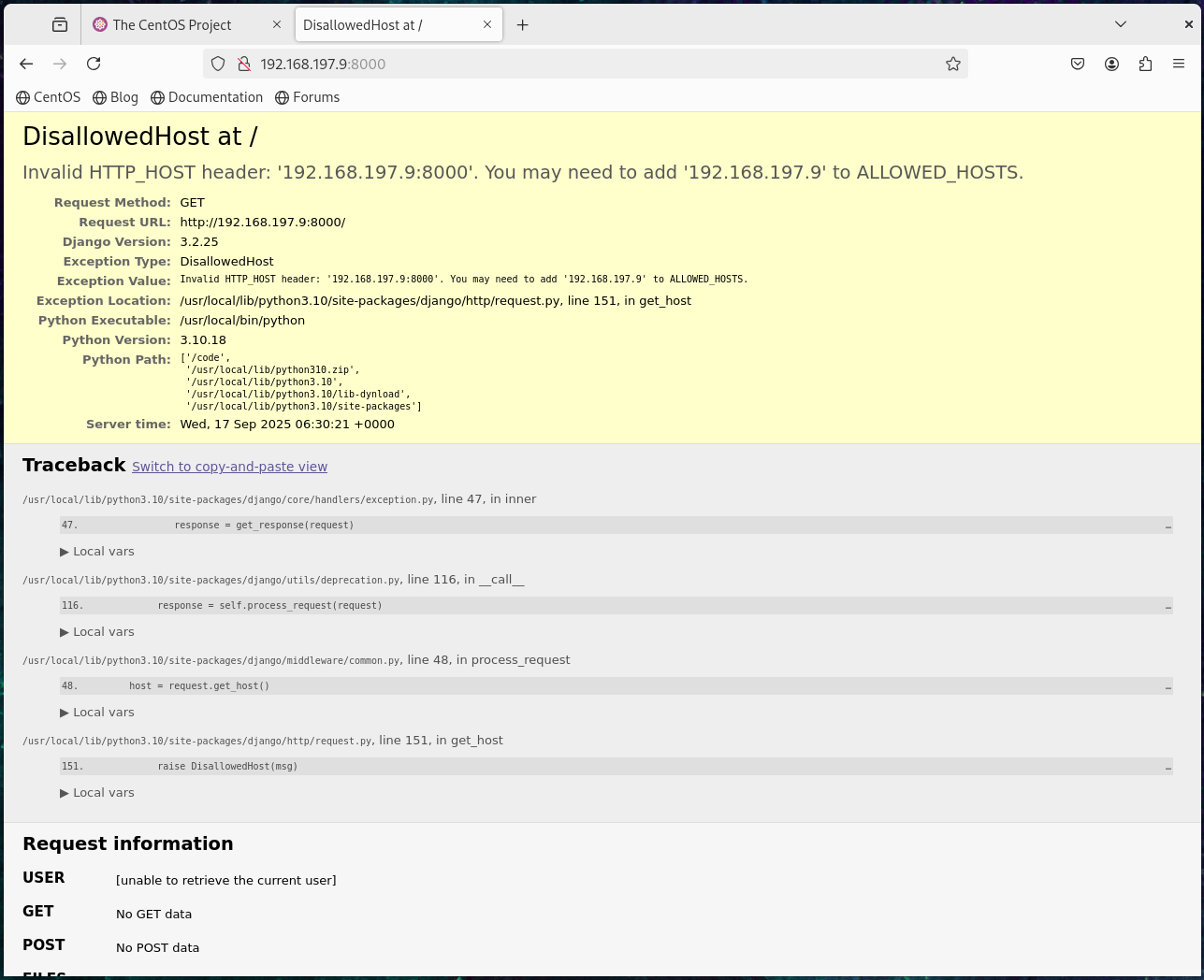
Step 4:
方法 1:停止并清除容器和网络(保留数据卷,推荐)
此方法会停止并删除服务相关的容器和网络,但保留数据库数据卷(postgres_data),下次启动服务时数据不会丢失:
[root@host1 django-pg]# docker compose down
[+] Running 3/3
 ✔ Container django-pg-web-1  Removed                                                           0.4s
 ✔ Container postgres_db      Removed                                                           0.2s
 ✔ Network django-pg_default  Removed                                                           0.2s
执行后效果:
- 停止并删除
postgres_db和django-pg-web-1容器; - 删除服务创建的默认网络;
- 数据卷
postgres_data保留(数据库数据不会丢失)。
方法 2:彻底清除(包括数据卷,数据会丢失)
若需要完全清理(比如测试环境,不需要保留数据),可添加 -v 参数删除数据卷:
# 停止并删除容器、网络、数据卷(数据会永久丢失!)
docker compose down -v
执行后效果:
- 除了方法 1 的操作外,还会删除
postgres_data数据卷; - 下次启动服务时,数据库会重新初始化(之前的数据全部丢失)。
验证清除结果
执行以下命令确认服务相关资源已被清除:
# 查看容器(应无 django-pg 相关容器)
docker ps -a | grep django-pg

# 查看网络(应无 django-pg_default 网络)
docker network ls | grep django-pg

# 查看数据卷(若用了 -v,应无 django-pg_postgres_data 卷)
docker volume ls | grep django-pg
若以上命令均无输出,说明清除成功。
说明
- 推荐日常开发使用方法 1(保留数据卷),避免重复创建数据;
- 仅在确认数据无用时使用方法 2(加
-v),操作前务必备份重要数据。

开源鸿蒙跨平台开发社区汇聚开发者与厂商,共建“一次开发,多端部署”的开源生态,致力于降低跨端开发门槛,推动万物智联创新。
更多推荐



 23
23 0
0- 0


 已为社区贡献3条内容

所有评论(0)