将Docker-Compose文件转换为 Kubernetes资源
一、概述
1.1 kompose概述
kompose 是一个将 Docker Compose 文件转换为 Kubernetes 或 OpenShift 可用的资源清单工具。
1.2 kompose架构
kompose 的架构分为三个主要阶段:
- Loader:读取输入文件(如 Docker Compose v1/v2),将其转换为内部表示(KomposeObject)。
- Transformer:将 KomposeObject 转换为目标格式(如 Kubernetes 或 OpenShift 的资源对象)。
- Outputter:将转换后的资源输出或部署到目标平台
架构图如下
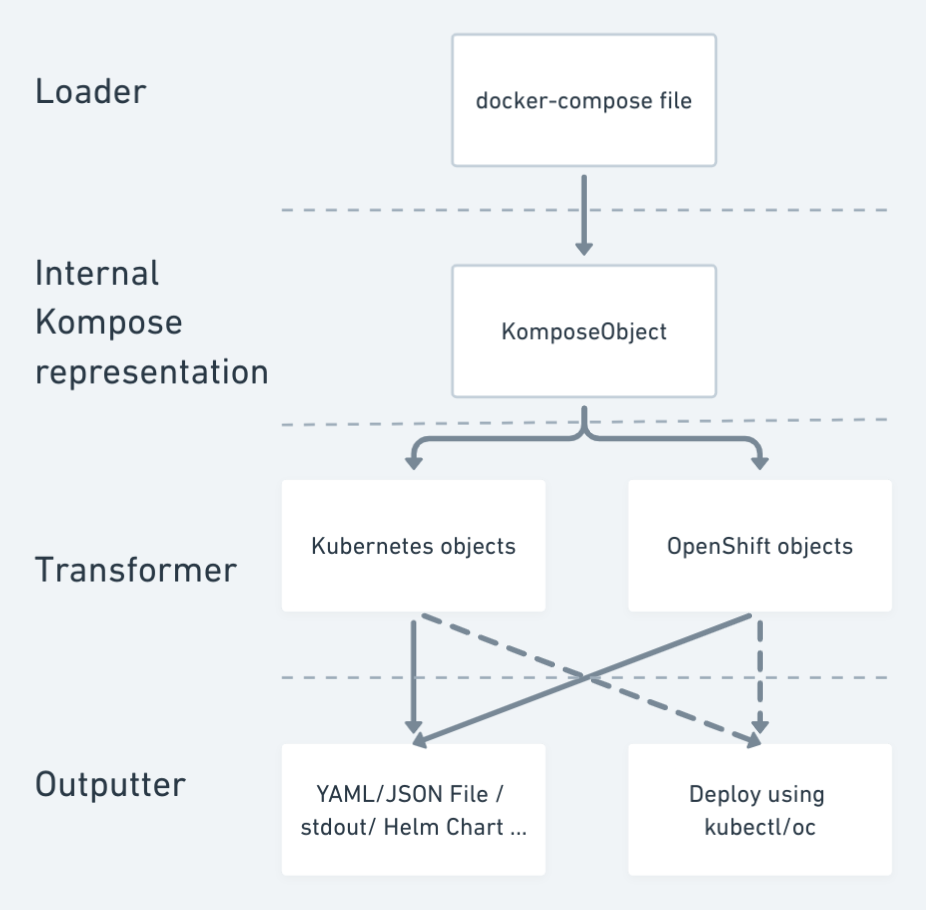
1)loader
功能
- 读取并解析输入文件(目前支持 Docker Compose v1 和 v2)。
- 转换为 kompose 内部数据结构
KomposeObject。
    type Loader interface {
        LoadFile(file string) kobject.KomposeObject
    }
2)Transformer
-
将
KomposeObject转换为目标平台的资源对象(如 Kubernetes 的 Deployment、Service 等)。 -
支持多种目标平台(如 Kubernetes 和 OpenShift)。
type Transformer interface {
    Transform(kobject.KomposeObject, kobject.ConvertOptions) []runtime.Object
}
3.Outputter
功能
- 接收
Transformer的输出(即 Kubernetes/OpenShift 对象)。 - 将其输出为 YAML 文件,或直接部署到目标平台。
KomposeObject 是从输入文件加载的所有容器的 Kompose 内部表示,用于统一不同输入格式的数据。其结构体如下
// KomposeObject holds the generic struct of Kompose transformation
type KomposeObject struct {
    ServiceConfigs map[string]ServiceConfig
}

// ServiceConfig holds the basic struct of a container
type ServiceConfig struct {
    ContainerName string
    Image         string
    Environment   []EnvVar
    Port          []Ports
    Command       []string
    WorkingDir    string
    Args          []string
    Volumes       []string
    Network       []string
    Labels        map[string]string
    Annotations   map[string]string
    CPUSet        string
    CPUShares     int64
    CPUQuota      int64
    CapAdd        []string
    CapDrop       []string
    Entrypoint    []string
    Expose        []string
    Privileged    bool
    Restart       string
    User          string
}
从这里可以看出,kompose 的设计是一个典型的 管道-过滤器(Pipe-Filter)架构,这使得 kompose 不仅是一个 Docker Compose 到 Kubernetes 的转换工具,也可以作为多格式、多平台的容器编排转换器来使用。
输入任意格式 → 统一内部表示 → 转换为任意目标平台 → 输出任意格式
1.3 转换规则
kompose使用compose-go用来解析compose中的配置项如何映射到 Kubernetes 或 OpenShift 的资源和配置, Compose 文件与 Kubernetes / OpenShift 资源之间的转换对照表如下
1)构建与部署相关
| 配置项 | 说明 | Kubernetes / OpenShift 映射 |
|---|---|---|
build | 构建镜像的上下文、Dockerfile 等 | Kubernetes 本身不直接支持构建镜像,需要结合 CI/CD 工具(如 Tekton、Jenkins)或 OpenShift 的 BuildConfig |
build: context | 构建镜像的上下文路径 | 无直接映射 |
build: dockerfile | 指定 Dockerfile 路径 | 无直接映射 |
build: args | 构建参数 | 无直接映射 |
deploy | 部署相关的配置(如副本数、更新策略等) | 映射到 Deployment 或 DeploymentConfig 的字段 |
deploy: replicas | 副本数 | 映射到 Deployment.Spec.Replicas |
deploy: update_config | 更新策略 | 映射到 Deployment.Spec.Strategy |
deploy: resources | 资源限制(CPU、内存) | 映射到 Container.Resources.Limits |
deploy: restart_policy | 重启策略 | 映射到 Pod 的重启策略 |
restart | 容器重启策略 | 无直接映射(Kubernetes 使用 Pod 级别重启策略) |
2)容器配置
| 配置项 | 说明 | Kubernetes / OpenShift 映射 |
|---|---|---|
command | 容器启动命令 | 映射到 Container.Args |
entrypoint | 容器入口点 | 映射到 Container.Command |
environment | 环境变量 | 映射到 Container.Env |
image | 容器镜像 | 映射到 Deployment.Spec.Containers.Image |
cap_add / cap_drop | 添加/删除容器能力 | 映射到 Container.SecurityContext.Capabilities.Add 或 Drop |
user | 运行容器的用户 | 映射到 Container.SecurityContext.RunAsUser |
hostname | 容器主机名 | 映射到 Pod.Spec.Hostname |
tmpfs | 临时文件系统 | 映射到 Container.Volumes.EmptyDir(内存中) |
pid | 是否共享主机 PID | 映射到 HostPID 字段 |
stop_grace_period | 停止容器的优雅等待时间 | 映射到 TerminationGracePeriodSeconds |
volumes | 挂载卷 | 映射到 PersistentVolumeClaim(持久卷) |
3)网络与服务发现
| 配置项 | 说明 | Kubernetes / OpenShift 映射 |
|---|---|---|
ports | 暴露端口 | 映射到 Service.Spec.Ports |
expose | 暴露服务 | 映射到 Service.Spec.Ports |
network_mode | 网络模式 | Kubernetes 使用自己的网络模型,无直接映射 |
networks | 自定义网络 | Kubernetes 使用 Service 和 NetworkPolicy 实现 |
domainname | 域名 | 映射到 SubDomain |
dns / dns_search | DNS 配置 | Kubernetes 使用内置的 DNS 服务(如 CoreDNS) |
- 安全与权限
| 配置项 | 说明 | Kubernetes / OpenShift 映射 |
|---|---|---|
security_opt | 安全选项 | Kubernetes 使用自己的安全策略 |
isolation | 容器隔离级别 | Kubernetes 不支持(主要适用于 Windows) |
secrets | 密钥管理 | 映射到 Secret 资源 |
configs | 配置文件管理 | 映射到 ConfigMap 资源 |
- 依赖与扩展
| 配置项 | 说明 | Kubernetes / OpenShift 映射 |
|---|---|---|
depends_on | 容器依赖关系 | Kubernetes 不支持(需使用 InitContainer 或 Job) |
extends | 继承配置 | 无直接映射(需手动合并配置) |
external_links | 外部链接 | Kubernetes 使用扁平结构,无直接映射 |
links | 容器间链接 | Kubernetes 使用 Service 和 DNS 实现 |
- 日志与监控
| 配置项 | 说明 | Kubernetes / OpenShift 映射 |
|---|---|---|
logging | 日志配置 | Kubernetes 使用节点级日志收集(如 Fluentd、ELK) |
healthcheck | 健康检查 | 映射到 ReadinessProbe 和 LivenessProbe |
- 其他
| 配置项 | 说明 | Kubernetes / OpenShift 映射 |
|---|---|---|
container_name | 容器名称 | 映射到 Metadata.Name 和 Deployment.Spec.Containers.Name |
labels | 标签 | 映射到 Metadata.Annotations |
devices | 设备挂载 | Kubernetes 不支持(需使用特权容器) |
cgroup_parent | Cgroup 父级 | Kubernetes 不支持 |
二、部署
2.1 部署kompose
我们有很多种方式安装 Kompose。首选方式是从最新的 GitHub 发布页面下载二进制文件。
curl -L https://github.com/kubernetes/kompose/releases/download/v1.34.0/kompose-linux-amd64 -o kompose
chmod +x kompose
sudo mv ./kompose /usr/local/bin/kompose
2.2 kompose转换示例
1)准备一个docker-compose文件如下
services:
  gitlab:
    image: gitlab/gitlab-ee:16.1.1-ee.0
    container_name: gitlab
    restart: always
    hostname: 'gitlab.example.com'
    environment:
      GITLAB_OMNIBUS_CONFIG: |
        # Add any other gitlab.rb configuration here, each on its own line
        external_url 'http://gitlab.example.com'
    ports:
      - '30880:80'
      - '30443:443'
      - '3022:22'
    volumes:
      - '/gitlab/config:/etc/gitlab'
      - '/gitlab/logs:/var/log/gitlab'
      - '/gitlab/data:/var/opt/gitlab'
    shm_size: '256m'
2)使用kompose转换
root@ubuntu-server:~/kompose# kompose convert
INFO Kubernetes file "gitlab-service.yaml" created
INFO Kubernetes file "gitlab-deployment.yaml" created
INFO Kubernetes file "gitlab-claim0-persistentvolumeclaim.yaml" created
INFO Kubernetes file "gitlab-claim1-persistentvolumeclaim.yaml" created
INFO Kubernetes file "gitlab-claim2-persistentvolumeclaim.yaml" created
这边能看到 kompose针对docker-compose中的一个service会创建对应的deployment和services,如果有volumes卷的会,会生成对应的pvc
2.3 kompose使用
2.3.1基本命令
1)基本命令使用
# Kubernetes 转换
kompose --file compose.yaml convert

# OpenShift 转换
kompose --provider openshift --file compose.yaml convert
多文件合并转换:
# 使用多个 -f 参数
kompose -f compose.yaml -f compose.prod.yaml convert

# 使用环境变量 COMPOSE_FILE
COMPOSE_FILE="compose.yaml:alternative-compose.yaml" kompose convert
⚠️ 注意:多个文件合并时,后一个文件的配置会覆盖前面相同的配置。
2)Kompose 支持通过命令行参数修改生成的控制器类型。
支持的控制器类型:
deployment(默认)daemonsetreplicationcontrollerstatefulset
修改控制器类型
kompose convert --controller daemonset
2.3.2Labels标签配置
Kompose 支持在 docker-compose.yaml 文件中使用特定标签来定制 Kubernetes 资源行为,无需手动修改生成的 YAML 文件。
常用标签分类:
控制器类型
| 标签 | 示例 | 说明 |
|---|---|---|
kompose.controller.type | deployment | 设置控制器类型 |
kompose.controller.port.expose | true | 暴露为 HostPort(不推荐) |
定时任务(CronJob)
| 标签 | 示例 | 说明 |
|---|---|---|
kompose.cronjob.schedule | "1 * * * *" | 定时任务执行周期 |
kompose.cronjob.backoff_limit | 6 | 最大失败重试次数 |
kompose.cronjob.concurrency_policy | Forbid | 并发策略(Forbid、Allow、Never) |
自动扩缩容(HPA)
| 标签 | 示例 | 说明 |
|---|---|---|
kompose.hpa.cpu | 80% | CPU 使用率触发自动扩缩容 |
kompose.hpa.memory | 512Mi | 内存使用量触发扩缩容 |
kompose.hpa.replicas.min/max | 2 / 10 | 设置最小/最大副本数 |
初始化容器(InitContainer)
| 标签 | 示例 | 说明 |
|---|---|---|
kompose.init.containers.name | init-db | 初始化容器名称 |
kompose.init.containers.image | busybox | 初始化容器镜像 |
kompose.init.containers.command | ["sh", "-c", "echo init"] | 初始化命令 |
健康检查(Liveness & Readiness Probes)
| 标签 | 示例 | 说明 |
|---|---|---|
kompose.service.healthcheck.liveness.http_get_path | /health | Liveness 探针路径 |
kompose.service.healthcheck.readiness.disable | true | 禁用 Readiness 探针 |
kompose.service.healthcheck.readiness.interval | 10s | Readiness 检查间隔 |
kompose.service.healthcheck.readiness.timeout | 5s | Readiness 超时时间 |
服务暴露(Service / Ingress / Route)
| 标签 | 示例 | 说明 |
|---|---|---|
kompose.service.expose | example.com | 暴露为 Ingress 或 Route |
kompose.service.expose.tls-secret | my-tls-secret | TLS 证书 Secret |
kompose.service.expose.ingress-class-name | nginx | 指定 Ingress 控制器类 |
存储卷配置
| 标签 | 示例 | 说明 |
|---|---|---|
kompose.volume.size | 1Gi | 卷大小 |
kompose.volume.storage-class-name | standard | 存储类名称 |
kompose.volume.type | persistentVolumeClaim | 卷类型(如 configMap、emptyDir) |
安全相关
| 标签 | 示例 | 说明 |
|---|---|---|
kompose.security-context.fsgroup | 2000 | 设置卷的文件系统组 ID |
kompose.image-pull-policy | IfNotPresent | 镜像拉取策略 |
kompose.image-pull-secret | myregistrykey | 私有镜像仓库 Secret |
其他功能
| 标签 | 示例 | 说明 |
|---|---|---|
kompose.service.group | sidecar | 将多个服务组合为一个 Pod(Sidecar 模式) |
kompose.service.type | nodeport | 设置 Service 类型(ClusterIP、NodePort、LoadBalancer) |
kompose.service.nodeport.port | 30000 | 设置 NodePort 端口号 |
kompose.service.external-traffic-policy | local | 外部流量策略 |
重启策略(Restart Policy)
Compose restart 值 | 生成对象 | Pod restartPolicy |
|---|---|---|
""(空) | 控制器(Deployment) | Always |
always | 控制器 | Always |
unless-stopped | 控制器 | Always |
on-failure | Pod / CronJob | OnFailure |
no | Pod / CronJob | Never |
示例
root@ubuntu-server:~/kompose# cat docker-compose.yml
services:
  gitlab:
    image: gitlab/gitlab-ee:16.1.1-ee.0
    container_name: gitlab
    restart: always
    hostname: 'gitlab.example.com'
    environment:
      GITLAB_OMNIBUS_CONFIG: |
        # Add any other gitlab.rb configuration here, each on its own line
        external_url 'http://gitlab.example.com'
    ports:
      - '30880:80'
      - '30443:443'
      - '3022:22'
    volumes:
      - '/gitlab/config:/etc/gitlab'
      - '/gitlab/logs:/var/log/gitlab'
      - '/gitlab/data:/var/opt/gitlab'
    shm_size: '256m'
    labels:
      kompose.service.type: nodeport
      kompose.service.nodeport.port: 30880
      kompose.controller.type: statefulset
      kompose.volume.size: 10Gi
      kompose.volume.storage-class-name: nfs-client
      kompose.image-pull-policy: IfNotPresent

root@ubuntu-server:~/kompose# kompose convert
FATA cannot set kompose.service.nodeport.port when service has multiple ports
PS: 当服务有多个端口的时候,无法时候nodeport指定端口

去除nodeport端口再次执行
root@ubuntu-server:~/kompose# kompose convert
INFO Kubernetes file "gitlab-service.yaml" created
INFO Kubernetes file "gitlab-statefulset.yaml" created
INFO Kubernetes file "gitlab-claim0-persistentvolumeclaim.yaml" created
INFO Kubernetes file "gitlab-claim1-persistentvolumeclaim.yaml" created
INFO Kubernetes file "gitlab-claim2-persistentvolumeclaim.yaml" created
查看labels配置是否生效
查看labels是否生效
pvc相关
root@ubuntu-server:~/kompose# cat gitlab-claim1-persistentvolumeclaim.yaml
apiVersion: v1
kind: PersistentVolumeClaim
metadata:
  labels:
    io.kompose.service: gitlab-claim1
  name: gitlab-claim1
spec:
  accessModes:
    - ReadWriteOnce
  resources:
    requests:
      storage: 10Gi
  storageClassName: nfs-client


svc相关
root@ubuntu-server:~/kompose# cat gitlab-service.yaml
apiVersion: v1
kind: Service
metadata:
  annotations:
    kompose.cmd: kompose convert
    kompose.controller.type: statefulset
    kompose.image-pull-policy: IfNotPresent
    kompose.service.type: nodeport
    kompose.version: 1.34.0 (cbf2835db)
    kompose.volume.size: 10Gi
    kompose.volume.storage-class-name: nfs-client
  labels:
    io.kompose.service: gitlab
  name: gitlab
spec:
  ports:
    - name: "30880"
      port: 30880
      targetPort: 80
    - name: "30443"
      port: 30443
      targetPort: 443
    - name: "3022"
      port: 3022
      targetPort: 22
  selector:
    io.kompose.service: gitlab
  type: NodePort

控制器相关
root@ubuntu-server:~/kompose# cat gitlab-statefulset.yaml
apiVersion: apps/v1
kind: StatefulSet
metadata:
  annotations:
    kompose.cmd: kompose convert
    kompose.controller.type: statefulset
    kompose.image-pull-policy: IfNotPresent
    kompose.service.type: nodeport
    kompose.version: 1.34.0 (cbf2835db)
    kompose.volume.size: 10Gi
    kompose.volume.storage-class-name: nfs-client
  labels:
    io.kompose.service: gitlab
  name: gitlab
spec:
  replicas: 1
  selector:
    matchLabels:
      io.kompose.service: gitlab
  serviceName: gitlab
  template:
    metadata:
      labels:
        io.kompose.service: gitlab
    spec:
      containers:
        - env:
            - name: GITLAB_OMNIBUS_CONFIG
              value: |
                # Add any other gitlab.rb configuration here, each on its own line
                external_url 'http://gitlab.example.com'
          image: gitlab/gitlab-ee:16.1.1-ee.0
          imagePullPolicy: IfNotPresent
          name: gitlab
          ports:
            - containerPort: 80
              protocol: TCP
            - containerPort: 443
              protocol: TCP
            - containerPort: 22
              protocol: TCP
          volumeMounts:
            - mountPath: /etc/gitlab
              name: gitlab-claim0
            - mountPath: /var/log/gitlab
              name: gitlab-claim1
            - mountPath: /var/opt/gitlab
              name: gitlab-claim2
      hostname: gitlab.example.com
      restartPolicy: Always
      volumes:
        - name: gitlab-claim0
          persistentVolumeClaim:
            claimName: gitlab-claim0
        - name: gitlab-claim1
          persistentVolumeClaim:
            claimName: gitlab-claim1
        - name: gitlab-claim2
          persistentVolumeClaim:
            claimName: gitlab-claim2
  volumeClaimTemplates:
    - metadata:
        labels:
          io.kompose.service: gitlab-claim0
        name: gitlab-claim0
      spec:
        accessModes:
          - ReadWriteOnce
        resources:
          requests:
            storage: 10Gi
        storageClassName: nfs-client
    - metadata:
        labels:
          io.kompose.service: gitlab-claim1
        name: gitlab-claim1
      spec:
        accessModes:
          - ReadWriteOnce
        resources:
          requests:
            storage: 10Gi
        storageClassName: nfs-client
    - metadata:
        labels:
          io.kompose.service: gitlab-claim2
        name: gitlab-claim2
      spec:
        accessModes:
          - ReadWriteOnce
        resources:
          requests:
            storage: 10Gi
        storageClassName: nfs-client
2.3.3构建与推送镜像
1)构建镜像
如果 docker-compose.yaml 中包含 build 配置,可以使用 --build 触发构建。
kompose --file docker-compose.yaml convert --build
2)推送镜像:
使用 --push-image=true 可将构建的镜像推送到 Docker Hub(默认):
kompose --file docker-compose.yaml convert --build --push-image
3)自定义镜像仓库:
使用 --push-image-registry 指定推送的私有仓库地址:
kompose --file docker-compose.yaml convert --build --push-image --push-image-registry myregistry.com
4)镜像认证:
Kompose 使用 Docker 的认证配置文件:
- Linux:
~/.docker/config.json
2.3.4注意事项
卷挂载策略:
- 如果服务定义了卷,则 Kubernetes 使用
Recreate策略代替默认的RollingUpdate,以避免多个 Pod 同时访问卷。
服务命名规则:
- 如果服务名包含
_或.,Kompose 会自动替换为-(如web_service→web-service)。 - 这可能导致某些 Compose 文件逻辑出错,请注意检查。

开源鸿蒙跨平台开发社区汇聚开发者与厂商,共建“一次开发,多端部署”的开源生态,致力于降低跨端开发门槛,推动万物智联创新。
更多推荐



 37
37 0
0- 0


 已为社区贡献1条内容

所有评论(0)