react-native记录一个卡片层叠式轮播效果/图片不加载的解决方案
·
react-native记录一个卡片层叠式轮播效果
顺便说一下大量图片不加载的情况,最后面描述。
效果图:
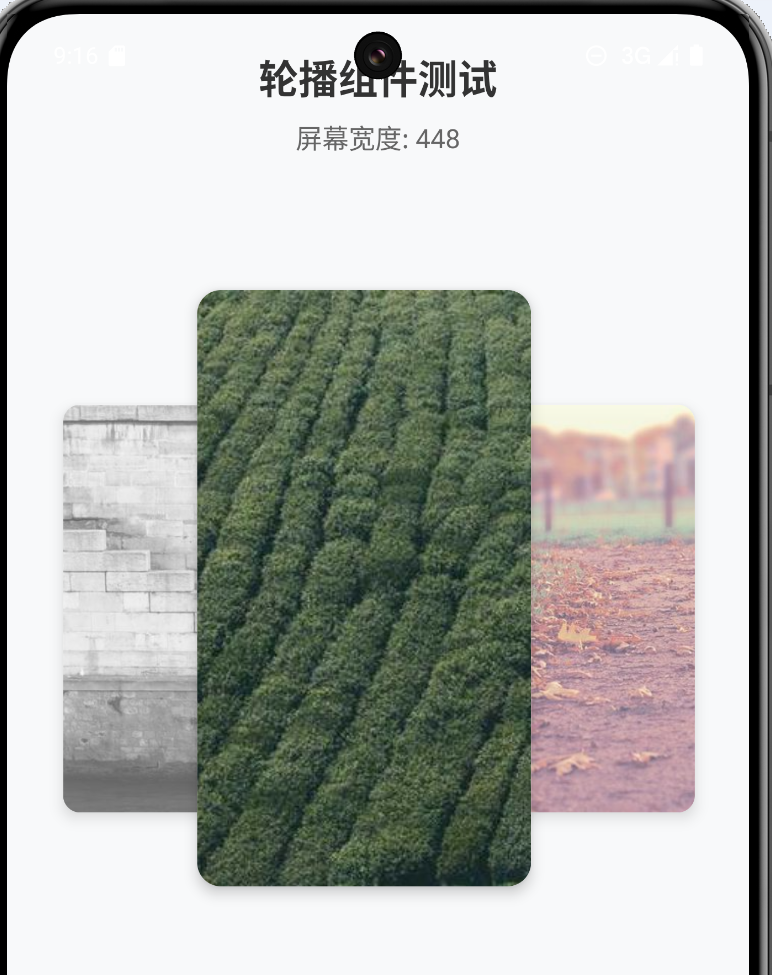
网上找了好些插件,有部分代码,但是没有效果图,我这里记录一下这种样式的效果
1、安装插件
npm install react-native-reanimated-carousel
npm install react-native-reanimated
2、参数说明
react-native-reanimated-carousel的API记录-CSDN博客
3、插件代码
import React from 'react';
import { View, Text, StyleSheet, Dimensions, Image } from 'react-native';
import Carousel from 'react-native-reanimated-carousel';
import Animated, {
interpolate,
useAnimatedStyle,
Extrapolate
} from 'react-native-reanimated';
type CardItem = {
id: string;
title: string;
description: string;
imageUrl: string;
};
type CardCarouselProps = {
carouselWidth: number; // 轮播图宽度
autoPlay?: boolean; // 自动播放
loop?: boolean; // 循环播放
autoPlayInterval?: number; // 自动播放间隔时间
height?: number; // 轮播图高度
};
const { width: screenWidth } = Dimensions.get('window');
const CardCarousel: React.FC<CardCarouselProps> = ({
carouselWidth,
autoPlay = true, // 默认值
loop = true, // 默认值
autoPlayInterval = 3000, // 默认值
// height = 300, // 默认值
mode = 'parallax',// 滑动模式
modeConfig={
parallaxScrollingScale: 0.9,// 基础缩放
parallaxScrollingOffset: 280,// 水平偏移量
// parallaxAdjacentItemScale: 0.2// 相邻卡片额外缩放
},
}) => {
const data: CardItem[] = [
{
id: '1',
title: '夏日特惠',
description: '限时抢购5折起',
imageUrl: 'https://picsum.photos/600/400?summer'
},
{
id: '2',
title: '新品上市',
description: '最新科技产品',
imageUrl: 'https://picsum.photos/600/400?tech'
},
{
id: '3',
title: '会员专享',
description: '专属优惠福利',
imageUrl: 'https://picsum.photos/600/400?vip'
}
];
const renderItem: React.FC<{
item: CardItem;
index: number;
animationValue: Animated.SharedValue<number>;
}> = ({ item, index, animationValue }) => {
const cardStyle = useAnimatedStyle(() => {
const scale = interpolate(
animationValue.value,
[-1, 0, 1],
[0.8, 1, 0.8], // 中间卡片最大,两侧卡片较小
Extrapolate.CLAMP
);
const opacity = interpolate(
animationValue.value,
[-1, 0, 1],
[0.6, 1, 0.6], // 中间卡片完全不透明,两侧卡片半透明
Extrapolate.CLAMP
);
// 堆叠效果的位移
const translateX = interpolate(
animationValue.value,
[-1, 0, 1],
[120, 80, 105], // 两侧卡片向中间偏移
Extrapolate.CLAMP
);
// zIndex 确保中间卡片在最上层
const zIndex = interpolate(
animationValue.value,
[-1, 0, 1],
[1, 3, 1], // 中间卡片 zIndex 最高
Extrapolate.CLAMP
);
// 动态调整卡片宽度和高度
const cardWidth = interpolate(
animationValue.value,
[-1, 0, 1],
[screenWidth * 0.5, screenWidth * 0.5, screenWidth * 0.5], // 中间卡片更宽
Extrapolate.CLAMP
);
const cardHeight = interpolate(
animationValue.value,
[-1, 0, 1],
[380, 400, 380], // 中间卡片更高
Extrapolate.CLAMP
);
return {
// transform: [{ scale }],
// opacity
transform: [{ scale }, { translateX }],
opacity,
zIndex: zIndex as any,
justifyContent: 'center', // 确保图片在父容器中垂直居中
alignItems: 'center', // 确保图片在父容器中水平居中
width: cardWidth,
height: cardHeight
};
}, [animationValue]);
return (
<Animated.View style={[styles.cardContainer, cardStyle]}>
<Image
source={{ uri: item.imageUrl }}
style={styles.cardImage}
resizeMode="cover"
/>
{/* <View style={styles.cardContent}>
<Text style={styles.cardTitle}>{item.title}</Text>
<Text style={styles.cardDescription}>{item.description}</Text>
</View> */}
</Animated.View>
);
};
return (
<View style={styles.container}>
<Carousel
width={screenWidth*0.9}
data={data}
renderItem={renderItem}
autoPlay={autoPlay}
autoPlayInterval={autoPlayInterval}
loop={loop}
mode={mode}
modeConfig={modeConfig}
/>
</View>
);
};
const styles = StyleSheet.create({
container: {
flex: 1,
justifyContent: 'center',
alignItems: 'center',
marginVertical: 20
},
cardContainer: {
// width: '100%',
// height: '100%',
borderRadius: 16,
overflow: 'hidden',
backgroundColor: '#fff',
shadowColor: '#000',
shadowOffset: { width: 0, height: 4 },
shadowOpacity: 0.2,
shadowRadius: 8,
elevation: 5,
justifyContent: 'center', // 确保卡片内容垂直居中
alignItems: 'center' // 确保卡片内容水平居中
},
cardImage: {
width: '100%',
height: '100%'
},
cardContent: {
padding: 16
},
cardTitle: {
fontSize: 20,
fontWeight: 'bold',
marginBottom: 8
},
cardDescription: {
fontSize: 14,
color: '#666'
}
});
export default CardCarousel;
网络图片不加载出来,解决方案:
在图片里面加入resizeMethod="resize"(只能安卓使用)
 <Image
      source={{ uri: item.imageUrl}}
       resizeMode="contain"
       resizeMethod="resize"
       style={styles.cardImage}
   />
参考:https://blog.csdn.net/TanHao8/article/details/104007386


开源鸿蒙跨平台开发社区汇聚开发者与厂商,共建“一次开发,多端部署”的开源生态,致力于降低跨端开发门槛,推动万物智联创新。
更多推荐
 17
17 0
0- 0


 已为社区贡献3条内容

所有评论(0)