Flutter 三方库「flutter_platform_alert」的鸿蒙化适配指南
开发工具: 华为云码道
flutter_platform_alert 将系统原生提示框和提示音能力封装为 Flutter 插件,应用可以显示标准提示框、自定义按钮提示框,并播放提示音。本文以 flutter_platform_alert 0.9.1 为例,介绍源码准备、OHOS 工程配置、ArkTS 实现和 example 真机运行。
插件目前支持 android、ios、macos、windows、linux 和 ohos 平台,源码位于 AtomGit 配套仓库。文中的代码以提交 9f5998b02b7978d7b1ca063304a6e3096de619ca 为参考。
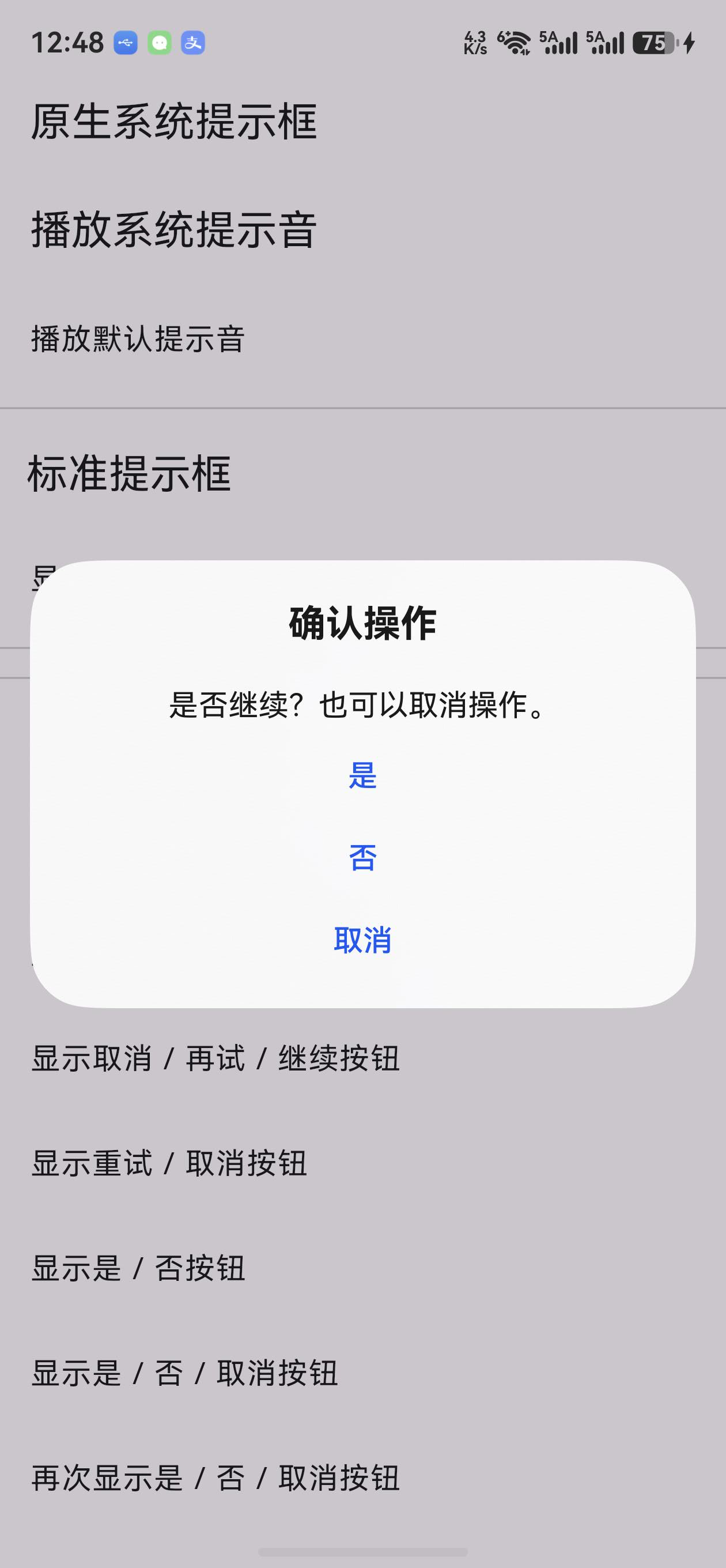
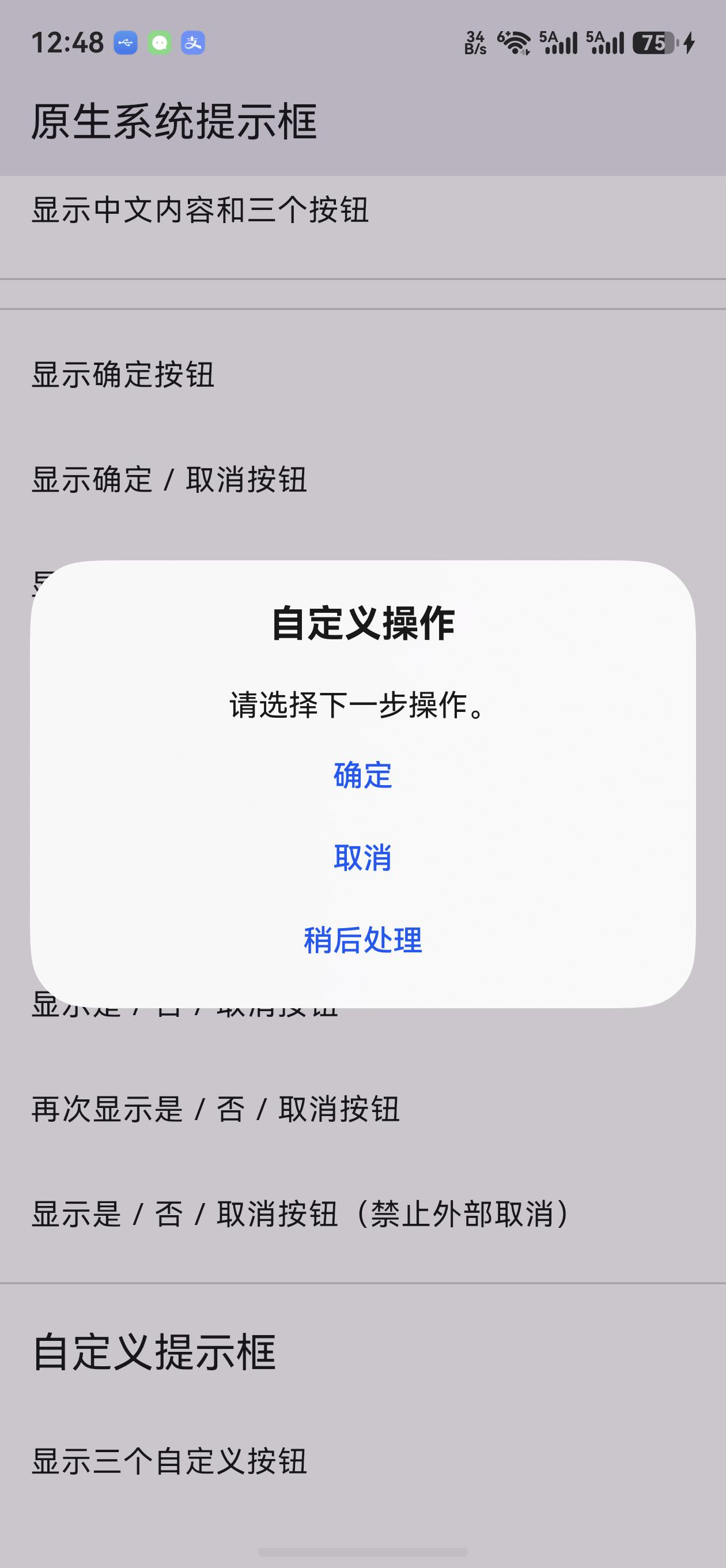
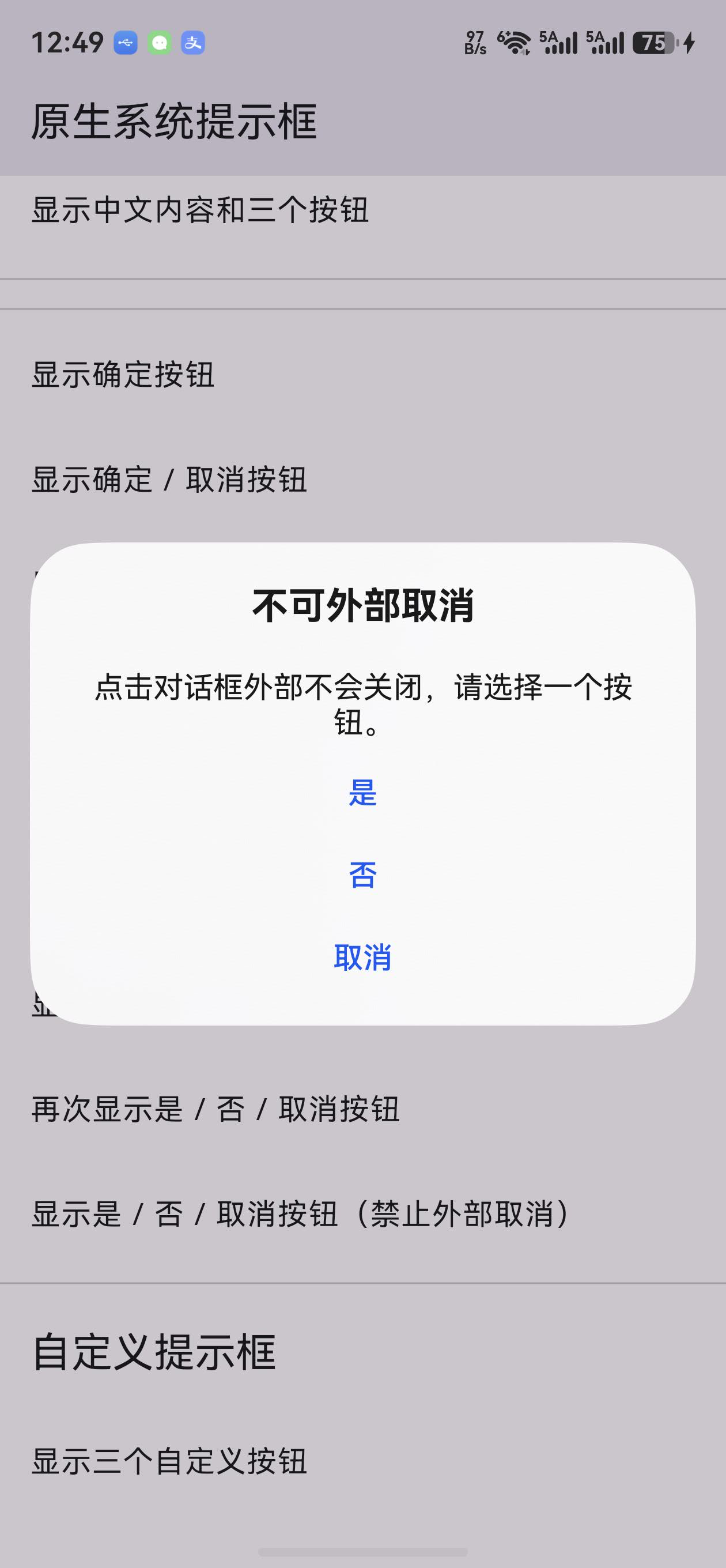
截图标注:操作步骤与截图命令真机运行图(从左到右):标准提示框/自定义按钮/禁止外部取消。采集于 2026-09-09,设备 ALN-AL00 / HUAWEI Mate 60 Pro,系统 OpenHarmony-6.1.1.120(API 24);使用本地源码构建并安装的签名 Release HAP。
第三张截图采集前已点击对话框外部,确认提示框仍显示;随后点击框内“取消”正常关闭。提示音播放日志与按钮返回结果见第 8.5 节。
执行目录:本文 Markdown 所在目录。先用 hdc list targets 获取设备 ID,将下列 <device-id> 替换为实际值。截图来自仓库完整 Demo,保留原始真机画面;本机 snapshot_display 使用 .jpeg 后缀。
mkdir -p blog-assets/flutter_platform_alert
标准提示框: 点击“显示是/否/取消按钮”,保持对话框打开后执行:
hdc -t <device-id> shell snapshot_display -f /data/local/tmp/alert-standard.jpeg
hdc -t <device-id> file recv /data/local/tmp/alert-standard.jpeg ./blog-assets/flutter_platform_alert/alert-standard.jpeg
自定义按钮: 关闭上一个对话框,向上滑动列表,点击“显示三个自定义按钮”,保持对话框打开后执行:
hdc -t <device-id> shell snapshot_display -f /data/local/tmp/alert-custom.jpeg
hdc -t <device-id> file recv /data/local/tmp/alert-custom.jpeg ./blog-assets/flutter_platform_alert/alert-custom.jpeg
禁止外部取消: 点击“显示是/否/取消按钮(禁止外部取消)”,点击遮罩后确认对话框仍显示,再执行:
hdc -t <device-id> shell snapshot_display -f /data/local/tmp/alert-no-outside-cancel.jpeg
hdc -t <device-id> file recv /data/local/tmp/alert-no-outside-cancel.jpeg ./blog-assets/flutter_platform_alert/alert-no-outside-cancel.jpeg
三张图片均为 1260 × 2720 原始截图,标题、正文和按钮完整保留。静态图片展示提示框外观;取消行为通过实际点击及日志核验,声音是否可听见不能由截图判断。
一、插件简介与适配目标
原生提示框是 HarmonyOS ArkUI 提供的界面能力。应用调用 UIContext.showAlertDialog 后,系统负责显示标题、正文和按钮,并在用户选择按钮或取消时返回结果。业务层不需要自己绘制原生对话框,也不需要自行处理各平台的按钮布局。
例如,编辑器可以在退出前询问是否保存,下载页面可以在失败后提供重试操作,业务应用也可以通过提示音提醒用户注意当前操作。
按钮结果通过异步调用获取:应用发起调用后,原生侧显示对话框,并在用户操作后将结果返回 Dart。提示音通过独立的 playAlertSound() 播放;OHOS 端优先使用系统默认通知音,未取得通知音 URI 时使用插件内置短提示音。
二、环境准备
环境搭建参考社区文档:Flutter OH 开发环境搭建,完成 Flutter OH SDK 安装、环境变量和 DevEco Studio 配置。
完成后,在宿主机终端执行以下命令,确认当前选中的是支持 OHOS 的 Flutter 工具链,并能发现目标设备:
flutter --version
flutter doctor -v
hdc list targets
工程使用的工具链和本文复现时补全的 SDK 配置如下:
| 项目 | 版本或配置 | 用途 |
|---|---|---|
| Flutter OHOS SDK | 3.44.9+ohos-0.0.1-canary1 | Flutter 编译与 OHOS 平台工具链 |
| Flutter 分支 | oh-3.44.9-dev | CPF-Flutter 对应开发分支 |
| Dart SDK | 3.12.2 | Dart 语言与包管理环境 |
| HarmonyOS 开发套件 | 7.0.0(API 26) | 开发套件版本及对应的 API 级别 |
compileSdkVersion | 26.0.0(本文显式补全) | 编译时使用的 SDK API |
targetSdkVersion | 26.0.0(本文显式补全) | 应用面向的行为版本 |
compatibleSdkVersion | 5.1.0(18) | 当前工程声明的最低兼容版本 |
| 插件版本 | 0.9.1 | pubspec.yaml 中的包版本 |
| 原生语言 | ArkTS | HarmonyOS 插件实现 |
| 插件产物 | HAR | 被应用 entry 模块依赖 |
2.1 开发套件版本与工程中的 SDK 版本配置
7.0.0(API 26) 和 26.0.0 涉及 HarmonyOS 开发套件版本(API 版本)及其底座 OpenHarmony 的版本号体系。在本文工程中,相关版本的含义与配置方式如下:
7.0.0(API 26)表示 HarmonyOS 开发套件版本为7.0.0,对应 API 26。26.0.0是本文 HarmonyOS 应用工程中compileSdkVersion和targetSdkVersion的属性值。5.1.0(18)是本文工程中compatibleSdkVersion的属性值,声明最低兼容 API 18。
参考提交的 example/ohos/build-profile.json5 声明了 compatibleSdkVersion 和 runtimeOS,未显式填写编译与目标 SDK。为按本文的 API 26 环境复现,在现有 product 中补充 compileSdkVersion 和 targetSdkVersion,对应的配置为:
{
  "name": "default",
  "compatibleSdkVersion": "5.1.0(18)",
  "compileSdkVersion": "26.0.0",
  "targetSdkVersion": "26.0.0",
  "runtimeOS": "HarmonyOS"
}
这组配置使用 API 26 SDK 编译,并以 API 26 为目标版本,最低兼容 API 18。显示原生提示框和播放提示音时,应用还需要具备可用的前台 UIAbility;声音是否可听见取决于通知音量、系统声音模式和音频路由。
三、从源码仓库开始准备适配工程
3.1 将上游源码同步到 AtomGit
适配已有第三方插件时,先从 Pub 包信息或项目 README 确认上游地址、包名、版本和许可证。同步仓库时保留源码、许可证和提交历史,方便后续跟踪上游更新。
在 AtomGit 网页的新建仓库流程中,找到从已有仓库导入的入口,填写上游 Git 地址,选择自己有写权限的组织或个人空间,设置目标仓库名称后执行导入。完成后检查目标分支、pubspec.yaml、LICENSE 和提交历史是否完整,并记录适配起点的提交号。如果上游本身托管在 AtomGit,也可以通过 Fork 获得自己的工作仓库。
上游源码地址为 zonble/flutter_platform_alert,本次适配基于 0.9.1。
flutter_platform_alert 现可从 AtomGit 获取。下面使用 AtomGit 地址拉取代码;需要提交修改时,使用自己有写权限的仓库或 Fork。
3.2 将代码拉取到宿主机
在安装了 Flutter OH 和 DevEco Studio 的开发电脑上打开终端,进入准备存放项目的目录,执行:
git clone https://atomgit.com/oh-flutter/flutter_platform_alert.git
cd flutter_platform_alert
pwd
ls
git remote -v
git status --short --branch
git rev-parse HEAD
git clone 会创建 flutter_platform_alert/ 目录;cd 后的位置就是下文所说的插件仓库根目录,这里应能看到 pubspec.yaml、lib/ 和 example/。Git 仓库名和 Dart 包名均为 flutter_platform_alert。
需要使用与本文相同的代码版本时,在没有未提交修改的仓库中切换到以下提交:
git switch --detach 9f5998b02b7978d7b1ca063304a6e3096de619ca
适配其他插件时,使用该插件对应版本的 tag 或 commit 作为分支起点。
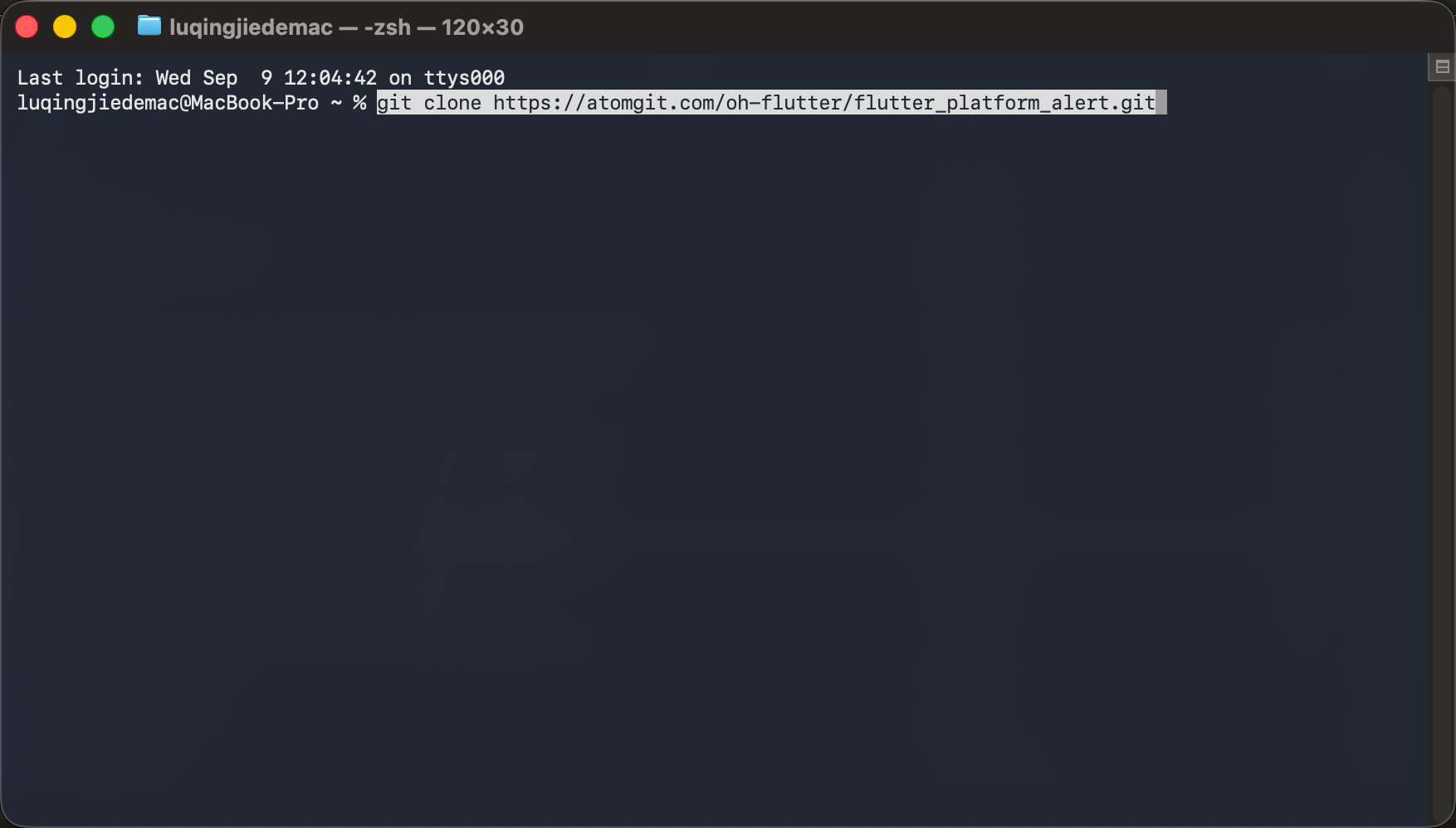
图 1:在宿主机终端输入 AtomGit 仓库拉取命令。
3.3 在仓库根目录创建适配分支
接着在 flutter_platform_alert/ 根目录创建分支。分支名统一使用 feat/ohos_库名称_版本号,库名称取 pubspec.yaml 的 name,版本号取此次适配的基线版本。本例为:
git switch -c feat/ohos_flutter_platform_alert_0.9.1
git branch --show-current
如果该分支已存在,使用 git switch feat/ohos_flutter_platform_alert_0.9.1 切换即可。
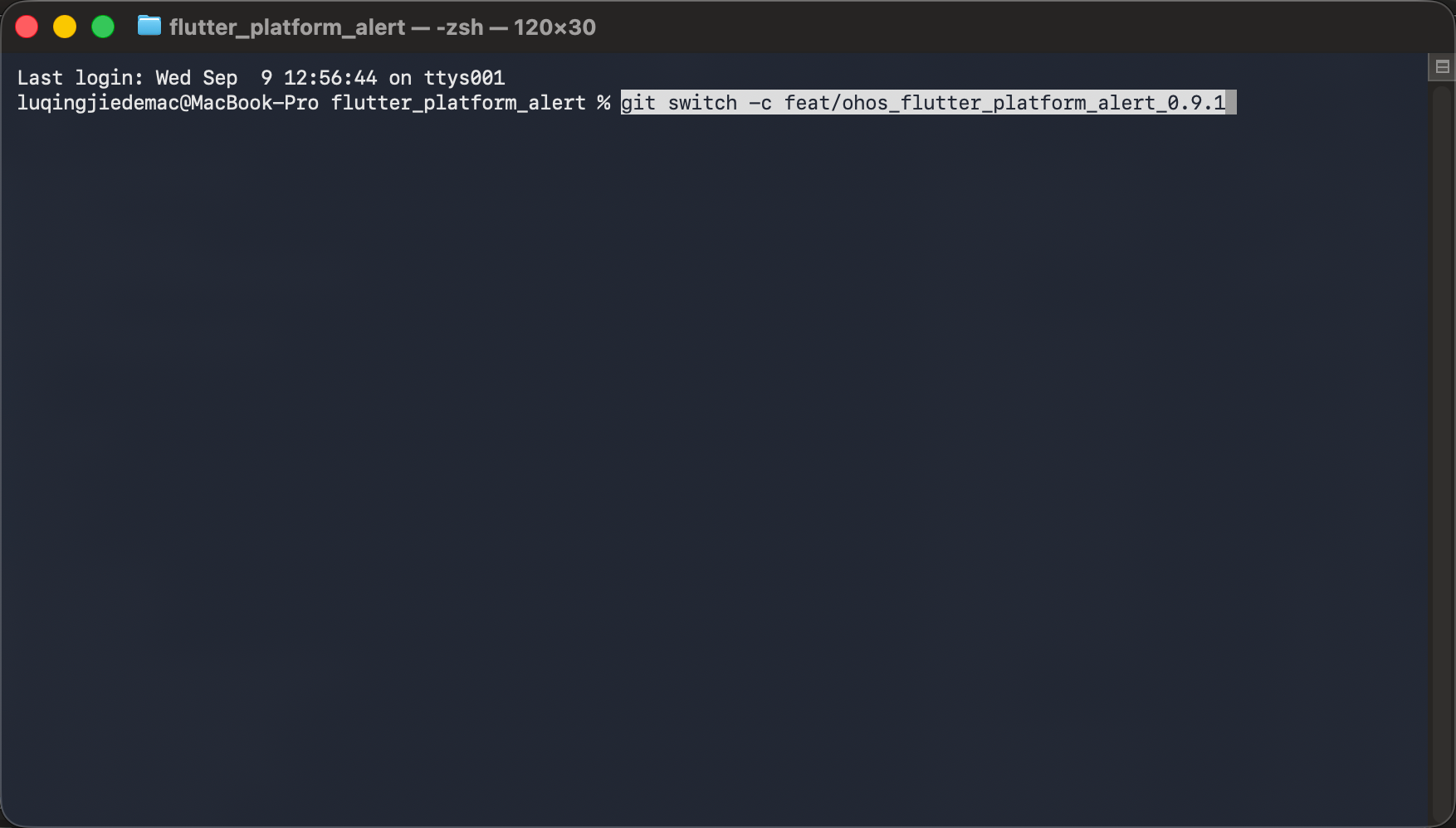
图 2:在 flutter_platform_alert 仓库根目录输入适配分支创建命令。
3.4 自动补全 OHOS 适配结构
分支创建后,仍在同一个插件根目录执行结构补全。以下命令适用于尚无 ohos/ 目录的既有 Flutter 平台插件:
flutter create --template=plugin --platforms=ohos --project-name flutter_platform_alert .
git status --short
git diff -- pubspec.yaml lib example
--template=plugin指定插件模板。--platforms=ohos指定需要补全的平台。--project-name flutter_platform_alert使用 Dart 包名,避免当前目录被重命名后生成错误的包名。- 最后的
.表示在当前插件目录补全工程,不是另建一层flutter_platform_alert/。
该命令生成 OHOS 平台脚手架,业务逻辑需要在 ArkTS 中实现。生成后通过 diff 检查 pubspec.yaml、lib/ 和 example/ 的变化,保留已有 API、其他平台注册项及依赖配置。不同 Flutter OH 版本生成的模板可能略有差异。
如果生成后 example/ohos/ 仍不存在,进入已有示例应用补全平台:
cd example
flutter create --platforms=ohos .
cd ..
配套仓库已经包含 ohos/ 和 example/ohos/,直接运行示例时可以跳过结构补全。新建插件则使用 flutter create --org com.nutpi --template=plugin --platforms=ohos flutter_platform_alert;已有插件使用上面的 . 在当前目录补全。
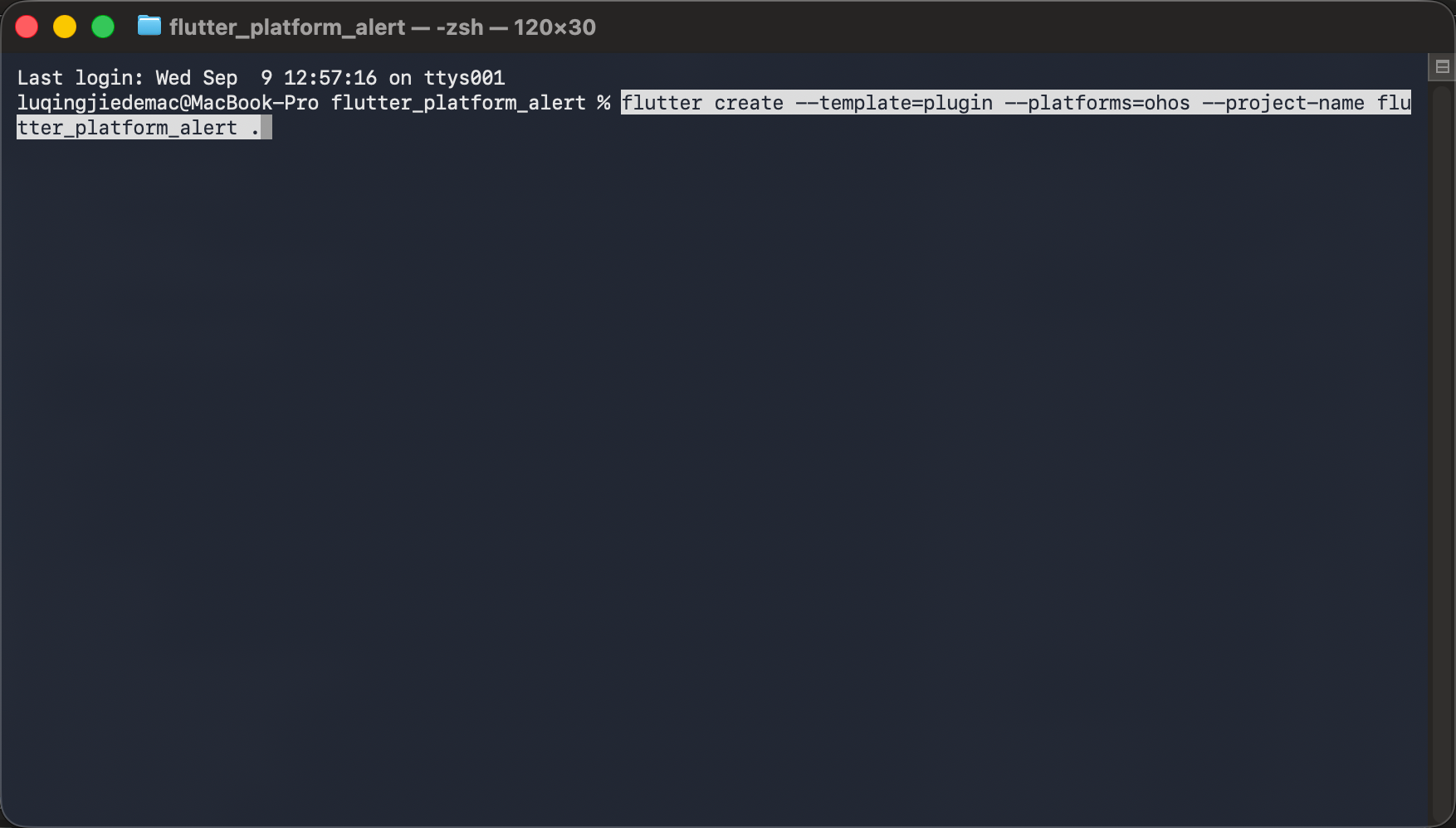
图 3:在插件根目录输入 OHOS 结构补全命令。
3.5 适配后的项目目录
适配后的关键目录如下:
flutter_platform_alert/
├── lib/
│   ├── flutter_platform_alert.dart
│   └── src/
│       ├── flutter_platform_alert.dart
│       ├── alert_button.dart
│       ├── helpers.dart
│       └── alert_options/
│           ├── platform_alert_options.dart
│           └── ohos_alert_options.dart
├── ohos/
│   ├── index.ets
│   ├── oh-package.json5
│   └── src/main/
│       ├── ets/components/plugin/FlutterPlatformAlertPlugin.ets
│       ├── module.json5
│       └── resources/
│           ├── base/element/string.json
│           ├── zh_CN/element/string.json
│           └── rawfile/flutter_platform_alert_tone.wav
├── example/
│   ├── lib/main.dart
│   ├── test/widget_test.dart
│   └── ohos/entry/
├── README.OpenHarmony_CN.md
├── README.OpenHarmony.md
├── CHANGELOG.OpenHarmony.md
└── pubspec.yaml
项目根目录如下,其中包含 ohos/、example/,以及 OpenHarmony 中英文说明和变更记录文件:
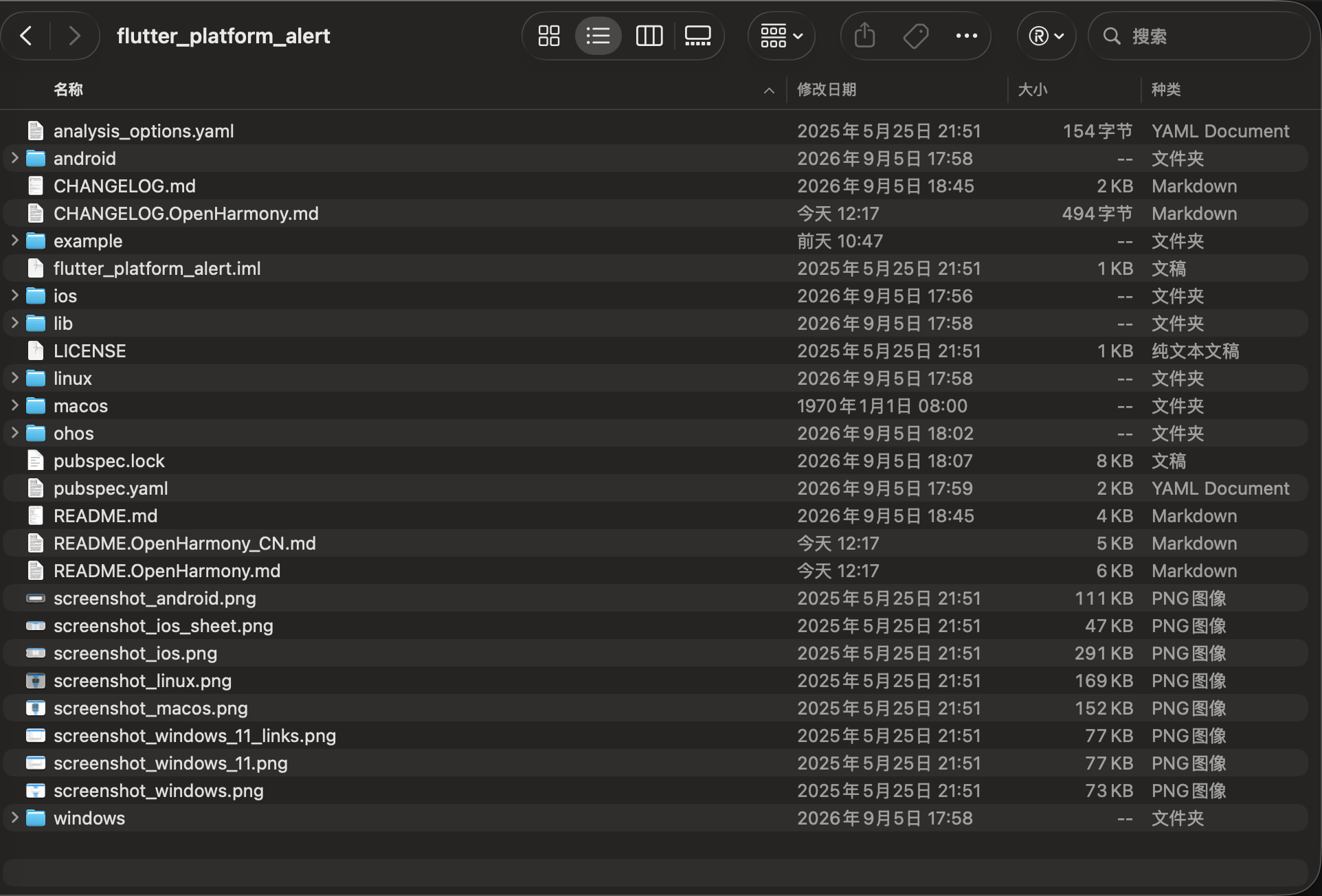
图 4:适配后的 flutter_platform_alert 项目根目录。
| 文件 | 主要职责 |
|---|---|
lib/flutter_platform_alert.dart | 为业务应用导出公开 API、枚举和平台选项 |
lib/src/flutter_platform_alert.dart | 实现三个公开方法和 MethodChannel 通信 |
lib/src/alert_button.dart、lib/src/helpers.dart | 声明按钮枚举,转换原生字符串结果 |
lib/src/alert_options/ | 定义各平台选项,OHOS 使用 cancelable |
FlutterPlatformAlertPlugin.ets | 注册 Flutter 通道并调用 HarmonyOS 原生能力 |
插件 module.json5 | 声明 HAR 模块及权限配置 |
示例 entry module.json5 | 声明宿主应用 Ability、设备类型和权限配置 |
example/lib/main.dart | 展示提示音、标准按钮组合、自定义按钮和取消行为 |
四、Dart 接口与通道分析
OHOS 实现需要遵循 Dart 层已有的方法、参数和回调约定。先阅读 lib/flutter_platform_alert.dart、lib/src/flutter_platform_alert.dart 和 lib/src/helpers.dart,再在 ohos/src/main/ets/components/plugin/FlutterPlatformAlertPlugin.ets 中实现对应的原生调用。适配其他已有平台的插件时,也应保留其公开接口和其他平台实现。
本例的对应关系如下:
| Dart 入口或模型 | 通道协议 | OHOS 实现 | 应保持的行为 |
|---|---|---|---|
FlutterPlatformAlert.showAlert(...) | flutter_platform_alert / showAlert | UIContext.showAlertDialog 和标准按钮映射 | 用户操作后返回 AlertButton;外部取消返回 cancelButton |
FlutterPlatformAlert.showCustomAlert(...) | flutter_platform_alert / showCustomAlert | UIContext.showAlertDialog 和自定义按钮映射 | 返回 CustomButton;外部取消或默认按钮返回 other |
FlutterPlatformAlert.playAlertSound() | flutter_platform_alert / playAlertSound | 系统默认通知音或内置 WAV,通过 AVPlayer 播放 | 播放启动成功后完成 Future<void>,不代表声音已经播放结束 |
原生端需要保持这些方法名和返回字符串一致。前台 Ability 不可用或原生调用失败时,通过 MethodChannel 错误通知 Dart 层。
4.1 跨端架构与调用时序
Flutter 侧和 HarmonyOS 侧之间使用 MethodChannel('flutter_platform_alert'),负责发送显示提示框和播放提示音的命令,并返回一次调用的结果。
对话框方法等待用户操作后返回按钮结果,提示音方法在播放器启动成功后返回。该插件不使用持续事件流,也没有订阅和取消订阅 API。
4.1.1 一次完整提示框调用的时序
4.2 按钮模型:lib/src/alert_button.dart
原生 API 返回字符串结果,alert_button.dart 声明业务侧使用的枚举,helpers.dart 负责转换。两个枚举的成员如下:
enum AlertButton {
  abortButton,
  cancelButton,
  continueButton,
  ignoreButton,
  noButton,
  okButton,
  retryButton,
  tryAgainButton,
  yesButton,
  other,
}

enum CustomButton {
  positiveButton,
  negativeButton,
  neutralButton,
  other,
}
| 原生返回值 | Dart 枚举 | 业务含义 |
|---|---|---|
ok / cancel | AlertButton.okButton / cancelButton | 确定/取消 |
yes / no | AlertButton.yesButton / noButton | 是/否 |
abort / retry / ignore | AlertButton.abortButton / retryButton / ignoreButton | 中止/重试/忽略 |
try_again / continue | AlertButton.tryAgainButton / continueButton | 再试一次/继续 |
positive_button | CustomButton.positiveButton | 自定义肯定按钮 |
negative_button | CustomButton.negativeButton | 自定义否定按钮 |
neutral_button | CustomButton.neutralButton | 自定义中立按钮 |
| 其他字符串 | 对应枚举的 other | 未匹配结果;自定义框的外部取消或默认按钮也返回 other |
以自定义按钮转换为例:
class CustomButtonHelper {
  static CustomButton fromString(String string) {
    switch (string) {
      case "positive_button":
        return CustomButton.positiveButton;
      case "negative_button":
        return CustomButton.negativeButton;
      case "neutral_button":
        return CustomButton.neutralButton;
      default:
        break;
    }
    return CustomButton.other;
  }
}
fromString 将未匹配的字符串映射为 other。标准提示框通过 AlertButtonHelper 完成同样的转换;这里的兜底针对字符串,不意味着原生可以返回任意数据类型。
4.3 公开 API 与平台选项
业务通过 FlutterPlatformAlert 的静态方法调用原生能力,方法返回 Future。公开接口和通道实现在同一个类中,平台参数通过 PlatformAlertOptions 分发。OHOS 选项定义如下:
/// Represents OpenHarmony-specific options for an alert dialog.
class OhosAlertOptions {
  /// Whether the dialog can be dismissed by tapping outside of it.
  final bool cancelable;

  /// Creates an instance of [OhosAlertOptions].
  const OhosAlertOptions({this.cancelable = true});

  /// Converts these options to method channel arguments.
  Map<String, Object> toJson() => {'cancelable': cancelable};
}
PlatformAlertOptions.toJson() 在 OHOS 上选择对应参数,下面是其中的 OHOS 分支:
if (Platform.operatingSystem == 'ohos') {
  return (ohos ?? OhosAlertOptions()).toJson();
}
各接口和参数的行为如下:
showAlert:标题和正文必填,通过alertStyle选择标准按钮组合,用户操作后返回AlertButton;showCustomAlert:标题和正文必填,最多提供三个按钮标题,空标题不显示,返回CustomButton;playAlertSound:返回Future<void>;OHOS 当前不根据iconStyle切换不同提示音;OhosAlertOptions.cancelable:默认true,控制点击对话框外部是否可以取消;设为false不会移除对话框内的“取消”按钮。
OHOS 原生实现暂不读取 iconStyle、iconPath、base64Icon 和 position 来改变对话框外观或位置。公开参数为兼容其他平台保留,不能据此认为这些视觉选项在 OHOS 已生效。showCustomAlert 在 Dart 侧仍会加载非空 iconPath,所以传入不存在的资源路径仍可能在调用原生前报错。
4.4 Dart 通道协议分析
4.4.1 通道名称必须两端完全一致
static const MethodChannel _channel = MethodChannel('flutter_platform_alert');
通道名称属于跨语言协议。Dart 和 ArkTS 任何一端拼写不一致,都会出现“方法未实现”或“调用找不到插件”等问题。
4.4.2 显示提示框
标准提示框将标题、正文、按钮样式和平台选项发送给原生,返回后转换按钮结果:
static Future<AlertButton> showAlert({
  required String windowTitle,
  required String text,
  AlertButtonStyle alertStyle = AlertButtonStyle.ok,
  IconStyle iconStyle = IconStyle.none,
  PlatformAlertOptions? options,
  AlertWindowPosition windowPosition = AlertWindowPosition.parentWindowCenter,
}) async {
  options ??= PlatformAlertOptions();
  final result = await _channel.invokeMethod('showAlert', {
    'windowTitle': windowTitle,
    'text': text,
    'alertStyle': alertStyle.stringValue,
    'iconStyle': iconStyle.stringValue,
    'position': positionToInt(windowPosition),
    ...options.toJson(),
  });
  return AlertButtonHelper.fromString(result);
}
自定义提示框补充三个按钮标题,并处理可选图标资源:
static Future<CustomButton> showCustomAlert({
  required String windowTitle,
  required String text,
  IconStyle iconStyle = IconStyle.none,
  String? positiveButtonTitle,
  String? negativeButtonTitle,
  String? neutralButtonTitle,
  PlatformAlertOptions? options,
  AlertWindowPosition windowPosition = AlertWindowPosition.parentWindowCenter,
  String iconPath = '',
}) async {
  positiveButtonTitle ??= '';
  negativeButtonTitle ??= '';
  neutralButtonTitle ??= '';
  options ??= PlatformAlertOptions();

  final base64Icon = await () async {
    if (iconPath.isEmpty) return '';

    final imageData = await rootBundle.load(iconPath);
    String base64Icon = base64Encode(imageData.buffer.asUint8List());
    return base64Icon;
  }();

  var context = path.Context(style: path.Style.platform);
  final exactIconPath = iconPath.isNotEmpty
      ? context.joinAll([
          path.dirname(Platform.resolvedExecutable),
          'data/flutter_assets',
          iconPath,
        ])
      : '';

  final result = await _channel.invokeMethod('showCustomAlert', {
    'windowTitle': windowTitle,
    'text': text,
    'iconStyle': iconStyle.name,
    'positiveButtonTitle': positiveButtonTitle,
    'negativeButtonTitle': negativeButtonTitle,
    'neutralButtonTitle': neutralButtonTitle,
    'position': positionToInt(windowPosition),
    'iconPath': exactIconPath,
    'base64Icon': base64Icon,
    ...options.toJson(),
  });
  return CustomButtonHelper.fromString(result);
}
按钮文案决定显示内容,原生返回的字符串决定业务收到的枚举,两者不能混用。OhosAlertOptions 通过 options.toJson() 合并到同一份参数中。
4.4.3 播放提示音与处理返回结果
static Future<void> playAlertSound(
    {IconStyle iconStyle = IconStyle.none}) async {
  final iconStyleString = iconStyle.name;
  await _channel.invokeMethod('playAlertSound', {
    'iconStyle': iconStyleString,
  });
}
对话框被用户取消属于正常返回:标准框返回 cancelButton,自定义框返回 other。调用失败则抛出 PlatformException,可使用 try/catch 处理。
提示音 Future 在 player.play() 成功后完成;播放器到达 completed 状态后才释放资源。Future 正常完成不能代替对实际声音的验证,系统静音、通知音量和输出设备都会影响可听见的结果。
五、补全 OHOS 原生实现与工程配置
5.1 在 FlutterPlatformAlertPlugin.ets 中实现原生能力
以 showAlert 为例:业务仍调用 FlutterPlatformAlert.showAlert(...),Dart 通道仍发送同名命令。需要补全的是 FlutterPlatformAlertPlugin.ets 中的对应分支:调用 UIContext.showAlertDialog 显示对话框,通过 result.success 或 result.error 回传结果。这样业务页面沿用原有接口即可使用 OHOS 原生提示框。
FlutterPlatformAlertPlugin 实现 FlutterPlugin、MethodCallHandler 和 AbilityAware。下面列出类中的主要成员和方法,完整文件还包含 getUniqueClassName() 等插件接口。
原生插件位于:
ohos/src/main/ets/components/plugin/FlutterPlatformAlertPlugin.ets
5.1.1 引入 Flutter 和 HarmonyOS 能力
import {
  AbilityAware,
  AbilityPluginBinding,
  FlutterManager,
  FlutterPlugin,
  FlutterPluginBinding,
  MethodCall,
  MethodCallHandler,
  MethodChannel,
  MethodResult,
} from '@ohos/flutter_ohos';
import { UIContext } from '@kit.ArkUI';
import { audio } from '@kit.AudioKit';
import { BusinessError, settings } from '@kit.BasicServicesKit';
import { media } from '@kit.MediaKit';
import { hilog } from '@kit.PerformanceAnalysisKit';

const TAG = 'FlutterPlatformAlert';
const CHANNEL_NAME = 'flutter_platform_alert';
const FALLBACK_SOUND_FILE = 'flutter_platform_alert_tone.wav';

interface DialogButtonSpec {
  label: ResourceStr;
  resultValue: string;
  primary: boolean;
}
其中:
FlutterPlugin负责接入 Flutter Engine 生命周期;MethodChannel接收 Dart 发来的命令;AbilityAware和AbilityPluginBinding获取宿主 Ability;UIContext提供原生提示框能力;settings获取默认通知音 URI,media和audio负责播放器及通知音频流配置;BusinessError用于读取 HarmonyOS 异常码和异常消息;hilog用于原生侧诊断日志。
5.1.2 连接 Flutter Engine 和宿主 Ability
private channel: MethodChannel | null = null;
private abilityBinding: AbilityPluginBinding | null = null;
private readonly activePlayers: Set<media.AVPlayer> = new Set<media.AVPlayer>();
private readonly playerResourceClosers: Map<media.AVPlayer, () => void> = new Map<media.AVPlayer, () => void>();

onAttachedToEngine(binding: FlutterPluginBinding): void {
  this.channel = new MethodChannel(binding.getBinaryMessenger(), CHANNEL_NAME);
  this.channel.setMethodCallHandler(this);
}

onAttachedToAbility(binding: AbilityPluginBinding): void {
  this.abilityBinding = binding;
}

onDetachedFromAbility(): void {
  this.abilityBinding = null;
}
Engine 连接时注册 MethodChannel;Ability 连接时保存宿主引用。提示框需要从当前主窗口获取 UIContext:
private getUIContext(): UIContext | null {
  if (this.abilityBinding === null) {
    return null;
  }
  try {
    const ability = this.abilityBinding.getAbility();
    const windowStage = FlutterManager.getInstance().windowStageOf(ability);
    return windowStage?.getMainWindowSync().getUIContext() ?? null;
  } catch (error) {
    const businessError = error as BusinessError;
    hilog.error(0, TAG, `Failed to obtain UIContext: ${businessError.code} ${businessError.message}`);
    return null;
  }
}
未绑定 Ability 或无法取得主窗口时返回 null,后续调用会得到 NO_ACTIVITY。业务应从已显示的前台页面触发提示框,不能仅凭插件已经注册就认为窗口上下文已就绪。
5.1.3 显示系统原生提示框
标准提示框根据 alertStyle 构建按钮,自定义提示框则读取业务传入的按钮文案:
private showStandardAlert(call: MethodCall, result: MethodResult): void {
  const title = String(call.argument('windowTitle') ?? '');
  const message = String(call.argument('text') ?? '');
  const style = String(call.argument('alertStyle') ?? 'ok');
  const buttons = this.standardButtons(style);
  this.showDialog(title, message, buttons, this.isCancelable(call), 'cancel', result);
}

private showCustomAlert(call: MethodCall, result: MethodResult): void {
  const buttons: Array<DialogButtonSpec> = [];
  const positive = String(call.argument('positiveButtonTitle') ?? '');
  const negative = String(call.argument('negativeButtonTitle') ?? '');
  const neutral = String(call.argument('neutralButtonTitle') ?? '');

  if (positive.length > 0) {
    buttons.push({ label: positive, resultValue: 'positive_button', primary: true });
  }
  if (negative.length > 0) {
    buttons.push({ label: negative, resultValue: 'negative_button', primary: positive.length === 0 });
  }
  if (neutral.length > 0) {
    buttons.push({
      label: neutral,
      resultValue: 'neutral_button',
      primary: positive.length === 0 && negative.length === 0,
    });
  }
  if (buttons.length === 0) {
    buttons.push({ label: $r('app.string.flutter_platform_alert_ok'), resultValue: 'other', primary: true });
  }

  const title = String(call.argument('windowTitle') ?? '');
  const message = String(call.argument('text') ?? '');
  this.showDialog(title, message, buttons, this.isCancelable(call), 'other', result);
}
standardButtons 的按钮与返回值对应如下,显示顺序以 OHOS 实现为准:
AlertButtonStyle | OHOS 按钮顺序(简体中文) | 原生返回值 |
|---|---|---|
abortRetryIgnore | 重试、忽略、中止 | retry、ignore、abort |
cancelTryContinue | 再试一次、继续、取消 | try_again、continue、cancel |
ok | 确定 | ok |
okCancel | 确定、取消 | ok、cancel |
retryCancel | 重试、取消 | retry、cancel |
yesNo | 是、否 | yes、no |
yesNoCancel | 是、否、取消 | yes、no、cancel |
button() 从 ohos/src/main/resources/base/element/string.json 和 zh_CN/element/string.json 读取标准按钮的英文、简体中文资源,语言随系统设置变化。自定义按钮直接使用调用方传入的标题;三个标题都为空时增加默认“确定”按钮,其结果为 other。
两个入口最终都调用 showDialog:
private showDialog(
  title: string,
  message: string,
  buttons: Array<DialogButtonSpec>,
  cancelable: boolean,
  cancelResult: string,
  result: MethodResult,
): void {
  const uiContext = this.getUIContext();
  if (uiContext === null) {
    result.error('NO_ACTIVITY', 'A foreground UIAbility is required to show an alert dialog.', null);
    return;
  }

  let callbackConsumed = false;
  const complete = (value: string): void => {
    if (callbackConsumed) {
      return;
    }
    callbackConsumed = true;
    result.success(value);
  };

  const dialogButtons: Array<AlertDialogButtonOptions> = buttons.map(
    (button: DialogButtonSpec): AlertDialogButtonOptions => {
      const option: AlertDialogButtonOptions = {
        value: button.label,
        primary: button.primary,
        action: (): void => complete(button.resultValue),
      };
      return option;
    },
  );

  try {
    uiContext.showAlertDialog({
      title: title,
      message: message,
      autoCancel: cancelable,
      cancel: (): void => complete(cancelResult),
      buttons: dialogButtons,
    });
  } catch (error) {
    const businessError = error as BusinessError;
    hilog.error(0, TAG, `Failed to show alert: ${businessError.code} ${businessError.message}`);
    result.error(String(businessError.code ?? 'ALERT_ERROR'), businessError.message ?? 'Failed to show alert.', null);
  }
}
callbackConsumed 保证同一次对话框调用只完成一次结果,避免按钮和取消路径重复返回。autoCancel 控制外部取消;标准框的取消值是 cancel,自定义框的取消值是 other。
5.1.4 播放系统提示音和内置提示音
播放前同样需要有效的宿主 Ability。播放器优先使用系统默认通知音 URI,为空时使用 rawfile/flutter_platform_alert_tone.wav:
private playAlertSound(result: MethodResult): void {
  const ability = this.abilityBinding?.getAbility();
  if (ability === undefined || ability === null) {
    result.error('NO_ACTIVITY', 'A foreground UIAbility is required to play the alert sound.', null);
    return;
  }

  this.createAndPlayAlertSound(ability.context, result).catch((error: BusinessError) => {
    hilog.error(0, TAG, `Failed to play alert sound: ${error.code} ${error.message}`);
    result.error(String(error.code ?? 'AUDIO_ERROR'), error.message ?? 'Failed to play alert sound.', null);
  });
}

private async createAndPlayAlertSound(context: Context, result: MethodResult): Promise<void> {
  const uri = settings.getValueSync(context, settings.sound.DEFAULT_NOTIFICATION_SOUND, '');

  const player = await media.createAVPlayer();
  this.activePlayers.add(player);
  let callbackConsumed = false;

  const fail = (error: BusinessError): void => {
    if (!callbackConsumed) {
      callbackConsumed = true;
      result.error(String(error.code ?? 'AUDIO_ERROR'), error.message ?? 'Failed to play alert sound.', null);
    }
    this.releasePlayer(player);
  };

  player.on('error', fail);
  player.on('stateChange', (state: media.AVPlayerState): void => {
    switch (state) {
      case 'initialized':
        player.audioRendererInfo = {
          usage: audio.StreamUsage.STREAM_USAGE_NOTIFICATION,
          rendererFlags: 0,
        };
        player.prepare().catch(fail);
        break;
      case 'prepared':
        try {
          player.setVolume(1.0);
        } catch (error) {
          fail(error as BusinessError);
          break;
        }
        player.play().then((): void => {
          if (!callbackConsumed) {
            callbackConsumed = true;
            result.success(null);
          }
        }).catch(fail);
        break;
      case 'completed':
      case 'error':
        this.releasePlayer(player);
        break;
      default:
        break;
    }
  });

  if (uri.length > 0) {
    player.url = uri;
    return;
  }

  hilog.info(0, TAG, 'System notification sound URI is unavailable; using the bundled fallback sound');
  const rawFile = context.resourceManager.getRawFdSync(FALLBACK_SOUND_FILE);
  this.playerResourceClosers.set(player, (): void => {
    context.resourceManager.closeRawFdSync(FALLBACK_SOUND_FILE);
  });
  try {
    player.fdSrc = {
      fd: rawFile.fd,
      offset: rawFile.offset,
      length: rawFile.length,
    };
  } catch (error) {
    this.releasePlayer(player);
    const businessError = error as BusinessError;
    throw new Error(businessError.message ?? 'Failed to configure the bundled alert sound.');
  }
}
播放器在 initialized 状态设置 STREAM_USAGE_NOTIFICATION 并准备播放,在 prepared 状态启动,在 completed 或 error 状态释放。内置提示音通过资源文件描述符读取,插件保存对应的关闭函数,释放播放器后关闭资源。
这里的回退条件是系统通知音 URI 为空,不是所有系统音播放错误都会自动切换到内置音。setVolume(1.0) 设置播放器音量,不能绕过系统的静音和通知音量设置。
5.1.5 处理 MethodChannel 命令
onMethodCall(call: MethodCall, result: MethodResult): void {
  switch (call.method) {
    case 'playAlertSound':
      this.playAlertSound(result);
      break;
    case 'showAlert':
      this.showStandardAlert(call, result);
      break;
    case 'showCustomAlert':
      this.showCustomAlert(call, result);
      break;
    default:
      result.notImplemented();
      break;
  }
}
showAlert、showCustomAlert 和 playAlertSound 分别进入对应实现;未知方法返回 notImplemented()。原生能力不可用时通过 result.error 将错误码和消息传回 Dart,hilog 则保留原生侧的诊断信息。
没有可用 Ability 或 UIContext 时返回 NO_ACTIVITY。对话框异常优先返回原生错误码,缺少错误码时使用 ALERT_ERROR;音频异常同样优先返回原生错误码,缺少错误码时使用 AUDIO_ERROR。用户点击取消属于正常按钮结果,不应按原生调用失败处理。
5.1.6 Engine 解绑时释放资源
onDetachedFromEngine(_binding: FlutterPluginBinding): void {
  this.channel?.setMethodCallHandler(null);
  this.channel = null;
  this.releaseAllPlayers();
}

private releasePlayer(player: media.AVPlayer): void {
  if (!this.activePlayers.delete(player)) {
    return;
  }
  player.release()
    .catch((error: BusinessError): void => {
      hilog.warn(0, TAG, `Failed to release AVPlayer: ${error.code} ${error.message}`);
    })
    .finally((): void => this.closePlayerResource(player));
}

private closePlayerResource(player: media.AVPlayer): void {
  const closeResource = this.playerResourceClosers.get(player);
  if (closeResource === undefined) {
    return;
  }
  this.playerResourceClosers.delete(player);
  try {
    closeResource();
  } catch (error) {
    const businessError = error as BusinessError;
    hilog.warn(0, TAG, `Failed to close alert sound resource: ${businessError.code} ${businessError.message}`);
  }
}

private releaseAllPlayers(): void {
  this.activePlayers.forEach((player: media.AVPlayer): void => this.releasePlayer(player));
}
Flutter Engine 销毁时也会执行清理,释放播放器、资源文件描述符和通道 Handler。activePlayers.delete 防止同一播放器重复释放,关闭原始资源的操作放在播放器释放后的 finally 中。
Ability 解绑时当前实现只清空引用;播放器集中清理发生在播放完成、错误或 Engine 解绑时。插件未向 Dart 暴露主动关闭对话框或停止声音的方法,页面退出不能被描述成已经调用了这些不存在的接口。
5.2 声明插件和宿主权限
当前实现显示原生提示框、读取默认通知音设置和播放提示音,无需额外申请敏感权限。插件 HAR 与示例 entry 的配置如下。
5.2.1 插件 HAR 的权限
插件的 ohos/src/main/module.json5 声明 HAR 模块,权限数组为空:
{
  "module": {
    "name": "flutter_platform_alert",
    "type": "har",
    "deviceTypes": ["default", "tablet"],
    "requestPermissions": []
  }
}
标准按钮使用字符串资源,提示音使用插件随包携带的 rawfile。这些资源需要正常打包,不能只提交 ArkTS 文件而遗漏资源目录。
5.2.2 应用 entry 的权限
最终安装的是宿主应用。本例的 example/ohos/entry/src/main/module.json5 保留了示例工程的网络权限配置:
{
  "module": {
    "requestPermissions": [
      { "name": "ohos.permission.INTERNET" }
    ]
  }
}
这段是现有配置片段,合并时保留原有 Ability 等配置。显示本地原生提示框和播放随包提示音本身不需要新增网络权限,也不需要运行时申请运动、麦克风或悬浮窗权限;弹框所需的是当前前台 Ability 和主窗口上下文。
5.3 注册并导出插件
pubspec.yaml 通过以下配置声明 OHOS 插件类:
flutter:
  plugin:
    platforms:
      ohos:
        pluginClass: FlutterPlatformAlertPlugin
插件的 ohos/index.ets 需要导出实现:
import FlutterPlatformAlertPlugin from './src/main/ets/components/plugin/FlutterPlatformAlertPlugin';
export default FlutterPlatformAlertPlugin;
执行 flutter pub get 和构建后,Flutter 工具会为应用生成插件注册代码。通常不应手工编辑 GeneratedPluginRegistrant.ets,因为下次构建可能覆盖它。
注册异常的排查步骤见第九节 MissingPluginException。
5.4 检查 example 的 OHOS 应用结构
本例的 example/ohos/build-profile.json5 应在 products 中设置版本。参考提交未显式填写编译和目标 SDK;下面按第二节补全为 API 26,请合并到现有工程;其中 signingConfig: "default" 需要与本机配置的签名名称一致,签名材料保留在本地。
{
  "app": {
    "products": [
      {
        "name": "default",
        "signingConfig": "default",
        "compatibleSdkVersion": "5.1.0(18)",
        "runtimeOS": "HarmonyOS",
        "compileSdkVersion": "26.0.0",
        "targetSdkVersion": "26.0.0"
      }
    ]
  },
  "modules": [
    {
      "name": "entry",
      "srcPath": "./entry",
      "targets": [
        {
          "name": "default",
          "applyToProducts": ["default"]
        }
      ]
    }
  ]
}
配置后,在 DevEco Studio 中执行一次 Sync Project。如果 entry 模块正常识别,Project 视图中会出现 entry,并能打开 entry 模块的签名配置。
六、补全交付文件并提交适配分支
6.1 除代码外还要补全哪些文件
代码适配完成后,还需要整理安装说明、接口文档、版本记录和开源信息。接收仓库有专用模板时,按其格式填写:
| 文件 | 应写清楚的内容 |
|---|---|
README.OpenSource | 上游名称、源码地址、适配版本或提交、版权及许可证信息;按仓库模板列出第三方依赖 |
README.md | 原项目说明、OHOS 支持入口、配套 Demo 和文档链接;保留上游信息 |
README.OpenHarmony_CN.md | 简介、AtomGit 安装方式、版本对应关系、环境约束、权限、接口表、示例、已验证范围和遗留问题 |
README.OpenHarmony.md | 与中文说明对应的英文文档 |
CHANGELOG.OpenHarmony.md | OHOS 新增能力、适配版本、兼容限制与测试范围 |
LICENSE / NOTICE | 保留上游许可证;NOTICE 按许可证和原项目要求保留或补充 |
example/README.md | 依赖方式、运行目录、签名、操作步骤与效果图;覆盖标准框、自定义框、外部取消及提示音 |
pubspec.yaml、ohos/oh-package.json5 | 核对包名、版本、插件注册、仓库地址、许可证和依赖 |
.gitignore | 忽略构建缓存及本机签名材料,不漏提交必要源码和配置 |
README.OpenSource 记录库本身的来源与版本。本例的包名为 flutter_platform_alert,版本为 0.9.1,采用 MIT 许可证;Flutter 和 HarmonyOS SDK 版本写入环境说明。
远端参考提交已包含 OpenHarmony 中英文说明和变更记录,文档中的适配记录版本为 0.9.1-ohos-1.0.0,pubspec.yaml 的实际包版本仍为 0.9.1。README.OpenSource 尚需按接收仓库要求补全;文档中仍使用 GitCode 的安装和反馈链接时,交付前核对并与实际 AtomGit 地址保持一致。
6.2 提交前检查
提交前先完成第八节的插件、example 和真机测试,再从根目录检查改动:
git branch --show-current
git diff --check
git status --short
git diff --stat
git diff
检查 diff 中的接口、平台注册和依赖变化,移除本机路径及签名信息,并使文档中的版本和分支与提交内容一致。
6.3 提交并推送到 AtomGit
文档和代码整理完成后,在根目录暂存并提交。以下命令以已补全 README.OpenSource 为前提,文件名按项目实际情况调整:
git add lib ohos pubspec.yaml example .gitignore
git add README.md README.OpenSource README.OpenHarmony_CN.md
git add README.OpenHarmony.md CHANGELOG.OpenHarmony.md
git diff --cached --check
git diff --cached --stat
git diff --cached
git commit -m "feat: add OHOS support for flutter_platform_alert 0.9.1"
git remote -v
git branch --show-current
git push -u origin feat/ohos_flutter_platform_alert_0.9.1
DevEco 可能向 example/ohos/build-profile.json5 写入本机签名配置,需要在提交前从暂存内容中移除。推送时,origin 应指向自己的 AtomGit 仓库,当前分支为 feat/ohos_flutter_platform_alert_0.9.1。
推送后在 AtomGit 发起合并请求,说明上游来源和版本、OHOS 实现范围、依赖及权限、测试环境、操作结果、已知限制,并附 Demo 运行图。目标分支和评审流程以接收仓库要求为准。
七、使用根目录 example 演示接入
仓库自带 example/,可以直接用来调试插件和体验原生提示框及提示音。
7.1 本地适配时使用路径依赖
当前 example/pubspec.yaml 的依赖是:
dependencies:
  flutter:
    sdk: flutter
  flutter_platform_alert:
    path: ../
../ 相对于 example/pubspec.yaml 指向插件根目录,修改根目录插件后可直接联调。
上面仅列出插件相关依赖。仓库完整 Demo 还保留 tray_manager、window_manager 和 cupertino_icons;托盘和窗口初始化只在 Windows、macOS、Linux 分支执行,OHOS 运行时不依赖这些桌面操作。使用完整 Demo 时保留其现有依赖和 images/ 资源声明。
7.2 通过 AtomGit 引入插件
业务应用通过 AtomGit 引入时,将 flutter_platform_alert 的 path 配置替换为下面的 Git 依赖。这里固定到本文使用的提交:
dependencies:
  flutter:
    sdk: flutter
  flutter_platform_alert:
    git:
      url: https://atomgit.com/oh-flutter/flutter_platform_alert.git
      ref: 9f5998b02b7978d7b1ca063304a6e3096de619ca
使用自己的适配版本时,先推送分支,再将 url 改为对应仓库,ref 改为 feat/ohos_flutter_platform_alert_0.9.1。正式发布后可固定到 tag 或 commit。
从插件根目录执行:
cd example
flutter pub get
flutter pub deps
检查 example/pubspec.lock 中 flutter_platform_alert 的来源为 git,并核对 url、ref 和 resolved-ref。同时检查没有 dependency_overrides 或 pubspec_overrides.yaml 将其覆盖回本地依赖,确认应用使用的是 Git 依赖。
7.3 调用接口实现原生提示框和提示音
下面的页面展示标准提示框、自定义提示框、提示音按钮和返回结果,可用于 example/lib/main.dart。这是便于讲解的最小页面;仓库中的完整 Demo 还提供全部标准按钮组合、禁止外部取消等入口,并在控制台打印按钮结果。第八节的操作与真机截图以仓库完整 Demo 为准。
import 'package:flutter/material.dart';
import 'package:flutter/services.dart';
import 'package:flutter_platform_alert/flutter_platform_alert.dart';
void main() {
runApp(const MaterialApp(home: PlatformAlertPage()));
}
class PlatformAlertPage extends StatefulWidget {
const PlatformAlertPage({super.key});
State<PlatformAlertPage> createState() => _PlatformAlertPageState();
}
class _PlatformAlertPageState extends State<PlatformAlertPage> {
String _resultText = '尚未操作';
bool _busy = false;
Future<void> _run(Future<String> Function() action) async {
if (_busy) return;
setState(() => _busy = true);
try {
final message = await action();
if (!mounted) return;
setState(() => _resultText = message);
} on PlatformException catch (error) {
if (!mounted) return;
setState(() => _resultText = '${error.code}:${error.message ?? "调用失败"}');
} finally {
if (mounted) {
setState(() => _busy = false);
}
}
}
Future<void> _showStandard() => _run(() async {
final result = await FlutterPlatformAlert.showAlert(
windowTitle: '确认操作',
text: '是否继续?也可以取消操作。',
alertStyle: AlertButtonStyle.yesNoCancel,
);
return '标准提示框:${result.name}';
});
Future<void> _showCustom() => _run(() async {
final result = await FlutterPlatformAlert.showCustomAlert(
windowTitle: '自定义操作',
text: '请选择下一步操作。',
positiveButtonTitle: '保存',
negativeButtonTitle: '放弃',
neutralButtonTitle: '稍后处理',
options: PlatformAlertOptions(
ohos: const OhosAlertOptions(cancelable: false),
),
);
return '自定义提示框:${result.name}';
});
Future<void> _playSound() => _run(() async {
await FlutterPlatformAlert.playAlertSound();
return '提示音播放调用已成功';
});
Widget build(BuildContext context) {
return Scaffold(
appBar: AppBar(title: const Text('原生系统提示框')),
body: Padding(
padding: const EdgeInsets.all(16),
child: Column(
crossAxisAlignment: CrossAxisAlignment.stretch,
children: [
Text('操作结果:$_resultText'),
Text(_busy ? '等待操作完成' : '可以操作'),
const SizedBox(height: 16),
FilledButton(
onPressed: _busy ? null : _showStandard,
child: const Text('显示标准提示框'),
),
OutlinedButton(
onPressed: _busy ? null : _showCustom,
child: const Text('显示自定义提示框'),
),
TextButton(
onPressed: _busy ? null : _playSound,
child: const Text('播放默认提示音'),
),
],
),
),
);
}
}
7.4 页面退出时处理异步结果
异步回调先检查 mounted,避免页面销毁后继续调用 setState。本插件通过 Future 返回一次结果,没有需要在 dispose 中取消的事件流订阅;页面退出后应忽略已经失效的界面更新。
多个页面都需要显示提示框时,可以由应用级服务统一调度,在已有对话框等待用户操作时避免重复发起调用。上面的 _busy 防止同一页面重复点击;原生 callbackConsumed 只保证一次调用不重复返回,不能代替跨页面的弹框调度。
八、验证、构建与鸿蒙设备运行效果
8.1 分别验证插件与 example
从插件仓库根目录执行:
flutter pub get
flutter analyze
# 当前根目录没有 test/;补充插件测试后再执行 flutter test。
cd example
flutter pub get
flutter analyze
flutter test
接口测试应验证参数传递、按钮结果转换、成功和错误返回、外部取消以及重复调用的行为。Widget 测试应匹配实际保留的 Demo 页面;如果替换成第七节最小页面,也要相应调整原来的 UI 断言。
参考提交的 example/test/widget_test.dart 检查“原生系统提示框”“播放默认提示音”等页面入口,不会实际打开鸿蒙原生对话框或验证提示音。插件根目录尚无 test/,不能将 example 页面测试等同于插件接口和原生能力已全部验证。
Dart 测试覆盖接口和页面逻辑,原生对话框、按钮交互和声音行为还需要在鸿蒙设备上验证。
8.2 确认设备连接
hdc list targets
flutter devices
设备首次连接电脑时,需要在手机端确认调试授权。列表为空时,检查 USB 连接、调试模式和电脑授权。
8.3 配置签名
真机安装的 HAP 通常需要有效签名。推荐使用 DevEco Studio 为 entry 模块配置自动签名:
- 用 DevEco Studio 打开
example/ohos,不是仓库根目录; - 等待工程 Sync 成功,确认 Project 视图中存在
entry模块; - 打开 File > Project Structure > Signing Configs;
- 为
defaultproduct 选择或生成签名; - 确认设备、应用包名、证书和 Profile 匹配;
- 再回到终端执行 Flutter 构建或运行。
签名材料保存在本机,公开仓库中只保留构建所需的通用配置。
8.4 运行示例
以下命令在 example/ 目录执行,将 <device-id> 替换为设备列表中的实际 ID:
flutter run -d <device-id>
也可以先构建 HAP:
flutter build hap --debug
典型产物位于:
example/ohos/entry/build/default/outputs/default/
目录中通常包含已签名和未签名 HAP。真机安装应选择与当前设备匹配的已签名产物。
本次真机运行(2026-09-09)使用本地 HEAD: c0eddd5 的完整 Demo,Flutter 3.44.9+ohos-0.0.1-canary1,DevEco Studio 26.0.0。以下命令在 example/ 目录执行;手机已有更高版本的旧示例,因此本次通过 --build-number=4 覆盖安装,未修改 Dart/ArkTS 实现:
flutter build hap --release --build-number=4
hdc -t <device-id> install -r build/ohos/hap/entry-default-signed.hap
hdc -t <device-id> shell aa start -a EntryAbility -b net.zonble.flutter_platform_alert_example
签名 Release HAP 已构建、安装并启动成功。若设备已有版本号不小于 4 的示例,再次安装时需使用更高的构建号。
8.5 在设备上测试提示框和提示音
- 打开应用,确认页面显示“原生系统提示框”,并包含“播放默认提示音”和“标准提示框”等入口;
- 点击“显示是/否/取消按钮”,分别选择按钮,检查 Flutter 控制台的
AlertButton是否与选择一致; - 分别测试其他标准按钮组合和“显示三个自定义按钮”,核对按钮文案及
CustomButton结果; - 对默认允许外部取消的提示框点击遮罩,标准框应返回
cancelButton,自定义框应返回other; - 点击“显示是/否/取消按钮(禁止外部取消)”,确认点击遮罩不会关闭对话框,框内按钮仍可正常使用;
- 点击“播放默认提示音”,分别在正常响铃和静音模式下检查声音,结合通知音量、音频输出和原生日志判断结果;
- 关闭对话框后重复打开,并在页面退出、重新进入和应用恢复前台后检查调用是否正常、结果是否只返回一次。
第七节最小页面初始的“尚未操作”来自 Demo 默认值,方法返回后才显示真实按钮结果。提示音调用成功与用户实际听见声音是两个判断;默认通知音 URI 为空时,日志会提示使用内置短提示音。
8.6 鸿蒙设备运行效果
适配后的 OHOS 实现提供 标准提示框、自定义按钮提示框 和 提示音播放,并支持配置是否允许点击对话框外部取消。
以下三张为本次在鸿蒙真机上采集的标准提示框、自定义按钮和禁止外部取消画面,与文章开头使用同一组三图。
截图标注:操作步骤与截图命令真机运行图(从左到右):标准提示框/自定义按钮/禁止外部取消。采集于 2026-09-09,设备 ALN-AL00 / HUAWEI Mate 60 Pro,系统 OpenHarmony-6.1.1.120(API 24);使用本地源码构建并安装的签名 Release HAP。
第三张截图采集前已点击对话框外部,确认提示框仍显示;随后点击框内“取消”正常关闭。提示音播放日志与按钮返回结果见第 8.5 节。
执行目录:本文 Markdown 所在目录。先用 hdc list targets 获取设备 ID,将下列 <device-id> 替换为实际值。截图来自仓库完整 Demo,保留原始真机画面;本机 snapshot_display 使用 .jpeg 后缀。
mkdir -p blog-assets/flutter_platform_alert
标准提示框: 点击“显示是/否/取消按钮”,保持对话框打开后执行:
hdc -t <device-id> shell snapshot_display -f /data/local/tmp/alert-standard.jpeg
hdc -t <device-id> file recv /data/local/tmp/alert-standard.jpeg ./blog-assets/flutter_platform_alert/alert-standard.jpeg
自定义按钮: 关闭上一个对话框,向上滑动列表,点击“显示三个自定义按钮”,保持对话框打开后执行:
hdc -t <device-id> shell snapshot_display -f /data/local/tmp/alert-custom.jpeg
hdc -t <device-id> file recv /data/local/tmp/alert-custom.jpeg ./blog-assets/flutter_platform_alert/alert-custom.jpeg
禁止外部取消: 点击“显示是/否/取消按钮(禁止外部取消)”,点击遮罩后确认对话框仍显示,再执行:
hdc -t <device-id> shell snapshot_display -f /data/local/tmp/alert-no-outside-cancel.jpeg
hdc -t <device-id> file recv /data/local/tmp/alert-no-outside-cancel.jpeg ./blog-assets/flutter_platform_alert/alert-no-outside-cancel.jpeg
三张图片均为 1260 × 2720 原始截图,标题、正文和按钮完整保留。静态图片展示提示框外观;取消行为通过实际点击及日志核验,声音是否可听见不能由截图判断。
| 标准提示框 | 自定义按钮 | 禁止外部取消 |
|---|---|---|
是/否/取消,返回 AlertButton | 确定/取消/稍后处理,返回 CustomButton | 点击遮罩后保持显示,通过框内按钮完成操作 |
原生提示框依赖前台窗口,提示音受系统声音设置和音频路由影响。不同系统版本和设备的样式及声音行为可能存在差异,需要在目标设备上测试;以上三图及第 8.5 节记录对应本次真机操作,不代表其他系统版本、全部按钮组合或静音场景已经验证。
九、FAQ:适配过程与使用问题
9.1 Missing SDK components
典型错误如下:
Missing SDK components. SDK path: ...,
missing components: toolchains,ets,js,native,previewer.
这个错误发生在 Hvigor 同步阶段。通常需要检查构建工具使用的 SDK 路径、组件是否完整,以及 Hvigor 与 SDK 的版本是否匹配。
处理顺序:
- 在 DevEco Studio SDK Manager 中确认 API 26 组件已经下载完整;
- 检查 Flutter 和 DevEco Studio 使用的 SDK 路径是否一致;
- 避免误用
/Applications/DevEco-Studio.app/Contents/sdk之类的不完整目录; - 确认 SDK 根目录下存在
toolchains、ets、js、native、previewer; - 执行
flutter config --ohos-sdk <正确路径>; - 重新执行
flutter doctor -v和 DevEco Studio Sync。
因为 Sync 和 Compile 首先读取 Mac 本地 SDK。手机 API 版本只在部署、安装和运行时参与兼容判断。即使完全不连接手机,本地 SDK 不完整时也会得到相同错误。
当前工程的 compatibleSdkVersion 是 API 18,因此 API 24 在安装版本门槛上是满足的;但应用仍需满足签名要求,并在运行时具备可用的前台 Ability 和窗口上下文。
9.2 DevEco Studio 中看不到 entry 模块
插件的 ohos/ 目录是 HAR 模块,可安装应用的 entry 模块位于 example/ohos/entry。
请直接使用 DevEco Studio 打开:
flutter_platform_alert/example/ohos
如果仍看不到 entry,先解决 SDK Sync 错误,再检查 example/ohos/build-profile.json5 的 modules 是否包含 ./entry。同步失败时,Project Structure 无法正确解析模块,签名界面也可能不显示 entry。
9.3 无法手动签名
签名配置依附于可构建的应用模块和 product。只有 HAR 插件模块、工程 Sync 失败,或者打开了错误目录时,DevEco Studio 都可能无法提供 entry 签名入口。
建议先确认:
- 打开的是
example/ohos; - SDK 组件完整并且 Sync 成功;
entry的模块类型为entry;defaultproduct 和 target 已正确关联;- 当前账号、证书和调试设备状态有效。
9.4 能安装但没有弹框,或提示音听不见
按以下顺序检查:
- 是否从当前已显示的 Flutter 页面点击对应操作;
- 是否捕获到
NO_ACTIVITY,以及 Ability 和主窗口是否已经就绪; hilog中是否出现FlutterPlatformAlert的 UIContext、弹框或音频错误;- 提示音调用是否抛出
PlatformException,不能只检查按钮是否点击成功; - 设备是否处于静音或振动模式,通知音量和输出设备是否符合预期;
- 系统默认通知音 URI 为空时,HAR 是否包含
rawfile/flutter_platform_alert_tone.wav; - 是否误把其他平台的图标或位置参数,当成 OHOS 已实现的视觉效果。
9.5 MissingPluginException
这通常表示 Dart 通道找不到已注册的原生插件。新增原生插件后需要重新构建应用。从仓库根目录执行:
cd example
flutter clean
flutter pub get
flutter run -d <device-id>
如果仍然出现,检查自动生成的插件注册文件中是否包含 FlutterPlatformAlertPlugin,同时核对 pubspec.yaml、ohos/index.ets 和 oh-package.json5。
9.6 连续点击后重复弹框或重复收到结果
重点检查两处调用保护:
- Dart 侧是否在前一个 Future 完成前重复发起弹框;第七节使用
_busy暂时禁用按钮; - ArkTS 侧
showDialog中的callbackConsumed是否保证每次调用只返回一次结果。
还应确认业务层没有多个页面或按钮同时触发提示框。原生保护针对单次调用,不会自动合并多次调用;多个页面都需要弹框时,推荐在应用级服务中统一调度。
9.7 编译成功但安装失败
常见原因包括:
- HAP 未签名或使用了错误的 Profile;
- 设备未加入调试设备列表;
- 包名与签名 Profile 不匹配;
- 安装包的
compatibleSdkVersion高于设备 API; - 手机上已经安装了使用不同证书签名的同包名应用。
根据安装错误码区分签名、版本和包名冲突,再处理对应配置。
9.8 flutter create 不认识 ohos,或包名不合法
先执行 flutter --version,确认使用的是 OHOS 版工具链,环境配置回到第二节的社区链接核对。包名报错时,确认当前目录包含目标插件的 pubspec.yaml,并显式传入 --project-name flutter_platform_alert;本例仓库名和 Dart 包名相同,均为 flutter_platform_alert。生成后检查 diff,再补充 ArkTS 业务实现。
9.9 AtomGit 依赖提示找不到分支或无权限
先检查 URL 是否指向已同步的目标仓库,再确认 feat/ohos_flutter_platform_alert_0.9.1 已推送。分支尚未推送时,可以先使用第七节的提交号。私有仓库还需在本机配置 Git 认证。
9.10 改了本地 ArkTS,Demo 为什么没变化
先检查 example/pubspec.yaml:Git 依赖读取远程提交,不会自动读取本地插件改动。本地联调切回 path: ../;测试远程版本则先提交推送,再更新依赖并核对 pubspec.lock 的 resolved-ref。原生代码变动后停止应用并重新构建运行,不能只做 Dart 热重载。
9.11 修改图标样式或位置没有变化,取消结果也与预期不同
OHOS 当前不根据 iconStyle、iconPath、base64Icon 或 position 改变提示框外观与位置。这些参数为跨平台 API 保留,并不表示每个平台都已实现对应能力。
标准框外部取消返回 AlertButton.cancelButton,自定义框外部取消返回 CustomButton.other;未填写任何自定义按钮标题时,默认“确定”按钮也返回 other。cancelable: false 只限制点击外部取消,框内“取消”按钮仍然可以完成调用。业务应按实际返回枚举处理结果。
相关链接

开源鸿蒙跨平台开发社区汇聚开发者与厂商,共建“一次开发,多端部署”的开源生态,致力于降低跨端开发门槛,推动万物智联创新。
更多推荐
 0
0 0
0- 0


 已为社区贡献58条内容

所有评论(0)