实战指南 Flutter for OpenHarmony:引入第三方库url_launcher 链接跳转详解
场景一:应用中有"关于我们"页面,需要打开公司官网场景二:商品详情页面,需要拨打客服电话场景三:用户反馈页面,需要打开邮件客户端发送反馈场景四:社交分享,需要打开分享链接场景五:应用内嵌浏览器,需要加载网页内容是解决这些需求的完美方案!它提供了一个统一的接口,支持多种 URL Scheme,让应用可以轻松地与系统其他应用进行交互。除了使用系统提供的标准 Scheme,你还可以定义和使用自定义的 U
欢迎加入开源鸿蒙跨平台社区:https://openharmonycrossplatform.csdn.net
🎯 前言:为什么需要链接跳转功能?
在移动应用开发中,链接跳转是一个非常常见且重要的功能:
场景一:应用中有"关于我们"页面,需要打开公司官网
场景二:商品详情页面,需要拨打客服电话
场景三:用户反馈页面,需要打开邮件客户端发送反馈
场景四:社交分享,需要打开分享链接
场景五:应用内嵌浏览器,需要加载网页内容
url_launcher 是解决这些需求的完美方案!它提供了一个统一的接口,支持多种 URL Scheme,让应用可以轻松地与系统其他应用进行交互。
🚀 核心能力一览
| 功能特性 | 详细说明 | OpenHarmony 支持 |
|---|---|---|
| 网页跳转 | 打开浏览器访问指定 URL | ✅ |
| 电话拨打 | 拨打电话号码 | ✅ |
| 短信发送 | 打开短信应用发送短信 | ✅ |
| 邮件发送 | 打开邮件应用发送邮件 | ✅ |
| 应用跳转 | 跳转到其他应用 | ✅ |
| 自定义 Scheme | 支持自定义 URL Scheme | ✅ |
| 跨平台一致 | 所有平台行为一致 | ✅ |
支持的 URL Scheme
url_launcher 支持以下常见的 URL Scheme:
| Scheme | 用途 | 示例 URL |
|---|---|---|
| http | 网页链接(非加密) | http://www.example.com |
| https | 网页链接(加密) | https://www.example.com |
| tel | 电话号码 | tel:+8613800138000 |
| sms | 短信 | sms:+8613800138000 |
| mailto | 邮件 | mailto:contact@example.com |
| geo | 地理位置 | geo:39.9042,116.4074 |
| file | 文件(受限) | file:///path/to/file |
| custom | 自定义 Scheme | myapp://action |
📱 如何运行这些示例
运行步骤
- 创建新项目或使用现有项目
- 配置依赖(见下方)
- 配置权限(见下方)
- 复制示例代码到
lib/main.dart - 运行应用:
flutter run
⚠️ 常见问题
- 问题:链接无法打开
- 解决:检查是否配置了网络权限和应用跳转权限
⚙️ 环境准备:三步走
第一步:添加依赖
📄 pubspec.yaml:
dependencies:
  flutter:
    sdk: flutter

  # 添加 url_launcher 依赖(OpenHarmony 适配版本)
  url_launcher:
    git:
      url: https://atomgit.com/openharmony-tpc/flutter_packages
      path: packages/url_launcher/url_launcher
执行命令:
flutter pub get
第二步:配置权限
2.1 配置网络权限
如果需要打开网页链接,需要配置网络权限。
📄 ohos/entry/src/main/module.json5:
{
  "module": {
    "requestPermissions": [
      {
        "name": "ohos.permission.INTERNET",
        "reason": "$string:network_reason",
        "usedScene": {
          "abilities": ["EntryAbility"],
          "when": "inuse"
        }
      }
    ]
  }
}
2.2 配置应用跳转权限(可选)
如果需要跳转到其他应用(如拨打电话、发送短信),需要配置应用跳转权限。
📄 ohos/entry/src/main/module.json5:
{
  "module": {
    "requestPermissions": [
      {
        "name": "ohos.permission.INTERNET",
        "reason": "$string:network_reason",
        "usedScene": {
          "abilities": ["EntryAbility"],
          "when": "inuse"
        }
      },
      {
        "name": "ohos.permission.GET_BUNDLE_INFO",
        "reason": "$string:app_jump_reason",
        "usedScene": {
          "abilities": ["EntryAbility"],
          "when": "inuse"
        }
      }
    ]
  }
}
2.3 配置权限说明
📄 ohos/entry/src/main/resources/base/element/string.json:
{
  "string": [
    {
      "name": "network_reason",
      "value": "访问网络资源"
    },
    {
      "name": "app_jump_reason",
      "value": "跳转到其他应用"
    }
  ]
}
第三步:初始化平台实例
📄 lib/main.dart:
import 'package:flutter/material.dart';
import 'package:url_launcher/url_launcher.dart';
void main() {
runApp(const MyApp());
}
class MyApp extends StatelessWidget {
const MyApp({super.key});
Widget build(BuildContext context) {
return MaterialApp(
title: 'URL Launcher Demo',
theme: ThemeData(
colorScheme: ColorScheme.fromSeed(seedColor: const Color(0xFF6366F1)),
useMaterial3: true,
),
home: const HomePage(),
);
}
}
📸 场景一:打开网页链接
📝 完整代码
class HomePage extends StatefulWidget {
const HomePage({super.key});
State<HomePage> createState() => _HomePageState();
}
class _HomePageState extends State<HomePage> {
final Uri _url = Uri.parse('https://developer.huawei.com/consumer/cn/doc/harmonyos-guides/');
Future<void> _launchUrl() async {
if (!await launchUrl(_url, mode: LaunchMode.externalApplication)) {
if (mounted) {
ScaffoldMessenger.of(context).showSnackBar(
SnackBar(content: Text('无法打开链接: $_url')),
);
}
}
}
Widget build(BuildContext context) {
return Scaffold(
appBar: AppBar(
title: const Text('URL Launcher Demo'),
),
body: Center(
child: Column(
mainAxisAlignment: MainAxisAlignment.center,
children: [
const Icon(
Icons.language,
size: 64,
color: Color(0xFF6366F1),
),
const SizedBox(height: 24),
const Text(
'点击按钮打开网页',
style: TextStyle(fontSize: 18),
),
const SizedBox(height: 16),
ElevatedButton.icon(
onPressed: _launchUrl,
icon: const Icon(Icons.open_in_browser),
label: const Text('打开华为开发者文档'),
style: ElevatedButton.styleFrom(
backgroundColor: const Color(0xFF6366F1),
foregroundColor: Colors.white,
padding: const EdgeInsets.symmetric(horizontal: 24, vertical: 12),
),
),
],
),
),
);
}
}
🔑 关键点解析
- 创建 Uri 对象:
Uri.parse('https://...')将字符串转换为 Uri 对象 - launchUrl 方法:
launchUrl(_url, mode: LaunchMode.externalApplication)打开链接 - LaunchMode 参数:
LaunchMode.externalApplication:在外部浏览器中打开LaunchMode.inAppWebView:在应用内 WebView 中打开(需要额外配置)
- 错误处理:检查返回值,如果为 false 显示错误提示
🖼️ 场景二:拨打电话
📝 完整代码
Future<void> _makePhoneCall() async {
  final Uri phoneUri = Uri(
    scheme: 'tel',
    path: '+8613800138000',
  );

  if (!await launchUrl(phoneUri)) {
    if (mounted) {
      ScaffoldMessenger.of(context).showSnackBar(
        const SnackBar(content: Text('无法拨打电话')),
      );
    }
  }
}

// 在 build 方法中添加按钮
ElevatedButton.icon(
  onPressed: _makePhoneCall,
  icon: const Icon(Icons.phone),
  label: const Text('拨打客服电话'),
  style: ElevatedButton.styleFrom(
    backgroundColor: const Color(0xFF10B981),
    foregroundColor: Colors.white,
  ),
),
🔑 关键点解析
- 使用 tel Scheme:
Uri(scheme: 'tel', path: '+8613800138000')创建电话 URI - 国际号码格式:使用
+86前缀表示中国区号 - 权限要求:需要
ohos.permission.GET_BUNDLE_INFO权限才能拨打电话
🎥 场景三:发送短信
📝 完整代码
Future<void> _sendSMS() async {
  final Uri smsUri = Uri(
    scheme: 'sms',
    path: '+8613800138000',
    queryParameters: {'body': '您好,我对您的产品很感兴趣'},
  );

  if (!await launchUrl(smsUri)) {
    if (mounted) {
      ScaffoldMessenger.of(context).showSnackBar(
        const SnackBar(content: Text('无法打开短信应用')),
      );
    }
  }
}

// 在 build 方法中添加按钮
ElevatedButton.icon(
  onPressed: _sendSMS,
  icon: const Icon(Icons.sms),
  label: const Text('发送短信'),
  style: ElevatedButton.styleFrom(
    backgroundColor: const Color(0xFFEC4899),
    foregroundColor: Colors.white,
  ),
),
🔑 关键点解析
- 使用 sms Scheme:
Uri(scheme: 'sms', path: '...')创建短信 URI - 预填充短信内容:使用
queryParameters参数预填充短信内容 - queryParameters 格式:
{'body': '短信内容'}设置短信正文
📧 场景四:发送邮件
📝 完整代码
Future<void> _sendEmail() async {
  final Uri emailUri = Uri(
    scheme: 'mailto',
    path: 'contact@example.com',
    queryParameters: {
      'subject': '产品咨询',
      'body': '您好,我想咨询关于...',
    },
  );

  if (!await launchUrl(emailUri)) {
    if (mounted) {
      ScaffoldMessenger.of(context).showSnackBar(
        const SnackBar(content: Text('无法打开邮件应用')),
      );
    }
  }
}

// 在 build 方法中添加按钮
ElevatedButton.icon(
  onPressed: _sendEmail,
  icon: const Icon(Icons.email),
  label: const Text('发送邮件'),
  style: ElevatedButton.styleFrom(
    backgroundColor: const Color(0xFFF59E0B),
    foregroundColor: Colors.white,
  ),
),
🔑 关键点解析
- 使用 mailto Scheme:
Uri(scheme: 'mailto', path: '...')创建邮件 URI - 设置邮件主题:
'subject': '邮件主题' - 设置邮件正文:
'body': '邮件正文'
🗜️ 场景五:完整的多功能链接跳转应用
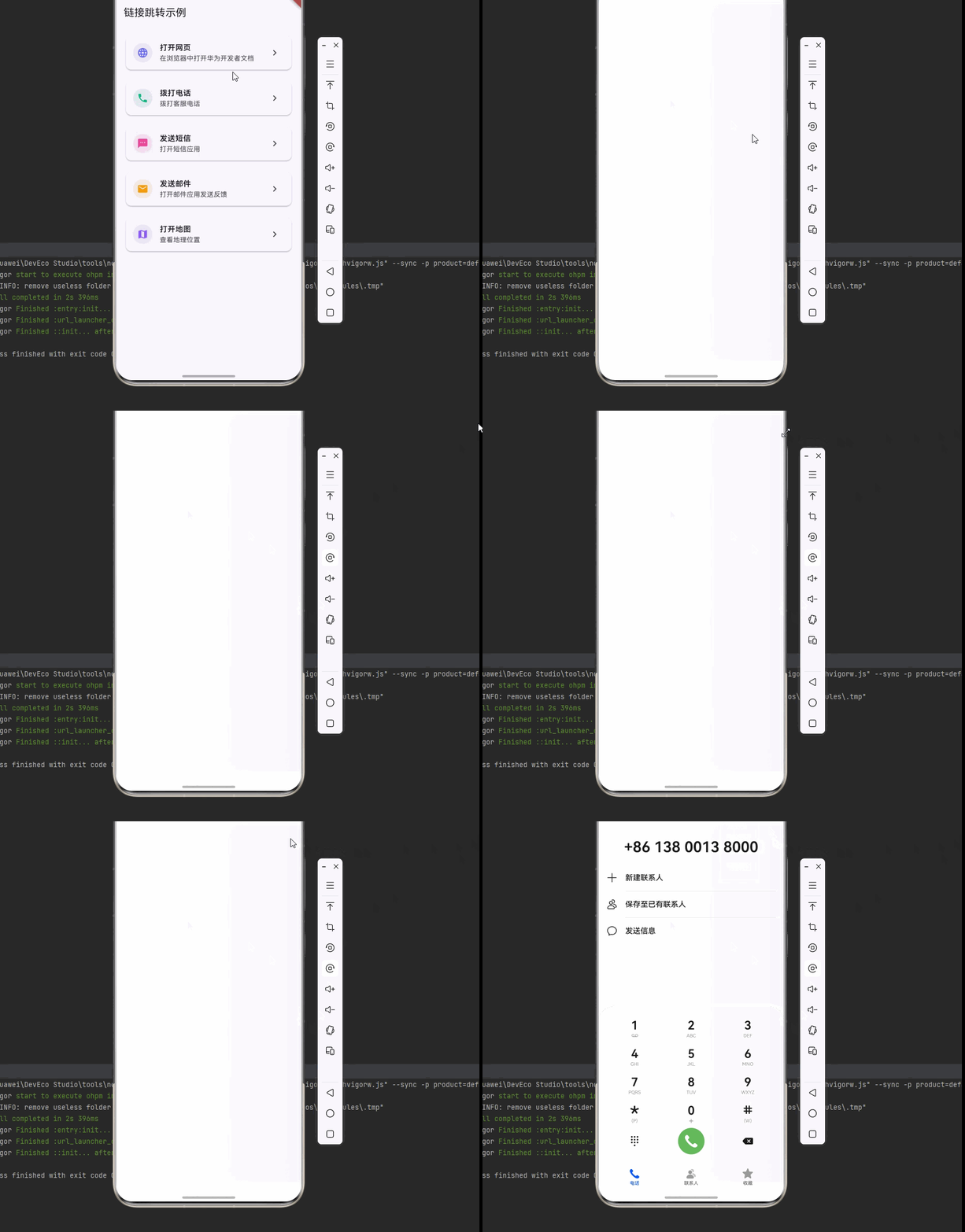
📝 完整代码
import 'package:flutter/material.dart';
import 'package:url_launcher/url_launcher.dart';
void main() {
runApp(const MyApp());
}
class MyApp extends StatelessWidget {
const MyApp({super.key});
Widget build(BuildContext context) {
return MaterialApp(
title: '链接跳转示例',
theme: ThemeData(
colorScheme: ColorScheme.fromSeed(seedColor: const Color(0xFF6366F1)),
useMaterial3: true,
),
home: const HomePage(),
);
}
}
class HomePage extends StatefulWidget {
const HomePage({super.key});
State<HomePage> createState() => _HomePageState();
}
class _HomePageState extends State<HomePage> {
Widget build(BuildContext context) {
return Scaffold(
appBar: AppBar(
title: const Text('链接跳转示例'),
),
body: ListView(
padding: const EdgeInsets.all(16),
children: [
_buildLinkCard(
context,
icon: Icons.language,
title: '打开网页',
subtitle: '在浏览器中打开华为开发者文档',
color: const Color(0xFF6366F1),
onTap: () => _launchInBrowser(),
),
const SizedBox(height: 16),
_buildLinkCard(
context,
icon: Icons.phone,
title: '拨打电话',
subtitle: '拨打客服电话',
color: const Color(0xFF10B981),
onTap: () => _makePhoneCall(),
),
const SizedBox(height: 16),
_buildLinkCard(
context,
icon: Icons.sms,
title: '发送短信',
subtitle: '打开短信应用',
color: const Color(0xFFEC4899),
onTap: () => _sendSMS(),
),
const SizedBox(height: 16),
_buildLinkCard(
context,
icon: Icons.email,
title: '发送邮件',
subtitle: '打开邮件应用发送反馈',
color: const Color(0xFFF59E0B),
onTap: () => _sendEmail(),
),
const SizedBox(height: 16),
_buildLinkCard(
context,
icon: Icons.map,
title: '打开地图',
subtitle: '查看地理位置',
color: const Color(0xFF8B5CF6),
onTap: () => _openMap(),
),
],
),
);
}
Widget _buildLinkCard(
BuildContext context, {
required IconData icon,
required String title,
required String subtitle,
required Color color,
required VoidCallback onTap,
}) {
return Card(
elevation: 2,
child: ListTile(
leading: CircleAvatar(
backgroundColor: color.withOpacity(0.1),
child: Icon(icon, color: color),
),
title: Text(
title,
style: const TextStyle(fontWeight: FontWeight.w600),
),
subtitle: Text(subtitle),
trailing: const Icon(Icons.chevron_right),
onTap: onTap,
),
);
}
Future<void> _launchInBrowser() async {
final Uri url = Uri.parse('https://developer.huawei.com/consumer/cn/doc/harmonyos-guides/');
if (!await launchUrl(url, mode: LaunchMode.externalApplication)) {
if (mounted) {
ScaffoldMessenger.of(context).showSnackBar(
SnackBar(content: Text('无法打开链接: $url')),
);
}
}
}
Future<void> _makePhoneCall() async {
final Uri phoneUri = Uri(
scheme: 'tel',
path: '+8613800138000',
);
if (!await launchUrl(phoneUri)) {
if (mounted) {
ScaffoldMessenger.of(context).showSnackBar(
const SnackBar(content: Text('无法拨打电话')),
);
}
}
}
Future<void> _sendSMS() async {
final Uri smsUri = Uri(
scheme: 'sms',
path: '+8613800138000',
queryParameters: {'body': '您好,我对您的产品很感兴趣'},
);
if (!await launchUrl(smsUri)) {
if (mounted) {
ScaffoldMessenger.of(context).showSnackBar(
const SnackBar(content: Text('无法打开短信应用')),
);
}
}
}
Future<void> _sendEmail() async {
final Uri emailUri = Uri(
scheme: 'mailto',
path: 'contact@example.com',
queryParameters: {
'subject': '产品咨询',
'body': '您好,我想咨询关于...',
},
);
if (!await launchUrl(emailUri)) {
if (mounted) {
ScaffoldMessenger.of(context).showSnackBar(
const SnackBar(content: Text('无法打开邮件应用')),
);
}
}
}
Future<void> _openMap() async {
final Uri mapUri = Uri.parse('geo:39.9042,116.4074');
if (!await launchUrl(mapUri)) {
if (mounted) {
ScaffoldMessenger.of(context).showSnackBar(
SnackBar(content: Text('无法打开地图')),
);
}
}
}
}
⚡ 高级技巧:自定义 URL Scheme
除了使用系统提供的标准 Scheme,你还可以定义和使用自定义的 URL Scheme 来实现应用间的深度链接。
📝 自定义 Scheme 示例
Future<void> _openDeepLink() async {
  final Uri deepLinkUri = Uri.parse('myapp://product/detail/123');

  if (!await launchUrl(deepLinkUri)) {
    if (mounted) {
      ScaffoldMessenger.of(context).showSnackBar(
        const SnackBar(content: Text('无法打开应用')),
      );
    }
  }
}

// 检查是否可以打开某个 URL
Future<void> _checkUrlSupport() async {
  final Uri url = Uri.parse('https://www.example.com');
  final bool canLaunch = await canLaunchUrl(url);

  debugPrint('Can launch URL: $canLaunch');

  if (mounted) {
    ScaffoldMessenger.of(context).showSnackBar(
      SnackBar(content: Text('Can launch: $canLaunch')),
    );
  }
}
❓ 常见问题排查
Q1:链接无法打开怎么办?
// 检查是否可以打开链接
final bool canLaunch = await canLaunchUrl(url);
debugPrint('Can launch: $canLaunch');

if (canLaunch) {
  await launchUrl(url);
} else {
  // 显示错误提示
}
Q2:如何在应用内打开网页?
// 使用 LaunchMode.inAppWebView
await launchUrl(
  url,
  mode: LaunchMode.inAppWebView,
  webViewConfiguration: const WebViewConfiguration(
    enableJavaScript: true,
    enableDomStorage: true,
  ),
);
Q3:如何处理应用内打开失败?
try {
  final launched = await launchUrl(
    url,
    mode: LaunchMode.inAppWebView,
  );

  if (!launched) {
    // 降级到外部浏览器
    await launchUrl(url, mode: LaunchMode.externalApplication);
  }
} catch (e) {
  debugPrint('打开链接失败: $e');
}
Q4:如何检查链接是否有效?
Future<bool> _isValidUrl(String urlString) async {
  try {
    final uri = Uri.parse(urlString);

    // 检查是否有 scheme
    if (!uri.hasScheme) {
      return false;
    }

    // 检查是否可以打开
    return await canLaunchUrl(uri);
  } catch (e) {
    return false;
  }
}
🚀 性能优化建议
1. 避免重复检查
// ❌ 不好的做法:每次都检查
if (await canLaunchUrl(url)) {
  await launchUrl(url);
}

// ✅ 好的做法:缓存结果
final _urlSupportCache = <String, bool>{};

Future<bool> _canLaunchUrl(Uri url) async {
  final urlStr = url.toString();

  if (_urlSupportCache.containsKey(urlStr)) {
    return _urlSupportCache[urlStr]!;
  }

  final canLaunch = await canLaunchUrl(url);
  _urlSupportCache[urlStr] = canLaunch;
  return canLaunch;
}
2. 使用常量定义 URL
class AppUrls {
  static const String website = 'https://www.example.com';
  static const String supportEmail = 'support@example.com';
  static const String supportPhone = '+8613800138000';
}

// 使用
launchUrl(Uri.parse(AppUrls.website));
3. 添加加载状态
bool _isLaunching = false;

Future<void> _launchUrl(Uri url) async {
  if (_isLaunching) return;

  setState(() => _isLaunching = true);

  try {
    final launched = await launchUrl(url);

    if (!launched && mounted) {
      ScaffoldMessenger.of(context).showSnackBar(
        const SnackBar(content: Text('无法打开链接')),
      );
    }
  } catch (e) {
    if (mounted) {
      ScaffoldMessenger.of(context).showSnackBar(
        SnackBar(content: Text('打开链接失败: $e')),
      );
    }
  } finally {
    if (mounted) {
      setState(() => _isLaunching = false);
    }
  }
}
📚 参考资料

开源鸿蒙跨平台开发社区汇聚开发者与厂商,共建“一次开发,多端部署”的开源生态,致力于降低跨端开发门槛,推动万物智联创新。
更多推荐
 20
20 0
0- 0


 已为社区贡献15条内容

所有评论(0)