React Native 鸿蒙跨平台开发:数据可视化仪表盘设计与实现
仪表盘是数据可视化应用的核心组件,能够直观地展示关键指标和实时数据。本文将深入讲解如何综合使用 、 和构建专业的数据可视化仪表盘系统。仪表盘系统数据层展示层交互层数据获取数据处理状态管理指标卡片进度组件图表组件实时更新用户交互动画效果LinearGradientProgressBarMaskedViewAnimated API技术深度解析:技术深度解析:技术深度解析:技术深度解析:四、高级应用场景
·
欢迎加入开源鸿蒙跨平台社区:https://openharmonycrossplatform.csdn.net
一、核心知识点
仪表盘是数据可视化应用的核心组件,能够直观地展示关键指标和实时数据。本文将深入讲解如何综合使用 react-native-linear-gradient、@react-native-ohos/progress-bar-android 和 @react-native-masked-view/masked-view 构建专业的数据可视化仪表盘系统。
1.1 仪表盘架构设计
1.2 仪表盘组件分类
| 组件类型 | 核心技术 | 数据类型 | 视觉特点 |
|---|---|---|---|
| 指标卡片 | 渐变 + 遮罩 | 数值、百分比 | 大号数字、渐变效果 |
| 进度组件 | ProgressBar + 颜色映射 | 进度、状态 | 进度条、状态指示 |
| 仪表盘组件 | 径向渐变 + 动画 | 仪表、速度计 | 圆形、指针动画 |
| 趋势图表 | 多段渐变 + 遮罩 | 时间序列数据 | 趋势线、渐变填充 |
| 状态面板 | 多层次设计 | 多维度数据 | 网格布局、层次清晰 |
1.3 核心技术特性
- 实时更新:数据变化时自动刷新显示
- 渐变效果:丰富的渐变色彩方案
- 遮罩特效:文字/图标渐变填充
- 动画流畅:使用原生驱动,性能优异
- 响应式布局:适配不同屏幕尺寸
- 状态管理:完整的数据状态管理
二、实战核心代码深度解析
2.1 核心指标卡片
import React from 'react';
import { View, Text, StyleSheet } from 'react-native';
import MaskedView from '@react-native-masked-view/masked-view';
import { LinearGradient } from 'react-native-linear-gradient';

interface MetricCardProps {
  title: string;
  value: number;
  unit: string;
  colors: string[];
  trend?: 'up' | 'down' | 'stable';
  trendValue?: number;
}

const MetricCard = ({ title, value, unit, colors, trend, trendValue }: MetricCardProps) => {
  const getTrendIcon = () => {
    switch (trend) {
      case 'up': return '📈';
      case 'down': return '📉';
      default: return '➡️';
    }
  };

  const getTrendColor = () => {
    switch (trend) {
      case 'up': return '#2A9D8F';
      case 'down': return '#FF6B6B';
      default: return '#909399';
    }
  };

  return (
    <View style={styles.metricCard}>
      {/* 标题 */}
      <Text style={styles.metricTitle}>{title}</Text>

      {/* 数值显示 */}
      <MaskedView
        style={styles.metricMaskedView}
        maskElement={
          <View style={styles.metricMaskContainer}>
            <Text style={styles.metricValue}>
              {value}
            </Text>
          </View>
        }
      >
        <LinearGradient
          colors={colors}
          start={{ x: 0, y: 0 }}
          end={{ x: 1, y: 0 }}
          style={styles.gradient}
        />
      </MaskedView>

      {/* 单位 */}
      <Text style={styles.metricUnit}>{unit}</Text>

      {/* 趋势指示 */}
      {trend && trendValue && (
        <View style={styles.trendContainer}>
          <Text style={styles.trendIcon}>{getTrendIcon()}</Text>
          <Text style={[styles.trendValue, { color: getTrendColor() }]}>
            {trendValue > 0 ? '+' : ''}{trendValue}%
          </Text>
        </View>
      )}
    </View>
  );
};

const styles = StyleSheet.create({
  metricCard: {
    backgroundColor: '#FFFFFF',
    borderRadius: 12,
    padding: 20,
    shadowColor: '#000000',
    shadowOffset: { width: 0, height: 2 },
    shadowOpacity: 0.08,
    shadowRadius: 8,
    elevation: 4,
  },
  metricTitle: {
    fontSize: 14,
    color: '#909399',
    marginBottom: 8,
  },
  metricMaskedView: {
    height: 80,
    marginBottom: 8,
  },
  metricMaskContainer: {
    backgroundColor: 'transparent',
    alignItems: 'center',
    justifyContent: 'center',
    height: '100%',
  },
  metricValue: {
    fontSize: 64,
    fontWeight: '900',
    color: '#000000',
    lineHeight: 80,
  },
  gradient: {
    flex: 1,
  },
  metricUnit: {
    fontSize: 16,
    color: '#606266',
    textAlign: 'center',
    marginBottom: 12,
  },
  trendContainer: {
    flexDirection: 'row',
    alignItems: 'center',
    justifyContent: 'center',
  },
  trendIcon: {
    fontSize: 16,
    marginRight: 4,
  },
  trendValue: {
    fontSize: 14,
    fontWeight: '600',
  },
});
技术深度解析:
- 数值遮罩:大号数值呈现渐变效果
- 趋势指示:显示数据变化趋势
- 颜色映射:趋势值自动映射颜色
- 层次设计:通过字体大小建立层次
- 单位标注:清晰标注数值单位
2.2 环形进度组件
import React from 'react';
import { View, Text, StyleSheet } from 'react-native';
import MaskedView from '@react-native-masked-view/masked-view';
import { LinearGradient } from 'react-native-linear-gradient';
import { ProgressBar } from '@react-native-community/progress-bar-android';

interface CircularProgressProps {
  title: string;
  progress: number;
  colors: string[];
  icon?: string;
}

const CircularProgress = ({ title, progress, colors, icon }: CircularProgressProps) => {
  return (
    <View style={styles.circularContainer}>
      {/* 圆形背景 */}
      <View style={styles.circularBackground}>
        {/* 进度遮罩 */}
        <MaskedView
          style={styles.circularMaskedView}
          maskElement={
            <View style={styles.circularMaskContainer}>
              <Text style={styles.circularProgress}>
                {Math.round(progress)}%
              </Text>
            </View>
          }
        >
          <LinearGradient
            colors={colors}
            start={{ x: 0, y: 0 }}
            end={{ x: 1, y: 1 }}
            style={styles.gradient}
          />
        </MaskedView>

        {/* 图标 */}
        {icon && (
          <Text style={styles.circularIcon}>{icon}</Text>
        )}
      </View>

      {/* 标题 */}
      <Text style={styles.circularTitle}>{title}</Text>

      {/* 线性进度条 */}
      <ProgressBar
        styleAttr="Horizontal"
        indeterminate={false}
        progress={progress / 100}
        animating={true}
        color={colors[0]}
        style={styles.circularProgressBar}
      />
    </View>
  );
};

const styles = StyleSheet.create({
  circularContainer: {
    backgroundColor: '#FFFFFF',
    borderRadius: 12,
    padding: 16,
    alignItems: 'center',
    shadowColor: '#000000',
    shadowOffset: { width: 0, height: 2 },
    shadowOpacity: 0.08,
    shadowRadius: 8,
    elevation: 4,
  },
  circularBackground: {
    width: 120,
    height: 120,
    borderRadius: 60,
    backgroundColor: '#F5F7FA',
    justifyContent: 'center',
    alignItems: 'center',
    marginBottom: 12,
    position: 'relative',
  },
  circularMaskedView: {
    width: 100,
    height: 100,
    borderRadius: 50,
  },
  circularMaskContainer: {
    backgroundColor: 'transparent',
    alignItems: 'center',
    justifyContent: 'center',
    height: '100%',
  },
  circularProgress: {
    fontSize: 32,
    fontWeight: '900',
    color: '#000000',
  },
  gradient: {
    flex: 1,
    borderRadius: 50,
  },
  circularIcon: {
    position: 'absolute',
    fontSize: 48,
    opacity: 0.1,
  },
  circularTitle: {
    fontSize: 16,
    fontWeight: '600',
    color: '#303133',
    marginBottom: 12,
  },
  circularProgressBar: {
    width: '100%',
  },
});
技术深度解析:
- 圆形布局:使用 borderRadius 创建圆形
- 双层显示:圆形百分比 + 线性进度条
- 图标叠加:半透明图标作为背景装饰
- 居中对齐:所有元素居中显示
- 视觉平衡:圆形和线性的比例协调
2.3 趋势图表组件
import React from 'react';
import { View, Text, StyleSheet } from 'react-native';
import MaskedView from '@react-native-masked-view/masked-view';
import { LinearGradient } from 'react-native-linear-gradient';

interface TrendChartProps {
  data: {
    label: string;
    value: number;
  }[];
  colors: string[];
}

const TrendChart = ({ data, colors }: TrendChartProps) => {
  const maxValue = Math.max(...data.map(d => d.value));

  return (
    <View style={styles.trendContainer}>
      <Text style={styles.trendTitle}>趋势分析</Text>

      <View style={styles.trendChart}>
        {data.map((item, index) => (
          <View key={index} style={styles.trendItem}>
            {/* 数值 */}
            <MaskedView
              style={styles.trendValueMaskedView}
              maskElement={
                <View style={styles.trendValueMaskContainer}>
                  <Text style={styles.trendValue}>
                    {item.value}
                  </Text>
                </View>
              }
            >
              <LinearGradient
                colors={colors}
                start={{ x: 0, y: 0 }}
                end={{ x: 1, y: 0 }}
                style={styles.gradient}
              />
            </MaskedView>

            {/* 进度条 */}
            <View style={styles.trendBarContainer}>
              <View style={[
                styles.trendBar,
                {
                  width: `${(item.value / maxValue) * 100}%`,
                  backgroundColor: colors[0],
                }
              ]} />
            </View>

            {/* 标签 */}
            <Text style={styles.trendLabel}>{item.label}</Text>
          </View>
        ))}
      </View>
    </View>
  );
};

const styles = StyleSheet.create({
  trendContainer: {
    backgroundColor: '#FFFFFF',
    borderRadius: 12,
    padding: 16,
    shadowColor: '#000000',
    shadowOffset: { width: 0, height: 2 },
    shadowOpacity: 0.08,
    shadowRadius: 8,
    elevation: 4,
  },
  trendTitle: {
    fontSize: 18,
    fontWeight: '600',
    color: '#303133',
    marginBottom: 16,
  },
  trendChart: {
    flexDirection: 'row',
    justifyContent: 'space-around',
  },
  trendItem: {
    alignItems: 'center',
    flex: 1,
  },
  trendValueMaskedView: {
    height: 40,
    marginBottom: 8,
  },
  trendValueMaskContainer: {
    backgroundColor: 'transparent',
    alignItems: 'center',
    justifyContent: 'center',
    height: '100%',
  },
  trendValue: {
    fontSize: 24,
    fontWeight: '900',
    color: '#000000',
  },
  gradient: {
    flex: 1,
  },
  trendBarContainer: {
    width: '100%',
    height: 8,
    backgroundColor: '#F5F7FA',
    borderRadius: 4,
    marginBottom: 8,
    overflow: 'hidden',
  },
  trendBar: {
    height: '100%',
    borderRadius: 4,
  },
  trendLabel: {
    fontSize: 12,
    color: '#909399',
  },
});
技术深度解析:
- 数据归一化:根据最大值计算百分比
- 数值遮罩:数值呈现渐变效果
- 进度条:使用宽度百分比显示趋势
- 标签对齐:所有元素居中对齐
- 空间分布:等宽分布各数据项
2.4 状态面板组件
const StatusPanel = ({ panels }: { panels: any[] }) => {
  return (
    <View style={styles.panelContainer}>
      {panels.map((panel, index) => (
        <View key={index} style={[styles.panelItem, { borderLeftColor: panel.colors[0] }]}>
          {/* 面板头部 */}
          <View style={styles.panelHeader}>
            <Text style={styles.panelIcon}>{panel.icon}</Text>
            <Text style={styles.panelTitle}>{panel.title}</Text>
          </View>

          {/* 数值 */}
          <MaskedView
            style={styles.panelMaskedView}
            maskElement={
              <View style={styles.panelMaskContainer}>
                <Text style={styles.panelValue}>
                  {panel.value}
                </Text>
              </View>
            }
          >
            <LinearGradient
              colors={panel.colors}
              start={{ x: 0, y: 0 }}
              end={{ x: 1, y: 0 }}
              style={styles.gradient}
            />
          </MaskedView>

          {/* 单位 */}
          <Text style={styles.panelUnit}>{panel.unit}</Text>

          {/* 进度条 */}
          <ProgressBar
            styleAttr="Horizontal"
            indeterminate={false}
            progress={panel.progress / 100}
            animating={true}
            color={panel.colors[0]}
            style={styles.panelProgressBar}
          />

          {/* 状态指示 */}
          <View style={styles.panelStatus}>
            <View style={[styles.statusDot, { backgroundColor: panel.colors[0] }]} />
            <Text style={styles.panelStatusText}>{panel.status}</Text>
          </View>
        </View>
      ))}
    </View>
  );
};
技术深度解析:
- 网格布局:多列布局展示多个面板
- 左侧边框:彩色边框标识不同面板
- 信息层次:图标、标题、数值、进度、状态
- 状态指示:颜色点 + 文字双重指示
- 视觉统一:统一的卡片样式
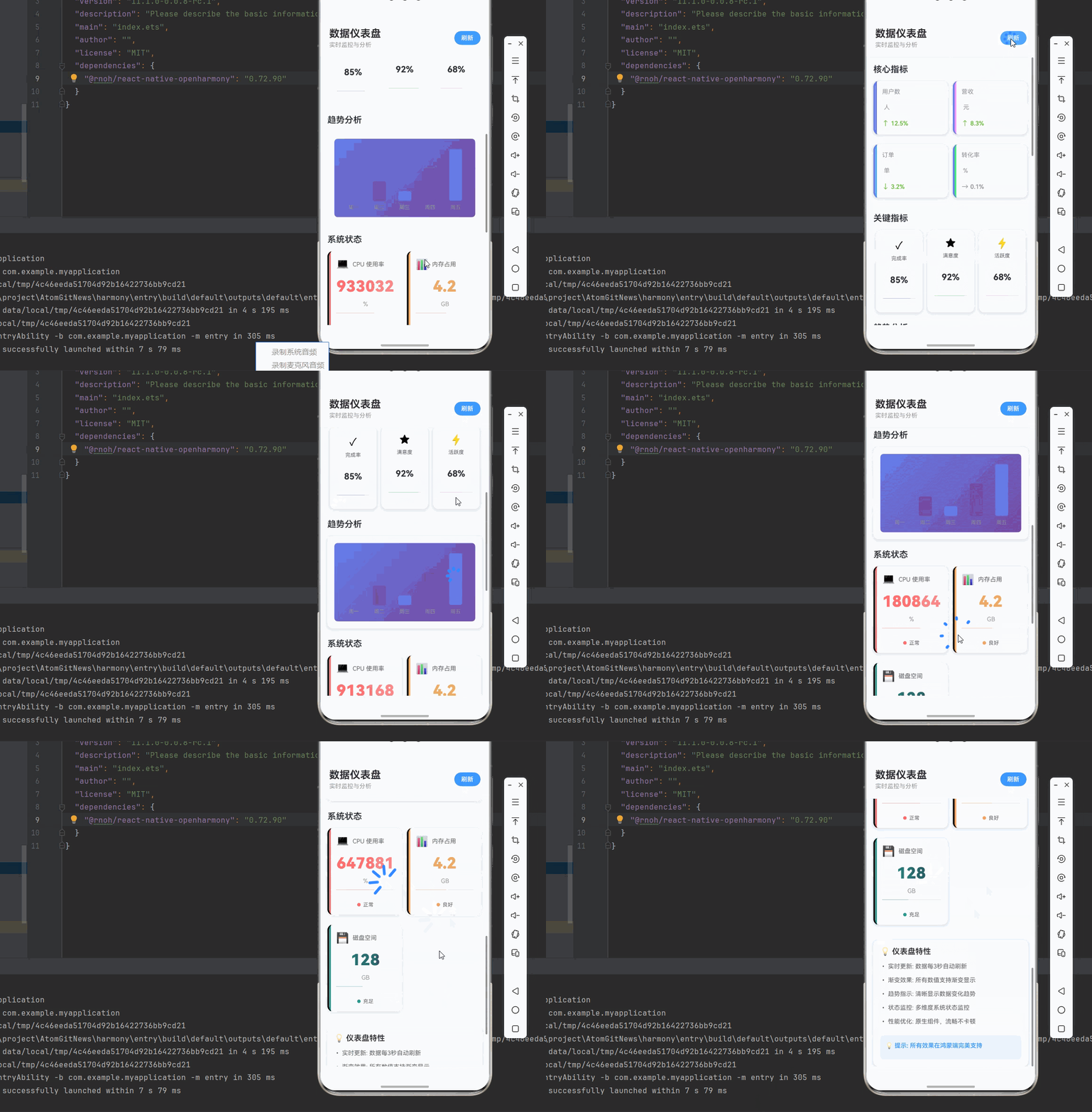
三、实战完整版:综合仪表盘系统
import React, { useState, useEffect } from 'react';
import {
  View,
  Text,
  StyleSheet,
  SafeAreaView,
  ScrollView,
  StatusBar,
  TouchableOpacity,
} from 'react-native';
import MaskedView from '@react-native-masked-view/masked-view';
import { LinearGradient } from 'react-native-linear-gradient';
import { ProgressBar } from '@react-native-community/progress-bar-android';

// ==================== 组件定义 ====================

// 指标卡片
interface MetricCardProps {
  title: string;
  value: number;
  unit: string;
  colors: string[];
  trend: 'up' | 'down' | 'stable';
  trendValue: number;
}

const MetricCard = ({ title, value, unit, colors, trend, trendValue }: MetricCardProps) => {
  const getTrendIcon = () => {
    if (trend === 'up') return trendValue > 0 ? '↑' : '↓';
    if (trend === 'down') return trendValue < 0 ? '↓' : '↑';
    return '→';
  };

  const getTrendColor = () => {
    if (trend === 'up') return trendValue > 0 ? '#67C23A' : '#F56C6C';
    if (trend === 'down') return trendValue < 0 ? '#67C23A' : '#F56C6C';
    return '#909399';
  };

  return (
    <View style={styles.metricCard}>
      <View style={[styles.metricBorder, { backgroundColor: colors[0] }]} />
      <View style={styles.metricContent}>
        <Text style={styles.metricTitle}>{title}</Text>
        <View style={styles.metricValueContainer}>
          <MaskedView
            style={styles.metricMaskedView}
            maskElement={
              <View style={styles.metricMaskContainer}>
                <Text style={styles.metricValue}>
                  {value.toLocaleString()}
                </Text>
              </View>
            }
          >
            <LinearGradient
              colors={colors}
              start={{ x: 0, y: 0 }}
              end={{ x: 1, y: 0 }}
              style={styles.gradient}
            />
          </MaskedView>
          <Text style={styles.metricUnit}>{unit}</Text>
        </View>
        <View style={styles.metricTrend}>
          <Text style={[styles.metricTrendIcon, { color: getTrendColor() }]}>
            {getTrendIcon()}
          </Text>
          <Text style={[styles.metricTrendValue, { color: getTrendColor() }]}>
            {Math.abs(trendValue)}%
          </Text>
        </View>
      </View>
    </View>
  );
};

// 环形进度
interface CircularProgressProps {
  title: string;
  progress: number;
  colors: string[];
  icon: string;
}

const CircularProgress = ({ title, progress, colors, icon }: CircularProgressProps) => {
  const radius = 35;
  const circumference = 2 * Math.PI * radius;
  const strokeDashoffset = circumference - (progress / 100) * circumference;

  return (
    <View style={styles.circularCard}>
      <Text style={styles.circularIcon}>{icon}</Text>
      <Text style={styles.circularTitle}>{title}</Text>
      <View style={styles.circularProgressContainer}>
        <Text style={styles.circularProgress}>{progress}%</Text>
      </View>
      <ProgressBar
        styleAttr="Horizontal"
        indeterminate={false}
        progress={progress / 100}
        animating={true}
        color={colors[0]}
        style={styles.circularProgressBar}
      />
    </View>
  );
};

// 趋势图表
interface TrendChartProps {
  data: { label: string; value: number }[];
  colors: string[];
}

// 指标数据类型
interface MetricData {
  value: number;
  unit: string;
  colors: string[];
  trend: 'up' | 'down' | 'stable';
  trendValue: number;
}

const TrendChart = ({ data, colors }: TrendChartProps) => {
  const maxValue = Math.max(...data.map(d => d.value));
  const minValue = Math.min(...data.map(d => d.value));
  const range = maxValue - minValue || 1;

  return (
    <View style={styles.trendChart}>
      <LinearGradient
        colors={colors}
        start={{ x: 0, y: 0 }}
        end={{ x: 1, y: 1 }}
        style={styles.trendChartBackground}
      >
        <View style={styles.trendChartContent}>
          {data.map((item, index) => {
            const height = ((item.value - minValue) / range) * 100;
            const barColor = index % 2 === 0 ? colors[0] : colors[1];

            return (
              <View key={index} style={styles.trendBarContainer}>
                <View style={styles.trendBarWrapper}>
                  <View
                    style={[
                      styles.trendBar,
                      { height: `${height}%`, backgroundColor: barColor }
                    ]}
                  />
                </View>
                <Text style={styles.trendLabel}>{item.label}</Text>
              </View>
            );
          })}
        </View>
      </LinearGradient>
    </View>
  );
};

// 状态面板
const StatusPanel = ({ panels }: { panels: any[] }) => {
  return (
    <View style={styles.statusPanel}>
      {panels.map((panel, index) => (
        <View key={index} style={styles.statusPanelItem}>
          <View style={[styles.statusPanelBorder, { backgroundColor: panel.colors[0] }]} />
          <View style={styles.statusPanelContent}>
            {/* 图标和标题 */}
            <View style={styles.statusPanelHeader}>
              <Text style={styles.statusPanelIcon}>{panel.icon}</Text>
              <Text style={styles.statusPanelTitle}>{panel.title}</Text>
            </View>

            {/* 数值 */}
            <MaskedView
              style={styles.panelMaskedView}
              maskElement={
                <View style={styles.panelMaskContainer}>
                  <Text style={styles.panelValue}>
                    {panel.value}
                  </Text>
                </View>
              }
            >
              <LinearGradient
                colors={panel.colors}
                start={{ x: 0, y: 0 }}
                end={{ x: 1, y: 0 }}
                style={styles.gradient}
              />
            </MaskedView>

            {/* 单位 */}
            <Text style={styles.panelUnit}>{panel.unit}</Text>

            {/* 进度条 */}
            <ProgressBar
              styleAttr="Horizontal"
              indeterminate={false}
              progress={panel.progress / 100}
              animating={true}
              color={panel.colors[0]}
              style={styles.panelProgressBar}
            />

            {/* 状态指示 */}
            <View style={styles.panelStatus}>
              <View style={[styles.statusDot, { backgroundColor: panel.colors[0] }]} />
              <Text style={styles.panelStatusText}>{panel.status}</Text>
            </View>
          </View>
        </View>
      ))}
    </View>
  );
};

const DashboardScreen = () => {
  // 核心指标
  const [metrics, setMetrics] = useState<Record<string, MetricData>>({
    users: { value: 12580, unit: '人', colors: ['#667eea', '#764ba2'], trend: 'up', trendValue: 12.5 },
    revenue: { value: 856000, unit: '元', colors: ['#f093fb', '#f5576c'], trend: 'up', trendValue: 8.3 },
    orders: { value: 3240, unit: '单', colors: ['#4FACFE', '#00F2FE'], trend: 'down', trendValue: -3.2 },
    conversion: { value: 4.8, unit: '%', colors: ['#43e97b', '#38f9d7'], trend: 'stable', trendValue: 0.1 },
  });

  // 环形进度
  const [circulars, setCirculars] = useState([
    { id: 1, title: '完成率', progress: 85, colors: ['#667eea', '#764ba2'], icon: '✓' },
    { id: 2, title: '满意度', progress: 92, colors: ['#43e97b', '#38f9d7'], icon: '★' },
    { id: 3, title: '活跃度', progress: 68, colors: ['#f093fb', '#f5576c'], icon: '⚡' },
  ]);

  // 趋势数据
  const [trendData, setTrendData] = useState([
    { label: '周一', value: 120 },
    { label: '周二', value: 180 },
    { label: '周三', value: 150 },
    { label: '周四', value: 220 },
    { label: '周五', value: 280 },
  ]);

  // 状态面板
  const [panels, setPanels] = useState([
    {
      icon: '💻',
      title: 'CPU 使用率',
      value: 65,
      unit: '%',
      colors: ['#FF6B6B', '#FF8E8E'],
      progress: 65,
      status: '正常'
    },
    {
      icon: '📊',
      title: '内存占用',
      value: 4.2,
      unit: 'GB',
      colors: ['#F4A261', '#E9C46A'],
      progress: 52,
      status: '良好'
    },
    {
      icon: '💾',
      title: '磁盘空间',
      value: 128,
      unit: 'GB',
      colors: ['#2A9D8F', '#264653'],
      progress: 45,
      status: '充足'
    },
  ]);

  // 模拟实时数据更新
  useEffect(() => {
    const updateInterval = setInterval(() => {
      // 更新用户数
      setMetrics(prev => ({
        ...prev,
        users: {
          ...prev.users,
          value: prev.users.value + Math.floor(Math.random() * 10 - 5),
        },
      }));

      // 更新 CPU
      setPanels(prev => prev.map(panel =>
        panel.title === 'CPU 使用率'
          ? {
              ...panel,
              value: Math.max(0, Math.min(100, panel.value + (Math.random() - 0.5) * 5)),
              progress: Math.max(0, Math.min(100, panel.progress + (Math.random() - 0.5) * 5)),
            }
          : panel
      ));
    }, 3000);

    return () => clearInterval(updateInterval);
  }, []);

  return (
    <SafeAreaView style={styles.container}>
      <StatusBar barStyle="dark-content" backgroundColor="#ffffff" />

      {/* 头部 */}
      <View style={styles.header}>
        <View>
          <Text style={styles.headerTitle}>数据仪表盘</Text>
          <Text style={styles.headerSubtitle}>实时监控与分析</Text>
        </View>
        <TouchableOpacity style={styles.refreshButton}>
          <Text style={styles.refreshButtonText}>刷新</Text>
        </TouchableOpacity>
      </View>

      <ScrollView style={styles.content}>
        {/* 核心指标 */}
        <View style={styles.section}>
          <Text style={styles.sectionTitle}>核心指标</Text>

          <View style={styles.metricsGrid}>
            <MetricCard
              title="用户数"
              value={metrics.users.value}
              unit={metrics.users.unit}
              colors={metrics.users.colors}
              trend={metrics.users.trend}
              trendValue={metrics.users.trendValue}
            />

            <MetricCard
              title="营收"
              value={metrics.revenue.value}
              unit={metrics.revenue.unit}
              colors={metrics.revenue.colors}
              trend={metrics.revenue.trend}
              trendValue={metrics.revenue.trendValue}
            />

            <MetricCard
              title="订单"
              value={metrics.orders.value}
              unit={metrics.orders.unit}
              colors={metrics.orders.colors}
              trend={metrics.orders.trend}
              trendValue={metrics.orders.trendValue}
            />

            <MetricCard
              title="转化率"
              value={metrics.conversion.value}
              unit={metrics.conversion.unit}
              colors={metrics.conversion.colors}
              trend={metrics.conversion.trend}
              trendValue={metrics.conversion.trendValue}
            />
          </View>
        </View>

        {/* 环形进度 */}
        <View style={styles.section}>
          <Text style={styles.sectionTitle}>关键指标</Text>

          <View style={styles.circularGrid}>
            {circulars.map(circular => (
              <CircularProgress
                key={circular.id}
                title={circular.title}
                progress={circular.progress}
                colors={circular.colors}
                icon={circular.icon}
              />
            ))}
          </View>
        </View>

        {/* 趋势图表 */}
        <View style={styles.section}>
          <Text style={styles.sectionTitle}>趋势分析</Text>

          <TrendChart
            data={trendData}
            colors={['#667eea', '#764ba2']}
          />
        </View>

        {/* 状态面板 */}
        <View style={styles.section}>
          <Text style={styles.sectionTitle}>系统状态</Text>

          <StatusPanel panels={panels} />
        </View>

        {/* 使用说明 */}
        <View style={styles.infoCard}>
          <Text style={styles.infoTitle}>💡 仪表盘特性</Text>

          <Text style={styles.infoText}>
            • 实时更新: 数据每3秒自动刷新
          </Text>
          <Text style={styles.infoText}>
            • 渐变效果: 所有数值支持渐变显示
          </Text>
          <Text style={styles.infoText}>
            • 趋势指示: 清晰显示数据变化趋势
          </Text>
          <Text style={styles.infoText}>
            • 状态监控: 多维度系统状态监控
          </Text>
          <Text style={styles.infoText}>
            • 性能优化: 原生组件,流畅不卡顿
          </Text>

          <View style={styles.tipBox}>
            <Text style={[styles.infoText, styles.tipText]}>
              💡 提示: 所有效果在鸿蒙端完美支持
            </Text>
          </View>
        </View>
      </ScrollView>
    </SafeAreaView>
  );
};

const styles = StyleSheet.create({
  // ==================== MetricCard 样式 ====================
  metricCard: {
    width: '48%',
    backgroundColor: '#FFFFFF',
    borderRadius: 12,
    padding: 16,
    marginBottom: 12,
    borderLeftWidth: 4,
    borderLeftColor: '#667eea',
    shadowColor: '#000000',
    shadowOffset: { width: 0, height: 2 },
    shadowOpacity: 0.08,
    shadowRadius: 8,
    elevation: 4,
  },
  metricBorder: {
    position: 'absolute',
    left: 0,
    top: 0,
    bottom: 0,
    width: 4,
    borderTopLeftRadius: 12,
    borderBottomLeftRadius: 12,
  },
  metricContent: {
    flex: 1,
  },
  metricTitle: {
    fontSize: 14,
    color: '#909399',
    marginBottom: 8,
  },
  metricValueContainer: {
    flexDirection: 'row',
    alignItems: 'center',
    marginBottom: 8,
  },
  metricMaskedView: {
    height: 40,
    marginRight: 4,
  },
  metricMaskContainer: {
    backgroundColor: 'transparent',
    justifyContent: 'center',
    height: '100%',
  },
  metricValue: {
    fontSize: 28,
    fontWeight: '900',
    color: '#000000',
  },
  metricUnit: {
    fontSize: 14,
    color: '#909399',
  },
  metricTrend: {
    flexDirection: 'row',
    alignItems: 'center',
  },
  metricTrendIcon: {
    fontSize: 16,
    marginRight: 4,
  },
  metricTrendValue: {
    fontSize: 14,
    fontWeight: '600',
  },

  // ==================== CircularProgress 样式 ====================
  circularCard: {
    width: '30%',
    backgroundColor: '#FFFFFF',
    borderRadius: 12,
    padding: 16,
    alignItems: 'center',
    shadowColor: '#000000',
    shadowOffset: { width: 0, height: 2 },
    shadowOpacity: 0.08,
    shadowRadius: 8,
    elevation: 4,
  },
  circularIcon: {
    fontSize: 24,
    marginBottom: 8,
  },
  circularTitle: {
    fontSize: 12,
    color: '#606266',
    marginBottom: 8,
  },
  circularProgressContainer: {
    width: 70,
    height: 70,
    borderRadius: 35,
    backgroundColor: '#F5F7FA',
    justifyContent: 'center',
    alignItems: 'center',
    marginBottom: 8,
  },
  circularProgress: {
    fontSize: 20,
    fontWeight: '700',
    color: '#303133',
  },
  circularProgressBar: {
    width: '100%',
  },

  // ==================== TrendChart 样式 ====================
  trendChart: {
    backgroundColor: '#FFFFFF',
    borderRadius: 12,
    padding: 16,
    shadowColor: '#000000',
    shadowOffset: { width: 0, height: 2 },
    shadowOpacity: 0.08,
    shadowRadius: 8,
    elevation: 4,
  },
  trendChartBackground: {
    borderRadius: 8,
    padding: 16,
  },
  trendChartContent: {
    flexDirection: 'row',
    justifyContent: 'space-around',
    alignItems: 'flex-end',
    height: 150,
  },
  trendBarContainer: {
    alignItems: 'center',
    flex: 1,
  },
  trendBarWrapper: {
    width: 30,
    height: 120,
    justifyContent: 'flex-end',
    marginBottom: 8,
  },
  trendBar: {
    width: '100%',
    borderRadius: 4,
  },
  trendLabel: {
    fontSize: 12,
    color: '#909399',
  },

  // ==================== StatusPanel 样式 ====================
  statusPanel: {
    flexDirection: 'row',
    flexWrap: 'wrap',
    gap: 12,
  },
  statusPanelItem: {
    width: '48%',
    backgroundColor: '#FFFFFF',
    borderRadius: 12,
    marginBottom: 12,
    borderLeftWidth: 4,
    shadowColor: '#000000',
    shadowOffset: { width: 0, height: 2 },
    shadowOpacity: 0.08,
    shadowRadius: 8,
    elevation: 4,
  },
  statusPanelBorder: {
    position: 'absolute',
    left: 0,
    top: 0,
    bottom: 0,
    width: 4,
    borderTopLeftRadius: 12,
    borderBottomLeftRadius: 12,
  },
  statusPanelContent: {
    flex: 1,
    padding: 16,
  },
  statusPanelHeader: {
    flexDirection: 'row',
    alignItems: 'center',
    marginBottom: 12,
  },
  statusPanelIcon: {
    fontSize: 24,
    marginRight: 8,
  },
  statusPanelTitle: {
    fontSize: 14,
    color: '#606266',
  },
  panelMaskedView: {
    height: 50,
    marginBottom: 8,
  },
  panelMaskContainer: {
    backgroundColor: 'transparent',
    alignItems: 'center',
    justifyContent: 'center',
    height: '100%',
  },
  panelValue: {
    fontSize: 36,
    fontWeight: '900',
    color: '#000000',
  },
  panelUnit: {
    fontSize: 14,
    color: '#909399',
    textAlign: 'center',
    marginBottom: 12,
  },
  panelProgressBar: {
    marginBottom: 12,
  },
  panelStatus: {
    flexDirection: 'row',
    alignItems: 'center',
    justifyContent: 'center',
  },
  statusDot: {
    width: 8,
    height: 8,
    borderRadius: 4,
    marginRight: 6,
  },
  panelStatusText: {
    fontSize: 12,
    color: '#606266',
  },
  gradient: {
    flex: 1,
  },
  infoCard: {
    backgroundColor: '#FFFFFF',
    borderRadius: 12,
    padding: 16,
    shadowColor: '#000000',
    shadowOffset: { width: 0, height: 2 },
    shadowOpacity: 0.08,
    shadowRadius: 8,
    elevation: 4,
  },
  infoTitle: {
    fontSize: 18,
    fontWeight: '600',
    color: '#303133',
    marginBottom: 12,
  },
  infoText: {
    fontSize: 14,
    lineHeight: 24,
    marginBottom: 8,
    color: '#606266',
  },
  tipBox: {
    backgroundColor: '#ECF5FF',
    borderRadius: 8,
    padding: 12,
    marginTop: 12,
  },
  tipText: {
    color: '#409EFF',
    fontWeight: '600',
  },

  // ==================== DashboardScreen 样式 ====================
  container: {
    flex: 1,
    backgroundColor: '#F5F7FA',
  },
  header: {
    flexDirection: 'row',
    justifyContent: 'space-between',
    alignItems: 'center',
    padding: 20,
    backgroundColor: '#FFFFFF',
    borderBottomWidth: 1,
    borderBottomColor: '#EBEEF5',
  },
  headerTitle: {
    fontSize: 24,
    fontWeight: '700',
    color: '#303133',
    marginBottom: 4,
  },
  headerSubtitle: {
    fontSize: 14,
    color: '#909399',
  },
  refreshButton: {
    paddingHorizontal: 16,
    paddingVertical: 8,
    backgroundColor: '#409EFF',
    borderRadius: 20,
  },
  refreshButtonText: {
    fontSize: 14,
    color: '#FFFFFF',
    fontWeight: '600',
  },
  content: {
    flex: 1,
    padding: 16,
  },
  section: {
    marginBottom: 24,
  },
  sectionTitle: {
    fontSize: 20,
    fontWeight: '600',
    color: '#303133',
    marginBottom: 16,
  },
  metricsGrid: {
    flexDirection: 'row',
    flexWrap: 'wrap',
    gap: 12,
  },
  circularGrid: {
    flexDirection: 'row',
    justifyContent: 'space-around',
  },
  panelContainer: {
    flexDirection: 'row',
    gap: 12,
  },
  panelItem: {
    flex: 1,
    backgroundColor: '#FFFFFF',
    borderRadius: 12,
    padding: 16,
    borderLeftWidth: 4,
    shadowColor: '#000000',
    shadowOffset: { width: 0, height: 2 },
    shadowOpacity: 0.08,
    shadowRadius: 8,
    elevation: 4,
  },
  panelHeader: {
    flexDirection: 'row',
    alignItems: 'center',
    marginBottom: 12,
  },
  panelIcon: {
    fontSize: 24,
    marginRight: 8,
  },
  panelTitle: {
    fontSize: 14,
    color: '#606266',
  },
});

export default DashboardScreen;
四、高级应用场景
4.1 多维度数据对比
const MultiDimensionalComparison = () => {
  const dimensions = [
    { name: '性能', current: 85, target: 90, colors: ['#667eea', '#764ba2'] },
    { name: '安全', current: 92, target: 95, colors: ['#43e97b', '#38f9d7'] },
    { name: '稳定', current: 78, target: 85, colors: ['#F4A261', '#E9C46A'] },
    { name: '可用', current: 95, target: 99, colors: ['#4FACFE', '#00F2FE'] },
  ];

  return (
    <View style={styles.comparisonContainer}>
      {dimensions.map((dim, index) => (
        <View key={index} style={styles.comparisonItem}>
          <Text style={styles.comparisonTitle}>{dim.name}</Text>

          {/* 当前值 */}
          <MaskedView
            style={styles.comparisonMaskedView}
            maskElement={
              <View style={styles.comparisonMaskContainer}>
                <Text style={styles.comparisonValue}>
                  {dim.current}
                </Text>
              </View>
            }
          >
            <LinearGradient
              colors={dim.colors}
              start={{ x: 0, y: 0 }}
              end={{ x: 1, y: 0 }}
              style={styles.gradient}
            />
          </MaskedView>

          {/* 目标值 */}
          <Text style={styles.comparisonTarget}>
            目标: {dim.target}
          </Text>

          {/* 对比进度条 */}
          <View style={styles.comparisonBarContainer}>
            <View style={[
              styles.comparisonBar,
              styles.comparisonBarCurrent,
              { width: `${dim.current}%`, backgroundColor: dim.colors[0] }
            ]} />
            <View style={[
              styles.comparisonBar,
              styles.comparisonBarTarget,
              { left: `${dim.target}%` }
            ]} />
          </View>
        </View>
      ))}
    </View>
  );
};
4.2 告警阈值监控
const AlertThresholdMonitor = () => {
  const monitors = [
    { name: 'CPU', value: 85, threshold: 80, alert: true },
    { name: '内存', value: 65, threshold: 80, alert: false },
    { name: '磁盘', value: 95, threshold: 90, alert: true },
    { name: '网络', value: 45, threshold: 80, alert: false },
  ];

  return (
    <View style={styles.alertContainer}>
      {monitors.map((monitor, index) => (
        <View key={index} style={[
          styles.alertItem,
          monitor.alert && styles.alertItemCritical
        ]}>
          <View style={styles.alertHeader}>
            <Text style={styles.alertIcon}>{monitor.alert ? '⚠️' : '✓'}</Text>
            <Text style={styles.alertName}>{monitor.name}</Text>
            <Text style={[
              styles.alertValue,
              { color: monitor.alert ? '#FF6B6B' : '#2A9D8F' }
            ]}>
              {monitor.value}%
            </Text>
          </View>

          <ProgressBar
            styleAttr="Horizontal"
            indeterminate={false}
            progress={monitor.value / 100}
            animating={true}
            color={monitor.alert ? '#FF6B6B' : '#2A9D8F'}
          />

          <Text style={styles.alertThreshold}>
            阈值: {monitor.threshold}%
          </Text>
        </View>
      ))}
    </View>
  );
};
4.3 历史趋势对比
const HistoryTrendComparison = () => {
  const data = {
    current: [
      { label: '1月', value: 120 },
      { label: '2月', value: 180 },
      { label: '3月', value: 150 },
      { label: '4月', value: 220 },
      { label: '5月', value: 280 },
    ],
    lastYear: [
      { label: '1月', value: 100 },
      { label: '2月', value: 160 },
      { label: '3月', value: 140 },
      { label: '4月', value: 200 },
      { label: '5月', value: 250 },
    ],
  };

  return (
    <View style={styles.historyContainer}>
      <Text style={styles.historyTitle}>同比趋势对比</Text>

      {/* 图例 */}
      <View style={styles.legendContainer}>
        <View style={styles.legendItem}>
          <View style={[styles.legendDot, { backgroundColor: '#667eea' }]} />
          <Text style={styles.legendText}>今年</Text>
        </View>
        <View style={styles.legendItem}>
          <View style={[styles.legendDot, { backgroundColor: '#C0C4CC' }]} />
          <Text style={styles.legendText}>去年</Text>
        </View>
      </View>

      {/* 趋势对比 */}
      <View style={styles.trendComparisonChart}>
        {data.current.map((item, index) => (
          <View key={index} style={styles.trendComparisonItem}>
            <Text style={styles.trendComparisonLabel}>{item.label}</Text>

            <View style={styles.trendComparisonBarContainer}>
              {/* 去年 */}
              <View style={[
                styles.trendComparisonBar,
                styles.trendComparisonBarLast,
                {
                  height: `${(data.lastYear[index].value / 300) * 100}%`,
                  backgroundColor: '#C0C4CC',
                }
              ]} />

              {/* 今年 */}
              <View style={[
                styles.trendComparisonBar,
                styles.trendComparisonBarCurrent,
                {
                  height: `${(item.value / 300) * 100}%`,
                  backgroundColor: '#667eea',
                }
              ]} />
            </View>

            {/* 数值 */}
            <MaskedView
              style={styles.trendValueMaskedView}
              maskElement={
                <View style={styles.trendValueMaskContainer}>
                  <Text style={styles.trendComparisonValue}>
                    {item.value}
                  </Text>
                </View>
              }
            >
              <LinearGradient
                colors={['#667eea', '#764ba2']}
                start={{ x: 0, y: 0 }}
                end={{ x: 1, y: 0 }}
                style={styles.gradient}
              />
            </MaskedView>
          </View>
        ))}
      </View>
    </View>
  );
};
五、总结
本文深入讲解了如何综合使用 LinearGradient、ProgressBar 和 MaskedView 构建专业的数据可视化仪表盘系统。
核心技术要点:
| 组件类型 | 核心技术 | 功能特点 | 应用场景 |
|---|---|---|---|
| 指标卡片 | 渐变 + 遮罩 | 大号数值、趋势指示 | 核心指标展示 |
| 环形进度 | 圆形 + 进度条 | 百分比、图标装饰 | 关键指标展示 |
| 趋势图表 | 多列 + 渐变 | 趋势对比、数据归一化 | 时间序列数据 |
| 状态面板 | 网格 + 边框 | 多维度、状态指示 | 系统状态监控 |
设计原则:
- 数据优先:突出关键数据,清晰易读
- 视觉层次:通过大小、颜色、位置建立层次
- 实时更新:数据变化时自动刷新
- 趋势分析:提供历史对比和趋势预测
- 状态监控:实时显示系统运行状态
- 性能优化:原生组件,流畅不卡顿
扩展建议:
- 添加更多图表类型(饼图、雷达图)
- 支持数据导出和报表生成
- 集成推送通知,主动告警
- 添加数据筛选和时间范围选择
- 支持自定义仪表盘布局
通过本文的学习,你应该能够:
- 构建完整的数据可视化仪表盘
- 实现多种类型的图表组件
- 处理实时数据更新
- 优化性能和用户体验
- 设计清晰的信息架构
在鸿蒙平台上,这些技术得到了完美支持,可以轻松实现与 iOS/Android 平台一致的仪表盘体验。

开源鸿蒙跨平台开发社区汇聚开发者与厂商,共建“一次开发,多端部署”的开源生态,致力于降低跨端开发门槛,推动万物智联创新。
更多推荐

 9
9 0
0- 0


 已为社区贡献48条内容

所有评论(0)