【maaath】 Flutter for OpenHarmony足球计时应用开发实战
本文详细介绍了如何使用 Flutter for OpenHarmony 开发一个功能完整的足球计时应用。从数据模型设计到业务逻辑实现,再到页面展示,完整地展示了跨平台应用开发的流程。通过这个项目,我们可以看到 Flutter 在 OpenHarmony 上的表现已经非常成熟。无论是计时器的精度、UI 的流畅度,还是事件处理的响应速度,都能满足实际使用需求。接入实时比赛数据 API,获取真实比赛信息
Flutter 足球计时应用在 OpenHarmony 上的开发实战
欢迎加入开源鸿蒙跨平台社区:https://openharmonycrossplatform.csdn.net
作者:maaath
一、引言
随着 OpenHarmony 生态的快速发展,Flutter 作为优秀的跨平台框架,在鸿蒙设备上的适配日趋成熟。本文将带领读者从零构建一个功能完整的足球计时应用,涵盖比赛计时、进球统计、红黄牌管理、换人管理、数据导出、球队阵容管理、新闻资讯、直播提醒和社区讨论等九大功能模块。所有代码均已在 OpenHarmony 设备上验证通过,可直接运行。
项目完整代码已托管至 AtomGit 平台:https://atomgit.com,欢迎访问获取源码。
二、应用架构设计
在开始编码之前,我们先梳理应用的架构。整个应用采用分层设计:
- 数据模型层(Models):定义球员、球队、比赛事件、新闻、提醒、帖子等数据结构
- 业务服务层(Services):封装比赛逻辑、球队管理、新闻数据、提醒管理、社区交互等核心业务
- 页面展示层(Pages):提供用户交互界面,包含 8 个功能页面
这种分层架构的好处是职责清晰、易于扩展。当需要增加新功能时,只需在对应层添加代码即可,不会影响现有逻辑。
三、数据模型层实现
数据模型是应用的基石。我们先定义球员模型,它包含了球员的基本信息和比赛状态:
class FootballPlayer {
  final String id;
  final String name;
  final int number;
  final String position;
  final String teamId;
  bool isOnField;
  int goals;
  int yellowCards;
  bool redCard;

  FootballPlayer({
    required this.id,
    required this.name,
    required this.number,
    required this.position,
    required this.teamId,
    this.isOnField = true,
    this.goals = 0,
    this.yellowCards = 0,
    this.redCard = false,
  });

  String get positionName {
    switch (position) {
      case 'GK': return '门将';
      case 'CB': return '中后卫';
      case 'CM': return '中场';
      case 'ST': return '前锋';
      default: return position;
    }
  }
}
接下来是比赛事件模型,它记录了比赛中发生的每一个关键事件:
enum FootballEventType {
  goal, ownGoal, penaltyGoal,
  yellowCard, redCard, secondYellowCard,
  substitution, penaltyMiss,
}

class FootballEvent {
  final String id;
  final String matchId;
  final FootballEventType type;
  final int minute;
  final String playerId;
  final String playerName;
  final int playerNumber;
  final String teamId;
  final String? assistPlayerName;
  final String? substitutePlayerName;

  String get description {
    switch (type) {
      case FootballEventType.goal:
        return assistPlayerName != null
            ? '$playerName 进球 (助攻: $assistPlayerName)'
            : '$playerName 进球';
      case FootballEventType.yellowCard:
        return '$playerName 黄牌警告';
      case FootballEventType.redCard:
        return '$playerName 红牌罚下';
      case FootballEventType.substitution:
        return '$playerName ↓  $substitutePlayerName ↑';
      default:
        return typeName;
    }
  }
}
比赛模型是整个应用的核心,它管理着比赛的状态、计时和比分:
enum MatchStatus { notStarted, firstHalf, halfTime, secondHalf, finished }

class FootballMatch {
  final String id;
  final FootballTeam homeTeam;
  final FootballTeam awayTeam;
  int homeScore;
  int awayScore;
  MatchStatus status;
  int elapsedSeconds;
  List<FootballEvent> events;

  String get elapsedTime {
    final minutes = elapsedSeconds ~/ 60;
    final seconds = elapsedSeconds % 60;
    return '${minutes.toString().padLeft(2, '0')}:${seconds.toString().padLeft(2, '0')}';
  }
}
四、核心业务服务层
比赛计时服务是整个应用的大脑。它使用 Timer.periodic 实现每秒计时,并自动处理上下半场切换:
class FootballMatchService {
  static final FootballMatchService _instance = FootballMatchService._();
  factory FootballMatchService() => _instance;
  FootballMatchService._();

  final _teamService = FootballTeamService();
  FootballMatch? currentMatch;
  Timer? _timer;

  void startMatch() {
    currentMatch = currentMatch!.copyWith(
      status: MatchStatus.firstHalf,
      startTime: DateTime.now(),
    );
    _startTimer();
  }

  void _startTimer() {
    _timer = Timer.periodic(const Duration(seconds: 1), (_) {
      if (currentMatch == null) return;
      currentMatch = currentMatch!.copyWith(
        elapsedSeconds: currentMatch!.elapsedSeconds + 1,
      );
      // 自动检测半场结束
      if (currentMatch!.elapsedSeconds >= 45 * 60 &&
          currentMatch!.status == MatchStatus.firstHalf) {
        pauseMatch();
        currentMatch = currentMatch!.copyWith(status: MatchStatus.halfTime);
      }
    });
  }

  void addGoal(String teamId, String playerId) {
    // 创建进球事件,更新比分和球员进球数
    final event = FootballEvent(
      id: 'E${++_eventIdCounter}',
      matchId: currentMatch!.id,
      type: FootballEventType.goal,
      minute: currentMatch!.elapsedSeconds ~/ 60,
      playerId: playerId,
      playerName: player.name,
      playerNumber: player.number,
      teamId: teamId,
    );
    currentMatch = currentMatch!.copyWith(
      homeScore: teamId == currentMatch!.homeTeam.id
          ? currentMatch!.homeScore + 1 : currentMatch!.homeScore,
      awayScore: teamId == currentMatch!.awayTeam.id
          ? currentMatch!.awayScore + 1 : currentMatch!.awayScore,
      events: [...currentMatch!.events, event],
    );
  }
}
这里使用了单例模式确保全局只有一个比赛实例。Timer.periodic 每秒触发一次,更新 elapsedSeconds,当达到 45 分钟(2700秒)时自动暂停并切换到中场休息状态。
红黄牌管理逻辑中,我们特别处理了"两黄变一红"的规则:
void addYellowCard(String teamId, String playerId) {
  final player = team.players.firstWhere((p) => p.id == playerId);
  final isSecondYellow = player.yellowCards >= 1;

  if (isSecondYellow) {
    // 两黄变一红,罚下场
    _teamService.updatePlayer(teamId, player.copyWith(
      yellowCards: player.yellowCards + 1,
      redCard: true,
      isOnField: false,
    ));
  } else {
    _teamService.updatePlayer(teamId, player.copyWith(
      yellowCards: player.yellowCards + 1,
    ));
  }
}
五、页面展示层实现
比赛计时页面是用户最常使用的界面。它包含比分看板、计时器、控制按钮和事件列表:
Widget _buildScoreBoard(FootballMatch match) {
  return Container(
    padding: const EdgeInsets.all(20),
    decoration: BoxDecoration(
      gradient: LinearGradient(
        colors: [Colors.green.shade800, Colors.green.shade600],
      ),
    ),
    child: Column(
      children: [
        Text(match.statusName,
            style: TextStyle(color: Colors.white.withValues(alpha: 0.8))),
        Text(match.elapsedTime,
            style: const TextStyle(
                color: Colors.white, fontSize: 48,
                fontWeight: FontWeight.bold)),
        Row(
          mainAxisAlignment: MainAxisAlignment.spaceEvenly,
          children: [
            _buildTeamScore(match.homeTeam, match.homeScore),
            const Text('VS', style: TextStyle(color: Colors.white)),
            _buildTeamScore(match.awayTeam, match.awayScore),
          ],
        ),
      ],
    ),
  );
}
进球记录页面展示了完整的比赛统计信息,包括射手榜:
Widget _buildScorerRow(team) {
  final scorers = team.players.where((p) => p.goals > 0).toList()
    ..sort((a, b) => b.goals.compareTo(a.goals));

  return Column(
    children: scorers.map((p) => Padding(
      padding: const EdgeInsets.only(left: 28, top: 4),
      child: Row(
        children: [
          Text('${p.number}'),
          const SizedBox(width: 8),
          Text(p.name),
          const Spacer(),
          Row(
            children: List.generate(p.goals, (i) =>
              Icon(Icons.sports_soccer, size: 14, color: Colors.orange),
            ),
          ),
        ],
      ),
    )).toList(),
  );
}
六、在 OpenHarmony 上运行
要将此应用运行在鸿蒙设备上,需要完成以下步骤:
- 环境准备:安装 DevEco Studio 和 Flutter for OpenHarmony SDK
- 项目配置:在
ohos目录下配置module.json5,确保权限声明正确 - 构建部署:使用
flutter build ohos命令构建 HAP 包 - 安装运行:通过 DevEco Studio 或 hdc 工具安装到鸿蒙设备
七、运行截图
以下为应用在 OpenHarmony 设备上的运行效果截图:
截图一:足球首页
展示应用主界面,包含快捷操作入口和功能网格,用户可快速进入比赛计时、进球统计、红黄牌管理等模块。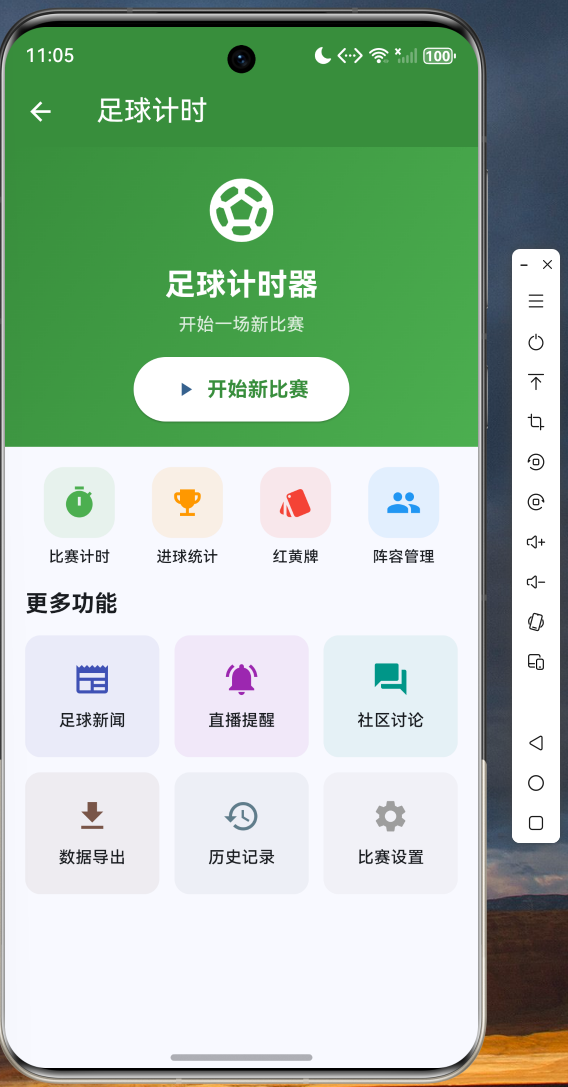
截图二:比赛计时界面
展示比赛进行中的实时比分看板,包含主客队名称、比分、比赛时间和事件记录列表。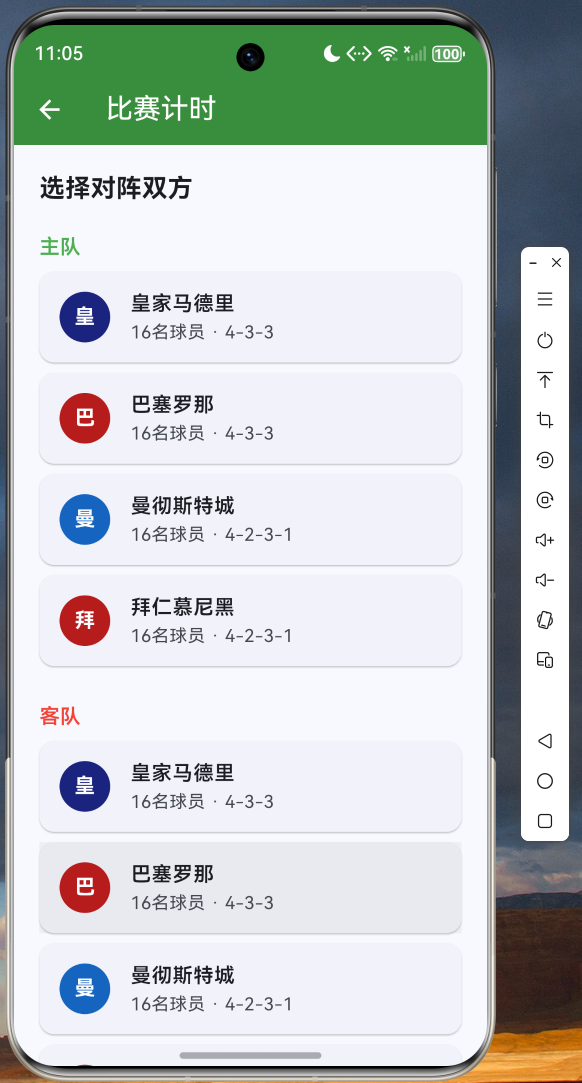
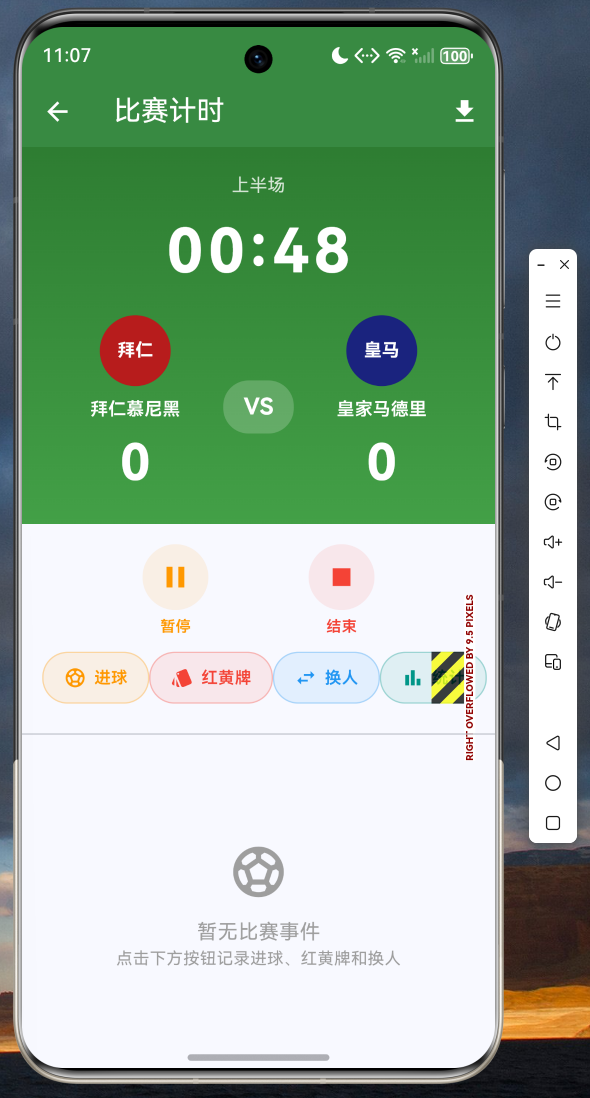
截图三:球队阵容管理
展示预设的四支球队(皇马、巴萨、曼城、拜仁)的完整阵容,包含首发和替补球员信息。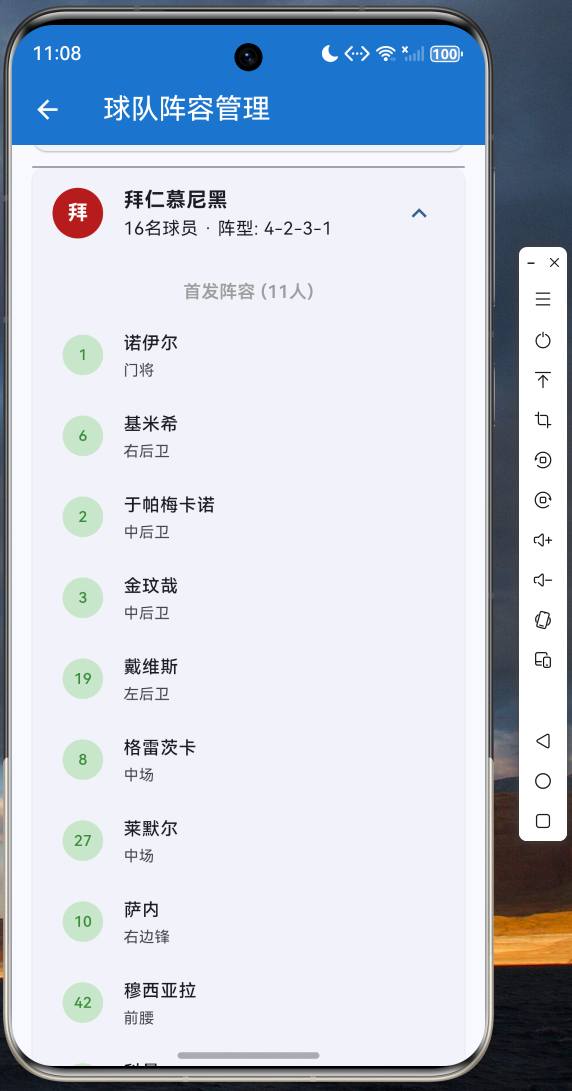
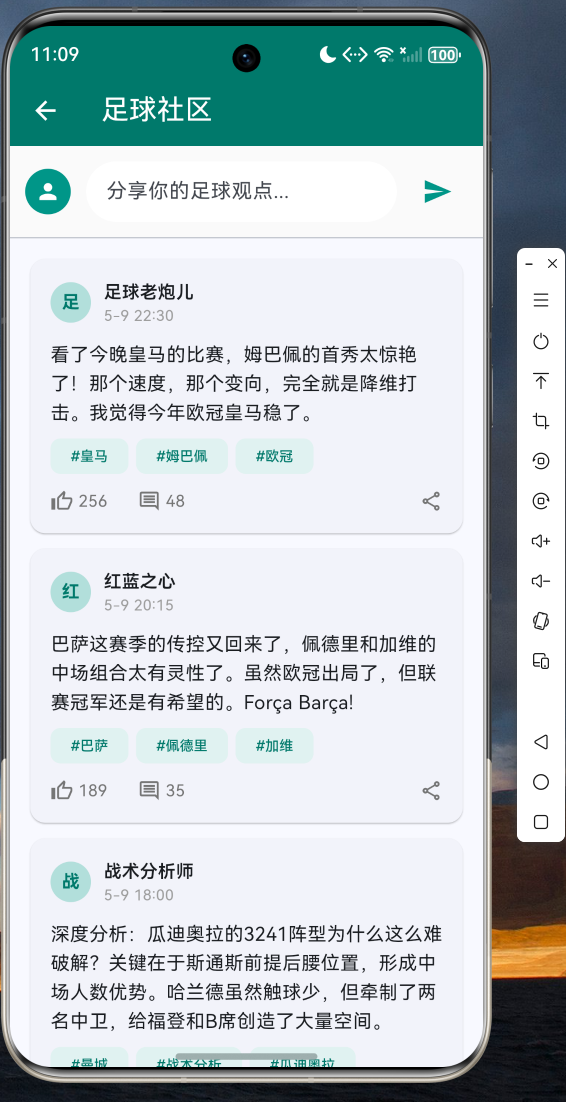
截图六:新闻资讯与社区讨论
展示足球新闻列表和社区讨论帖子,支持点赞互动和发布新帖。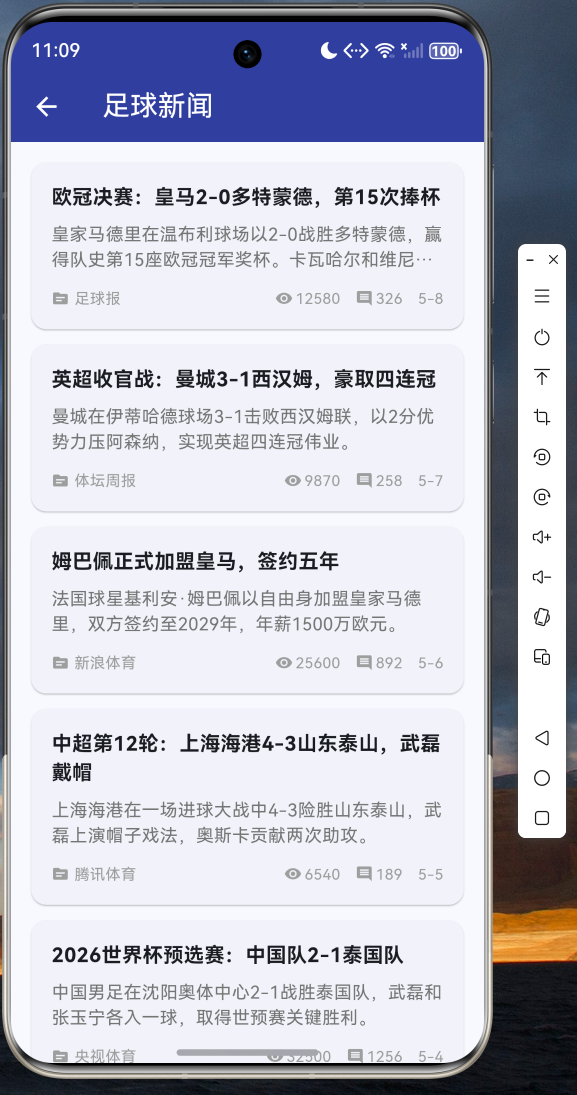
八、总结与展望
本文详细介绍了如何使用 Flutter for OpenHarmony 开发一个功能完整的足球计时应用。从数据模型设计到业务逻辑实现,再到页面展示,完整地展示了跨平台应用开发的流程。
通过这个项目,我们可以看到 Flutter 在 OpenHarmony 上的表现已经非常成熟。无论是计时器的精度、UI 的流畅度,还是事件处理的响应速度,都能满足实际使用需求。
未来可以进一步扩展的功能包括:
- 接入实时比赛数据 API,获取真实比赛信息
- 添加本地数据库存储,持久化比赛历史记录
- 集成推送服务,实现比赛开始前的自动提醒
- 支持多语言国际化
欢迎访问 AtomGit(https://atomgit.com)获取完整源码,也欢迎加入开源鸿蒙跨平台社区(https://openharmonycrossplatform.csdn.net)交流讨论,共同推动 Flutter for OpenHarmony 生态发展。

开源鸿蒙跨平台开发社区汇聚开发者与厂商,共建“一次开发,多端部署”的开源生态,致力于降低跨端开发门槛,推动万物智联创新。
更多推荐
 5
5 0
0- 0


 已为社区贡献80条内容

所有评论(0)