Flutter三方库适配OpenHarmony【flutter_libphonenumber】——FlutterLibphonenumberPlugin.ets 消息分发实现
本文深入分析了Flutter三方库flutter_libphonenumber适配OpenHarmony的核心实现文件FlutterLibphonenumberPlugin.ets。该文件作为ArkTS侧的插件入口,实现了FlutterPlugin和MethodCallHandler接口,主要承担通道管理、消息分发、参数提取等职责。文章详细解析了其源码结构,包括导入声明、常量定义、类声明,并重点剖
前言
欢迎来到 Flutter三方库适配OpenHarmony 系列文章!本系列围绕 flutter_libphonenumber 这个 电话号码处理库 的鸿蒙平台适配,进行全面深入的技术分享。
欢迎加入开源鸿蒙跨平台社区:https://openharmonycrossplatform.csdn.net
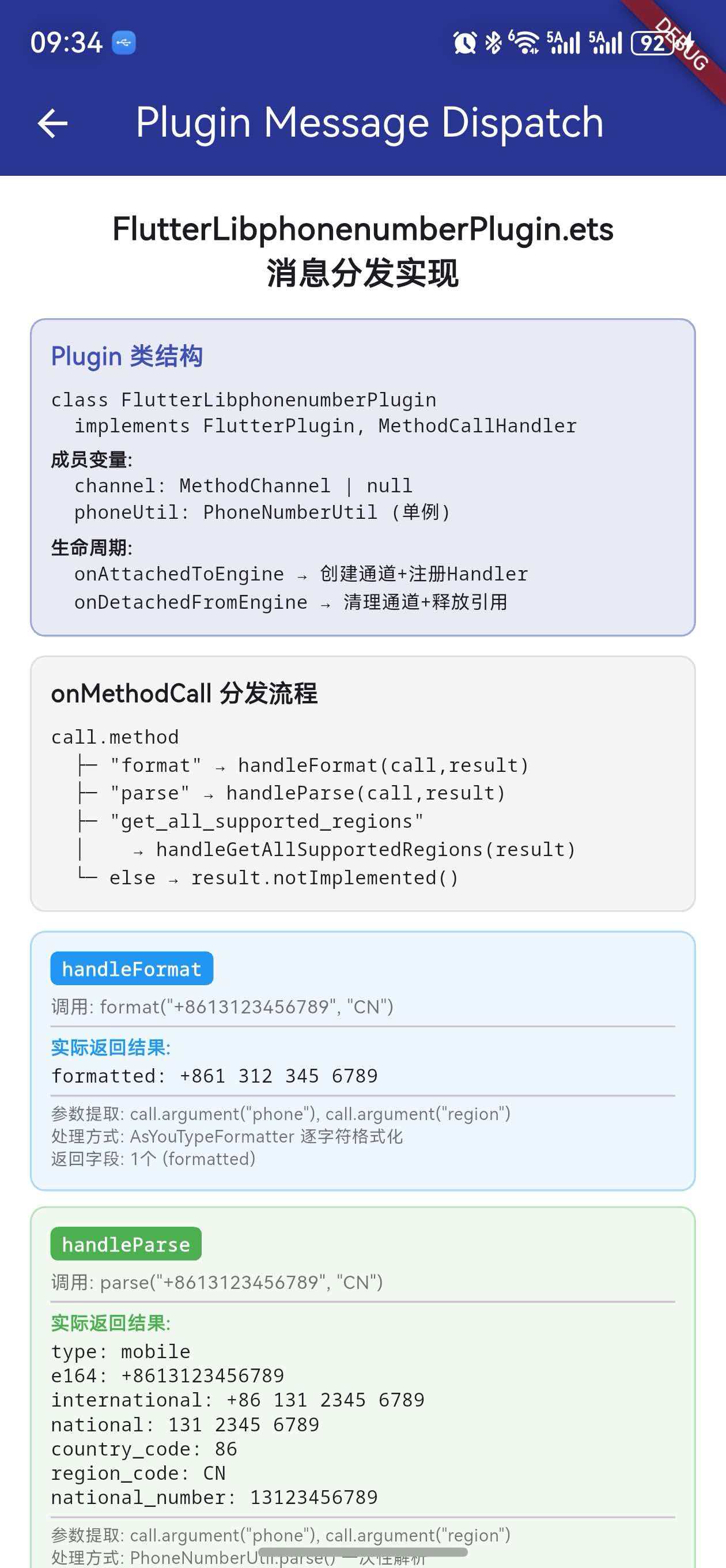
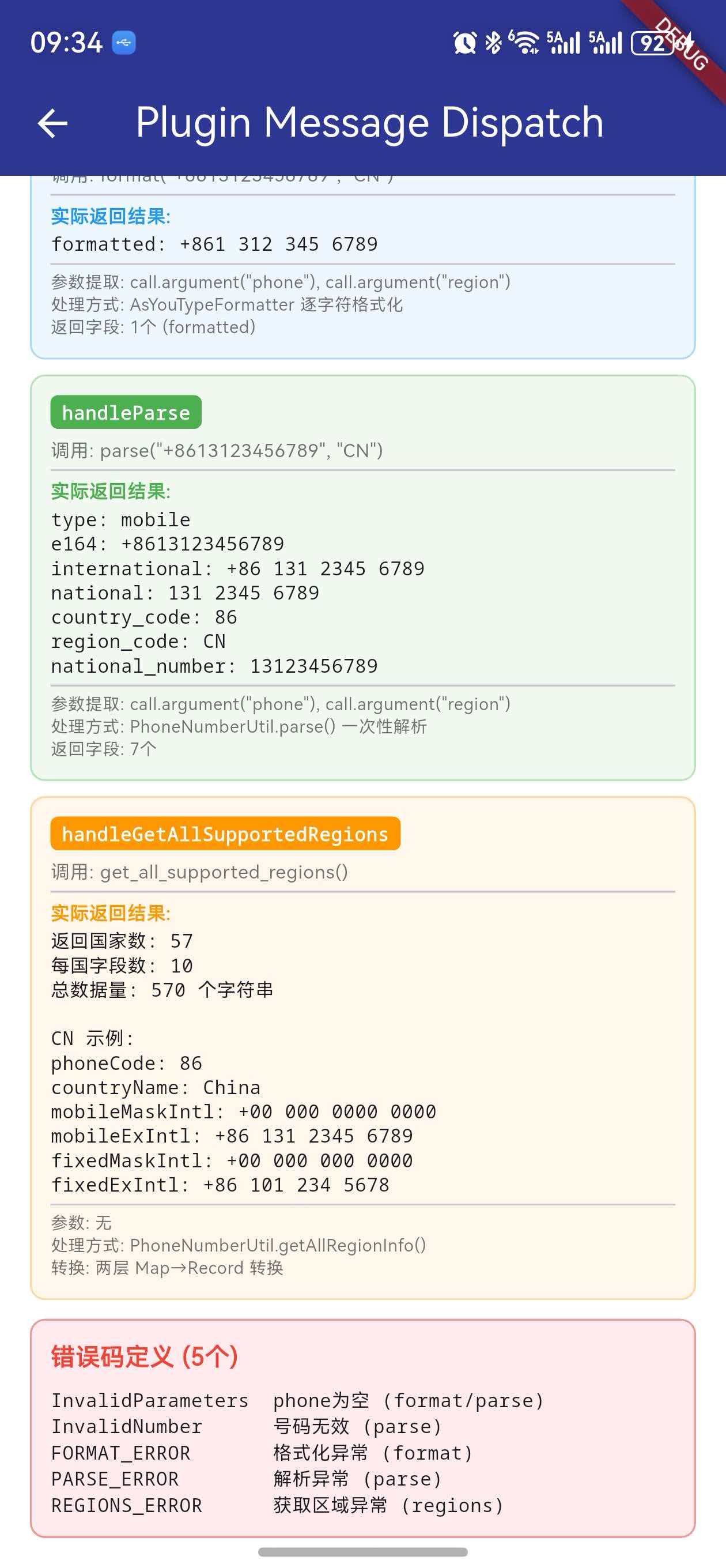
上一篇我们全面解析了 MethodChannel 通信机制。本篇将聚焦 ArkTS 侧的 消息接收端——FlutterLibphonenumberPlugin.ets,深入分析它如何接收 Dart 侧的方法调用、如何分发到对应的处理函数、以及每个处理函数的完整实现逻辑。
FlutterLibphonenumberPlugin.ets是鸿蒙平台插件的 核心入口文件。它实现了FlutterPlugin和MethodCallHandler两个接口,承担着通道管理和消息分发的双重职责。理解它的实现,就理解了整个插件的 ArkTS 侧架构。
一、文件定位与职责
1.1 在插件架构中的位置
flutter_libphonenumber_ohos/
├── lib/
│   └── flutter_libphonenumber_ohos.dart  ← Dart 侧(发送请求)
└── ohos/
    └── src/main/ets/components/plugin/
        ├── FlutterLibphonenumberPlugin.ets  ← 本文主角(接收+分发)
        └── PhoneNumberUtil.ets              ← 业务逻辑(处理请求)
1.2 核心职责
| 职责 | 说明 |
|---|---|
| 通道管理 | 创建和销毁 MethodChannel |
| 消息分发 | 根据方法名路由到对应处理函数 |
| 参数提取 | 从 MethodCall 中提取参数 |
| 结果返回 | 通过 MethodResult 返回成功/错误 |
| 数据转换 | Map → Record 类型转换 |
1.3 与 Dart 侧的对应关系
| Dart 侧方法 | ArkTS 侧处理函数 |
|---|---|
format(phone, region) |
handleFormat(call, result) |
parse(phone, region) |
handleParse(call, result) |
getAllSupportedRegions() |
handleGetAllSupportedRegions(result) |
二、完整源码结构分析
2.1 导入声明
import {
  FlutterPlugin,
  FlutterPluginBinding,
  MethodCall,
  MethodCallHandler,
  MethodChannel,
  MethodResult
} from '@ohos/flutter_ohos';
import { PhoneNumberUtil, RegionInfo, PhoneNumber }
  from './PhoneNumberUtil';
导入分为两组:
| 来源 | 导入项 | 用途 |
|---|---|---|
@ohos/flutter_ohos |
FlutterPlugin, FlutterPluginBinding | 插件生命周期接口 |
@ohos/flutter_ohos |
MethodCall, MethodCallHandler | 方法调用处理接口 |
@ohos/flutter_ohos |
MethodChannel, MethodResult | 通道和结果对象 |
./PhoneNumberUtil |
PhoneNumberUtil, RegionInfo, PhoneNumber | 业务逻辑类 |
@ohos/flutter_ohos是 Flutter 鸿蒙引擎提供的 SDK 包,包含了所有平台通道相关的类型定义。它的角色类似于 Android 的io.flutter.embedding和 iOS 的FlutterMacOS/Flutter。
2.2 常量定义
const TAG: string = 'FlutterLibphonenumberPlugin';
const CHANNEL_NAME: string =
  'com.bottlepay/flutter_libphonenumber_ohos';
| 常量 | 值 | 用途 |
|---|---|---|
TAG |
'FlutterLibphonenumberPlugin' |
插件唯一标识,用于 getUniqueClassName() |
CHANNEL_NAME |
'com.bottlepay/flutter_libphonenumber_ohos' |
MethodChannel 通道名称 |
2.3 类声明
export default class FlutterLibphonenumberPlugin
    implements FlutterPlugin, MethodCallHandler {
  private channel: MethodChannel | null = null;
  private phoneUtil: PhoneNumberUtil =
    PhoneNumberUtil.getInstance();
}
关键设计点:
export default— 作为模块的默认导出,供index.ets和GeneratedPluginRegistrant引用implements FlutterPlugin, MethodCallHandler— 同时实现两个接口channel: MethodChannel | null— 可空类型,在 detach 时置为 nullphoneUtil: PhoneNumberUtil— 通过单例获取,整个插件共享一个实例
三、FlutterPlugin 接口实现
3.1 接口定义
FlutterPlugin 接口要求实现三个方法:
interface FlutterPlugin {
  getUniqueClassName(): string;
  onAttachedToEngine(binding: FlutterPluginBinding): void;
  onDetachedFromEngine(binding: FlutterPluginBinding): void;
}
3.2 getUniqueClassName()
getUniqueClassName(): string {
  return TAG;  // 'FlutterLibphonenumberPlugin'
}
这个方法返回插件的 唯一标识符,Flutter Engine 用它来:
- 防止同一个插件被重复注册
- 在日志中标识插件来源
- 管理插件的生命周期
3.3 onAttachedToEngine()
onAttachedToEngine(binding: FlutterPluginBinding): void {
  this.channel = new MethodChannel(
    binding.getBinaryMessenger(), CHANNEL_NAME);
  this.channel.setMethodCallHandler(this);
}
执行流程:
FlutterEngine 启动
    │
    └── GeneratedPluginRegistrant.register(engine)
        │
        └── new FlutterLibphonenumberPlugin()
            │
            └── onAttachedToEngine(binding)
                │
                ├── ① binding.getBinaryMessenger()
                │   └── 获取二进制消息传输器
                │
                ├── ② new MethodChannel(messenger, CHANNEL_NAME)
                │   └── 创建通道实例
                │
                └── ③ channel.setMethodCallHandler(this)
                    └── 将自身注册为消息处理器
                        (因为 this implements MethodCallHandler)
关键点:
setMethodCallHandler(this)中的this之所以可以传入,是因为FlutterLibphonenumberPlugin实现了MethodCallHandler接口。这是一种常见的设计模式——让插件类同时充当消息处理器。
3.4 onDetachedFromEngine()
onDetachedFromEngine(binding: FlutterPluginBinding): void {
  if (this.channel !== null) {
    this.channel.setMethodCallHandler(null);
    this.channel = null;
  }
}
清理步骤:
- 移除处理器 —
setMethodCallHandler(null)断开消息处理链 - 释放通道 —
channel = null允许 GC 回收通道对象 - 空值检查 —
if (this.channel !== null)防止重复清理
四、onMethodCall 消息分发
4.1 分发逻辑
onMethodCall(call: MethodCall, result: MethodResult): void {
  if (call.method === 'format') {
    this.handleFormat(call, result);
  } else if (call.method === 'parse') {
    this.handleParse(call, result);
  } else if (call.method === 'get_all_supported_regions') {
    this.handleGetAllSupportedRegions(result);
  } else {
    result.notImplemented();
  }
}
4.2 分发流程图
onMethodCall(call, result)
    │
    ├── call.method === 'format'?
    │   ├── YES → handleFormat(call, result)
    │   └── NO ↓
    │
    ├── call.method === 'parse'?
    │   ├── YES → handleParse(call, result)
    │   └── NO ↓
    │
    ├── call.method === 'get_all_supported_regions'?
    │   ├── YES → handleGetAllSupportedRegions(result)
    │   └── NO ↓
    │
    └── result.notImplemented()
        └── Dart 侧收到 MissingPluginException
4.3 参数传递模式
注意三个处理函数的参数差异:
| 处理函数 | 接收 call | 接收 result | 原因 |
|---|---|---|---|
handleFormat |
✅ | ✅ | 需要从 call 中提取 phone 和 region |
handleParse |
✅ | ✅ | 需要从 call 中提取 phone 和 region |
handleGetAllSupportedRegions |
❌ | ✅ | 无参数,只需要 result 返回数据 |
4.4 为什么使用 if-else 而非 switch
ArkTS(基于 TypeScript)支持 switch 语句,但这里使用了 if-else。两种写法在功能上等价:
// 等价的 switch 写法
switch (call.method) {
  case 'format':
    this.handleFormat(call, result);
    break;
  case 'parse':
    this.handleParse(call, result);
    break;
  case 'get_all_supported_regions':
    this.handleGetAllSupportedRegions(result);
    break;
  default:
    result.notImplemented();
}
对于只有 3 个分支的情况,
if-else和switch的可读性和性能差异可以忽略不计。
五、handleFormat 详解
5.1 完整实现
private handleFormat(
  call: MethodCall, result: MethodResult
): void {
  let phone = call.argument('phone') as string;
  let region = call.argument('region') as string;

  // ① 参数校验
  if (phone === null || phone.length === 0) {
    result.error('InvalidParameters',
      "Invalid 'phone' parameter.", null);
    return;
  }

  try {
    // ② 确定区域
    let useRegion: string =
      region !== null ? region : 'CN';

    // ③ 创建格式化器
    let formatter =
      this.phoneUtil.getAsYouTypeFormatter(useRegion);
    let formatted: string = '';
    formatter.clear();

    // ④ 逐字符输入
    for (let i = 0; i < phone.length; i++) {
      formatted = formatter.inputDigit(phone.charAt(i));
    }

    // ⑤ 构建响应
    let response: Map<string, string> = new Map();
    response.set('formatted', formatted);
    result.success(this.convertMapToRecord(response));
  } catch (e) {
    // ⑥ 异常处理
    result.error('FORMAT_ERROR',
      'Failed to format phone number', null);
  }
}
5.2 执行步骤分析
| 步骤 | 操作 | 说明 |
|---|---|---|
| ① | 参数校验 | phone 不能为 null 或空字符串 |
| ② | 区域默认值 | region 为 null 时默认使用 ‘CN’ |
| ③ | 创建格式化器 | AsYouTypeFormatter 按区域初始化 |
| ④ | 逐字符格式化 | 模拟用户逐个输入数字的过程 |
| ⑤ | 构建响应 | Map → Record → result.success() |
| ⑥ | 异常兜底 | 任何异常都返回 FORMAT_ERROR |
5.3 AsYouTypeFormatter 的逐字符机制
handleFormat 使用了一种独特的格式化方式——逐字符输入:
for (let i = 0; i < phone.length; i++) {
  formatted = formatter.inputDigit(phone.charAt(i));
}
这模拟了用户在键盘上逐个输入数字的过程。每输入一个字符,inputDigit() 都会返回 当前已输入部分的格式化结果:
输入: '+8613123456789'

inputDigit('+') → '+'
inputDigit('8') → '+8'
inputDigit('6') → '+86'
inputDigit('1') → '+86 1'
inputDigit('3') → '+86 13'
inputDigit('1') → '+86 131'
inputDigit('2') → '+86 131 2'
inputDigit('3') → '+86 131 23'
inputDigit('4') → '+86 131 234'
inputDigit('5') → '+86 131 2345'
inputDigit('6') → '+86 131 2345 6'
inputDigit('7') → '+86 131 2345 67'
inputDigit('8') → '+86 131 2345 678'
inputDigit('9') → '+86 131 2345 6789'

最终 formatted = '+86 131 2345 6789'
为什么用逐字符而非一次性格式化:
AsYouTypeFormatter的设计初衷就是支持实时输入格式化。虽然在handleFormat中是一次性传入完整号码,但通过逐字符输入可以复用同一套格式化逻辑。
5.4 返回值结构
// 返回给 Dart 侧的数据
{
  'formatted': '+86 131 2345 6789'
}
只有一个字段 formatted,包含格式化后的电话号码字符串。
六、handleParse 详解
6.1 完整实现
private handleParse(
  call: MethodCall, result: MethodResult
): void {
  let phone = call.argument('phone') as string;
  let region = call.argument('region') as string;

  // ① 参数校验
  if (phone === null || phone.length === 0) {
    result.error('InvalidParameters',
      "Invalid 'phone' parameter.", null);
    return;
  }

  try {
    // ② 解析号码
    let useRegion: string =
      region !== null ? region : '';
    let phoneNumber: PhoneNumber | null =
      this.phoneUtil.parse(phone, useRegion);

    // ③ 有效性验证
    if (phoneNumber === null ||
        !this.phoneUtil.isValidNumber(phoneNumber)) {
      result.error('InvalidNumber',
        'Number ' + phone + ' is invalid', null);
      return;
    }

    // ④ 提取元数据
    let regionCode =
      this.phoneUtil.getRegionCodeForNumber(phoneNumber);
    let numberType =
      this.phoneUtil.getNumberType(phoneNumber);

    // ⑤ 构建 7 字段响应
    let response: Map<string, string> = new Map();
    response.set('type', numberType);
    response.set('e164',
      this.phoneUtil.formatE164(phoneNumber));
    response.set('international',
      this.phoneUtil.formatInternational(phoneNumber));
    response.set('national',
      this.phoneUtil.formatNational(phoneNumber, regionCode));
    response.set('country_code',
      phoneNumber.countryCode.toString());
    response.set('region_code', regionCode);
    response.set('national_number',
      phoneNumber.nationalNumber);

    result.success(this.convertMapToRecord(response));
  } catch (e) {
    result.error('PARSE_ERROR',
      'Failed to parse phone number', null);
  }
}
6.2 与 handleFormat 的差异
| 对比项 | handleFormat | handleParse |
|---|---|---|
| 参数校验 | 只校验 phone | 只校验 phone |
| region 默认值 | 'CN' |
''(空字符串) |
| 处理方式 | AsYouTypeFormatter 逐字符 | PhoneNumberUtil.parse() 一次性 |
| 有效性验证 | 无 | isValidNumber() 验证 |
| 返回字段数 | 1 个(formatted) | 7 个(type, e164, …) |
| 错误码 | FORMAT_ERROR |
InvalidNumber / PARSE_ERROR |
6.3 parse 的两阶段错误处理
handleParse 有两个可能返回错误的位置:
阶段 1:参数校验
  phone 为空 → error('InvalidParameters', ...)

阶段 2:号码验证
  parse 返回 null 或 isValidNumber 为 false
  → error('InvalidNumber', ...)

阶段 3:异常兜底
  任何未预期的异常
  → error('PARSE_ERROR', ...)
6.4 七个返回字段的生成
每个字段都调用了 PhoneNumberUtil 的不同方法:
| 字段 | 生成方法 | 示例值(+8613123456789) |
|---|---|---|
type |
getNumberType() |
mobile |
e164 |
formatE164() |
+8613123456789 |
international |
formatInternational() |
+86 131 2345 6789 |
national |
formatNational() |
131 2345 6789 |
country_code |
phoneNumber.countryCode |
86 |
region_code |
getRegionCodeForNumber() |
CN |
national_number |
phoneNumber.nationalNumber |
13123456789 |
七、handleGetAllSupportedRegions 详解
7.1 完整实现
private handleGetAllSupportedRegions(
  result: MethodResult
): void {
  try {
    // ① 获取全量数据
    let regionsInfo: Map<string, RegionInfo> =
      this.phoneUtil.getAllRegionInfo();

    // ② 构建嵌套 Map
    let regionsMap:
      Map<string, Record<string, string>> = new Map();

    regionsInfo.forEach(
      (info: RegionInfo, region: string) => {
        // ③ 每个国家 10 个字段
        let itemMap: Map<string, string> = new Map();
        itemMap.set('phoneCode', info.phoneCode);
        itemMap.set('countryName', info.countryName);
        itemMap.set('exampleNumberMobileNational',
          info.exampleNumberMobileNational);
        itemMap.set('exampleNumberFixedLineNational',
          info.exampleNumberFixedLineNational);
        itemMap.set('phoneMaskMobileNational',
          info.phoneMaskMobileNational);
        itemMap.set('phoneMaskFixedLineNational',
          info.phoneMaskFixedLineNational);
        itemMap.set('exampleNumberMobileInternational',
          info.exampleNumberMobileInternational);
        itemMap.set('exampleNumberFixedLineInternational',
          info.exampleNumberFixedLineInternational);
        itemMap.set('phoneMaskMobileInternational',
          info.phoneMaskMobileInternational);
        itemMap.set('phoneMaskFixedLineInternational',
          info.phoneMaskFixedLineInternational);

        // ④ 内层 Map → Record
        regionsMap.set(region,
          this.convertMapToRecord(itemMap));
      }
    );

    // ⑤ 外层 Map → Record
    result.success(
      this.convertRegionsMapToRecord(regionsMap));
  } catch (e) {
    result.error('REGIONS_ERROR',
      'Failed to get supported regions', null);
  }
}
7.2 数据构建流程
PhoneNumberUtil.getAllRegionInfo()
    │
    └── Map<string, RegionInfo>  (57 个国家)
        │
        ├── 'CN' → RegionInfo { phoneCode: '86', ... }
        ├── 'US' → RegionInfo { phoneCode: '1', ... }
        ├── 'GB' → RegionInfo { phoneCode: '44', ... }
        └── ... (共 57 个)
            │
            ↓ forEach 遍历
            │
            每个 RegionInfo → Map<string, string> (10 字段)
            │
            ↓ convertMapToRecord()
            │
            每个 Map → Record<string, string>
            │
            ↓ 收集到 regionsMap
            │
            Map<string, Record<string, string>>
            │
            ↓ convertRegionsMapToRecord()
            │
            Record<string, Record<string, string>>
            │
            ↓ result.success()
            │
            传回 Dart 侧
7.3 两层 Record 转换
这是 handleGetAllSupportedRegions 最独特的地方——需要 两层 Map → Record 转换:
第一层(内层):每个国家的数据
  Map<string, string> → Record<string, string>
  调用 convertMapToRecord()

第二层(外层):所有国家的集合
  Map<string, Record<string, string>>
    → Record<string, Record<string, string>>
  调用 convertRegionsMapToRecord()
7.4 10 个字段的对称性
每个国家返回的 10 个字段具有严格的 对称结构:
                    Mobile              FixedLine
                ┌──────────────┐   ┌──────────────┐
National        │ exampleNumber│   │ exampleNumber│
                │ MobileNational│  │ FixedLineNat.│
                │ phoneMask    │   │ phoneMask    │
                │ MobileNational│  │ FixedLineNat.│
                └──────────────┘   └──────────────┘
International   │ exampleNumber│   │ exampleNumber│
                │ MobileIntl.  │   │ FixedLineIntl│
                │ phoneMask    │   │ phoneMask    │
                │ MobileIntl.  │   │ FixedLineIntl│
                └──────────────┘   └──────────────┘

+ phoneCode + countryName = 10 个字段
八、参数提取机制
8.1 call.argument() 方法
ArkTS 侧通过 call.argument(key) 提取 Dart 侧传入的参数:
let phone = call.argument('phone') as string;
let region = call.argument('region') as string;
8.2 参数来源对照
Dart 侧发送:
_channel.invokeMapMethod<String, String>('format', {
  'phone': phone,    // ← key 是 'phone'
  'region': region,  // ← key 是 'region'
});
ArkTS 侧接收:
let phone = call.argument('phone') as string;
// call.argument('phone') 提取 key 为 'phone' 的值
8.3 类型转换
call.argument() 返回的是 ESObject(类似 any),需要通过 as string 进行类型断言:
// argument() 返回 ESObject,需要类型断言
let phone = call.argument('phone') as string;
let region = call.argument('region') as string;
注意:如果 Dart 侧传入的值类型与
as断言的类型不匹配,不会在编译时报错,但运行时可能产生意外行为。因此参数校验(phone === null || phone.length === 0)是必要的。
8.4 可选参数处理
parse 方法的 region 参数在 Dart 侧是可选的:
// Dart 侧:region 可能为 null
Future<Map<String, dynamic>> parse(
  final String phone, {
  final String? region,  // 可选参数
}) async {
  return await _channel.invokeMapMethod('parse', {
    'phone': phone,
    'region': region,  // 可能传入 null
  });
}
ArkTS 侧的处理:
let region = call.argument('region') as string;
// region 可能为 null
let useRegion: string = region !== null ? region : '';
// 为 null 时使用空字符串
九、MethodResult 响应模式
9.1 三种响应方式
interface MethodResult {
  success(result: ESObject): void;
  error(errorCode: string,
        errorMessage: string | null,
        errorDetails: ESObject | null): void;
  notImplemented(): void;
}
9.2 success 的使用
// 返回格式化结果
result.success(this.convertMapToRecord(response));

// 返回解析结果
result.success(this.convertMapToRecord(response));

// 返回全量国家数据
result.success(this.convertRegionsMapToRecord(regionsMap));
success() 接受一个 ESObject 参数,在本插件中始终传入 Record 类型。
9.3 error 的使用
// 参数无效
result.error('InvalidParameters',
  "Invalid 'phone' parameter.", null);

// 号码无效
result.error('InvalidNumber',
  'Number ' + phone + ' is invalid', null);

// 格式化失败
result.error('FORMAT_ERROR',
  'Failed to format phone number', null);

// 解析失败
result.error('PARSE_ERROR',
  'Failed to parse phone number', null);

// 获取区域失败
result.error('REGIONS_ERROR',
  'Failed to get supported regions', null);
9.4 错误码汇总
| 错误码 | 触发条件 | 所在方法 |
|---|---|---|
InvalidParameters |
phone 为 null 或空 | format, parse |
InvalidNumber |
号码解析失败或无效 | parse |
FORMAT_ERROR |
格式化过程异常 | format |
PARSE_ERROR |
解析过程异常 | parse |
REGIONS_ERROR |
获取区域数据异常 | get_all_supported_regions |
9.5 notImplemented 的使用
// 未知方法名
result.notImplemented();
当 Dart 侧调用了一个不存在的方法名时,返回 notImplemented()。Dart 侧会收到 MissingPluginException。
十、Map → Record 转换函数
10.1 单层转换
private convertMapToRecord(
  map: Map<string, string>
): Record<string, string> {
  let record: Record<string, string> =
    {} as Record<string, string>;
  map.forEach((value: string, key: string) => {
    record[key] = value;
  });
  return record;
}
10.2 为什么需要转换
ArkTS 中 Map 和 Record 是不同的类型:
| 特性 | Map | Record |
|---|---|---|
| 类型 | Map<K, V> |
Record<K, V> |
| 访问方式 | map.get(key) |
record[key] |
| 遍历方式 | map.forEach() |
Object.keys() |
| MethodResult 兼容 | ❌ 不兼容 | ✅ 兼容 |
MethodResult.success() 期望接收的是类似 JavaScript 普通对象的 Record 类型,而不是 Map 实例。因此需要手动转换。
10.3 嵌套转换
private convertRegionsMapToRecord(
  map: Map<string, Record<string, string>>
): Record<string, Record<string, string>> {
  let record = {} as
    Record<string, Record<string, string>>;
  map.forEach(
    (value: Record<string, string>, key: string) => {
      record[key] = value;
    }
  );
  return record;
}
注意:内层的 Record<string, string> 已经在 forEach 循环中通过 convertMapToRecord() 转换完成,所以外层只需要处理 Map → Record 的外壳转换。
10.4 转换的性能影响
对于 get_all_supported_regions:
- 内层转换:57 次 × 10 个字段 = 570 次属性赋值
- 外层转换:57 次属性赋值
- 总计:627 次属性赋值
这个开销在毫秒级以内,对性能没有实质影响。
十一、与 Android/iOS 插件的对比
11.1 Android 插件结构
// Android: FlutterLibphonenumberPlugin.kt
class FlutterLibphonenumberPlugin :
    FlutterPlugin, MethodCallHandler {

  override fun onMethodCall(
    call: MethodCall, result: Result
  ) {
    when (call.method) {
      "format" -> handleFormat(call, result)
      "parse" -> handleParse(call, result)
      "get_all_supported_regions" ->
        handleGetAllSupportedRegions(result)
      else -> result.notImplemented()
    }
  }
}
11.2 iOS 插件结构
// iOS: SwiftFlutterLibphonenumberIosPlugin.swift
public class SwiftFlutterLibphonenumberIosPlugin:
    NSObject, FlutterPlugin {

  public func handle(
    _ call: FlutterMethodCall,
    result: @escaping FlutterResult
  ) {
    switch call.method {
    case "format":
      handleFormat(call, result: result)
    case "parse":
      handleParse(call, result: result)
    case "get_all_supported_regions":
      handleGetAllSupportedRegions(result: result)
    default:
      result(FlutterMethodNotImplemented)
    }
  }
}
11.3 三平台对比
| 对比项 | Android (Kotlin) | iOS (Swift) | 鸿蒙 (ArkTS) |
|---|---|---|---|
| 分发语法 | when |
switch |
if-else |
| 接口名 | MethodCallHandler |
FlutterPlugin |
MethodCallHandler |
| 结果返回 | result.success() |
result(data) |
result.success() |
| 错误返回 | result.error() |
result(FlutterError) |
result.error() |
| 数据类型 | HashMap |
Dictionary |
Record |
| 类型转换 | 自动 | 自动 | 需手动 Map→Record |
鸿蒙的独特之处:需要手动进行
Map → Record转换,这是其他平台不需要的额外步骤。这是因为 ArkTS 的类型系统比 Kotlin 和 Swift 更严格地区分了Map和普通对象。
十二、设计模式与代码质量分析
12.1 使用的设计模式
| 模式 | 应用 | 说明 |
|---|---|---|
| 命令模式 | onMethodCall 分发 |
方法名作为命令标识 |
| 策略模式 | 三个 handle 方法 | 不同方法名对应不同处理策略 |
| 外观模式 | Plugin 类整体 | 对外暴露统一的 MethodChannel 接口 |
| 单例模式 | PhoneNumberUtil.getInstance() |
共享业务逻辑实例 |
12.2 代码组织的优点
- 职责分离 — Plugin 只负责通道管理和消息分发,业务逻辑在 PhoneNumberUtil 中
- 错误隔离 — 每个 handle 方法都有独立的 try-catch,一个方法的异常不影响其他方法
- 参数校验前置 — 在调用业务逻辑之前先校验参数,避免无效调用
- 统一的响应格式 — 所有方法都通过 Map → Record → result.success() 返回
12.3 潜在的改进方向
1. 参数校验可以提取为公共方法:
// 当前:每个方法重复校验
if (phone === null || phone.length === 0) {
  result.error('InvalidParameters', ...);
  return;
}

// 改进:提取公共校验
private validatePhone(
  phone: string, result: MethodResult
): boolean {
  if (phone === null || phone.length === 0) {
    result.error('InvalidParameters',
      "Invalid 'phone' parameter.", null);
    return false;
  }
  return true;
}
2. 错误码可以定义为常量:
// 当前:字符串字面量
result.error('InvalidParameters', ...);

// 改进:常量定义
const ERROR_INVALID_PARAMS = 'InvalidParameters';
const ERROR_INVALID_NUMBER = 'InvalidNumber';
const ERROR_FORMAT = 'FORMAT_ERROR';
const ERROR_PARSE = 'PARSE_ERROR';
const ERROR_REGIONS = 'REGIONS_ERROR';
3. 日志记录:
当前实现没有日志输出,在调试时可能不便。可以添加:
import { Log } from '@ohos/flutter_ohos';

onMethodCall(call: MethodCall, result: MethodResult): void {
  Log.i(TAG, 'onMethodCall: ' + call.method);
  // ...
}
注意:以上改进方向仅供参考。当前的实现对于 3 个方法的规模来说已经足够清晰,过度抽象反而会增加理解成本。
总结
本文深入分析了 FlutterLibphonenumberPlugin.ets 的消息分发实现。关键要点回顾:
- Plugin 类同时实现 FlutterPlugin(生命周期管理)和 MethodCallHandler(消息处理)两个接口,通过
setMethodCallHandler(this)将自身注册为处理器 onMethodCall使用 if-else 分发,将format、parse、get_all_supported_regions三个方法路由到对应的 handle 函数handleFormat使用 AsYouTypeFormatter 逐字符格式化,返回 1 个字段;handleParse使用 PhoneNumberUtil.parse() 一次性解析,返回 7 个字段handleGetAllSupportedRegions构建 57 国 × 10 字段 的嵌套数据结构,需要两层 Map → Record 转换- 错误处理采用 三级策略:参数校验 → 业务验证 → 异常兜底,共定义了 5 个错误码
- 与 Android/iOS 相比,鸿蒙平台需要额外的 Map → Record 转换,这是 ArkTS 类型系统的特殊要求
下一篇我们将深入分析 PhoneNumberUtil.ets 核心类的整体设计,了解 57 国数据的组织方式和各个公开方法的实现。
如果这篇文章对你有帮助,欢迎点赞👍、收藏⭐、关注🔔,你的支持是我持续创作的动力!
相关资源:
- OpenHarmony 适配仓库:gitcode.com/oh-flutter/flutter_libphonenumber
- 开源鸿蒙跨平台社区:openharmonycrossplatform.csdn.net
- Flutter Platform Channels 官方文档:docs.flutter.dev - Platform channels
- Flutter MethodChannel API:api.flutter.dev - MethodChannel
- ArkTS 语言文档:developer.huawei.com - ArkTS
- Flutter 鸿蒙 SDK:@ohos/flutter_ohos
- Google libphonenumber:github.com/google/libphonenumber
- PhoneNumberKit (iOS):github.com/marmelroy/PhoneNumberKit
- Flutter-OHOS 项目:gitee.com/openharmony-sig/flutter_flutter
- plugin_platform_interface:pub.dev/packages/plugin_platform_interface

开源鸿蒙跨平台开发社区汇聚开发者与厂商,共建“一次开发,多端部署”的开源生态,致力于降低跨端开发门槛,推动万物智联创新。
更多推荐



 5
5 0
0- 0


 已为社区贡献24条内容

所有评论(0)