Flutter三方库适配OpenHarmony【apple_product_name】应用统计分析中的设备识别
本文介绍了在移动应用开发中如何利用apple_product_name库实现设备识别与统计分析。通过将设备型号标识符转换为用户友好名称,构建了包含数据采集、处理、存储和展示的完整分析架构。重点讲解了设备分布统计、系列分类和档次分析三大核心功能,并提供了代码示例展示如何实现设备信息缓存、事件追踪和分类统计。文章还探讨了这些数据在市场分析、功能适配等场景的应用价值,为开发者提供了从数据采集到可视化呈现
前言
欢迎加入开源鸿蒙跨平台社区:https://openharmonycrossplatform.csdn.net
在移动应用开发中,设备识别是构建完善统计分析体系的关键环节。无论是用户画像构建、性能监控、崩溃分析还是A/B测试分组,都离不开对设备信息的精确获取和分类。apple_product_name库提供了将原始型号标识符(如ALN-AL00)转换为用户友好产品名称(如HUAWEI Mate 60 Pro)的能力,使统计报表更加直观易懂。
本文将从统计分析架构设计出发,深入讲解如何在应用中集成设备识别能力,涵盖设备分布统计、系列分类、档次分析、事件追踪、用户画像构建等核心场景,并提供一个完整的分析仪表盘演示页面,展示从数据采集到可视化呈现的全流程。
一、统计分析架构设计
1.1 整体架构概览
一个完善的设备统计分析系统通常包含以下几个层次:
| 层次 | 职责 | 关键组件 |
|---|---|---|
| 数据采集层 | 收集设备信息和用户行为 | OhosProductName、事件追踪器 |
| 数据处理层 | 分类、聚合、转换 | 设备分类器、档次分析器 |
| 数据存储层 | 持久化统计数据 | 本地缓存、云端数据库 |
| 数据展示层 | 可视化呈现分析结果 | 仪表盘、图表、报表 |
架构原则:设备信息应在应用启动时一次性获取并缓存,后续所有模块通过缓存读取,避免重复的异步调用开销。
1.2 核心API回顾
apple_product_name库为统计分析提供了三个核心API:
import 'package:apple_product_name/apple_product_name_ohos.dart';

final ohos = OhosProductName();

// 1. 获取当前设备型号标识符
final machineId = await ohos.getMachineId();
// 返回: "ALN-AL00"

// 2. 获取当前设备产品名称
final productName = await ohos.getProductName();
// 返回: "HUAWEI Mate 60 Pro"

// 3. 根据型号标识符查找产品名称
final name = await ohos.lookup('CFR-AN00');
// 返回: "HUAWEI Mate 70"
其中lookup方法是统计分析的核心——它允许将服务端收集的大量型号标识符批量转换为可读的产品名称,是设备分布统计的基础。
1.3 统计分析服务单例
统计分析服务采用单例模式,确保全局只有一个实例运行:
class AnalyticsService {
  static final AnalyticsService _instance = AnalyticsService._();
  factory AnalyticsService() => _instance;
  AnalyticsService._();

  String? _productName;
  String? _machineId;
  String? _deviceTier;
  String? _deviceSeries;

  /// 应用启动时调用,缓存设备信息
  Future<void> initialize() async {
    final ohos = OhosProductName();
    _productName = await ohos.getProductName();
    _machineId = await ohos.getMachineId();
    _deviceTier = DeviceTierAnalyzer.getTier(_productName!);
    _deviceSeries = DeviceSeriesClassifier.classify(_productName!);
  }

  /// 追踪事件,自动附带设备信息
  void trackEvent(String eventName, [Map<String, dynamic>? params]) {
    final eventData = {
      'event': eventName,
      'device': _productName,
      'machineId': _machineId,
      'tier': _deviceTier,
      'series': _deviceSeries,
      'timestamp': DateTime.now().toIso8601String(),
      ...?params,
    };
    _sendToServer(eventData);
  }

  void _sendToServer(Map<String, dynamic> data) {
    // 实际项目中发送到统计服务器
    debugPrint('[Analytics] $data');
  }
}
设计要点:
initialize方法在应用启动时调用一次,将设备名称、型号、档次、系列全部缓存,后续trackEvent直接使用缓存值,零异步开销。
二、设备分布统计
2.1 基础分布统计
设备分布统计是最基础也是最重要的分析功能,它展示用户群体中各设备型号的占比:
class DeviceDistribution {
  /// 将型号标识符列表转换为产品名称分布
  static Future<Map<String, int>> analyze(
    List<String> machineIds,
  ) async {
    final ohos = OhosProductName();
    final distribution = <String, int>{};

    for (final id in machineIds) {
      final name = await ohos.lookup(id);
      distribution[name] = (distribution[name] ?? 0) + 1;
    }

    return distribution;
  }

  /// 计算百分比分布
  static Map<String, double> toPercentage(Map<String, int> dist) {
    final total = dist.values.reduce((a, b) => a + b);
    return dist.map((k, v) =>
      MapEntry(k, (v / total * 100).roundToDouble()));
  }
}
2.2 分布统计结果示例
假设从服务端获取了一批用户设备数据,统计结果如下:
| 设备名称 | 数量 | 占比 |
|---|---|---|
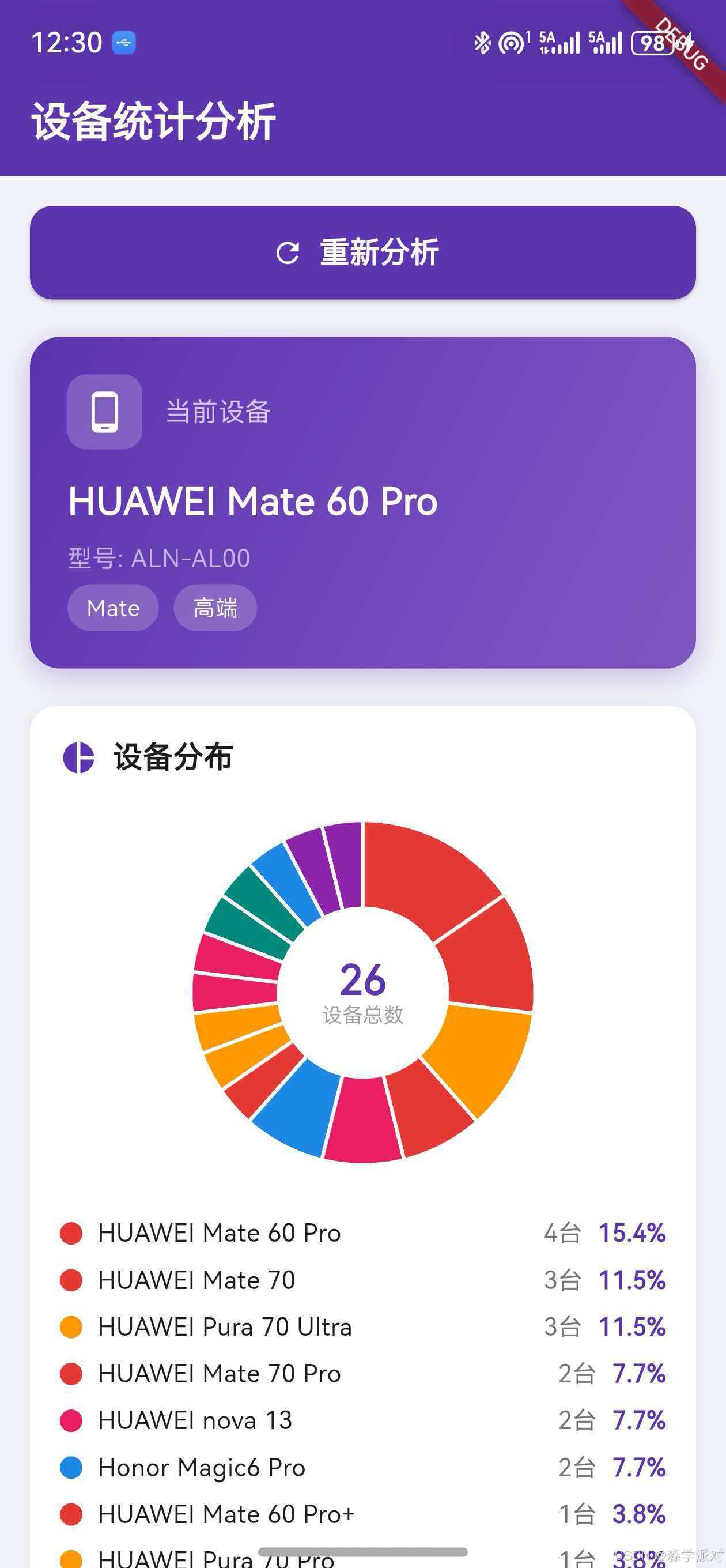
| HUAWEI Mate 60 Pro | 4 | 15.4% |
| HUAWEI Pura 70 Ultra | 3 | 11.5% |
| HUAWEI Mate 70 | 3 | 11.5% |
| HUAWEI Mate 70 Pro | 2 | 7.7% |
| HUAWEI nova 13 | 2 | 7.7% |
| Honor Magic6 Pro | 2 | 7.7% |
| 其他设备 | 10 | 38.5% |
这些数据可以帮助产品团队了解用户使用的主流设备型号,在UI适配和性能优化时优先覆盖高占比设备。
三、设备系列分类
3.1 系列分类器设计
将具体型号归入产品系列,可以从更宏观的角度了解用户设备偏好:
class DeviceSeriesClassifier {
  /// 根据产品名称判断所属系列
  static String classify(String productName) {
    if (productName.contains('MatePad')) return 'MatePad';
    if (productName.contains('Mate X') ||
        productName.contains('Pocket')) return '折叠屏';
    if (productName.contains('Mate')) return 'Mate';
    if (productName.contains('Pura') ||
        productName.contains(' P6')) return 'Pura';
    if (productName.contains('nova')) return 'nova';
    if (productName.contains('WATCH')) return 'WATCH';
    if (productName.contains('Honor') ||
        productName.contains('Magic')) return 'Honor';
    return '其他';
  }

  /// 批量分类统计
  static Future<Map<String, int>> analyzeByCategory(
    List<String> machineIds,
  ) async {
    final ohos = OhosProductName();
    final categories = <String, int>{};
    for (final id in machineIds) {
      final name = await ohos.lookup(id);
      final cat = classify(name);
      categories[cat] = (categories[cat] ?? 0) + 1;
    }
    return categories;
  }
}
3.2 分类规则说明
分类器采用关键词优先匹配策略,注意匹配顺序很重要:
MatePad必须在Mate之前匹配,否则平板会被错误归入Mate系列Mate X和Pocket归入折叠屏系列,因为它们都是折叠形态产品Pura是华为2024年起的新品牌名,替代了原来的P系列Honor和Magic统一归入荣耀系列
扩展提示:实际项目中可以将分类规则配置化,存储在远程配置中心,支持动态更新而无需发版。
3.3 系列分类应用场景
系列分类数据在以下场景中非常有价值:
- 市场分析:了解不同产品线的用户占比,评估品牌策略效果
- 功能适配:针对折叠屏系列做特殊的UI适配
- 性能基准:同系列设备的性能表现对比
- 推送策略:按系列推送不同的营销内容
四、设备档次分析
4.1 档次分析器
将设备按定位分为旗舰、高端、中端、平板等层次:
class DeviceTierAnalyzer {
  /// 根据产品名称判断设备档次
  static String getTier(String productName) {
    // 旗舰级:Pro+、Ultra、RS
    if (productName.contains('Pro+') ||
        productName.contains('Ultra') ||
        productName.contains('RS')) {
      return '旗舰';
    }
    // 高端:Pro、Mate系列、Magic系列
    if (productName.contains('Pro') ||
        productName.contains('Mate 7') ||
        productName.contains('Mate 6') ||
        productName.contains('Magic')) {
      return '高端';
    }
    // 中端:nova、Honor数字系列
    if (productName.contains('nova') ||
        productName.contains('Honor')) {
      return '中端';
    }
    // 平板
    if (productName.contains('MatePad')) return '平板';
    return '其他';
  }

  /// 批量档次统计
  static Future<Map<String, int>> analyzeByTier(
    List<String> machineIds,
  ) async {
    final ohos = OhosProductName();
    final tiers = <String, int>{};
    for (final id in machineIds) {
      final name = await ohos.lookup(id);
      final tier = getTier(name);
      tiers[tier] = (tiers[tier] ?? 0) + 1;
    }
    return tiers;
  }
}
4.2 档次与运营策略映射
| 档次 | 代表设备 | 用户特征 | 运营策略 |
|---|---|---|---|
| 旗舰 | Mate 70 Pro+、Pura 70 Ultra | 高消费力、追求极致体验 | 推送高端功能、VIP服务 |
| 高端 | Mate 60 Pro、Magic6 Pro | 注重品质、主力用户群 | 核心功能优化、品质保障 |
| 中端 | nova 13、Honor 200 | 性价比导向、年轻用户 | 轻量化体验、社交功能 |
| 平板 | MatePad Pro 13.2 | 生产力需求、大屏体验 | 横屏适配、多窗口支持 |
数据驱动决策:通过档次分析,产品团队可以了解用户群体的消费能力分布,制定差异化的功能策略和定价方案。
五、事件追踪与设备关联
5.1 语义化事件追踪器
将常见用户行为封装为语义化的追踪方法:
class EventTracker {
  static final _analytics = AnalyticsService();

  /// 应用启动
  static void trackAppLaunch() {
    _analytics.trackEvent('app_launch');
  }

  /// 页面浏览
  static void trackPageView(String pageName) {
    _analytics.trackEvent('page_view', {'page': pageName});
  }

  /// 按钮点击
  static void trackButtonClick(String buttonName) {
    _analytics.trackEvent('button_click', {'button': buttonName});
  }

  /// 购买行为
  static void trackPurchase(double amount, String productId) {
    _analytics.trackEvent('purchase', {
      'amount': amount,
      'product_id': productId,
    });
  }

  /// 错误事件
  static void trackError(String error, String? stackTrace) {
    _analytics.trackEvent('error', {
      'error': error,
      'stack_trace': stackTrace,
    });
  }

  /// 自定义事件
  static void trackCustom(String name, Map<String, dynamic> params) {
    _analytics.trackEvent(name, params);
  }
}
5.2 事件数据结构
每个追踪事件自动包含完整的设备上下文:
{
  "event": "page_view",
  "page": "home",
  "device": "HUAWEI Mate 60 Pro",
  "machineId": "ALN-AL00",
  "tier": "高端",
  "series": "Mate",
  "timestamp": "2025-03-15T10:30:00.000Z"
}
这种结构使得后端可以从多个维度对事件进行切片分析:
- 按
device:具体型号的行为差异 - 按
tier:不同消费层次的使用习惯 - 按
series:不同产品线用户的功能偏好
六、用户画像构建
6.1 设备维度画像模型
设备信息是用户画像的重要组成维度:
class DeviceUserProfile {
  final String deviceName;     // 产品名称
  final String machineId;      // 型号标识符
  final String deviceTier;     // 设备档次
  final String deviceSeries;   // 产品系列
  final DateTime firstSeen;    // 首次出现时间
  final int sessionCount;      // 会话次数

  DeviceUserProfile({
    required this.deviceName,
    required this.machineId,
    required this.deviceTier,
    required this.deviceSeries,
    required this.firstSeen,
    required this.sessionCount,
  });

  /// 从当前设备构建画像
  static Future<DeviceUserProfile> fromCurrentDevice() async {
    final ohos = OhosProductName();
    final name = await ohos.getProductName();
    final id = await ohos.getMachineId();

    return DeviceUserProfile(
      deviceName: name,
      machineId: id,
      deviceTier: DeviceTierAnalyzer.getTier(name),
      deviceSeries: DeviceSeriesClassifier.classify(name),
      firstSeen: DateTime.now(),
      sessionCount: 1,
    );
  }

  /// 转换为可序列化的Map
  Map<String, dynamic> toMap() => {
    'deviceName': deviceName,
    'machineId': machineId,
    'deviceTier': deviceTier,
    'deviceSeries': deviceSeries,
    'firstSeen': firstSeen.toIso8601String(),
    'sessionCount': sessionCount,
  };
}
6.2 画像数据的应用
用户画像中的设备维度可以与行为数据交叉分析:
- 旗舰用户 + 高频使用 → 核心用户群,优先保障体验
- 中端用户 + 付费行为 → 高价值用户,重点维护
- 平板用户 + 长时间会话 → 生产力场景,优化大屏体验
- 折叠屏用户 + 多窗口使用 → 特殊形态适配需求
七、性能监控与设备关联
7.1 性能指标采集
将性能数据与设备信息关联,可以发现设备相关的性能问题:
class PerformanceMonitor {
  static final _analytics = AnalyticsService();

  /// 记录应用启动耗时
  static void trackAppStartTime(Duration duration) {
    _analytics.trackEvent('perf_app_start', {
      'duration_ms': duration.inMilliseconds,
    });
  }

  /// 记录页面加载耗时
  static void trackPageLoadTime(String page, Duration duration) {
    _analytics.trackEvent('perf_page_load', {
      'page': page,
      'duration_ms': duration.inMilliseconds,
    });
  }

  /// 记录帧率
  static void trackFrameRate(double fps) {
    _analytics.trackEvent('perf_frame_rate', {
      'fps': fps,
    });
  }

  /// 记录内存使用
  static void trackMemoryUsage(int bytesUsed) {
    _analytics.trackEvent('perf_memory', {
      'bytes': bytesUsed,
      'mb': (bytesUsed / 1024 / 1024).toStringAsFixed(1),
    });
  }
}
7.2 性能数据分析维度
| 性能指标 | 分析维度 | 分析目标 |
|---|---|---|
| 启动耗时 | 按设备型号 | 发现启动慢的设备 |
| 页面加载 | 按设备档次 | 中端设备是否需要降级 |
| 帧率 | 按设备系列 | 动画在哪些设备上卡顿 |
| 内存占用 | 按设备档次 | 低端设备内存压力 |
性能基线:建议为每个档次的设备建立性能基线,当某个设备的性能指标偏离基线超过阈值时自动告警。
八、崩溃分析与设备定位
8.1 崩溃报告采集
崩溃数据与设备信息结合,可以快速定位设备相关的兼容性问题:
class CrashReporter {
  /// 报告崩溃,自动附带设备信息
  static Future<void> reportCrash(
    dynamic error,
    StackTrace stackTrace,
  ) async {
    final ohos = OhosProductName();
    final crashData = {
      'error': error.toString(),
      'stackTrace': stackTrace.toString(),
      'device': await ohos.getProductName(),
      'machineId': await ohos.getMachineId(),
      'timestamp': DateTime.now().toIso8601String(),
    };
    // 发送到崩溃分析服务
    await _sendCrashReport(crashData);
  }

  /// 在main函数中集成全局崩溃捕获
  static void initialize() {
    FlutterError.onError = (details) {
      reportCrash(
        details.exception,
        details.stack ?? StackTrace.current,
      );
    };
  }

  static Future<void> _sendCrashReport(
    Map<String, dynamic> data,
  ) async {
    debugPrint('[CrashReport] $data');
  }
}
8.2 崩溃数据分析流程
崩溃分析的典型流程:
- 收集崩溃报告,包含设备型号和堆栈信息
- 按设备型号分组,统计各设备的崩溃次数
- 识别崩溃率异常偏高的设备型号
- 结合堆栈信息定位设备特有的兼容性问题
- 针对性修复并在对应设备上验证
实战经验:如果某个特定型号的崩溃率远高于同系列其他型号,通常是该型号特有的系统版本或硬件差异导致的兼容性问题。
九、A/B测试与设备分组
9.1 基于设备ID的稳定分组
A/B测试需要将用户稳定地分配到实验组或对照组:
class ABTestService {
  /// 基于设备ID的稳定哈希分组
  static Future<String> getTestGroup(String testName) async {
    final ohos = OhosProductName();
    final machineId = await ohos.getMachineId();

    // 组合测试名和设备ID生成稳定哈希
    final seed = '$testName:$machineId';
    final hash = seed.hashCode;
    return hash % 2 == 0 ? 'control' : 'treatment';
  }

  /// 便捷方法:是否在实验组
  static Future<bool> isInTreatmentGroup(String testName) async {
    return await getTestGroup(testName) == 'treatment';
  }

  /// 按设备档次分组(高端用户优先体验新功能)
  static Future<bool> shouldEnableFeature(
    String featureName,
  ) async {
    final ohos = OhosProductName();
    final name = await ohos.getProductName();
    final tier = DeviceTierAnalyzer.getTier(name);

    // 旗舰和高端设备优先开启新功能
    if (tier == '旗舰' || tier == '高端') {
      return true;
    }
    // 其他设备走A/B测试
    return await isInTreatmentGroup(featureName);
  }
}
9.2 分组策略对比
| 分组策略 | 优点 | 缺点 | 适用场景 |
|---|---|---|---|
| 设备ID哈希 | 稳定、均匀 | 无法按特征分组 | 通用A/B测试 |
| 设备档次分组 | 可按用户价值分层 | 样本不均匀 | 功能灰度发布 |
| 设备系列分组 | 可按硬件特征分组 | 粒度较粗 | 硬件相关功能测试 |
| 随机分组 | 简单 | 不稳定 | 一次性实验 |
十、数据可视化方案
10.1 自绘饼图实现
使用CustomPainter实现设备分布饼图,无需引入第三方图表库:
class PieChartPainter extends CustomPainter {
final List<DeviceStat> data;
final Map<String, Color> colorMap;
PieChartPainter(this.data, this.colorMap);
void paint(Canvas canvas, Size size) {
final center = Offset(size.width / 2, size.height / 2);
final radius = min(size.width, size.height) / 2 - 8;
double startAngle = -pi / 2;
for (final d in data) {
final sweep = d.ratio * 2 * pi;
final color = colorMap[d.series] ?? Colors.grey;
// 绘制扇形
canvas.drawArc(
Rect.fromCircle(center: center, radius: radius),
startAngle, sweep, true,
Paint()..color = color..style = PaintingStyle.fill,
);
// 白色分隔线
canvas.drawArc(
Rect.fromCircle(center: center, radius: radius),
startAngle, sweep, true,
Paint()..color = Colors.white
..style = PaintingStyle.stroke
..strokeWidth = 2,
);
startAngle += sweep;
}
// 中心镂空(甜甜圈效果)
canvas.drawCircle(
center, radius * 0.5,
Paint()..color = Colors.white,
);
}
bool shouldRepaint(covariant CustomPainter old) => true;
}
10.2 水平条形图
系列分类和档次分析使用水平条形图展示:
Widget buildHorizontalBar({
  required String label,
  required int count,
  required int maxCount,
  required Color color,
}) {
  return Padding(
    padding: const EdgeInsets.symmetric(vertical: 5),
    child: Column(
      crossAxisAlignment: CrossAxisAlignment.start,
      children: [
        Row(
          mainAxisAlignment: MainAxisAlignment.spaceBetween,
          children: [
            Text(label, style: const TextStyle(
              fontSize: 14, fontWeight: FontWeight.w500)),
            Text('$count台',
              style: TextStyle(fontSize: 13, color: Colors.grey[600])),
          ],
        ),
        const SizedBox(height: 4),
        ClipRRect(
          borderRadius: BorderRadius.circular(4),
          child: LinearProgressIndicator(
            value: count / maxCount,
            backgroundColor: Colors.grey[200],
            valueColor: AlwaysStoppedAnimation(color),
            minHeight: 8,
          ),
        ),
      ],
    ),
  );
}
10.3 时间线事件日志
事件追踪日志使用时间线样式展示,每个节点包含标签、时间和消息:
- 使用圆形节点 + 竖线连接形成时间线视觉效果
- 最后一个节点使用主题色高亮,表示最新事件
- 每个节点显示标签(如"设备识别"、“分布统计”)和具体消息
十一、完整演示页面
11.1 演示页面设计
本文提供一个完整的分析仪表盘演示页面,采用紫色主题(Color(0xFF5E35B1)),包含以下模块:
- 当前设备识别卡片(紫色渐变背景)
- 设备分布饼图(自绘甜甜圈图)
- 产品系列分类(水平条形图)
- 设备档次分析(彩色进度条)
- 事件追踪日志(时间线样式)
交互设计:所有分析操作需要用户点击"开始设备统计分析"按钮触发,不会在页面加载时自动执行,避免不必要的性能开销。
11.2 页面入口与主题配置
import 'dart:math';
import 'package:apple_product_name/apple_product_name_ohos.dart';
import 'package:flutter/material.dart';
void main() {
runApp(const MyApp());
}
class MyApp extends StatelessWidget {
const MyApp({Key? key}) : super(key: key);
Widget build(BuildContext context) {
return MaterialApp(
title: '设备统计分析',
theme: ThemeData(
primarySwatch: Colors.deepPurple,
scaffoldBackgroundColor: const Color(0xFFF0F2F8),
),
home: const Article25DemoPage(),
);
}
}
11.3 状态管理与数据模型
class Article25DemoPage extends StatefulWidget {
const Article25DemoPage({Key? key}) : super(key: key);
State<Article25DemoPage> createState() => _Article25DemoPageState();
}
class _Article25DemoPageState extends State<Article25DemoPage> {
bool _isLoading = false;
bool _hasData = false;
String _currentDevice = '';
String _currentMachineId = '';
String _currentTier = '';
String _currentSeries = '';
final List<_DeviceStat> _distribution = [];
final List<_CategoryStat> _seriesStats = [];
final List<_TierStat> _tierStats = [];
final List<_EventLog> _eventLogs = [];
// 模拟的设备池(映射表中的真实型号)
static const _simulatedDevices = [
'CFR-AN00', 'CFR-AN00', 'CFR-AN00', // Mate 70 x3
'CFS-AN00', 'CFS-AN00', // Mate 70 Pro x2
'ALN-AL00', 'ALN-AL00', 'ALN-AL00', 'ALN-AL00', // Mate 60 Pro x4
'GGK-AL10', // Mate 60 Pro+
'HBK-AL00', 'HBK-AL00', 'HBK-AL00', // Pura 70 Ultra x3
'DUA-AL00', 'HBN-AL00', // Pura 70 Pro, Pura 70
'FOA-AL00', 'FOA-AL00', 'FNA-AL00', // nova 13 x2, nova 13 Pro
'CTR-AL00', // nova 12
'GROK-W09', 'GOT-W09', // MatePad Pro
'PGT-AN00', 'PGT-AN00', 'BVL-AN00', // Honor Magic6
'BAL-AL00', 'GGK-W10', // Pocket 2, Mate X5
];
// ...
}
11.4 核心分析逻辑
Future<void> _runAnalysis() async {
  if (_isLoading) return;
  setState(() { _isLoading = true; _eventLogs.clear(); });

  final ohos = OhosProductName();

  // 1. 获取当前设备信息
  _addLog('初始化', '获取当前设备信息...');
  _currentMachineId = await ohos.getMachineId();
  _currentDevice = await ohos.getProductName();
  _currentTier = _getTier(_currentDevice);
  _currentSeries = _getSeries(_currentDevice);
  _addLog('设备识别', '$_currentDevice ($_currentMachineId)');

  // 2. 模拟批量 lookup 统计设备分布
  _addLog('分布统计', '分析 ${_simulatedDevices.length} 台设备...');
  final nameCount = <String, int>{};
  for (final id in _simulatedDevices) {
    final name = await ohos.lookup(id);
    nameCount[name] = (nameCount[name] ?? 0) + 1;
  }
  _distribution.clear();
  final total = _simulatedDevices.length;
  final sorted = nameCount.entries.toList()
    ..sort((a, b) => b.value.compareTo(a.value));
  for (final e in sorted) {
    _distribution.add(_DeviceStat(e.key, e.value, e.value / total));
  }
  _addLog('分布完成', '识别出 ${_distribution.length} 种设备型号');

  // 3. 系列分类
  _addLog('系列分类', '按产品线归类...');
  final seriesCount = <String, int>{};
  for (final d in _distribution) {
    final s = _getSeries(d.name);
    seriesCount[s] = (seriesCount[s] ?? 0) + d.count;
  }
  _seriesStats.clear();
  for (final e in seriesCount.entries.toList()
    ..sort((a, b) => b.value.compareTo(a.value))) {
    _seriesStats.add(_CategoryStat(e.key, e.value, e.value / total));
  }
  _addLog('系列完成', '${_seriesStats.length} 个产品系列');

  // 4. 档次分析
  _addLog('档次分析', '按设备定位分层...');
  final tierCount = <String, int>{};
  for (final d in _distribution) {
    final t = _getTier(d.name);
    tierCount[t] = (tierCount[t] ?? 0) + d.count;
  }
  _tierStats.clear();
  for (final e in tierCount.entries.toList()
    ..sort((a, b) => b.value.compareTo(a.value))) {
    _tierStats.add(
      _TierStat(e.key, e.value, e.value / total, _tierColor(e.key)));
  }
  _addLog('分析完成', '全部统计数据就绪 ✓');

  setState(() { _isLoading = false; _hasData = true; });
}
11.5 辅助分类方法
String _getSeries(String name) {
  if (name.contains('MatePad')) return 'MatePad';
  if (name.contains('Mate X') || name.contains('Pocket')) return '折叠屏';
  if (name.contains('Mate')) return 'Mate';
  if (name.contains('Pura') || name.contains(' P6')) return 'Pura';
  if (name.contains('nova')) return 'nova';
  if (name.contains('WATCH')) return 'WATCH';
  if (name.contains('Honor') || name.contains('Magic')) return 'Honor';
  return '其他';
}

String _getTier(String name) {
  if (name.contains('Pro+') || name.contains('Ultra') ||
      name.contains('RS')) return '旗舰';
  if (name.contains('Pro') || name.contains('Mate 7') ||
      name.contains('Mate 6') || name.contains('Magic')) return '高端';
  if (name.contains('nova') || name.contains('Honor')) return '中端';
  if (name.contains('MatePad')) return '平板';
  return '其他';
}

Color _tierColor(String tier) {
  switch (tier) {
    case '旗舰': return const Color(0xFFE53935);
    case '高端': return const Color(0xFFFF9800);
    case '中端': return const Color(0xFF43A047);
    case '平板': return const Color(0xFF1E88E5);
    default: return const Color(0xFF757575);
  }
}
11.6 页面布局构建
Widget build(BuildContext context) {
return Scaffold(
appBar: AppBar(
title: const Text('设备统计分析',
style: TextStyle(fontWeight: FontWeight.w600)),
backgroundColor: const Color(0xFF5E35B1),
foregroundColor: Colors.white,
elevation: 0,
),
body: SingleChildScrollView(
padding: const EdgeInsets.all(16),
child: Column(
crossAxisAlignment: CrossAxisAlignment.start,
children: [
// 启动按钮
SizedBox(
width: double.infinity,
height: 50,
child: ElevatedButton.icon(
onPressed: _isLoading ? null : _runAnalysis,
icon: _isLoading
? const SizedBox(width: 20, height: 20,
child: CircularProgressIndicator(
strokeWidth: 2, color: Colors.white))
: Icon(_hasData ? Icons.refresh : Icons.analytics),
label: Text(
_isLoading ? '分析中...'
: (_hasData ? '重新分析' : '开始设备统计分析'),
style: const TextStyle(
fontSize: 16, fontWeight: FontWeight.w600)),
style: ElevatedButton.styleFrom(
backgroundColor: const Color(0xFF5E35B1),
foregroundColor: Colors.white,
shape: RoundedRectangleBorder(
borderRadius: BorderRadius.circular(12)),
),
),
),
// 空状态占位
if (!_hasData && !_isLoading) ...[
const SizedBox(height: 24),
_buildPlaceholder(),
],
// 数据展示区域
if (_hasData || _isLoading) ...[
if (_currentDevice.isNotEmpty) ...[
const SizedBox(height: 20),
_buildCurrentDeviceCard(),
],
if (_distribution.isNotEmpty) ...[
const SizedBox(height: 20),
_buildDistributionSection(),
],
if (_seriesStats.isNotEmpty) ...[
const SizedBox(height: 20),
_buildSeriesSection(),
],
if (_tierStats.isNotEmpty) ...[
const SizedBox(height: 20),
_buildTierSection(),
],
if (_eventLogs.isNotEmpty) ...[
const SizedBox(height: 20),
_buildEventLogSection(),
],
],
const SizedBox(height: 16),
],
),
),
);
}
11.7 当前设备卡片
Widget _buildCurrentDeviceCard() {
  return Container(
    width: double.infinity,
    padding: const EdgeInsets.all(20),
    decoration: BoxDecoration(
      gradient: const LinearGradient(
        colors: [Color(0xFF5E35B1), Color(0xFF7E57C2)],
        begin: Alignment.topLeft,
        end: Alignment.bottomRight,
      ),
      borderRadius: BorderRadius.circular(16),
      boxShadow: [BoxShadow(
        color: const Color(0xFF5E35B1).withOpacity(0.3),
        blurRadius: 12, offset: const Offset(0, 4))],
    ),
    child: Column(
      crossAxisAlignment: CrossAxisAlignment.start,
      children: [
        Row(children: [
          Container(
            padding: const EdgeInsets.all(8),
            decoration: BoxDecoration(
              color: Colors.white.withOpacity(0.2),
              borderRadius: BorderRadius.circular(10)),
            child: const Icon(Icons.phone_android,
              color: Colors.white, size: 24),
          ),
          const SizedBox(width: 12),
          const Text('当前设备',
            style: TextStyle(color: Colors.white70, fontSize: 14)),
        ]),
        const SizedBox(height: 14),
        Text(_currentDevice, style: const TextStyle(
          color: Colors.white, fontSize: 20,
          fontWeight: FontWeight.bold)),
        const SizedBox(height: 6),
        Text('型号: $_currentMachineId',
          style: const TextStyle(color: Colors.white60, fontSize: 13)),
        const SizedBox(height: 4),
        Row(children: [
          _buildTag(_currentSeries, Colors.white.withOpacity(0.2)),
          const SizedBox(width: 8),
          _buildTag(_currentTier, Colors.white.withOpacity(0.2)),
        ]),
      ],
    ),
  );
}
11.8 数据模型定义
class _DeviceStat {
  final String name;
  final int count;
  final double ratio;
  _DeviceStat(this.name, this.count, this.ratio);
}

class _CategoryStat {
  final String name;
  final int count;
  final double ratio;
  _CategoryStat(this.name, this.count, this.ratio);
}

class _TierStat {
  final String name;
  final int count;
  final double ratio;
  final Color color;
  _TierStat(this.name, this.count, this.ratio, this.color);
}

class _EventLog {
  final String tag;
  final String message;
  final DateTime time;
  _EventLog(this.tag, this.message, this.time);
}
十二、插件原生层支持
12.1 MethodChannel通信
演示页面中的所有设备识别操作都通过MethodChannel与原生层通信:
// AppleProductNamePlugin.ets(鸿蒙原生层)
onMethodCall(call: MethodCall, result: MethodResult): void {
  switch (call.method) {
    case "getMachineId":
      // 返回 deviceInfo.productModel
      result.success(deviceInfo.productModel);
      break;
    case "getProductName":
      // 优先查映射表,否则用 marketName
      const model = deviceInfo.productModel;
      let name = HUAWEI_DEVICE_MAP[model];
      if (!name) {
        name = deviceInfo.marketName || model;
      }
      result.success(name);
      break;
    case "lookup":
      // 根据传入的machineId查映射表
      const machineId = call.argument("machineId") as string;
      result.success(HUAWEI_DEVICE_MAP[machineId]);
      break;
  }
}
12.2 映射表在统计中的作用
HUAWEI_DEVICE_MAP映射表是整个统计分析的数据基础:
| 功能 | 依赖的API | 映射表作用 |
|---|---|---|
| 当前设备识别 | getProductName |
将本机型号转为产品名 |
| 批量设备统计 | lookup |
将服务端收集的型号批量转换 |
| 设备分布分析 | lookup + 聚合 |
按产品名称分组统计 |
| 系列/档次分析 | 基于产品名称 | 产品名称是分类的输入 |
映射表覆盖率:当前映射表覆盖了华为Mate、Pura、nova、MatePad、Pocket系列以及荣耀Magic系列共80+款设备,对于未收录的型号会回退到系统
marketName。
十三、缓存策略与性能优化
13.1 设备信息缓存
设备信息在应用生命周期内不会变化,应该缓存起来避免重复调用:
class DeviceInfoCache {
  static String? _productName;
  static String? _machineId;
  static String? _tier;
  static String? _series;

  /// 初始化缓存(应用启动时调用一次)
  static Future<void> initialize() async {
    final ohos = OhosProductName();
    _productName = await ohos.getProductName();
    _machineId = await ohos.getMachineId();
    _tier = DeviceTierAnalyzer.getTier(_productName!);
    _series = DeviceSeriesClassifier.classify(_productName!);
  }

  static String get productName => _productName ?? 'Unknown';
  static String get machineId => _machineId ?? 'Unknown';
  static String get tier => _tier ?? '其他';
  static String get series => _series ?? '其他';
}
13.2 批量lookup优化
当需要处理大量设备数据时,可以使用本地缓存减少重复查询:
class BatchLookupOptimizer {
  final _cache = <String, String>{};
  final _ohos = OhosProductName();

  /// 带缓存的批量查询
  Future<List<String>> batchLookup(List<String> machineIds) async {
    final results = <String>[];
    for (final id in machineIds) {
      if (_cache.containsKey(id)) {
        results.add(_cache[id]!);
      } else {
        final name = await _ohos.lookup(id);
        _cache[id] = name;
        results.add(name);
      }
    }
    return results;
  }
}
优化效果对比:
- 无缓存:26台设备 × 每次MethodChannel调用 = 26次跨平台通信
- 有缓存:26台设备中去重约15种型号 = 最多15次跨平台通信,后续命中缓存
十四、数据隐私与合规
14.1 隐私保护原则
在统计分析中使用设备信息时,必须遵循数据隐私法规:
- 最小化采集:只采集分析所需的设备信息,不采集IMEI等敏感标识
- 匿名化处理:统计报表中使用聚合数据,不展示单个用户的设备信息
- 用户知情同意:在隐私政策中明确说明设备信息的采集和使用目的
- 数据安全传输:设备信息通过HTTPS加密传输到服务端
合规提示:
apple_product_name库获取的productModel和marketName属于设备属性信息,不属于个人敏感信息,但仍建议在隐私政策中进行说明。
14.2 数据脱敏策略
在统计报表中展示设备数据时,应注意脱敏:
- 设备分布只展示聚合后的型号占比,不关联到具体用户
- 崩溃报告中的设备信息仅用于问题定位,不用于用户追踪
- A/B测试分组基于设备ID哈希,无法反推原始设备ID
十五、最佳实践总结
15.1 数据采集最佳实践
- 应用启动时初始化
AnalyticsService并缓存设备信息 - 使用单例模式确保全局一致的设备上下文
- 每个事件自动附带设备维度,无需手动传递
- 批量lookup使用缓存优化,减少跨平台通信
15.2 数据分析最佳实践
- 建立多层次分析体系:型号 → 系列 → 档次
- 为每个档次建立性能基线,异常时自动告警
- 崩溃数据按设备分组,快速定位兼容性问题
- A/B测试使用稳定哈希分组,保证用户体验一致
15.3 数据展示最佳实践
- 饼图展示设备分布占比,直观了解主流设备
- 条形图展示系列/档次排名,便于对比
- 时间线展示分析流程,增强可追溯性
- 仪表盘整合多维度数据,一屏掌握全局
总结
本文从统计分析架构设计出发,系统讲解了如何利用apple_product_name库在应用中实现完善的设备识别和分析体系。通过设备分布统计了解用户群体的设备构成,通过系列分类和档次分析从宏观角度把握用户特征,通过事件追踪将设备信息与用户行为关联,通过性能监控和崩溃分析定位设备相关的质量问题,通过A/B测试实现精准的功能灰度发布。最后提供了一个完整的分析仪表盘演示页面,展示了从数据采集到可视化呈现的全流程。
下一篇文章将介绍设备兼容性检测方案,讲解如何基于设备信息实现功能降级和兼容性适配。
如果这篇文章对你有帮助,欢迎点赞👍、收藏⭐、关注🔔,你的支持是我持续创作的动力!
相关资源:

开源鸿蒙跨平台开发社区汇聚开发者与厂商,共建“一次开发,多端部署”的开源生态,致力于降低跨端开发门槛,推动万物智联创新。
更多推荐


 7
7 0
0- 0


 已为社区贡献63条内容

所有评论(0)