Harmony Flutter 跨平台开发实战:鸿蒙与音乐律动艺术、Lissajous 利萨茹曲线:频率耦合的轨迹艺术
Lissajous 曲线(Lissajous Curve),又称利萨茹图形或鲍迪奇曲线,是由美国数学家纳撒尼尔·鲍迪奇(Nathaniel Bowditch)在 1815 年首次研究,后由法国物理学家朱尔·安托万·利萨茹(Jules Antoine Lissajous)在 1857 年独立发现并详细研究。历史里程碑:Lissajous 曲线由两个相互垂直的简谐振动合成:参数方程:参数含义说明AX
·
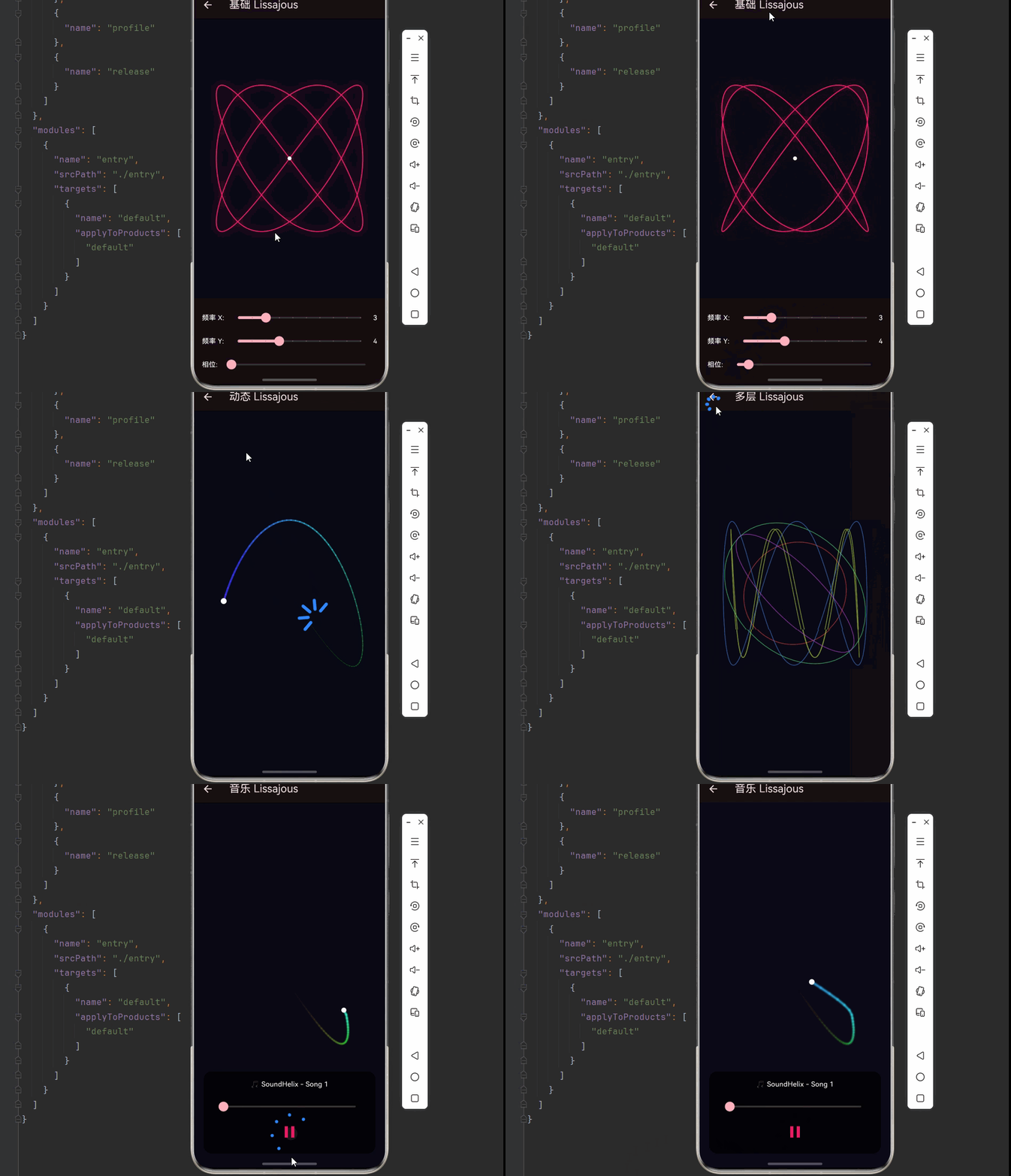
欢迎加入开源鸿蒙跨平台社区:https://openharmonycrossplatform.csdn.net
📊 一、Lissajous 曲线:数学与艺术的交汇
📚 1.1 Lissajous 曲线的历史
Lissajous 曲线(Lissajous Curve),又称利萨茹图形或鲍迪奇曲线,是由美国数学家纳撒尼尔·鲍迪奇(Nathaniel Bowditch)在 1815 年首次研究,后由法国物理学家朱尔·安托万·利萨茹(Jules Antoine Lissajous)在 1857 年独立发现并详细研究。
历史里程碑:
| 年份 | 人物 | 贡献 |
|---|---|---|
| 1815 | 纳撒尼尔·鲍迪奇 | 首次数学研究 |
| 1857 | 朱尔·利萨茹 | 实验研究、声学应用 |
| 19世纪 | 示波器发明 | 成为经典显示模式 |
| 现代 | 音乐可视化 | 节奏与图形的完美结合 |
📐 1.2 Lissajous 曲线的数学定义
Lissajous 曲线由两个相互垂直的简谐振动合成:
参数方程:
x(t) = A × sin(a × t + δ)
y(t) = B × sin(b × t)
| 参数 | 含义 | 说明 |
|---|---|---|
| A | X 轴振幅 | 水平方向最大偏移 |
| B | Y 轴振幅 | 垂直方向最大偏移 |
| a | X 轴频率 | 水平振动频率 |
| b | Y 轴频率 | 垂直振动频率 |
| δ | 相位差 | 两振动的相位偏移 |
| t | 时间参数 | 变化范围 [0, 2π] |
🔬 1.3 频率比与图形形状
频率比 a:b 决定了曲线的基本形状:
| 频率比 a:b | 图形形状 | 特点 |
|---|---|---|
| 1:1 | 圆/椭圆 | 最基本形式 |
| 1:2 | 抛物线形 | 单环交叉 |
| 1:3 | 三叶形 | 三个环 |
| 2:3 | "8"字形 | 五个交叉点 |
| 3:4 | 复杂环 | 七个交叉点 |
| 5:6 | 花形 | 十一个交叉点 |
频率比示意:

1:1      1:2      1:3      2:3
 ○       ∞       ๑       ๘

3:4      3:5      4:5      5:6
 ❂       ❁       ✿       ❀
相位差的影响:
- δ = 0:图形对称
- δ = π/4:图形倾斜
- δ = π/2:图形旋转 90°
🎯 1.4 Lissajous 曲线的应用
| 领域 | 应用 | 效果 |
|---|---|---|
| 📺 示波器 | 信号分析 | 测量频率比和相位差 |
| 🎵 音乐可视化 | 节奏显示 | 动态轨迹效果 |
| 🔬 物理学 | 振动研究 | 简谐运动合成 |
| 🎨 艺术设计 | 几何图案 | 动态生成艺术 |
| 🎮 游戏开发 | 粒子轨迹 | 特效路径 |
🔧 二、Lissajous 曲线的 Dart 实现
🧮 2.1 基础 Lissajous 类
import 'dart:math';
import 'dart:typed_data';

/// Lissajous 曲线参数
class LissajousParams {
  double amplitudeX;
  double amplitudeY;
  double frequencyX;
  double frequencyY;
  double phase;

  LissajousParams({
    this.amplitudeX = 100,
    this.amplitudeY = 100,
    this.frequencyX = 1,
    this.frequencyY = 1,
    this.phase = 0,
  });

  /// 计算曲线上的点
  Point2D getPoint(double t) {
    return Point2D(
      amplitudeX * sin(frequencyX * t + phase),
      amplitudeY * sin(frequencyY * t),
    );
  }

  /// 获取频率比字符串
  String get frequencyRatio => '${frequencyX.toInt()}:${frequencyY.toInt()}';

  /// 复制并修改
  LissajousParams copyWith({
    double? amplitudeX,
    double? amplitudeY,
    double? frequencyX,
    double? frequencyY,
    double? phase,
  }) {
    return LissajousParams(
      amplitudeX: amplitudeX ?? this.amplitudeX,
      amplitudeY: amplitudeY ?? this.amplitudeY,
      frequencyX: frequencyX ?? this.frequencyX,
      frequencyY: frequencyY ?? this.frequencyY,
      phase: phase ?? this.phase,
    );
  }
}

/// Lissajous 曲线生成器
class LissajousCurve {
  final LissajousParams params;
  final int pointCount;

  LissajousCurve({
    required this.params,
    this.pointCount = 500,
  });

  /// 生成完整曲线点集
  List<Point2D> generatePoints() {
    final points = <Point2D>[];
    final step = 2 * pi / pointCount;

    for (int i = 0; i <= pointCount; i++) {
      final t = i * step;
      points.add(params.getPoint(t));
    }

    return points;
  }

  /// 生成部分曲线(动画用)
  List<Point2D> generatePartialPoints(double progress) {
    final points = <Point2D>[];
    final totalSteps = (pointCount * progress).toInt();
    final step = 2 * pi / pointCount;

    for (int i = 0; i <= totalSteps; i++) {
      final t = i * step;
      points.add(params.getPoint(t));
    }

    return points;
  }

  /// 获取当前点
  Point2D getCurrentPoint(double t) {
    return params.getPoint(t);
  }
}

/// 二维点
class Point2D {
  final double x;
  final double y;

  const Point2D(this.x, this.y);

  Point2D operator +(Point2D other) => Point2D(x + other.x, y + other.y);
  Point2D operator -(Point2D other) => Point2D(x - other.x, y - other.y);
  Point2D operator *(double scalar) => Point2D(x * scalar, y * scalar);

  double get magnitude => sqrt(x * x + y * y);

  Point2D get normalized {
    final mag = magnitude;
    return mag > 0 ? Point2D(x / mag, y / mag) : const Point2D(0, 0);
  }

  Offset toOffset() => Offset(x, y);
}
⚡ 2.2 多层 Lissajous 系统
/// 多层 Lissajous 系统
class MultiLissajousSystem {
  final List<LissajousCurve> curves;
  final List<Color> colors;
  final List<double> speeds;
  final List<double> phases;

  MultiLissajousSystem({
    required this.curves,
    required this.colors,
    required this.speeds,
    required this.phases,
  });

  factory MultiLissajousSystem.create({
    required int layerCount,
    required double baseAmplitude,
    required Random random,
  }) {
    final curves = <LissajousCurve>[];
    final colors = <Color>[];
    final speeds = <double>[];
    final phases = <double>[];

    for (int i = 0; i < layerCount; i++) {
      final freqX = random.nextInt(5) + 1;
      final freqY = random.nextInt(5) + 1;

      curves.add(LissajousCurve(
        params: LissajousParams(
          amplitudeX: baseAmplitude * (0.5 + random.nextDouble() * 0.5),
          amplitudeY: baseAmplitude * (0.5 + random.nextDouble() * 0.5),
          frequencyX: freqX.toDouble(),
          frequencyY: freqY.toDouble(),
          phase: random.nextDouble() * 2 * pi,
        ),
      ));

      colors.add(HSVColor.fromAHSV(
        1,
        i * 360 / layerCount,
        0.7,
        0.9,
      ).toColor());

      speeds.add(0.5 + random.nextDouble() * 1.5);
      phases.add(random.nextDouble() * 2 * pi);
    }

    return MultiLissajousSystem(
      curves: curves,
      colors: colors,
      speeds: speeds,
      phases: phases,
    );
  }

  /// 更新相位
  void update(double dt) {
    for (int i = 0; i < phases.length; i++) {
      phases[i] += speeds[i] * dt;
    }
  }

  /// 获取所有曲线的当前点
  List<Point2D> getCurrentPoints(double time) {
    return curves.asMap().entries.map((entry) {
      final i = entry.key;
      final curve = entry.value;
      return curve.params.getPoint(time + phases[i]);
    }).toList();
  }
}

/// Lissajous 轨迹系统
class LissajousTrail {
  final List<Point2D> trail;
  final int maxLength;
  final Color color;
  final double width;

  LissajousTrail({
    required this.maxLength,
    required this.color,
    this.width = 2,
  }) : trail = [];

  void addPoint(Point2D point) {
    trail.add(point);
    if (trail.length > maxLength) {
      trail.removeAt(0);
    }
  }

  void clear() {
    trail.clear();
  }

  Path toPath() {
    if (trail.isEmpty) return Path();

    final path = Path();
    path.moveTo(trail.first.x, trail.first.y);

    for (int i = 1; i < trail.length; i++) {
      path.lineTo(trail[i].x, trail[i].y);
    }

    return path;
  }

  /// 绘制渐变轨迹
  void draw(Canvas canvas, Offset center) {
    if (trail.length < 2) return;

    for (int i = 1; i < trail.length; i++) {
      final progress = i / trail.length;
      final alpha = progress * 0.8;
      final strokeWidth = width * progress;

      final paint = Paint()
        ..color = color.withOpacity(alpha)
        ..strokeWidth = strokeWidth
        ..strokeCap = StrokeCap.round
        ..style = PaintingStyle.stroke;

      canvas.drawLine(
        Offset(center.dx + trail[i - 1].x, center.dy + trail[i - 1].y),
        Offset(center.dx + trail[i].x, center.dy + trail[i].y),
        paint,
      );
    }
  }
}
🎨 2.3 音频响应的 Lissajous 控制器
import 'package:flutter/material.dart';
import 'package:just_audio_ohos/just_audio_ohos.dart';
import 'package:audio_session/audio_session.dart';
/// 音频驱动的 Lissajous 控制器
class AudioLissajousController extends ChangeNotifier {
final AudioPlayer _player = AudioPlayer();
final Random _random = Random();
late MultiLissajousSystem _system;
final List<LissajousTrail> _trails = [];
bool _isPlaying = false;
Duration _position = Duration.zero;
Duration _duration = Duration.zero;
Float32List _audioData = Float32List(128);
double _energy = 0;
double _bass = 0;
double _mid = 0;
double _treble = 0;
double _time = 0;
int _layerCount = 5;
bool get isPlaying => _isPlaying;
Duration get position => _position;
Duration get duration => _duration;
MultiLissajousSystem get system => _system;
List<LissajousTrail> get trails => _trails;
Float32List get audioData => _audioData;
double get energy => _energy;
double get bass => _bass;
double get mid => _mid;
double get treble => _treble;
AudioPlayer get player => _player;
/// 初始化
Future<void> initialize(Size size) async {
final session = await AudioSession.instance;
await session.configure(const AudioSessionConfiguration.music());
_player.playerStateStream.listen((state) {
_isPlaying = state.playing;
notifyListeners();
});
_player.positionStream.listen((position) {
_position = position;
notifyListeners();
});
_player.durationStream.listen((duration) {
_duration = duration ?? Duration.zero;
notifyListeners();
});
_initializeSystem(size);
}
/// 初始化系统
void _initializeSystem(Size size) {
final baseAmplitude = min(size.width, size.height) * 0.35;
_system = MultiLissajousSystem.create(
layerCount: _layerCount,
baseAmplitude: baseAmplitude,
random: _random,
);
_trails.clear();
for (int i = 0; i < _layerCount; i++) {
_trails.add(LissajousTrail(
maxLength: 200,
color: _system.colors[i],
width: 2 + _random.nextDouble() * 2,
));
}
}
/// 加载网络音频
Future<void> loadAudio(String url) async {
try {
await _player.setUrl(url);
} catch (e) {
debugPrint('加载音频失败: $e');
}
}
/// 更新
void update(double dt, Size size) {
_time += dt;
// 更新音频数据
_updateAudioData();
// 计算音频特征
_calculateAudioFeatures();
// 更新系统
_updateSystem(dt, size);
// 更新轨迹
_updateTrails();
notifyListeners();
}
void _updateAudioData() {
for (int i = 0; i < 128; i++) {
if (_isPlaying) {
final freq = (i / 128) * 8 + 1;
final wave1 = sin(_time * freq) * 0.4;
final wave2 = sin(_time * freq * 1.5 + pi / 3) * 0.3;
final noise = (_random.nextDouble() - 0.5) * 0.15;
final bassBoost = i < 32 ? 0.3 : 0;
_audioData[i] = _audioData[i] * 0.85 +
(wave1 + wave2 + noise + bassBoost) * 0.15;
} else {
_audioData[i] *= 0.95;
}
}
}
void _calculateAudioFeatures() {
double totalEnergy = 0;
double bassEnergy = 0;
double midEnergy = 0;
double trebleEnergy = 0;
for (int i = 0; i < 128; i++) {
final value = _audioData[i].abs();
totalEnergy += value;
if (i < 32) {
bassEnergy += value;
} else if (i < 96) {
midEnergy += value;
} else {
trebleEnergy += value;
}
}
_energy = totalEnergy / 128;
_bass = bassEnergy / 32;
_mid = midEnergy / 64;
_treble = trebleEnergy / 32;
}
void _updateSystem(double dt, Size size) {
_system.update(dt);
// 根据音频调整参数
for (int i = 0; i < _system.curves.length; i++) {
final curve = _system.curves[i];
// 低音影响振幅
final ampScale = 1 + _bass * 0.5;
curve.params.amplitudeX = min(size.width, size.height) * 0.35 * ampScale;
curve.params.amplitudeY = min(size.width, size.height) * 0.35 * ampScale;
// 中频影响相位
curve.params.phase += _mid * 0.1;
}
}
void _updateTrails() {
final points = _system.getCurrentPoints(_time);
for (int i = 0; i < min(points.length, _trails.length); i++) {
_trails[i].addPoint(points[i]);
}
}
/// 设置频率比
void setFrequencyRatio(int index, int freqX, int freqY) {
if (index < _system.curves.length) {
_system.curves[index].params.frequencyX = freqX.toDouble();
_system.curves[index].params.frequencyY = freqY.toDouble();
}
}
/// 播放/暂停
Future<void> togglePlay() async {
if (_isPlaying) {
await _player.pause();
} else {
await _player.play();
}
}
/// 跳转
Future<void> seek(Duration position) async {
await _player.seek(position);
}
void dispose() {
_player.dispose();
super.dispose();
}
}
📦 三、完整示例代码
以下是完整的 Lissajous 曲线音乐可视化示例代码:
import 'package:flutter/material.dart';
import 'package:just_audio_ohos/just_audio_ohos.dart';
import 'package:audio_session/audio_session.dart';
import 'dart:math';
import 'dart:typed_data';
void main() {
runApp(const LissajousApp());
}
class LissajousApp extends StatelessWidget {
const LissajousApp({super.key});
Widget build(BuildContext context) {
return MaterialApp(
title: 'Lissajous 利萨茹曲线',
theme: ThemeData(
colorScheme: ColorScheme.fromSeed(
seedColor: Colors.pink,
brightness: Brightness.dark,
),
useMaterial3: true,
),
home: const LissajousHomePage(),
debugShowCheckedModeBanner: false,
);
}
}
class LissajousHomePage extends StatelessWidget {
const LissajousHomePage({super.key});
Widget build(BuildContext context) {
return Scaffold(
appBar: AppBar(
title: const Text('📊 Lissajous 利萨茹曲线'),
backgroundColor: Theme.of(context).colorScheme.inversePrimary,
),
body: ListView(
padding: const EdgeInsets.all(16),
children: [
_buildCard(context, title: '基础曲线', description: '静态 Lissajous 图形',
icon: Icons.show_chart, color: Colors.pink,
onTap: () => Navigator.push(context, MaterialPageRoute(builder: (_) => const BasicLissajousDemo()))),
_buildCard(context, title: '动态曲线', description: '动画演化效果',
icon: Icons.motion_photos_on, color: Colors.purple,
onTap: () => Navigator.push(context, MaterialPageRoute(builder: (_) => const DynamicLissajousDemo()))),
_buildCard(context, title: '多层系统', description: '多曲线叠加',
icon: Icons.layers, color: Colors.indigo,
onTap: () => Navigator.push(context, MaterialPageRoute(builder: (_) => const MultiLayerDemo()))),
_buildCard(context, title: '音乐曲线', description: '音频驱动的轨迹',
icon: Icons.music_note, color: Colors.orange,
onTap: () => Navigator.push(context, MaterialPageRoute(builder: (_) => const MusicLissajousDemo()))),
_buildCard(context, title: '示波器', description: '经典示波器效果',
icon: Icons.monitor, color: Colors.cyan,
onTap: () => Navigator.push(context, MaterialPageRoute(builder: (_) => const OscilloscopeDemo()))),
],
),
);
}
Widget _buildCard(BuildContext context, {required String title, required String description,
required IconData icon, required Color color, required VoidCallback onTap}) {
return Card(
margin: const EdgeInsets.only(bottom: 12),
shape: RoundedRectangleBorder(borderRadius: BorderRadius.circular(16)),
child: InkWell(
onTap: onTap,
borderRadius: BorderRadius.circular(16),
child: Padding(
padding: const EdgeInsets.all(16),
child: Row(
children: [
Container(width: 56, height: 56,
decoration: BoxDecoration(color: color.withOpacity(0.1), borderRadius: BorderRadius.circular(12)),
child: Icon(icon, color: color, size: 28)),
const SizedBox(width: 16),
Expanded(child: Column(crossAxisAlignment: CrossAxisAlignment.start, children: [
Text(title, style: const TextStyle(fontSize: 16, fontWeight: FontWeight.bold)),
const SizedBox(height: 4),
Text(description, style: TextStyle(color: Colors.grey[600], fontSize: 14)),
])),
Icon(Icons.chevron_right, color: Colors.grey[400]),
],
),
),
),
);
}
}
/// 点类
class Point2D {
final double x, y;
const Point2D(this.x, this.y);
Point2D operator +(Point2D o) => Point2D(x + o.x, y + o.y);
Point2D operator -(Point2D o) => Point2D(x - o.x, y - o.y);
Point2D operator *(double s) => Point2D(x * s, y * s);
Offset toOffset() => Offset(x, y);
}
/// 基础 Lissajous 演示
class BasicLissajousDemo extends StatefulWidget {
const BasicLissajousDemo({super.key});
State<BasicLissajousDemo> createState() => _BasicLissajousDemoState();
}
class _BasicLissajousDemoState extends State<BasicLissajousDemo> {
int _freqX = 3, _freqY = 4;
double _phase = 0;
double _amplitude = 150;
Widget build(BuildContext context) {
return Scaffold(
appBar: AppBar(title: const Text('基础 Lissajous')),
body: Column(
children: [
Expanded(child: CustomPaint(painter: BasicLissajousPainter(_freqX, _freqY, _phase, _amplitude), size: Size.infinite)),
_buildControls(),
],
),
);
}
Widget _buildControls() {
return Container(
padding: const EdgeInsets.all(16),
color: Colors.black12,
child: Column(
children: [
Row(children: [
const Text('频率 X: ', style: TextStyle(color: Colors.white)),
Expanded(child: Slider(value: _freqX.toDouble(), min: 1, max: 10, divisions: 9,
onChanged: (v) => setState(() => _freqX = v.toInt()))),
Text('$_freqX', style: const TextStyle(color: Colors.white)),
]),
Row(children: [
const Text('频率 Y: ', style: TextStyle(color: Colors.white)),
Expanded(child: Slider(value: _freqY.toDouble(), min: 1, max: 10, divisions: 9,
onChanged: (v) => setState(() => _freqY = v.toInt()))),
Text('$_freqY', style: const TextStyle(color: Colors.white)),
]),
Row(children: [
const Text('相位: ', style: TextStyle(color: Colors.white)),
Expanded(child: Slider(value: _phase, min: 0, max: pi * 2,
onChanged: (v) => setState(() => _phase = v))),
]),
],
),
);
}
}
class BasicLissajousPainter extends CustomPainter {
final int freqX, freqY;
final double phase, amplitude;
BasicLissajousPainter(this.freqX, this.freqY, this.phase, this.amplitude);
void paint(Canvas canvas, Size size) {
canvas.drawRect(Rect.fromLTWH(0, 0, size.width, size.height), Paint()..color = const Color(0xFF0a0a15));
final center = Offset(size.width / 2, size.height / 2);
final path = Path();
final points = 500;
for (int i = 0; i <= points; i++) {
final t = i / points * 2 * pi;
final x = amplitude * sin(freqX * t + phase);
final y = amplitude * sin(freqY * t);
if (i == 0) {
path.moveTo(center.dx + x, center.dy + y);
} else {
path.lineTo(center.dx + x, center.dy + y);
}
}
// 发光效果
final glowPaint = Paint()
..color = Colors.pink.withOpacity(0.3)
..strokeWidth = 6
..style = PaintingStyle.stroke
..maskFilter = const MaskFilter.blur(BlurStyle.normal, 8);
canvas.drawPath(path, glowPaint);
// 主线
final mainPaint = Paint()
..color = Colors.pink
..strokeWidth = 2
..style = PaintingStyle.stroke;
canvas.drawPath(path, mainPaint);
// 中心点
canvas.drawCircle(center, 4, Paint()..color = Colors.white);
}
bool shouldRepaint(covariant BasicLissajousPainter old) =>
freqX != old.freqX || freqY != old.freqY || phase != old.phase;
}
/// 动态 Lissajous 演示
class DynamicLissajousDemo extends StatefulWidget {
const DynamicLissajousDemo({super.key});
State<DynamicLissajousDemo> createState() => _DynamicLissajousDemoState();
}
class _DynamicLissajousDemoState extends State<DynamicLissajousDemo> with SingleTickerProviderStateMixin {
late AnimationController _controller;
double _time = 0;
final List<Point2D> _trail = [];
int _trailLength = 100;
void initState() {
super.initState();
_controller = AnimationController(vsync: this, duration: const Duration(seconds: 1))..repeat();
_controller.addListener(_update);
}
void _update() {
_time += 0.02;
final point = Point2D(150 * sin(3 * _time), 150 * sin(4 * _time + _time * 0.5));
_trail.add(point);
if (_trail.length > _trailLength) _trail.removeAt(0);
setState(() {});
}
void dispose() {
_controller.dispose();
super.dispose();
}
Widget build(BuildContext context) {
return Scaffold(
appBar: AppBar(title: const Text('动态 Lissajous')),
body: CustomPaint(painter: DynamicLissajousPainter(_trail, _time), size: Size.infinite),
);
}
}
class DynamicLissajousPainter extends CustomPainter {
final List<Point2D> trail;
final double time;
DynamicLissajousPainter(this.trail, this.time);
void paint(Canvas canvas, Size size) {
canvas.drawRect(Rect.fromLTWH(0, 0, size.width, size.height), Paint()..color = const Color(0xFF0a0a15));
final center = Offset(size.width / 2, size.height / 2);
// 绘制轨迹
for (int i = 1; i < trail.length; i++) {
final progress = i / trail.length;
final hue = (time * 50 + progress * 180) % 360;
final paint = Paint()
..color = HSVColor.fromAHSV(progress * 0.8, hue, 0.8, 1).toColor()
..strokeWidth = 1 + progress * 3
..strokeCap = StrokeCap.round;
canvas.drawLine(
Offset(center.dx + trail[i - 1].x, center.dy + trail[i - 1].y),
Offset(center.dx + trail[i].x, center.dy + trail[i].y),
paint,
);
}
// 当前点
if (trail.isNotEmpty) {
final lastPoint = trail.last;
canvas.drawCircle(Offset(center.dx + lastPoint.x, center.dy + lastPoint.y), 6,
Paint()..color = Colors.white);
}
}
bool shouldRepaint(covariant DynamicLissajousPainter old) => true;
}
/// 多层演示
class MultiLayerDemo extends StatefulWidget {
const MultiLayerDemo({super.key});
State<MultiLayerDemo> createState() => _MultiLayerDemoState();
}
class _MultiLayerDemoState extends State<MultiLayerDemo> with SingleTickerProviderStateMixin {
late AnimationController _controller;
final List<_CurveLayer> _layers = [];
double _time = 0;
void initState() {
super.initState();
_controller = AnimationController(vsync: this, duration: const Duration(seconds: 1))..repeat();
_controller.addListener(_update);
final random = Random();
for (int i = 0; i < 5; i++) {
_layers.add(_CurveLayer(
freqX: random.nextInt(5) + 1,
freqY: random.nextInt(5) + 1,
amplitude: 100 + random.nextDouble() * 50,
speed: 0.5 + random.nextDouble() * 1.5,
color: HSVColor.fromAHSV(0.6, i * 72, 0.7, 0.9).toColor(),
));
}
}
void _update() {
_time += 0.016;
setState(() {});
}
void dispose() {
_controller.dispose();
super.dispose();
}
Widget build(BuildContext context) {
return Scaffold(
appBar: AppBar(title: const Text('多层 Lissajous')),
body: CustomPaint(painter: MultiLayerPainter(_layers, _time), size: Size.infinite),
);
}
}
class _CurveLayer {
final int freqX, freqY;
final double amplitude, speed;
final Color color;
_CurveLayer({required this.freqX, required this.freqY, required this.amplitude,
required this.speed, required this.color});
}
class MultiLayerPainter extends CustomPainter {
final List<_CurveLayer> layers;
final double time;
MultiLayerPainter(this.layers, this.time);
void paint(Canvas canvas, Size size) {
canvas.drawRect(Rect.fromLTWH(0, 0, size.width, size.height), Paint()..color = const Color(0xFF0a0a15));
final center = Offset(size.width / 2, size.height / 2);
for (final layer in layers) {
final path = Path();
final points = 300;
final phase = time * layer.speed;
for (int i = 0; i <= points; i++) {
final t = i / points * 2 * pi;
final x = layer.amplitude * sin(layer.freqX * t + phase);
final y = layer.amplitude * sin(layer.freqY * t);
if (i == 0) path.moveTo(center.dx + x, center.dy + y);
else path.lineTo(center.dx + x, center.dy + y);
}
canvas.drawPath(path, Paint()
..color = layer.color
..strokeWidth = 1.5
..style = PaintingStyle.stroke);
}
}
bool shouldRepaint(covariant MultiLayerPainter old) => true;
}
/// 音乐 Lissajous 演示
class MusicLissajousDemo extends StatefulWidget {
const MusicLissajousDemo({super.key});
State<MusicLissajousDemo> createState() => _MusicLissajousDemoState();
}
class _MusicLissajousDemoState extends State<MusicLissajousDemo> with TickerProviderStateMixin {
late AnimationController _animController;
late AudioPlayer _audioPlayer;
final List<Point2D> _trail = [];
Float32List _audioData = Float32List(128);
bool _isPlaying = false;
Duration _position = Duration.zero;
Duration _duration = Duration.zero;
double _energy = 0, _bass = 0;
double _time = 0;
static const String _audioUrl = 'https://www.soundhelix.com/examples/mp3/SoundHelix-Song-1.mp3';
void initState() {
super.initState();
_initAudio();
_animController = AnimationController(vsync: this, duration: const Duration(milliseconds: 16))..repeat();
_animController.addListener(_update);
}
Future<void> _initAudio() async {
_audioPlayer = AudioPlayer();
final session = await AudioSession.instance;
await session.configure(const AudioSessionConfiguration.music());
_audioPlayer.playerStateStream.listen((s) => setState(() => _isPlaying = s.playing));
_audioPlayer.positionStream.listen((p) => setState(() => _position = p));
_audioPlayer.durationStream.listen((d) => setState(() => _duration = d ?? Duration.zero));
try { await _audioPlayer.setUrl(_audioUrl); } catch (e) { debugPrint('加载失败: $e'); }
}
void _update() {
_time += 0.016;
for (int i = 0; i < 128; i++) {
if (_isPlaying) {
final freq = (i / 128) * 8 + 1;
final wave = sin(_time * freq) * 0.4 + sin(_time * freq * 1.5) * 0.3;
final bass = i < 32 ? 0.3 : 0;
_audioData[i] = _audioData[i] * 0.85 + (wave + bass) * 0.15;
} else {
_audioData[i] *= 0.95;
}
}
double total = 0, bassE = 0;
for (int i = 0; i < 128; i++) {
total += _audioData[i].abs();
if (i < 32) bassE += _audioData[i].abs();
}
_energy = total / 128;
_bass = bassE / 32;
final amp = 120 + _energy * 80;
final point = Point2D(amp * sin((3 + _bass * 2) * _time), amp * sin((4 + _energy) * _time + _time * 0.3));
_trail.add(point);
if (_trail.length > 150) _trail.removeAt(0);
setState(() {});
}
void dispose() {
_animController.dispose();
_audioPlayer.dispose();
super.dispose();
}
Widget build(BuildContext context) {
return Scaffold(
appBar: AppBar(title: const Text('音乐 Lissajous')),
body: Stack(
children: [
CustomPaint(painter: MusicLissajousPainter(_trail, _energy, _isPlaying), size: Size.infinite),
Positioned(bottom: 30, left: 20, right: 20, child: _buildControls()),
],
),
);
}
Widget _buildControls() {
return Container(
padding: const EdgeInsets.all(16),
decoration: BoxDecoration(color: Colors.black.withOpacity(0.7), borderRadius: BorderRadius.circular(16)),
child: Column(
mainAxisSize: MainAxisSize.min,
children: [
const Text('🎵 SoundHelix - Song 1', style: TextStyle(color: Colors.white, fontSize: 14)),
const SizedBox(height: 12),
Slider(value: _duration.inMilliseconds > 0 ? _position.inMilliseconds.toDouble().clamp(0, _duration.inMilliseconds.toDouble()) : 0,
max: _duration.inMilliseconds > 0 ? _duration.inMilliseconds.toDouble() : 1,
onChanged: (v) => _audioPlayer.seek(Duration(milliseconds: v.toInt()))),
IconButton(icon: Icon(_isPlaying ? Icons.pause : Icons.play_arrow, color: Colors.pink, size: 40),
onPressed: () => _isPlaying ? _audioPlayer.pause() : _audioPlayer.play()),
],
),
);
}
}
class MusicLissajousPainter extends CustomPainter {
final List<Point2D> trail;
final double energy;
final bool isPlaying;
MusicLissajousPainter(this.trail, this.energy, this.isPlaying);
void paint(Canvas canvas, Size size) {
canvas.drawRect(Rect.fromLTWH(0, 0, size.width, size.height),
Paint()..color = Color.lerp(const Color(0xFF0a0a15), const Color(0xFF150a20), energy)!);
final center = Offset(size.width / 2, size.height / 2);
for (int i = 1; i < trail.length; i++) {
final progress = i / trail.length;
final hue = (energy * 200 + progress * 160) % 360;
final paint = Paint()
..color = HSVColor.fromAHSV(progress * 0.9, hue, 0.8, 1).toColor()
..strokeWidth = 1 + progress * 3 + energy * 2
..strokeCap = StrokeCap.round;
if (isPlaying) paint.maskFilter = MaskFilter.blur(BlurStyle.normal, 1 + energy * 2);
canvas.drawLine(
Offset(center.dx + trail[i - 1].x, center.dy + trail[i - 1].y),
Offset(center.dx + trail[i].x, center.dy + trail[i].y),
paint,
);
}
if (trail.isNotEmpty) {
canvas.drawCircle(Offset(center.dx + trail.last.x, center.dy + trail.last.y), 5 + energy * 3,
Paint()..color = Colors.white);
}
}
bool shouldRepaint(covariant MusicLissajousPainter old) => true;
}
/// 示波器演示
class OscilloscopeDemo extends StatefulWidget {
const OscilloscopeDemo({super.key});
State<OscilloscopeDemo> createState() => _OscilloscopeDemoState();
}
class _OscilloscopeDemoState extends State<OscilloscopeDemo> with SingleTickerProviderStateMixin {
late AnimationController _controller;
double _time = 0;
final List<double> _waveformX = [];
final List<double> _waveformY = [];
int _sampleCount = 200;
void initState() {
super.initState();
_controller = AnimationController(vsync: this, duration: const Duration(seconds: 1))..repeat();
_controller.addListener(_update);
}
void _update() {
_time += 0.02;
_waveformX.add(sin(_time * 3) * 100);
_waveformY.add(sin(_time * 4 + pi / 4) * 100);
if (_waveformX.length > _sampleCount) _waveformX.removeAt(0);
if (_waveformY.length > _sampleCount) _waveformY.removeAt(0);
setState(() {});
}
void dispose() {
_controller.dispose();
super.dispose();
}
Widget build(BuildContext context) {
return Scaffold(
appBar: AppBar(title: const Text('示波器')),
body: CustomPaint(painter: OscilloscopePainter(_waveformX, _waveformY, _time), size: Size.infinite),
);
}
}
class OscilloscopePainter extends CustomPainter {
final List<double> waveformX;
final List<double> waveformY;
final double time;
OscilloscopePainter(this.waveformX, this.waveformY, this.time);
void paint(Canvas canvas, Size size) {
// 背景
canvas.drawRect(Rect.fromLTWH(0, 0, size.width, size.height), Paint()..color = const Color(0xFF001a00));
// 网格
final gridPaint = Paint()
..color = Colors.green.withOpacity(0.2)
..strokeWidth = 0.5;
for (int i = 0; i <= 10; i++) {
final x = i * size.width / 10;
final y = i * size.height / 10;
canvas.drawLine(Offset(x, 0), Offset(x, size.height), gridPaint);
canvas.drawLine(Offset(0, y), Offset(size.width, y), gridPaint);
}
final center = Offset(size.width / 2, size.height / 2);
// X-Y 模式
if (waveformX.length == waveformY.length && waveformX.isNotEmpty) {
final path = Path();
for (int i = 0; i < waveformX.length; i++) {
final x = center.dx + waveformX[i];
final y = center.dy + waveformY[i];
if (i == 0) path.moveTo(x, y);
else path.lineTo(x, y);
}
final glowPaint = Paint()
..color = Colors.green.withOpacity(0.3)
..strokeWidth = 4
..style = PaintingStyle.stroke
..maskFilter = const MaskFilter.blur(BlurStyle.normal, 4);
canvas.drawPath(path, glowPaint);
canvas.drawPath(path, Paint()
..color = const Color(0xFF00ff00)
..strokeWidth = 1.5
..style = PaintingStyle.stroke);
}
// 信息显示
final textPainter = TextPainter(
text: TextSpan(text: 'X-Y Mode | ${waveformX.length} samples',
style: const TextStyle(color: Color(0xFF00ff00), fontSize: 12, fontFamily: 'monospace')),
textDirection: TextDirection.ltr,
)..layout();
textPainter.paint(canvas, const Offset(10, 10));
}
bool shouldRepaint(covariant OscilloscopePainter old) => true;
}
📝 四、总结
本篇文章深入探讨了 Lissajous 曲线在音乐可视化中的应用,从参数方程到频率耦合,构建了具有"示波器感"的轨迹动画效果。
✅ 核心知识点回顾
| 知识点 | 说明 |
|---|---|
| 📊 Lissajous 曲线 | 参数方程、频率比、相位差 |
| 🔢 频率比 | 决定图形形状 |
| 📐 相位差 | 影响图形旋转 |
| 🎵 音频驱动 | 能量控制振幅和频率 |
| 🔊 网络音乐 | just_audio_ohos 在线播放 |
⭐ 最佳实践要点
- ✅ 使用轨迹渐变增强视觉效果
- ✅ 多层叠加创造丰富图案
- ✅ 音频特征映射曲线参数
- ✅ 示波器风格网格背景
🚀 进阶方向
- 🔮 3D Lissajous 曲线
- ✨ 粒子沿曲线运动
- 👆 触摸交互调整参数
- ⚡ GPU 着色器渲染

开源鸿蒙跨平台开发社区汇聚开发者与厂商,共建“一次开发,多端部署”的开源生态,致力于降低跨端开发门槛,推动万物智联创新。
更多推荐
 17
17 0
0- 0


 已为社区贡献40条内容

所有评论(0)