Harmony Flutter 跨平台开发实战:鸿蒙与音乐律动艺术、分布式联觉震动:鸿蒙多端同步的节奏共鸣
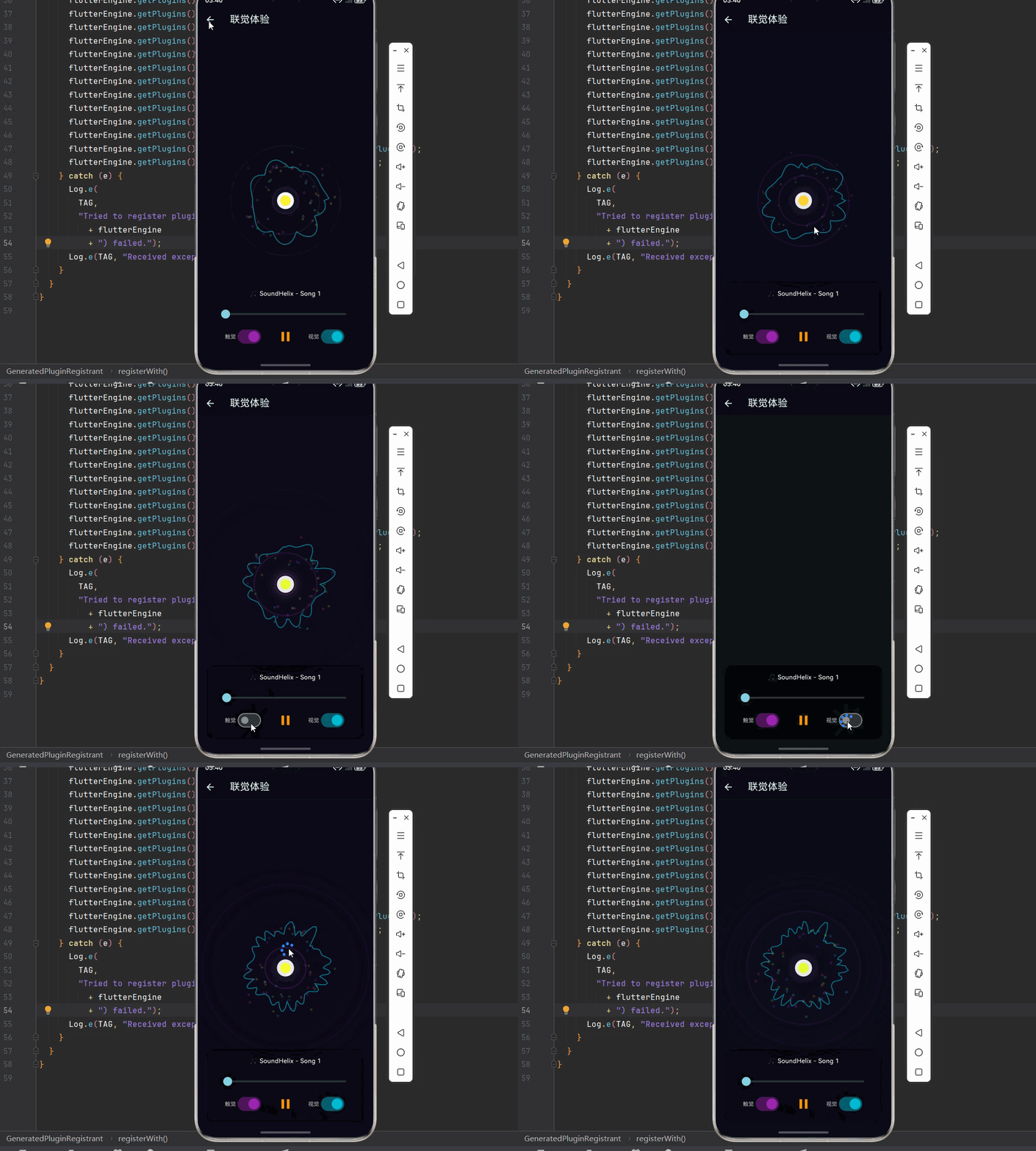
鸿蒙系统的分布式能力是其核心特性之一,实现了"一生万物,万物归一"的理念。分布式技术栈技术层能力应用场景🔗分布式软总线设备自动发现、组网多设备协同📡分布式数据数据跨设备同步播放状态同步🎮分布式任务任务跨设备迁移无缝切换📱分布式硬件虚拟化硬件池多屏协同🔔分布式通知跨设备通知状态提醒本系列文章深入探讨了鸿蒙平台上的音乐可视化技术,从基础音频处理到高级分布式协同,构建了完整的跨平台音乐可视化解
·
欢迎加入开源鸿蒙跨平台社区:https://openharmonycrossplatform.csdn.net
🌐 一、鸿蒙分布式能力:万物互联的艺术
📚 1.1 分布式技术概述
鸿蒙系统的分布式能力是其核心特性之一,实现了"一生万物,万物归一"的理念。在音乐可视化领域,分布式能力可以带来全新的体验:
分布式技术栈:
| 技术层 | 能力 | 应用场景 |
|---|---|---|
| 🔗 分布式软总线 | 设备自动发现、组网 | 多设备协同 |
| 📡 分布式数据 | 数据跨设备同步 | 播放状态同步 |
| 🎮 分布式任务 | 任务跨设备迁移 | 无缝切换 |
| 📱 分布式硬件 | 虚拟化硬件池 | 多屏协同 |
| 🔔 分布式通知 | 跨设备通知 | 状态提醒 |
📐 1.2 多设备协同场景
在音乐可视化中,多设备协同可以创造独特的体验:
场景一:多屏沉浸
┌─────────────┐  ┌─────────────┐  ┌─────────────┐
│   手机      │  │   平板      │  │   电视      │
│  控制中心   │  │  主可视化   │  │  氛围渲染   │
└─────────────┘  └─────────────┘  └─────────────┘
       ↕                ↕                ↕
       └────────────────┴────────────────┘
                    同步音频数据

场景二:穿戴联动
┌─────────────┐        ┌─────────────┐
│   手表      │  ←──→  │   手机      │
│  心率反馈   │        │  音乐播放   │
└─────────────┘        └─────────────┘
       ↕                      ↕
┌─────────────┐        ┌─────────────┐
│   耳机      │  ←──→  │   手环      │
│  触觉震动   │        │  节奏闪烁   │
└─────────────┘        └─────────────┘
🔬 1.3 触觉反馈原理
触觉反馈(Haptic Feedback)是增强音乐沉浸感的重要手段:
| 反馈类型 | 效果 | 适用场景 |
|---|---|---|
| 💫 轻触 | 微弱震动 | 节拍提示 |
| 🌊 波浪 | 渐变震动 | 旋律起伏 |
| 💥 脉冲 | 强烈震动 | 重音强调 |
| 🎵 节奏 | 模式震动 | 节奏同步 |
| ✨ 自定义 | 波形震动 | 精细控制 |
震动波形示意:
轻触:    ▂
波浪:    ▂▃▄▅▆▇█▇▆▅▄▃▂
脉冲:    █
节奏:    ▂█▂▂█▂▂█▂▂█
自定义:  ▃▅▇▅▃▂▄▆▄▂▃▅▇
🎯 1.4 联觉设计理念
联觉(Synesthesia)是一种神经现象,指一种感官刺激引发另一种感官体验。在音乐可视化中,我们可以模拟这种体验:
| 感官映射 | 音乐特征 | 视觉表现 | 触觉表现 |
|---|---|---|---|
| 🎵 音高 | 频率 | 垂直位置/颜色 | 震动频率 |
| 🔊 响度 | 振幅 | 大小/亮度 | 震动强度 |
| 🎹 音色 | 波形 | 形状/纹理 | 震动模式 |
| ⚡ 节奏 | 拍子 | 闪烁/运动 | 脉冲序列 |
| 🌊 旋律 | 音高序列 | 轨迹/流动 | 波浪震动 |
🔧 二、分布式能力的 Dart 实现
🧮 2.1 设备发现与管理
import 'dart:async';
import 'dart:convert';

/// 设备信息
class DeviceInfo {
  final String deviceId;
  final String deviceName;
  final DeviceType type;
  final DeviceState state;
  final String? ipAddress;
  final int? port;

  const DeviceInfo({
    required this.deviceId,
    required this.deviceName,
    required this.type,
    required this.state,
    this.ipAddress,
    this.port,
  });

  factory DeviceInfo.fromJson(Map<String, dynamic> json) {
    return DeviceInfo(
      deviceId: json['deviceId'] ?? '',
      deviceName: json['deviceName'] ?? '',
      type: DeviceType.values.firstWhere(
        (e) => e.toString() == 'DeviceType.${json['type']}',
        orElse: () => DeviceType.unknown,
      ),
      state: DeviceState.values.firstWhere(
        (e) => e.toString() == 'DeviceState.${json['state']}',
        orElse: () => DeviceState.offline,
      ),
      ipAddress: json['ipAddress'],
      port: json['port'],
    );
  }

  Map<String, dynamic> toJson() => {
    'deviceId': deviceId,
    'deviceName': deviceName,
    'type': type.name,
    'state': state.name,
    'ipAddress': ipAddress,
    'port': port,
  };
}

/// 设备类型
enum DeviceType {
  phone,
  tablet,
  tv,
  watch,
  speaker,
  headset,
  unknown,
}

/// 设备状态
enum DeviceState {
  online,
  offline,
  busy,
  connecting,
}

/// 设备管理器
class DeviceManager {
  final Map<String, DeviceInfo> _devices = {};
  final StreamController<List<DeviceInfo>> _deviceStream =
      StreamController<List<DeviceInfo>>.broadcast();

  List<DeviceInfo> get devices => _devices.values.toList();
  Stream<List<DeviceInfo>> get deviceStream => _deviceStream.stream;

  /// 添加设备
  void addDevice(DeviceInfo device) {
    _devices[device.deviceId] = device;
    _notifyUpdate();
  }

  /// 移除设备
  void removeDevice(String deviceId) {
    _devices.remove(deviceId);
    _notifyUpdate();
  }

  /// 更新设备状态
  void updateDeviceState(String deviceId, DeviceState state) {
    final device = _devices[deviceId];
    if (device != null) {
      _devices[deviceId] = DeviceInfo(
        deviceId: device.deviceId,
        deviceName: device.deviceName,
        type: device.type,
        state: state,
        ipAddress: device.ipAddress,
        port: device.port,
      );
      _notifyUpdate();
    }
  }

  /// 获取设备
  DeviceInfo? getDevice(String deviceId) => _devices[deviceId];

  /// 获取特定类型设备
  List<DeviceInfo> getDevicesByType(DeviceType type) {
    return _devices.values.where((d) => d.type == type).toList();
  }

  /// 获取在线设备
  List<DeviceInfo> get onlineDevices =>
      _devices.values.where((d) => d.state == DeviceState.online).toList();

  void _notifyUpdate() {
    _deviceStream.add(devices);
  }

  void dispose() {
    _deviceStream.close();
  }
}
⚡ 2.2 数据同步服务
/// 同步数据类型
enum SyncDataType {
  audioData,
  playbackState,
  visualizationParams,
  hapticPattern,
  custom,
}

/// 同步消息
class SyncMessage {
  final SyncDataType type;
  final Map<String, dynamic> data;
  final DateTime timestamp;
  final String? sourceDevice;

  const SyncMessage({
    required this.type,
    required this.data,
    required this.timestamp,
    this.sourceDevice,
  });

  factory SyncMessage.fromJson(Map<String, dynamic> json) {
    return SyncMessage(
      type: SyncDataType.values.firstWhere(
        (e) => e.name == json['type'],
        orElse: () => SyncDataType.custom,
      ),
      data: Map<String, dynamic>.from(json['data'] ?? {}),
      timestamp: DateTime.parse(json['timestamp']),
      sourceDevice: json['sourceDevice'],
    );
  }

  Map<String, dynamic> toJson() => {
    'type': type.name,
    'data': data,
    'timestamp': timestamp.toIso8601String(),
    'sourceDevice': sourceDevice,
  };
}

/// 数据同步服务
class DataSyncService {
  final DeviceManager _deviceManager;
  final StreamController<SyncMessage> _messageStream =
      StreamController<SyncMessage>.broadcast();

  final Map<String, List<SyncMessage>> _messageHistory = {};
  final int _maxHistorySize = 100;

  Stream<SyncMessage> get messageStream => _messageStream.stream;

  DataSyncService(this._deviceManager);

  /// 广播消息到所有设备
  void broadcast(SyncMessage message) {
    _addToHistory(message);
    _messageStream.add(message);
  }

  /// 发送消息到特定设备
  void sendToDevice(String deviceId, SyncMessage message) {
    final device = _deviceManager.getDevice(deviceId);
    if (device != null && device.state == DeviceState.online) {
      _addToHistory(message);
      _messageStream.add(message);
    }
  }

  /// 发送音频数据
  void sendAudioData(Float32List audioData, {String? targetDevice}) {
    final message = SyncMessage(
      type: SyncDataType.audioData,
      data: {
        'samples': audioData.toList(),
        'length': audioData.length,
      },
      timestamp: DateTime.now(),
    );

    if (targetDevice != null) {
      sendToDevice(targetDevice, message);
    } else {
      broadcast(message);
    }
  }

  /// 发送播放状态
  void sendPlaybackState({
    required bool isPlaying,
    required Duration position,
    required Duration duration,
    String? trackId,
    String? targetDevice,
  }) {
    final message = SyncMessage(
      type: SyncDataType.playbackState,
      data: {
        'isPlaying': isPlaying,
        'positionMs': position.inMilliseconds,
        'durationMs': duration.inMilliseconds,
        'trackId': trackId,
      },
      timestamp: DateTime.now(),
    );

    if (targetDevice != null) {
      sendToDevice(targetDevice, message);
    } else {
      broadcast(message);
    }
  }

  /// 发送可视化参数
  void sendVisualizationParams({
    required Map<String, dynamic> params,
    String? targetDevice,
  }) {
    final message = SyncMessage(
      type: SyncDataType.visualizationParams,
      data: params,
      timestamp: DateTime.now(),
    );

    if (targetDevice != null) {
      sendToDevice(targetDevice, message);
    } else {
      broadcast(message);
    }
  }

  /// 发送触觉模式
  void sendHapticPattern({
    required List<double> pattern,
    required int intensity,
    String? targetDevice,
  }) {
    final message = SyncMessage(
      type: SyncDataType.hapticPattern,
      data: {
        'pattern': pattern,
        'intensity': intensity,
      },
      timestamp: DateTime.now(),
    );

    if (targetDevice != null) {
      sendToDevice(targetDevice, message);
    } else {
      broadcast(message);
    }
  }

  void _addToHistory(SyncMessage message) {
    final key = message.type.name;
    _messageHistory.putIfAbsent(key, () => []);
    _messageHistory[key]!.add(message);

    if (_messageHistory[key]!.length > _maxHistorySize) {
      _messageHistory[key]!.removeAt(0);
    }
  }

  List<SyncMessage> getHistory(SyncDataType type) {
    return _messageHistory[type.name] ?? [];
  }

  void dispose() {
    _messageStream.close();
  }
}
🎨 2.3 触觉反馈控制器
import 'package:flutter/services.dart';

/// 触觉反馈类型
enum HapticType {
  lightImpact,
  mediumImpact,
  heavyImpact,
  selection,
  vibrate,
}

/// 触觉模式
class HapticPattern {
  final String name;
  final List<int> timings;
  final List<int> amplitudes;

  const HapticPattern({
    required this.name,
    required this.timings,
    required this.amplitudes,
  });

  /// 预设模式
  static const HapticPattern heartbeat = HapticPattern(
    name: 'heartbeat',
    timings: [0, 100, 100, 200],
    amplitudes: [0, 255, 0, 200],
  );

  static const HapticPattern wave = HapticPattern(
    name: 'wave',
    timings: [0, 50, 50, 50, 50, 50, 50, 50, 50],
    amplitudes: [0, 50, 100, 150, 200, 150, 100, 50, 0],
  );

  static const HapticPattern pulse = HapticPattern(
    name: 'pulse',
    timings: [0, 50],
    amplitudes: [0, 255],
  );

  static const HapticPattern rhythm = HapticPattern(
    name: 'rhythm',
    timings: [0, 100, 100, 100, 200, 100, 100, 100],
    amplitudes: [0, 255, 0, 200, 0, 255, 0, 150],
  );

  static const HapticPattern crescendo = HapticPattern(
    name: 'crescendo',
    timings: [0, 100, 100, 100, 100, 100, 100, 100],
    amplitudes: [0, 50, 80, 120, 160, 200, 230, 255],
  );
}

/// 触觉反馈控制器
class HapticController {
  static final HapticController _instance = HapticController._internal();
  factory HapticController() => _instance;
  HapticController._internal();

  bool _enabled = true;
  int _intensity = 200;

  bool get enabled => _enabled;
  int get intensity => _intensity;

  /// 设置启用状态
  void setEnabled(bool enabled) {
    _enabled = enabled;
  }

  /// 设置强度 (0-255)
  void setIntensity(int intensity) {
    _intensity = intensity.clamp(0, 255);
  }

  /// 轻触反馈
  void lightImpact() {
    if (!_enabled) return;
    HapticFeedback.lightImpact();
  }

  /// 中等反馈
  void mediumImpact() {
    if (!_enabled) return;
    HapticFeedback.mediumImpact();
  }

  /// 强烈反馈
  void heavyImpact() {
    if (!_enabled) return;
    HapticFeedback.heavyImpact();
  }

  /// 选择反馈
  void selection() {
    if (!_enabled) return;
    HapticFeedback.selectionClick();
  }

  /// 震动
  void vibrate() {
    if (!_enabled) return;
    HapticFeedback.vibrate();
  }

  /// 播放触觉模式
  Future<void> playPattern(HapticPattern pattern) async {
    if (!_enabled) return;

    for (int i = 0; i < pattern.timings.length; i++) {
      final timing = pattern.timings[i];
      final amplitude = pattern.amplitudes[i];

      await Future.delayed(Duration(milliseconds: timing));

      if (amplitude > 0) {
        final scaledAmplitude = (amplitude * _intensity / 255).round();
        if (scaledAmplitude > 150) {
          HapticFeedback.heavyImpact();
        } else if (scaledAmplitude > 80) {
          HapticFeedback.mediumImpact();
        } else if (scaledAmplitude > 0) {
          HapticFeedback.lightImpact();
        }
      }
    }
  }

  /// 音频驱动的触觉反馈
  void audioDrivenFeedback(double energy, double bass) {
    if (!_enabled) return;

    // 低音脉冲
    if (bass > 0.6) {
      HapticFeedback.heavyImpact();
    } else if (bass > 0.4) {
      HapticFeedback.mediumImpact();
    } else if (energy > 0.3) {
      HapticFeedback.lightImpact();
    }
  }

  /// 节拍同步反馈
  void beatSyncFeedback(int beat, int beatsPerMeasure) {
    if (!_enabled) return;

    if (beat == 0) {
      // 强拍
      HapticFeedback.heavyImpact();
    } else if (beat % 2 == 0) {
      // 次强拍
      HapticFeedback.mediumImpact();
    } else {
      // 弱拍
      HapticFeedback.lightImpact();
    }
  }
}
📦 三、完整示例代码
以下是完整的分布式联觉震动音乐可视化示例代码:
import 'package:flutter/material.dart';
import 'package:just_audio_ohos/just_audio_ohos.dart';
import 'package:audio_session/audio_session.dart';
import 'package:flutter/services.dart';
import 'dart:math';
import 'dart:typed_data';
import 'dart:async';
void main() {
runApp(const DistributedApp());
}
class DistributedApp extends StatelessWidget {
const DistributedApp({super.key});
Widget build(BuildContext context) {
return MaterialApp(
title: '分布式联觉震动',
theme: ThemeData(
colorScheme: ColorScheme.fromSeed(seedColor: Colors.cyan, brightness: Brightness.dark),
useMaterial3: true,
),
home: const DistributedHomePage(),
debugShowCheckedModeBanner: false,
);
}
}
class DistributedHomePage extends StatelessWidget {
const DistributedHomePage({super.key});
Widget build(BuildContext context) {
return Scaffold(
appBar: AppBar(title: const Text('🌐 分布式联觉'), backgroundColor: Theme.of(context).colorScheme.inversePrimary),
body: ListView(padding: const EdgeInsets.all(16), children: [
_buildCard(context, title: '设备发现', description: '扫描附近设备', icon: Icons.devices, color: Colors.cyan,
onTap: () => Navigator.push(context, MaterialPageRoute(builder: (_) => const DeviceDiscoveryDemo()))),
_buildCard(context, title: '触觉反馈', description: '震动模式体验', icon: Icons.vibration, color: Colors.purple,
onTap: () => Navigator.push(context, MaterialPageRoute(builder: (_) => const HapticDemo()))),
_buildCard(context, title: '音频触觉同步', description: '音乐驱动震动', icon: Icons.music_note, color: Colors.orange,
onTap: () => Navigator.push(context, MaterialPageRoute(builder: (_) => const AudioHapticDemo()))),
_buildCard(context, title: '多设备可视化', description: '分布式渲染', icon: Icons.connected_tv, color: Colors.teal,
onTap: () => Navigator.push(context, MaterialPageRoute(builder: (_) => const MultiDeviceDemo()))),
_buildCard(context, title: '联觉体验', description: '沉浸式音乐', icon: Icons.sensors, color: Colors.pink,
onTap: () => Navigator.push(context, MaterialPageRoute(builder: (_) => const SynesthesiaDemo()))),
]),
);
}
Widget _buildCard(BuildContext context, {required String title, required String description, required IconData icon,
required Color color, required VoidCallback onTap}) {
return Card(
margin: const EdgeInsets.only(bottom: 12),
shape: RoundedRectangleBorder(borderRadius: BorderRadius.circular(16)),
child: InkWell(
onTap: onTap,
borderRadius: BorderRadius.circular(16),
child: Padding(
padding: const EdgeInsets.all(16),
child: Row(children: [
Container(width: 56, height: 56, decoration: BoxDecoration(color: color.withOpacity(0.1), borderRadius: BorderRadius.circular(12)),
child: Icon(icon, color: color, size: 28)),
const SizedBox(width: 16),
Expanded(child: Column(crossAxisAlignment: CrossAxisAlignment.start, children: [
Text(title, style: const TextStyle(fontSize: 16, fontWeight: FontWeight.bold)),
const SizedBox(height: 4),
Text(description, style: TextStyle(color: Colors.grey[600], fontSize: 14)),
])),
Icon(Icons.chevron_right, color: Colors.grey[400]),
]),
),
),
);
}
}
/// 设备信息
class Device {
final String id, name;
final DeviceType type;
bool isOnline;
Device({required this.id, required this.name, required this.type, this.isOnline = true});
}
enum DeviceType { phone, tablet, tv, watch, speaker }
/// 设备发现演示
class DeviceDiscoveryDemo extends StatefulWidget {
const DeviceDiscoveryDemo({super.key});
State<DeviceDiscoveryDemo> createState() => _DeviceDiscoveryDemoState();
}
class _DeviceDiscoveryDemoState extends State<DeviceDiscoveryDemo> {
final List<Device> _devices = [];
bool _scanning = false;
void initState() {
super.initState();
_startScan();
}
void _startScan() {
setState(() => _scanning = true);
// 模拟设备发现
Future.delayed(const Duration(seconds: 2), () {
setState(() {
_devices.addAll([
Device(id: '1', name: '华为 Mate 60', type: DeviceType.phone),
Device(id: '2', name: '华为 MatePad Pro', type: DeviceType.tablet),
Device(id: '3', name: '华为智慧屏', type: DeviceType.tv),
Device(id: '4', name: '华为 Watch GT', type: DeviceType.watch),
Device(id: '5', name: '华为 Sound X', type: DeviceType.speaker),
]);
_scanning = false;
});
});
}
Widget build(BuildContext context) {
return Scaffold(
appBar: AppBar(title: const Text('设备发现')),
body: Column(children: [
Container(
padding: const EdgeInsets.all(16),
color: Colors.black12,
child: Row(children: [
if (_scanning) ...[
const SizedBox(width: 16, height: 16, child: CircularProgressIndicator(strokeWidth: 2)),
const SizedBox(width: 12),
const Text('正在扫描...', style: TextStyle(color: Colors.white70)),
] else ...[
Icon(Icons.check_circle, color: Colors.green[400]),
const SizedBox(width: 12),
Text('发现 ${_devices.length} 台设备', style: const TextStyle(color: Colors.white70)),
],
const Spacer(),
TextButton(onPressed: _startScan, child: const Text('重新扫描')),
]),
),
Expanded(child: ListView.builder(
padding: const EdgeInsets.all(16),
itemCount: _devices.length,
itemBuilder: (context, index) => _buildDeviceCard(_devices[index]),
)),
]),
);
}
Widget _buildDeviceCard(Device device) {
final icons = {
DeviceType.phone: Icons.phone_android,
DeviceType.tablet: Icons.tablet,
DeviceType.tv: Icons.tv,
DeviceType.watch: Icons.watch,
DeviceType.speaker: Icons.speaker,
};
return Card(
margin: const EdgeInsets.only(bottom: 8),
shape: RoundedRectangleBorder(borderRadius: BorderRadius.circular(12)),
child: ListTile(
leading: Container(width: 48, height: 48, decoration: BoxDecoration(color: Colors.cyan.withOpacity(0.1), borderRadius: BorderRadius.circular(8)),
child: Icon(icons[device.type], color: Colors.cyan)),
title: Text(device.name),
subtitle: Text(device.type.name.toUpperCase()),
trailing: Switch(value: device.isOnline, onChanged: (v) => setState(() => device.isOnline = v)),
),
);
}
}
/// 触觉反馈演示
class HapticDemo extends StatefulWidget {
const HapticDemo({super.key});
State<HapticDemo> createState() => _HapticDemoState();
}
class _HapticDemoState extends State<HapticDemo> {
bool _enabled = true;
int _intensity = 200;
Widget build(BuildContext context) {
return Scaffold(
appBar: AppBar(title: const Text('触觉反馈')),
body: SingleChildScrollView(
padding: const EdgeInsets.all(16),
child: Column(crossAxisAlignment: CrossAxisAlignment.start, children: [
_buildSettings(),
const SizedBox(height: 24),
const Text('基础反馈', style: TextStyle(fontSize: 18, fontWeight: FontWeight.bold)),
const SizedBox(height: 12),
Wrap(spacing: 12, runSpacing: 12, children: [
_buildHapticButton('轻触', Colors.green, () => HapticFeedback.lightImpact()),
_buildHapticButton('中等', Colors.orange, () => HapticFeedback.mediumImpact()),
_buildHapticButton('强烈', Colors.red, () => HapticFeedback.heavyImpact()),
_buildHapticButton('选择', Colors.blue, () => HapticFeedback.selectionClick()),
_buildHapticButton('震动', Colors.purple, () => HapticFeedback.vibrate()),
]),
const SizedBox(height: 24),
const Text('预设模式', style: TextStyle(fontSize: 18, fontWeight: FontWeight.bold)),
const SizedBox(height: 12),
Wrap(spacing: 12, runSpacing: 12, children: [
_buildPatternButton('心跳', Colors.pink, _playHeartbeat),
_buildPatternButton('波浪', Colors.cyan, _playWave),
_buildPatternButton('脉冲', Colors.yellow, _playPulse),
_buildPatternButton('节奏', Colors.teal, _playRhythm),
_buildPatternButton('渐强', Colors.indigo, _playCrescendo),
]),
]),
),
);
}
Widget _buildSettings() {
return Card(
shape: RoundedRectangleBorder(borderRadius: BorderRadius.circular(12)),
child: Padding(
padding: const EdgeInsets.all(16),
child: Column(children: [
Row(children: [
const Text('启用触觉反馈'),
const Spacer(),
Switch(value: _enabled, onChanged: (v) => setState(() => _enabled = v)),
]),
const SizedBox(height: 12),
Row(children: [
Text('强度: $_intensity'),
Expanded(child: Slider(value: _intensity.toDouble(), min: 0, max: 255, divisions: 255,
onChanged: (v) => setState(() => _intensity = v.toInt()))),
]),
]),
),
);
}
Widget _buildHapticButton(String label, Color color, VoidCallback onTap) {
return Material(
color: color.withOpacity(0.2),
borderRadius: BorderRadius.circular(12),
child: InkWell(
onTap: _enabled ? onTap : null,
borderRadius: BorderRadius.circular(12),
child: Container(
padding: const EdgeInsets.symmetric(horizontal: 24, vertical: 16),
child: Text(label, style: TextStyle(color: color, fontWeight: FontWeight.bold)),
),
),
);
}
Widget _buildPatternButton(String label, Color color, VoidCallback onTap) {
return Material(
color: color.withOpacity(0.2),
borderRadius: BorderRadius.circular(12),
child: InkWell(
onTap: _enabled ? onTap : null,
borderRadius: BorderRadius.circular(12),
child: Container(
padding: const EdgeInsets.symmetric(horizontal: 24, vertical: 16),
child: Text(label, style: TextStyle(color: color, fontWeight: FontWeight.bold)),
),
),
);
}
void _playHeartbeat() async {
HapticFeedback.heavyImpact();
await Future.delayed(const Duration(milliseconds: 150));
HapticFeedback.mediumImpact();
}
void _playWave() async {
for (int i = 0; i < 5; i++) {
HapticFeedback.lightImpact();
await Future.delayed(const Duration(milliseconds: 80));
}
}
void _playPulse() => HapticFeedback.heavyImpact();
void _playRhythm() async {
HapticFeedback.heavyImpact();
await Future.delayed(const Duration(milliseconds: 200));
HapticFeedback.lightImpact();
await Future.delayed(const Duration(milliseconds: 200));
HapticFeedback.mediumImpact();
}
void _playCrescendo() async {
for (int i = 0; i < 5; i++) {
if (i < 2) HapticFeedback.lightImpact();
else if (i < 4) HapticFeedback.mediumImpact();
else HapticFeedback.heavyImpact();
await Future.delayed(const Duration(milliseconds: 100));
}
}
}
/// 音频触觉同步演示
class AudioHapticDemo extends StatefulWidget {
const AudioHapticDemo({super.key});
State<AudioHapticDemo> createState() => _AudioHapticDemoState();
}
class _AudioHapticDemoState extends State<AudioHapticDemo> with TickerProviderStateMixin {
late AnimationController _animController;
late AudioPlayer _audioPlayer;
Float32List _audioData = Float32List(128);
bool _isPlaying = false;
Duration _position = Duration.zero;
Duration _duration = Duration.zero;
double _energy = 0, _bass = 0;
double _time = 0;
bool _hapticEnabled = true;
double _lastHapticTime = 0;
static const String _audioUrl = 'https://www.soundhelix.com/examples/mp3/SoundHelix-Song-1.mp3';
void initState() {
super.initState();
_initAudio();
_animController = AnimationController(vsync: this, duration: const Duration(milliseconds: 16))..repeat();
_animController.addListener(_update);
}
Future<void> _initAudio() async {
_audioPlayer = AudioPlayer();
final session = await AudioSession.instance;
await session.configure(const AudioSessionConfiguration.music());
_audioPlayer.playerStateStream.listen((s) => setState(() => _isPlaying = s.playing));
_audioPlayer.positionStream.listen((p) => setState(() => _position = p));
_audioPlayer.durationStream.listen((d) => setState(() => _duration = d ?? Duration.zero));
try { await _audioPlayer.setUrl(_audioUrl); } catch (e) { debugPrint('加载失败: $e'); }
}
void _update() {
_time += 0.016;
for (int i = 0; i < 128; i++) {
if (_isPlaying) {
final freq = (i / 128) * 8 + 1;
final wave = sin(_time * freq) * 0.4 + sin(_time * freq * 1.5) * 0.3;
final bass = i < 32 ? 0.3 : 0;
_audioData[i] = _audioData[i] * 0.85 + (wave + bass) * 0.15;
} else {
_audioData[i] *= 0.95;
}
}
double total = 0, bassE = 0;
for (int i = 0; i < 128; i++) {
total += _audioData[i].abs();
if (i < 32) bassE += _audioData[i].abs();
}
_energy = total / 128;
_bass = bassE / 32;
// 触觉反馈
if (_hapticEnabled && _isPlaying && _time - _lastHapticTime > 0.15) {
if (_bass > 0.6) {
HapticFeedback.heavyImpact();
_lastHapticTime = _time;
} else if (_bass > 0.4) {
HapticFeedback.mediumImpact();
_lastHapticTime = _time;
}
}
setState(() {});
}
void dispose() {
_animController.dispose();
_audioPlayer.dispose();
super.dispose();
}
Widget build(BuildContext context) {
return Scaffold(
appBar: AppBar(title: const Text('音频触觉同步')),
body: Stack(children: [
CustomPaint(painter: AudioHapticPainter(_time, _audioData, _energy, _bass), size: Size.infinite),
Positioned(bottom: 30, left: 20, right: 20, child: _buildControls()),
]),
);
}
Widget _buildControls() {
return Container(
padding: const EdgeInsets.all(16),
decoration: BoxDecoration(color: Colors.black.withOpacity(0.7), borderRadius: BorderRadius.circular(16)),
child: Column(
mainAxisSize: MainAxisSize.min,
children: [
const Text('🎵 SoundHelix - Song 1', style: TextStyle(color: Colors.white, fontSize: 14)),
const SizedBox(height: 12),
Slider(value: _duration.inMilliseconds > 0 ? _position.inMilliseconds.toDouble().clamp(0, _duration.inMilliseconds.toDouble()) : 0,
max: _duration.inMilliseconds > 0 ? _duration.inMilliseconds.toDouble() : 1,
onChanged: (v) => _audioPlayer.seek(Duration(milliseconds: v.toInt()))),
Row(mainAxisAlignment: MainAxisAlignment.center, children: [
Row(children: [
const Text('触觉', style: TextStyle(color: Colors.white70, fontSize: 12)),
Switch(value: _hapticEnabled, onChanged: (v) => setState(() => _hapticEnabled = v), activeColor: Colors.cyan),
]),
const SizedBox(width: 20),
IconButton(icon: Icon(_isPlaying ? Icons.pause : Icons.play_arrow, color: Colors.orange, size: 36),
onPressed: () => _isPlaying ? _audioPlayer.pause() : _audioPlayer.play()),
]),
],
),
);
}
}
class AudioHapticPainter extends CustomPainter {
final double time;
final Float32List audioData;
final double energy, bass;
AudioHapticPainter(this.time, this.audioData, this.energy, this.bass);
void paint(Canvas canvas, Size size) {
final center = Offset(size.width / 2, size.height / 2);
final maxR = min(size.width, size.height) / 2 - 50;
final bgColor = Color.lerp(const Color(0xFF0a0a15), const Color(0xFF0a1520), energy)!;
canvas.drawRect(Rect.fromLTWH(0, 0, size.width, size.height), Paint()..color = bgColor);
// 绘制脉冲圆环
for (int i = 0; i < 3; i++) {
final phase = (time * 2 + i * 0.5) % 2;
final r = maxR * phase / 2;
final alpha = (1 - phase / 2) * 0.5;
canvas.drawCircle(center, r, Paint()..color = Colors.cyan.withOpacity(alpha)..style = PaintingStyle.stroke..strokeWidth = 2);
}
// 绘制音频波形
final path = Path();
for (int i = 0; i < audioData.length; i++) {
final angle = 2 * pi * i / audioData.length - pi / 2;
final r = maxR * 0.5 * (1 + audioData[i].abs() * 0.8);
final x = center.dx + r * cos(angle);
final y = center.dy + r * sin(angle);
if (i == 0) path.moveTo(x, y);
else path.lineTo(x, y);
}
path.close();
final wavePaint = Paint()
..color = HSVColor.fromAHSV(0.7, ((bass * 120 + 180) % 360).abs(), 0.8, 1).toColor()
..style = PaintingStyle.stroke
..strokeWidth = 2;
if (energy > 0.3) wavePaint.maskFilter = MaskFilter.blur(BlurStyle.normal, 3);
canvas.drawPath(path, wavePaint);
// 绘制中心指示器
final centerR = maxR * 0.15 * (1 + bass * 0.5);
canvas.drawCircle(center, centerR, Paint()..color = Colors.white.withOpacity(0.8));
canvas.drawCircle(center, centerR * 0.6, Paint()..color = Colors.cyan);
// 绘制触觉指示
if (bass > 0.5) {
final indicatorR = maxR * 0.05;
canvas.drawCircle(center, centerR + indicatorR, Paint()..color = Colors.orange.withOpacity(bass));
}
}
bool shouldRepaint(covariant AudioHapticPainter old) => true;
}
/// 多设备可视化演示
class MultiDeviceDemo extends StatefulWidget {
const MultiDeviceDemo({super.key});
State<MultiDeviceDemo> createState() => _MultiDeviceDemoState();
}
class _MultiDeviceDemoState extends State<MultiDeviceDemo> with SingleTickerProviderStateMixin {
late AnimationController _controller;
double _time = 0;
final List<Device> _devices = [
Device(id: '1', name: '主设备', type: DeviceType.phone),
Device(id: '2', name: '平板', type: DeviceType.tablet),
Device(id: '3', name: '电视', type: DeviceType.tv),
];
void initState() {
super.initState();
_controller = AnimationController(vsync: this, duration: const Duration(milliseconds: 16))..repeat();
_controller.addListener(() { _time += 0.016; setState(() {}); });
}
void dispose() {
_controller.dispose();
super.dispose();
}
Widget build(BuildContext context) {
return Scaffold(
appBar: AppBar(title: const Text('多设备可视化')),
body: Column(children: [
Expanded(child: Row(children: _devices.asMap().entries.map((e) =>
Expanded(child: _buildDeviceView(e.key, e.value))).toList())),
_buildSyncStatus(),
]),
);
}
Widget _buildDeviceView(int index, Device device) {
return Container(
margin: const EdgeInsets.all(8),
decoration: BoxDecoration(color: Colors.black12, borderRadius: BorderRadius.circular(12)),
child: Column(children: [
Container(
padding: const EdgeInsets.all(8),
decoration: BoxDecoration(color: Colors.cyan.withOpacity(0.2), borderRadius: const BorderRadius.vertical(top: Radius.circular(12))),
child: Row(mainAxisAlignment: MainAxisAlignment.center, children: [
Icon(Icons.devices, color: Colors.cyan, size: 16),
const SizedBox(width: 8),
Text(device.name, style: const TextStyle(color: Colors.cyan, fontSize: 12)),
]),
),
Expanded(child: CustomPaint(painter: DeviceVizPainter(_time, index), size: Size.infinite)),
]),
);
}
Widget _buildSyncStatus() {
return Container(
padding: const EdgeInsets.all(16),
color: Colors.black12,
child: Row(mainAxisAlignment: MainAxisAlignment.center, children: [
Icon(Icons.sync, color: Colors.green[400], size: 20),
const SizedBox(width: 8),
const Text('所有设备已同步', style: TextStyle(color: Colors.white70)),
const SizedBox(width: 16),
Text('延迟: ${Random().nextInt(20) + 5}ms', style: TextStyle(color: Colors.grey[500], fontSize: 12)),
]),
);
}
}
class DeviceVizPainter extends CustomPainter {
final double time;
final int deviceIndex;
DeviceVizPainter(this.time, this.deviceIndex);
void paint(Canvas canvas, Size size) {
final center = Offset(size.width / 2, size.height / 2);
final maxR = min(size.width, size.height) / 2 - 10;
canvas.drawRect(Rect.fromLTWH(0, 0, size.width, size.height), Paint()..color = const Color(0xFF0a0a15));
// 不同设备显示不同效果
switch (deviceIndex) {
case 0:
_drawWaveform(canvas, center, maxR);
break;
case 1:
_drawBars(canvas, center, maxR);
break;
case 2:
_drawCircular(canvas, center, maxR);
break;
}
}
void _drawWaveform(Canvas canvas, Offset center, double maxR) {
final path = Path();
for (int i = 0; i < 64; i++) {
final x = center.dx - maxR + i * maxR * 2 / 64;
final y = center.dy + sin(time * 3 + i * 0.2) * maxR * 0.3;
if (i == 0) path.moveTo(x, y);
else path.lineTo(x, y);
}
canvas.drawPath(path, Paint()..color = Colors.cyan..style = PaintingStyle.stroke..strokeWidth = 2);
}
void _drawBars(Canvas canvas, Offset center, double maxR) {
for (int i = 0; i < 16; i++) {
final x = center.dx - maxR + i * maxR * 2 / 16 + 2;
final h = maxR * 0.5 * (0.3 + 0.7 * sin(time * 2 + i * 0.5).abs());
canvas.drawRect(Rect.fromLTWH(x, center.dy - h, maxR * 2 / 16 - 4, h * 2),
Paint()..color = HSVColor.fromAHSV(0.8, i * 20 + time * 30, 0.7, 1).toColor());
}
}
void _drawCircular(Canvas canvas, Offset center, double maxR) {
for (int i = 0; i < 32; i++) {
final angle = 2 * pi * i / 32;
final r = maxR * 0.5 * (0.5 + 0.5 * sin(time * 2 + i * 0.3));
final x = center.dx + r * cos(angle);
final y = center.dy + r * sin(angle);
canvas.drawCircle(Offset(x, y), 4, Paint()..color = HSVColor.fromAHSV(0.8, i * 10 + time * 20, 0.7, 1).toColor());
}
}
bool shouldRepaint(covariant DeviceVizPainter old) => true;
}
/// 联觉体验演示
class SynesthesiaDemo extends StatefulWidget {
const SynesthesiaDemo({super.key});
State<SynesthesiaDemo> createState() => _SynesthesiaDemoState();
}
class _SynesthesiaDemoState extends State<SynesthesiaDemo> with TickerProviderStateMixin {
late AnimationController _animController;
late AudioPlayer _audioPlayer;
Float32List _audioData = Float32List(128);
bool _isPlaying = false;
Duration _position = Duration.zero;
Duration _duration = Duration.zero;
double _energy = 0, _bass = 0, _mid = 0, _treble = 0;
double _time = 0;
bool _hapticEnabled = true;
bool _visualEnabled = true;
double _lastHapticTime = 0;
static const String _audioUrl = 'https://www.soundhelix.com/examples/mp3/SoundHelix-Song-1.mp3';
void initState() {
super.initState();
_initAudio();
_animController = AnimationController(vsync: this, duration: const Duration(milliseconds: 16))..repeat();
_animController.addListener(_update);
}
Future<void> _initAudio() async {
_audioPlayer = AudioPlayer();
final session = await AudioSession.instance;
await session.configure(const AudioSessionConfiguration.music());
_audioPlayer.playerStateStream.listen((s) => setState(() => _isPlaying = s.playing));
_audioPlayer.positionStream.listen((p) => setState(() => _position = p));
_audioPlayer.durationStream.listen((d) => setState(() => _duration = d ?? Duration.zero));
try { await _audioPlayer.setUrl(_audioUrl); } catch (e) { debugPrint('加载失败: $e'); }
}
void _update() {
_time += 0.016;
for (int i = 0; i < 128; i++) {
if (_isPlaying) {
final freq = (i / 128) * 8 + 1;
final wave = sin(_time * freq) * 0.4 + sin(_time * freq * 1.5) * 0.3;
final bass = i < 32 ? 0.3 : 0;
_audioData[i] = _audioData[i] * 0.85 + (wave + bass) * 0.15;
} else {
_audioData[i] *= 0.95;
}
}
double total = 0, bassE = 0, midE = 0, trebleE = 0;
for (int i = 0; i < 128; i++) {
total += _audioData[i].abs();
if (i < 32) bassE += _audioData[i].abs();
else if (i < 96) midE += _audioData[i].abs();
else trebleE += _audioData[i].abs();
}
_energy = total / 128;
_bass = bassE / 32;
_mid = midE / 64;
_treble = trebleE / 32;
// 触觉反馈
if (_hapticEnabled && _isPlaying && _time - _lastHapticTime > 0.12) {
if (_bass > 0.55) {
HapticFeedback.heavyImpact();
_lastHapticTime = _time;
} else if (_mid > 0.45) {
HapticFeedback.mediumImpact();
_lastHapticTime = _time;
} else if (_treble > 0.35) {
HapticFeedback.lightImpact();
_lastHapticTime = _time;
}
}
setState(() {});
}
void dispose() {
_animController.dispose();
_audioPlayer.dispose();
super.dispose();
}
Widget build(BuildContext context) {
return Scaffold(
appBar: AppBar(title: const Text('联觉体验')),
body: Stack(children: [
if (_visualEnabled) CustomPaint(painter: SynesthesiaPainter(_time, _audioData, _energy, _bass, _mid, _treble), size: Size.infinite),
Positioned(bottom: 30, left: 20, right: 20, child: _buildControls()),
]),
);
}
Widget _buildControls() {
return Container(
padding: const EdgeInsets.all(16),
decoration: BoxDecoration(color: Colors.black.withOpacity(0.7), borderRadius: BorderRadius.circular(16)),
child: Column(
mainAxisSize: MainAxisSize.min,
children: [
const Text('🎵 SoundHelix - Song 1', style: TextStyle(color: Colors.white, fontSize: 14)),
const SizedBox(height: 12),
Slider(value: _duration.inMilliseconds > 0 ? _position.inMilliseconds.toDouble().clamp(0, _duration.inMilliseconds.toDouble()) : 0,
max: _duration.inMilliseconds > 0 ? _duration.inMilliseconds.toDouble() : 1,
onChanged: (v) => _audioPlayer.seek(Duration(milliseconds: v.toInt()))),
Row(mainAxisAlignment: MainAxisAlignment.spaceEvenly, children: [
_buildToggle('触觉', _hapticEnabled, (v) => setState(() => _hapticEnabled = v), Colors.purple),
IconButton(icon: Icon(_isPlaying ? Icons.pause : Icons.play_arrow, color: Colors.orange, size: 36),
onPressed: () => _isPlaying ? _audioPlayer.pause() : _audioPlayer.play()),
_buildToggle('视觉', _visualEnabled, (v) => setState(() => _visualEnabled = v), Colors.cyan),
]),
],
),
);
}
Widget _buildToggle(String label, bool value, ValueChanged<bool> onChanged, Color color) {
return Row(children: [
Text(label, style: const TextStyle(color: Colors.white70, fontSize: 12)),
Switch(value: value, onChanged: onChanged, activeColor: color),
]);
}
}
class SynesthesiaPainter extends CustomPainter {
final double time;
final Float32List audioData;
final double energy, bass, mid, treble;
SynesthesiaPainter(this.time, this.audioData, this.energy, this.bass, this.mid, this.treble);
void paint(Canvas canvas, Size size) {
final center = Offset(size.width / 2, size.height / 2);
final maxR = min(size.width, size.height) / 2 - 50;
// 动态背景色
final bgColor = Color.lerp(
Color.lerp(const Color(0xFF0a0a15), const Color(0xFF150a20), bass),
const Color(0xFF0a1520),
treble,
)!;
canvas.drawRect(Rect.fromLTWH(0, 0, size.width, size.height), Paint()..color = bgColor);
// 低音层 - 大圆形脉冲
_drawBassLayer(canvas, center, maxR);
// 中频层 - 波形图案
_drawMidLayer(canvas, center, maxR);
// 高频层 - 粒子效果
_drawTrebleLayer(canvas, center, maxR);
// 中心核心
_drawCore(canvas, center, maxR);
}
void _drawBassLayer(Canvas canvas, Offset center, double maxR) {
final pulseCount = 3;
for (int i = 0; i < pulseCount; i++) {
final phase = (time * 1.5 + i * 0.4) % 2;
final r = maxR * 0.8 * phase;
final alpha = (1 - phase / 2) * bass * 0.6;
canvas.drawCircle(center, r,
Paint()..color = Colors.purple.withOpacity(alpha)..style = PaintingStyle.stroke..strokeWidth = 3);
}
}
void _drawMidLayer(Canvas canvas, Offset center, double maxR) {
final path = Path();
for (int i = 0; i < audioData.length; i++) {
final angle = 2 * pi * i / audioData.length - pi / 2;
final r = maxR * 0.5 * (1 + audioData[i].abs() * 0.6);
final x = center.dx + r * cos(angle);
final y = center.dy + r * sin(angle);
if (i == 0) path.moveTo(x, y);
else path.lineTo(x, y);
}
path.close();
final paint = Paint()
..color = Colors.cyan.withOpacity(0.6)
..style = PaintingStyle.stroke
..strokeWidth = 2;
if (mid > 0.3) paint.maskFilter = MaskFilter.blur(BlurStyle.normal, 4);
canvas.drawPath(path, paint);
}
void _drawTrebleLayer(Canvas canvas, Offset center, double maxR) {
final random = Random(42);
for (int i = 0; i < 50; i++) {
final angle = random.nextDouble() * 2 * pi;
final dist = maxR * 0.3 + random.nextDouble() * maxR * 0.5;
final x = center.dx + dist * cos(angle + time * 0.5);
final y = center.dy + dist * sin(angle + time * 0.5);
final size = 2 + treble * 4;
final hue = (i * 7 + time * 50) % 360;
canvas.drawCircle(Offset(x, y), size,
Paint()..color = HSVColor.fromAHSV(treble * 0.8, hue.toDouble(), 0.8, 1).toColor());
}
}
void _drawCore(Canvas canvas, Offset center, double maxR) {
final coreR = maxR * 0.12 * (1 + energy * 0.3);
// 外发光
canvas.drawCircle(center, coreR * 1.5,
Paint()..color = Colors.white.withOpacity(energy * 0.3)..maskFilter = MaskFilter.blur(BlurStyle.normal, 10));
// 核心
canvas.drawCircle(center, coreR, Paint()..color = Colors.white.withOpacity(0.9));
canvas.drawCircle(center, coreR * 0.6, Paint()..color = HSVColor.fromAHSV(1, ((bass * 60 + treble * 180) % 360).abs(), 0.8, 1).toColor());
}
bool shouldRepaint(covariant SynesthesiaPainter old) => true;
}
📝 四、系列总结
本系列文章深入探讨了鸿蒙平台上的音乐可视化技术,从基础音频处理到高级分布式协同,构建了完整的跨平台音乐可视化解决方案。
✅ 系列知识点回顾
| 文章 | 主题 | 核心技术 |
|---|---|---|
| 62 | 贝塞尔流体律动 | 三阶贝塞尔曲线、流体动画 |
| 63 | 柏林噪声场 | Perlin 噪声、分形布朗运动 |
| 64 | 粒子物理引力场 | 万有引力、斥力场、涡旋 |
| 65 | Voronoi 泰森多边形 | 空间分割、Delaunay 三角 |
| 66 | Lissajous 利萨茹曲线 | 频率耦合、参数方程 |
| 67 | Mandelbrot 分形生长 | 复数迭代、自相似性 |
| 68 | 元胞自动机 | 生命游戏、演化规则 |
| 69 | 极坐标对称投影 | 万花筒、曼陀罗图案 |
| 70 | 分布式联觉震动 | 多设备协同、触觉反馈 |
⭐ 最佳实践总结
- ✅ 使用
just_audio_ohos实现网络音频播放 - ✅ 音频特征提取驱动可视化参数
- ✅ 合理使用动画控制器保证性能
- ✅ 支持用户交互增强体验
- ✅ 遵循鸿蒙分布式设计理念
🚀 未来展望
- 🔮 AI 驱动的智能可视化
- ✨ AR/VR 沉浸式体验
- 👆 手势识别交互
- ⚡ 实时音频合成
- 🌐 云端协同渲染

开源鸿蒙跨平台开发社区汇聚开发者与厂商,共建“一次开发,多端部署”的开源生态,致力于降低跨端开发门槛,推动万物智联创新。
更多推荐
 12
12 0
0- 0


 已为社区贡献42条内容

所有评论(0)