进阶实战 Flutter for OpenHarmony:复合动画与粒子系统 - 高级视觉效果实现
欢迎加入开源鸿蒙跨平台社区:https://openharmonycrossplatform.csdn.net
一、动画系统架构深度解析
在现代移动应用中,动画效果是提升用户体验的关键因素。从简单的补间动画到复杂的粒子系统,Flutter 提供了一套完整的动画框架。理解这套框架的底层原理,是构建高性能动画系统的基础。
📱 1.1 Flutter 动画系统架构
Flutter 的动画系统由多个核心层次组成,每一层都有其特定的职责:
┌─────────────────────────────────────────────────────────────────┐
│                      应用层 (Application Layer)                  │
│  ┌─────────────────────────────────────────────────────────┐    │
│  │  AnimatedBuilder, AnimatedWidget, Implicit Animations   │    │
│  └─────────────────────────────────────────────────────────┘    │
│                              │                                   │
│                              ▼                                   │
│  ┌─────────────────────────────────────────────────────────┐    │
│  │              动画对象层 (Animation Objects Layer)         │    │
│  │  Animation<double>, CurvedAnimation, Tween, Interval... │    │
│  └─────────────────────────────────────────────────────────┘    │
│                              │                                   │
│                              ▼                                   │
│  ┌─────────────────────────────────────────────────────────┐    │
│  │              动画控制器层 (Controller Layer)              │    │
│  │  AnimationController, Simulation, PhysicsSimulation...  │    │
│  └─────────────────────────────────────────────────────────┘    │
│                              │                                   │
│                              ▼                                   │
│  ┌─────────────────────────────────────────────────────────┐    │
│  │              渲染层 (Rendering Layer)                     │    │
│  │  CustomPainter, Canvas, Paint, Ticker...                │    │
│  └─────────────────────────────────────────────────────────┘    │
└─────────────────────────────────────────────────────────────────┘
🔬 1.2 动画核心组件详解
Flutter 动画系统的核心组件包括以下几个部分:
AnimationController(动画控制器)
AnimationController 是动画系统的核心,它负责控制动画的时间流逝、状态管理和帧同步。控制器会在每一帧更新动画值,并通知监听器进行重绘。
// 创建动画控制器
final controller = AnimationController(
  duration: const Duration(milliseconds: 1000),
  vsync: this, // 需要 TickerProviderStateMixin
);

// 控制器方法
controller.forward();   // 向前播放
controller.reverse();   // 反向播放
controller.repeat();    // 循环播放
controller.reset();     // 重置到初始状态
controller.stop();      // 停止动画
Tween(补间动画)
Tween 定义了动画的起始值和结束值,并通过线性插值计算中间值。它可以处理各种类型的值,包括数字、颜色、偏移量等。
// 数值补间
final numberTween = Tween<double>(begin: 0, end: 100);

// 颜色补间
final colorTween = ColorTween(begin: Colors.red, end: Colors.blue);

// 偏移量补间
final offsetTween = Tween<Offset>(begin: Offset.zero, end: Offset(100, 100));
CurvedAnimation(曲线动画)
曲线动画为线性动画添加非线性变化,使动画更加自然流畅。Flutter 内置了多种动画曲线,也支持自定义曲线。
// 使用内置曲线
final curve = CurvedAnimation(
  parent: controller,
  curve: Curves.easeInOut,
);

// 使用区间曲线
final interval = CurvedAnimation(
  parent: controller,
  curve: const Interval(0.0, 0.5, curve: Curves.easeOut),
);
🎯 1.3 粒子系统设计原理
粒子系统是一种模拟自然现象(如火焰、烟雾、雨雪等)的技术。它通过大量简单粒子的组合运动,产生复杂的视觉效果。
粒子系统核心架构:
┌─────────────────────────────────────────────────────────────┐
│                    粒子系统架构                              │
├─────────────────────────────────────────────────────────────┤
│  ┌─────────────┐    ┌─────────────┐    ┌─────────────┐     │
│  │  粒子发射器  │ -> │  粒子更新器  │ -> │  粒子渲染器  │     │
│  │  Emitter    │    │  Updater    │    │  Renderer   │     │
│  └─────────────┘    └─────────────┘    └─────────────┘     │
│          │                  │                  │            │
│          v                  v                  v            │
│  ┌─────────────────────────────────────────────────────┐   │
│  │              粒子数据模型 (Particle Model)           │   │
│  │   position, velocity, color, size, life, alpha      │   │
│  └─────────────────────────────────────────────────────┘   │
└─────────────────────────────────────────────────────────────┘
粒子生命周期:
每个粒子都经历创建、更新、消亡三个阶段:
创建粒子 (Create)
      │
      ├──▶ 初始化位置、速度、颜色、大小等属性
      │
      ▼
更新循环 (Update Loop)
      │
      ├──▶ 更新位置 (position += velocity * dt)
      │
      ├──▶ 更新生命值 (life -= dt)
      │
      ├──▶ 更新透明度 (alpha = life / maxLife)
      │
      └──▶ 应用物理效果(重力、阻力等)
            │
            ▼
消亡判断 (Death Check)
      │
      └──▶ life <= 0 ? 移除粒子 : 继续更新
二、粒子系统基础实现
粒子系统的基础实现包括粒子数据模型、粒子发射器和粒子渲染器三个核心组件。通过这三个组件的协作,可以实现各种粒子效果。
👆 2.1 粒子数据模型设计
粒子数据模型定义了粒子的所有属性,包括位置、速度、颜色、大小、生命周期等。良好的数据模型设计是构建高性能粒子系统的基础。
import 'dart:math';
import 'package:flutter/material.dart';

/// 粒子数据模型
class Particle {
  Offset position;      // 当前位置
  Offset velocity;      // 运动速度
  Color color;          // 粒子颜色
  double size;          // 粒子大小
  double life;          // 当前生命值
  double maxLife;       // 最大生命值
  double alpha;         // 透明度
  double rotation;      // 旋转角度
  double rotationSpeed; // 旋转速度

  Particle({
    required this.position,
    required this.velocity,
    required this.color,
    required this.size,
    required this.maxLife,
    this.rotation = 0,
    this.rotationSpeed = 0,
  }) : life = maxLife, alpha = 1.0;

  /// 判断粒子是否已消亡
  bool get isDead => life <= 0;

  /// 更新粒子状态
  void update(double dt) {
    position = position + velocity * dt;
    life -= dt;
    alpha = (life / maxLife).clamp(0.0, 1.0);
    rotation += rotationSpeed * dt;
  }
}
粒子属性详解:
| 属性 | 类型 | 说明 | 应用场景 |
|---|---|---|---|
| position | Offset | 粒子在画布上的位置 | 所有粒子效果 |
| velocity | Offset | 粒子的运动方向和速度 | 运动、爆炸效果 |
| color | Color | 粒子的颜色 | 所有粒子效果 |
| size | double | 粒子的大小 | 所有粒子效果 |
| life | double | 粒子的剩余生命时间 | 控制粒子消亡 |
| maxLife | double | 粒子的最大生命时间 | 计算透明度 |
| alpha | double | 粒子的透明度 | 淡出效果 |
| rotation | double | 粒子的旋转角度 | 旋转效果 |
| rotationSpeed | double | 粒子的旋转速度 | 旋转效果 |
🔧 2.2 粒子发射器实现
粒子发射器负责创建新粒子,并设置粒子的初始属性。通过调整发射器的参数,可以产生不同风格的粒子效果。
/// 粒子发射器
class ParticleEmitter {
  final Random _random = Random();

  Offset position;          // 发射位置
  double emissionRate;      // 发射速率(每秒粒子数)
  double particleLifespan;  // 粒子生命周期
  double minSpeed;          // 最小速度
  double maxSpeed;          // 最大速度
  double minSize;           // 最小尺寸
  double maxSize;           // 最大尺寸
  List<Color> colors;       // 颜色列表
  double spread;            // 发射角度范围
  double direction;         // 主发射方向

  ParticleEmitter({
    required this.position,
    this.emissionRate = 10,
    this.particleLifespan = 2.0,
    this.minSpeed = 50,
    this.maxSpeed = 150,
    this.minSize = 3,
    this.maxSize = 8,
    this.colors = const [Colors.blue, Colors.cyan, Colors.teal],
    this.spread = 6.28,  // 2π,全方位发射
    this.direction = 0,  // 向右
  });

  /// 发射粒子
  List<Particle> emit(double dt) {
    final particles = <Particle>[];
    final count = (emissionRate * dt).floor();

    for (int i = 0; i < count; i++) {
      // 计算发射角度(主方向 + 随机偏移)
      final angle = direction + (_random.nextDouble() - 0.5) * spread;

      // 计算随机速度
      final speed = minSpeed + _random.nextDouble() * (maxSpeed - minSpeed);
      final velocity = Offset.fromDirection(angle, speed);

      // 创建粒子
      particles.add(Particle(
        position: position,
        velocity: velocity,
        color: colors[_random.nextInt(colors.length)],
        size: minSize + _random.nextDouble() * (maxSize - minSize),
        maxLife: particleLifespan * (0.5 + _random.nextDouble() * 0.5),
        rotationSpeed: (_random.nextDouble() - 0.5) * 10,
      ));
    }

    return particles;
  }
}
发射器参数调优指南:
- emissionRate(发射速率):控制粒子的密度,值越大粒子越密集
- spread(扩散角度):控制粒子的扩散范围,0 表示单向发射,2π 表示全方位发射
- particleLifespan(生命周期):控制粒子的存活时间,影响粒子轨迹长度
- minSpeed/maxSpeed(速度范围):控制粒子的运动速度,影响粒子扩散距离
🎨 2.3 粒子渲染器实现
粒子渲染器使用 CustomPainter 进行高性能绘制。通过 Canvas API,可以绘制各种形状和效果的粒子。
/// 粒子渲染器
class ParticlePainter extends CustomPainter {
final List<Particle> particles;
ParticlePainter({required this.particles});
void paint(Canvas canvas, Size size) {
for (final particle in particles) {
final paint = Paint()
..color = particle.color.withOpacity(particle.alpha)
..style = PaintingStyle.fill;
canvas.save();
canvas.translate(particle.position.dx, particle.position.dy);
canvas.rotate(particle.rotation);
canvas.drawCircle(Offset.zero, particle.size, paint);
canvas.restore();
}
}
bool shouldRepaint(ParticlePainter oldDelegate) => true;
}
三、高级粒子效果实现
在掌握了粒子系统的基础实现后,我们可以创建更加复杂和炫酷的粒子效果。本节将介绍烟花粒子、流体粒子和星空粒子三种高级效果。
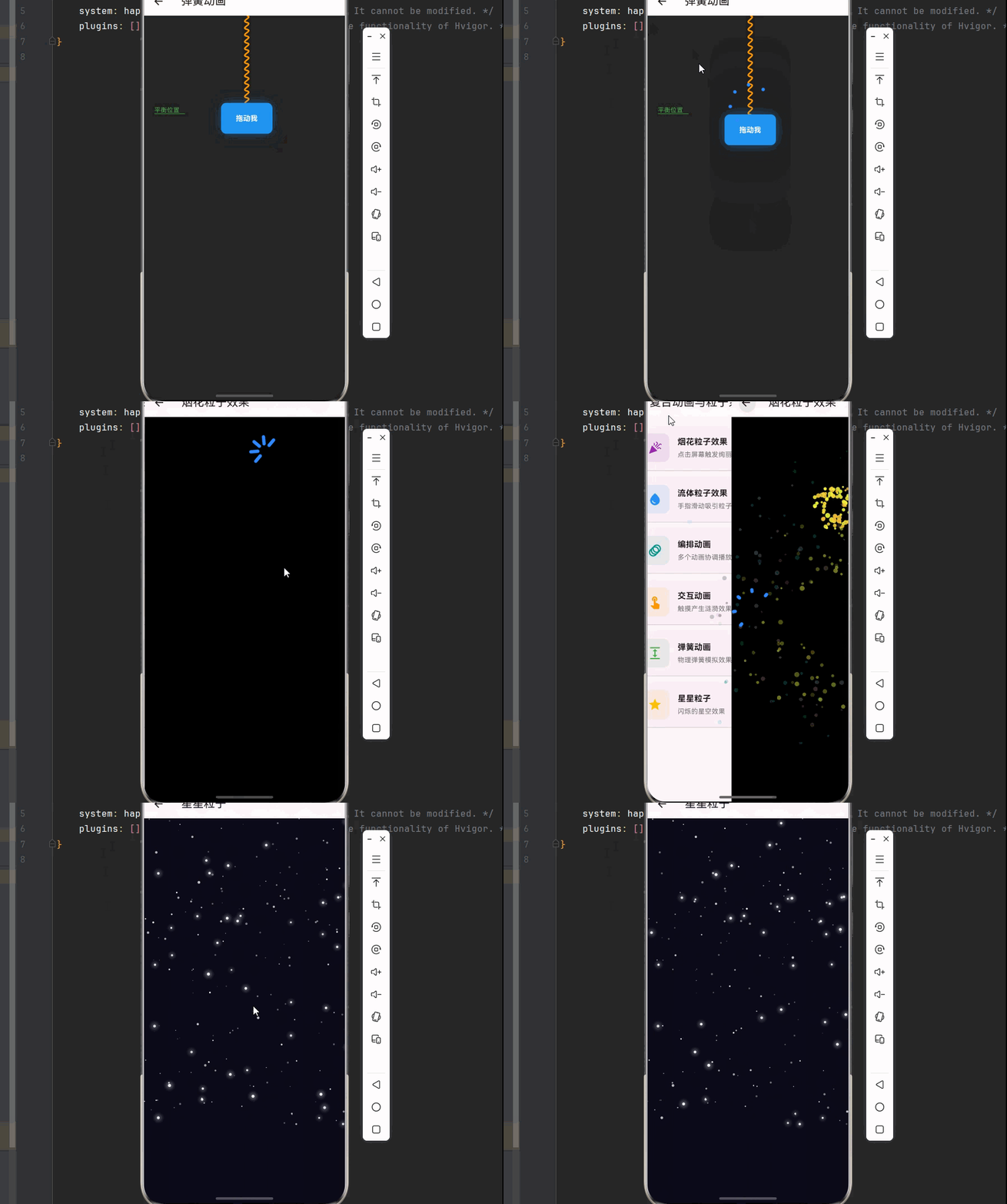
✨ 3.1 烟花粒子效果
烟花效果是粒子系统的经典应用,它包含发射阶段和爆炸阶段两个过程。发射阶段模拟烟花升空,爆炸阶段产生绚丽的粒子扩散效果。
烟花效果实现原理:
发射阶段                    爆炸阶段
   │                          │
   ├──▶ 烟花从底部发射         ├──▶ 在目标位置爆炸
   │                          │
   ├──▶ 向上运动,速度递减     ├──▶ 生成大量粒子
   │                          │
   ├──▶ 到达目标高度或速度归零 ├──▶ 粒子向四周扩散
   │                          │
   └──────────────────────────┤
                              │
                         重力影响
                              │
                              ▼
                         粒子逐渐消亡
/// 烟花粒子系统
class FireworkParticleSystem extends StatefulWidget {
const FireworkParticleSystem({super.key});
State<FireworkParticleSystem> createState() => _FireworkParticleSystemState();
}
class _FireworkParticleSystemState extends State<FireworkParticleSystem>
with SingleTickerProviderStateMixin {
late AnimationController _controller;
final List<Firework> _fireworks = [];
final Random _random = Random();
void initState() {
super.initState();
_controller = AnimationController(
vsync: this,
duration: const Duration(seconds: 1),
)..repeat();
_controller.addListener(_update);
}
void _update() {
final dt = 1 / 60;
// 随机生成新烟花
if (_random.nextDouble() < 0.02) {
_createFirework();
}
// 更新所有烟花
for (var i = _fireworks.length - 1; i >= 0; i--) {
final firework = _fireworks[i];
firework.update(dt);
// 移除已完成的烟花
if (firework.exploded && firework.particles.isEmpty) {
_fireworks.removeAt(i);
}
}
setState(() {});
}
void _createFirework() {
final startX = 50 + _random.nextDouble() * 300;
final firework = Firework(
startPosition: Offset(startX, 400),
targetY: 50 + _random.nextDouble() * 150,
color: Colors.primaries[_random.nextInt(Colors.primaries.length)],
);
_fireworks.add(firework);
}
void _createFireworkAt(Offset position) {
final firework = Firework(
startPosition: position,
targetY: position.dy,
color: Colors.primaries[_random.nextInt(Colors.primaries.length)],
instantExplode: true,
);
_fireworks.add(firework);
}
void dispose() {
_controller.removeListener(_update);
_controller.dispose();
super.dispose();
}
Widget build(BuildContext context) {
return Scaffold(
appBar: AppBar(title: const Text('烟花粒子效果')),
body: GestureDetector(
onTapDown: (details) => _createFireworkAt(details.localPosition),
child: Container(
color: Colors.black,
child: CustomPaint(
painter: FireworkPainter(fireworks: _fireworks),
size: Size.infinite,
),
),
),
);
}
}
/// 烟花类
class Firework {
Offset position;
double targetY;
Color color;
bool exploded = false;
bool instantExplode;
final List<Particle> particles = [];
final Random _random = Random();
double velocity = -300;
Firework({
required Offset startPosition,
required this.targetY,
required this.color,
this.instantExplode = false,
}) : position = startPosition {
if (instantExplode) {
explode();
}
}
void update(double dt) {
if (!exploded) {
// 发射阶段:向上运动
position = Offset(position.dx, position.dy + velocity * dt);
velocity += 200 * dt; // 重力减速
// 到达目标或速度归零时爆炸
if (position.dy <= targetY || velocity > 0) {
explode();
}
} else {
// 爆炸阶段:更新所有粒子
for (var i = particles.length - 1; i >= 0; i--) {
particles[i].update(dt);
// 应用重力
particles[i].velocity = particles[i].velocity + const Offset(0, 50) * dt;
if (particles[i].isDead) {
particles.removeAt(i);
}
}
}
}
void explode() {
exploded = true;
final count = 50 + _random.nextInt(50);
for (int i = 0; i < count; i++) {
final angle = _random.nextDouble() * 6.28;
final speed = 100 + _random.nextDouble() * 150;
particles.add(Particle(
position: position,
velocity: Offset.fromDirection(angle, speed),
color: _getRandomColor(),
size: 2 + _random.nextDouble() * 3,
maxLife: 1 + _random.nextDouble(),
));
}
}
Color _getRandomColor() {
final hsl = HSLColor.fromColor(color);
return hsl.withHue((hsl.hue + _random.nextDouble() * 30 - 15) % 360).toColor();
}
}
/// 烟花绘制器
class FireworkPainter extends CustomPainter {
final List<Firework> fireworks;
FireworkPainter({required this.fireworks});
void paint(Canvas canvas, Size size) {
for (final firework in fireworks) {
if (!firework.exploded) {
// 绘制发射中的烟花
final paint = Paint()
..color = firework.color
..style = PaintingStyle.fill;
canvas.drawCircle(firework.position, 4, paint);
// 绘制尾迹
final trailPaint = Paint()
..color = firework.color.withOpacity(0.3)
..strokeWidth = 2;
canvas.drawLine(
firework.position,
Offset(firework.position.dx, firework.position.dy + 20),
trailPaint,
);
} else {
// 绘制爆炸粒子
for (final particle in firework.particles) {
final paint = Paint()
..color = particle.color.withOpacity(particle.alpha)
..style = PaintingStyle.fill;
canvas.drawCircle(particle.position, particle.size, paint);
}
}
}
}
bool shouldRepaint(FireworkPainter oldDelegate) => true;
}
🌊 3.2 流体粒子效果
流体粒子效果模拟液体或气体的流动行为,通过粒子之间的相互作用产生流体般的视觉效果。用户可以通过触摸屏幕吸引粒子,产生交互式的流动效果。
流体粒子物理模型:
粒子受力分析:
┌─────────────────────────────────────────┐
│                                         │
│    ┌─────────────────────────────┐      │
│    │         吸引力              │      │
│    │   (用户触摸产生)            │      │
│    └─────────────────────────────┘      │
│                   │                     │
│                   ▼                     │
│    ┌─────────────────────────────┐      │
│    │         速度更新            │      │
│    │   velocity += force * dt    │      │
│    └─────────────────────────────┘      │
│                   │                     │
│                   ▼                     │
│    ┌─────────────────────────────┐      │
│    │         阻尼衰减            │      │
│    │   velocity *= damping       │      │
│    └─────────────────────────────┘      │
│                   │                     │
│                   ▼                     │
│    ┌─────────────────────────────┐      │
│    │         位置更新            │      │
│    │   position += velocity * dt │      │
│    └─────────────────────────────┘      │
│                   │                     │
│                   ▼                     │
│    ┌─────────────────────────────┐      │
│    │         边界约束            │      │
│    │   position.clamp(bounds)    │      │
│    └─────────────────────────────┘      │
│                                         │
└─────────────────────────────────────────┘
/// 流体粒子
class FluidParticle {
Offset position;
Offset velocity;
Color color;
double size;
FluidParticle({
required this.position,
required this.color,
this.velocity = Offset.zero,
this.size = 4,
});
}
/// 流体粒子系统
class FluidParticleSystem extends StatefulWidget {
const FluidParticleSystem({super.key});
State<FluidParticleSystem> createState() => _FluidParticleSystemState();
}
class _FluidParticleSystemState extends State<FluidParticleSystem>
with SingleTickerProviderStateMixin {
late AnimationController _controller;
final List<FluidParticle> _particles = [];
final Random _random = Random();
Offset _attractor = Offset.zero;
bool _attracting = false;
void initState() {
super.initState();
_controller = AnimationController(
vsync: this,
duration: const Duration(seconds: 1),
)..repeat();
_initParticles();
_controller.addListener(_update);
}
void _initParticles() {
for (int i = 0; i < 200; i++) {
_particles.add(FluidParticle(
position: Offset(
_random.nextDouble() * 400,
_random.nextDouble() * 600,
),
color: Colors.primaries[_random.nextInt(Colors.primaries.length)],
));
}
}
void _update() {
final dt = 1 / 60;
for (final particle in _particles) {
// 应用吸引力
if (_attracting) {
final direction = _attractor - particle.position;
final distance = direction.distance;
if (distance > 10) {
particle.velocity += direction / distance * 200 * dt;
}
}
// 应用阻尼
particle.velocity *= 0.98;
// 更新位置
particle.position += particle.velocity * dt;
// 边界约束
particle.position = Offset(
particle.position.dx.clamp(0.0, 400.0),
particle.position.dy.clamp(0.0, 600.0),
);
}
setState(() {});
}
void dispose() {
_controller.removeListener(_update);
_controller.dispose();
super.dispose();
}
Widget build(BuildContext context) {
return Scaffold(
appBar: AppBar(title: const Text('流体粒子效果')),
body: GestureDetector(
onPanStart: (details) {
_attracting = true;
_attractor = details.localPosition;
},
onPanUpdate: (details) => _attractor = details.localPosition,
onPanEnd: (_) => _attracting = false,
child: Container(
color: const Color(0xFF0A0A0A),
child: CustomPaint(
painter: FluidParticlePainter(particles: _particles),
size: Size.infinite,
),
),
),
);
}
}
/// 流体粒子绘制器
class FluidParticlePainter extends CustomPainter {
final List<FluidParticle> particles;
FluidParticlePainter({required this.particles});
void paint(Canvas canvas, Size size) {
for (final particle in particles) {
final paint = Paint()
..color = particle.color.withOpacity(0.8)
..style = PaintingStyle.fill
..maskFilter = const MaskFilter.blur(BlurStyle.normal, 3);
canvas.drawCircle(particle.position, particle.size, paint);
}
}
bool shouldRepaint(FluidParticlePainter oldDelegate) => true;
}
四、复合动画系统实现
复合动画是指多个动画效果组合在一起,形成更加复杂和丰富的视觉效果。Flutter 提供了强大的动画编排能力,可以轻松实现各种复合动画。
🎪 4.1 编排动画系统
编排动画通过 Interval 和 CurvedAnimation 实现多个动画的时间协调。每个动画可以有不同的开始时间、持续时间和动画曲线。
编排动画时间轴:
时间轴 (0 ────────────────────────────────────────── 1.0)

淡入动画: [██████████░░░░░░░░░░░░░░░░░░░░░░░░░░░░░░░] (0.0 - 0.3)
缩放动画: [░░░░████████████████░░░░░░░░░░░░░░░░░░░░░] (0.2 - 0.5)
滑动动画: [░░░░░░░░████████████████████░░░░░░░░░░░░░░] (0.3 - 0.7)
旋转动画: [░░░░░░░░░░░░░░░░░░░░░░░░████████████████████] (0.5 - 1.0)

结果效果: 所有动画叠加,产生流畅的复合动画
/// 编排动画系统
class OrchestratedAnimationDemo extends StatefulWidget {
const OrchestratedAnimationDemo({super.key});
State<OrchestratedAnimationDemo> createState() => _OrchestratedAnimationDemoState();
}
class _OrchestratedAnimationDemoState extends State<OrchestratedAnimationDemo>
with TickerProviderStateMixin {
late AnimationController _controller;
late Animation<double> _fadeAnimation;
late Animation<double> _scaleAnimation;
late Animation<Offset> _slideAnimation;
late Animation<double> _rotationAnimation;
void initState() {
super.initState();
_controller = AnimationController(
duration: const Duration(milliseconds: 2000),
vsync: this,
);
// 淡入动画:0% - 30%
_fadeAnimation = Tween<double>(begin: 0, end: 1).animate(
CurvedAnimation(
parent: _controller,
curve: const Interval(0, 0.3, curve: Curves.easeIn),
),
);
// 缩放动画:20% - 50%
_scaleAnimation = Tween<double>(begin: 0.5, end: 1).animate(
CurvedAnimation(
parent: _controller,
curve: const Interval(0.2, 0.5, curve: Curves.elasticOut),
),
);
// 滑动动画:30% - 70%
_slideAnimation = Tween<Offset>(
begin: const Offset(0, 0.5),
end: Offset.zero,
).animate(
CurvedAnimation(
parent: _controller,
curve: const Interval(0.3, 0.7, curve: Curves.easeOutCubic),
),
);
// 旋转动画:50% - 100%
_rotationAnimation = Tween<double>(begin: 0, end: 0.1).animate(
CurvedAnimation(
parent: _controller,
curve: const Interval(0.5, 1, curve: Curves.easeInOut),
),
);
_controller.forward();
}
void dispose() {
_controller.dispose();
super.dispose();
}
Widget build(BuildContext context) {
return Scaffold(
appBar: AppBar(title: const Text('编排动画')),
body: Center(
child: AnimatedBuilder(
animation: _controller,
builder: (context, child) {
return FadeTransition(
opacity: _fadeAnimation,
child: SlideTransition(
position: _slideAnimation,
child: ScaleTransition(
scale: _scaleAnimation,
child: RotationTransition(
turns: _rotationAnimation,
child: Container(
width: 200,
height: 200,
decoration: BoxDecoration(
gradient: const LinearGradient(
colors: [Colors.purple, Colors.blue],
begin: Alignment.topLeft,
end: Alignment.bottomRight,
),
borderRadius: BorderRadius.circular(20),
boxShadow: [
BoxShadow(
color: Colors.purple.withOpacity(0.5),
blurRadius: 20,
spreadRadius: 5,
),
],
),
child: const Center(
child: Text(
'编排动画',
style: TextStyle(
color: Colors.white,
fontSize: 24,
fontWeight: FontWeight.bold,
),
),
),
),
),
),
),
);
},
),
),
floatingActionButton: FloatingActionButton(
onPressed: () {
_controller.reset();
_controller.forward();
},
child: const Icon(Icons.replay),
),
);
}
}
🎭 4.2 交互动画系统
交互动画响应用户的触摸操作,产生动态的视觉反馈。通过结合手势检测和动画控制器,可以实现丰富的交互体验。
交互动画设计原则:
- 即时响应:触摸操作应立即产生视觉反馈
- 自然过渡:动画效果应符合物理直觉
- 适度反馈:动画强度应与操作力度匹配
- 可中断性:动画应能响应用户的中断操作
/// 涟漪效果
class RippleEffect {
Offset position;
double radius;
double maxRadius;
double opacity;
Color color;
bool isComplete = false;
RippleEffect({
required this.position,
required this.color,
this.radius = 0,
this.maxRadius = 150,
this.opacity = 1,
});
void update() {
radius += 5;
opacity = 1 - (radius / maxRadius);
if (radius >= maxRadius) isComplete = true;
}
}
/// 交互动画系统
class InteractiveAnimationDemo extends StatefulWidget {
const InteractiveAnimationDemo({super.key});
State<InteractiveAnimationDemo> createState() => _InteractiveAnimationDemoState();
}
class _InteractiveAnimationDemoState extends State<InteractiveAnimationDemo>
with TickerProviderStateMixin {
late AnimationController _pulseController;
late Animation<double> _pulseAnimation;
final List<RippleEffect> _ripples = [];
Offset _touchPosition = Offset.zero;
bool _isPressed = false;
void initState() {
super.initState();
_pulseController = AnimationController(
duration: const Duration(milliseconds: 1000),
vsync: this,
)..repeat(reverse: true);
_pulseAnimation = Tween<double>(begin: 1, end: 1.1).animate(
CurvedAnimation(parent: _pulseController, curve: Curves.easeInOut),
);
_pulseController.addListener(_updateRipples);
}
void _addRipple(Offset position) {
_ripples.add(RippleEffect(
position: position,
color: Colors.primaries[DateTime.now().millisecond % Colors.primaries.length],
));
}
void _updateRipples() {
for (var i = _ripples.length - 1; i >= 0; i--) {
_ripples[i].update();
if (_ripples[i].isComplete) _ripples.removeAt(i);
}
if (mounted) setState(() {});
}
void dispose() {
_pulseController.removeListener(_updateRipples);
_pulseController.dispose();
super.dispose();
}
Widget build(BuildContext context) {
return Scaffold(
appBar: AppBar(title: const Text('交互动画')),
body: GestureDetector(
onTapDown: (details) {
_touchPosition = details.localPosition;
_addRipple(details.localPosition);
setState(() => _isPressed = true);
},
onTapUp: (_) => setState(() => _isPressed = false),
onTapCancel: () => setState(() => _isPressed = false),
onPanUpdate: (details) {
_touchPosition = details.localPosition;
if (_ripples.isNotEmpty) _ripples.last.position = details.localPosition;
},
child: AnimatedBuilder(
animation: _pulseController,
builder: (context, child) {
return CustomPaint(
painter: RipplePainter(
ripples: _ripples,
touchPosition: _touchPosition,
isPressed: _isPressed,
pulseValue: _pulseAnimation.value,
),
size: Size.infinite,
);
},
),
),
);
}
}
/// 涟漪绘制器
class RipplePainter extends CustomPainter {
final List<RippleEffect> ripples;
final Offset touchPosition;
final bool isPressed;
final double pulseValue;
RipplePainter({
required this.ripples,
required this.touchPosition,
required this.isPressed,
required this.pulseValue,
});
void paint(Canvas canvas, Size size) {
final bgPaint = Paint()..color = const Color(0xFF1A1A2E);
canvas.drawRect(Rect.fromLTWH(0, 0, size.width, size.height), bgPaint);
for (final ripple in ripples) {
final paint = Paint()
..color = ripple.color.withOpacity(ripple.opacity * 0.5)
..style = PaintingStyle.stroke
..strokeWidth = 3;
canvas.drawCircle(ripple.position, ripple.radius, paint);
}
if (isPressed) {
final centerPaint = Paint()
..color = Colors.white.withOpacity(0.8)
..style = PaintingStyle.fill;
canvas.drawCircle(touchPosition, 20 * pulseValue, centerPaint);
}
}
bool shouldRepaint(RipplePainter oldDelegate) => true;
}
五、物理模拟动画
物理模拟动画通过模拟真实世界的物理规律,产生自然流畅的动画效果。弹簧动画是物理模拟的典型应用,它模拟弹簧的伸缩运动。
🎱 5.1 弹簧动画原理
弹簧动画基于胡克定律,弹簧的恢复力与位移成正比。通过调整弹簧系数和阻尼系数,可以产生不同的弹性效果。
弹簧物理模型:
弹簧受力分析:
┌─────────────────────────────────────────┐
│                                         │
│    F = -k * x - c * v                   │
│    │     │     │                        │
│    │     │     └── 阻尼力 (与速度成正比) │
│    │     └── 弹簧力 (与位移成正比)       │
│    └── 合力                             │
│                                         │
│    k = 弹簧系数 (刚度)                  │
│    c = 阻尼系数                         │
│    x = 位移                             │
│    v = 速度                             │
│                                         │
└─────────────────────────────────────────┘

运动方程:
a = F / m = (-k * x - c * v) / m
v = v + a * dt
x = x + v * dt
/// 弹簧动画系统
class SpringAnimationDemo extends StatefulWidget {
const SpringAnimationDemo({super.key});
State<SpringAnimationDemo> createState() => _SpringAnimationDemoState();
}
class _SpringAnimationDemoState extends State<SpringAnimationDemo>
with SingleTickerProviderStateMixin {
late AnimationController _controller;
double _dragY = 200;
double _velocity = 0;
bool _isDragging = false;
static const double _restPosition = 200;
static const double _springConstant = 0.1;
static const double _damping = 0.9;
void initState() {
super.initState();
_controller = AnimationController(
vsync: this,
duration: const Duration(seconds: 1),
)..repeat();
_controller.addListener(_updatePhysics);
}
void _updatePhysics() {
if (!_isDragging) {
// 计算弹簧力
final displacement = _dragY - _restPosition;
final springForce = -_springConstant * displacement;
// 更新速度和位置
_velocity += springForce;
_velocity *= _damping;
_dragY += _velocity;
// 判断是否到达平衡
if (_velocity.abs() < 0.1 && (_dragY - _restPosition).abs() < 0.1) {
_dragY = _restPosition;
_velocity = 0;
}
setState(() {});
}
}
void dispose() {
_controller.removeListener(_updatePhysics);
_controller.dispose();
super.dispose();
}
Widget build(BuildContext context) {
return Scaffold(
appBar: AppBar(title: const Text('弹簧动画')),
body: GestureDetector(
onVerticalDragStart: (_) => setState(() => _isDragging = true),
onVerticalDragUpdate: (details) {
setState(() {
_dragY += details.delta.dy;
_dragY = _dragY.clamp(50.0, 400.0);
});
},
onVerticalDragEnd: (_) => setState(() => _isDragging = false),
child: Container(
color: Colors.grey.shade900,
child: Stack(
children: [
Positioned(
left: 180,
top: 0,
child: CustomPaint(
painter: SpringPainter(startY: 0, endY: _dragY, coils: 15),
size: const Size(40, 400),
),
),
Positioned(
left: 150,
top: _dragY - 30,
child: Container(
width: 100,
height: 60,
decoration: BoxDecoration(
color: Colors.blue,
borderRadius: BorderRadius.circular(10),
boxShadow: [BoxShadow(color: Colors.blue.withOpacity(0.5), blurRadius: 20)],
),
child: const Center(
child: Text('拖动我', style: TextStyle(color: Colors.white, fontWeight: FontWeight.bold)),
),
),
),
Positioned(
left: 20,
top: _restPosition - 10,
child: Container(width: 60, height: 2, color: Colors.green.withOpacity(0.5)),
),
const Positioned(
left: 20,
top: _restPosition - 25,
child: Text('平衡位置', style: TextStyle(color: Colors.green, fontSize: 12)),
),
],
),
),
),
);
}
}
/// 弹簧绘制器
class SpringPainter extends CustomPainter {
final double startY;
final double endY;
final int coils;
SpringPainter({required this.startY, required this.endY, required this.coils});
void paint(Canvas canvas, Size size) {
final paint = Paint()
..color = Colors.orange
..strokeWidth = 3
..style = PaintingStyle.stroke;
final path = Path();
path.moveTo(size.width / 2, startY);
final coilHeight = (endY - startY) / coils;
final amplitude = size.width / 3;
for (int i = 0; i < coils; i++) {
final y1 = startY + coilHeight * i + coilHeight * 0.25;
final y2 = startY + coilHeight * i + coilHeight * 0.75;
final y3 = startY + coilHeight * (i + 1);
path.cubicTo(
size.width / 2 + amplitude, y1,
size.width / 2 - amplitude, y2,
size.width / 2, y3,
);
}
canvas.drawPath(path, paint);
}
bool shouldRepaint(SpringPainter oldDelegate) => startY != oldDelegate.startY || endY != oldDelegate.endY;
}
⭐ 5.2 星空粒子效果
星空粒子效果模拟夜空中闪烁的星星,通过正弦函数控制星星的亮度变化,产生自然的闪烁效果。
/// 星星粒子
class StarParticle {
Offset position;
double size;
double brightness;
double twinkleSpeed;
double phase;
StarParticle({
required this.position,
required this.size,
required this.twinkleSpeed,
required this.phase,
}) : brightness = 1;
}
/// 星空效果
class StarFieldDemo extends StatefulWidget {
const StarFieldDemo({super.key});
State<StarFieldDemo> createState() => _StarFieldDemoState();
}
class _StarFieldDemoState extends State<StarFieldDemo>
with SingleTickerProviderStateMixin {
late AnimationController _controller;
final List<StarParticle> _stars = [];
final Random _random = Random();
void initState() {
super.initState();
_controller = AnimationController(
vsync: this,
duration: const Duration(seconds: 1),
)..repeat();
_initStars();
}
void _initStars() {
for (int i = 0; i < 200; i++) {
_stars.add(StarParticle(
position: Offset(
_random.nextDouble() * 400,
_random.nextDouble() * 600,
),
size: 0.5 + _random.nextDouble() * 2,
twinkleSpeed: 1 + _random.nextDouble() * 3,
phase: _random.nextDouble() * 6.28,
));
}
}
void dispose() {
_controller.dispose();
super.dispose();
}
Widget build(BuildContext context) {
return Scaffold(
appBar: AppBar(title: const Text('星星粒子')),
body: AnimatedBuilder(
animation: _controller,
builder: (context, child) {
return CustomPaint(
painter: StarFieldPainter(
stars: _stars,
time: DateTime.now().millisecondsSinceEpoch / 1000,
),
size: Size.infinite,
);
},
),
);
}
}
/// 星空绘制器
class StarFieldPainter extends CustomPainter {
final List<StarParticle> stars;
final double time;
StarFieldPainter({required this.stars, required this.time});
void paint(Canvas canvas, Size size) {
final bgPaint = Paint()..color = const Color(0xFF0D0D1A);
canvas.drawRect(Rect.fromLTWH(0, 0, size.width, size.height), bgPaint);
for (final star in stars) {
// 使用正弦函数计算闪烁亮度
final brightness = (sin(time * star.twinkleSpeed + star.phase) + 1) / 2;
final paint = Paint()
..color = Colors.white.withOpacity(0.3 + brightness * 0.7)
..style = PaintingStyle.fill;
canvas.drawCircle(star.position, star.size * (0.8 + brightness * 0.4), paint);
// 为较大的星星添加光晕效果
if (star.size > 1.5 && brightness > 0.7) {
final glowPaint = Paint()
..color = Colors.white.withOpacity(brightness * 0.3)
..maskFilter = const MaskFilter.blur(BlurStyle.normal, 3);
canvas.drawCircle(star.position, star.size * 3, glowPaint);
}
}
}
bool shouldRepaint(StarFieldPainter oldDelegate) => true;
}
六、完整代码示例
下面是一个整合了所有粒子与动画功能的完整示例:
import 'dart:math';
import 'package:flutter/material.dart';
void main() {
runApp(const MyApp());
}
class MyApp extends StatelessWidget {
const MyApp({super.key});
Widget build(BuildContext context) {
return MaterialApp(
debugShowCheckedModeBanner: false,
theme: ThemeData(
colorScheme: ColorScheme.fromSeed(seedColor: Colors.purple),
useMaterial3: true,
),
home: const ParticleAnimationHomePage(),
);
}
}
/// 粒子动画主页
class ParticleAnimationHomePage extends StatelessWidget {
const ParticleAnimationHomePage({super.key});
Widget build(BuildContext context) {
return Scaffold(
appBar: AppBar(
title: const Text('✨ 复合动画与粒子系统'),
),
body: ListView(
padding: const EdgeInsets.all(16),
children: [
_buildSectionCard(
context,
title: '烟花粒子效果',
description: '点击屏幕触发绚丽烟花',
icon: Icons.celebration,
color: Colors.purple,
onTap: () => Navigator.push(
context,
MaterialPageRoute(builder: (_) => const FireworkParticleSystem()),
),
),
_buildSectionCard(
context,
title: '流体粒子效果',
description: '手指滑动吸引粒子流动',
icon: Icons.water_drop,
color: Colors.blue,
onTap: () => Navigator.push(
context,
MaterialPageRoute(builder: (_) => const FluidParticleSystem()),
),
),
_buildSectionCard(
context,
title: '编排动画',
description: '多个动画协调播放',
icon: Icons.animation,
color: Colors.teal,
onTap: () => Navigator.push(
context,
MaterialPageRoute(builder: (_) => const OrchestratedAnimationDemo()),
),
),
_buildSectionCard(
context,
title: '交互动画',
description: '触摸产生涟漪效果',
icon: Icons.touch_app,
color: Colors.orange,
onTap: () => Navigator.push(
context,
MaterialPageRoute(builder: (_) => const InteractiveAnimationDemo()),
),
),
_buildSectionCard(
context,
title: '弹簧动画',
description: '物理弹簧模拟效果',
icon: Icons.expand,
color: Colors.green,
onTap: () => Navigator.push(
context,
MaterialPageRoute(builder: (_) => const SpringAnimationDemo()),
),
),
_buildSectionCard(
context,
title: '星星粒子',
description: '闪烁的星空效果',
icon: Icons.star,
color: Colors.amber,
onTap: () => Navigator.push(
context,
MaterialPageRoute(builder: (_) => const StarFieldDemo()),
),
),
],
),
);
}
Widget _buildSectionCard(
BuildContext context, {
required String title,
required String description,
required IconData icon,
required Color color,
required VoidCallback onTap,
}) {
return Card(
margin: const EdgeInsets.only(bottom: 12),
child: InkWell(
onTap: onTap,
borderRadius: BorderRadius.circular(12),
child: Padding(
padding: const EdgeInsets.all(16),
child: Row(
children: [
Container(
width: 56,
height: 56,
decoration: BoxDecoration(
color: color.withOpacity(0.1),
borderRadius: BorderRadius.circular(12),
),
child: Icon(icon, color: color, size: 28),
),
const SizedBox(width: 16),
Expanded(
child: Column(
crossAxisAlignment: CrossAxisAlignment.start,
children: [
Text(
title,
style: const TextStyle(
fontSize: 16,
fontWeight: FontWeight.bold,
),
),
const SizedBox(height: 4),
Text(
description,
style: TextStyle(
fontSize: 13,
color: Colors.grey[600],
),
),
],
),
),
Icon(Icons.chevron_right, color: Colors.grey[400]),
],
),
),
),
);
}
}
/// 粒子数据模型
class Particle {
Offset position;
Offset velocity;
Color color;
double size;
double life;
double maxLife;
double alpha;
double rotation;
double rotationSpeed;
Particle({
required this.position,
required this.velocity,
required this.color,
required this.size,
required this.maxLife,
this.rotation = 0,
this.rotationSpeed = 0,
}) : life = maxLife, alpha = 1.0;
bool get isDead => life <= 0;
void update(double dt) {
position = position + velocity * dt;
life -= dt;
alpha = (life / maxLife).clamp(0.0, 1.0);
rotation += rotationSpeed * dt;
}
}
/// 烟花粒子系统
class FireworkParticleSystem extends StatefulWidget {
const FireworkParticleSystem({super.key});
State<FireworkParticleSystem> createState() => _FireworkParticleSystemState();
}
class _FireworkParticleSystemState extends State<FireworkParticleSystem>
with SingleTickerProviderStateMixin {
late AnimationController _controller;
final List<Firework> _fireworks = [];
final Random _random = Random();
void initState() {
super.initState();
_controller = AnimationController(
vsync: this,
duration: const Duration(seconds: 1),
)..repeat();
_controller.addListener(_update);
}
void _update() {
final dt = 1 / 60;
if (_random.nextDouble() < 0.02) {
_createFirework();
}
for (var i = _fireworks.length - 1; i >= 0; i--) {
final firework = _fireworks[i];
firework.update(dt);
if (firework.exploded && firework.particles.isEmpty) {
_fireworks.removeAt(i);
}
}
setState(() {});
}
void _createFirework() {
final startX = 50 + _random.nextDouble() * 300;
final firework = Firework(
startPosition: Offset(startX, 400),
targetY: 50 + _random.nextDouble() * 150,
color: Colors.primaries[_random.nextInt(Colors.primaries.length)],
);
_fireworks.add(firework);
}
void _createFireworkAt(Offset position) {
final firework = Firework(
startPosition: position,
targetY: position.dy,
color: Colors.primaries[_random.nextInt(Colors.primaries.length)],
instantExplode: true,
);
_fireworks.add(firework);
}
void dispose() {
_controller.removeListener(_update);
_controller.dispose();
super.dispose();
}
Widget build(BuildContext context) {
return Scaffold(
appBar: AppBar(title: const Text('烟花粒子效果')),
body: GestureDetector(
onTapDown: (details) => _createFireworkAt(details.localPosition),
child: Container(
color: Colors.black,
child: CustomPaint(
painter: FireworkPainter(fireworks: _fireworks),
size: Size.infinite,
),
),
),
);
}
}
/// 烟花类
class Firework {
Offset position;
double targetY;
Color color;
bool exploded = false;
bool instantExplode;
final List<Particle> particles = [];
final Random _random = Random();
double velocity = -300;
Firework({
required Offset startPosition,
required this.targetY,
required this.color,
this.instantExplode = false,
}) : position = startPosition {
if (instantExplode) {
explode();
}
}
void update(double dt) {
if (!exploded) {
position = Offset(position.dx, position.dy + velocity * dt);
velocity += 200 * dt;
if (position.dy <= targetY || velocity > 0) {
explode();
}
} else {
for (var i = particles.length - 1; i >= 0; i--) {
particles[i].update(dt);
particles[i].velocity = particles[i].velocity + const Offset(0, 50) * dt;
if (particles[i].isDead) {
particles.removeAt(i);
}
}
}
}
void explode() {
exploded = true;
final count = 50 + _random.nextInt(50);
for (int i = 0; i < count; i++) {
final angle = _random.nextDouble() * 6.28;
final speed = 100 + _random.nextDouble() * 150;
particles.add(Particle(
position: position,
velocity: Offset.fromDirection(angle, speed),
color: _getRandomColor(),
size: 2 + _random.nextDouble() * 3,
maxLife: 1 + _random.nextDouble(),
));
}
}
Color _getRandomColor() {
final hsl = HSLColor.fromColor(color);
return hsl.withHue((hsl.hue + _random.nextDouble() * 30 - 15) % 360).toColor();
}
}
/// 烟花绘制器
class FireworkPainter extends CustomPainter {
final List<Firework> fireworks;
FireworkPainter({required this.fireworks});
void paint(Canvas canvas, Size size) {
for (final firework in fireworks) {
if (!firework.exploded) {
final paint = Paint()
..color = firework.color
..style = PaintingStyle.fill;
canvas.drawCircle(firework.position, 4, paint);
final trailPaint = Paint()
..color = firework.color.withOpacity(0.3)
..strokeWidth = 2;
canvas.drawLine(
firework.position,
Offset(firework.position.dx, firework.position.dy + 20),
trailPaint,
);
} else {
for (final particle in firework.particles) {
final paint = Paint()
..color = particle.color.withOpacity(particle.alpha)
..style = PaintingStyle.fill;
canvas.drawCircle(particle.position, particle.size, paint);
}
}
}
}
bool shouldRepaint(FireworkPainter oldDelegate) => true;
}
/// 流体粒子
class FluidParticle {
Offset position;
Offset velocity;
Color color;
double size;
FluidParticle({
required this.position,
required this.color,
this.velocity = Offset.zero,
this.size = 4,
});
}
/// 流体粒子系统
class FluidParticleSystem extends StatefulWidget {
const FluidParticleSystem({super.key});
State<FluidParticleSystem> createState() => _FluidParticleSystemState();
}
class _FluidParticleSystemState extends State<FluidParticleSystem>
with SingleTickerProviderStateMixin {
late AnimationController _controller;
final List<FluidParticle> _particles = [];
final Random _random = Random();
Offset _attractor = Offset.zero;
bool _attracting = false;
void initState() {
super.initState();
_controller = AnimationController(
vsync: this,
duration: const Duration(seconds: 1),
)..repeat();
_initParticles();
_controller.addListener(_update);
}
void _initParticles() {
for (int i = 0; i < 200; i++) {
_particles.add(FluidParticle(
position: Offset(
_random.nextDouble() * 400,
_random.nextDouble() * 600,
),
color: Colors.primaries[_random.nextInt(Colors.primaries.length)],
));
}
}
void _update() {
final dt = 1 / 60;
for (final particle in _particles) {
if (_attracting) {
final direction = _attractor - particle.position;
final distance = direction.distance;
if (distance > 10) {
particle.velocity += direction / distance * 200 * dt;
}
}
particle.velocity *= 0.98;
particle.position += particle.velocity * dt;
particle.position = Offset(
particle.position.dx.clamp(0.0, 400.0),
particle.position.dy.clamp(0.0, 600.0),
);
}
setState(() {});
}
void dispose() {
_controller.removeListener(_update);
_controller.dispose();
super.dispose();
}
Widget build(BuildContext context) {
return Scaffold(
appBar: AppBar(title: const Text('流体粒子效果')),
body: GestureDetector(
onPanStart: (details) {
_attracting = true;
_attractor = details.localPosition;
},
onPanUpdate: (details) => _attractor = details.localPosition,
onPanEnd: (_) => _attracting = false,
child: Container(
color: const Color(0xFF0A0A0A),
child: CustomPaint(
painter: FluidParticlePainter(particles: _particles),
size: Size.infinite,
),
),
),
);
}
}
/// 流体粒子绘制器
class FluidParticlePainter extends CustomPainter {
final List<FluidParticle> particles;
FluidParticlePainter({required this.particles});
void paint(Canvas canvas, Size size) {
for (final particle in particles) {
final paint = Paint()
..color = particle.color.withOpacity(0.8)
..style = PaintingStyle.fill
..maskFilter = const MaskFilter.blur(BlurStyle.normal, 3);
canvas.drawCircle(particle.position, particle.size, paint);
}
}
bool shouldRepaint(FluidParticlePainter oldDelegate) => true;
}
/// 编排动画系统
class OrchestratedAnimationDemo extends StatefulWidget {
const OrchestratedAnimationDemo({super.key});
State<OrchestratedAnimationDemo> createState() => _OrchestratedAnimationDemoState();
}
class _OrchestratedAnimationDemoState extends State<OrchestratedAnimationDemo>
with TickerProviderStateMixin {
late AnimationController _controller;
late Animation<double> _fadeAnimation;
late Animation<double> _scaleAnimation;
late Animation<Offset> _slideAnimation;
late Animation<double> _rotationAnimation;
void initState() {
super.initState();
_controller = AnimationController(
duration: const Duration(milliseconds: 2000),
vsync: this,
);
_fadeAnimation = Tween<double>(begin: 0, end: 1).animate(
CurvedAnimation(
parent: _controller,
curve: const Interval(0, 0.3, curve: Curves.easeIn),
),
);
_scaleAnimation = Tween<double>(begin: 0.5, end: 1).animate(
CurvedAnimation(
parent: _controller,
curve: const Interval(0.2, 0.5, curve: Curves.elasticOut),
),
);
_slideAnimation = Tween<Offset>(
begin: const Offset(0, 0.5),
end: Offset.zero,
).animate(
CurvedAnimation(
parent: _controller,
curve: const Interval(0.3, 0.7, curve: Curves.easeOutCubic),
),
);
_rotationAnimation = Tween<double>(begin: 0, end: 0.1).animate(
CurvedAnimation(
parent: _controller,
curve: const Interval(0.5, 1, curve: Curves.easeInOut),
),
);
_controller.forward();
}
void dispose() {
_controller.dispose();
super.dispose();
}
Widget build(BuildContext context) {
return Scaffold(
appBar: AppBar(title: const Text('编排动画')),
body: Center(
child: AnimatedBuilder(
animation: _controller,
builder: (context, child) {
return FadeTransition(
opacity: _fadeAnimation,
child: SlideTransition(
position: _slideAnimation,
child: ScaleTransition(
scale: _scaleAnimation,
child: RotationTransition(
turns: _rotationAnimation,
child: Container(
width: 200,
height: 200,
decoration: BoxDecoration(
gradient: const LinearGradient(
colors: [Colors.purple, Colors.blue],
begin: Alignment.topLeft,
end: Alignment.bottomRight,
),
borderRadius: BorderRadius.circular(20),
boxShadow: [
BoxShadow(
color: Colors.purple.withOpacity(0.5),
blurRadius: 20,
spreadRadius: 5,
),
],
),
child: const Center(
child: Text(
'编排动画',
style: TextStyle(
color: Colors.white,
fontSize: 24,
fontWeight: FontWeight.bold,
),
),
),
),
),
),
),
);
},
),
),
floatingActionButton: FloatingActionButton(
onPressed: () {
_controller.reset();
_controller.forward();
},
child: const Icon(Icons.replay),
),
);
}
}
/// 涟漪效果
class RippleEffect {
Offset position;
double radius;
double maxRadius;
double opacity;
Color color;
bool isComplete = false;
RippleEffect({
required this.position,
required this.color,
this.radius = 0,
this.maxRadius = 150,
this.opacity = 1,
});
void update() {
radius += 5;
opacity = 1 - (radius / maxRadius);
if (radius >= maxRadius) isComplete = true;
}
}
/// 交互动画系统
class InteractiveAnimationDemo extends StatefulWidget {
const InteractiveAnimationDemo({super.key});
State<InteractiveAnimationDemo> createState() => _InteractiveAnimationDemoState();
}
class _InteractiveAnimationDemoState extends State<InteractiveAnimationDemo>
with TickerProviderStateMixin {
late AnimationController _pulseController;
late Animation<double> _pulseAnimation;
final List<RippleEffect> _ripples = [];
Offset _touchPosition = Offset.zero;
bool _isPressed = false;
void initState() {
super.initState();
_pulseController = AnimationController(
duration: const Duration(milliseconds: 1000),
vsync: this,
)..repeat(reverse: true);
_pulseAnimation = Tween<double>(begin: 1, end: 1.1).animate(
CurvedAnimation(parent: _pulseController, curve: Curves.easeInOut),
);
_pulseController.addListener(_updateRipples);
}
void _addRipple(Offset position) {
_ripples.add(RippleEffect(
position: position,
color: Colors.primaries[DateTime.now().millisecond % Colors.primaries.length],
));
}
void _updateRipples() {
for (var i = _ripples.length - 1; i >= 0; i--) {
_ripples[i].update();
if (_ripples[i].isComplete) _ripples.removeAt(i);
}
if (mounted) setState(() {});
}
void dispose() {
_pulseController.removeListener(_updateRipples);
_pulseController.dispose();
super.dispose();
}
Widget build(BuildContext context) {
return Scaffold(
appBar: AppBar(title: const Text('交互动画')),
body: GestureDetector(
onTapDown: (details) {
_touchPosition = details.localPosition;
_addRipple(details.localPosition);
setState(() => _isPressed = true);
},
onTapUp: (_) => setState(() => _isPressed = false),
onTapCancel: () => setState(() => _isPressed = false),
onPanUpdate: (details) {
_touchPosition = details.localPosition;
if (_ripples.isNotEmpty) _ripples.last.position = details.localPosition;
},
child: AnimatedBuilder(
animation: _pulseController,
builder: (context, child) {
return CustomPaint(
painter: RipplePainter(
ripples: _ripples,
touchPosition: _touchPosition,
isPressed: _isPressed,
pulseValue: _pulseAnimation.value,
),
size: Size.infinite,
);
},
),
),
);
}
}
/// 涟漪绘制器
class RipplePainter extends CustomPainter {
final List<RippleEffect> ripples;
final Offset touchPosition;
final bool isPressed;
final double pulseValue;
RipplePainter({
required this.ripples,
required this.touchPosition,
required this.isPressed,
required this.pulseValue,
});
void paint(Canvas canvas, Size size) {
final bgPaint = Paint()..color = const Color(0xFF1A1A2E);
canvas.drawRect(Rect.fromLTWH(0, 0, size.width, size.height), bgPaint);
for (final ripple in ripples) {
final paint = Paint()
..color = ripple.color.withOpacity(ripple.opacity * 0.5)
..style = PaintingStyle.stroke
..strokeWidth = 3;
canvas.drawCircle(ripple.position, ripple.radius, paint);
}
if (isPressed) {
final centerPaint = Paint()
..color = Colors.white.withOpacity(0.8)
..style = PaintingStyle.fill;
canvas.drawCircle(touchPosition, 20 * pulseValue, centerPaint);
}
}
bool shouldRepaint(RipplePainter oldDelegate) => true;
}
/// 弹簧动画系统
class SpringAnimationDemo extends StatefulWidget {
const SpringAnimationDemo({super.key});
State<SpringAnimationDemo> createState() => _SpringAnimationDemoState();
}
class _SpringAnimationDemoState extends State<SpringAnimationDemo>
with SingleTickerProviderStateMixin {
late AnimationController _controller;
double _dragY = 200;
double _velocity = 0;
bool _isDragging = false;
static const double _restPosition = 200;
static const double _springConstant = 0.1;
static const double _damping = 0.9;
void initState() {
super.initState();
_controller = AnimationController(
vsync: this,
duration: const Duration(seconds: 1),
)..repeat();
_controller.addListener(_updatePhysics);
}
void _updatePhysics() {
if (!_isDragging) {
final displacement = _dragY - _restPosition;
final springForce = -_springConstant * displacement;
_velocity += springForce;
_velocity *= _damping;
_dragY += _velocity;
if (_velocity.abs() < 0.1 && (_dragY - _restPosition).abs() < 0.1) {
_dragY = _restPosition;
_velocity = 0;
}
setState(() {});
}
}
void dispose() {
_controller.removeListener(_updatePhysics);
_controller.dispose();
super.dispose();
}
Widget build(BuildContext context) {
return Scaffold(
appBar: AppBar(title: const Text('弹簧动画')),
body: GestureDetector(
onVerticalDragStart: (_) => setState(() => _isDragging = true),
onVerticalDragUpdate: (details) {
setState(() {
_dragY += details.delta.dy;
_dragY = _dragY.clamp(50.0, 400.0);
});
},
onVerticalDragEnd: (_) => setState(() => _isDragging = false),
child: Container(
color: Colors.grey.shade900,
child: Stack(
children: [
Positioned(
left: 180,
top: 0,
child: CustomPaint(
painter: SpringPainter(startY: 0, endY: _dragY, coils: 15),
size: const Size(40, 400),
),
),
Positioned(
left: 150,
top: _dragY - 30,
child: Container(
width: 100,
height: 60,
decoration: BoxDecoration(
color: Colors.blue,
borderRadius: BorderRadius.circular(10),
boxShadow: [BoxShadow(color: Colors.blue.withOpacity(0.5), blurRadius: 20)],
),
child: const Center(
child: Text('拖动我', style: TextStyle(color: Colors.white, fontWeight: FontWeight.bold)),
),
),
),
Positioned(
left: 20,
top: _restPosition - 10,
child: Container(width: 60, height: 2, color: Colors.green.withOpacity(0.5)),
),
const Positioned(
left: 20,
top: _restPosition - 25,
child: Text('平衡位置', style: TextStyle(color: Colors.green, fontSize: 12)),
),
],
),
),
),
);
}
}
/// 弹簧绘制器
class SpringPainter extends CustomPainter {
final double startY;
final double endY;
final int coils;
SpringPainter({required this.startY, required this.endY, required this.coils});
void paint(Canvas canvas, Size size) {
final paint = Paint()
..color = Colors.orange
..strokeWidth = 3
..style = PaintingStyle.stroke;
final path = Path();
path.moveTo(size.width / 2, startY);
final coilHeight = (endY - startY) / coils;
final amplitude = size.width / 3;
for (int i = 0; i < coils; i++) {
final y1 = startY + coilHeight * i + coilHeight * 0.25;
final y2 = startY + coilHeight * i + coilHeight * 0.75;
final y3 = startY + coilHeight * (i + 1);
path.cubicTo(
size.width / 2 + amplitude, y1,
size.width / 2 - amplitude, y2,
size.width / 2, y3,
);
}
canvas.drawPath(path, paint);
}
bool shouldRepaint(SpringPainter oldDelegate) => startY != oldDelegate.startY || endY != oldDelegate.endY;
}
/// 星星粒子
class StarParticle {
Offset position;
double size;
double brightness;
double twinkleSpeed;
double phase;
StarParticle({
required this.position,
required this.size,
required this.twinkleSpeed,
required this.phase,
}) : brightness = 1;
}
/// 星空效果
class StarFieldDemo extends StatefulWidget {
const StarFieldDemo({super.key});
State<StarFieldDemo> createState() => _StarFieldDemoState();
}
class _StarFieldDemoState extends State<StarFieldDemo>
with SingleTickerProviderStateMixin {
late AnimationController _controller;
final List<StarParticle> _stars = [];
final Random _random = Random();
void initState() {
super.initState();
_controller = AnimationController(
vsync: this,
duration: const Duration(seconds: 1),
)..repeat();
_initStars();
}
void _initStars() {
for (int i = 0; i < 200; i++) {
_stars.add(StarParticle(
position: Offset(
_random.nextDouble() * 400,
_random.nextDouble() * 600,
),
size: 0.5 + _random.nextDouble() * 2,
twinkleSpeed: 1 + _random.nextDouble() * 3,
phase: _random.nextDouble() * 6.28,
));
}
}
void dispose() {
_controller.dispose();
super.dispose();
}
Widget build(BuildContext context) {
return Scaffold(
appBar: AppBar(title: const Text('星星粒子')),
body: AnimatedBuilder(
animation: _controller,
builder: (context, child) {
return CustomPaint(
painter: StarFieldPainter(
stars: _stars,
time: DateTime.now().millisecondsSinceEpoch / 1000,
),
size: Size.infinite,
);
},
),
);
}
}
/// 星空绘制器
class StarFieldPainter extends CustomPainter {
final List<StarParticle> stars;
final double time;
StarFieldPainter({required this.stars, required this.time});
void paint(Canvas canvas, Size size) {
final bgPaint = Paint()..color = const Color(0xFF0D0D1A);
canvas.drawRect(Rect.fromLTWH(0, 0, size.width, size.height), bgPaint);
for (final star in stars) {
final brightness = (sin(time * star.twinkleSpeed + star.phase) + 1) / 2;
final paint = Paint()
..color = Colors.white.withOpacity(0.3 + brightness * 0.7)
..style = PaintingStyle.fill;
canvas.drawCircle(star.position, star.size * (0.8 + brightness * 0.4), paint);
if (star.size > 1.5 && brightness > 0.7) {
final glowPaint = Paint()
..color = Colors.white.withOpacity(brightness * 0.3)
..maskFilter = const MaskFilter.blur(BlurStyle.normal, 3);
canvas.drawCircle(star.position, star.size * 3, glowPaint);
}
}
}
bool shouldRepaint(StarFieldPainter oldDelegate) => true;
}
七、最佳实践与注意事项
✅ 7.1 性能优化建议
在开发粒子系统和复杂动画时,性能优化至关重要。以下是一些关键的性能优化策略:
1. 粒子数量控制
粒子数量直接影响渲染性能,应根据设备性能合理控制:
// 根据设备性能动态调整粒子数量
int getOptimalParticleCount() {
  // 低端设备:50-100 个粒子
  // 中端设备:100-200 个粒子
  // 高端设备:200-500 个粒子
  return 150; // 默认值
}
2. 对象池复用
避免频繁创建和销毁粒子对象,使用对象池复用:
class ParticlePool {
  final List<Particle> _pool = [];

  Particle acquire() {
    if (_pool.isNotEmpty) {
      return _pool.removeLast();
    }
    return Particle(
      position: Offset.zero,
      velocity: Offset.zero,
      color: Colors.white,
      size: 1,
      maxLife: 1,
    );
  }

  void release(Particle particle) {
    _pool.add(particle);
  }
}
3. 绘制优化
正确实现 shouldRepaint 方法,避免不必要的重绘:
bool shouldRepaint(ParticlePainter oldDelegate) {
// 只有粒子列表发生变化时才重绘
return particles.length != oldDelegate.particles.length;
}
⚠️ 7.2 常见问题与解决方案
| 问题 | 原因 | 解决方案 |
|---|---|---|
| 动画卡顿 | 粒子数量过多 | 限制粒子数量,使用对象池 |
| 内存泄漏 | 控制器未释放 | 在 dispose 中释放 AnimationController |
| 绘制闪烁 | shouldRepaint 返回错误 | 正确实现 shouldRepaint 逻辑 |
| 物理不准确 | 时间步长不稳定 | 使用固定时间步长进行物理计算 |
| setState 错误 | 在 build 中调用 setState | 使用 AnimationListener 替代 |
📝 7.3 代码规范建议
- 分离关注点:将粒子数据、更新逻辑、渲染逻辑分离到不同的类中
- 使用状态管理:对于复杂动画系统,使用状态管理工具管理动画状态
- 提供配置选项:允许用户自定义粒子参数,提高代码复用性
- 添加性能监控:监控帧率和内存使用情况,及时发现性能问题
八、总结
本文深入探讨了 Flutter 的复合动画与粒子系统,从基础概念到高级实现,帮助你构建专业级的动画效果。
核心要点回顾:
📌 动画系统架构:理解 AnimationController、Tween、CurvedAnimation 的协作关系
📌 粒子系统设计:掌握粒子发射器、更新器、渲染器的三层架构设计
📌 烟花效果:实现发射阶段和爆炸阶段的完整烟花粒子效果
📌 流体效果:通过物理模拟实现流体般的粒子流动效果
📌 编排动画:使用 Interval 和 CurvedAnimation 协调多个动画
📌 交互动画:响应用户触摸操作,产生动态视觉反馈
📌 物理模拟:实现弹簧等物理动画效果,提升动画自然度
通过本文的学习,你应该能够实现各种复杂的动画和粒子效果,为用户提供流畅自然的视觉体验。在实际开发中,请根据具体需求选择合适的动画方案,并注意性能优化。
九、参考资料

开源鸿蒙跨平台开发社区汇聚开发者与厂商,共建“一次开发,多端部署”的开源生态,致力于降低跨端开发门槛,推动万物智联创新。
更多推荐
 0
0 0
0- 0


 已为社区贡献33条内容

所有评论(0)