进阶实战 Flutter for OpenHarmony:Notification 组件实战 - 事件冒泡传递
// 自定义计数器通知});/// 自定义表单验证通知});/// 自定义登录状态通知userName;});/// 使用示例@overrideappBar: AppBar(title: const Text('自定义 Notification')),SnackBar(${action/// 自定义计数器通知 class CounterNotification extends Notificati
欢迎加入开源鸿蒙跨平台社区:https://openharmonycrossplatform.csdn.net
一、场景引入:为什么需要事件冒泡传递?
在移动应用开发中,组件间的通信是一个常见需求。想象一下这样的场景:你正在开发一个复杂的表单页面,表单中的输入框需要将验证结果传递给父组件;或者你在开发一个可滚动列表,需要在滚动到特定位置时通知父组件更新 UI;又或者你在开发一个自定义组件,需要在内部事件发生时通知外部。这些场景都需要一种从子组件向父组件传递事件的机制。
这就是为什么我们需要 Notification。Notification 是 Flutter 提供的事件冒泡机制,它允许事件从子组件向父组件传递,父组件可以通过 NotificationListener 监听并处理这些事件。与回调函数不同,Notification 可以跨越多层组件传递,而且不需要逐层传递回调。
📱 1.1 事件冒泡传递的典型应用场景
在现代移动应用中,事件冒泡传递的需求非常广泛:
滚动事件监听:监听列表、网格等可滚动组件的滚动事件,实现吸顶效果、加载更多、滚动到顶部按钮等。
表单验证通知:子组件(输入框)将验证结果通过 Notification 传递给父组件(表单),父组件汇总所有验证结果。
自定义组件事件:自定义组件内部发生特定事件时,通过 Notification 通知外部使用者,如滑块值变化、开关状态变化等。
手势事件传递:复杂的手势交互需要在组件树中传递事件,如嵌套滚动、手势冲突处理等。
状态同步通知:子组件状态变化时通知父组件进行同步更新。
1.2 Notification 与其他事件传递方案对比
Flutter 提供了多种事件传递方案:
| 方案 | 适用场景 | 传递方向 | 灵活度 | 学习成本 |
|---|---|---|---|---|
| 回调函数 | 简单事件传递 | 子→父 | 中 | 低 |
| Notification | 跨层级事件 | 子→父 | 高 | 中 |
| InheritedWidget | 数据共享 | 父→子 | 高 | 中 |
| Stream | 异步事件流 | 任意 | 极高 | 中 |
| EventBus | 全局事件 | 任意 | 高 | 低 |
对于跨层级事件传递场景,Notification 是最佳选择:
冒泡机制:事件自动向上传递,不需要逐层传递回调。
类型安全:可以监听特定类型的 Notification,编译时类型检查。
可中断:父组件可以决定是否继续向上传递事件。
Flutter 原生:是 Flutter 框架的一部分,与滚动等系统事件无缝集成。
1.3 Notification 核心概念
理解 Notification 的核心概念是掌握事件冒泡传递的关键:
Notification:Flutter 提供的事件基类,自定义事件需要继承此类。Notification 可以在 Widget 树中向上传递。
NotificationListener:用于监听特定类型 Notification 的组件。当 Notification 经过时,会调用 onNotification 回调。
dispatch:Notification 的方法,用于发送通知。调用后 Notification 会向上冒泡。
冒泡机制:Notification 从发送位置开始,逐级向上传递,直到被处理或到达根节点。
二、技术架构设计
在正式编写代码之前,我们需要设计一个清晰的架构。良好的架构设计可以让代码更易于理解、维护和扩展。
🏛️ 2.1 事件冒泡架构设计
┌─────────────────────────────────────────────────────────────┐
│                    父组件层                                  │
│  ┌─────────────────────────────────────────────────────┐    │
│  │           NotificationListener<T>                   │    │
│  │  - 监听特定类型的 Notification                        │    │
│  │  - onNotification 回调处理事件                        │    │
│  │  - 返回 true 终止冒泡,false 继续传递                 │    │
│  └─────────────────────────────────────────────────────┘    │
│                              ▲                               │
│                              │ 冒泡                          │
│                              │                               │
│  ┌─────────────────────────────────────────────────────┐    │
│  │           中间组件                                   │    │
│  │  - 不处理 Notification                               │    │
│  │  - Notification 继续向上传递                         │    │
│  └─────────────────────────────────────────────────────┘    │
│                              ▲                               │
│                              │ 冒泡                          │
│                              │                               │
│  ┌─────────────────────────────────────────────────────┐    │
│  │           子组件                                     │    │
│  │  - 创建 Notification 实例                            │    │
│  │  - 调用 dispatch() 发送通知                          │    │
│  └─────────────────────────────────────────────────────┘    │
└─────────────────────────────────────────────────────────────┘
🎯 2.2 Notification 生命周期
子组件创建 Notification
      │
      ▼
调用 notification.dispatch(context)
      │
      ▼
Notification 开始向上冒泡
      │
      ├──▶ 遇到 NotificationListener
      │    │
      │    ├──▶ 类型匹配?
      │    │    │
      │    │    ├──▶ 是:调用 onNotification
      │    │    │    │
      │    │    │    ├──▶ 返回 true:终止冒泡
      │    │    │    │
      │    │    │    └──▶ 返回 false:继续冒泡
      │    │    │
      │    │    └──▶ 否:继续冒泡
      │    │
      │    └──▶ 继续向上传递
      │
      └──▶ 到达根节点
            │
            └──▶ 冒泡结束
📐 2.3 内置 Notification 类型
Flutter 提供了多种内置的 Notification:
| Notification 类型 | 触发时机 | 典型用途 |
|---|---|---|
| ScrollNotification | 滚动事件 | 吸顶、加载更多 |
| ScrollStartNotification | 开始滚动 | 记录滚动开始 |
| ScrollUpdateNotification | 滚动更新 | 实时监听位置 |
| ScrollEndNotification | 结束滚动 | 滚动完成处理 |
| UserScrollNotification | 用户滚动 | 区分用户/程序滚动 |
| OverscrollNotification | 过度滚动 | 弹性滚动效果 |
| SizeChangedLayoutNotification | 尺寸变化 | 布局响应 |
三、核心功能实现
🔧 3.1 自定义 Notification
import 'package:flutter/material.dart';
/// 自定义计数器通知
class CounterNotification extends Notification {
final int value;
final String action;
const CounterNotification({
required this.value,
required this.action,
});
}
/// 自定义表单验证通知
class FormValidationNotification extends Notification {
final String fieldName;
final bool isValid;
final String? errorMessage;
const FormValidationNotification({
required this.fieldName,
required this.isValid,
this.errorMessage,
});
}
/// 自定义登录状态通知
class LoginStatusNotification extends Notification {
final bool isLoggedIn;
final String? userName;
const LoginStatusNotification({
required this.isLoggedIn,
this.userName,
});
}
/// 使用示例
class CustomNotificationPage extends StatelessWidget {
const CustomNotificationPage({super.key});
Widget build(BuildContext context) {
return Scaffold(
appBar: AppBar(title: const Text('自定义 Notification')),
body: NotificationListener<CounterNotification>(
onNotification: (notification) {
ScaffoldMessenger.of(context).showSnackBar(
SnackBar(
content: Text('${notification.action}: ${notification.value}'),
duration: const Duration(seconds: 1),
),
);
return true; // 终止冒泡
},
child: Center(
child: Column(
mainAxisAlignment: MainAxisAlignment.center,
children: [
const CounterWidget(),
const SizedBox(height: 32),
ElevatedButton(
onPressed: () {
CounterNotification(value: 100, action: '重置')
.dispatch(context);
},
child: const Text('发送重置通知'),
),
],
),
),
),
);
}
}
class CounterWidget extends StatelessWidget {
const CounterWidget({super.key});
Widget build(BuildContext context) {
return Row(
mainAxisAlignment: MainAxisAlignment.center,
children: [
IconButton(
icon: const Icon(Icons.remove),
onPressed: () {
CounterNotification(value: -1, action: '减少')
.dispatch(context);
},
),
const SizedBox(width: 16),
IconButton(
icon: const Icon(Icons.add),
onPressed: () {
CounterNotification(value: 1, action: '增加')
.dispatch(context);
},
),
],
);
}
}
📜 3.2 滚动事件监听
/// 滚动监听页面
class ScrollNotificationPage extends StatefulWidget {
const ScrollNotificationPage({super.key});
State<ScrollNotificationPage> createState() => _ScrollNotificationPageState();
}
class _ScrollNotificationPageState extends State<ScrollNotificationPage> {
double _scrollProgress = 0;
bool _isScrolling = false;
ScrollDirection _scrollDirection = ScrollDirection.idle;
Widget build(BuildContext context) {
return Scaffold(
appBar: AppBar(title: const Text('滚动监听')),
body: NotificationListener<ScrollNotification>(
onNotification: (notification) {
setState(() {
// 计算滚动进度
_scrollProgress = notification.metrics.pixels /
notification.metrics.maxScrollExtent;
// 判断滚动状态
if (notification is ScrollStartNotification) {
_isScrolling = true;
} else if (notification is ScrollEndNotification) {
_isScrolling = false;
}
// 获取滚动方向
if (notification is UserScrollNotification) {
_scrollDirection = notification.direction;
}
});
return false; // 继续传递
},
child: Stack(
children: [
// 滚动列表
ListView.builder(
itemCount: 50,
itemBuilder: (context, index) {
return ListTile(
title: Text('列表项 ${index + 1}'),
subtitle: Text('这是第 ${index + 1} 个列表项'),
);
},
),
// 滚动信息显示
Positioned(
top: 16,
left: 16,
right: 16,
child: _buildScrollInfo(),
),
// 滚动到顶部按钮
if (_scrollProgress > 0.1)
Positioned(
bottom: 16,
right: 16,
child: FloatingActionButton(
onPressed: () {
// 通过 ScrollController 滚动到顶部
},
child: const Icon(Icons.arrow_upward),
),
),
],
),
),
);
}
Widget _buildScrollInfo() {
return Card(
child: Padding(
padding: const EdgeInsets.all(12),
child: Column(
crossAxisAlignment: CrossAxisAlignment.start,
children: [
Row(
children: [
const Text('滚动进度: '),
Expanded(
child: LinearProgressIndicator(value: _scrollProgress),
),
Text(' ${(_scrollProgress * 100).toStringAsFixed(0)}%'),
],
),
const SizedBox(height: 8),
Text('状态: ${_isScrolling ? "滚动中" : "静止"}'),
Text('方向: ${_getDirectionText()}'),
],
),
),
);
}
String _getDirectionText() {
switch (_scrollDirection) {
case ScrollDirection.forward:
return '向下';
case ScrollDirection.reverse:
return '向上';
case ScrollDirection.idle:
return '静止';
}
}
}
/// 吸顶效果实现
class StickyHeaderPage extends StatefulWidget {
const StickyHeaderPage({super.key});
State<StickyHeaderPage> createState() => _StickyHeaderPageState();
}
class _StickyHeaderPageState extends State<StickyHeaderPage> {
bool _isHeaderSticky = false;
Widget build(BuildContext context) {
return Scaffold(
body: NotificationListener<ScrollNotification>(
onNotification: (notification) {
final sticky = notification.metrics.pixels > 200;
if (sticky != _isHeaderSticky) {
setState(() => _isHeaderSticky = sticky);
}
return false;
},
child: CustomScrollView(
slivers: [
// 顶部内容
const SliverToBoxAdapter(
child: SizedBox(
height: 200,
child: Center(child: Text('顶部内容')),
),
),
// 吸顶头部
SliverPersistentHeader(
pinned: true,
delegate: _StickyHeaderDelegate(
isSticky: _isHeaderSticky,
),
),
// 列表内容
SliverList(
delegate: SliverChildBuilderDelegate(
(context, index) => ListTile(title: Text('项目 ${index + 1}')),
childCount: 30,
),
),
],
),
),
);
}
}
class _StickyHeaderDelegate extends SliverPersistentHeaderDelegate {
final bool isSticky;
_StickyHeaderDelegate({required this.isSticky});
double get minExtent => 50;
double get maxExtent => 50;
Widget build(BuildContext context, double shrinkOffset, bool overlapsContent) {
return Container(
color: isSticky ? Colors.blue : Colors.blue.shade200,
child: const Center(
child: Text(
'吸顶头部',
style: TextStyle(color: Colors.white, fontSize: 18),
),
),
);
}
bool shouldRebuild(_StickyHeaderDelegate oldDelegate) {
return isSticky != oldDelegate.isSticky;
}
}
📝 3.3 表单验证通知
/// 表单字段组件
class FormFieldWidget extends StatelessWidget {
final String fieldName;
final String label;
final String? Function(String?)? validator;
const FormFieldWidget({
super.key,
required this.fieldName,
required this.label,
this.validator,
});
Widget build(BuildContext context) {
return TextFormField(
decoration: InputDecoration(
labelText: label,
border: const OutlineInputBorder(),
),
onChanged: (value) {
final validationResult = validator?.call(value);
FormValidationNotification(
fieldName: fieldName,
isValid: validationResult == null,
errorMessage: validationResult,
).dispatch(context);
},
);
}
}
/// 表单容器
class FormContainer extends StatefulWidget {
final Widget child;
final VoidCallback? onValid;
final VoidCallback? onInvalid;
const FormContainer({
super.key,
required this.child,
this.onValid,
this.onInvalid,
});
State<FormContainer> createState() => FormContainerState();
}
class FormContainerState extends State<FormContainer> {
final Map<String, bool> _fieldValidity = {};
final Map<String, String?> _fieldErrors = {};
bool get isValid => _fieldValidity.values.every((v) => v);
int get validCount => _fieldValidity.values.where((v) => v).length;
int get totalCount => _fieldValidity.length;
void _handleValidation(FormValidationNotification notification) {
_fieldValidity[notification.fieldName] = notification.isValid;
_fieldErrors[notification.fieldName] = notification.errorMessage;
if (isValid) {
widget.onValid?.call();
} else {
widget.onInvalid?.call();
}
}
Widget build(BuildContext context) {
return NotificationListener<FormValidationNotification>(
onNotification: (notification) {
_handleValidation(notification);
setState(() {});
return true;
},
child: widget.child,
);
}
}
/// 完整表单示例
class FormValidationPage extends StatelessWidget {
const FormValidationPage({super.key});
Widget build(BuildContext context) {
return Scaffold(
appBar: AppBar(title: const Text('表单验证')),
body: FormContainer(
onValid: () {
ScaffoldMessenger.of(context).showSnackBar(
const SnackBar(content: Text('表单验证通过')),
);
},
child: Padding(
padding: const EdgeInsets.all(16),
child: Column(
children: [
FormFieldWidget(
fieldName: 'email',
label: '邮箱',
validator: (value) {
if (value == null || value.isEmpty) {
return '请输入邮箱';
}
if (!RegExp(r'^[\w-\.]+@([\w-]+\.)+[\w-]{2,4}$').hasMatch(value)) {
return '请输入有效的邮箱';
}
return null;
},
),
const SizedBox(height: 16),
FormFieldWidget(
fieldName: 'password',
label: '密码',
validator: (value) {
if (value == null || value.isEmpty) {
return '请输入密码';
}
if (value.length < 6) {
return '密码至少6位';
}
return null;
},
),
const SizedBox(height: 16),
FormFieldWidget(
fieldName: 'phone',
label: '手机号',
validator: (value) {
if (value == null || value.isEmpty) {
return '请输入手机号';
}
if (!RegExp(r'^1[3-9]\d{9}$').hasMatch(value)) {
return '请输入有效的手机号';
}
return null;
},
),
const SizedBox(height: 24),
const _SubmitButton(),
],
),
),
),
);
}
}
class _SubmitButton extends StatelessWidget {
const _SubmitButton();
Widget build(BuildContext context) {
final state = context.findAncestorStateOfType<FormContainerState>();
return ListenableBuilder(
listenable: state,
builder: (context, child) {
final isValid = state?.isValid ?? false;
return SizedBox(
width: double.infinity,
child: ElevatedButton(
onPressed: isValid ? () {} : null,
child: const Text('提交'),
),
);
},
);
}
}
🎚️ 3.4 滑块值变化通知
/// 滑块值变化通知
class SliderNotification extends Notification {
final double value;
final double start;
final double end;
const SliderNotification({
required this.value,
required this.start,
required this.end,
});
}
/// 自定义滑块组件
class CustomSlider extends StatelessWidget {
final double min;
final double max;
final double initialValue;
const CustomSlider({
super.key,
this.min = 0,
this.max = 100,
this.initialValue = 50,
});
Widget build(BuildContext context) {
double value = initialValue;
return StatefulBuilder(
builder: (context, setState) {
return Column(
children: [
Slider(
value: value,
min: min,
max: max,
onChanged: (newValue) {
setState(() => value = newValue);
SliderNotification(
value: newValue,
start: min,
end: max,
).dispatch(context);
},
),
Text('当前值: ${value.toStringAsFixed(1)}'),
],
);
},
);
}
}
/// 范围滑块通知
class RangeSliderNotification extends Notification {
final RangeValues values;
const RangeSliderNotification(this.values);
}
/// 范围滑块组件
class CustomRangeSlider extends StatelessWidget {
final double min;
final double max;
final RangeValues initialValues;
const CustomRangeSlider({
super.key,
this.min = 0,
this.max = 100,
this.initialValues = const RangeValues(20, 80),
});
Widget build(BuildContext context) {
RangeValues values = initialValues;
return StatefulBuilder(
builder: (context, setState) {
return Column(
children: [
RangeSlider(
values: values,
min: min,
max: max,
onChanged: (newValues) {
setState(() => values = newValues);
RangeSliderNotification(newValues).dispatch(context);
},
),
Text('范围: ${values.start.toStringAsFixed(1)} - ${values.end.toStringAsFixed(1)}'),
],
);
},
);
}
}
/// 价格筛选页面
class PriceFilterPage extends StatefulWidget {
const PriceFilterPage({super.key});
State<PriceFilterPage> createState() => _PriceFilterPageState();
}
class _PriceFilterPageState extends State<PriceFilterPage> {
RangeValues _priceRange = const RangeValues(0, 1000);
Widget build(BuildContext context) {
return Scaffold(
appBar: AppBar(title: const Text('价格筛选')),
body: NotificationListener<RangeSliderNotification>(
onNotification: (notification) {
setState(() => _priceRange = notification.values);
return true;
},
child: Padding(
padding: const EdgeInsets.all(16),
child: Column(
crossAxisAlignment: CrossAxisAlignment.start,
children: [
const Text(
'选择价格范围',
style: TextStyle(fontSize: 18, fontWeight: FontWeight.bold),
),
const SizedBox(height: 24),
const CustomRangeSlider(
min: 0,
max: 1000,
initialValues: RangeValues(0, 1000),
),
const SizedBox(height: 24),
Text(
'已选价格: ¥${_priceRange.start.toStringAsFixed(0)} - ¥${_priceRange.end.toStringAsFixed(0)}',
style: const TextStyle(fontSize: 16),
),
const Spacer(),
SizedBox(
width: double.infinity,
child: ElevatedButton(
onPressed: () {
Navigator.pop(context, _priceRange);
},
child: const Text('确定'),
),
),
],
),
),
),
);
}
}
四、完整应用示例
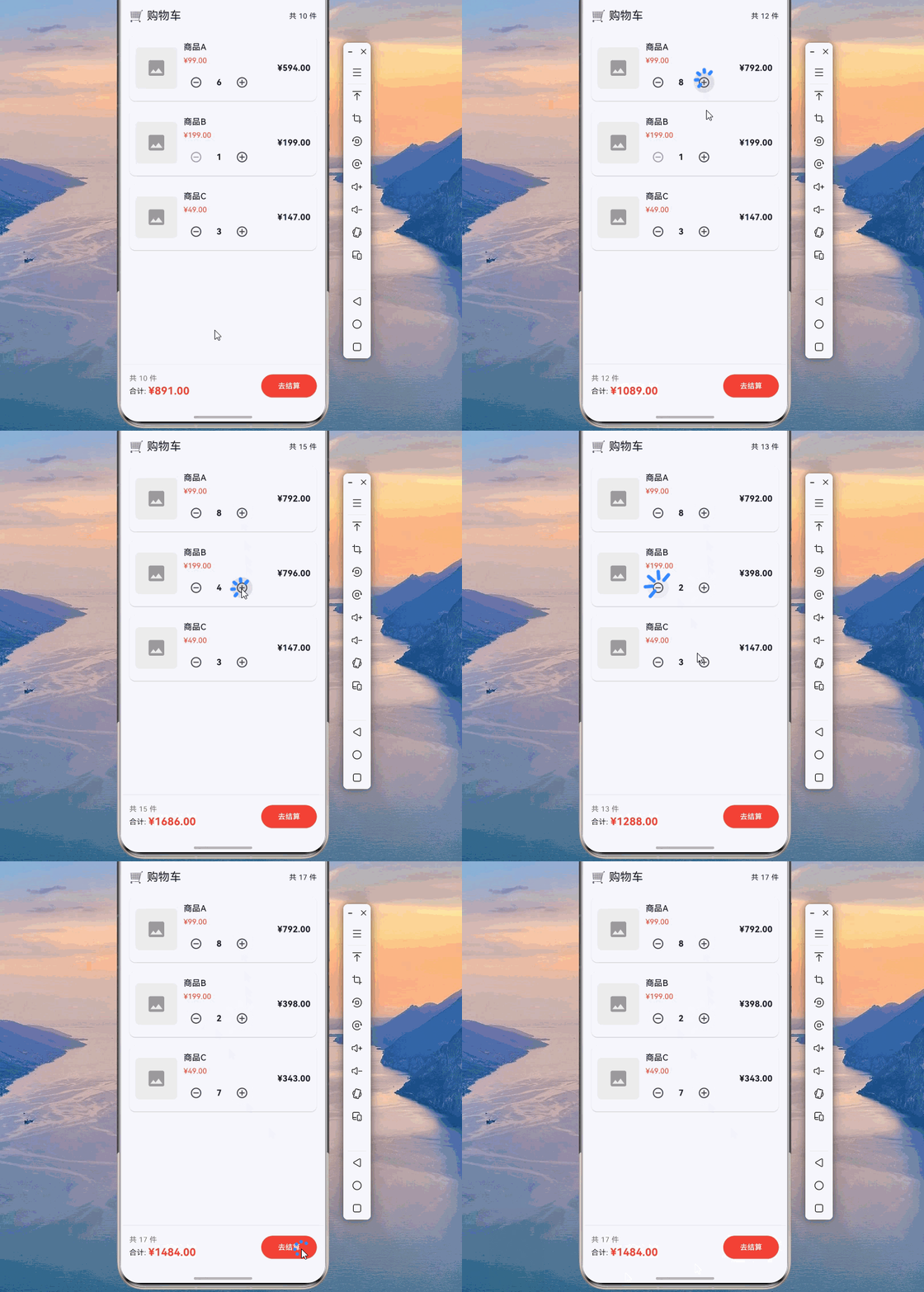
下面是一个完整的购物车数量选择器示例:
import 'package:flutter/material.dart';
void main() {
runApp(const NotificationApp());
}
class NotificationApp extends StatelessWidget {
const NotificationApp({super.key});
Widget build(BuildContext context) {
return MaterialApp(
debugShowCheckedModeBanner: false,
theme: ThemeData(
colorScheme: ColorScheme.fromSeed(seedColor: Colors.blue),
useMaterial3: true,
),
home: const ShoppingCartPage(),
);
}
}
/// 数量变化通知
class QuantityNotification extends Notification {
final String productId;
final int quantity;
final int delta;
const QuantityNotification({
required this.productId,
required this.quantity,
required this.delta,
});
}
/// 购物车商品
class CartItem {
final String id;
final String name;
final double price;
int quantity;
CartItem({
required this.id,
required this.name,
required this.price,
this.quantity = 1,
});
double get total => price * quantity;
}
/// 数量选择器
class QuantitySelector extends StatelessWidget {
final String productId;
final int initialQuantity;
const QuantitySelector({
super.key,
required this.productId,
this.initialQuantity = 1,
});
Widget build(BuildContext context) {
int quantity = initialQuantity;
return StatefulBuilder(
builder: (context, setState) {
return Row(
mainAxisSize: MainAxisSize.min,
children: [
IconButton(
icon: const Icon(Icons.remove_circle_outline),
onPressed: quantity > 1
? () {
setState(() => quantity--);
QuantityNotification(
productId: productId,
quantity: quantity,
delta: -1,
).dispatch(context);
}
: null,
),
Container(
width: 40,
alignment: Alignment.center,
child: Text(
quantity.toString(),
style: const TextStyle(fontSize: 16, fontWeight: FontWeight.bold),
),
),
IconButton(
icon: const Icon(Icons.add_circle_outline),
onPressed: quantity < 99
? () {
setState(() => quantity++);
QuantityNotification(
productId: productId,
quantity: quantity,
delta: 1,
).dispatch(context);
}
: null,
),
],
);
},
);
}
}
/// 购物车页面
class ShoppingCartPage extends StatefulWidget {
const ShoppingCartPage({super.key});
State<ShoppingCartPage> createState() => _ShoppingCartPageState();
}
class _ShoppingCartPageState extends State<ShoppingCartPage> {
final List<CartItem> _items = [
CartItem(id: '1', name: '商品A', price: 99.0, quantity: 2),
CartItem(id: '2', name: '商品B', price: 199.0, quantity: 1),
CartItem(id: '3', name: '商品C', price: 49.0, quantity: 3),
];
int _totalCount = 6;
double _totalPrice = 495.0;
void _updateQuantity(String productId, int newQuantity, int delta) {
final index = _items.indexWhere((item) => item.id == productId);
if (index >= 0) {
setState(() {
_items[index].quantity = newQuantity;
_totalCount += delta;
_totalPrice += _items[index].price * delta;
});
}
}
Widget build(BuildContext context) {
return Scaffold(
appBar: AppBar(
title: const Text('🛒 购物车'),
actions: [
Padding(
padding: const EdgeInsets.only(right: 16),
child: Center(
child: Text(
'共 $_totalCount 件',
style: const TextStyle(fontSize: 14),
),
),
),
],
),
body: NotificationListener<QuantityNotification>(
onNotification: (notification) {
_updateQuantity(
notification.productId,
notification.quantity,
notification.delta,
);
return true;
},
child: Column(
children: [
Expanded(
child: ListView.builder(
itemCount: _items.length,
itemBuilder: (context, index) {
final item = _items[index];
return _buildCartItem(item);
},
),
),
_buildBottomBar(),
],
),
),
);
}
Widget _buildCartItem(CartItem item) {
return Card(
margin: const EdgeInsets.symmetric(horizontal: 16, vertical: 8),
child: Padding(
padding: const EdgeInsets.all(12),
child: Row(
children: [
Container(
width: 80,
height: 80,
decoration: BoxDecoration(
color: Colors.grey.shade200,
borderRadius: BorderRadius.circular(8),
),
child: const Icon(Icons.image, size: 40, color: Colors.grey),
),
const SizedBox(width: 12),
Expanded(
child: Column(
crossAxisAlignment: CrossAxisAlignment.start,
children: [
Text(
item.name,
style: const TextStyle(
fontSize: 16,
fontWeight: FontWeight.w500,
),
),
const SizedBox(height: 4),
Text(
'¥${item.price.toStringAsFixed(2)}',
style: const TextStyle(
color: Colors.red,
fontSize: 14,
),
),
const SizedBox(height: 8),
QuantitySelector(
productId: item.id,
initialQuantity: item.quantity,
),
],
),
),
Text(
'¥${item.total.toStringAsFixed(2)}',
style: const TextStyle(
fontSize: 16,
fontWeight: FontWeight.bold,
),
),
],
),
),
);
}
Widget _buildBottomBar() {
return Container(
padding: const EdgeInsets.all(16),
decoration: BoxDecoration(
color: Colors.white,
boxShadow: [
BoxShadow(
color: Colors.black.withOpacity(0.05),
blurRadius: 4,
offset: const Offset(0, -2),
),
],
),
child: SafeArea(
child: Row(
children: [
Column(
mainAxisSize: MainAxisSize.min,
crossAxisAlignment: CrossAxisAlignment.start,
children: [
Text(
'共 $_totalCount 件',
style: TextStyle(color: Colors.grey.shade600),
),
Row(
children: [
const Text('合计: ', style: TextStyle(fontSize: 14)),
Text(
'¥${_totalPrice.toStringAsFixed(2)}',
style: const TextStyle(
fontSize: 20,
color: Colors.red,
fontWeight: FontWeight.bold,
),
),
],
),
],
),
const Spacer(),
ElevatedButton(
onPressed: () {},
style: ElevatedButton.styleFrom(
backgroundColor: Colors.red,
foregroundColor: Colors.white,
padding: const EdgeInsets.symmetric(horizontal: 32, vertical: 12),
),
child: const Text('去结算'),
),
],
),
),
);
}
}
五、进阶技巧
🌟 5.1 多类型 Notification 监听
/// 监听多种类型的 Notification
class MultiNotificationListener extends StatelessWidget {
final Widget child;
const MultiNotificationListener({super.key, required this.child});
Widget build(BuildContext context) {
return NotificationListener<ScrollNotification>(
onNotification: (notification) {
if (notification is ScrollStartNotification) {
debugPrint('开始滚动');
} else if (notification is ScrollEndNotification) {
debugPrint('结束滚动');
}
return false;
},
child: NotificationListener<SizeChangedLayoutNotification>(
onNotification: (notification) {
debugPrint('尺寸变化');
return false;
},
child: child,
),
);
}
}
🔄 5.2 Notification 链式传递
/// 链式传递 Notification
class NotificationChain extends StatelessWidget {
final Widget child;
const NotificationChain({super.key, required this.child});
Widget build(BuildContext context) {
return NotificationListener<CounterNotification>(
onNotification: (notification) {
// 处理后转发
debugPrint('第一层处理: ${notification.value}');
return false; // 继续传递
},
child: NotificationListener<CounterNotification>(
onNotification: (notification) {
// 第二层处理
debugPrint('第二层处理: ${notification.value}');
return true; // 终止传递
},
child: child,
),
);
}
}
⚡ 5.3 Notification 与状态管理结合
/// 结合 InheritedWidget 使用 Notification
class NotificationProvider extends InheritedWidget {
final void Function(Notification) onNotification;
const NotificationProvider({
super.key,
required this.onNotification,
required super.child,
});
static NotificationProvider of(BuildContext context) {
return context.dependOnInheritedWidgetOfExactType<NotificationProvider>()!;
}
bool updateShouldNotify(NotificationProvider oldWidget) {
return onNotification != oldWidget.onNotification;
}
}
/// 便捷发送通知的扩展
extension NotificationExtension on BuildContext {
void sendNotification(Notification notification) {
notification.dispatch(this);
}
}
// 使用示例
// context.sendNotification(CounterNotification(value: 1, action: '增加'));
六、最佳实践与注意事项
✅ 6.1 性能优化建议
-
及时终止冒泡:如果不需要继续传递,返回 true 终止冒泡。
-
避免过度监听:只监听需要的 Notification 类型。
-
合理使用 setState:在 onNotification 中谨慎使用 setState。
-
使用特定类型:使用泛型指定监听的 Notification 类型。
-
分离监听器:将不同类型的监听器分开,避免嵌套过深。
⚠️ 6.2 常见问题与解决方案
| 问题 | 原因 | 解决方案 |
|---|---|---|
| Notification 未被接收 | 监听器类型不匹配 | 检查 Notification 类型 |
| 过度重建 | onNotification 中调用 setState | 使用局部状态管理 |
| 事件丢失 | 返回值错误 | 检查返回值逻辑 |
| 性能问题 | 监听器过于频繁触发 | 添加节流或防抖 |
| 类型转换错误 | 未指定泛型类型 | 使用泛型指定类型 |
📝 6.3 代码规范建议
-
命名规范:使用
XxxNotification命名自定义通知。 -
添加注释:为自定义 Notification 添加文档注释。
-
不可变数据:Notification 应该是不可变的。
-
提供构造函数:使用 const 构造函数。
-
错误处理:处理 Notification 未被监听的情况。
七、总结
本文详细介绍了 Flutter 中 Notification 组件的使用方法,从基础概念到高级技巧,帮助你掌握事件冒泡传递的核心能力。
核心要点回顾:
📌 Notification 基础:理解事件冒泡机制和 NotificationListener 使用
📌 自定义 Notification:创建和发送自定义事件通知
📌 滚动事件监听:监听和处理滚动相关事件
📌 实际应用:表单验证、数量选择器等典型场景
📌 进阶技巧:多类型监听、链式传递、状态管理结合
通过本文的学习,你应该能够独立开发事件冒泡传递功能,并理解 Flutter 事件系统的底层原理。
八、参考资料

开源鸿蒙跨平台开发社区汇聚开发者与厂商,共建“一次开发,多端部署”的开源生态,致力于降低跨端开发门槛,推动万物智联创新。
更多推荐
 7
7 0
0- 0


 已为社区贡献37条内容

所有评论(0)