进阶实战 Flutter for OpenHarmony:Sliver 系列组件实战 - 折叠头部与吸顶效果系统
// 自定义吸顶头部代理});/// 使用示例const Text('分类导航', style: TextStyle(fontWeight: FontWeight.bold)),child: const Text('查看全部'),),],),),),
欢迎加入开源鸿蒙跨平台社区:https://openharmonycrossplatform.csdn.net
一、场景引入:为什么需要折叠头部和吸顶效果?
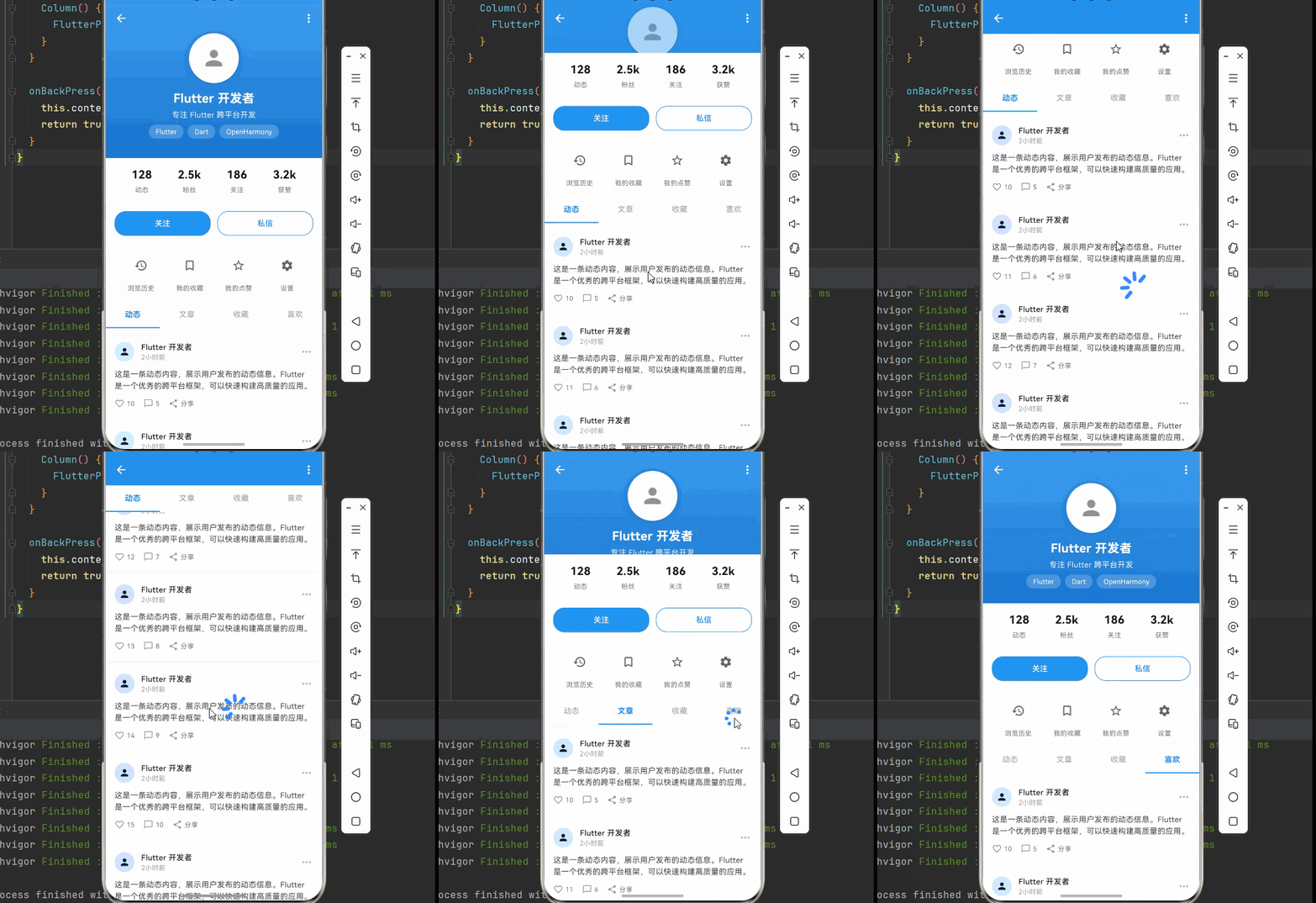
在现代移动应用中,用户体验是至关重要的。想象一下这样的场景:你打开一个音乐播放器应用,顶部展示着专辑封面和歌曲信息,当你向上滑动查看歌词或歌曲列表时,顶部的专辑封面会优雅地折叠收起,只留下一个简洁的标题栏。又或者你打开一个电商应用,顶部的分类导航在滚动时会固定在屏幕顶部,方便你随时切换分类。
这就是为什么我们需要 折叠头部 和 吸顶效果。这些交互效果不仅能够节省屏幕空间,展示更多内容,还能提供流畅自然的视觉体验,让用户感受到应用的专业性和精致度。
📱 1.1 折叠头部与吸顶的典型应用场景
在现代移动应用中,这些效果的需求非常广泛:
音乐播放器:专辑封面在顶部展示,滚动时折叠收起,只保留歌曲名称和播放控制按钮。这种设计既能在初始状态展示丰富的视觉信息,又能在浏览时节省空间。
社交应用个人主页:用户头像和基本信息在顶部,滚动时折叠收起,只保留用户名。用户可以在浏览动态时随时知道这是谁的主页。
电商商品详情:商品图片轮播在顶部,滚动时折叠,规格选择栏吸顶固定。用户可以随时查看和修改商品规格。
新闻资讯应用:频道导航吸顶,用户在浏览新闻列表时可以随时切换频道,无需返回顶部。
个人中心页面:用户信息卡片在顶部,滚动时折叠,功能入口网格吸顶。提供更好的导航体验。
1.2 Sliver 系列组件详解
Flutter 提供了丰富的 Sliver 组件来实现这些效果:
| Sliver 组件 | 功能描述 | 典型用途 |
|---|---|---|
| SliverAppBar | 可折叠的应用栏 | 折叠头部、标题栏 |
| SliverPersistentHeader | 持久化头部 | 自定义吸顶效果 |
| SliverList | 列表布局 | 动态列表内容 |
| SliverGrid | 网格布局 | 网格卡片展示 |
| SliverToBoxAdapter | 普通组件包装 | 将普通组件转为 Sliver |
| SliverFillRemaining | 填充剩余空间 | 底部固定内容 |
| SliverSafeArea | 安全区域 | 处理刘海屏 |
| SliverOpacity | 透明度控制 | 滚动时的渐隐效果 |
| SliverFadeTransition | 淡入淡出 | 动态显示隐藏 |
1.3 SliverAppBar 核心属性
SliverAppBar 是实现折叠头部的核心组件:
SliverAppBar({
  double expandedHeight,        // 展开时的高度
  double collapsedHeight,       // 折叠时的高度
  bool floating: false,         // 是否浮动(向下滚动立即显示)
  bool pinned: false,           // 是否固定(折叠后保持在顶部)
  bool snap: false,             // 是否吸附(配合 floating 使用)
  Widget flexibleSpace,         // 可伸缩的内容区域
  Widget title,                 // 标题
  List<Widget> actions,         // 右侧操作按钮
  Widget leading,               // 左侧返回按钮
  Color backgroundColor,        // 背景色
  double elevation,             // 阴影高度
})
三种常见配置模式:
| 配置 | 效果描述 | 适用场景 |
|---|---|---|
pinned: true |
折叠后固定在顶部 | 需要始终显示标题栏 |
floating: true |
向下滚动立即显示 | 快速访问标题栏 |
pinned + floating |
固定且快速响应 | 导航栏场景 |
snap: true (需 floating) |
完全展开或折叠 | 简洁的交互体验 |
二、技术架构设计
在正式编写代码之前,我们需要设计一个清晰的架构。良好的架构设计可以让代码更易于理解、维护和扩展。
🏛️ 2.1 页面结构设计
我们以音乐播放器为例,设计页面结构:
┌─────────────────────────────────────────────────────────────┐
│                    CustomScrollView                          │
│                                                              │
│  ┌─────────────────────────────────────────────────────┐    │
│  │           SliverAppBar (可折叠头部)                   │    │
│  │                                                      │    │
│  │  ┌─────────────────────────────────────────────┐    │    │
│  │  │         FlexibleSpaceBar                     │    │    │
│  │  │  ┌─────────────────────────────────────┐    │    │    │
│  │  │  │         专辑封面图片                  │    │    │    │
│  │  │  │      (滚动时缩放、折叠)               │    │    │    │
│  │  │  └─────────────────────────────────────┘    │    │    │
│  │  │                                              │    │    │
│  │  │  ┌─────────────────────────────────────┐    │    │    │
│  │  │  │    歌曲名称、歌手信息                 │    │    │    │
│  │  │  └─────────────────────────────────────┘    │    │    │
│  │  └─────────────────────────────────────────────┘    │    │
│  └─────────────────────────────────────────────────────┘    │
│                                                              │
│  ┌─────────────────────────────────────────────────────┐    │
│  │      SliverPersistentHeader (操作栏-吸顶)            │    │
│  │  - 播放、收藏、分享按钮                               │    │
│  │  - 滚动时固定在顶部                                   │    │
│  └─────────────────────────────────────────────────────┘    │
│                                                              │
│  ┌─────────────────────────────────────────────────────┐    │
│  │           SliverToBoxAdapter (歌词区域)               │    │
│  │  - 歌词内容展示                                       │    │
│  └─────────────────────────────────────────────────────┘    │
│                                                              │
│  ┌─────────────────────────────────────────────────────┐    │
│  │           SliverList (相关歌曲推荐)                   │    │
│  │  - 推荐歌曲列表                                       │    │
│  └─────────────────────────────────────────────────────┘    │
│                                                              │
└─────────────────────────────────────────────────────────────┘
🎯 2.2 数据模型设计
/// 歌曲信息
class Song {
  final String id;
  final String title;
  final String artist;
  final String album;
  final String coverUrl;
  final Duration duration;
  final bool isLiked;

  const Song({
    required this.id,
    required this.title,
    required this.artist,
    required this.album,
    required this.coverUrl,
    required this.duration,
    this.isLiked = false,
  });
}

/// 歌词行
class LyricLine {
  final Duration timestamp;
  final String text;

  const LyricLine({
    required this.timestamp,
    required this.text,
  });
}
📐 2.3 滚动交互流程
用户滚动屏幕
      │
      ▼
ScrollController 监听滚动偏移量
      │
      ├──▶ offset = 0: 头部完全展开,显示专辑封面
      │
      ├──▶ 0 < offset < expandedHeight: 头部逐渐折叠
      │    │
      │    ├── 专辑封面缩放并上移
      │    ├── 标题逐渐显示
      │    └── 背景色渐变
      │
      └──▶ offset >= expandedHeight: 头部完全折叠
           │
           ├── 只显示标题栏
           └── 操作栏吸顶固定
三、核心功能实现
🔧 3.1 基础折叠头部实现
import 'package:flutter/material.dart';
import 'package:flutter/services.dart';
class MusicPlayerPage extends StatefulWidget {
const MusicPlayerPage({super.key});
State<MusicPlayerPage> createState() => _MusicPlayerPageState();
}
class _MusicPlayerPageState extends State<MusicPlayerPage> {
final ScrollController _scrollController = ScrollController();
bool _isPlaying = false;
bool _isLiked = false;
void dispose() {
_scrollController.dispose();
super.dispose();
}
Widget build(BuildContext context) {
return Scaffold(
body: CustomScrollView(
controller: _scrollController,
slivers: [
// 可折叠头部
SliverAppBar(
expandedHeight: 350,
floating: false,
pinned: true,
snap: false,
backgroundColor: Colors.purple.shade800,
foregroundColor: Colors.white,
systemOverlayStyle: SystemUiOverlayStyle.light,
leading: IconButton(
icon: const Icon(Icons.keyboard_arrow_down),
onPressed: () => Navigator.pop(context),
),
actions: [
IconButton(
icon: const Icon(Icons.more_vert),
onPressed: () {},
),
],
flexibleSpace: FlexibleSpaceBar(
centerTitle: true,
title: const Text(
'夜曲',
style: TextStyle(
color: Colors.white,
fontWeight: FontWeight.bold,
),
),
background: _buildAlbumCover(),
),
),
// 操作栏(吸顶)
SliverPersistentHeader(
pinned: true,
delegate: _PlayerControlsDelegate(
isPlaying: _isPlaying,
isLiked: _isLiked,
onPlayTap: () => setState(() => _isPlaying = !_isPlaying),
onLikeTap: () => setState(() => _isLiked = !_isLiked),
),
),
// 歌词区域
SliverToBoxAdapter(
child: _buildLyricsSection(),
),
// 相关推荐
SliverToBoxAdapter(
child: _buildRecommendSection(),
),
// 底部间距
const SliverToBoxAdapter(
child: SizedBox(height: 100),
),
],
),
// 底部播放控制
bottomNavigationBar: _buildMiniPlayer(),
);
}
Widget _buildAlbumCover() {
return Container(
decoration: BoxDecoration(
gradient: LinearGradient(
begin: Alignment.topCenter,
end: Alignment.bottomCenter,
colors: [
Colors.purple.shade600,
Colors.purple.shade900,
],
),
),
child: SafeArea(
child: Column(
mainAxisAlignment: MainAxisAlignment.center,
children: [
const SizedBox(height: 40),
// 专辑封面
Container(
width: 200,
height: 200,
decoration: BoxDecoration(
color: Colors.grey.shade300,
borderRadius: BorderRadius.circular(16),
boxShadow: [
BoxShadow(
color: Colors.black.withOpacity(0.3),
blurRadius: 20,
offset: const Offset(0, 10),
),
],
),
child: const Icon(
Icons.album,
size: 80,
color: Colors.grey,
),
),
const SizedBox(height: 20),
// 歌曲信息
const Text(
'夜曲',
style: TextStyle(
fontSize: 24,
fontWeight: FontWeight.bold,
color: Colors.white,
),
),
const SizedBox(height: 8),
Text(
'周杰伦 · 十一月的肖邦',
style: TextStyle(
fontSize: 14,
color: Colors.white.withOpacity(0.7),
),
),
],
),
),
);
}
Widget _buildLyricsSection() {
final lyrics = [
'为你弹奏肖邦的夜曲',
'纪念我死去的爱情',
'跟夜风一样的声音',
'心碎的很好听',
'手在键盘敲很轻',
'我给的思念很小心',
'你埋葬的地方叫幽冥',
];
return Container(
padding: const EdgeInsets.all(20),
child: Column(
crossAxisAlignment: CrossAxisAlignment.start,
children: [
Row(
children: [
const Icon(Icons.lyrics, size: 20),
const SizedBox(width: 8),
const Text(
'歌词',
style: TextStyle(
fontSize: 18,
fontWeight: FontWeight.bold,
),
),
const Spacer(),
TextButton(
onPressed: () {},
child: const Text('展开'),
),
],
),
const SizedBox(height: 16),
...lyrics.map((line) => Padding(
padding: const EdgeInsets.symmetric(vertical: 8),
child: Text(
line,
style: TextStyle(
fontSize: 16,
height: 1.8,
color: Colors.grey.shade700,
),
),
)),
],
),
);
}
Widget _buildRecommendSection() {
return Container(
padding: const EdgeInsets.all(20),
child: Column(
crossAxisAlignment: CrossAxisAlignment.start,
children: [
const Row(
children: [
Icon(Icons.queue_music, size: 20),
SizedBox(width: 8),
Text(
'相关推荐',
style: TextStyle(
fontSize: 18,
fontWeight: FontWeight.bold,
),
),
],
),
const SizedBox(height: 16),
...List.generate(5, (index) => _buildSongItem(index)),
],
),
);
}
Widget _buildSongItem(int index) {
return ListTile(
contentPadding: EdgeInsets.zero,
leading: Container(
width: 50,
height: 50,
decoration: BoxDecoration(
color: Colors.grey.shade200,
borderRadius: BorderRadius.circular(8),
),
child: const Icon(Icons.music_note, color: Colors.grey),
),
title: Text('推荐歌曲 ${index + 1}'),
subtitle: Text('歌手 ${index + 1}'),
trailing: const Icon(Icons.play_circle_outline),
onTap: () {},
);
}
Widget _buildMiniPlayer() {
return Container(
height: 70,
decoration: BoxDecoration(
color: Colors.white,
boxShadow: [
BoxShadow(
color: Colors.black.withOpacity(0.1),
blurRadius: 10,
offset: const Offset(0, -2),
),
],
),
child: Row(
children: [
// 歌曲信息
Padding(
padding: const EdgeInsets.all(8),
child: Container(
width: 50,
height: 50,
decoration: BoxDecoration(
color: Colors.grey.shade200,
borderRadius: BorderRadius.circular(8),
),
child: const Icon(Icons.album, color: Colors.grey),
),
),
const Expanded(
child: Column(
mainAxisAlignment: MainAxisAlignment.center,
crossAxisAlignment: CrossAxisAlignment.start,
children: [
Text(
'夜曲',
style: TextStyle(fontWeight: FontWeight.w500),
),
Text(
'周杰伦',
style: TextStyle(fontSize: 12, color: Colors.grey),
),
],
),
),
// 播放控制
IconButton(
icon: Icon(
_isPlaying ? Icons.pause : Icons.play_arrow,
size: 36,
),
onPressed: () => setState(() => _isPlaying = !_isPlaying),
),
IconButton(
icon: const Icon(Icons.skip_next, size: 36),
onPressed: () {},
),
const SizedBox(width: 8),
],
),
);
}
}
/// 播放控制栏代理
class _PlayerControlsDelegate extends SliverPersistentHeaderDelegate {
final bool isPlaying;
final bool isLiked;
final VoidCallback onPlayTap;
final VoidCallback onLikeTap;
_PlayerControlsDelegate({
required this.isPlaying,
required this.isLiked,
required this.onPlayTap,
required this.onLikeTap,
});
double get minExtent => 70;
double get maxExtent => 70;
Widget build(BuildContext context, double shrinkOffset, bool overlapsContent) {
return Container(
color: Colors.purple.shade800,
child: Row(
mainAxisAlignment: MainAxisAlignment.spaceEvenly,
children: [
_buildControlButton(
icon: isLiked ? Icons.favorite : Icons.favorite_border,
label: isLiked ? '已喜欢' : '喜欢',
color: isLiked ? Colors.red : Colors.white,
onTap: onLikeTap,
),
_buildControlButton(
icon: Icons.download,
label: '下载',
onTap: () {},
),
_buildControlButton(
icon: isPlaying ? Icons.pause : Icons.play_arrow,
label: isPlaying ? '暂停' : '播放',
isLarge: true,
onTap: onPlayTap,
),
_buildControlButton(
icon: Icons.comment,
label: '评论',
onTap: () {},
),
_buildControlButton(
icon: Icons.share,
label: '分享',
onTap: () {},
),
],
),
);
}
Widget _buildControlButton({
required IconData icon,
required String label,
Color? color,
bool isLarge = false,
required VoidCallback onTap,
}) {
return InkWell(
onTap: onTap,
child: Padding(
padding: const EdgeInsets.symmetric(horizontal: 12, vertical: 8),
child: Column(
mainAxisSize: MainAxisSize.min,
children: [
Icon(
icon,
size: isLarge ? 32 : 24,
color: color ?? Colors.white,
),
const SizedBox(height: 4),
Text(
label,
style: TextStyle(
fontSize: 10,
color: color ?? Colors.white.withOpacity(0.8),
),
),
],
),
),
);
}
bool shouldRebuild(_PlayerControlsDelegate oldDelegate) {
return isPlaying != oldDelegate.isPlaying || isLiked != oldDelegate.isLiked;
}
}
📌 3.2 自定义吸顶头部实现
/// 自定义吸顶头部代理
class StickyHeaderDelegate extends SliverPersistentHeaderDelegate {
final Widget child;
final double height;
final Color backgroundColor;
StickyHeaderDelegate({
required this.child,
this.height = 50,
this.backgroundColor = Colors.white,
});
double get minExtent => height;
double get maxExtent => height;
Widget build(BuildContext context, double shrinkOffset, bool overlapsContent) {
return Container(
color: backgroundColor,
child: child,
);
}
bool shouldRebuild(StickyHeaderDelegate oldDelegate) {
return child != oldDelegate.child ||
height != oldDelegate.height ||
backgroundColor != oldDelegate.backgroundColor;
}
}
/// 使用示例
SliverPersistentHeader(
pinned: true,
delegate: StickyHeaderDelegate(
height: 50,
backgroundColor: Colors.white,
child: Container(
padding: const EdgeInsets.symmetric(horizontal: 16),
child: Row(
children: [
const Text('分类导航', style: TextStyle(fontWeight: FontWeight.bold)),
const Spacer(),
TextButton(
onPressed: () {},
child: const Text('查看全部'),
),
],
),
),
),
)
🎨 3.3 渐变背景折叠头部
/// 带渐变背景的折叠头部
class GradientSliverAppBar extends StatelessWidget {
final String title;
final String subtitle;
final double expandedHeight;
final List<Color> gradientColors;
const GradientSliverAppBar({
super.key,
required this.title,
required this.subtitle,
this.expandedHeight = 300,
this.gradientColors = const [Colors.blue, Colors.purple],
});
Widget build(BuildContext context) {
return SliverAppBar(
expandedHeight: expandedHeight,
floating: false,
pinned: true,
backgroundColor: gradientColors.last,
flexibleSpace: LayoutBuilder(
builder: (context, constraints) {
final expandRatio = (constraints.maxHeight - kToolbarHeight) /
(expandedHeight - kToolbarHeight);
final animation = AlwaysStoppedAnimation(1 - expandRatio.clamp(0.0, 1.0));
return FlexibleSpaceBar(
title: AnimatedOpacity(
opacity: 1 - expandRatio.clamp(0.0, 1.0),
duration: Duration.zero,
child: Text(title),
),
background: Container(
decoration: BoxDecoration(
gradient: LinearGradient(
begin: Alignment.topCenter,
end: Alignment.bottomCenter,
colors: gradientColors,
),
),
child: SafeArea(
child: Column(
mainAxisAlignment: MainAxisAlignment.center,
children: [
const SizedBox(height: 40),
// 头像
Container(
width: 100,
height: 100,
decoration: BoxDecoration(
shape: BoxShape.circle,
border: Border.all(color: Colors.white, width: 3),
),
child: const CircleAvatar(
backgroundColor: Colors.white,
child: Icon(Icons.person, size: 50, color: Colors.grey),
),
),
const SizedBox(height: 16),
// 标题
Text(
title,
style: const TextStyle(
fontSize: 24,
fontWeight: FontWeight.bold,
color: Colors.white,
),
),
const SizedBox(height: 8),
// 副标题
Text(
subtitle,
style: TextStyle(
fontSize: 14,
color: Colors.white.withOpacity(0.8),
),
),
],
),
),
),
);
},
),
);
}
}
📊 3.4 多级吸顶导航
/// 多级吸顶导航
class MultiLevelStickyHeader extends StatelessWidget {
final List<String> tabs;
final int selectedIndex;
final ValueChanged<int> onTabChanged;
const MultiLevelStickyHeader({
super.key,
required this.tabs,
required this.selectedIndex,
required this.onTabChanged,
});
Widget build(BuildContext context) {
return SliverPersistentHeader(
pinned: true,
delegate: _TabBarHeaderDelegate(
tabs: tabs,
selectedIndex: selectedIndex,
onTabChanged: onTabChanged,
),
);
}
}
class _TabBarHeaderDelegate extends SliverPersistentHeaderDelegate {
final List<String> tabs;
final int selectedIndex;
final ValueChanged<int> onTabChanged;
_TabBarHeaderDelegate({
required this.tabs,
required this.selectedIndex,
required this.onTabChanged,
});
double get minExtent => 48;
double get maxExtent => 48;
Widget build(BuildContext context, double shrinkOffset, bool overlapsContent) {
return Container(
color: Colors.white,
child: Row(
children: tabs.asMap().entries.map((entry) {
final index = entry.key;
final tab = entry.value;
final isSelected = index == selectedIndex;
return Expanded(
child: InkWell(
onTap: () => onTabChanged(index),
child: Container(
alignment: Alignment.center,
decoration: BoxDecoration(
border: Border(
bottom: BorderSide(
color: isSelected ? Colors.blue : Colors.transparent,
width: 2,
),
),
),
child: Text(
tab,
style: TextStyle(
color: isSelected ? Colors.blue : Colors.grey,
fontWeight: isSelected ? FontWeight.bold : FontWeight.normal,
),
),
),
),
);
}).toList(),
),
);
}
bool shouldRebuild(_TabBarHeaderDelegate oldDelegate) {
return selectedIndex != oldDelegate.selectedIndex;
}
}
四、完整应用示例
下面是一个完整的个人主页示例,展示折叠头部和吸顶效果:
import 'package:flutter/material.dart';
import 'package:flutter/services.dart';
void main() {
runApp(const ProfileApp());
}
class ProfileApp extends StatelessWidget {
const ProfileApp({super.key});
Widget build(BuildContext context) {
return MaterialApp(
title: '个人主页',
debugShowCheckedModeBanner: false,
theme: ThemeData(
colorScheme: ColorScheme.fromSeed(seedColor: Colors.blue),
useMaterial3: true,
),
home: const ProfilePage(),
);
}
}
class ProfilePage extends StatefulWidget {
const ProfilePage({super.key});
State<ProfilePage> createState() => _ProfilePageState();
}
class _ProfilePageState extends State<ProfilePage> {
final ScrollController _scrollController = ScrollController();
int _selectedTabIndex = 0;
bool _isFollowing = false;
final List<String> _tabs = ['动态', '文章', '收藏', '喜欢'];
void dispose() {
_scrollController.dispose();
super.dispose();
}
Widget build(BuildContext context) {
return Scaffold(
body: CustomScrollView(
controller: _scrollController,
slivers: [
// 可折叠头部
SliverAppBar(
expandedHeight: 280,
floating: false,
pinned: true,
backgroundColor: Colors.blue,
foregroundColor: Colors.white,
systemOverlayStyle: SystemUiOverlayStyle.light,
leading: IconButton(
icon: const Icon(Icons.arrow_back),
onPressed: () => Navigator.pop(context),
),
actions: [
IconButton(
icon: const Icon(Icons.more_vert),
onPressed: () {},
),
],
flexibleSpace: FlexibleSpaceBar(
background: _buildProfileHeader(),
),
),
// 统计信息
SliverToBoxAdapter(
child: _buildStatsSection(),
),
// 操作按钮
SliverToBoxAdapter(
child: _buildActionButtons(),
),
// 功能入口
SliverToBoxAdapter(
child: _buildQuickActions(),
),
// Tab 导航(吸顶)
SliverPersistentHeader(
pinned: true,
delegate: _TabBarDelegate(
tabs: _tabs,
selectedIndex: _selectedTabIndex,
onTabChanged: (index) {
setState(() => _selectedTabIndex = index);
},
),
),
// 内容列表
SliverList(
delegate: SliverChildBuilderDelegate(
(context, index) => _buildContentItem(index),
childCount: 10,
),
),
// 底部间距
const SliverToBoxAdapter(
child: SizedBox(height: 20),
),
],
),
);
}
Widget _buildProfileHeader() {
return Container(
decoration: BoxDecoration(
gradient: LinearGradient(
begin: Alignment.topCenter,
end: Alignment.bottomCenter,
colors: [
Colors.blue.shade400,
Colors.blue.shade700,
],
),
),
child: SafeArea(
child: Column(
mainAxisAlignment: MainAxisAlignment.center,
children: [
const SizedBox(height: 20),
// 头像
Container(
width: 90,
height: 90,
decoration: BoxDecoration(
shape: BoxShape.circle,
border: Border.all(color: Colors.white, width: 3),
boxShadow: [
BoxShadow(
color: Colors.black.withOpacity(0.2),
blurRadius: 10,
),
],
),
child: const CircleAvatar(
backgroundColor: Colors.white,
child: Icon(Icons.person, size: 45, color: Colors.grey),
),
),
const SizedBox(height: 12),
// 用户名
const Text(
'Flutter 开发者',
style: TextStyle(
fontSize: 22,
fontWeight: FontWeight.bold,
color: Colors.white,
),
),
const SizedBox(height: 4),
// 简介
Text(
'专注 Flutter 跨平台开发',
style: TextStyle(
fontSize: 14,
color: Colors.white.withOpacity(0.9),
),
),
const SizedBox(height: 8),
// 标签
Row(
mainAxisAlignment: MainAxisAlignment.center,
children: [
_buildTag('Flutter'),
const SizedBox(width: 8),
_buildTag('Dart'),
const SizedBox(width: 8),
_buildTag('OpenHarmony'),
],
),
],
),
),
);
}
Widget _buildTag(String text) {
return Container(
padding: const EdgeInsets.symmetric(horizontal: 12, vertical: 4),
decoration: BoxDecoration(
color: Colors.white.withOpacity(0.2),
borderRadius: BorderRadius.circular(12),
),
child: Text(
text,
style: const TextStyle(
fontSize: 12,
color: Colors.white,
),
),
);
}
Widget _buildStatsSection() {
return Container(
color: Colors.white,
padding: const EdgeInsets.symmetric(vertical: 16),
child: Row(
mainAxisAlignment: MainAxisAlignment.spaceEvenly,
children: [
_buildStatItem('128', '动态'),
_buildStatItem('2.5k', '粉丝'),
_buildStatItem('186', '关注'),
_buildStatItem('3.2k', '获赞'),
],
),
);
}
Widget _buildStatItem(String value, String label) {
return Column(
children: [
Text(
value,
style: const TextStyle(
fontSize: 20,
fontWeight: FontWeight.bold,
),
),
const SizedBox(height: 4),
Text(
label,
style: TextStyle(
fontSize: 12,
color: Colors.grey.shade600,
),
),
],
);
}
Widget _buildActionButtons() {
return Container(
color: Colors.white,
padding: const EdgeInsets.symmetric(horizontal: 16, vertical: 12),
child: Row(
children: [
Expanded(
child: ElevatedButton(
onPressed: () {
setState(() => _isFollowing = !_isFollowing);
},
style: ElevatedButton.styleFrom(
backgroundColor: _isFollowing ? Colors.grey.shade200 : Colors.blue,
foregroundColor: _isFollowing ? Colors.black : Colors.white,
padding: const EdgeInsets.symmetric(vertical: 12),
shape: RoundedRectangleBorder(
borderRadius: BorderRadius.circular(20),
),
),
child: Text(_isFollowing ? '已关注' : '关注'),
),
),
const SizedBox(width: 12),
Expanded(
child: OutlinedButton(
onPressed: () {},
style: OutlinedButton.styleFrom(
foregroundColor: Colors.blue,
side: const BorderSide(color: Colors.blue),
padding: const EdgeInsets.symmetric(vertical: 12),
shape: RoundedRectangleBorder(
borderRadius: BorderRadius.circular(20),
),
),
child: const Text('私信'),
),
),
],
),
);
}
Widget _buildQuickActions() {
return Container(
color: Colors.white,
padding: const EdgeInsets.symmetric(vertical: 16),
child: Row(
mainAxisAlignment: MainAxisAlignment.spaceEvenly,
children: [
_buildQuickAction(Icons.history, '浏览历史'),
_buildQuickAction(Icons.bookmark_border, '我的收藏'),
_buildQuickAction(Icons.star_border, '我的点赞'),
_buildQuickAction(Icons.settings, '设置'),
],
),
);
}
Widget _buildQuickAction(IconData icon, String label) {
return InkWell(
onTap: () {},
child: Column(
children: [
Container(
width: 48,
height: 48,
decoration: BoxDecoration(
color: Colors.grey.shade100,
shape: BoxShape.circle,
),
child: Icon(icon, color: Colors.grey.shade700),
),
const SizedBox(height: 8),
Text(
label,
style: TextStyle(
fontSize: 12,
color: Colors.grey.shade600,
),
),
],
),
);
}
Widget _buildContentItem(int index) {
return Container(
color: Colors.white,
margin: const EdgeInsets.only(top: 8),
padding: const EdgeInsets.all(16),
child: Column(
crossAxisAlignment: CrossAxisAlignment.start,
children: [
Row(
children: [
const CircleAvatar(
radius: 18,
child: Icon(Icons.person, size: 20),
),
const SizedBox(width: 12),
const Expanded(
child: Column(
crossAxisAlignment: CrossAxisAlignment.start,
children: [
Text(
'Flutter 开发者',
style: TextStyle(fontWeight: FontWeight.w500),
),
Text(
'2小时前',
style: TextStyle(fontSize: 12, color: Colors.grey),
),
],
),
),
Icon(Icons.more_horiz, color: Colors.grey.shade400),
],
),
const SizedBox(height: 12),
Text(
'这是一条动态内容,展示用户发布的动态信息。Flutter 是一个优秀的跨平台框架,可以快速构建高质量的应用。',
style: TextStyle(height: 1.5, color: Colors.grey.shade800),
),
const SizedBox(height: 12),
Row(
children: [
_buildInteractionButton(Icons.favorite_border, '${index + 10}'),
const SizedBox(width: 16),
_buildInteractionButton(Icons.chat_bubble_outline, '${index + 5}'),
const SizedBox(width: 16),
_buildInteractionButton(Icons.share, '分享'),
],
),
],
),
);
}
Widget _buildInteractionButton(IconData icon, String label) {
return Row(
children: [
Icon(icon, size: 18, color: Colors.grey),
const SizedBox(width: 4),
Text(
label,
style: TextStyle(fontSize: 12, color: Colors.grey.shade600),
),
],
);
}
}
class _TabBarDelegate extends SliverPersistentHeaderDelegate {
final List<String> tabs;
final int selectedIndex;
final ValueChanged<int> onTabChanged;
_TabBarDelegate({
required this.tabs,
required this.selectedIndex,
required this.onTabChanged,
});
double get minExtent => 48;
double get maxExtent => 48;
Widget build(BuildContext context, double shrinkOffset, bool overlapsContent) {
return Container(
color: Colors.white,
child: Row(
children: tabs.asMap().entries.map((entry) {
final index = entry.key;
final tab = entry.value;
final isSelected = index == selectedIndex;
return Expanded(
child: InkWell(
onTap: () => onTabChanged(index),
child: Container(
alignment: Alignment.center,
decoration: BoxDecoration(
border: Border(
bottom: BorderSide(
color: isSelected ? Colors.blue : Colors.transparent,
width: 2,
),
),
),
child: Text(
tab,
style: TextStyle(
color: isSelected ? Colors.blue : Colors.grey,
fontWeight: isSelected ? FontWeight.bold : FontWeight.normal,
),
),
),
),
);
}).toList(),
),
);
}
bool shouldRebuild(_TabBarDelegate oldDelegate) {
return selectedIndex != oldDelegate.selectedIndex;
}
}
五、最佳实践与注意事项
✅ 5.1 性能优化建议
-
正确实现 shouldRebuild:只在数据真正变化时返回
true,避免不必要的重绘。 -
使用 const 构造函数:对于不变的子组件,使用 const 构造函数。
-
避免过度使用 SliverToBoxAdapter:对于大量同质内容,使用 SliverList 或 SliverGrid。
-
合理设置 expandedHeight:过大的展开高度会影响用户体验。
⚠️ 5.2 常见问题与解决方案
| 问题 | 原因 | 解决方案 |
|---|---|---|
| 头部不折叠 | pinned/floating 配置错误 | 检查 SliverAppBar 配置 |
| 吸顶失效 | pinned 未设置 | 设置 pinned: true |
| 标题显示异常 | FlexibleSpaceBar 配置问题 | 检查 title 和 background |
| 滚动卡顿 | 内容过于复杂 | 简化布局,使用 builder |
| 状态丢失 | 滚动时重建 | 使用 AutomaticKeepAliveClientMixin |
📝 5.3 代码规范建议
-
分离 Sliver 组件:将复杂的 Sliver 组件拆分成独立的 Widget。
-
使用常量:对于固定的尺寸、颜色等,使用常量定义。
-
添加注释:复杂的滚动逻辑应该添加注释说明。
-
错误处理:处理边界情况,如空数据等。
六、总结
本文详细介绍了 Flutter 中 Sliver 系列组件的使用方法,从基础概念到高级技巧,帮助你掌握折叠头部和吸顶效果的核心能力。
核心要点回顾:
📌 SliverAppBar 基础:理解 expandedHeight、pinned、floating 等属性
📌 折叠头部实现:使用 FlexibleSpaceBar 实现可折叠的头部效果
📌 吸顶效果实现:使用 SliverPersistentHeader 实现自定义吸顶
📌 多级吸顶导航:实现 Tab 导航的吸顶效果
📌 性能优化:正确实现 shouldRebuild,合理使用 Sliver 组件
通过本文的学习,你应该能够独立开发具有折叠头部和吸顶效果的页面,并能够将这些技术应用到更多场景中。
七、参考资料

开源鸿蒙跨平台开发社区汇聚开发者与厂商,共建“一次开发,多端部署”的开源生态,致力于降低跨端开发门槛,推动万物智联创新。
更多推荐
 10
10 0
0- 0


 已为社区贡献35条内容

所有评论(0)