进阶实战 Flutter for OpenHarmony:video_player 第三方库实战
是 Flutter 官方提供的视频播放插件,支持从网络、资源和本地文件播放视频。它提供了底层的视频播放能力,开发者可以基于它构建自定义的视频播放界面。特性说明🌐 多种来源支持网络视频、Asset 资源、本地文件📺 播放控制支持播放、暂停、停止、跳转⚡ 播放速度支持调整播放速度🔄 循环播放支持视频循环播放📊 播放状态支持监听播放进度、缓冲状态📱 跨平台支持支持 Android、iOS、We
欢迎加入开源鸿蒙跨平台社区:https://openharmonycrossplatform.csdn.net
🎯 一、组件概述与应用场景
📋 1.1 video_player 简介
video_player 是 Flutter 官方提供的视频播放插件,支持从网络、资源和本地文件播放视频。它提供了底层的视频播放能力,开发者可以基于它构建自定义的视频播放界面。
核心特性:
| 特性 | 说明 |
|---|---|
| 🌐 多种来源 | 支持网络视频、Asset 资源、本地文件 |
| 📺 播放控制 | 支持播放、暂停、停止、跳转 |
| ⚡ 播放速度 | 支持调整播放速度 |
| 🔄 循环播放 | 支持视频循环播放 |
| 📊 播放状态 | 支持监听播放进度、缓冲状态 |
| 📱 跨平台支持 | 支持 Android、iOS、Web、HarmonyOS 平台 |
| 🎨 自定义 UI | 可完全自定义播放控制界面 |
💡 1.2 实际应用场景
短视频应用:抖音、快手风格的视频播放。
在线教育:课程视频播放、倍速学习。
直播回放:直播录像播放、进度控制。
视频网站:YouTube 风格的视频播放器。
企业培训:培训视频播放、进度追踪。
🏗️ 1.3 系统架构设计
┌─────────────────────────────────────────────────────────┐
│                    UI 展示层                             │
│  ┌─────────────┐  ┌─────────────┐  ┌─────────────┐     │
│  │ 视频列表页面 │  │ 视频播放页面 │  │ 全屏播放页面 │     │
│  └─────────────┘  └─────────────┘  └─────────────┘     │
└─────────────────────────────────────────────────────────┘
                          │
                          ▼
┌─────────────────────────────────────────────────────────┐
│                    控制层                                │
│  ┌─────────────────────────────────────────────────┐   │
│  │        VideoPlayerController (播放控制器)        │   │
│  │  • play()  • pause()  • seekTo()               │   │
│  │  • setPlaybackSpeed()  • setLooping()          │   │
│  └─────────────────────────────────────────────────┘   │
└─────────────────────────────────────────────────────────┘
                          │
                          ▼
┌─────────────────────────────────────────────────────────┐
│                    原生层                                │
│  ┌─────────────────────────────────────────────────┐   │
│  │         VideoPlayer (原生播放器)                 │   │
│  │  • Android ExoPlayer  • iOS AVPlayer            │   │
│  │  • HarmonyOS AVPlayer                            │   │
│  └─────────────────────────────────────────────────┘   │
└─────────────────────────────────────────────────────────┘
📦 二、项目配置与依赖安装
🔧 2.1 添加依赖配置
打开项目根目录下的 pubspec.yaml 文件,添加以下配置:
dependencies:
  flutter:
    sdk: flutter

  # video_player - 视频播放(OpenHarmony 适配版本)
  video_player:
    git:
      url: "https://atomgit.com/openharmony-tpc/flutter_packages.git"
      path: "packages/video_player/video_player"
配置说明:
- video_player 使用 OpenHarmony 适配版本
- 支持网络视频、Asset 资源、本地文件播放
🔐 2.2 HarmonyOS 权限配置
在 OpenHarmony 项目的 entry/src/main/module.json5 文件中添加网络权限:
{
  "module": {
    "requestPermissions": [
      {
        "name": "ohos.permission.INTERNET",
        "reason": "$string:network_reason",
        "usedScene": {
          "abilities": [
            "EntryAbility"
          ],
          "when": "inuse"
        }
      }
    ]
  }
}
string.json 配置:
在 entry/src/main/resources/base/element/string.json 中添加权限说明:
{
  "string": [
    {
      "name": "network_reason",
      "value": "用于播放网络视频"
    }
  ]
}
📥 2.3 下载依赖
配置完成后,在项目根目录执行以下命令:
flutter pub get
🔧 三、核心功能详解
🎬 3.1 创建视频播放控制器
import 'package:video_player/video_player.dart';

// 网络视频
final controller = VideoPlayerController.networkUrl(Uri.parse(
  'https://example.com/video.mp4'
));

// Asset 资源
final controller = VideoPlayerController.asset('assets/video.mp4');

// 本地文件
final controller = VideoPlayerController.file(File('/path/to/video.mp4'));

// 初始化
await controller.initialize();
▶️ 3.2 播放控制
// 播放
controller.play();

// 暂停
controller.pause();

// 停止
await controller.pause();
await controller.seekTo(Duration.zero);

// 跳转
await controller.seekTo(Duration(seconds: 30));

// 设置播放速度
await controller.setPlaybackSpeed(1.5);

// 设置循环播放
await controller.setLooping(true);

// 设置音量
await controller.setVolume(0.5);
📊 3.3 监听播放状态
// 添加监听器
controller.addListener(() {
  final position = controller.value.position;
  final duration = controller.value.duration;
  final isPlaying = controller.value.isPlaying;
  final isBuffering = controller.value.isBuffering;

  print('当前位置: $position');
  print('总时长: $duration');
  print('是否播放中: $isPlaying');
  print('是否缓冲中: $isBuffering');
});
🎨 3.4 显示视频
VideoPlayer(controller)
或使用 Video widget:
Center(
  child: controller.value.isInitialized
      ? AspectRatio(
          aspectRatio: controller.value.aspectRatio,
          child: VideoPlayer(controller),
        )
      : const CircularProgressIndicator(),
)
📝 四、完整示例代码
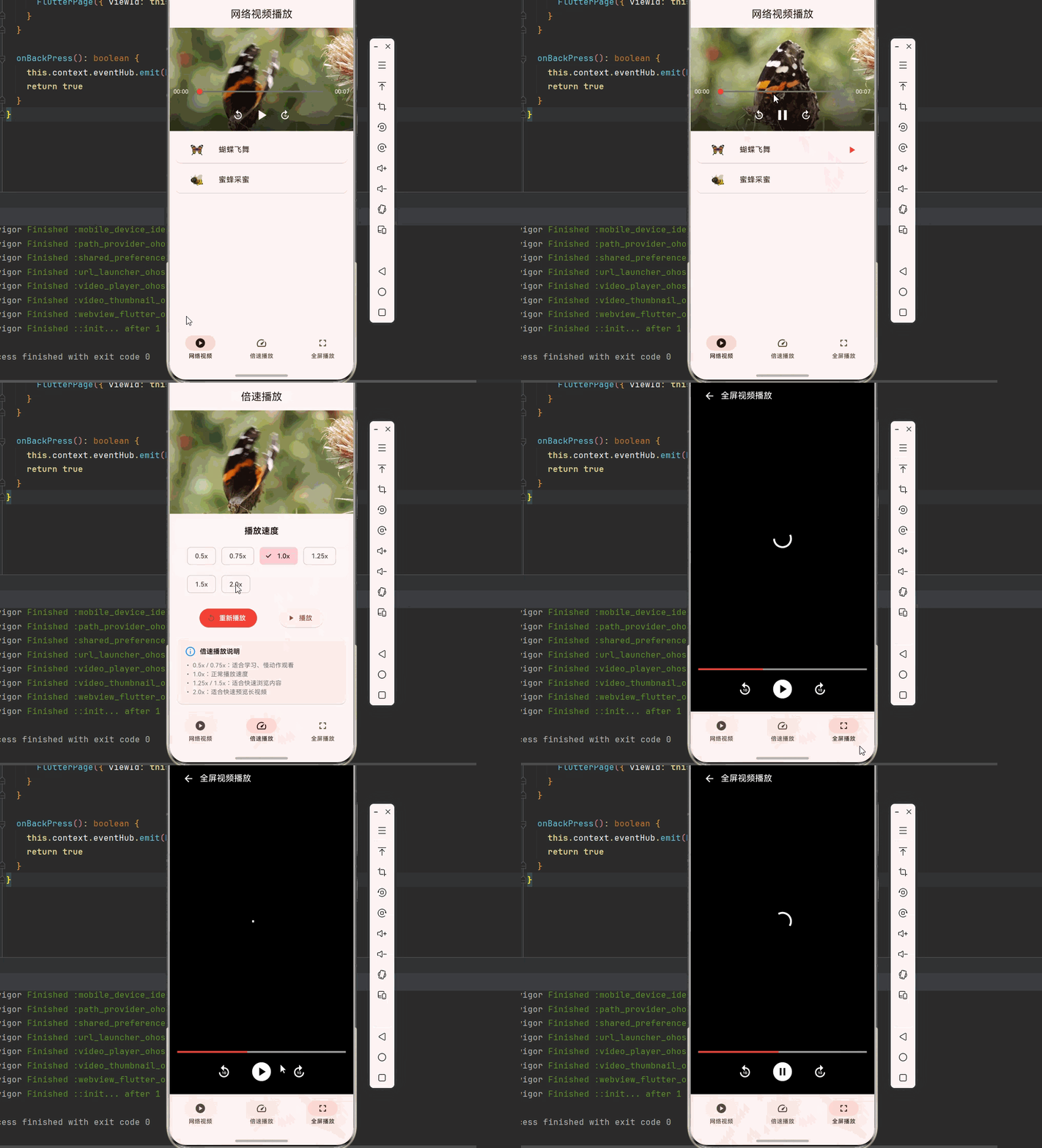
下面是一个完整的专业视频播放器系统示例:
import 'dart:async';
import 'package:flutter/material.dart';
import 'package:video_player/video_player.dart';
void main() {
runApp(const VideoPlayerApp());
}
class VideoPlayerApp extends StatelessWidget {
const VideoPlayerApp({super.key});
Widget build(BuildContext context) {
return MaterialApp(
title: '专业视频播放器',
debugShowCheckedModeBanner: false,
theme: ThemeData(
colorScheme: ColorScheme.fromSeed(seedColor: Colors.red),
useMaterial3: true,
),
home: const MainPage(),
);
}
}
class MainPage extends StatefulWidget {
const MainPage({super.key});
State<MainPage> createState() => _MainPageState();
}
class _MainPageState extends State<MainPage> {
int _currentIndex = 0;
final List<Widget> _pages = [
const NetworkVideoPage(),
const SpeedControlPage(),
const FullscreenVideoPage(),
];
Widget build(BuildContext context) {
return Scaffold(
body: _pages[_currentIndex],
bottomNavigationBar: NavigationBar(
selectedIndex: _currentIndex,
onDestinationSelected: (index) {
setState(() => _currentIndex = index);
},
destinations: const [
NavigationDestination(icon: Icon(Icons.play_circle), label: '网络视频'),
NavigationDestination(icon: Icon(Icons.speed), label: '倍速播放'),
NavigationDestination(icon: Icon(Icons.fullscreen), label: '全屏播放'),
],
),
);
}
}
// ============ 网络视频播放页面 ============
class NetworkVideoPage extends StatefulWidget {
const NetworkVideoPage({super.key});
State<NetworkVideoPage> createState() => _NetworkVideoPageState();
}
class _NetworkVideoPageState extends State<NetworkVideoPage> {
VideoPlayerController? _controller;
bool _isInitialized = false;
bool _isPlaying = false;
String? _error;
final List<VideoItem> _videoList = [
VideoItem(
title: '蝴蝶飞舞',
url: 'https://flutter.github.io/assets-for-api-docs/assets/videos/butterfly.mp4',
thumbnail: '🦋',
),
VideoItem(
title: '蜜蜂采蜜',
url: 'https://www.w3schools.com/html/mov_bbb.mp4',
thumbnail: '🐝',
),
];
VideoItem? _currentVideo;
void initState() {
super.initState();
_initializeVideo(_videoList.first);
}
Future<void> _initializeVideo(VideoItem video) async {
if (_controller?.value.isInitialized == true) {
await _controller!.pause();
_controller!.removeListener(_videoListener);
await _controller!.dispose();
}
setState(() {
_currentVideo = video;
_isInitialized = false;
_isPlaying = false;
_error = null;
});
_controller = VideoPlayerController.networkUrl(Uri.parse(video.url));
try {
await _controller!.initialize();
_controller!.addListener(_videoListener);
setState(() {
_isInitialized = true;
});
} catch (e) {
setState(() {
_error = e.toString();
});
}
}
void _videoListener() {
if (_controller?.value.isPlaying != _isPlaying) {
setState(() {
_isPlaying = _controller?.value.isPlaying ?? false;
});
}
}
void dispose() {
_controller?.removeListener(_videoListener);
_controller?.dispose();
super.dispose();
}
String _formatDuration(Duration duration) {
final minutes = duration.inMinutes;
final seconds = duration.inSeconds.remainder(60);
return '${minutes.toString().padLeft(2, '0')}:${seconds.toString().padLeft(2, '0')}';
}
Widget build(BuildContext context) {
return Scaffold(
appBar: AppBar(
title: const Text('网络视频播放'),
centerTitle: true,
),
body: Column(
children: [
Container(
color: Colors.black,
child: AspectRatio(
aspectRatio: 16 / 9,
child: _error != null
? Center(
child: Column(
mainAxisAlignment: MainAxisAlignment.center,
children: [
const Icon(Icons.error_outline, color: Colors.red, size: 48),
const SizedBox(height: 8),
Text('加载失败', style: TextStyle(color: Colors.grey.shade400)),
],
),
)
: _isInitialized
? Stack(
alignment: Alignment.bottomCenter,
children: [
VideoPlayer(_controller!),
_buildControls(),
],
)
: const Center(
child: CircularProgressIndicator(color: Colors.white),
),
),
),
Expanded(
child: ListView.builder(
padding: const EdgeInsets.all(8),
itemCount: _videoList.length,
itemBuilder: (context, index) {
final video = _videoList[index];
final isSelected = _currentVideo == video;
return Card(
color: isSelected ? Colors.red.shade50 : null,
child: ListTile(
leading: Container(
width: 60,
height: 40,
decoration: BoxDecoration(
color: Colors.grey.shade200,
borderRadius: BorderRadius.circular(8),
),
child: Center(
child: Text(video.thumbnail, style: const TextStyle(fontSize: 24)),
),
),
title: Text(video.title),
trailing: isSelected && _isPlaying
? const Icon(Icons.play_arrow, color: Colors.red)
: null,
onTap: () => _initializeVideo(video),
),
);
},
),
),
],
),
);
}
Widget _buildControls() {
final position = _controller!.value.position;
final duration = _controller!.value.duration;
return Container(
decoration: BoxDecoration(
gradient: LinearGradient(
begin: Alignment.topCenter,
end: Alignment.bottomCenter,
colors: [Colors.transparent, Colors.black.withOpacity(0.7)],
),
),
padding: const EdgeInsets.all(8),
child: Column(
mainAxisSize: MainAxisSize.min,
children: [
Row(
children: [
Text(
_formatDuration(position),
style: const TextStyle(color: Colors.white, fontSize: 12),
),
Expanded(
child: SliderTheme(
data: SliderTheme.of(context).copyWith(
thumbShape: const RoundSliderThumbShape(enabledThumbRadius: 6),
trackHeight: 3,
),
child: Slider(
value: position.inSeconds.toDouble(),
max: duration.inSeconds.toDouble(),
activeColor: Colors.red,
inactiveColor: Colors.grey.shade600,
onChanged: (value) {
_controller!.seekTo(Duration(seconds: value.toInt()));
},
),
),
),
Text(
_formatDuration(duration),
style: const TextStyle(color: Colors.white, fontSize: 12),
),
],
),
Row(
mainAxisAlignment: MainAxisAlignment.center,
children: [
IconButton(
onPressed: () {
final newPosition = position - const Duration(seconds: 10);
_controller!.seekTo(newPosition < Duration.zero ? Duration.zero : newPosition);
},
icon: const Icon(Icons.replay_10, color: Colors.white),
),
IconButton(
onPressed: () {
if (_isPlaying) {
_controller!.pause();
} else {
_controller!.play();
}
},
icon: Icon(
_isPlaying ? Icons.pause : Icons.play_arrow,
color: Colors.white,
size: 36,
),
),
IconButton(
onPressed: () {
final newPosition = position + const Duration(seconds: 10);
_controller!.seekTo(newPosition > duration ? duration : newPosition);
},
icon: const Icon(Icons.forward_10, color: Colors.white),
),
],
),
],
),
);
}
}
// ============ 倍速播放页面 ============
class SpeedControlPage extends StatefulWidget {
const SpeedControlPage({super.key});
State<SpeedControlPage> createState() => _SpeedControlPageState();
}
class _SpeedControlPageState extends State<SpeedControlPage> {
late VideoPlayerController _controller;
bool _isInitialized = false;
double _currentSpeed = 1.0;
final List<double> _speedOptions = [0.5, 0.75, 1.0, 1.25, 1.5, 2.0];
void initState() {
super.initState();
_controller = VideoPlayerController.networkUrl(Uri.parse(
'https://flutter.github.io/assets-for-api-docs/assets/videos/butterfly.mp4'
));
_controller.initialize().then((_) {
setState(() {
_isInitialized = true;
});
_controller.setLooping(true);
});
}
void dispose() {
_controller.dispose();
super.dispose();
}
Widget build(BuildContext context) {
return Scaffold(
appBar: AppBar(
title: const Text('倍速播放'),
centerTitle: true,
),
body: Column(
children: [
Container(
color: Colors.black,
child: AspectRatio(
aspectRatio: 16 / 9,
child: _isInitialized
? VideoPlayer(_controller!)
: const Center(
child: CircularProgressIndicator(color: Colors.white),
),
),
),
const SizedBox(height: 24),
const Padding(
padding: EdgeInsets.symmetric(horizontal: 16),
child: Text(
'播放速度',
style: TextStyle(fontSize: 18, fontWeight: FontWeight.bold),
),
),
const SizedBox(height: 16),
Padding(
padding: const EdgeInsets.symmetric(horizontal: 16),
child: Wrap(
spacing: 12,
runSpacing: 12,
children: _speedOptions.map((speed) {
final isSelected = _currentSpeed == speed;
return ChoiceChip(
label: Text('${speed}x'),
selected: isSelected,
selectedColor: Colors.red.shade100,
onSelected: (selected) {
if (selected) {
_controller.setPlaybackSpeed(speed);
setState(() {
_currentSpeed = speed;
});
}
},
);
}).toList(),
),
),
const SizedBox(height: 24),
Padding(
padding: const EdgeInsets.symmetric(horizontal: 16),
child: Row(
mainAxisAlignment: MainAxisAlignment.spaceEvenly,
children: [
ElevatedButton.icon(
onPressed: _isInitialized
? () {
_controller.seekTo(Duration.zero);
_controller.play();
}
: null,
icon: const Icon(Icons.replay),
label: const Text('重新播放'),
style: ElevatedButton.styleFrom(
backgroundColor: Colors.red,
foregroundColor: Colors.white,
),
),
ElevatedButton.icon(
onPressed: _isInitialized
? () {
if (_controller.value.isPlaying) {
_controller.pause();
} else {
_controller.play();
}
setState(() {});
}
: null,
icon: Icon(_controller.value.isPlaying ? Icons.pause : Icons.play_arrow),
label: Text(_controller.value.isPlaying ? '暂停' : '播放'),
),
],
),
),
const Spacer(),
Card(
margin: const EdgeInsets.all(16),
child: Padding(
padding: const EdgeInsets.all(16),
child: Column(
crossAxisAlignment: CrossAxisAlignment.start,
children: [
const Row(
children: [
Icon(Icons.info_outline, color: Colors.blue),
SizedBox(width: 8),
Text('倍速播放说明', style: TextStyle(fontWeight: FontWeight.bold)),
],
),
const SizedBox(height: 8),
Text(
'• 0.5x / 0.75x:适合学习、慢动作观看\n'
'• 1.0x:正常播放速度\n'
'• 1.25x / 1.5x:适合快速浏览内容\n'
'• 2.0x:适合快速预览长视频',
style: TextStyle(color: Colors.grey.shade600, fontSize: 13),
),
],
),
),
),
],
),
);
}
}
// ============ 全屏播放页面 ============
class FullscreenVideoPage extends StatefulWidget {
const FullscreenVideoPage({super.key});
State<FullscreenVideoPage> createState() => _FullscreenVideoPageState();
}
class _FullscreenVideoPageState extends State<FullscreenVideoPage> {
late VideoPlayerController _controller;
bool _isInitialized = false;
bool _showControls = true;
Timer? _hideTimer;
void initState() {
super.initState();
_controller = VideoPlayerController.networkUrl(Uri.parse(
'https://www.w3schools.com/html/mov_bbb.mp4'
));
_controller.initialize().then((_) {
setState(() {
_isInitialized = true;
});
_controller.play();
_startHideTimer();
});
}
void _startHideTimer() {
_hideTimer?.cancel();
_hideTimer = Timer(const Duration(seconds: 3), () {
if (_controller.value.isPlaying) {
setState(() {
_showControls = false;
});
}
});
}
void _toggleControls() {
setState(() {
_showControls = !_showControls;
});
if (_showControls) {
_startHideTimer();
}
}
void dispose() {
_hideTimer?.cancel();
_controller.dispose();
super.dispose();
}
Widget build(BuildContext context) {
return Scaffold(
backgroundColor: Colors.black,
body: GestureDetector(
onTap: _toggleControls,
child: Stack(
children: [
Center(
child: _isInitialized
? AspectRatio(
aspectRatio: _controller!.value.aspectRatio,
child: VideoPlayer(_controller!),
)
: const CircularProgressIndicator(color: Colors.white),
),
if (_showControls)
Positioned(
top: 0,
left: 0,
right: 0,
child: Container(
decoration: BoxDecoration(
gradient: LinearGradient(
begin: Alignment.topCenter,
end: Alignment.bottomCenter,
colors: [Colors.black.withOpacity(0.7), Colors.transparent],
),
),
padding: const EdgeInsets.only(top: 40, left: 16, right: 16, bottom: 16),
child: Row(
children: [
IconButton(
onPressed: () => Navigator.pop(context),
icon: const Icon(Icons.arrow_back, color: Colors.white),
),
const Expanded(
child: Text(
'全屏视频播放',
style: TextStyle(color: Colors.white, fontSize: 18),
),
),
],
),
),
),
if (_showControls)
Positioned(
bottom: 0,
left: 0,
right: 0,
child: Container(
decoration: BoxDecoration(
gradient: LinearGradient(
begin: Alignment.bottomCenter,
end: Alignment.topCenter,
colors: [Colors.black.withOpacity(0.7), Colors.transparent],
),
),
padding: const EdgeInsets.all(16),
child: Column(
mainAxisSize: MainAxisSize.min,
children: [
VideoProgressIndicator(
_controller,
allowScrubbing: true,
colors: const VideoProgressColors(
playedColor: Colors.red,
bufferedColor: Colors.grey,
backgroundColor: Colors.grey,
),
),
const SizedBox(height: 8),
Row(
mainAxisAlignment: MainAxisAlignment.center,
children: [
IconButton(
onPressed: () {
final position = _controller.value.position - const Duration(seconds: 10);
_controller.seekTo(position < Duration.zero ? Duration.zero : position);
},
icon: const Icon(Icons.replay_10, color: Colors.white, size: 32),
),
const SizedBox(width: 24),
IconButton(
onPressed: () {
if (_controller.value.isPlaying) {
_controller.pause();
} else {
_controller.play();
_startHideTimer();
}
setState(() {});
},
icon: Icon(
_controller.value.isPlaying ? Icons.pause_circle : Icons.play_circle,
color: Colors.white,
size: 48,
),
),
const SizedBox(width: 24),
IconButton(
onPressed: () {
final position = _controller.value.position + const Duration(seconds: 10);
final duration = _controller.value.duration;
_controller.seekTo(position > duration ? duration : position);
},
icon: const Icon(Icons.forward_10, color: Colors.white, size: 32),
),
],
),
],
),
),
),
],
),
),
);
}
}
// ============ 数据模型 ============
class VideoItem {
final String title;
final String url;
final String thumbnail;
VideoItem({
required this.title,
required this.url,
required this.thumbnail,
});
}
🏆 五、最佳实践与注意事项
⚠️ 5.1 控制器生命周期管理
void initState() {
super.initState();
_controller = VideoPlayerController.networkUrl(Uri.parse(url));
_controller.initialize().then((_) {
setState(() {});
});
}
void dispose() {
_controller.dispose(); // 必须释放资源
super.dispose();
}
📊 5.2 播放状态监听
controller.addListener(() {
  if (controller.value.position >= controller.value.duration) {
    // 播放完成
  }
});
🎨 5.3 自定义进度条
VideoProgressIndicator(
  controller,
  allowScrubbing: true,  // 允许拖动
  colors: const VideoProgressColors(
    playedColor: Colors.red,
    bufferedColor: Colors.grey,
    backgroundColor: Colors.grey,
  ),
)
📱 5.4 平台差异
| 平台 | 特殊说明 |
|---|---|
| Android | 使用 ExoPlayer |
| iOS | 使用 AVPlayer |
| HarmonyOS | 使用 AVPlayer |
| Web | 使用 HTML5 video 元素 |
📌 六、总结
本文通过一个完整的专业视频播放器系统案例,深入讲解了 video_player 插件的使用方法与最佳实践:
播放控制:掌握播放、暂停、跳转、倍速等基本操作。
状态监听:学会监听播放进度和状态变化。
自定义 UI:实现完全自定义的播放控制界面。
全屏播放:实现沉浸式全屏播放体验。
掌握这些技巧,你就能构建出专业级的视频播放应用,提供流畅的视频播放体验。
参考资料

开源鸿蒙跨平台开发社区汇聚开发者与厂商,共建“一次开发,多端部署”的开源生态,致力于降低跨端开发门槛,推动万物智联创新。
更多推荐

 14
14 0
0- 0


 已为社区贡献98条内容

所有评论(0)