抛硬币 & 掷骰子合集 —— Flutter + OpenHarmony 鸿蒙风趣味决策工具
这款“抛硬币 & 掷骰子合集”,虽小却精。它用不到 500 行代码,实现了**物理感动画、状态管理、历史追踪**三大核心能力,完美诠释了Flutter 的表现力与 OpenHarmony 的设计哲学

个人主页:ujainu
https://blog.csdn.net/2501_93396617?spm=1011.2415.3001.5343
文章目录
前言
在日常生活中,我们常常面临“二选一”或“随机选择”的场景:
“今天穿哪件衣服?”
“谁去倒垃圾?”
“先玩哪个游戏?”
与其陷入无尽纠结,不如把决定权交给命运的随机性!为此,我们基于 Flutter + OpenHarmony 平台,打造了一款轻量、有趣、高颜值的 抛硬币 & 掷骰子合集(Coin Flip & Dice Roller)。它不仅支持两种经典随机方式,还通过逼真的物理动画与清晰的历史记录,让每一次“掷出”都充满仪式感与惊喜。
本文将带你从零实现这个小而美的工具,涵盖 动画设计、状态管理、UI 构建 三大核心模块。全文包含详细代码解析与完整可运行示例,适合 Flutter 中级开发者学习与复用。
一、为什么需要“物理感”动画?
1. 心理学依据:增强可信度
- 视觉延迟 = 真实感:快速闪现结果会让人怀疑“是否真随机”
- 过程可视化:旋转、弹跳、减速等动效模拟真实物理行为,提升用户信任
- 游戏化体验:动画本身成为娱乐的一部分,而非单纯功能
2. 鸿蒙设计原则契合
- 自然流畅:遵循 OpenHarmony 动效规范——缓入缓出、有始有终
- 情感化反馈:结果出现时伴随轻微缩放(“弹跳确认”),传递完成感
- 色彩语言:背景采用 蓝→紫渐变(
#6200EE主色延伸),科技感与活力并存
✅ 核心功能清单:
- 双模式切换:硬币(正/反) / 骰子(1–6)
- 逼真复合动画:旋转 + 缩放 + 位移
- 历史记录:横向滚动 ListView(最近 10 次)
- 快速测试:“连抛 5 次”一键生成
- 轻量高效:≈450 行 Dart 代码
二、技术架构:动画驱动的状态机
我们将应用拆解为三个关键层:
| 模块 | 职责 | 技术点 |
|---|---|---|
| 动画层 | 控制硬币翻转 / 骰子滚动 | AnimationController, TweenSequence |
| 逻辑层 | 生成随机结果、管理历史 | Random, List 状态管理 |
| UI 层 | 渲染按钮、历史记录、背景 | AnimatedRotation, ListView.builder |
⚠️ 注意:为简化实现,硬币使用 正面/反面图片切换 + 3D 翻转模拟;骰子采用 数字 + 旋转缩放动画(避免引入 3D 库)。
三、核心动画:如何模拟“物理感”?
1. 硬币翻转:3D 效果的 2D 实现
硬币翻转本质是绕 Y 轴旋转 180°,但 Flutter 的 Transform.rotate 仅支持 2D。我们通过以下技巧模拟 3D:
- 前半程(0°~90°):显示正面,宽度逐渐压缩至 0(模拟“侧边”)
- 后半程(90°~180°):显示反面,宽度从 0 恢复
- 配合旋转:整体绕 Z 轴旋转多圈,增强动感
Widget _buildCoin(double rotation, double scale, bool isHeads) {
  return AnimatedBuilder(
    animation: _coinController,
    builder: (context, child) {
      final progress = _coinController.value; // 0.0 ~ 1.0
      final flipAngle = pi * progress; // 0 ~ π
      final scaleX = cos(flipAngle).abs(); // 宽度压缩:1 → 0 → 1

      return Transform.scale(
        scale: scale,
        child: Transform.rotate(
          angle: rotation,
          child: Container(
            width: 120 * scaleX, // 关键:宽度随翻转角度变化
            height: 120,
            decoration: BoxDecoration(
              shape: BoxShape.circle,
              color: Colors.grey[200],
              border: Border.all(color: Colors.grey, width: 2),
            ),
            child: Center(
              child: Text(
                isHeads ? '正' : '反',
                style: const TextStyle(fontSize: 48, fontWeight: FontWeight.bold),
              ),
            ),
          ),
        ),
      );
    },
  );
}
💡 技巧说明:
cos(flipAngle).abs()实现宽度先减后增- 文字内容根据最终结果动态切换(非动画中切换)
2. 骰子滚动:复合动效组合
骰子动画更强调“混乱感”,我们叠加三种动画:
// 旋转:快速多圈
final rotateAnim = Tween<double>(begin: 0, end: 10 * pi).animate(
  CurvedAnimation(parent: controller, curve: Curves.easeOut),
);

// 位移:上下轻微跳动
final translateAnim = Tween<double>(begin: 0, end: -20).animate(
  CurvedAnimation(parent: controller, curve: Interval(0.7, 1, curve: Curves.easeOut)),
);

// 缩放:结束时弹跳
final scaleAnim = TweenSequence<double>([
  TweenSequenceItem(tween: ConstantTween(1.0), weight: 70),
  TweenSequenceItem(tween: Tween(begin: 1.0, end: 1.2), weight: 15),
  TweenSequenceItem(tween: Tween(begin: 1.2, end: 1.0), weight: 15),
]);
🔑 动效节奏:
- 前 70% 时间:高速旋转 + 轻微位移
- 后 30% 时间:减速 + 弹跳确认
四、状态管理:结果与历史记录
1. 数据结构设计
enum GameMode { coin, dice }

class ResultItem {
  final GameMode mode;
  final int value; // coin: 0=反, 1=正; dice: 1~6
  final DateTime timestamp;

  ResultItem(this.mode, this.value) : timestamp = DateTime.now();
}
2. 历史记录限制与更新
List<ResultItem> _history = [];

void _addResult(GameMode mode, int value) {
  setState(() {
    _history.insert(0, ResultItem(mode, value));
    if (_history.length > 10) {
      _history.removeLast(); // 保持最多 10 条
    }
  });
}
3. 连抛 5 次:批量生成
void _rollMultiple() {
  for (int i = 0; i < 5; i++) {
    Future.delayed(Duration(milliseconds: i * 300), () {
      if (_currentMode == GameMode.coin) {
        _flipCoin();
      } else {
        _rollDice();
      }
    });
  }
}
⏱️ 注意:使用
Future.delayed模拟连续动作,避免动画重叠
五、UI 实现:鸿蒙风界面构建
1. 背景渐变
Container(
  decoration: const BoxDecoration(
    gradient: LinearGradient(
      begin: Alignment.topLeft,
      end: Alignment.bottomRight,
      colors: [Color(0xFF4A00E0), Color(0xFF8E2DE2)],
    ),
  ),
  child: Scaffold(...),
)
2. 历史记录横向滚动
SizedBox(
  height: 60,
  child: ListView.builder(
    scrollDirection: Axis.horizontal,
    itemCount: _history.length,
    itemBuilder: (context, index) {
      final item = _history[index];
      final icon = item.mode == GameMode.coin
          ? (item.value == 1 ? '正' : '反')
          : '${item.value}';
      return Container(
        margin: const EdgeInsets.symmetric(horizontal: 4),
        padding: const EdgeInsets.symmetric(horizontal: 12, vertical: 8),
        decoration: BoxDecoration(
          color: Colors.white.withOpacity(0.9),
          borderRadius: BorderRadius.circular(20),
        ),
        child: Text(icon, style: const TextStyle(fontSize: 16)),
      );
    },
  ),
)
3. 模式切换按钮组
ToggleButtons(
  onPressed: (index) {
    setState(() {
      _currentMode = index == 0 ? GameMode.coin : GameMode.dice;
    });
  },
  isSelected: [
    _currentMode == GameMode.coin,
    _currentMode == GameMode.dice,
  ],
  children: const [
    Icon(Icons.monetization_on, size: 24),
    Icon(Icons.exposure_plus_1, size: 24),
  ],
)
六、完整可运行代码
以下为整合所有功能的完整实现,可直接在 Flutter + OpenHarmony 环境中运行:
import 'dart:math';
import 'package:flutter/material.dart';
const Color kPrimaryStart = Color(0xFF4A00E0);
const Color kPrimaryEnd = Color(0xFF8E2DE2);
const Color kCardColor = Color(0xFFF9F9FB);
void main() => runApp(const MyApp());
class MyApp extends StatelessWidget {
const MyApp({super.key});
Widget build(BuildContext context) {
return MaterialApp(
debugShowCheckedModeBanner: false,
title: '硬币骰子合集',
home: Scaffold(
body: Container(
decoration: const BoxDecoration(
gradient: LinearGradient(
begin: Alignment.topLeft,
end: Alignment.bottomRight,
colors: [kPrimaryStart, kPrimaryEnd],
),
),
child: const CoinDiceApp(),
),
),
);
}
}
enum GameMode { coin, dice }
class ResultItem {
final GameMode mode;
final int value;
final DateTime timestamp;
ResultItem(this.mode, this.value) : timestamp = DateTime.now();
}
class CoinDiceApp extends StatefulWidget {
const CoinDiceApp({super.key});
State<CoinDiceApp> createState() => _CoinDiceAppState();
}
class _CoinDiceAppState extends State<CoinDiceApp>
with TickerProviderStateMixin {
late AnimationController _coinController;
late AnimationController _diceController;
GameMode _currentMode = GameMode.coin;
List<ResultItem> _history = [];
Random _random = Random();
void initState() {
super.initState();
_coinController = AnimationController(
duration: const Duration(milliseconds: 1200),
vsync: this,
);
_diceController = AnimationController(
duration: const Duration(milliseconds: 1000),
vsync: this,
);
}
void dispose() {
_coinController.dispose();
_diceController.dispose();
super.dispose();
}
void _addResult(GameMode mode, int value) {
setState(() {
_history.insert(0, ResultItem(mode, value));
if (_history.length > 10) {
_history.removeLast();
}
});
}
void _flipCoin() {
if (_coinController.isAnimating) return;
final result = _random.nextBool();
final value = result ? 1 : 0;
_coinController.forward().then((_) {
_addResult(GameMode.coin, value);
});
}
void _rollDice() {
if (_diceController.isAnimating) return;
final result = _random.nextInt(6) + 1;
_diceController.forward().then((_) {
_addResult(GameMode.dice, result);
});
}
void _rollMultiple() {
for (int i = 0; i < 5; i++) {
Future.delayed(Duration(milliseconds: i * 300), () {
if (!mounted) return;
if (_currentMode == GameMode.coin) {
_flipCoin();
} else {
_rollDice();
}
});
}
}
Widget build(BuildContext context) {
return Padding(
padding: const EdgeInsets.all(24),
child: Column(
mainAxisAlignment: MainAxisAlignment.center,
children: [
// 模式切换
ToggleButtons(
onPressed: (index) {
setState(() {
_currentMode = index == 0 ? GameMode.coin : GameMode.dice;
});
},
isSelected: [
_currentMode == GameMode.coin,
_currentMode == GameMode.dice,
],
selectedColor: Colors.white,
fillColor: Colors.white.withOpacity(0.3),
borderRadius: BorderRadius.circular(20),
children: const [
Padding(
padding: EdgeInsets.symmetric(horizontal: 16, vertical: 8),
child: Text('硬币', style: TextStyle(fontSize: 16)),
),
Padding(
padding: EdgeInsets.symmetric(horizontal: 16, vertical: 8),
child: Text('骰子', style: TextStyle(fontSize: 16)),
),
],
),
const SizedBox(height: 40),
// 动画区域
SizedBox(
width: 200,
height: 200,
child: _currentMode == GameMode.coin
? _buildCoinAnimation()
: _buildDiceAnimation(),
),
const SizedBox(height: 30),
// 操作按钮
Row(
mainAxisAlignment: MainAxisAlignment.center,
children: [
ElevatedButton.icon(
onPressed: _currentMode == GameMode.coin ? _flipCoin : _rollDice,
icon: Icon(_currentMode == GameMode.coin ? Icons.flip : Icons.casino),
label: Text(_currentMode == GameMode.coin ? '抛硬币' : '掷骰子'),
style: ElevatedButton.styleFrom(
backgroundColor: Colors.white,
foregroundColor: kPrimaryStart,
padding: const EdgeInsets.symmetric(horizontal: 24, vertical: 12),
),
),
const SizedBox(width: 12),
OutlinedButton(
onPressed: _rollMultiple,
style: OutlinedButton.styleFrom(
side: const BorderSide(color: Colors.white),
foregroundColor: Colors.white,
padding: const EdgeInsets.symmetric(horizontal: 20, vertical: 12),
),
child: const Text('连抛5次'),
),
],
),
const SizedBox(height: 20),
// 历史记录
if (_history.isNotEmpty) ...[
const Text('最近结果', style: TextStyle(color: Colors.white, fontSize: 16)),
const SizedBox(height: 8),
SizedBox(
height: 50,
child: ListView.builder(
scrollDirection: Axis.horizontal,
itemCount: _history.length,
itemBuilder: (context, index) {
final item = _history[index];
final text = item.mode == GameMode.coin
? (item.value == 1 ? '正' : '反')
: '${item.value}';
return Container(
margin: const EdgeInsets.symmetric(horizontal: 4),
padding: const EdgeInsets.symmetric(horizontal: 16, vertical: 10),
decoration: BoxDecoration(
color: kCardColor,
borderRadius: BorderRadius.circular(20),
),
child: Text(text, style: const TextStyle(fontSize: 18, fontWeight: FontWeight.bold)),
);
},
),
),
],
],
),
);
}
Widget _buildCoinAnimation() {
final isHeads = _history.isEmpty || _history.first.mode != GameMode.coin
? true
: _history.first.value == 1;
return AnimatedBuilder(
animation: _coinController,
builder: (context, child) {
final progress = _coinController.value;
final totalRotation = 4 * pi * progress; // 2 full spins
final flipProgress = pi * progress; // 0 to pi
final scaleX = cos(flipProgress).abs().clamp(0.1, 1.0);
return Transform.rotate(
angle: totalRotation,
child: Transform.scale(
scale: 1.0,
child: Container(
width: 150 * scaleX,
height: 150,
decoration: BoxDecoration(
color: Colors.amber[100],
shape: BoxShape.circle,
border: Border.all(color: Colors.amber[800]!, width: 4),
boxShadow: const [
BoxShadow(color: Colors.black26, blurRadius: 10, offset: Offset(0, 4)),
],
),
child: Center(
child: Text(
isHeads ? '正' : '反',
style: const TextStyle(
fontSize: 60,
fontWeight: FontWeight.bold,
color: Colors.brown,
),
),
),
),
),
);
},
);
}
Widget _buildDiceAnimation() {
final currentValue = _history.isEmpty || _history.first.mode != GameMode.dice
? 1
: _history.first.value;
return AnimatedBuilder(
animation: _diceController,
builder: (context, child) {
final progress = _diceController.value;
final rotation = 10 * pi * progress;
final translateY = progress > 0.7 ? -20 * (1 - (progress - 0.7) / 0.3) : 0;
double scale = 1.0;
if (progress > 0.85) {
final bounceProgress = (progress - 0.85) / 0.15;
scale = 1.0 + 0.2 * (1 - bounceProgress.abs());
}
return Transform.translate(
offset: Offset(0, translateY.toDouble()),
child: Transform.scale(
scale: scale,
child: Transform.rotate(
angle: rotation,
child: Container(
width: 150,
height: 150,
decoration: BoxDecoration(
color: Colors.white,
borderRadius: BorderRadius.circular(20),
border: Border.all(color: Colors.grey, width: 3),
boxShadow: const [
BoxShadow(color: Colors.black26, blurRadius: 10, offset: Offset(0, 4)),
],
),
child: Center(
child: Text(
'$currentValue',
style: const TextStyle(
fontSize: 60,
fontWeight: FontWeight.bold,
color: kPrimaryStart,
),
),
),
),
),
),
);
},
);
}
}
运行界面
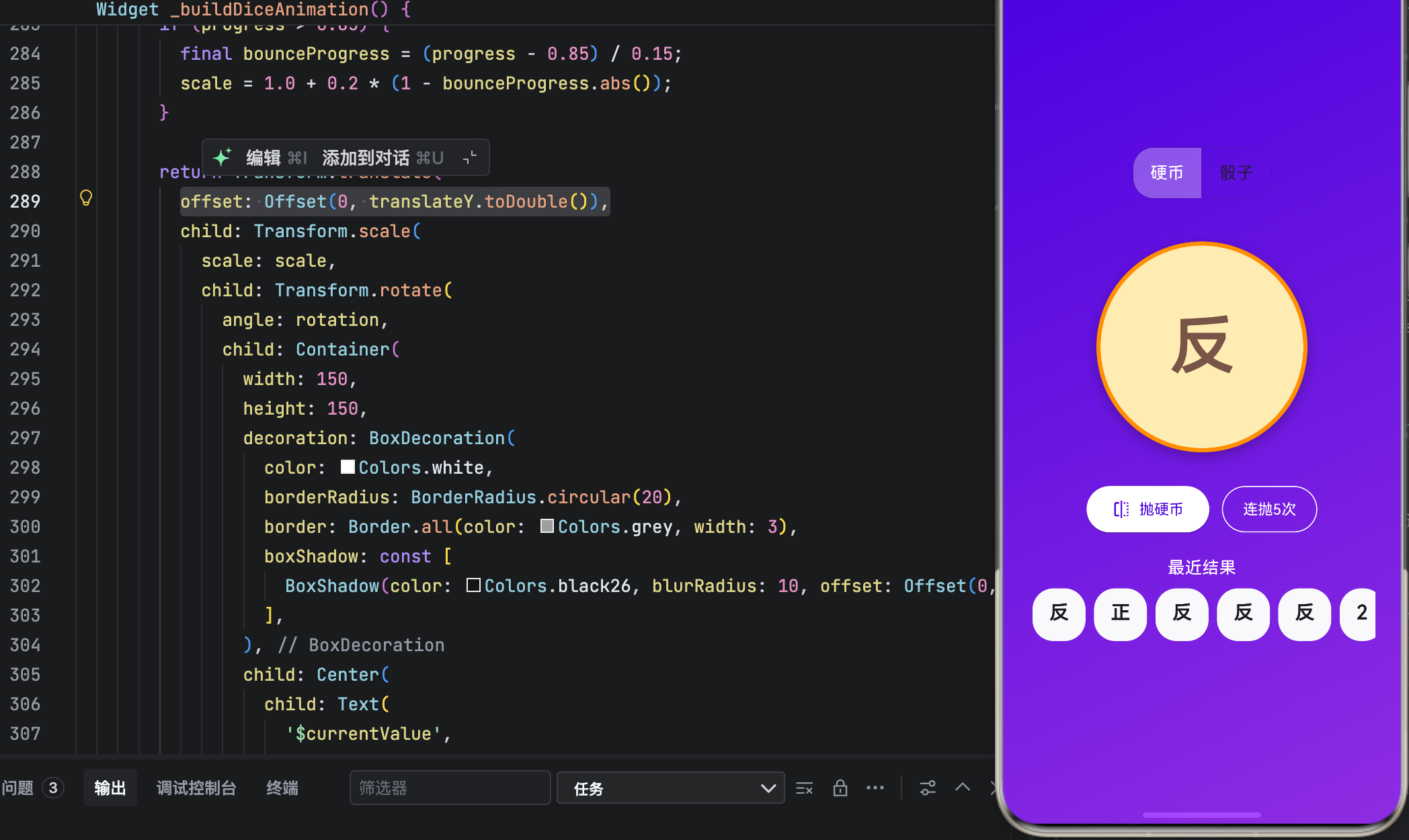
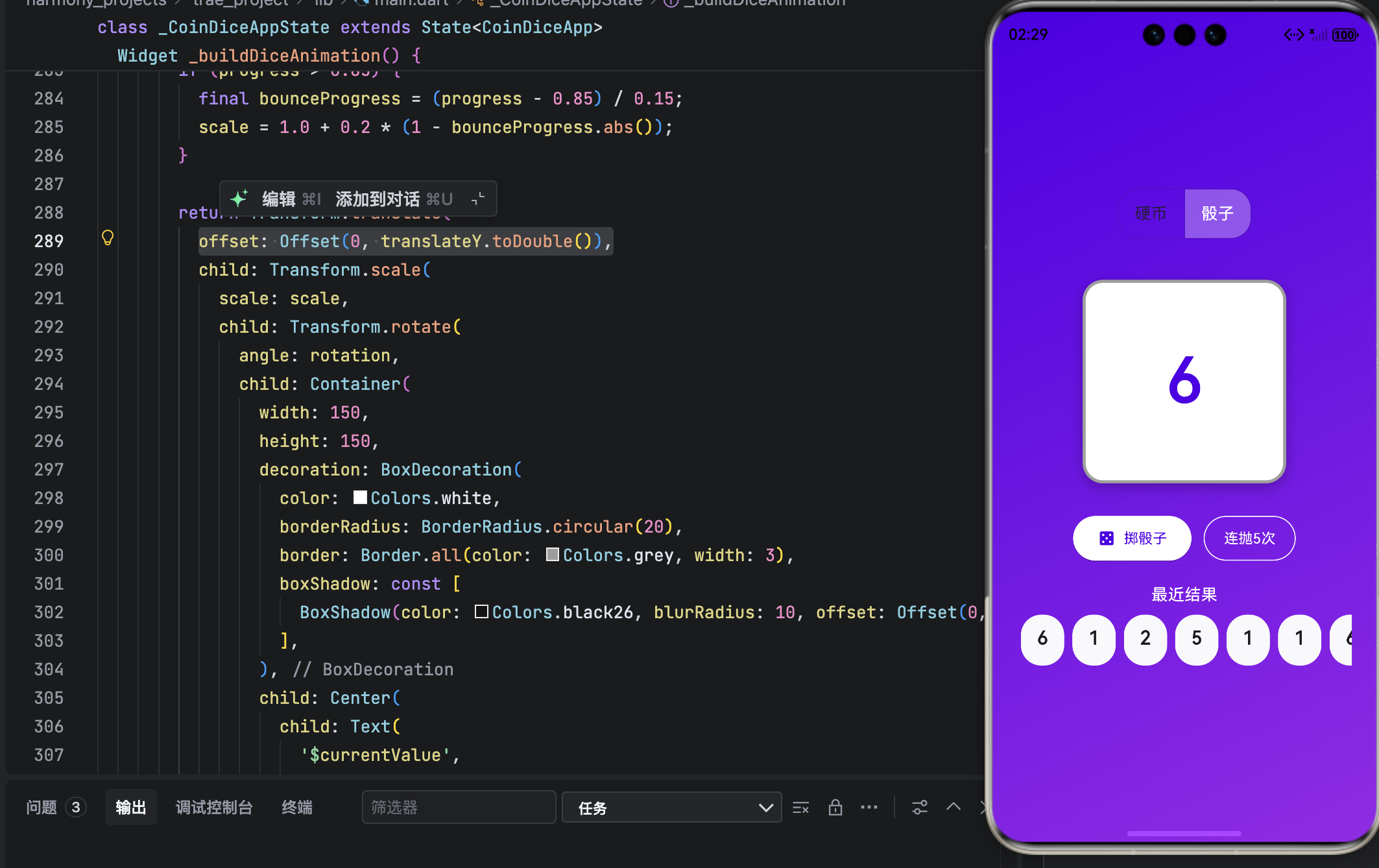
结语
这款“抛硬币 & 掷骰子合集”,虽小却精。它用不到 500 行代码,实现了物理感动画、状态管理、历史追踪三大核心能力,完美诠释了 Flutter 的表现力 与 OpenHarmony 的设计哲学。
无论是用于日常决策、游戏辅助,还是单纯解压娱乐,它都能带来一份轻松与乐趣。正如鸿蒙所倡导的:“科技应服务于人的直觉与愉悦。”

开源鸿蒙跨平台开发社区汇聚开发者与厂商,共建“一次开发,多端部署”的开源生态,致力于降低跨端开发门槛,推动万物智联创新。
更多推荐

 11
11 0
0- 0


 已为社区贡献25条内容

所有评论(0)