Flutter for OpenHarmony 实战:chopper 高效 REST 客户端封装
本文介绍了在OpenHarmony平台上使用Flutter框架封装REST客户端的实战经验。主要内容包括: 工程配置:通过chopper和http包实现网络请求,支持代码生成 核心实现:定义契约式服务接口,使用注解声明REST方法 鸿蒙适配:处理证书校验、设备指纹注入等平台特有需求 实用技巧:包含拦截器配置、权限申请等关键开发要点 完整示例:演示了基础的GET/POST请求实现和错误处理 该方案充
Flutter for OpenHarmony 实战:chopper 高效 REST 客户端封装

前言
在进行鸿蒙原生级别应用开发时,网络层框架的选择至关重要。虽然 dio 是 Flutter 界的绝对王者,但在需要高度结构化、接口化的中大型项目中,chopper 凭借其受 Retrofit 启示的注解式声明风格,成为了许多开发者的首选。
在 HarmonyOS NEXT 环境下,配合 chopper 的代码生成能力,我们可以像写原生 ArkTS 接口一样优雅地管理我们的 REST 接口定义。
一、 工程准备:安装与配置
1.1 添加依赖
在 pubspec.yaml 中增加配置。由于 Chopper 默认使用 http 包作为底层客户端,它天生完美适配鸿蒙(得益于 Flutter 对 Ohos HttpClient 的官方兼容)。
dependencies:
  chopper: ^8.5.0
  http: ^1.2.0

dev_dependencies:
  chopper_generator: ^8.5.0
  build_runner: ^2.4.11
二、 核心实战:构建鸿蒙资讯接口
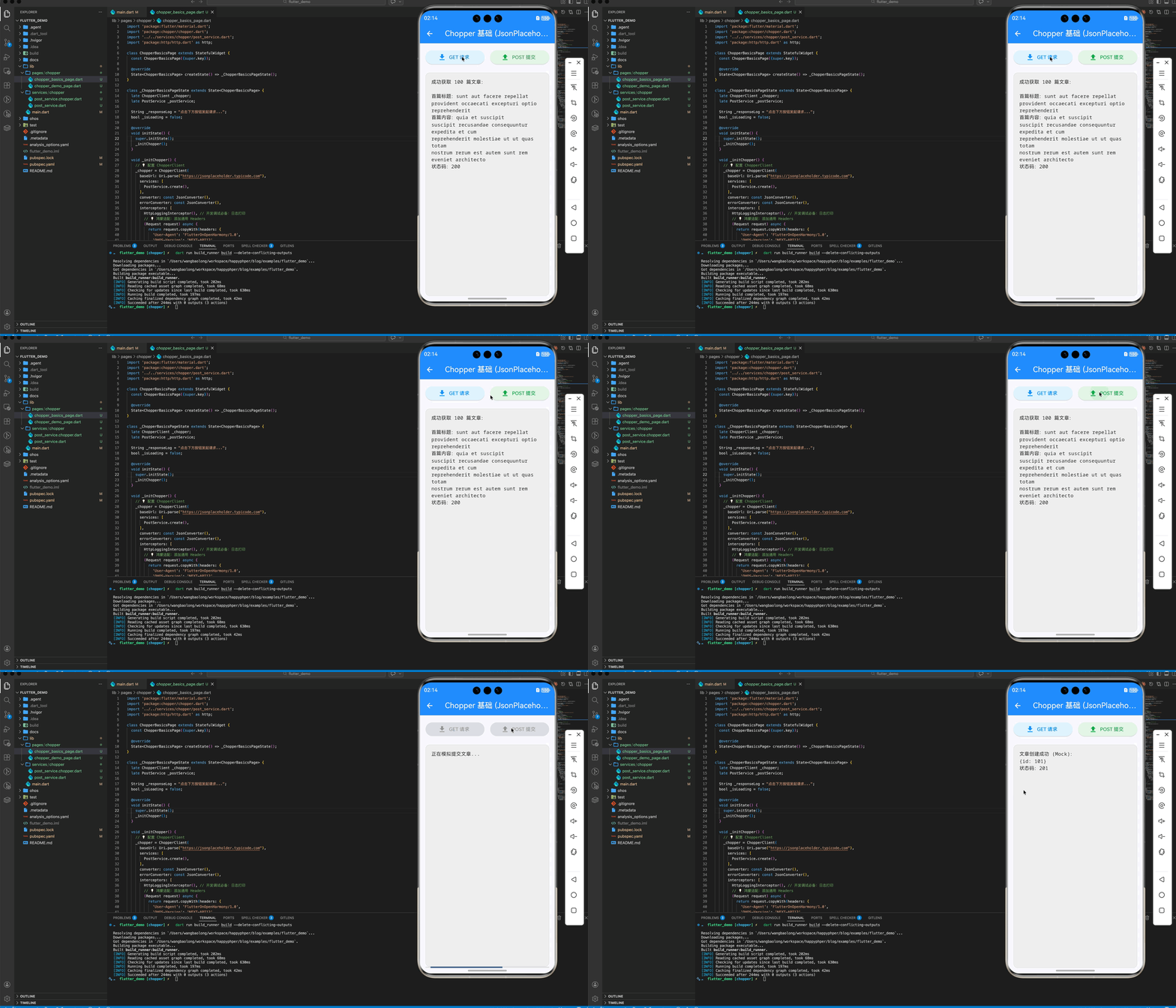
2.1 定义服务契约 (post_service.dart)
Chopper 强制要求你定义抽象 service 类,这种“契约先行”的模式非常适合多人协作。
import 'package:chopper/chopper.dart';
part 'post_service.chopper.dart';
(baseUrl: "/posts")
abstract class PostService extends ChopperService {
()
Future<Response> getPosts();
()
Future<Response> createPost(() Map<String, dynamic> body);
static PostService create([ChopperClient? client]) => _$PostService(client);
}
2.2 触发代码生成
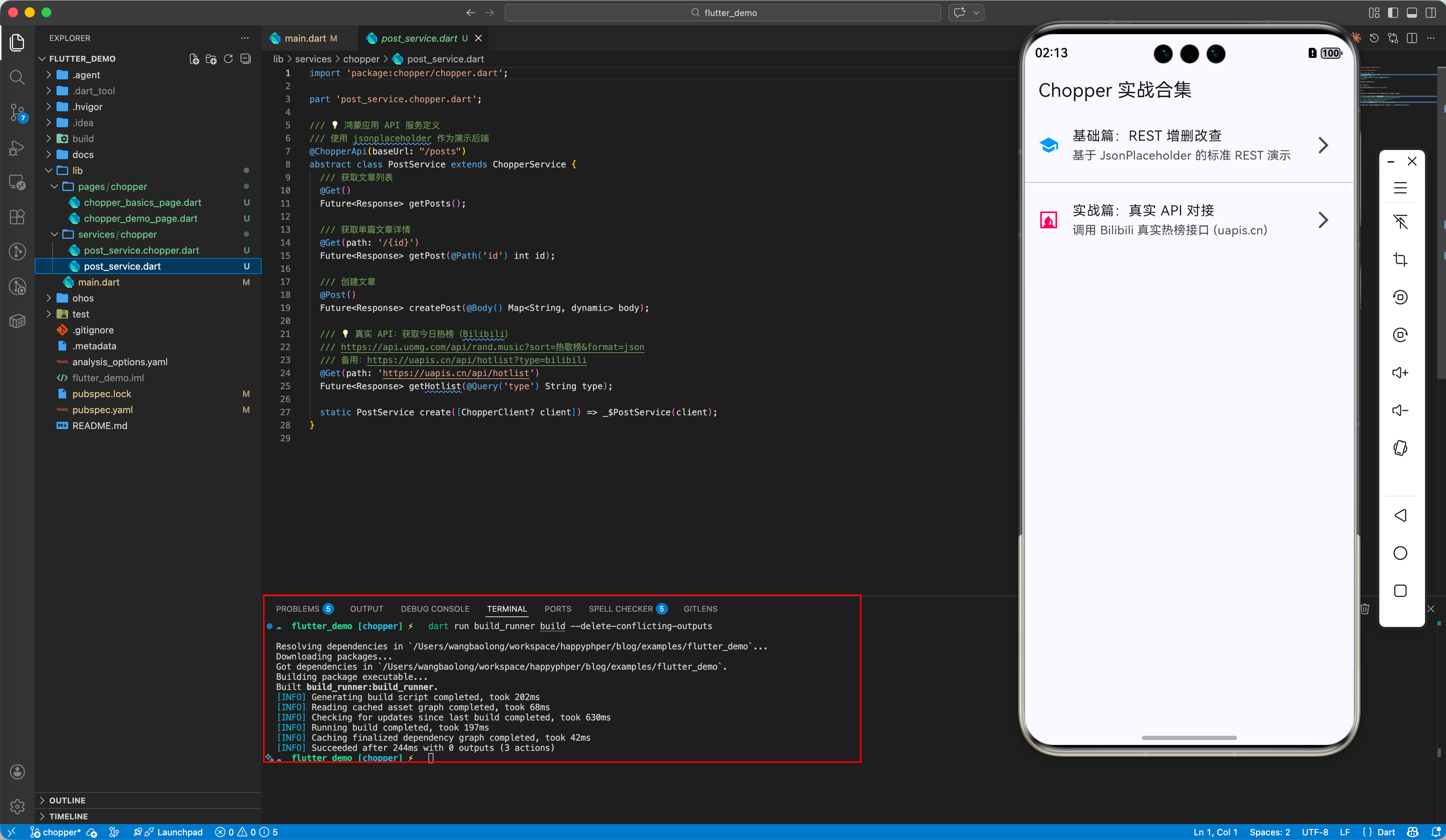
在终端执行指令,自动生成 .chopper.dart 实现文件:
dart run build_runner build --delete-conflicting-outputs
三、 鸿蒙平台的深度适配方案
3.1 兼容性基石:http.Client
在鸿蒙平台上初始化 ChopperClient 时,建议显式传入标准的 http.Client()。
final chopper = ChopperClient(
  baseUrl: Uri.parse("https://jsonplaceholder.typicode.com"),
  // ...
  // 💡 显式指定 Client,确保调用的是 flutter_engine 中适配好的 ohos_http_client
  client: http.Client(),
);
3.2 拦截器实战:鸿蒙设备指纹
鸿蒙应用往往需要处理设备唯一标识或 Token。Chopper 的拦截器是处理这些逻辑的最佳场所。
interceptors: [
  (Request request) async {
     // 💡 注入鸿蒙设备指纹或 Token
     return request.copyWith(headers: {
       'OHOS-Version': 'NEXT-API12',
       'Device-Type': 'Mate60Pro',
     });
  },
  HttpLoggingInterceptor(), // 调试日志
],
四、 避坑指南 (FAQ)
4.1 证书校验报错?
现象:在鸿蒙真机上请求自签名 HTTPS 接口时抛出 HandshakeException。
方案:这是底层 HttpClient 的安全策略。可以在 main.dart 中通过 HttpOverrides 全局配置证书信任策略(仅限开发环境),或在服务端部署合规的 SSL 证书。
4.2 权限声明
别忘了在鸿蒙原生工程的 module.json5 中申请 ohos.permission.INTERNET,否则所有请求都会静默失败。
五、 完整示例
为了让开发者能够从零到一掌握 Chopper 在鸿蒙端的应用,我们在示例工程中提供了两个维度的实战案例:
5.1 基础篇:REST 标准操作
演示了如何使用 Chopper 对接标准的 JsonPlaceholder 接口。
- 重点内容:GET 获取列表、POST 模拟提交数据、Logging 拦截器查看 Raw Request。
import 'package:flutter/material.dart';
import 'package:chopper/chopper.dart';
import '../../services/chopper/post_service.dart';
import 'package:http/http.dart' as http;
class ChopperBasicsPage extends StatefulWidget {
const ChopperBasicsPage({super.key});
State<ChopperBasicsPage> createState() => _ChopperBasicsPageState();
}
class _ChopperBasicsPageState extends State<ChopperBasicsPage> {
late ChopperClient _chopper;
late PostService _postService;
String _responseLog = "点击下方按钮发起请求...";
bool _isLoading = false;
void initState() {
super.initState();
_initChopper();
}
void _initChopper() {
// 💡 配置 ChopperClient
_chopper = ChopperClient(
baseUrl: Uri.parse("https://jsonplaceholder.typicode.com"),
services: [
PostService.create(),
],
converter: const JsonConverter(),
errorConverter: const JsonConverter(),
interceptors: [
HttpLoggingInterceptor(), // 开发调试必备:日志打印
// 💡 鸿蒙适配:添加通用 Headers
(Request request) async {
return request.copyWith(headers: {
'User-Agent': 'FlutterOnOpenHarmony/1.0',
'OHOS-Version': 'NEXT-API12',
});
}
],
// 💡 必须在鸿蒙上使用兼容的 http client
client: http.Client(),
);
_postService = _chopper.getService<PostService>();
}
void dispose() {
_chopper.dispose();
super.dispose();
}
Future<void> _fetchPosts() async {
setState(() {
_isLoading = true;
_responseLog = "正在请求 JsonPlaceholder...";
});
try {
final response = await _postService.getPosts();
if (response.isSuccessful) {
final List posts = response.body;
setState(() {
_responseLog = "成功获取 ${posts.length} 篇文章:\n\n"
"首篇标题:${posts.first['title']}\n"
"首篇内容:${posts.first['body']}\n"
"状态码:${response.statusCode}";
});
} else {
setState(() => _responseLog = "请求失败:${response.error}");
}
} catch (e) {
setState(() => _responseLog = "网络异常:$e");
} finally {
setState(() => _isLoading = false);
}
}
Future<void> _createPost() async {
setState(() {
_isLoading = true;
_responseLog = "正在模拟提交文章...";
});
try {
final response = await _postService.createPost({
'title': '鸿蒙 Flutter 实战',
'body': 'Chopper 网络层封装真的很简洁!',
'userId': 1,
});
if (response.isSuccessful) {
setState(() {
_responseLog =
"文章创建成功 (Mock):\n${response.body}\n状态码:${response.statusCode}";
});
} else {
setState(() => _responseLog = "提交失败:${response.error}");
}
} catch (e) {
setState(() => _responseLog = "提交异常:$e");
} finally {
setState(() => _isLoading = false);
}
}
Widget build(BuildContext context) {
return Scaffold(
appBar: AppBar(
title: const Text('Chopper 基础 (JsonPlaceholder)'),
backgroundColor: Colors.blueAccent,
foregroundColor: Colors.white,
),
body: Padding(
padding: const EdgeInsets.all(16.0),
child: Column(
children: [
_buildControlPanel(),
const SizedBox(height: 20),
Expanded(
child: Container(
width: double.infinity,
padding: const EdgeInsets.all(16),
decoration: BoxDecoration(
color: Colors.grey[200],
borderRadius: BorderRadius.circular(12),
border: Border.all(color: Colors.grey.shade300),
),
child: SingleChildScrollView(
child: Text(
_responseLog,
style: TextStyle(
fontFamily: 'monospace',
color: _responseLog.contains('异常') ||
_responseLog.contains('失败')
? Colors.red
: Colors.black87,
),
),
),
),
),
if (_isLoading) const LinearProgressIndicator(),
],
),
),
);
}
Widget _buildControlPanel() {
return Row(
children: [
Expanded(
child: ElevatedButton.icon(
onPressed: _isLoading ? null : _fetchPosts,
icon: const Icon(Icons.download),
label: const Text('GET 请求'),
style: ElevatedButton.styleFrom(
backgroundColor: Colors.blue[50], foregroundColor: Colors.blue),
),
),
const SizedBox(width: 16),
Expanded(
child: ElevatedButton.icon(
onPressed: _isLoading ? null : _createPost,
icon: const Icon(Icons.upload),
label: const Text('POST 提交'),
style: ElevatedButton.styleFrom(
backgroundColor: Colors.green[50],
foregroundColor: Colors.green),
),
),
],
);
}
}
5.2 实战篇:对接真实世界 API
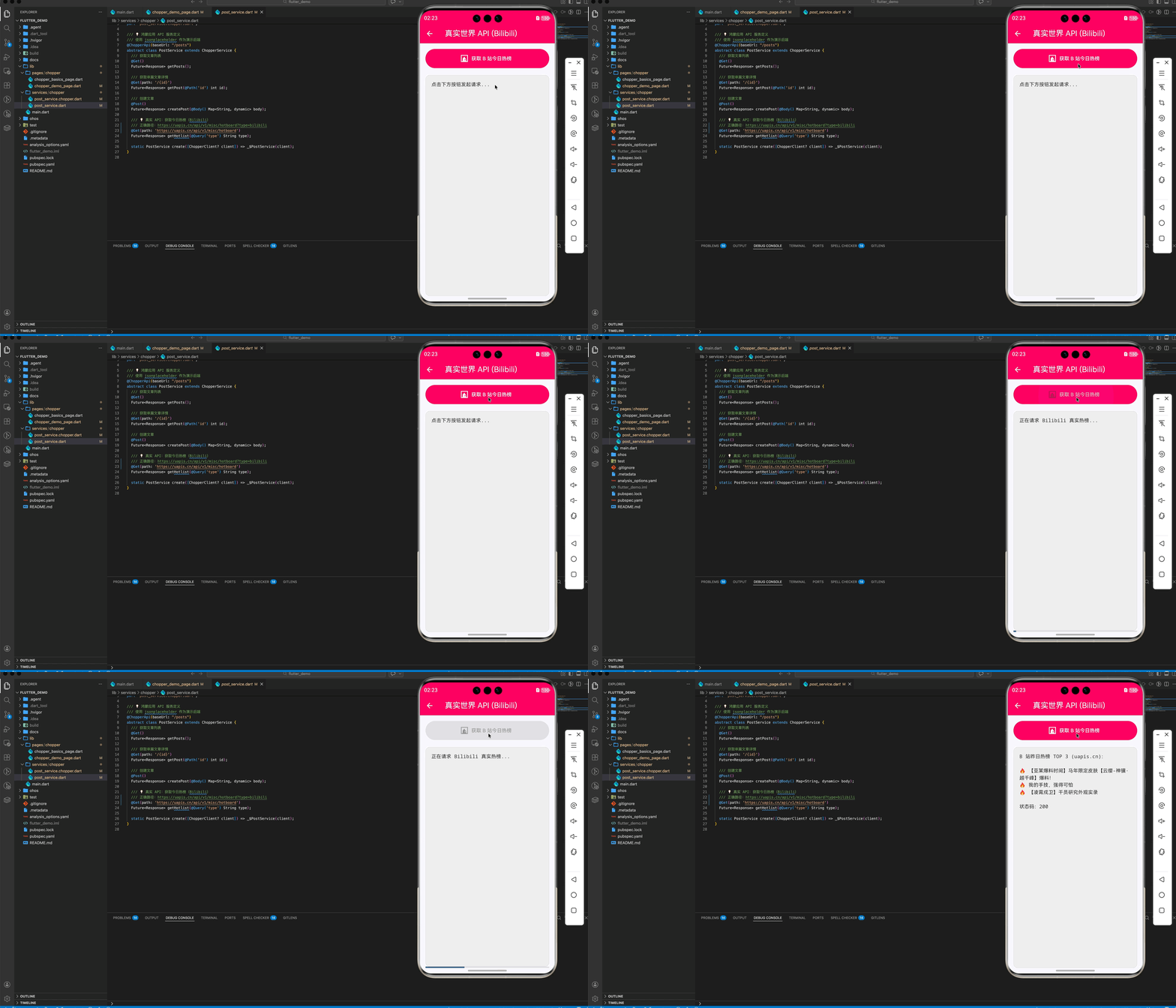
接入了第三方真实接口(uapis.cn),实时获取 Bilibili 站内的今日热榜。
- 重点内容:处理复杂嵌套的 JSON 返回结构(
{code: 200, data: []})、在 Service 中定义绝对路径 URL(https://uapis.cn/api/v1/misc/hotboard)、UI 层的 Loading 状态管理。 - 源码参考:
lib/pages/chopper/chopper_demo_page.dart
import 'package:flutter/material.dart';
import 'package:chopper/chopper.dart';
import '../../services/chopper/post_service.dart';
import 'package:http/http.dart' as http;
class ChopperRealPage extends StatefulWidget {
const ChopperRealPage({super.key});
State<ChopperRealPage> createState() => _ChopperRealPageState();
}
class _ChopperRealPageState extends State<ChopperRealPage> {
late ChopperClient _chopper;
late PostService _postService;
String _responseLog = "点击下方按钮发起请求...";
bool _isLoading = false;
void initState() {
super.initState();
_initChopper();
}
void _initChopper() {
// 💡 配置 ChopperClient
_chopper = ChopperClient(
baseUrl: Uri.parse("https://jsonplaceholder.typicode.com"),
services: [
PostService.create(),
],
converter: const JsonConverter(),
errorConverter: const JsonConverter(),
interceptors: [
HttpLoggingInterceptor(), // 开发调试必备:日志打印
// 💡 鸿蒙适配:添加通用 Headers
(Request request) async {
return request.copyWith(headers: {
'User-Agent':
'Mozilla/5.0 (Macintosh; Intel Mac OS X 10_15_7) AppleWebKit/537.36 (KHTML, like Gecko) Chrome/144.0.0.0 Safari/537.36',
'OHOS-Version': 'NEXT-API12',
'Referer': 'https://uapis.cn/docs/api-reference/get-misc-hotboard',
'Accept': 'application/json, text/plain, */*',
});
}
],
// 💡 必须在鸿蒙上使用兼容的 http client
client: http.Client(),
);
_postService = _chopper.getService<PostService>();
}
void dispose() {
_chopper.dispose();
super.dispose();
}
// 移除了 _fetchPosts 和 _createPost 方法
Future<void> _fetchBilibiliHot() async {
setState(() {
_isLoading = true;
_responseLog = "正在请求 Bilibili 真实热榜...";
});
try {
// 💡 调用真实第三方接口
final response = await _postService.getHotlist('bilibili');
if (response.isSuccessful) {
final Map map = response.body;
// 💡 适配新的返回结构:数据在 'list' 字段中
final List? hotList = map['list'] ?? map['data'];
if (hotList != null && hotList.isNotEmpty) {
final top3 =
hotList.take(3).map((e) => "🔥 ${e['title']}").join('\n');
setState(() {
_responseLog =
"B 站昨日热榜 TOP 3 (uapis.cn):\n\n$top3\n\n状态码:${response.statusCode}";
});
} else {
// 💡 打印详细的 API 报错信息
setState(() => _responseLog = "API 解析成功但数据为空:\n"
"有效字段: ${map.keys.join(', ')}\n"
"完整 Body: $map");
}
} else {
setState(() => _responseLog = "HTTP 请求失败:\n"
"状态码: ${response.statusCode}\n"
"错误信息: ${response.error}\n"
"完整 Body: ${response.body}");
}
} catch (e, stack) {
debugPrint("Chopper Error: $e");
debugPrint("Stacktrace: $stack");
setState(() => _responseLog = "代码执行异常:\n$e\n\n请查看终端控制台以获取堆栈信息。");
} finally {
setState(() => _isLoading = false);
}
}
Widget build(BuildContext context) {
return Scaffold(
appBar: AppBar(
title: const Text('真实世界 API (Bilibili)'),
backgroundColor: Colors.pink,
foregroundColor: Colors.white,
),
body: Padding(
padding: const EdgeInsets.all(16.0),
child: Column(
children: [
SizedBox(
width: double.infinity,
height: 55,
child: ElevatedButton.icon(
onPressed: _isLoading ? null : _fetchBilibiliHot,
icon: const Icon(Icons.fireplace),
label: const Text('获取 B 站今日热榜'),
style: ElevatedButton.styleFrom(
backgroundColor: Colors.pink,
foregroundColor: Colors.white),
),
),
const SizedBox(height: 20),
Expanded(
child: Container(
width: double.infinity,
padding: const EdgeInsets.all(16),
decoration: BoxDecoration(
color: Colors.grey[200],
borderRadius: BorderRadius.circular(12),
border: Border.all(color: Colors.grey.shade300),
),
child: SingleChildScrollView(
child: Text(
_responseLog,
style: TextStyle(
fontFamily: 'monospace',
color: _responseLog.contains('异常') ||
_responseLog.contains('失败')
? Colors.red
: Colors.black87,
),
),
),
),
),
if (_isLoading) const LinearProgressIndicator(),
],
),
),
);
}
}
六、 总结
chopper 为鸿蒙 Flutter 应用带来了强大的类型安全和架构解耦能力。虽然它的上手配置比 Dio 略显繁琐,但它生成的强类型代码能让后续的维护成本通过“指数级”下降。对于追求长期架构稳定性的鸿蒙项目,Chopper 是一个值得信赖的伙伴。
欢迎加入开源鸿蒙跨平台社区:开源鸿蒙跨平台开发者社区

开源鸿蒙跨平台开发社区汇聚开发者与厂商,共建“一次开发,多端部署”的开源生态,致力于降低跨端开发门槛,推动万物智联创新。
更多推荐

 13
13 0
0- 0


 已为社区贡献28条内容

所有评论(0)